Key Highlights
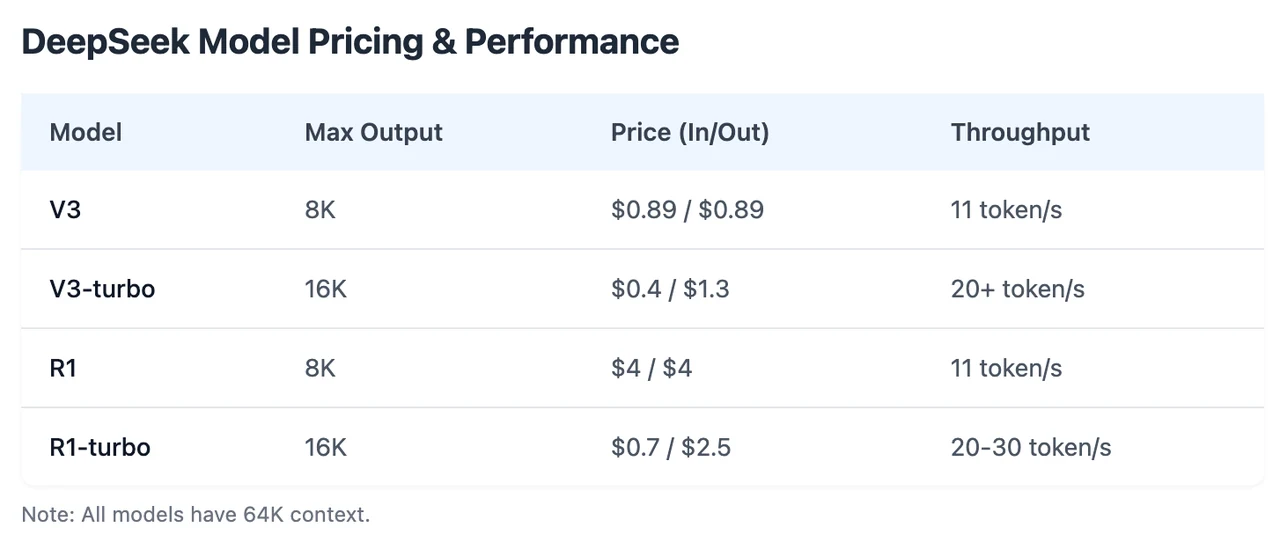
Novita AI has introduced DeepSeek R1 Turbo, offering 3x throughput and limited-time 60% discount. Moreover, this version fully supports function calling.
If you want to test its performance, start a free trail on Novita AI Playground directly!
What is Function Calling?
Function calling is a powerful feature that allows Large Language Models (LLMs) to interact with external systems and your code in a structured way. Beyond text generation, LLMs with function calling can recognize when a specific action is needed, generate the required parameters, and execute real-world tasks. This makes AI models more dynamic and practical, enabling seamless integration with external tools and APIs.
How Does Function Calling Work and What Problems Can It Solve?
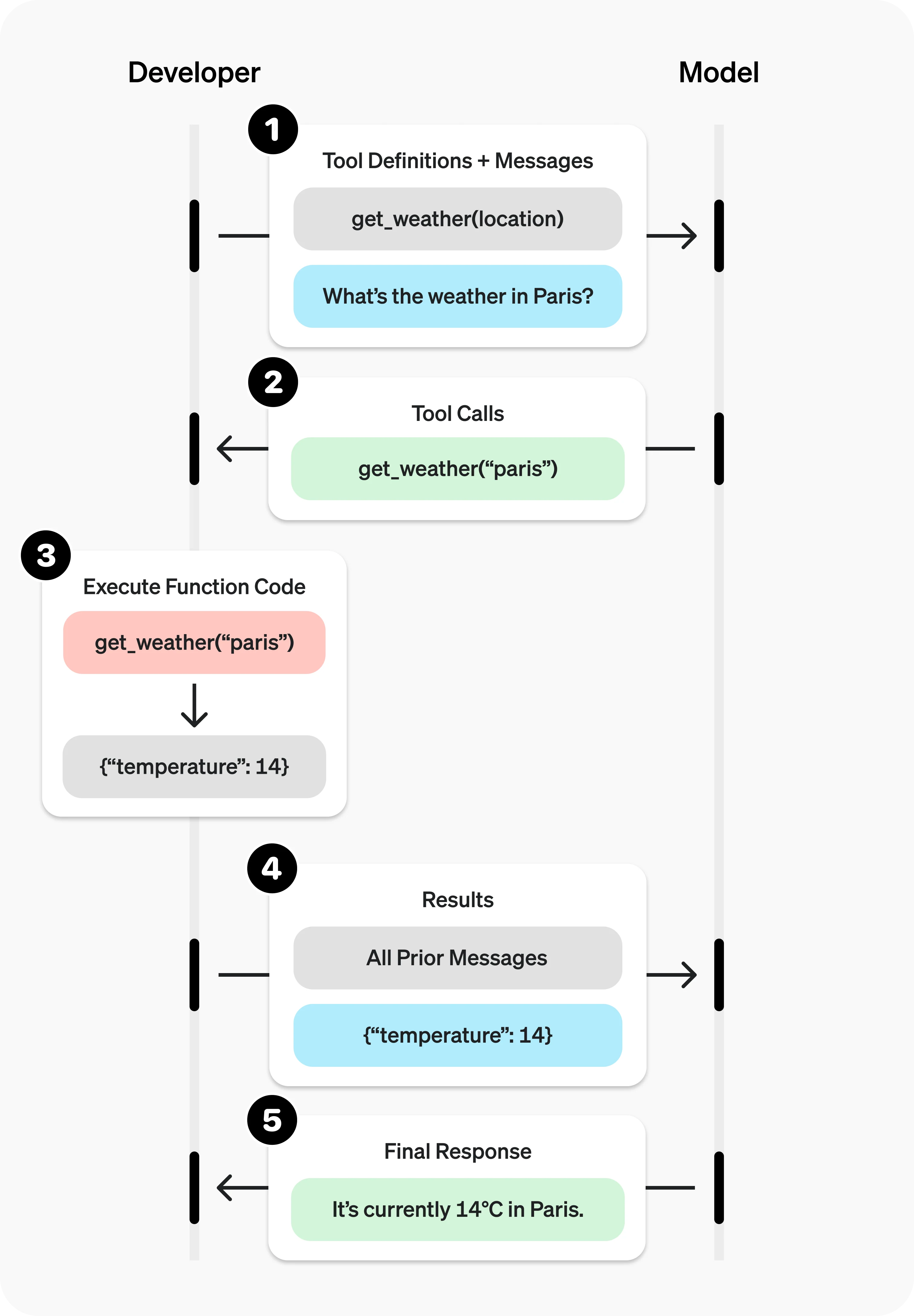
The process follows a simple and structured flow:
- User sends a request to the LLM.
- The LLM analyzes the request and determines if a function call is needed.
- If required, the LLM generates a structured JSON call to the appropriate function, including the function name and parameters.
- The application receives this call and executes the function.
- The result is sent back to the LLM.
- The LLM uses the result to generate a final response to the user.
This cycle can repeat for multi-step or complex tasks. Tools (functions) need to be defined with names, descriptions, and JSON schemas specifying their parameters. For added validation, Pydantic models can be used to enforce type safety.
Function calling extends the capability of LLMs, addressing many practical use cases:
- Data Retrieval: Convert language queries into API calls for real-time data (e.g., “What are my recent orders?”).
- Action Execution: Perform specific tasks (e.g., “Schedule a meeting” triggers a calendar API).
- Computation: Handle calculations or operations (e.g., compound interest or statistical analysis).
- Data Pipelines: Chain functions for complex workflows (e.g., fetch → process → store data).
- UI/UX Integration: Trigger interface updates like map markers or charts.
- Conversational Agents: Enable chatbots to call APIs for relevant responses (e.g., weather updates).
- Natural Language Understanding: Convert text into structured data or extract information (e.g., sentiment analysis, named entity recognition).
How to Use DeepSeek R1 Function Calling via Novita AI
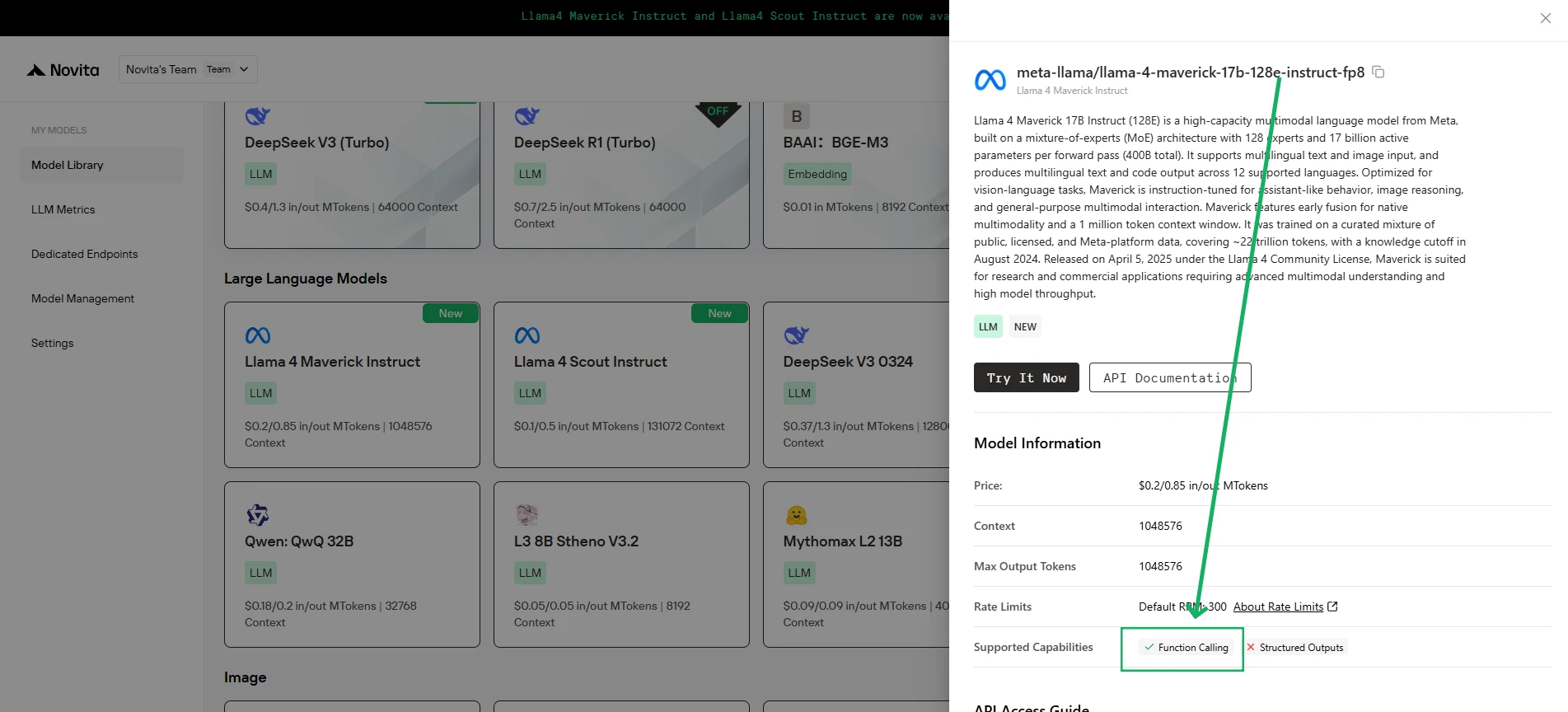
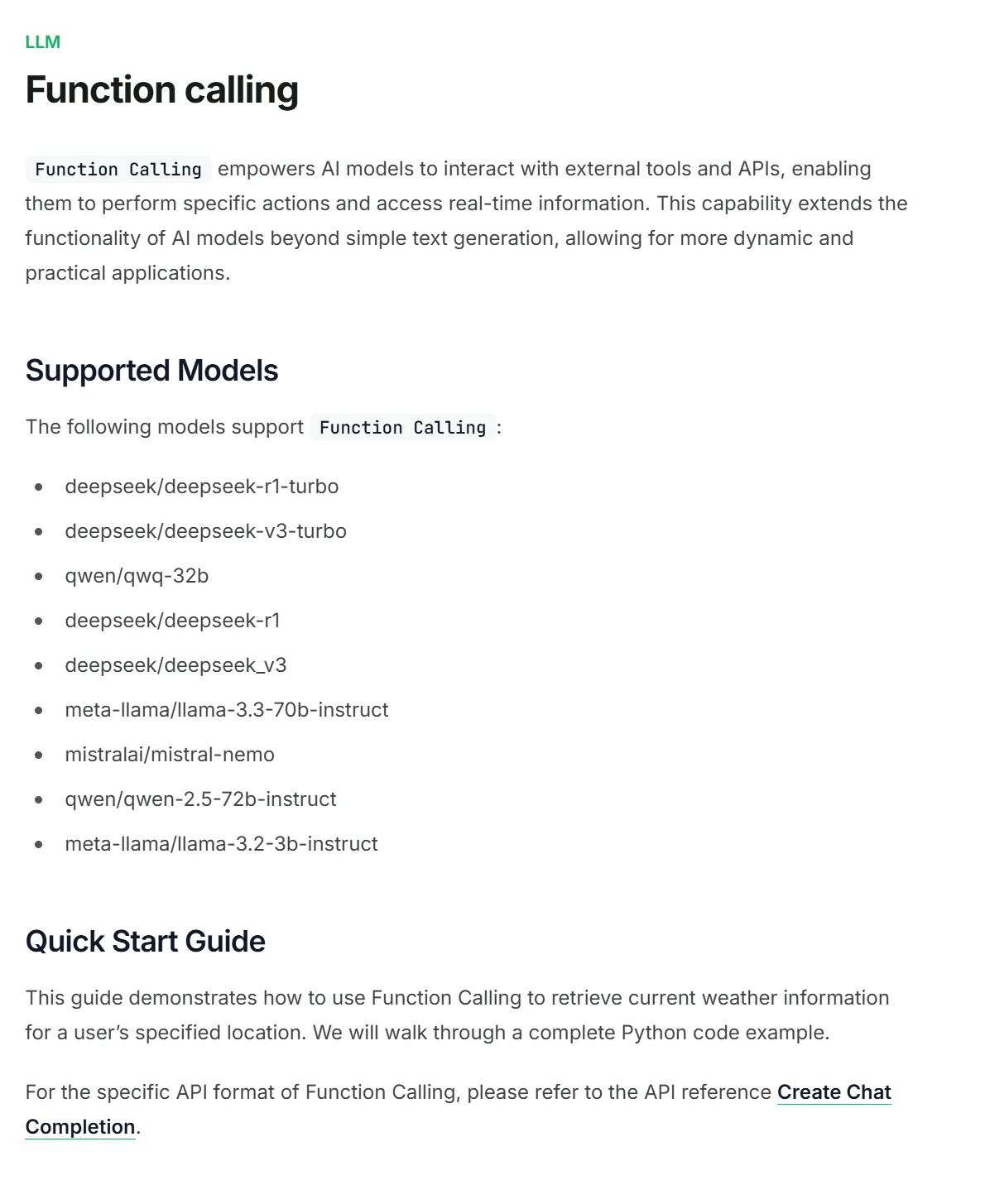
Novita AI has been launched support capability descriptions for each LLM, which you can directly view in the console and docs.
1.Initialize the Client
First, you need to initialize the client with your Novita API key.
from openai import OpenAI
import json

client = OpenAI(
    base_url="https://api.novita.ai/v3/openai",
    # Get the Novita AI API Key from: https://novita.ai/settings/key-management.
    api_key="<YOUR Novita AI API Key>",
)

model = "deepseek/deepseek_r1"- Define the Function to Be Called
Next, define the Python function that the model can call. In this example, it’s a function to get weather information.
# Example function to simulate fetching weather data.
def get_weather(location):
    """Retrieves the current weather for a given location."""
    print("Calling get_weather function with location: ", location)
    # In a real application, you would call an external weather API here.
    # This is a simplified example returning hardcoded data.
    return json.dumps({"location": location, "temperature": "60 degrees Fahrenheit"})
2.Construct the API Request with Tools and User Message
Now, create the API request to the Novita endpoint. This request includes the tools parameter, defining the functions the model can use, and the user’s message.
tools = [
    {
        "type": "function",
        "function": {
            "name": "get_weather",
            "description": "Get weather of an location, the user shoud supply a location first",
            "parameters": {
                "type": "object",
                "properties": {
                    "location": {
                        "type": "string",
                        "description": "The city and state, e.g. San Francisco, CA",
                    }
                },
                "required": ["location"]
            },
        }
    },
]

messages = [
    {
        "role": "user",
        "content": "What is the weather in San Francisco?"
    }
]

# Let's send the request and print the response.
response = client.chat.completions.create(
    model=model,
    messages=messages,
    tools=tools,
)

# Please check if the response contains tool calls if in production.
tool_call = response.choices[0].message.tool_calls[0]
print(tool_call.model_dump())3.Output
{'id': '0', 'function': {'arguments': '{"location": "San Francisco, CA"}', 'name': 'get_weather'}, 'type': 'function'}4.Respond with the Function Call Result and Get the Final Answer
The next step is to process the function call, execute the get_weather function, and send the result back to the model to generate the final response to the user.
# Ensure tool_call is defined from the previous step
if tool_call:
    # Extend conversation history with the assistant's tool call message
    messages.append(response.choices[0].message)

    function_name = tool_call.function.name
    if function_name == "get_weather":
        function_args = json.loads(tool_call.function.arguments)
        # Execute the function and get the response
        function_response = get_weather(
            location=function_args.get("location"))
        # Append the function response to the messages
        messages.append(
            {
                "tool_call_id": tool_call.id,
                "role": "tool",
                "content": function_response,
            }
        )

    # Get the final response from the model, now with the function result
    answer_response = client.chat.completions.create(
        model=model,
        messages=messages,
        # Note: Do not include tools parameter here.
    )
print(answer_response.choices[0].message)5.Output
{'id': '0', 'function': {'arguments': '{"location": "San Francisco, CA"}', 'name': 'get_weather'}, 'type': 'function'}Frequently Asked Question
What types of functions can be called?
You can define virtually any function that your application can execute, allowing LLMs to interact with databases, APIs, and internal logic.
Does function calling actually execute the code?
No, when the LLM decides to call a function, it only outputs a structured JSON object containing the function name and the necessary arguments.
Does DeepSeek R1 supports function calling?
Yes! Novita AI has introduced DeepSeek R1 Turbo, offering 3x throughput and limited-time 20% discount. Moreover, this version fully supports function calling.
Novita AI is the All-in-one cloud platform that empowers your AI ambitions. Integrated APIs, serverless, GPU Instance — the cost-effective tools you need. Eliminate infrastructure, start free, and make your AI vision a reality.