各大 AI 公司現在紛紛推出能夠針對您指定的主題進行深度研究,並產出全面報告的代理式 AI 系統,例如 OpenAI 的 Deep Research。
像 OpenAI 的 Deep Research 這類代理式 AI 系統,為多步驟搜尋與綜合分析等複雜任務提供了自動化流程。但多數現有解決方案是封閉原始碼、難以客製化,並且限制了您對模型行為和資料處理的控制。
舉例來說,您可能想使用不同的 LLM、自訂的搜尋提供者,或調整代理的規劃與行為方式,以產出特定輸出。
這引出了一個有趣的問題:您能否建立一個完全靈活的深度搜尋代理,使用自己偏好的 AI 模型、整合自己選擇的搜尋引擎,並自訂代理的行為?答案是 可以。
在本文中,您將學習如何使用 Novita AI 、 LangChain 和 Tavily 來建立自己的深度研究代理。
什麼是深度搜尋代理工作流程?
傳統搜尋通常很耗時,因為它需要篩選大量線上資訊,最終可能仍無法獲得深刻見解。深度搜尋代理工作流程 透過 AI 代理解決這些問題,這些代理能夠自主推理、做出決策,並在工作流程中協調外部工具。
此工作流程通常包含:
- 任務結構化:AI 代理將主題分解為較小的任務。
- 規劃:代理針對每個任務制定策略,協助工作流程決定任務執行順序。
- 工具整合:為了收集資訊,代理使用不同的工具,例如資料庫和網頁搜尋引擎。沒有這些工具,代理就無法執行工作流程中的關鍵動作。
- 綜合分析:代理分析收集到的資訊,並將其整合為連貫的資料。
- 報告生成:綜合分析資料後,代理建立包含摘要和引用的結構化報告。
您需要的工具
在進入本文的建置部分之前,讓我們先設定必要的工具。
Novita AI
為了建立代理工作流程,我們需要一個 LLM,而 Novita AI 提供了一個經濟高效、高效能的 API,讓您可以使用最新的 LLM、圖像生成模型等。
登入 Novita AI 開始使用。登入後,導覽至 設定 > 金鑰管理,並依照提示產生 API 金鑰。
請注意,如果您註冊,Novita AI 會提供免費額度讓您試用各種模型,因此您無需在開始建置或實驗前擔心購買額度的問題。
Tavily
Tavily 是一個為 AI 應用最佳化的進階網頁搜尋 API。透過 Tavily 的搜尋引擎工具,我們可以讓代理存取網際網路,協助收集準確且無偏誤的資訊。前往 Tavily 並產生 API 金鑰。

Langchain
LangChain 是一個專為使用 LLM 建置應用程式而設計的開源框架。透過 LangChain,您可以建立一個能逐步推理、使用工具並與 API 互動的代理工作流程。對於我們的深度研究代理,我們將使用 LangChain 來結構化研究流程、使用網頁搜尋等工具,並將所有內容綜合為結構化報告。

Google Colab
在本教學中,我們將使用 Google Colab 來建置和測試深度搜尋代理。Colab 讓您無需任何設定即可在瀏覽器中編寫和執行 Python 程式碼;這使得教學易於跟隨。
工作流程概述
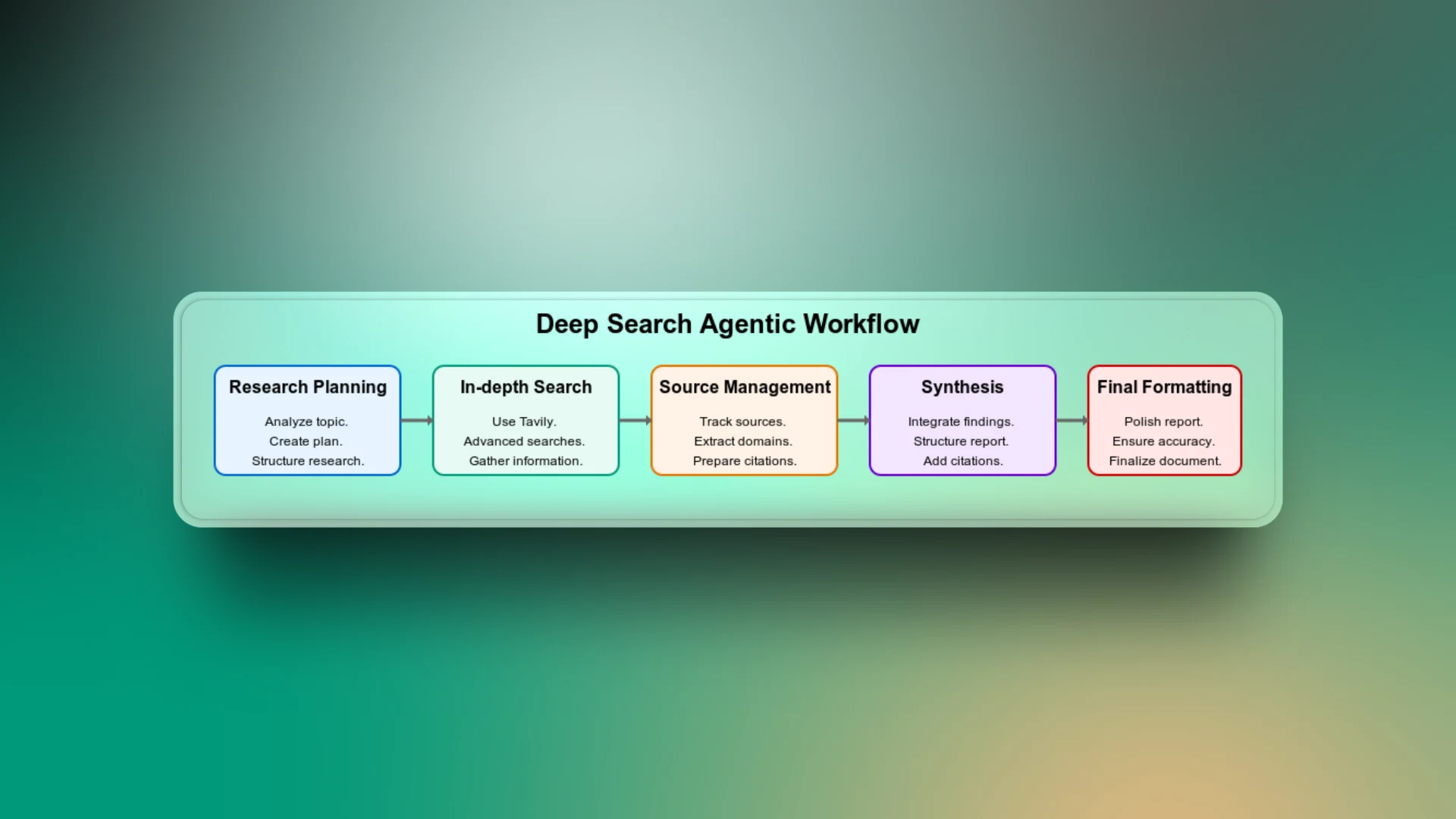
深度代理搜尋是不同工作流程階段的組合,從規劃搜尋任務到交付最終搜尋報告。讓我們逐一了解工作流程的每個步驟,以理解應用程式如何運作。
研究規劃
這是工作流程的第一步。在此,代理分析主題並根據主題脈絡建立結構化的研究計畫。它將廣泛的主題分解為針對性的子主題,例如歷史、技術細節、優缺點、使用案例等。
您可以將此視為工作流程中最重要的部分,因為如果沒有它,代理可能會執行一般搜尋並回傳不相關的結果。
深度搜尋
LLM 受限於其訓練資料,無法存取當前趨勢。例如,如果您要求沒有搜尋能力的代理列出某支足球隊目前的球員,它會根據其訓練資料回傳結果。但由於這些結果不包含最新更新,可能不再符合事實。
使用 Tavily 執行進階網頁搜尋,讓代理能夠存取最新且相關的網路來源。
來源管理
為確保代理產出的每一項資訊都能連結到可靠來源,追蹤所有來源非常重要。工作流程的這一部分有助於建立使用者對最終報告中主張或資料的信任,方便他們進行驗證。
綜合分析
為了將所有收集到的資訊串聯起來,代理會匯集所有研究面向的見解,形成連貫的報告。如果沒有工作流程的這個階段,搜尋輸出可能只是零散的報告。
最終格式化
即使報告事實準確且經過充分研究,格式不佳也可能難以閱讀。需要額外的步驟來確保清晰的結構、一致的標題、項目符號、間距等。
實作深度搜尋代理
到目前為止,您已經了解深度搜尋代理工作流程的內容。現在是時候在 Google Colab 中實作它了。
首先,我們將執行幾個關鍵步驟:
步驟 1:安裝相依套件
-q langchain langchain-openai tavily-python
步驟 2:匯入必要的函式庫
# 匯入標準 Python 函式庫
import os   # 用於與環境變數互動
import re   # 用於正規表達式
import ast  # 用於安全地從字串解析 Python 表達式

# LangChain 模型與工具
from langchain_openai import ChatOpenAI # 用於與 OpenAI 聊天模型互動的介面

from langchain_community.utilities.tavily_search import TavilySearchAPIWrapper  # 透過 Tavily API 啟用搜尋

# LangChain 訊息模式
from langchain.schema import SystemMessage, HumanMessage  # 定義對話中使用的訊息類型

# LangChain 代理元件
from langchain.agents import Tool, AgentExecutor, create_react_agent  # 用於建立和執行具有工具的代理工作流程

# LangChain 提示模板
from langchain.prompts import PromptTemplate  # 允許建立可重複使用的提示模板

# LangChain 記憶體
from langchain.memory import ConversationBufferMemory  # 協助跨回合維持對話狀態
步驟 3:設定環境變數
# 設定和擷取環境變數
os.environ["NOVITA_API_KEY"] = ""      # 替換為您的實際 Novita API 金鑰
os.environ["TAVILY_API_KEY"] = ""      # 替換為您的實際 Tavily API 金鑰

# 將 API 金鑰載入變數
novita_api_key = os.getenv("NOVITA_API_KEY")
tavily_api_key = os.getenv("TAVILY_API_KEY")
步驟 4:定義 LLM 輔助函式
Novita AI 與 OpenAI 相容;因此,我們將使用 LangChain 的 ChatOpenAI 模組來整合 Novita AI 與 LangChain。這表示我們可以像與 OpenAI 模型溝通一樣,以同樣的方式與 Novita 通訊。
然而,需要注意一個重要事項:我們需要將 base_url 設定指向 Novita 的 API 端點:https://api.novita.ai/v3/openai。
在此工作流程中,我們將使用模型 llama-4-maverick-17b-128e-instruct-fp8,這是一個專為指令遵循任務微調的強大 LLaMA 4 變體。
# LLM 輔助函式
def llm(api_key,
        model="meta-llama/llama-4-maverick-17b-128e-instruct-fp8",
        temperature=0.7):
    """使用指定參數建立一個 ChatOpenAI LLM 實例。"""
    return ChatOpenAI(
        model=model,
        openai_api_key=api_key,
        base_url="https://api.novita.ai/v3/openai",
        temperature=temperature,
    )
建置代理研究員
整個深度研究工作流程被封裝在一個名為 AgenticResearcher 的模組化類別中。此類別將管理產生研究計畫、執行網頁搜尋、綜合結果、格式化最終報告以及執行完整研究循環的過程。
我們將初始化具有透過 Novita API 存取 LLM 以及透過 Tavily API 存取網頁搜尋工具的代理研究員。然後,我們定義一個方法,使用 Tavily 對給定查詢執行進階網頁搜尋。結果會被格式化以提高可讀性,而原始資料則會儲存以供後續使用。
class AgenticResearcher:
    def __init__(self, novita_api_key, tavily_api_key, num_researchers=3, temperature=0.3):
        """使用必要的 API 金鑰和參數初始化研究代理。"""
        self.llm = llm(api_key=novita_api_key, temperature=temperature)
        self.tavily_search =
TavilySearchAPIWrapper(tavily_api_key=tavily_api_key)
        self.num_researchers = num_researchers
        self.raw_search_results = []
    def search(self, query):
        """搜尋網頁以取得關於指定查詢的資訊。"""
        try:
            results = self.tavily_search.results(
                query, max_results=7,
                search_depth="advanced"
            )
            # 儲存原始結果以供引用處理
            self.raw_search_results.extend(results)
            formatted = []
            for r in results:
                formatted += [
                    f"TITLE: {r.get('title','')}",
                    f"URL: {r.get('url','')}",
                    f"CONTENT:\
{r.get('content','')}",
                    "---"
                ]
            return "\
".join(formatted) if formatted else "No results found"
        except Exception as e:
            return f"Search error: {str(e)}"
建立多面向研究計畫
同樣屬於 AgenticResearcher 類別,讓我們建立一個方法,使用 LLM 將主題分解為多個不同的面向,產生結構化的研究計畫。每個面向包含一個標題和一個特定的搜尋查詢。目標是從多個角度探索主題,以確保深度和廣度。
def create_research_plan(self, topic):
"""建立包含多個待調查面向的結構化研究計畫。"""
sys = "You are a planner that outputs Python lists of dicts."
hum = f"""

Create a comprehensive research plan for: {topic}
Identify {self.num_researchers} distinct aspects to investigate thoroughly.
Analyze the topic and determine the most relevant aspects to research based on its nature and domain.
Output exactly:
ASPECT {{'title': '...', 'search_query': '...'}}
"""
try:
resp = self.llm.invoke([SystemMessage(content=sys), HumanMessage(content=hum)])
aspects = []
for line in resp.content.splitlines():
if line.strip().startswith("ASPECT"):
m = re.search(r"\{.*\}", line)
if m:
try:
aspects.append(ast.literal_eval(m.group(0)))
except Exception as e:
print(f"Error parsing aspect: {e}")
if not aspects:
# 適用於不同領域的通用預設面向
default_aspects = [
{"title": "Overview and Key Information", "search_query": f"{topic} overview key facts"},
{"title": "Background and Context", "search_query": f"{topic} background history context"},
{"title": "Details and Specifications", "search_query": f"{topic} details specifics data"},
{"title": "Analysis and Significance", "search_query": f"{topic} analysis importance implications"}
]
aspects = default_aspects[:self.num_researchers]
return aspects
except Exception as e:
print(f"Error creating research plan: {e}")
return [{"title": f"{topic} research", "search_query": topic}]
來源管理與引用
接下來,我們需要處理工作流程如何產生可靠的報告。我們將透過建立一個方法從原始搜尋結果中提取唯一來源,確保每個來源都被引用。
def extract_sources(self):
"""從原始搜尋結果中提取唯一來源以供引用。"""
unique_sources = {}
for result in self.raw_search_results:
url = result.get('url', '')
if url and 'http' in url:
domain = url.split('/')[2] if len(url.split('/')) > 2 else url
if domain not in unique_sources:
unique_sources[domain] = url
return unique_sources
報告綜合分析
現在我們已經從多個來源收集了原始資訊,下一步是將這些雜亂的輸入轉換為詳細的研究報告。我們將編寫方法,將原始文字綜合為可讀、有組織的報告,包含標題、副標題、主要發現和來源引用。
def synthesize(self, text):
"""將原始文字綜合為帶有引用的詳細結構化發現。"""
sources = self.extract_sources()
sources_list = list(sources.keys())
sys = """You are an expert research synthesizer that creates detailed, structured reports.
For each claim or fact you include, add a citation to the source domain.
Use the exact domain names provided without modification.
Adapt your report structure to the topic's domain and nature."""
hum = f"""
INFORMATION TO SYNTHESIZE:
{text}
AVAILABLE SOURCE DOMAINS (use these exact names for citations):
{sources_list}
Create a comprehensive, detailed research report with:
1. Main findings with specific facts and figures
2. Structured information with clear headings and subheadings appropriate to the topic
3. Citations using the exact source domain names in square brackets [like.this]
4. Relevant data presented clearly and professionally
5. Format adapted to the specific nature of the topic (technical, historical, news event, etc.)
FORMAT THE REPORT PROFESSIONALLY AND THOROUGHLY WITHOUT ASSUMING ANY SPECIFIC DOMAIN.
"""
try:
return self.llm.invoke([SystemMessage(content=sys), HumanMessage(content=hum)]).content
except Exception as e:
return f"Synthesis error: {str(e)}"
為代理建立工具
為了使我們的深度搜尋代理工作流程可運作,我們需要定義工具。工具賦予代理執行特定動作的能力。
此工作流程所需的核心工具包括 “plan” (幫助代理分解主題並建立結構化研究計畫)、 “search” (讓代理執行深度網頁搜尋)以及 “synthesize” (讓代理將所有原始發現轉換為有組織的報告)。
def get_tools(self):
"""建立並回傳代理可用的工具列表。"""
return [
Tool(
name="plan",
func=lambda t: str(self.create_research_plan(t)),
description="Create a detailed research plan with multiple aspects to investigate."
),
Tool(
name="search",
func=self.search,
description="Search the web thoroughly for a query and return comprehensive results."
),
Tool(
name="synthesize",
func=self.synthesize,
description="Transform raw text into detailed, structured findings with citations."
),
]
建立代理執行器
現在我們的工具已準備就緒,我們需要將所有內容結合為一個使用 ReAct 風格提示的 AI 代理。這有助於代理規劃、使用定義的工具採取行動、觀察結果,並循環直到擁有足夠的資料來產出最終研究報告。
def get_agent_executor(self):
"""建立並回傳包含工具和記憶體的代理執行器。"""
tools = self.get_tools()
template = """You are an autonomous research agent specialized in producing comprehensive, detailed reports on any topic.
{tool_names}
TOOLS:
{tools}
PREVIOUS CONVERSATIONS:
{chat_history}
When given a research topic (as {input}), follow this process:
1. Analyze the type of topic and create a research plan tailored to its domain
2. Search for comprehensive information on each aspect of the topic
3. Collect detailed, relevant information with sources
4. Synthesize everything into a professional, detailed report formatted appropriately for the topic
Follow exactly this format:
Question: {input}
Thought: (your reasoning here)
Action: the name of the tool to call, must be one of [{tool_names}]
Action Input: the input to the tool
Observation: (the tool's output)
... (repeat Thought/Action/Action Input/Observation as needed)
When you have gathered comprehensive information, output:
Final Answer: (your final, detailed research report with structured sections, appropriate formatting, specific details, and citations)
BEGIN WITH A THOROUGH PLAN!
{agent_scratchpad}
"""
prompt = PromptTemplate(
template=template,
input_variables=["input", "agent_scratchpad", "tools", "tool_names", "chat_history"]
)
# 建立底層代理
agent = create_react_agent(
llm=self.llm,
tools=tools,
prompt=prompt
)
# 使用記憶體包裝為執行器
memory = ConversationBufferMemory(memory_key="chat_history", return_messages=True)
agent_executor = AgentExecutor.from_agent_and_tools(
agent=agent,
tools=tools,
verbose=True,
memory=memory,
max_iterations=18,
early_stopping_method="generate",
handle_parsing_errors=True
)
return agent_executor
最終報告格式化
在研究代理完成深度搜尋後,輸出可能資訊豐富但不易閱讀。這個額外的步驟有助於使最終報告更加精美。為此,我們將提示 LLM 扮演專家編輯的角色,改善最終報告。
def format_final_report(self, raw_report):
"""為報告新增最終格式化,使其更專業。"""
sys = """You are an expert editor that improves research reports.
Keep all the factual content, citations, and structure intact.
Just improve the formatting, organization, and readability."""
hum = f"""
Here is a research report that needs final formatting improvements:
{raw_report}
Please improve the formatting and presentation while preserving all:
1. Facts and figures
2. Citations
3. Content organization
4. Statistical data
Make it look professional with proper headings, spacing, and layout.
"""
try:
improved = self.llm.invoke([SystemMessage(content=sys), HumanMessage(content=hum)]).content
return improved
except Exception as e:
# 如果格式化失敗,回傳原始報告
return raw_report
整合所有部分
讓我們將整個工作流程整合為一個管線,協調整個研究流程。這將作為進入點,讓代理執行完整的研究過程,然後格式化最終報告。
def run(self, topic):
"""針對給定主題執行研究過程。"""
try:
# 重置儲存的搜尋結果
self.raw_search_results = []
# 執行代理
executor = self.get_agent_executor()
raw_report = executor.invoke({"input": topic})["output"]
# 格式化最終報告
final_report = self.format_final_report(raw_report)
return final_report
except Exception as e:
return f"Research failed: {str(e)}"
執行研究代理
現在我們已經建立了深度搜尋代理工作流程,讓我們測試它,看看它在真實世界的研究任務中表現如何。
我們將建立一個研究代理的實例,並要求它針對一個當前主題生成詳細報告。
# 建立研究員物件
researcher = AgenticResearcher(novita_api_key, tavily_api_key, num_researchers=3)

# 執行測試研究
topic = "What are the most promising climate tech startups in 2025?"
report = researcher.run(topic)

# 顯示研究報告
print("\
" + "="*60)
print(f"📝 DETAILED RESEARCH REPORT: {topic}")
print("="*60)
print(report)
print("="*60 + "\
")
結果:

深度代理工作流程分解了主題並建立了研究計畫,執行了網路搜尋以檢索相關資訊,綜合了收集到的資料,最後根據搜尋查詢回傳了一份結構化報告。
結論
恭喜您建立了自己的深度搜尋代理工作流程!您現在可以研究任何主題,並針對您的查詢獲得詳細報告。
讓我們快速回顧一下您完成了什麼:
在本文中,您學習了如何建立一個能夠分解複雜主題、產生研究計畫、執行網路搜尋並將所有發現綜合為結構化報告的深度搜尋代理。
整個工作流程由以下技術驅動:
- Novita AI 作為 LLM 提供者
- LangChain 作為代理框架
- Tavily 作為即時搜尋引擎
請隨意嘗試針對不同主題測試代理,以體驗其能力!
這只是當今強大模型所能實現的眾多令人興奮的 AI 應用之一。請造訪 Novita LLM Playground 試用其他頂尖、最新的 AI 模型;說不定您的下一個偉大 AI 創意就是從那裡開始。
Novita AI 是一個 AI 雲端平台,為開發者提供一種簡單的方式,透過我們易用的 API 部署 AI 模型,同時也提供可負擔且可靠的 GPU 雲端服務,用於建置和擴充規模。