Various AI companies are now introducing agentic AI systems that can perform deep research on your requested topic and produce a comprehensive report, such as Deep Research by OpenAI.
Agentic AI systems like OpenAI’s Deep Research offer automated pipelines for complex tasks like multi-step search and synthesis. But most existing solutions are closed-source, hard to customize and limit your control over model behavior and data handling.
For instance, you might want to use a different LLM, a custom search provider or adjust how agents plan and behave to produce specific outputs.
That leads us to an interesting question: can you create your own deep search agent with full flexibility, where you can use your preferred AI model, integrate your preferred search engine, and customize how the agent behaves? The answer is yes.
In this article, you’ll learn how to build your own deep research agent using Novita AI, LangChain, and Tavily.
What Is a Deep Search Agentic Workflow?
Traditional search is often time-consuming, as it typically involves sifting through lots of information available online and, in the end, may not lead to insights. A Deep Search Agentic Workflow solves these problems through AI agents that can autonomously reason, make decisions and coordinate external tools as part of a workflow.
This workflow usually involves:
-
Task Structuring: The AI agent breaks down the topic into smaller tasks.
-
Planning: The agent creates strategies to address each task, which helps the workflow determine the sequence of task execution.
-
Tool Integration: To gather information, the agent uses different tools, such as databases and web search engines. Without these tools, the agent cannot perform key actions in the workflow.
-
Synthesis: The agent analyses the gathered information and combines it into coherent data.
-
Report Generation: After synthesising the data, the agent creates a structured report that includes summaries and citations.
Tools You’ll Need
Before we get into the building part of this article, let’s set up the necessary tools.
Novita AI
To build the agentic workflow, we’ll need an LLM, and Novita AI provides an affordable, high-performance API that gives you access to the latest LLMs, image generation models and more.
Log in to Novita AI to get started. Once logged in, navigate to Settings > Key Management and follow the prompts to generate an API key.
Note that if you sign up, Novita AI will provide you with free credits to try out various models, so you don’t need to worry about purchasing credits before you start building or experimenting
Tavily
Tavily is an advanced web search API optimised for AI applications. With Tavily’s search engine tool, we can give our agent access to the internet to help gather accurate and unbiased information. Head over to Tavily and generate an API key.

Langchain
LangChain is an open-source framework designed for building applications with LLMs. With LangChain you can create an agentic workflow that reasons step-by-step, uses tools and interacts with APIs. For our deep research agent, we’ll use LangChain to structure the research process, use tools like web search and synthesise everything into a structured report.

Google Colab
In this tutorial, we will build and test the Deep Search Agent using Google Colab. Colab allows you to write and run Python code in your browser with no setup required; this makes the tutorial simple to follow along with.
Workflow Overview
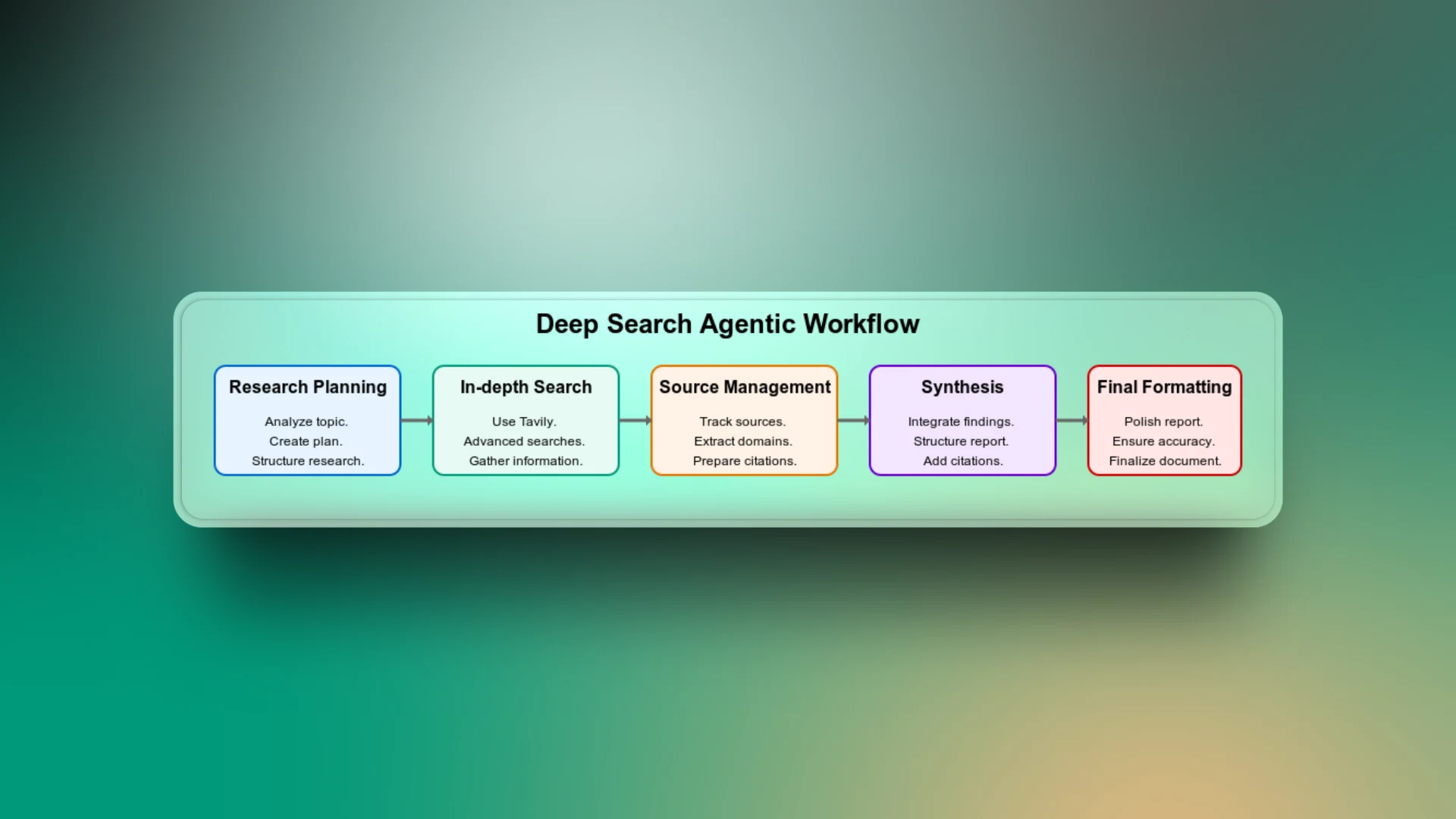
The deep agentic search is a combination of different workflow stages, from planning the search task to delivering the final search report. Let’s go through each step of the workflow to understand how the app works.
Research Planning
This is the first step of the workflow. Here, the agent analyses the topic and creates a structured research plan based on the context of the topic. It breaks down the broad subject into targeted subtopics like history, technical details, pros and cons, use cases and more.
You can consider this as the most important part of the workflow because, without it, the agent may perform generic searches and return irrelevant results.
In-depth Search
LLMs are limited to their training data and cannot access current trends. For example, if you prompt the agent without search capability to list the current players in a football team, it will return results based on the data it was trained on. However, because those results do not contain the most recent updates, they may no longer be factually correct.
The use of Tavily to perform advanced web searches gives the agent access to the most recent and relevant web sources.
Source Management
To ensure that every piece of information the agent produces can be linked to a reliable source, it’s important to keep track of all sources. This part of the workflow builds trust with users who want to verify claims or data in the final report.
Synthesis
To connect the dots between all gathered information, the agent brings together insights from all the researched aspects to form a coherent report. Without this phase of the workflow, the search output might just be a disjointed report.
Final Formatting
Even if the report is factually accurate and well-researched, poor formatting can make it difficult to read. An additional step is needed to ensure a clean structure, consistent headings, bullet points, spacing, and more.
Implementing the Deep Search Agent
So far, you’ve gained an understanding of what the deep search agentic workflow is all about. Now it’s time to implement it in Google Colab.
To get started, we’ll perform a few key steps:
Step 1: Install Dependencies
-q langchain langchain-openai tavily-pythonStep 2: Import Necessary Libraries
# Import standard Python libraries
import os   # For interacting with environment variables
import re   # For regular expression
import ast  # For safely parsing Python expressions from strings

# LangChain models and tools
from langchain_openai import ChatOpenAI # Interface for interacting with OpenAI's chat models

from langchain_community.utilities.tavily_search import TavilySearchAPIWrapper  # Enables search via the Tavily API

# LangChain message schema
from langchain.schema import SystemMessage, HumanMessage  # Defines message types used in conversations

# LangChain agent components
from langchain.agents import Tool, AgentExecutor, create_react_agent  # For building and running agentic workflows with tools

# LangChain prompt templates
from langchain.prompts import PromptTemplate  # Allows creation of reusable prompt templates

# LangChain memory
from langchain.memory import ConversationBufferMemory  # Helps maintain conversation state across turns
Step 3: Set Up Environment Variables
# Setting and retrieving environment variables
os.environ["NOVITA_API_KEY"] = ""      # Replace with your actual Novita API key
os.environ["TAVILY_API_KEY"] = ""      # Replace with your actual Tavily API key

# Load the API keys into variables
novita_api_key = os.getenv("NOVITA_API_KEY")
tavily_api_key = os.getenv("TAVILY_API_KEY")
Step 4: Define an LLM Helper Function
Novita AI is compatible with OpenAI; therefore, we will use the ChatOpenAI module from LangChain to integrate Novita AI with LangChain. This means we can communicate with Novita in the same way that we would with OpenAI models.
However, one important thing to note is that we need to set the base_url to point to Novita’s API endpoint: https://api.novita.ai/v3/openai.
In this workflow, we will use the model llama-4-maverick-17b-128e-instruct-fp8, which is a powerful LLaMA 4 variant fine-tuned for instruction-following tasks.
# LLM helper function
def llm(api_key,
        model="meta-llama/llama-4-maverick-17b-128e-instruct-fp8",
        temperature=0.7):
    """Create a ChatOpenAI LLM instance with specified parameters."""
    return ChatOpenAI(
        model=model,
        openai_api_key=api_key,
        base_url="https://api.novita.ai/v3/openai",
        temperature=temperature,
    )
Building the Agentic Researcher
The entire deep research workflow is encapsulated in a modular class called AgenticResearcher. This class will manage the process of generating research plans, performing web searches, synthesising results, formatting the final report, and running the full research loop.
We will initialise the research agent with access to an LLM via the Novita API and a web search tool via the Tavily API. Then, we define a method that performs an advanced web search on a given query using Tavily. The results are formatted for readability, and the raw data is stored for later use.
class AgenticResearcher:
    def __init__(self, novita_api_key, tavily_api_key, num_researchers=3, temperature=0.3):
        """Initialize the research agent with necessary API keys and parameters."""
        self.llm = llm(api_key=novita_api_key, temperature=temperature)
        self.tavily_search =
TavilySearchAPIWrapper(tavily_api_key=tavily_api_key)
        self.num_researchers = num_researchers
        self.raw_search_results = []
    def search(self, query):
        """Search the web for information on a given query."""
        try:
            results = self.tavily_search.results(
                query, max_results=7,
                search_depth="advanced"
            )
            # Store raw results for citation processing
            self.raw_search_results.extend(results)
            formatted = []
            for r in results:
                formatted += [
                    f"TITLE: {r.get('title','')}",
                    f"URL: {r.get('url','')}",
                    f"CONTENT:\
{r.get('content','')}",
                    "---"
                ]
            return "\
".join(formatted) if formatted else "No results found"
        except Exception as e:
            return f"Search error: {str(e)}"
Creating Multi-Aspect Research Plans
Still part of the AgenticResearcher class, let’s create a method that generates a structured research plan by breaking the topic into several distinct aspects using the LLM. Each aspect includes a title and a specific search query. The goal is to explore the topic from multiple angles to ensure both depth and breadth.
def create_research_plan(self, topic):
"""Create a structured research plan with multiple aspects to investigate."""
sys = "You are a planner that outputs Python lists of dicts."
hum = f"""

Create a comprehensive research plan for: {topic}
Identify {self.num_researchers} distinct aspects to investigate thoroughly.
Analyze the topic and determine the most relevant aspects to research based on its nature and domain.
Output exactly:
ASPECT {{'title': '...', 'search_query': '...'}}
"""
try:
resp = self.llm.invoke([SystemMessage(content=sys), HumanMessage(content=hum)])
aspects = []
for line in resp.content.splitlines():
if line.strip().startswith("ASPECT"):
m = re.search(r"\{.*\}", line)
if m:
try:
aspects.append(ast.literal_eval(m.group(0)))
except Exception as e:
print(f"Error parsing aspect: {e}")
if not aspects:
# General-purpose default aspects that work across different domains
default_aspects = [
{"title": "Overview and Key Information", "search_query": f"{topic} overview key facts"},
{"title": "Background and Context", "search_query": f"{topic} background history context"},
{"title": "Details and Specifications", "search_query": f"{topic} details specifics data"},
{"title": "Analysis and Significance", "search_query": f"{topic} analysis importance implications"}
]
aspects = default_aspects[:self.num_researchers]
return aspects
except Exception as e:
print(f"Error creating research plan: {e}")
return [{"title": f"{topic} research", "search_query": topic}]
Source Management and Citation
Next, we need to handle how the workflow generates credible reports. We will do this by creating a method that extracts unique sources from the raw search results, making sure that each source is cited.
def extract_sources(self):
"""Extract unique sources from raw search results for citations."""
unique_sources = {}
for result in self.raw_search_results:
url = result.get('url', '')
if url and 'http' in url:
domain = url.split('/')[2] if len(url.split('/')) > 2 else url
if domain not in unique_sources:
unique_sources[domain] = url
return unique_sources
Report Synthesis
Now that we’ve gathered raw information from multiple sources, the next step is to turn that messy input into a detailed research report. We’re going to write methods that synthesise the raw text into a readable, organised report with headings, subheadings, key findings and source citations.
def synthesize(self, text):
"""Synthesize raw text into detailed, structured findings with citations."""
sources = self.extract_sources()
sources_list = list(sources.keys())
sys = """You are an expert research synthesizer that creates detailed, structured reports.
For each claim or fact you include, add a citation to the source domain.
Use the exact domain names provided without modification.
Adapt your report structure to the topic's domain and nature."""
hum = f"""
INFORMATION TO SYNTHESIZE:
{text}
AVAILABLE SOURCE DOMAINS (use these exact names for citations):
{sources_list}
Create a comprehensive, detailed research report with:
1. Main findings with specific facts and figures
2. Structured information with clear headings and subheadings appropriate to the topic
3. Citations using the exact source domain names in square brackets [like.this]
4. Relevant data presented clearly and professionally
5. Format adapted to the specific nature of the topic (technical, historical, news event, etc.)
FORMAT THE REPORT PROFESSIONALLY AND THOROUGHLY WITHOUT ASSUMING ANY SPECIFIC DOMAIN.
"""
try:
return self.llm.invoke([SystemMessage(content=sys), HumanMessage(content=hum)]).content
except Exception as e:
return f"Synthesis error: {str(e)}"
Creating Tools for the Agent
To make our deep search agentic workflow functional, we need to define the tools. Tools give the agent capabilities to carry out certain actions.
The core tools needed for this workflow are the “plan” to help the agent break down the topic and create a structured research plan, “search” to let the agent perform a deep web search and “synthesize” to allow the agent to convert all raw findings into an organised report.
def get_tools(self):
"""Create and return the list of tools available to the agent."""
return [
Tool(
name="plan",
func=lambda t: str(self.create_research_plan(t)),
description="Create a detailed research plan with multiple aspects to investigate."
),
Tool(
name="search",
func=self.search,
description="Search the web thoroughly for a query and return comprehensive results."
),
Tool(
name="synthesize",
func=self.synthesize,
description="Transform raw text into detailed, structured findings with citations."
),
]
Building the Agent Executor
Now that our tools are ready, we need to tie everything together into an AI agent using ReAct style prompting. This helps the agent to plan, take actions using the defined tools, observe the results and loop until it has enough data to produce a final research report.
def get_agent_executor(self):
"""Create and return the agent executor with tools and memory."""
tools = self.get_tools()
template = """You are an autonomous research agent specialized in producing comprehensive, detailed reports on any topic.
{tool_names}
TOOLS:
{tools}
PREVIOUS CONVERSATIONS:
{chat_history}
When given a research topic (as {input}), follow this process:
1. Analyze the type of topic and create a research plan tailored to its domain
2. Search for comprehensive information on each aspect of the topic
3. Collect detailed, relevant information with sources
4. Synthesize everything into a professional, detailed report formatted appropriately for the topic
Follow exactly this format:
Question: {input}
Thought: (your reasoning here)
Action: the name of the tool to call, must be one of [{tool_names}]
Action Input: the input to the tool
Observation: (the tool's output)
... (repeat Thought/Action/Action Input/Observation as needed)
When you have gathered comprehensive information, output:
Final Answer: (your final, detailed research report with structured sections, appropriate formatting, specific details, and citations)
BEGIN WITH A THOROUGH PLAN!
{agent_scratchpad}
"""
prompt = PromptTemplate(
template=template,
input_variables=["input", "agent_scratchpad", "tools", "tool_names", "chat_history"]
)
# Create the low-level agent
agent = create_react_agent(
llm=self.llm,
tools=tools,
prompt=prompt
)
# Wrap it in an executor with memory
memory = ConversationBufferMemory(memory_key="chat_history", return_messages=True)
agent_executor = AgentExecutor.from_agent_and_tools(
agent=agent,
tools=tools,
verbose=True,
memory=memory,
max_iterations=18,
early_stopping_method="generate",
handle_parsing_errors=True
)
return agent_executor
Final Report Formatting
After the research agent completes its deep search, the output may be informative but not presentable. This additional step helps make the final report more polished. To achieve this, we will prompt the LLM to work as an expert editor to improve the final report.
def format_final_report(self, raw_report):
"""Add final formatting to the report to make it more professional."""
sys = """You are an expert editor that improves research reports.
Keep all the factual content, citations, and structure intact.
Just improve the formatting, organization, and readability."""
hum = f"""
Here is a research report that needs final formatting improvements:
{raw_report}
Please improve the formatting and presentation while preserving all:
1. Facts and figures
2. Citations
3. Content organization
4. Statistical data
Make it look professional with proper headings, spacing, and layout.
"""
try:
improved = self.llm.invoke([SystemMessage(content=sys), HumanMessage(content=hum)]).content
return improved
except Exception as e:
# If formatting fails, return original report
return raw_report
Bringing It All Together
Let’s tie the whole workflow into one pipeline that coordinates the entire research flow. This will serve as the entry point that allows the agent to carry out the full research process and then format the final report.
def run(self, topic):
"""Run the research process on the given topic."""
try:
# Reset stored search results
self.raw_search_results = []
# Run the agent
executor = self.get_agent_executor()
raw_report = executor.invoke({"input": topic})["output"]
# Format the final report
final_report = self.format_final_report(raw_report)
return final_report
except Exception as e:
return f"Research failed: {str(e)}"
Running the Research Agent
Now that we’ve built the deep search agentic workflow, let’s put it to test and see how well it performs on a real-world research task.
We’ll create an instance of the research agent and ask it to generate a detailed report on a current topic.
# Create the researcher object
researcher = AgenticResearcher(novita_api_key, tavily_api_key, num_researchers=3)

# Run a test research
topic = "What are the most promising climate tech startups in 2025?"
report = researcher.run(topic)

# Display the research report
print("\
" + "="*60)
print(f"📝 DETAILED RESEARCH REPORT: {topic}")
print("="*60)
print(report)
print("="*60 + "\
")
Result:

The deep agentic workflow broke down the topic and created a research plan, performed an internet search to retrieve relevant information, synthesised the gathered data and finally returned a structured report based on the search query.
Conclusion
Congratulations on building your own deep search agentic workflow! You can now research any topic and get a detailed report on your query.
Let’s do a quick recap of what you’ve accomplished:
In this article, you’ve learnt how to build a deep search agent that can break down complex topics, generate a research plan, perform internet searches and synthesise all the findings into a structured report.
This entire workflow was powered by:
- Novita AI as the LLM provider
- LangChain for the agentic framework
- Tavily as the real-time search engine
Feel free to try the agent on different topics to test its capabilities!
This is just one of the many exciting AI applications possible with today’s powerful models. Visit the Novita LLM Playground to try out other top, latest AI models; who knows, your next great AI idea might just start from there.
Novita AI is an AI cloud platform that offers developers an easy way to deploy AI models using our simple API, while also providing the affordable and reliable GPU cloud for building and scaling.



