다양한 AI 기업들이 이제 요청한 주제에 대해 심층 연구를 수행하고 포괄적인 보고서를 생성하는 에이전트 AI 시스템을 도입하고 있습니다. 예를 들어 OpenAI의 Deep Research가 있습니다.
OpenAI의 Deep Research와 같은 에이전트 AI 시스템은 다단계 검색 및 합성과 같은 복잡한 작업을 위한 자동화된 파이프라인을 제공합니다. 그러나 대부분의 기존 솔루션은 폐쇄형 소스이며, 사용자 정의가 어렵고 모델 동작 및 데이터 처리에 대한 제어를 제한합니다.
예를 들어, 다른 LLM을 사용하거나, 맞춤형 검색 제공자를 사용하거나, 에이전트가 특정 출력을 생성하기 위해 계획하고 행동하는 방식을 조정하고 싶을 수 있습니다.
이것은 흥미로운 질문으로 이어집니다. 선호하는 AI 모델을 사용하고, 원하는 검색 엔진을 통합하며, 에이전트의 동작 방식을 사용자 정의할 수 있는 완전한 유연성을 갖춘 자체 딥 서치 에이전트를 만들 수 있을까요? 정답은 ** 네 ** 입니다.
이 글에서는 Novita AI, LangChain, Tavily를 사용하여 자신만의 딥 리서치 에이전트를 구축하는 방법을 배웁니다.
딥 서치 에이전트 워크플로란 무엇인가?
전통적인 검색은 종종 시간이 많이 걸립니다. 일반적으로 온라인에서 제공되는 많은 정보를 샅샅이 뒤져야 하며, 결국 통찰력으로 이어지지 않을 수도 있습니다. ** 딥 서치 에이전트 워크플로 ** 는 이러한 문제를 워크플로의 일부로 자율적으로 추론하고, 결정을 내리며 외부 도구를 조정할 수 있는 AI 에이전트를 통해 해결합니다.
이 워크플로는 일반적으로 다음을 포함합니다:
- **태스크 구조화 **: AI 에이전트는 주제를 더 작은 작업으로 분해합니다.
- **계획 **: 에이전트는 각 작업을 처리하기 위한 전략을 수립하여 워크플로가 작업 실행 순서를 결정하는 데 도움을 줍니다.
- **도구 통합 **: 정보를 수집하기 위해 에이전트는 데이터베이스 및 웹 검색 엔진과 같은 다양한 도구를 사용합니다. 이러한 도구가 없으면 에이전트는 워크플로에서 주요 작업을 수행할 수 없습니다.
- **합성 **: 에이전트는 수집된 정보를 분석하고 이를 일관된 데이터로 결합합니다.
- **보고서 생성 **: 데이터를 합성한 후 에이전트는 요약 및 인용을 포함하는 구조화된 보고서를 만듭니다.
필요한 도구들
이 글의 구축 부분에 들어가기 전에 필요한 도구를 설정해 보겠습니다.
Novita AI
에이전트 워크플로를 구축하려면 LLM이 필요하며, Novita AI는 최신 LLM, 이미지 생성 모델 등에 액세스할 수 있는 저렴하고 고성능의 API를 제공합니다.
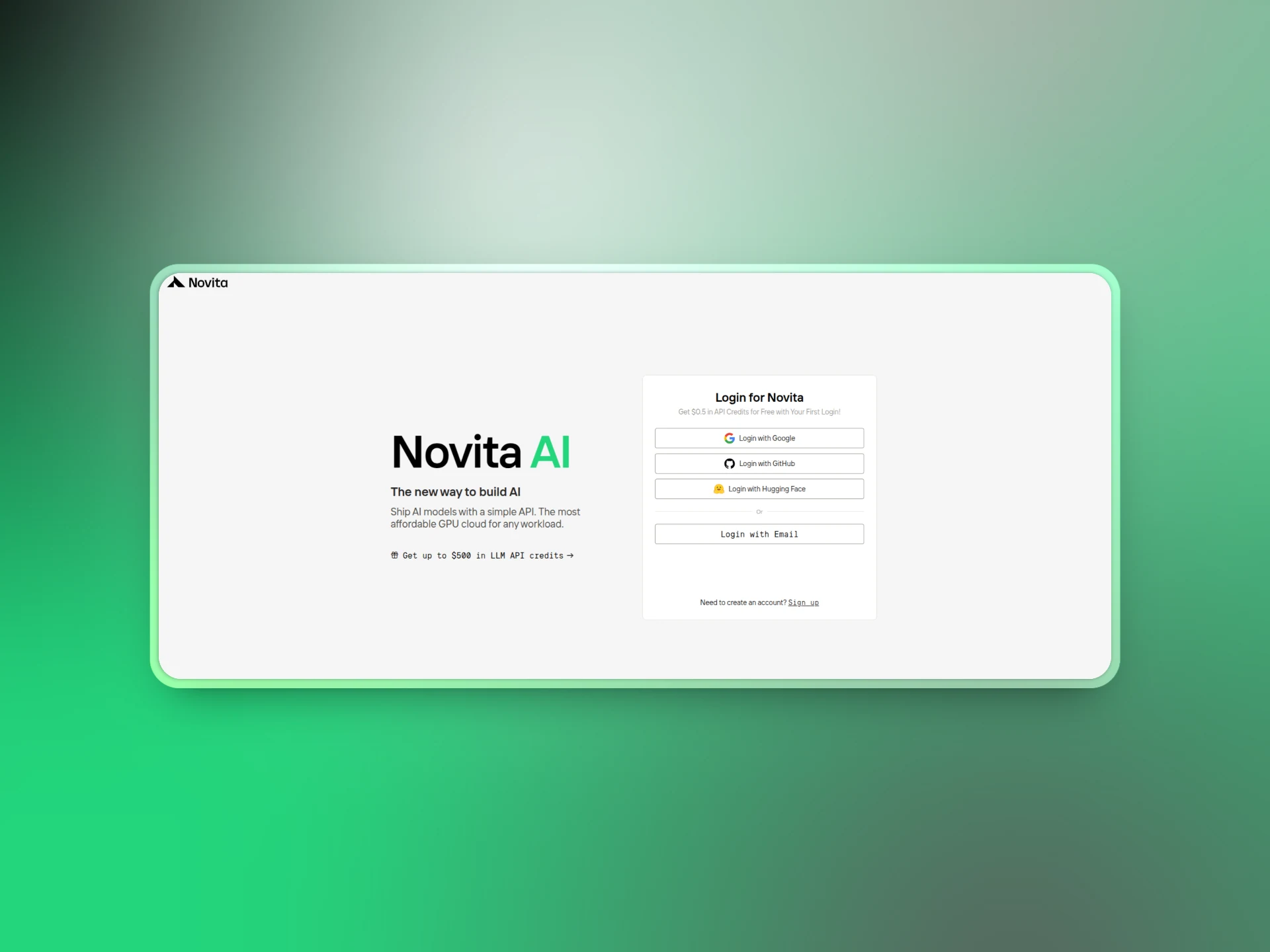
Novita AI에 로그인하여 시작하세요. 로그인한 후 Settings > Key Management 로 이동하여 프롬프트에 따라 API 키를 생성하세요.
Novita AI에 가입하면 다양한 모델을 시험해 볼 수 있는 무료 크레딧을 제공하므로 구축이나 실험을 시작하기 전에 크레딧을 구매할 걱정은 하지 않으셔도 됩니다.
Tavily
Tavily는 AI 애플리케이션에 최적화된 고급 웹 검색 API입니다. Tavily의 검색 엔진 도구를 사용하면 에이전트가 인터넷에 액세스하여 정확하고 편향되지 않은 정보를 수집할 수 있습니다. Tavily로 이동하여 API 키를 생성하세요.
Langchain
LangChain은 LLM으로 애플리케이션을 구축하기 위해 설계된 오픈 소스 프레임워크입니다. LangChain을 사용하면 단계별로 추론하고, 도구를 사용하며, API와 상호 작용하는 에이전트 워크플로를 만들 수 있습니다. 딥 리서치 에이전트의 경우 LangChain을 사용하여 연구 프로세스를 구조화하고, 웹 검색과 같은 도구를 사용하며, 모든 것을 구조화된 보고서로 합성할 것입니다.

Google Colab
이 튜토리얼에서는 Google Colab을 사용하여 딥 서치 에이전트를 구축하고 테스트합니다. Colab을 사용하면 설정 없이 브라우저에서 Python 코드를 작성하고 실행할 수 있으므로 튜토리얼을 쉽게 따라할 수 있습니다.
워크플로 개요
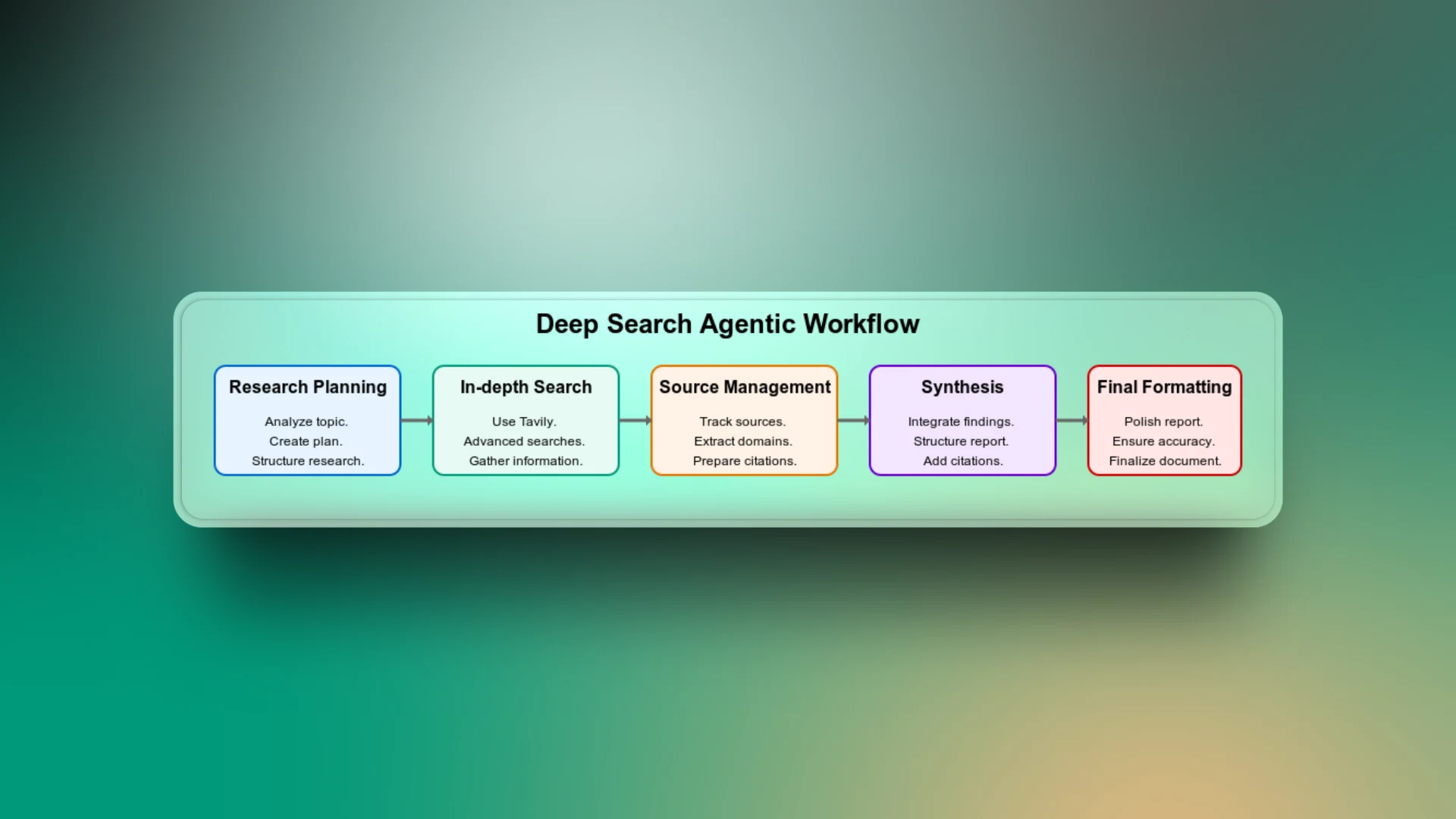
딥 에이전틱 검색은 검색 작업 계획부터 최종 검색 보고서 전달까지 다양한 워크플로 단계의 조합입니다. 앱이 어떻게 작동하는지 이해하기 위해 워크플로의 각 단계를 살펴보겠습니다.
연구 계획
이것은 워크플로의 첫 번째 단계입니다. 여기서 에이전트는 주제를 분석하고 주제의 맥락에 기반한 구조화된 연구 계획을 만듭니다. 광범위한 주제를 역사, 기술 세부 사항, 장단점, 사용 사례 등과 같은 대상 하위 주제로 세분화합니다.
이 단계가 없으면 에이전트가 일반적인 검색을 수행하고 관련 없는 결과를 반환할 수 있으므로 워크플로에서 가장 중요한 부분으로 간주할 수 있습니다.
심층 검색
LLM은 훈련 데이터에 제한되며 최신 트렌드에 액세스할 수 없습니다. 예를 들어, 검색 기능이 없는 에이전트에게 축구팀의 현재 선수 목록을 요청하면 훈련된 데이터를 기반으로 결과를 반환합니다. 그러나 이러한 결과에는 가장 최신 업데이트가 포함되어 있지 않기 때문에 더 이상 사실적으로 정확하지 않을 수 있습니다.
Tavily를 사용하여 고급 웹 검색을 수행하면 에이전트가 가장 최신의 관련 웹 소스에 액세스할 수 있습니다.
소스 관리
에이전트가 생성하는 모든 정보가 신뢰할 수 있는 출처에 연결될 수 있도록 하려면 모든 출처를 추적하는 것이 중요합니다. 워크플로의 이 부분은 최종 보고서에서 주장이나 데이터를 확인하려는 사용자와의 신뢰를 구축합니다.
합성
수집된 모든 정보 사이의 연결점을 찾기 위해 에이전트는 연구된 모든 측면의 통찰력을 모아 일관된 보고서를 구성합니다. 이 워크플로 단계가 없으면 검색 결과는 단지 단편적인 보고서에 불과할 수 있습니다.
최종 포맷팅
보고서가 사실적으로 정확하고 잘 조사되었더라도 형식이 좋지 않으면 읽기 어려울 수 있습니다. 깔끔한 구조, 일관된 제목, 글머리 기호, 간격 등을 보장하기 위해 추가 단계가 필요합니다.
딥 서치 에이전트 구현
지금까지 딥 서치 에이전트 워크플로가 무엇인지 이해했습니다. 이제 Google Colab에서 이를 구현할 차례입니다.
시작하려면 몇 가지 주요 단계를 수행하겠습니다:
1단계: 종속성 설치
!pip install -q langchain langchain-openai tavily-python
2단계: 필요한 라이브러리 가져오기
# Import standard Python libraries
import os   # For interacting with environment variables
import re   # For regular expression
import ast  # For safely parsing Python expressions from strings

# LangChain models and tools
from langchain_openai import ChatOpenAI # Interface for interacting with OpenAI's chat models

from langchain_community.utilities.tavily_search import TavilySearchAPIWrapper  # Enables search via the Tavily API

# LangChain message schema
from langchain.schema import SystemMessage, HumanMessage  # Defines message types used in conversations

# LangChain agent components
from langchain.agents import Tool, AgentExecutor, create_react_agent  # For building and running agentic workflows with tools

# LangChain prompt templates
from langchain.prompts import PromptTemplate  # Allows creation of reusable prompt templates

# LangChain memory
from langchain.memory import ConversationBufferMemory  # Helps maintain conversation state across turns
3단계: 환경 변수 설정
# Setting and retrieving environment variables
os.environ["NOVITA_API_KEY"] = ""      # Replace with your actual Novita API key
os.environ["TAVILY_API_KEY"] = ""      # Replace with your actual Tavily API key

# Load the API keys into variables
novita_api_key = os.getenv("NOVITA_API_KEY")
tavily_api_key = os.getenv("TAVILY_API_KEY")
4단계: LLM 도우미 함수 정의
Novita AI는 OpenAI와 호환되므로 LangChain의 ChatOpenAI 모듈을 사용하여 Novita AI를 LangChain과 통합할 것입니다. 이는 OpenAI 모델과 동일한 방식으로 Novita와 통신할 수 있음을 의미합니다.
그러나 주목해야 할 중요한 점은 base_url을 Novita의 API 엔드포인트(https://api.novita.ai/v3/openai)로 설정해야 한다는 것입니다.
이 워크플로에서는 모델 llama-4-maverick-17b-128e-instruct-fp8을 사용합니다. 이는 명령어 수행 작업에 맞게 미세 조정된 강력한 LLaMA 4 변형입니다.
# LLM helper function
def llm(api_key,
        model="meta-llama/llama-4-maverick-17b-128e-instruct-fp8",
        temperature=0.7):
    """Create a ChatOpenAI LLM instance with specified parameters."""
    return ChatOpenAI(
        model=model,
        openai_api_key=api_key,
        base_url="https://api.novita.ai/v3/openai",
        temperature=temperature,
    )
에이전트 리서처 구축
전체 딥 리서치 워크플로는 AgenticResearcher라는 모듈식 클래스에 캡슐화됩니다. 이 클래스는 연구 계획 생성, 웹 검색 수행, 결과 합성, 최종 보고서 형식 지정, 전체 연구 루프 실행 프로세스를 관리합니다.
Novita API를 통한 LLM 액세스와 Tavily API를 통한 웹 검색 도구를 사용하여 연구 에이전트를 초기화합니다. 그런 다음 Tavily를 사용하여 주어진 쿼리에 대해 고급 웹 검색을 수행하는 메서드를 정의합니다. 결과는 가독성을 위해 형식이 지정되며 원시 데이터는 나중에 사용하기 위해 저장됩니다.
class AgenticResearcher:
    def __init__(self, novita_api_key, tavily_api_key, num_researchers=3, temperature=0.3):
        """Initialize the research agent with necessary API keys and parameters."""
        self.llm = llm(api_key=novita_api_key, temperature=temperature)
        self.tavily_search =
TavilySearchAPIWrapper(tavily_api_key=tavily_api_key)
        self.num_researchers = num_researchers
        self.raw_search_results = []
    def search(self, query):
        """Search the web for information on a given query."""
        try:
            results = self.tavily_search.results(
                query, max_results=7,
                search_depth="advanced"
            )
            # Store raw results for citation processing
            self.raw_search_results.extend(results)
            formatted = []
            for r in results:
                formatted += [
                    f"TITLE: {r.get('title','')}",
                    f"URL: {r.get('url','')}",
                    f"CONTENT:\
{r.get('content','')}",
                    "---"
                ]
            return "\
".join(formatted) if formatted else "No results found"
        except Exception as e:
            return f"Search error: {str(e)}"
다중 측면 연구 계획 생성
AgenticResearcher 클래스의 일부로, LLM을 사용하여 주제를 여러 개의 뚜렷한 측면으로 나누어 구조화된 연구 계획을 생성하는 메서드를 만들어 보겠습니다. 각 측면에는 제목과 특정 검색 쿼리가 포함됩니다. 목표는 깊이와 폭을 모두 보장하기 위해 여러 각도에서 주제를 탐구하는 것입니다.
def create_research_plan(self, topic):
"""Create a structured research plan with multiple aspects to investigate."""
sys = "You are a planner that outputs Python lists of dicts."
hum = f"""

Create a comprehensive research plan for: {topic}
Identify {self.num_researchers} distinct aspects to investigate thoroughly.
Analyze the topic and determine the most relevant aspects to research based on its nature and domain.
Output exactly:
ASPECT {{'title': '...', 'search_query': '...'}}
"""
try:
resp = self.llm.invoke([SystemMessage(content=sys), HumanMessage(content=hum)])
aspects = []
for line in resp.content.splitlines():
if line.strip().startswith("ASPECT"):
m = re.search(r"\{.*\}", line)
if m:
try:
aspects.append(ast.literal_eval(m.group(0)))
except Exception as e:
print(f"Error parsing aspect: {e}")
if not aspects:
# General-purpose default aspects that work across different domains
default_aspects = [
{"title": "Overview and Key Information", "search_query": f"{topic} overview key facts"},
{"title": "Background and Context", "search_query": f"{topic} background history context"},
{"title": "Details and Specifications", "search_query": f"{topic} details specifics data"},
{"title": "Analysis and Significance", "search_query": f"{topic} analysis importance implications"}
]
aspects = default_aspects[:self.num_researchers]
return aspects
except Exception as e:
print(f"Error creating research plan: {e}")
return [{"title": f"{topic} research", "search_query": topic}]
소스 관리 및 인용
다음으로, 워크플로가 신뢰할 수 있는 보고서를 생성하는 방법을 처리해야 합니다. 각 소스가 인용되도록 원시 검색 결과에서 고유한 소스를 추출하는 메서드를 만들어 이를 수행하겠습니다.
def extract_sources(self):
"""Extract unique sources from raw search results for citations."""
unique_sources = {}
for result in self.raw_search_results:
url = result.get('url', '')
if url and 'http' in url:
domain = url.split('/')[2] if len(url.split('/')) > 2 else url
if domain not in unique_sources:
unique_sources[domain] = url
return unique_sources
보고서 합성
이제 여러 소스에서 원시 정보를 수집했으므로 다음 단계는 지저분한 입력을 상세한 연구 보고서로 바꾸는 것입니다. 원시 텍스트를 제목, 부제목, 주요 발견 사항 및 소스 인용이 포함된 읽기 쉽고 체계적인 보고서로 합성하는 메서드를 작성하겠습니다.
def synthesize(self, text):
"""Synthesize raw text into detailed, structured findings with citations."""
sources = self.extract_sources()
sources_list = list(sources.keys())
sys = """You are an expert research synthesizer that creates detailed, structured reports.
For each claim or fact you include, add a citation to the source domain.
Use the exact domain names provided without modification.
Adapt your report structure to the topic's domain and nature."""
hum = f"""
INFORMATION TO SYNTHESIZE:
{text}
AVAILABLE SOURCE DOMAINS (use these exact names for citations):
{sources_list}
Create a comprehensive, detailed research report with:
1. Main findings with specific facts and figures
2. Structured information with clear headings and subheadings appropriate to the topic
3. Citations using the exact source domain names in square brackets [like.this]
4. Relevant data presented clearly and professionally
5. Format adapted to the specific nature of the topic (technical, historical, news event, etc.)
FORMAT THE REPORT PROFESSIONALLY AND THOROUGHLY WITHOUT ASSUMING ANY SPECIFIC DOMAIN.
"""
try:
return self.llm.invoke([SystemMessage(content=sys), HumanMessage(content=hum)]).content
except Exception as e:
return f"Synthesis error: {str(e)}"
에이전트를 위한 도구 생성
딥 서치 에이전트 워크플로를 기능적으로 만들기 위해 도구를 정의해야 합니다. 도구는 에이전트에게 특정 작업을 수행할 수 있는 기능을 제공합니다.
이 워크플로에 필요한 핵심 도구는 에이전트가 주제를 분해하고 구조화된 연구 계획을 수립하는 데 도움이 되는 ‘plan’, 에이전트가 심층 웹 검색을 수행할 수 있게 하는 ‘search’, 그리고 에이전트가 모든 원시 결과를 체계적인 보고서로 변환할 수 있게 하는 'synthesize’입니다.
def get_tools(self):
"""Create and return the list of tools available to the agent."""
return [
Tool(
name="plan",
func=lambda t: str(self.create_research_plan(t)),
description="Create a detailed research plan with multiple aspects to investigate."
),
Tool(
name="search",
func=self.search,
description="Search the web thoroughly for a query and return comprehensive results."
),
Tool(
name="synthesize",
func=self.synthesize,
description="Transform raw text into detailed, structured findings with citations."
),
]
에이전트 실행기 구축
이제 도구가 준비되었으므로 ReAct 스타일 프롬프팅을 사용하여 모든 것을 AI 에이전트로 묶어야 합니다. 이는 에이전트가 계획을 세우고, 정의된 도구를 사용하여 작업을 수행하고, 결과를 관찰하고, 최종 연구 보고서를 생성하기에 충분한 데이터를 얻을 때까지 반복하는 데 도움이 됩니다.
def get_agent_executor(self):
"""Create and return the agent executor with tools and memory."""
tools = self.get_tools()
template = """You are an autonomous research agent specialized in producing comprehensive, detailed reports on any topic.
{tool_names}
TOOLS:
{tools}
PREVIOUS CONVERSATIONS:
{chat_history}
When given a research topic (as {input}), follow this process:
1. Analyze the type of topic and create a research plan tailored to its domain
2. Search for comprehensive information on each aspect of the topic
3. Collect detailed, relevant information with sources
4. Synthesize everything into a professional, detailed report formatted appropriately for the topic
Follow exactly this format:
Question: {input}
Thought: (your reasoning here)
Action: the name of the tool to call, must be one of [{tool_names}]
Action Input: the input to the tool
Observation: (the tool's output)
... (repeat Thought/Action/Action Input/Observation as needed)
When you have gathered comprehensive information, output:
Final Answer: (your final, detailed research report with structured sections, appropriate formatting, specific details, and citations)
BEGIN WITH A THOROUGH PLAN!
{agent_scratchpad}
"""
prompt = PromptTemplate(
template=template,
input_variables=["input", "agent_scratchpad", "tools", "tool_names", "chat_history"]
)
# Create the low-level agent
agent = create_react_agent(
llm=self.llm,
tools=tools,
prompt=prompt
)
# Wrap it in an executor with memory
memory = ConversationBufferMemory(memory_key="chat_history", return_messages=True)
agent_executor = AgentExecutor.from_agent_and_tools(
agent=agent,
tools=tools,
verbose=True,
memory=memory,
max_iterations=18,
early_stopping_method="generate",
handle_parsing_errors=True
)
return agent_executor
최종 보고서 포맷팅
연구 에이전트가 딥 서치를 완료한 후 출력은 유익할 수 있지만 제시하기에는 적합하지 않을 수 있습니다. 이 추가 단계는 최종 보고서를 더욱 세련되게 만드는 데 도움이 됩니다. 이를 위해 LLM에 최종 보고서를 개선하는 전문 편집자 역할을 하도록 프롬프트합니다.
def format_final_report(self, raw_report):
"""Add final formatting to the report to make it more professional."""
sys = """You are an expert editor that improves research reports.
Keep all the factual content, citations, and structure intact.
Just improve the formatting, organization, and readability."""
hum = f"""
Here is a research report that needs final formatting improvements:
{raw_report}
Please improve the formatting and presentation while preserving all:
1. Facts and figures
2. Citations
3. Content organization
4. Statistical data
Make it look professional with proper headings, spacing, and layout.
"""
try:
improved = self.llm.invoke([SystemMessage(content=sys), HumanMessage(content=hum)]).content
return improved
except Exception as e:
# If formatting fails, return original report
return raw_report
모든 것을 하나로 묶기
전체 워크플로를 전체 연구 흐름을 조정하는 하나의 파이프라인으로 묶어 보겠습니다. 이는 에이전트가 전체 연구 프로세스를 수행하고 최종 보고서를 형식화할 수 있도록 하는 진입점 역할을 합니다.
def run(self, topic):
"""Run the research process on the given topic."""
try:
# Reset stored search results
self.raw_search_results = []
# Run the agent
executor = self.get_agent_executor()
raw_report = executor.invoke({"input": topic})["output"]
# Format the final report
final_report = self.format_final_report(raw_report)
return final_report
except Exception as e:
return f"Research failed: {str(e)}"
연구 에이전트 실행
이제 딥 서치 에이전트 워크플로를 구축했으므로 실제 연구 작업에서 어떻게 작동하는지 테스트해 보겠습니다.
연구 에이전트의 인스턴스를 생성하고 현재 주제에 대한 상세 보고서를 생성하도록 요청하겠습니다.
# Create the researcher object
researcher = AgenticResearcher(novita_api_key, tavily_api_key, num_researchers=3)

# Run a test research
topic = "What are the most promising climate tech startups in 2025?"
report = researcher.run(topic)

# Display the research report
print("\
" + "="*60)
print(f"📝 DETAILED RESEARCH REPORT: {topic}")
print("="*60)
print(report)
print("="*60 + "\
")
결과:

딥 에이전틱 워크플로는 주제를 분해하고 연구 계획을 수립했으며, 관련 정보를 검색하기 위해 인터넷 검색을 수행하고, 수집된 데이터를 합성하여 마지막으로 검색 쿼리를 기반으로 구조화된 보고서를 반환했습니다.
결론
** 자신만의 딥 서치 에이전트 워크플로를 구축한 것을 축하합니다! 이제 모든 주제를 조사하고 쿼리에 대한 상세 보고서를 받을 수 있습니다. **
성취한 내용을 간단히 요약해 보겠습니다:
- 이 글에서는 복잡한 주제를 분해하고, 연구 계획을 생성하며, 인터넷 검색을 수행하고, 모든 결과를 구조화된 보고서로 합성할 수 있는 딥 서치 에이전트를 구축하는 방법을 배웠습니다.
- 이 전체 워크플로는 다음에 의해 구동되었습니다:
- LLM 제공자로서의 Novita AI
- 에이전틱 프레임워크로서의 LangChain
- 실시간 검색 엔진으로서의 Tavily
에이전트의 기능을 테스트하기 위해 다양한 주제로 시도해 보세요!
이는 오늘날의 강력한 모델로 가능한 많은 흥미로운 AI 애플리케이션 중 하나에 불과합니다. Novita LLM Playground를 방문하여 다른 최고의 최신 AI 모델을 사용해 보세요. 여러분의 다음 훌륭한 AI 아이디어가 거기서 시작될지도 모릅니다.
Novita AI는 개발자에게 간단한 API를 사용하여 AI 모델을 배포할 수 있는 쉬운 방법을 제공하는 동시에 구축 및 확장을 위한 저렴하고 안정적인 GPU 클라우드를 제공하는 AI 클라우드 플랫폼입니다.