
重點摘要
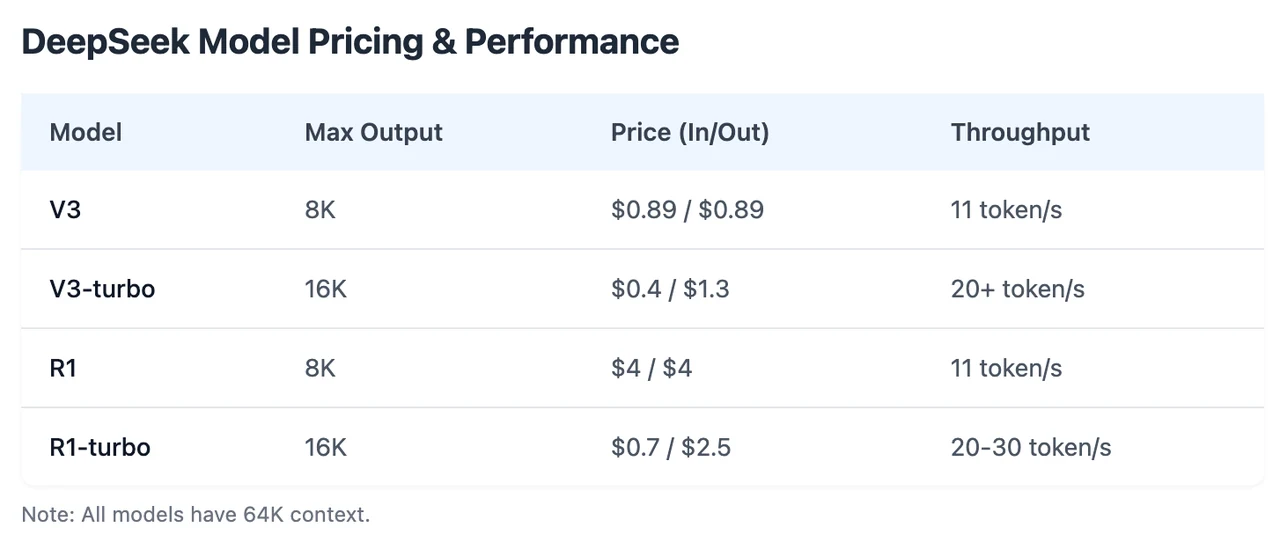
Novita AI 推出了 DeepSeek R1 Turbo,提供 **3 倍吞吐量 ** 和 ** 限時 60% 折扣 。此外,此版本完全支援 ** 函式呼叫。
如果您想測試其效能,請直接在 Novita AI Playground 開始免費試用!
什麼是函式呼叫?
函式呼叫是一項強大的功能,允許大型語言模型(LLM)以結構化方式與外部系統和您的程式碼互動。除了文字生成之外,具備函式呼叫能力的 LLM 可以識別何時需要執行特定動作、生成所需的參數,並執行實際任務。這使得 AI 模型更加動態且實用,實現與外部工具和 API 的無縫整合。
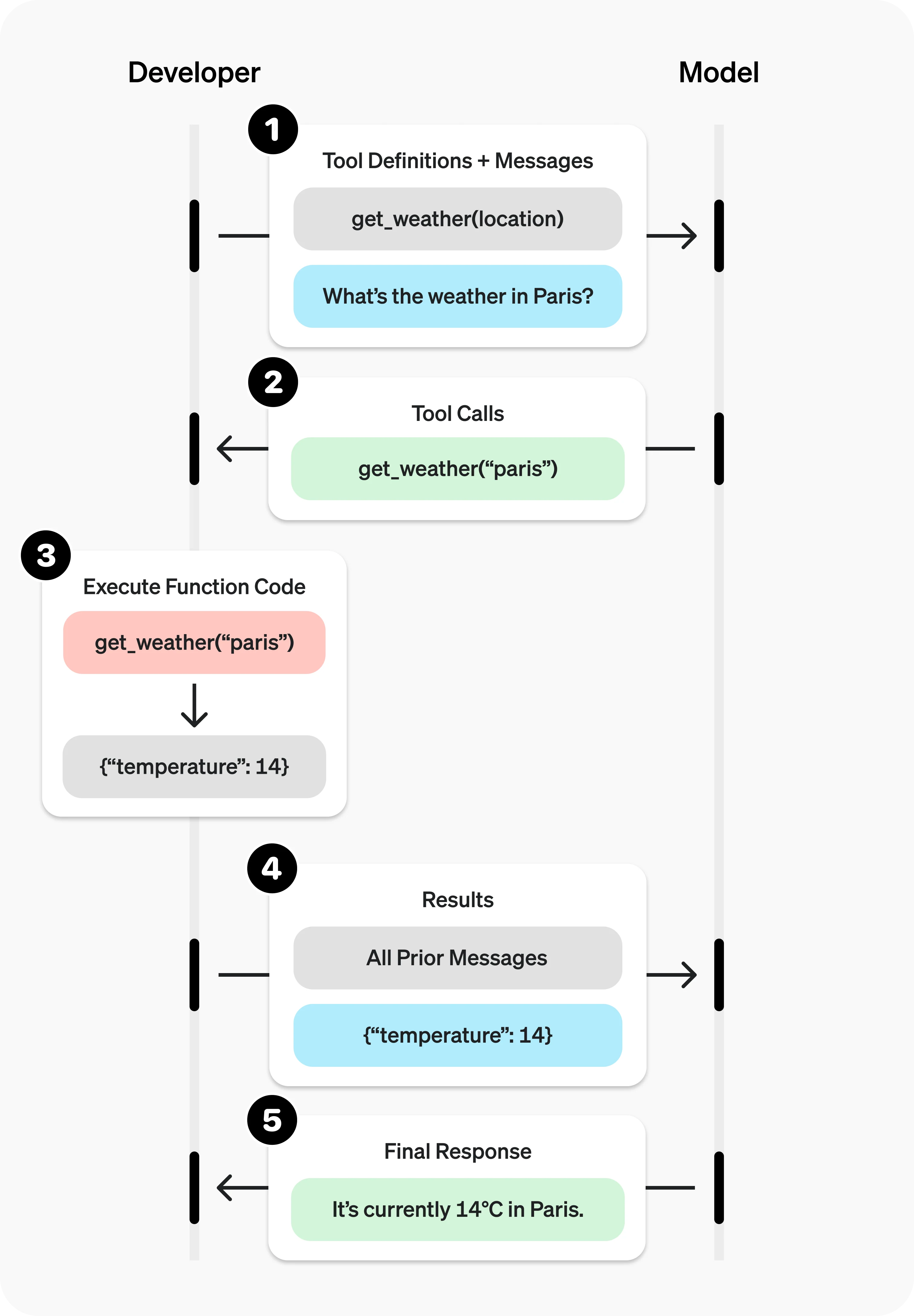
函式呼叫如何運作?它能解決哪些問題?
流程遵循簡單且結構化的步驟:
- 使用者向 LLM 發送請求。
- LLM 分析請求並判斷是否需要函式呼叫。
- 如果需要,LLM 會生成一個結構化 JSON 呼叫,指定對應的函式名稱與參數。
- 應用程式接收該呼叫並執行函式。
- 結果回傳給 LLM。
- LLM 根據結果生成最終回應給使用者。
這個循環可以重複進行,以處理多步驟或複雜任務。工具(函式)需要定義名稱、描述以及指定參數的 JSON schema。為了增加驗證,可以使用 Pydantic 模型來強制型別安全。
函式呼叫擴展了 LLM 的能力,解決了許多實際應用場景:
- 資料檢索:將語言查詢轉換為 API 呼叫以取得即時資料(例如:「我最近的訂單有哪些?」)。
- 動作執行:執行特定任務(例如:「安排會議」觸發行事曆 API)。
- 計算:處理計算或操作(例如:複利或統計分析)。
- 資料管道:串聯函式以處理複雜工作流程(例如:擷取 → 處理 → 儲存資料)。
- UI/UX 整合:觸發介面更新,例如地圖標記或圖表。
- 對話式代理:讓聊天機器人呼叫 API 以獲得相關回應(例如:天氣更新)。
- 自然語言理解:將文字轉換為結構化資料或提取資訊(例如:情緒分析、命名實體辨識)。
如何透過 Novita AI 使用 DeepSeek R1 函式呼叫
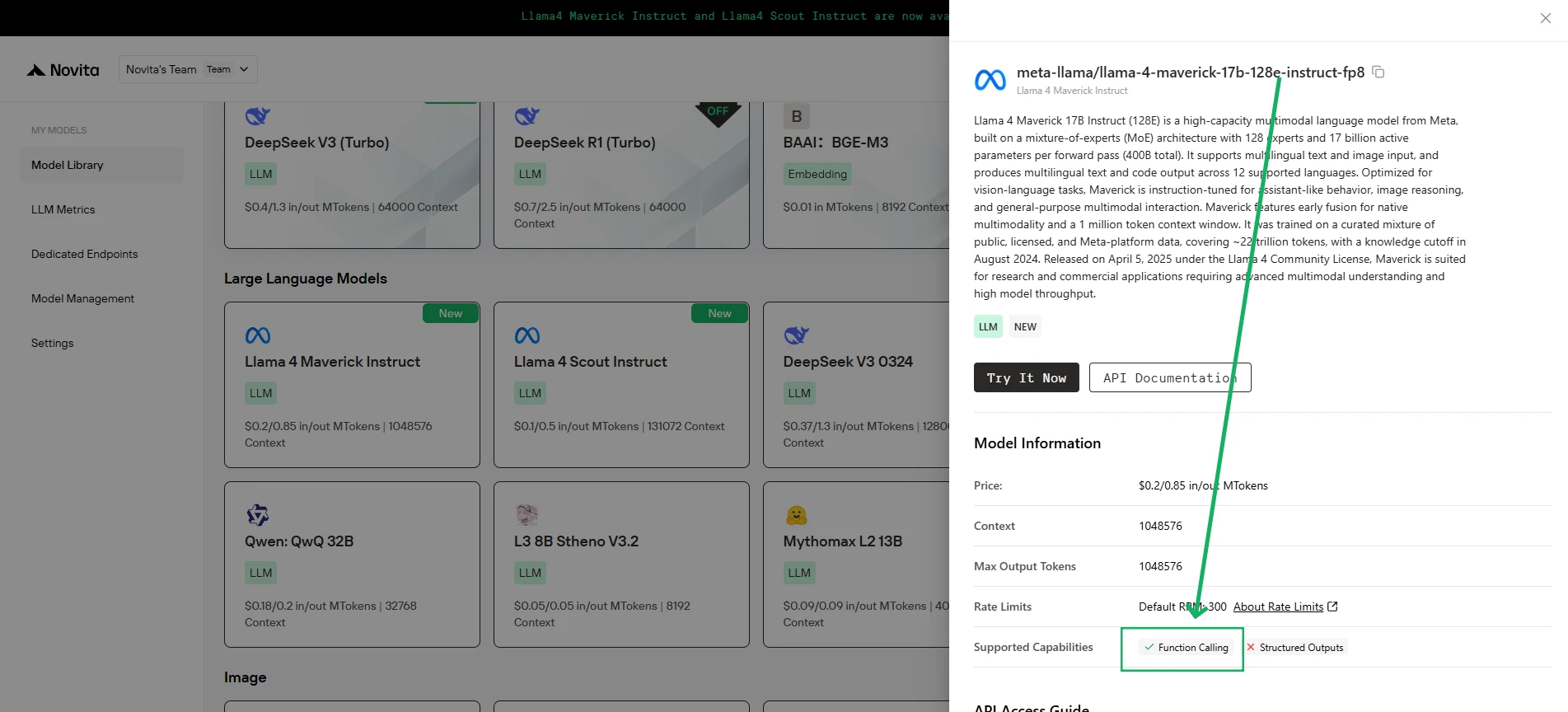
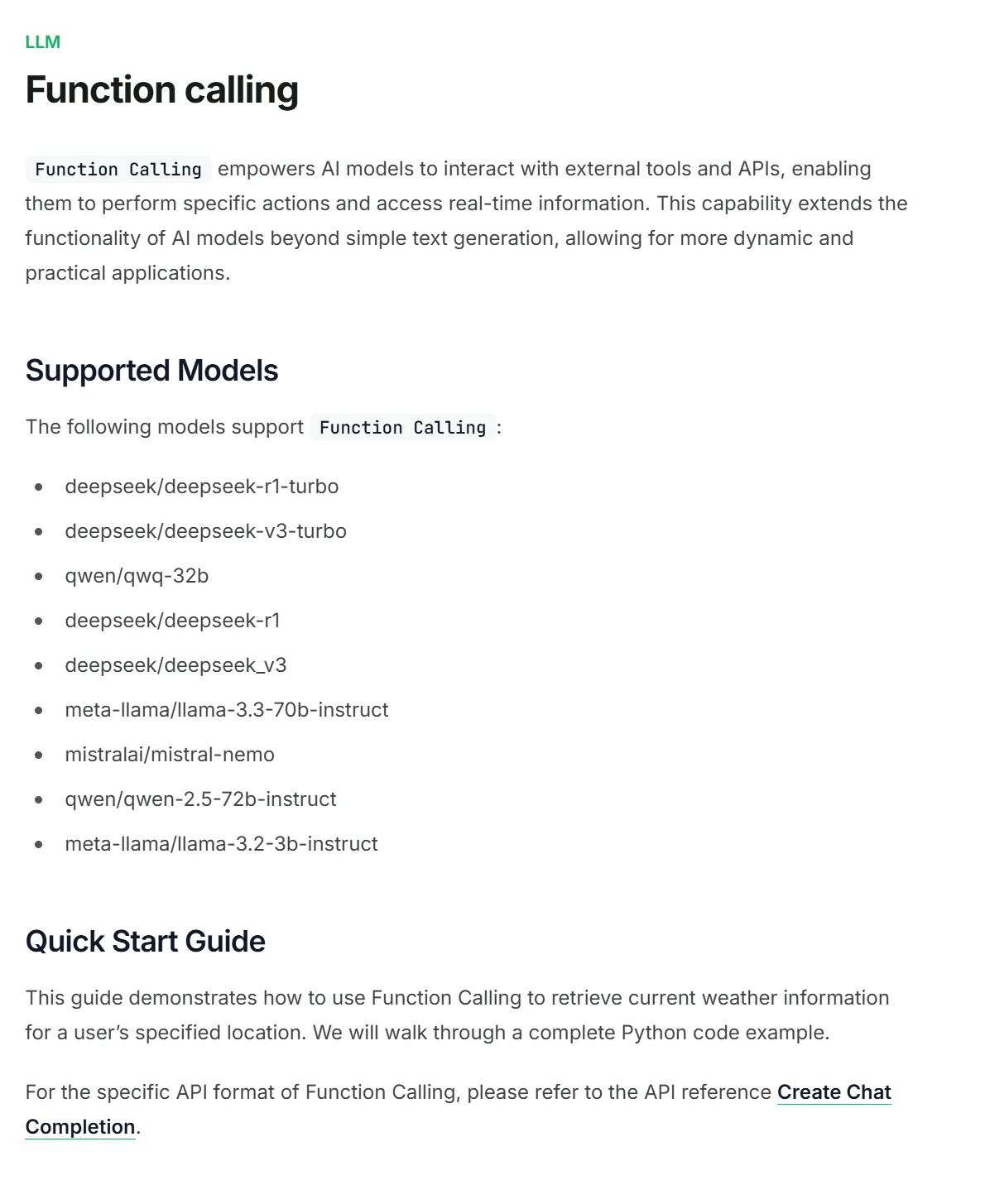
Novita AI 已為每個 LLM 推出支援能力描述,您可以直接在主控台和文件中查看。
1. 初始化客戶端
首先,您需要使用 Novita API 金鑰初始化客戶端。
from openai import OpenAI
import json

client = OpenAI(
    base_url="https://api.novita.ai/v3/openai",
    # Get the Novita AI API Key from: https://novita.ai/settings/key-management.
    api_key="<YOUR Novita AI API Key>",
)

model = "deepseek/deepseek_r1"
- 定義要呼叫的函式
接著,定義模型可以呼叫的 Python 函式。在此範例中,是一個取得天氣資訊的函式。
# Example function to simulate fetching weather data.
def get_weather(location):
    """Retrieves the current weather for a given location."""
    print("Calling get_weather function with location: ", location)
    # In a real application, you would call an external weather API here.
    # This is a simplified example returning hardcoded data.
    return json.dumps({"location": location, "temperature": "60 degrees Fahrenheit"})
2. 使用工具與使用者訊息建構 API 請求
現在,建立發送至 Novita 端點的 API 請求。此請求包含 tools 參數,定義模型可以使用的函式,以及使用者的訊息。
tools = [
    {
        "type": "function",
        "function": {
            "name": "get_weather",
            "description": "Get weather of an location, the user shoud supply a location first",
            "parameters": {
                "type": "object",
                "properties": {
                    "location": {
                        "type": "string",
                        "description": "The city and state, e.g. San Francisco, CA",
                    }
                },
                "required": ["location"]
            },
        }
    },
]

messages = [
    {
        "role": "user",
        "content": "What is the weather in San Francisco?"
    }
]

# Let's send the request and print the response.
response = client.chat.completions.create(
    model=model,
    messages=messages,
    tools=tools,
)

# Please check if the response contains tool calls if in production.
tool_call = response.choices[0].message.tool_calls[0]
print(tool_call.model_dump())
3. 輸出
{'id': '0', 'function': {'arguments': '{"location": "San Francisco, CA"}', 'name': 'get_weather'}, 'type': 'function'}
4. 回傳函式呼叫結果並取得最終答案
下一步是處理函式呼叫,執行 get_weather 函式,並將結果回傳給模型以生成對使用者的最終回應。
# Ensure tool_call is defined from the previous step
if tool_call:
    # Extend conversation history with the assistant's tool call message
    messages.append(response.choices[0].message)

    function_name = tool_call.function.name
    if function_name == "get_weather":
        function_args = json.loads(tool_call.function.arguments)
        # Execute the function and get the response
        function_response = get_weather(
            location=function_args.get("location"))
        # Append the function response to the messages
        messages.append(
            {
                "tool_call_id": tool_call.id,
                "role": "tool",
                "content": function_response,
            }
        )

    # Get the final response from the model, now with the function result
    answer_response = client.chat.completions.create(
        model=model,
        messages=messages,
        # Note: Do not include tools parameter here.
    )
    print(answer_response.choices[0].message)
5. 輸出
{'id': '0', 'function': {'arguments': '{"location": "San Francisco, CA"}', 'name': 'get_weather'}, 'type': 'function'}
常見問題
可以呼叫哪些類型的函式?
您幾乎可以定義任何應用程式能執行的函式,讓 LLM 與資料庫、API 和內部邏輯互動。
函式呼叫實際上是執行程式碼嗎?
不,當 LLM 決定呼叫函式時,它只會輸出一個結構化 JSON 物件,包含函式名稱和必要的引數。
DeepSeek R1 支援函式呼叫嗎?
是的!Novita AI 推出了 DeepSeek R1 Turbo,提供 **3 倍吞吐量 ** 和 ** 限時 20% 折扣 。此外,此版本完全支援 ** 函式呼叫。
Novita AI 是一個一站式雲端平台,助您實現 AI 野心。整合 API、無伺服器、GPU 實例 — 您所需的經濟高效工具。消除基礎設施負擔,免費開始,讓您的 AI 願景成真。