主なハイライト
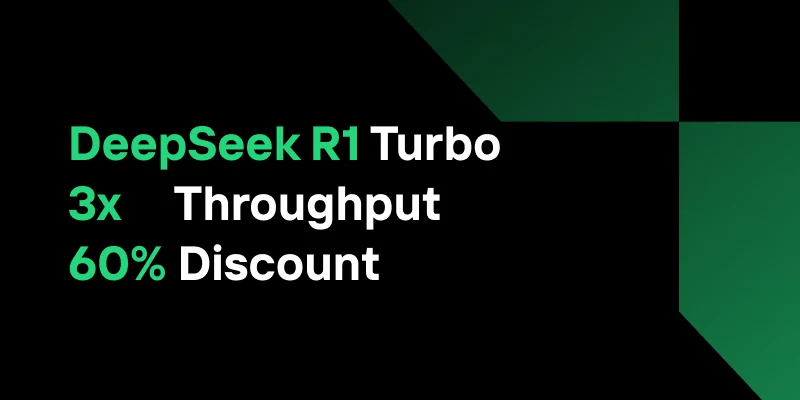
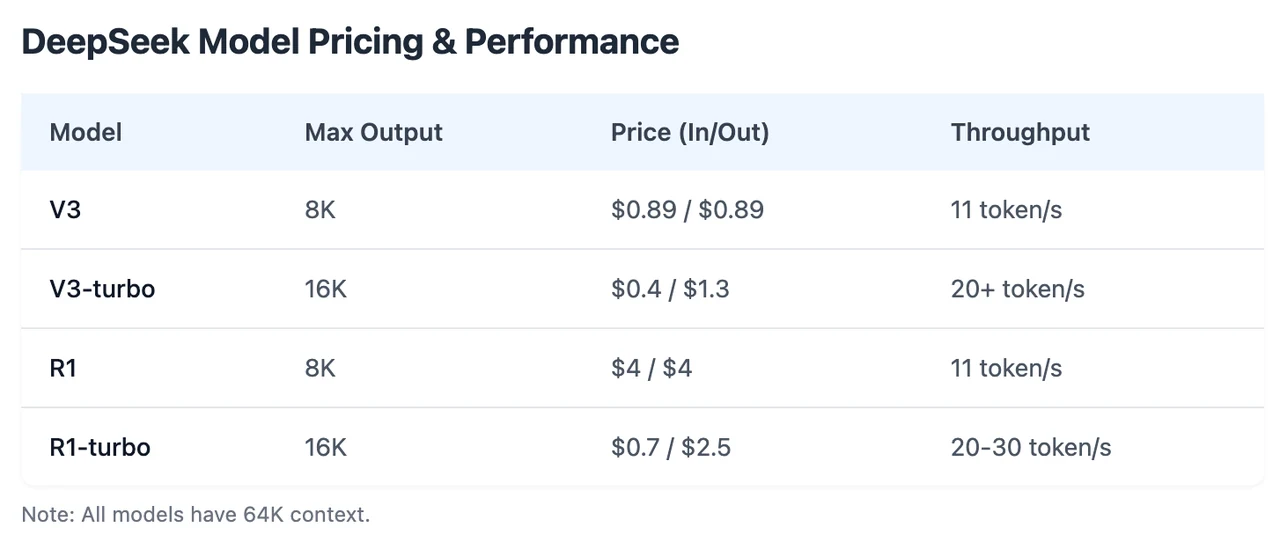
Novita AI は DeepSeek R1 Turbo を導入し、**3 倍のスループット ** と ** 期間限定 60% 割引 ** を提供しています。さらに、このバージョンは function calling に完全対応しています。
パフォーマンスを試してみたい場合は、Novita AI Playground で 無料トライアルを開始 してください!
Function Calling とは?
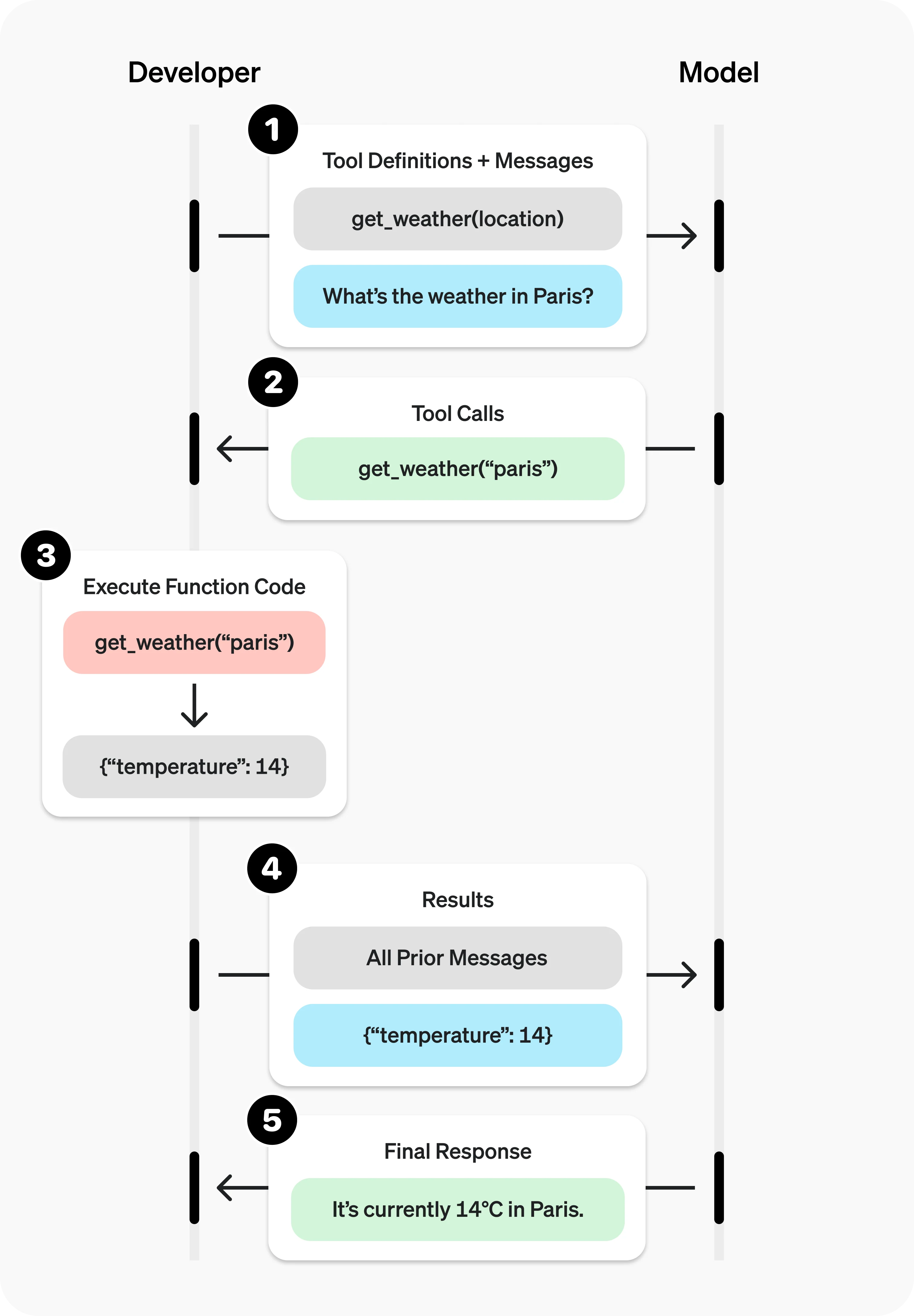
Function Calling は、大規模言語モデル(LLM)が外部システムやコードと構造化された方法で連携できるようにする強力な機能です。テキスト生成に加えて、function calling を備えた LLM は、特定のアクションが必要なタイミングを認識し、必要なパラメータを生成し、実際のタスクを実行できます。これにより、AI モデルはより動的かつ実用的になり、外部ツールや API とのシームレスな統合が可能になります。
Function Calling の仕組みと解決できる課題
プロセスはシンプルで構造化されたフローに従います。
- ユーザーが LLM にリクエストを送信します。
- LLM がリクエストを分析し、関数呼び出しが必要かどうかを判断します。
- 必要に応じて、LLM は関数名とパラメータを含む、適切な関数への構造化された JSON 呼び出しを生成します。
- アプリケーションがこの呼び出しを受信し、関数を実行します。
- 結果が LLM に返されます。
- LLM は結果を使用してユーザーへの最終応答を生成します。
このサイクルは、複数ステップのタスクや複雑なタスクのために繰り返すことができます。ツール(関数)は、名前、説明、およびパラメータを指定する JSON スキーマとともに定義する必要があります。検証を強化するために、Pydantic モデルを使用して型安全性を強制することもできます。
Function Calling は LLM の機能を拡張し、多くの実用的なユースケースに対応します。
- データ取得: 言語クエリを API 呼び出しに変換してリアルタイムデータを取得(例:「最近の注文は?」)。
- アクション実行: 特定のタスクを実行(例:「会議をスケジュール」でカレンダー API を起動)。
- 計算: 計算や演算を処理(例:複利や統計分析)。
- データパイプライン: 複雑なワークフローのために関数を連鎖(例:データ取得 → 処理 → 保存)。
- UI/UX 統合: マップマーカーやチャートなどのインターフェース更新をトリガー。
- 対話型エージェント: チャットボットが適切な応答のために API を呼び出せるようにする(例:天気情報)。
- 自然言語理解: テキストを構造化データに変換したり、情報を抽出(例:感情分析、固有表現抽出)。
Novita AI で DeepSeek R1 の Function Calling を使用する方法
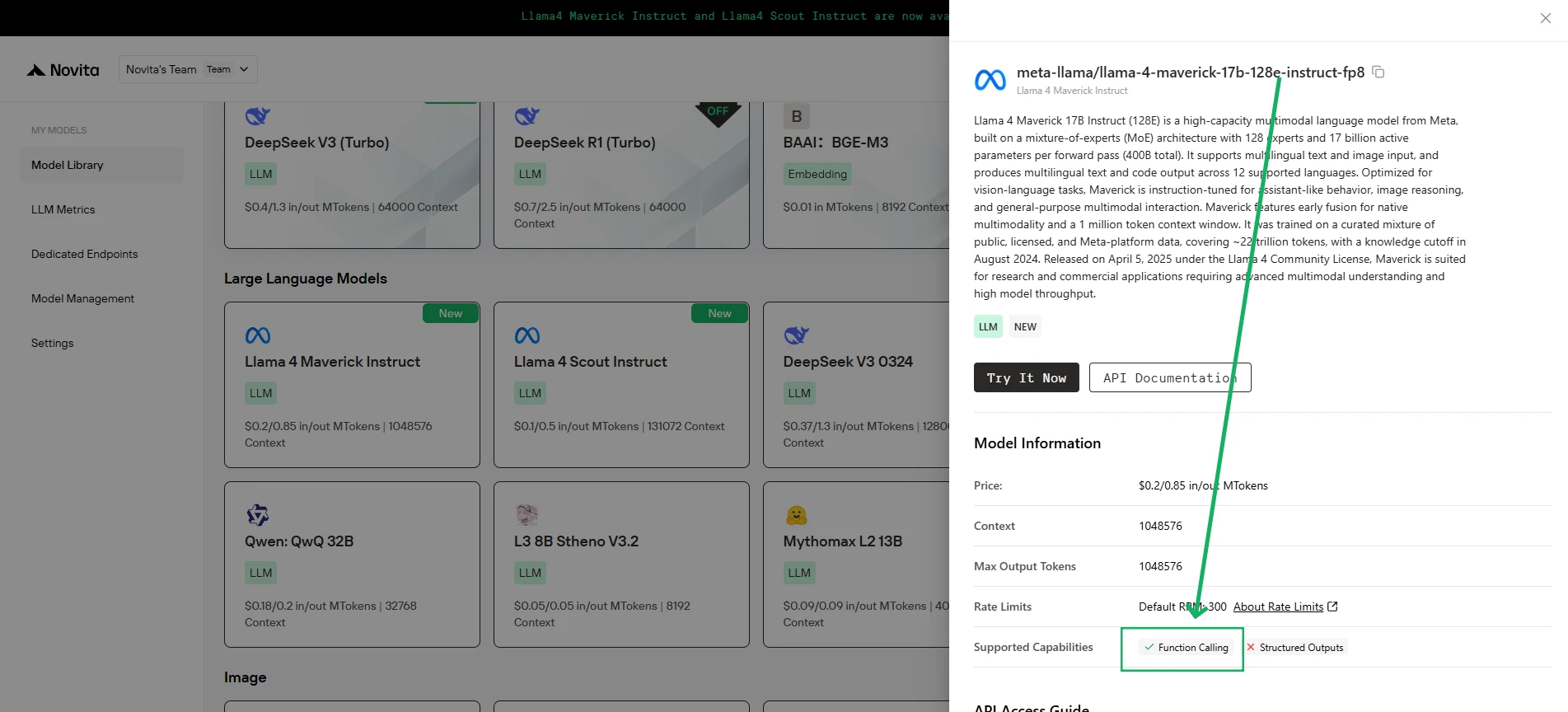
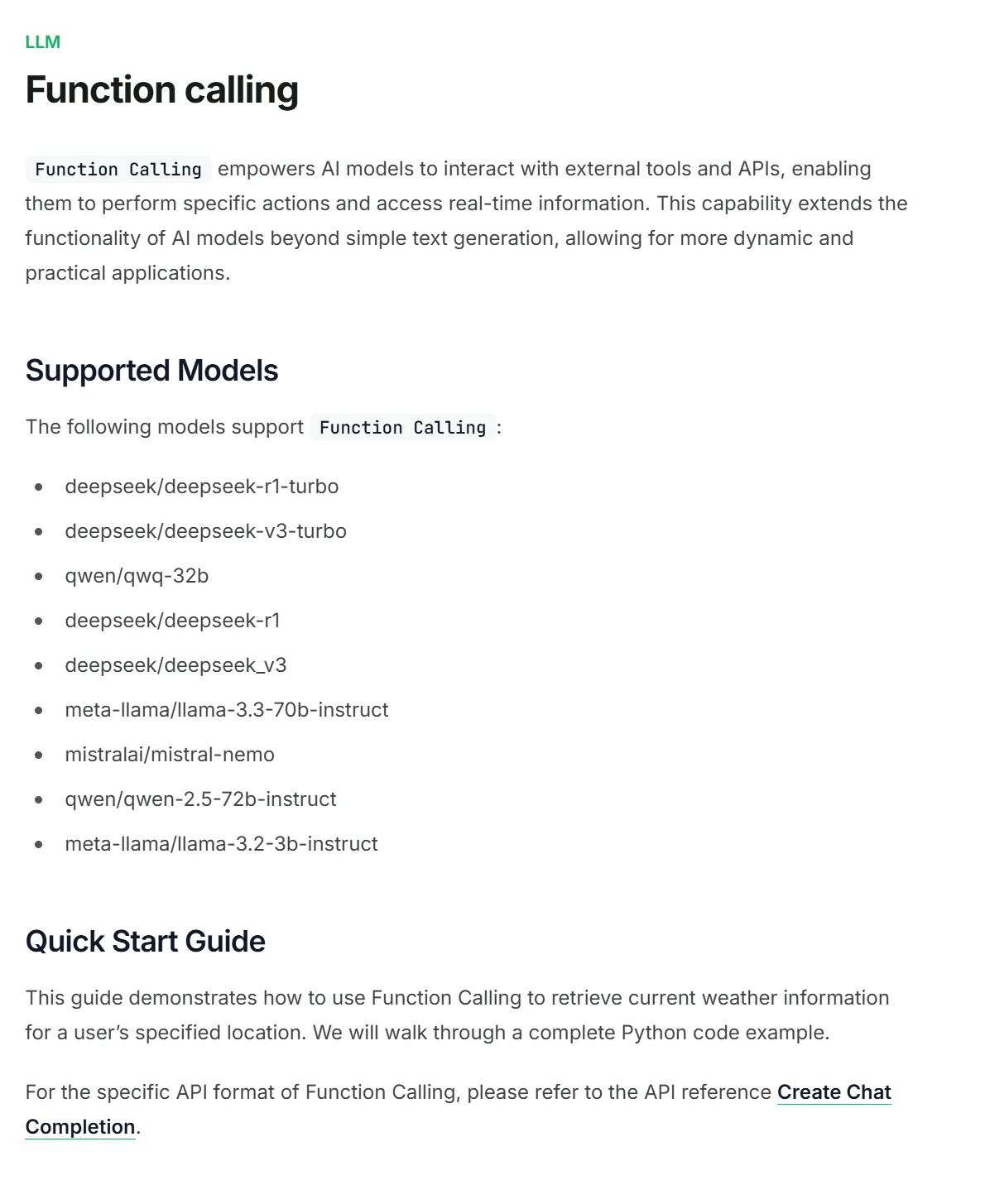
Novita AI は各 LLM の機能説明をサポートしており、コンソール や ドキュメント で直接確認できます。
1. クライアントの初期化
まず、Novita API キーを使用してクライアントを初期化します。
from openai import OpenAI
import json

client = OpenAI(
    base_url="https://api.novita.ai/v3/openai",
    # Get the Novita AI API Key from: https://novita.ai/settings/key-management.
    api_key="<YOUR Novita AI API Key>",
)

model = "deepseek/deepseek_r1"
- 呼び出す関数の定義
次に、モデルが呼び出せる Python 関数を定義します。この例では、天気情報を取得する関数です。
# Example function to simulate fetching weather data.
def get_weather(location):
    """Retrieves the current weather for a given location."""
    print("Calling get_weather function with location: ", location)
    # In a real application, you would call an external weather API here.
    # This is a simplified example returning hardcoded data.
    return json.dumps({"location": location, "temperature": "60 degrees Fahrenheit"})
2. ツールとユーザーメッセージを含む API リクエストの構築
次に、Novita エンドポイントへの API リクエストを作成します。このリクエストには、モデルが使用できる関数を定義する tools パラメータと、ユーザーメッセージが含まれます。
tools = [
    {
        "type": "function",
        "function": {
            "name": "get_weather",
            "description": "Get weather of an location, the user shoud supply a location first",
            "parameters": {
                "type": "object",
                "properties": {
                    "location": {
                        "type": "string",
                        "description": "The city and state, e.g. San Francisco, CA",
                    }
                },
                "required": ["location"]
            },
        }
    },
]

messages = [
    {
        "role": "user",
        "content": "What is the weather in San Francisco?"
    }
]

# Let's send the request and print the response.
response = client.chat.completions.create(
    model=model,
    messages=messages,
    tools=tools,
)

# Please check if the response contains tool calls if in production.
tool_call = response.choices[0].message.tool_calls[0]
print(tool_call.model_dump())
3. 出力
{'id': '0', 'function': {'arguments': '{"location": "San Francisco, CA"}', 'name': 'get_weather'}, 'type': 'function'}
4. 関数呼び出し結果で応答し、最終回答を取得
次のステップは、関数呼び出しを処理し、get_weather 関数を実行し、その結果をモデルに送り返してユーザーへの最終応答を生成することです。
# Ensure tool_call is defined from the previous step
if tool_call:
    # Extend conversation history with the assistant's tool call message
    messages.append(response.choices[0].message)

    function_name = tool_call.function.name
    if function_name == "get_weather":
        function_args = json.loads(tool_call.function.arguments)
        # Execute the function and get the response
        function_response = get_weather(
            location=function_args.get("location"))
        # Append the function response to the messages
        messages.append(
            {
                "tool_call_id": tool_call.id,
                "role": "tool",
                "content": function_response,
            }
        )

    # Get the final response from the model, now with the function result
    answer_response = client.chat.completions.create(
        model=model,
        messages=messages,
        # Note: Do not include tools parameter here.
    )
    print(answer_response.choices[0].message)
5. 出力
{'id': '0', 'function': {'arguments': '{"location": "San Francisco, CA"}', 'name': 'get_weather'}, 'type': 'function'}
よくある質問
どのような種類の関数を呼び出せますか?
アプリケーションが実行できる事実上すべての関数を定義できます。これにより、LLM がデータベース、API、内部ロジックと連携できるようになります。
Function Calling は実際にコードを実行するのですか?
いいえ。LLM が関数を呼び出すことを決定した場合、関数名と必要な引数を含む構造化された JSON オブジェクトを出力するだけです。
DeepSeek R1 は Function Calling をサポートしていますか?
はい!Novita AI は DeepSeek R1 Turbo を導入し、**3 倍のスループット ** と ** 期間限定 20% 割引 ** を提供しています。さらに、このバージョンは function calling に完全対応しています。
Novita AI は、AI の野心を実現するオールインワンのクラウドプラットフォームです。統合 API、サーバーレス、GPU インスタンス — 必要なコスト効率の高いツール。インフラストラクチャを排除し、無料で始め、AI のビジョンを現実にします。