無數 AI 公司現在正在推出能夠即時分析你的資料並提供全面洞察的代理式商業智慧系統,無需複雜的 SQL 查詢或手動處理試算表。例如,一個基於 RAG 的銷售分析系統可以在幾秒鐘內回答「上一季我們最暢銷的產品是什麼?」這類問題,而不是花費數小時。
基於 RAG 的銷售分析系統透過使用能夠自主推理、做出決策並協調外部工具的 AI 代理,解決這些問題,讓你能夠在整個資料生態系統中使用自然語言查詢。代理無需學習資料庫結構或試算表公式,它會分解你的查詢、決定最佳資料來源、執行目標分析,並提供帶有適當引用來源的全面、以資料為基礎的答案。
舉例來說,你可以使用不同的 LLM、自訂文件格式,或調整代理的分析與行為方式,以產生特定的業務輸出。在本教學中,你將學習如何使用 Novita AI 的統一 LLM API、LangChain 的代理框架以及進階文件處理能力,建構你自己的基於 RAG 的銷售分析系統。你將建立一個能自動將查詢路由到最佳資料來源,並提供可執行業務洞察的系統。
什麼是基於 RAG 的銷售分析系統?
基於 RAG 的銷售分析系統使用檢索增強生成 (Retrieval-Augmented Generation),透過結合大型語言模型的能力與一個能存取實際業務資料的檢索層,來提供準確且有根據的零售銷售問題答案。
這個系統通常包含:
- AI 代理分析查詢,並判斷是需要結構化資料分析 (SQL)、文件分析,或兩者都需要。
- 代理將查詢智慧地路由到最合適的資料來源——用於定量分析的 SQL 資料庫,或用於定性洞察的文件儲存庫。
- 代理使用各種工具來收集資訊,包括用於分析 CSV 檔案的 Pandas 代理、用於查詢資料庫的 SQL 代理,以及用於檢索文件的向量儲存庫。沒有這些工具,代理就無法完成工作流程中的關鍵任務。
- 代理使用專業技術處理收集到的資訊,例如對數值資料進行統計分析,以及對文字文件進行語義搜尋。
- 分析資料後,代理會建立一個結構化的回覆,其中包含摘要、計算結果和適當的引用來源。
你需要的工具
在開始建構之前,讓我們先設定必要的工具。
Novita AI
為了建構我們的 RAG 分析系統,我們需要存取強大的大型語言模型 (LLM) 和嵌入模型。Novita AI 提供價格合理、高效能的 API,透過單一統一介面提供最新的 LLM、嵌入模型等服務。
LangChain
LangChain 是一個專為使用 LLM 建構應用程式而設計的開源框架。使用 LangChain,你可以建立一個能夠逐步推理、使用工具並與 API 互動的代理工作流程。對於我們的銷售分析系統,我們將利用 LangChain 來建構分析流程、使用 SQL 代理和文件處理器等工具,並將所有資料綜合為結構化的洞察。
Streamlit
我們將使用 Streamlit 來建立互動式網頁介面。它非常適合快速原型開發,能用最少的程式碼創建專業外觀的 UI,讓本教學易於跟進。
FAISS
對於基於向量的文件檢索,FAISS 提供了快速的相似性搜尋能力,使我們能夠根據使用者查詢快速找到相關的文件區塊。
SQLAlchemy 與 PyMySQL
這些函式庫負責處理 SQL 資料庫操作和 MySQL 連線,讓我們的系統能夠直接查詢結構化的業務資料。
pandas
對於 CSV 資料操作和分析至關重要。我們的系統使用 pandas 代理來對表格資料執行複雜的計算。
系統架構概覽
我們的 RAG 系統透過一個多步驟工作流程智慧地處理使用者查詢,自動為每個問題決定最佳的資料來源和處理方式。系統不會強迫使用者知道他們的資料存放在何處,而是在幕後決定最佳方法。
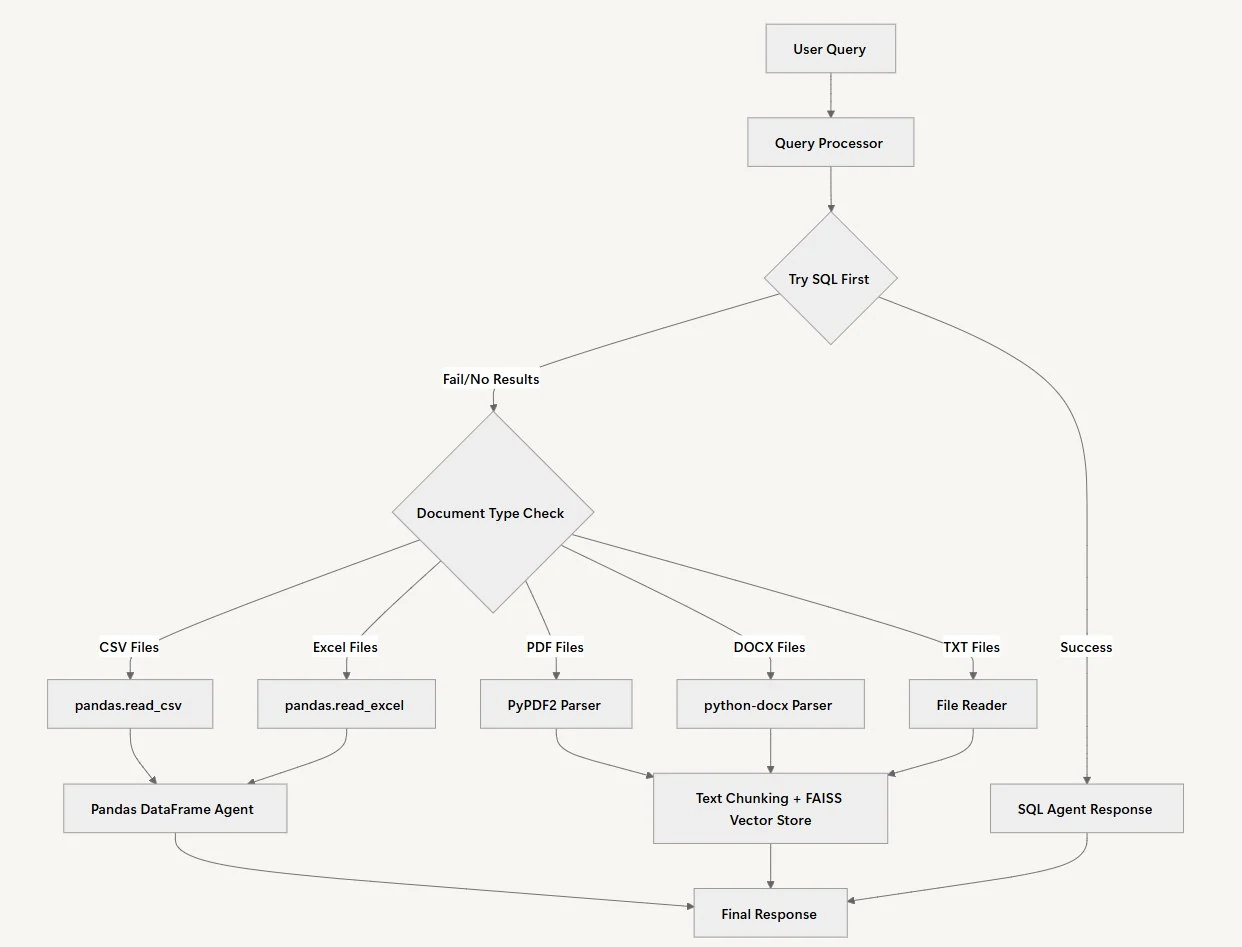
查詢處理
我們與代理協作流程的第一步是查詢處理。在此情況下,代理將驗證使用者提出的查詢,並根據查詢的上下文制定個人化的處理計劃。接著,它將決定問題需要分析的資料類型,即結構化資料、文件分析,或兩者皆是。
資料來源選擇
當使用者提交問題時,系統採用一個直接的方法:它會先嘗試透過諮詢 SQL 資料庫來解決問題。資料來源選擇之所以合理,是因為結構化資料通常能為定量問題提供最精確的答案。SQL 代理可以快速執行查詢,並透過正確的計算回傳確切數字。
文件分析
當 SQL 代理回傳空結果或找不到相關資訊時,系統會自動切換到文件分析。文件處理路徑會根據檔案類型而有所不同。CSV 和 Excel 檔案會載入到 Pandas DataFrame 中進行複雜資料分析,而 PDF、Word 檔案和文字文件則會被分割成區塊,並使用 FAISS 建立索引以進行語義搜尋。
來源管理
適當引用所有來源至關重要,以確保所提供的資訊可以追溯到可信的權威來源。工作流程中的這個步驟有助於與受眾建立信任,使他們能夠驗證最終報告中呈現的任何主張或資料。
回應綜合
為了連結所有收集到的資訊,代理會將來自所有分析資料來源的洞察整合起來,形成一個連貫的回應。如果缺少工作流程的這個階段,輸出可能會是一份不連貫的報告。
實作基於 RAG 的分析工作流程
到目前為止,你已經了解了基於 RAG 的銷售分析系統的相關概念。現在是時候實作它了。首先,我們需要執行幾個關鍵步驟:
安裝與設定
在繼續之前,讓我們為 RAG 分析系統建立完整的檔案結構。你需要在你的專案目錄中建立以下檔案:
| rag-analytics-system/ ├── .env # 環境變數 ├── requirements.txt # Python 依賴項 ├── query_processor.py # 主要的 QueryProcessor 類別 ├── main.py # Streamlit 介面 |
設定依賴項
首先,使用所有必要的依賴項更新 requirements.txt 檔案:
| langchain==0.3.26 langchain-openai==0.3.25 python-dotenv==1.1.1 SQLAlchemy==2.0.41 pandas==2.3.0 PyPDF2==3.0.1 faiss-cpu==1.11.0 PyMySQL==1.1.1 cryptography==45.0.4 langchain-experimental==0.3.4 streamlit==1.46.0 openpyxl==3.1.5 python-docx==1.2.0 |
然後登入 Novita AI。登入後,導覽至 Manage API Keys 頁面,點擊 Add New Key 按鈕,並輸入你的 Key Name。
Novita AI 會在註冊後提供免費額度讓你試用各種模型,因此你無需在開始建構或實驗之前購買額度。將你的憑證(例如你稍早建立的 Novita API 金鑰)新增到 .env 檔案中:
| NOVITA_API_KEY=”your_novita_api_key_here” |
現在,安裝專案所需的所有依賴項:
| # 建立虛擬環境 python -m venv rag_analytics_env source rag_analytics_env/bin/activate # 在 Windows 上:rag_analytics_env\\Scripts\\activate # 安裝依賴項 pip install -r requirements.txt |
建構查詢處理器
整個 RAG 分析工作流程被封裝在一個名為 QueryProcessor 的模組化類別中。這個類別將管理路由查詢、執行 SQL 分析、處理文件、綜合結果以及執行完整分析循環的過程。
QueryProcessor 作為我們分析系統的核心協調者。這個統一的方法讓我們能夠智慧地將查詢路由到最合適的分析方法,無論是 SQL 資料庫、CSV 檔案還是非結構化文件,而不是為不同資料類型建立單獨的工具。
首先,我們在 query_processor.py 檔案中匯入專案所需的函式庫。這些匯入為我們提供了語言模型整合、資料庫連線、文件處理和向量儲存所需的一切:
from langchain_openai import ChatOpenAI, OpenAIEmbeddings
from langchain.agents import AgentExecutor, create_react_agent
from langchain_community.agent_toolkits.sql.base import create_sql_agent
from langchain_experimental.agents.agent_toolkits import create_csv_agent, create_pandas_dataframe_agent
from langchain_community.agent_toolkits.sql.toolkit import SQLDatabaseToolkit
from langchain.agents import AgentType
from langchain.text_splitter import RecursiveCharacterTextSplitter
from langchain_community.vectorstores import FAISS
from langchain_community.utilities import SQLDatabase
from langchain.prompts import PromptTemplate
from langchain_community.tools import ReadFileTool
from langchain.schema import Document
import os
from dotenv import load_dotenv
from sqlalchemy.engine import Engine
import glob
import pandas as pd

load_dotenv()
接下來,我們初始化分析代理,使其能夠透過 Novita API 存取 LLM 和各種資料處理工具。初始化方法設定了我們需要的所有核心組件:用於理解查詢的語言模型、用於文件相似度搜尋的嵌入,以及用於高效處理大型文件的文字分割器。
class QueryProcessor:
    def __init__(self, documents_folder: str, sql_engine: Engine):
        self.documents_folder = documents_folder
        self.sql_engine = sql_engine
        self.llm = ChatOpenAI(
            model="google/gemma-3-27b-it",
            temperature=0,
            openai_api_key=os.getenv("NOVITA_API_KEY"),
            openai_api_base="https://api.novita.ai/v3/openai",
            default_headers={
                "X-Model-Provider": "google"
            }
        )
        self.embeddings = OpenAIEmbeddings(
            model="baai/bge-m3",
            openai_api_key=os.getenv("NOVITA_API_KEY"),
            openai_api_base="https://api.novita.ai/v3/openai",
            default_headers={
                "X-Model-Provider": "baai"
            }
        )
        self.text_splitter = RecursiveCharacterTextSplitter(
            chunk_size=1000,
            chunk_overlap=200,
            length_function=len,
        )
        self.sql_agent = None
        self._prepare_data_sources()
建構函式初始化了幾個關鍵組件。我們為 LLM 使用溫度 0,以確保回應一致且基於事實,而不是創造性的變體。文字分割器配置了重疊區塊,以便在處理大型文件時保持上下文的連續性。最後呼叫 _prepare_data_sources() 方法來設定我們的專業代理。
建立多來源資料整合
下一步是建立初始化不同資料處理代理的方法。每個代理專門處理特定的資料類型和分析任務,就像針對不同類型的問題有不同的專家一樣。
    def _prepare_data_sources(self):
        """Prepare both SQL and document data sources"""
        # Prepare SQL agent
        self._prepare_sql_agent()

        # Prepare document agent
        self._prepare_document_agent()

    def _prepare_sql_agent(self):
        """Initialize SQL agent"""
        # Convert SQLAlchemy Engine to LangChain SQLDatabase
        db = SQLDatabase(self.sql_engine)
        toolkit = SQLDatabaseToolkit(db=db, llm=self.llm)
        self.sql_agent = create_sql_agent(
            llm=self.llm,
            toolkit=toolkit,
            agent_type=AgentType.ZERO_SHOT_REACT_DESCRIPTION,
            verbose=True
        )

    def _prepare_document_agent(self):
        """Initialize document agent using ReadFileTool and vector store"""
        # Get all supported files
        supported_files = []
        for ext in ['*.txt', '*.pdf', '*.docx', '*.xlsx', '*.xls', '*.csv']:
            supported_files.extend(glob.glob(os.path.join(self.documents_folder, ext)))

        print(f"\nFound {len(supported_files)} supported files in {self.documents_folder}")

        if supported_files:
            # Create ReadFileTool
            read_file_tool = ReadFileTool()

            # Create tools list
            tools = [read_file_tool]

            # Create the prompt template for the react agent
            prompt = PromptTemplate.from_template("""
            You are a helpful assistant that can answer questions about business documents.
            You have access to the following tools:

            {tools}

            Use the following format:

            Question: the input question you must answer
            Thought: you should always think about what to do
            Action: the action to take, should be one of [{tool_names}]
            Action Input: the input to the action
            Observation: the result of the action
            ... (this Thought/Action/Action Input/Observation can repeat N times)
            Thought: I now know the final answer
            Final Answer: the final answer to the original input question

            Begin!

            Question: {input}
            Thought: I should read the relevant documents to find the answer
            {agent_scratchpad}
            """)

            agent = create_react_agent(self.llm, tools, prompt)
            self.document_agent = AgentExecutor.from_agent_and_tools(
                agent=agent,
                tools=tools,
                verbose=True
            )
            print("\nDocument agent initialized successfully")
        else:
            print("\nNo documents found in the specified folder.")
_prepare_sql_agent() 方法建立了一個專門用於資料庫查詢的代理。我們使用 ZERO_SHOT_REACT_DESCRIPTION 代理類型,這意味著代理可以在無需特定範例的情況下推理 SQL 查詢,使其能夠適應不同的資料庫結構。_prepare_document_agent() 方法掃描支援的檔案類型,並建立一個能夠讀取各種文件格式的彈性代理。ReAct(推理與行動)提示模板引導代理進行結構化的思考過程,類似於人類分析師處理文件分析的方式。
文件處理與向量儲存
接下來,我們需要處理工作流程如何處理不同的文件類型。本節建立了使用 pandas 代理處理 CSV/Excel 檔案以及使用向量儲存處理非結構化文件的方法。關鍵的見解在於,不同的資料類型需要不同的處理策略。
    CSV_PROMPT_PREFIX = """
IMPORTANT: You are working with a pandas DataFrame called 'df' that has been loaded with the actual data.
DO NOT create sample data or make up data. Use ONLY the actual DataFrame 'df' that is available to you.
First, explore the DataFrame by:
1. Setting pandas display options to show all columns: pd.set_option('display.max_columns', None)
2. Check the shape of the DataFrame: print(df.shape)
3. Get the column names: print(df.columns.tolist())
4. Check the data types: print(df.dtypes)
5. Look at the first few rows: print(df.head())
6. Then answer the question using the actual data in the DataFrame.
"""
    CSV_PROMPT_SUFFIX = """
- **CRITICAL**: Use ONLY the actual data in the DataFrame. Do NOT create sample data or use fictional data.
- **ALWAYS** before giving the Final Answer, try another method to verify your results.
- Then reflect on the answers of the two methods you did and ask yourself if it answers correctly the original question.
- If you are not sure, try another method.
- FORMAT 4 FIGURES OR MORE WITH COMMAS.
- If the methods tried do not give the same result, reflect and try again until you have two methods that have the same result.
- If you still cannot arrive to a consistent result, say that you are not sure of the answer.
- If you are sure of the correct answer, create a beautiful and thorough response using Markdown.
- **DO NOT MAKE UP AN ANSWER OR USE PRIOR KNOWLEDGE, ONLY USE THE RESULTS OF THE CALCULATIONS YOU HAVE DONE**.
- **ALWAYS**, as part of your "Final Answer", explain how you got to the answer on a section that starts with: "\n\nExplanation:\n".
- In the explanation, mention the column names that you used to get to the final answer.
- Show your work by displaying relevant DataFrame operations and their results.
"""
    def _process_document_query(self, query: str) -> str:
        """Process document query using CSV/Excel agents for tabular data, and LLM for unstructured data."""
        try:
            print(f"\nProcessing query: {query}")

            # Get all supported files
            supported_files = []
            for ext in ['*.txt', '*.pdf', '*.docx', '*.xlsx', '*.xls', '*.csv']:
                supported_files.extend(glob.glob(os.path.join(self.documents_folder, ext)))

            print(f"Found {len(supported_files)} supported files in {self.documents_folder}")

            if not supported_files:
                return "No documents found to search through."

            # Check for CSV/Excel files first
            csv_files = [f for f in supported_files if f.endswith('.csv')]
            excel_files = [f for f in supported_files if f.endswith(('.xlsx', '.xls'))]

            if csv_files:
                csv_file = csv_files[0]
                print(f"\nProcessing CSV file: {csv_file}")
                try:
                    # First try with pandas DataFrame agent
                    df = pd.read_csv(csv_file)
                    print(f"CSV loaded successfully with {len(df)} rows and columns: {df.columns.tolist()}")

                    # Create the agent with improved configuration
                    print("Creating pandas DataFrame agent...")
                    agent = create_pandas_dataframe_agent(
                        self.llm,
                        df,
                        verbose=True,
                        include_df_in_prompt=False,  # Avoid token limits with large DataFrames
                        allow_dangerous_code=True,
                        max_iterations=10,
                        handle_parsing_errors=True
                    )

                    # Process the query with our custom prompt
                    print(f"Processing query with agent: {query}")
                    # Improved prompt that ensures agent uses the actual DataFrame
                    prompt = f"""
You have access to a pandas DataFrame called 'df' with {len(df)} rows and the following columns: {df.columns.tolist()}.
Here are the first few rows of the data:
{df.head().to_string()}
Data types:
{df.dtypes.to_string()}
{self.CSV_PROMPT_PREFIX}
Question: {query}
{self.CSV_PROMPT_SUFFIX}
"""
                    response = agent.invoke({"input": prompt})
                    print(f"Agent response: {response}")
                    return response['output']

                except Exception as e:
                    print(f"Error with pandas DataFrame agent: {str(e)}")
                    print("Trying alternative CSV agent...")

                    # Fallback to CSV agent
                    try:
                        agent = create_csv_agent(
                            self.llm,
                            csv_file,
                            verbose=True,
                            allow_dangerous_code=True
                        )

                        enhanced_query = f"""
{self.CSV_PROMPT_PREFIX}
Question: {query}
{self.CSV_PROMPT_SUFFIX}
"""
                        response = agent.invoke({"input": enhanced_query})
                        return response['output']

                    except Exception as e2:
                        print(f"Error processing CSV file: {str(e2)}")
                        import traceback
                        print(f"Full traceback: {traceback.format_exc()}")
                        return f"Error processing CSV file: {str(e2)}"

            elif excel_files:
                excel_file = excel_files[0]
                print(f"\nProcessing Excel file: {excel_file}")
                try:
                    df = pd.read_excel(excel_file)
                    print(f"Excel loaded successfully with {len(df)} rows and columns: {df.columns.tolist()}")

                    # Create the agent with improved configuration
                    print("Creating pandas DataFrame agent...")
                    agent = create_pandas_dataframe_agent(
                        self.llm,
                        df,
                        verbose=True,
                        include_df_in_prompt=False,  # Avoid token limits with large DataFrames
                        allow_dangerous_code=True,
                        max_iterations=10,
                        handle_parsing_errors=True
                    )

                    # Process the query with our custom prompt
                    print(f"Processing query with agent: {query}")
                    # Improved prompt that ensures agent uses the actual DataFrame
                    prompt = f"""
You have access to a pandas DataFrame called 'df' with {len(df)} rows and the following columns: {df.columns.tolist()}.
Here are the first few rows of the data:
{df.head().to_string()}
Data types:
{df.dtypes.to_string()}
{self.CSV_PROMPT_PREFIX}
Question: {query}
{self.CSV_PROMPT_SUFFIX}
"""
                    response = agent.invoke({"input": prompt})
                    print(f"Agent response: {response}")
                    return response['output']
                except Exception as e:
                    print(f"Error processing Excel file: {str(e)}")
                    import traceback
                    print(f"Full traceback: {traceback.format_exc()}")
                    return f"Error processing Excel file: {str(e)}"

            # For unstructured text files
            print("\nProcessing unstructured text files...")
            all_content = []
            for file_path in supported_files:
                try:
                    if file_path.endswith('.txt'):
                        with open(file_path, 'r', encoding='utf-8') as f:
                            content = f.read()
                        all_content.append(Document(page_content=content, metadata={"source": file_path}))
                except Exception as e:
                    print(f"Error reading file {file_path}: {str(e)}")
                    continue

            if not all_content:
                return "Could not read any documents."

            # Process unstructured text using vector store
            print("Processing text with vector store...")
            chunks = self.text_splitter.split_documents(all_content)
            vector_store = FAISS.from_documents(chunks, self.embeddings)
            relevant_docs = vector_store.similarity_search(query, k=3)
            context = "\n\n".join([doc.page_content for doc in relevant_docs])

            print(f"Generated context length: {len(context)}")
            response = self.llm.invoke(
                f"""Based on the following context, answer the question: {query}

Context:
{context}

Answer:"""
            )
            return response.content

        except Exception as e:
            print(f"Error processing document query: {str(e)}")
            import traceback
            print(f"Full traceback: {traceback.format_exc()}")
            return f"Error processing document query: {str(e)}"
CSV 處理部分包含了詳細的提示工程,以確保分析準確。前綴和後綴提示至關重要,因為它們可以防止代理虛構資料或提供不正確的結果。代理嘗試多種方法的驗證步驟有助於確保準確性,就像細心的分析師會仔細檢查他們的計算一樣。我們優先使用 pandas DataFrame 代理而不是 CSV 代理,因為它們提供了更穩健的資料處理能力,並且在處理大型資料集時效能更好。故障轉移機制確保如果一種方法失敗,我們還有其他方法可以處理資料。
SQL 資料庫整合
現在我們已經處理了文件處理,我們需要建立智慧查詢路由系統,決定在 SQL 和文件分析之間選擇哪一個。這是我們系統的核心智慧——決定哪個資料來源最有可能包含給定問題的答案。
    def process_query(self, query: str) -> str:
        """
        Process query using agents to intelligently decide between SQL and documents
        """
        # First try SQL agent
        try:
            print("\nTrying SQL Agent...")
            sql_result = self.sql_agent.run(query)
            no_answer_phrases = [
                "no results", "i don't know", "unknown", "not sure", "cannot answer", "don't have", "no data", "n/a"
            ]
            if sql_result and not any(phrase in sql_result.lower() for phrase in no_answer_phrases) and sql_result.strip():
                return f"From SQL Database: {sql_result}"
            else:
                print("SQL Agent could not answer, trying documents...")
        except Exception as e:
            print(f"SQL Agent Error: {str(e)}")
            print("Falling back to documents...")

        # If SQL agent fails or returns no results, try document processing
        try:
            print("\nProcessing documents...")
            doc_result = self._process_document_query(query)
            if doc_result:
                return f"From Documents: {doc_result}"
            else:
                print("Document processing returned no results")
        except Exception as e:
            print(f"Document Processing Error: {str(e)}")

        return "Could not find relevant information in either SQL database or documents."
查詢路由邏輯遵循優先級系統:首先嘗試 SQL 資料庫,因為它們通常包含結構化、定量的資料,可以快速準確地回答業務問題。如果 SQL 代理回傳不清楚或負面的回應(透過我們的 no_answer_phrases 列表檢測),系統會自動回退到文件處理。這種方法模仿了人類分析師的工作方式——首先檢查結構化資料來源,然後在資料庫沒有所需資訊時轉向文件和報告。
建立 Streamlit 介面
現在讓我們建立使用者介面,讓業務用戶可以輕鬆使用我們的分析系統。Streamlit 介面提供了一個直觀的、基於聊天的體驗,隱藏了技術複雜性,同時提供了強大的分析能力。將以下程式碼片段加入到 main.py 檔案中:
import streamlit as st
from query_processor import QueryProcessor
import os
from dotenv import load_dotenv
from sqlalchemy import create_engine

# Load environment variables
load_dotenv()

# Initialize session state
if 'processor' not in st.session_state:
    st.session_state.processor = None
if 'messages' not in st.session_state:
    st.session_state.messages = []

# Set page config
st.set_page_config(
    page_title="Document Analysis Chatbot",
    page_icon="🤖",
    layout="wide"
)

# Custom CSS for button and title styling
st.markdown("""
<style>
    .stButton > button {
        background-color: #23D57C;
        color: white;
        border: none;
        border-radius: 8px;
        padding: 0.5rem 1rem;
        font-weight: 600;
        transition: all 0.3s ease;
    }
    .stButton > button:hover {
        background-color: #1fb36b;
        box-shadow: 0 4px 8px rgba(35, 213, 124, 0.3);
        transform: translateY(-2px);
    }
    .stButton > button:active {
        background-color: #1a9960;
        transform: translateY(0px);
    }
    h1 {
        color: #23D57C !important;
        font-weight: 700;
    }
</style>
""", unsafe_allow_html=True)

# Title and description
st.title("Document Analysis Chatbot using Novita")
這個初始設定創建了一個專業外觀的介面,並帶有自訂樣式。會話狀態管理確保使用者不會在與介面互動時丟失對話歷史記錄或需要重新初始化資料來源。自訂 CSS 提供了視覺反饋,並保持了品牌體驗的一致性。
最終系統整合
讓我們用資料來源初始化和聊天功能完成 Streamlit 介面。這個最後的章節將我們所有的組件整合到一個用戶友好的應用程式中,業務分析師無需技術專業知識即可使用。
# Check if data source is initialized
if st.session_state.processor is None:
    # Center the data source configuration
    st.markdown("<br><br>", unsafe_allow_html=True)

    # Create centered columns
    col1, col2, col3 = st.columns([1, 2, 1])

    with col2:
        st.subheader("🚀 Get Started")
        st.write("Initialize your data source to start chatting with your documents")

        # SQL Database Configuration (hidden)
        db_user = "root"
        db_password = "1234cisco"
        db_host = "localhost"
        db_name = "retail_sales_db"

        # Documents Folder Configuration
        st.write("**Documents Folder Path:**")
        documents_folder = st.text_input(
            "Documents Folder Path",
            placeholder="Enter path to your documents folder (e.g., docs)",
            label_visibility="collapsed"
        )

        st.markdown("<br>", unsafe_allow_html=True)

        # Center the button
        button_col1, button_col2, button_col3 = st.columns([1, 1, 1])
        with button_col2:
            if st.button("Initialize Data Source", use_container_width=True):
                try:
                    # Validate and resolve documents folder path
                    if not documents_folder:
                        st.error("Please provide a documents folder path")
                    else:
                        # Convert to absolute path
                        abs_documents_folder = os.path.abspath(documents_folder)
                        if not os.path.exists(abs_documents_folder):
                            st.error(f"Documents folder not found: {abs_documents_folder}")
                        elif not os.path.isdir(abs_documents_folder):
                            st.error(f"Path is not a directory: {abs_documents_folder}")
                        else:
                            # Initialize query processor with a dummy SQL engine
                            # Create SQL engine
                            connection_string = f"mysql+pymysql://{db_user}:{db_password}@{db_host}/{db_name}"
                            sql_engine = create_engine(connection_string)
                            st.session_state.processor = QueryProcessor(abs_documents_folder, sql_engine)
                            st.success("Data source initialized successfully!")
                            st.rerun()
                except Exception as e:
                    st.error(f"Error initializing data source: {str(e)}")
else:
    # Show data source status in sidebar
    with st.sidebar:
        st.header("📊 Data Source")
        st.success("✅ Data source initialized")
        if st.button("Reset Data Source"):
            st.session_state.processor = None
            st.session_state.messages = []
            st.rerun()

    # Main chat interface
    st.header("Chat Interface")

    # Display chat messages
    for message in st.session_state.messages:
        with st.chat_message(message["role"]):
            st.write(message["content"])

    # Chat input
    if prompt := st.chat_input("Ask a question about your documents"):
        # Add user message to chat history
        st.session_state.messages.append({"role": "user", "content": prompt})
        with st.chat_message("user"):
            st.write(prompt)

        # Process query
        try:
            response = st.session_state.processor.process_query(prompt)

            # Add assistant response to chat history
            st.session_state.messages.append({"role": "assistant", "content": response})
            with st.chat_message("assistant"):
                st.write(response)
        except Exception as e:
            st.error(f"Error processing query: {str(e)}")

    # Add a clear chat button only if there are messages
    if st.session_state.messages:
        if st.button("Clear Chat"):
            st.session_state.messages = []
            st.rerun()
初始化過程包含了穩健的錯誤處理和路徑驗證,以防止常見的使用者錯誤。側邊欄提供了清晰的狀態資訊,聊天介面遵循使用者從現代 AI 助手那裡習慣的熟悉模式。系統會維護對話歷史記錄,讓使用者能夠建立在先前的問題之上,並建立一個自然的分析工作流程。清除聊天功能讓使用者在需要時可以重新開始。
執行分析系統
現在我們已經建構了基於 RAG 的銷售分析系統,讓我們來測試它,看看它在實際業務查詢上的表現如何。
首先,建立一個 data_generator.py 檔案,並從此處複製 Python 腳本的程式碼,以產生我們將提供給系統的範例資料,然後使用以下命令執行腳本:
| python data_generator.py |
這將建立一個 sample_documents 資料夾,其中包含:
large_sales_dataset.csv- 10,000 筆銷售記錄business_strategy_2024.txt- 策略性業務文件sales_meeting_notes.txt- 會議記錄和行動項目
然後啟動 Streamlit 應用程式:
| streamlit run main.py |
應用程式將在你的瀏覽器中開啟,網址為 http://localhost:8501。
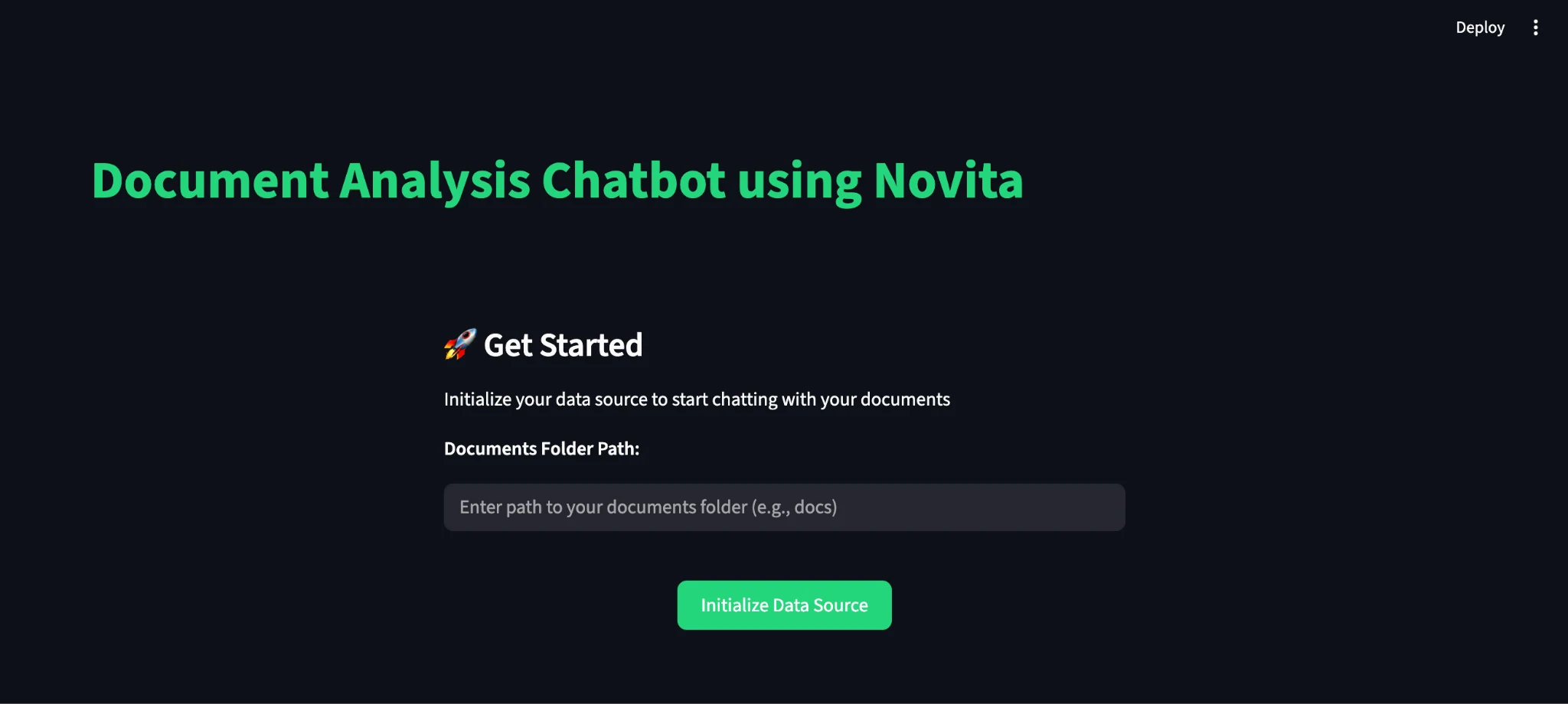
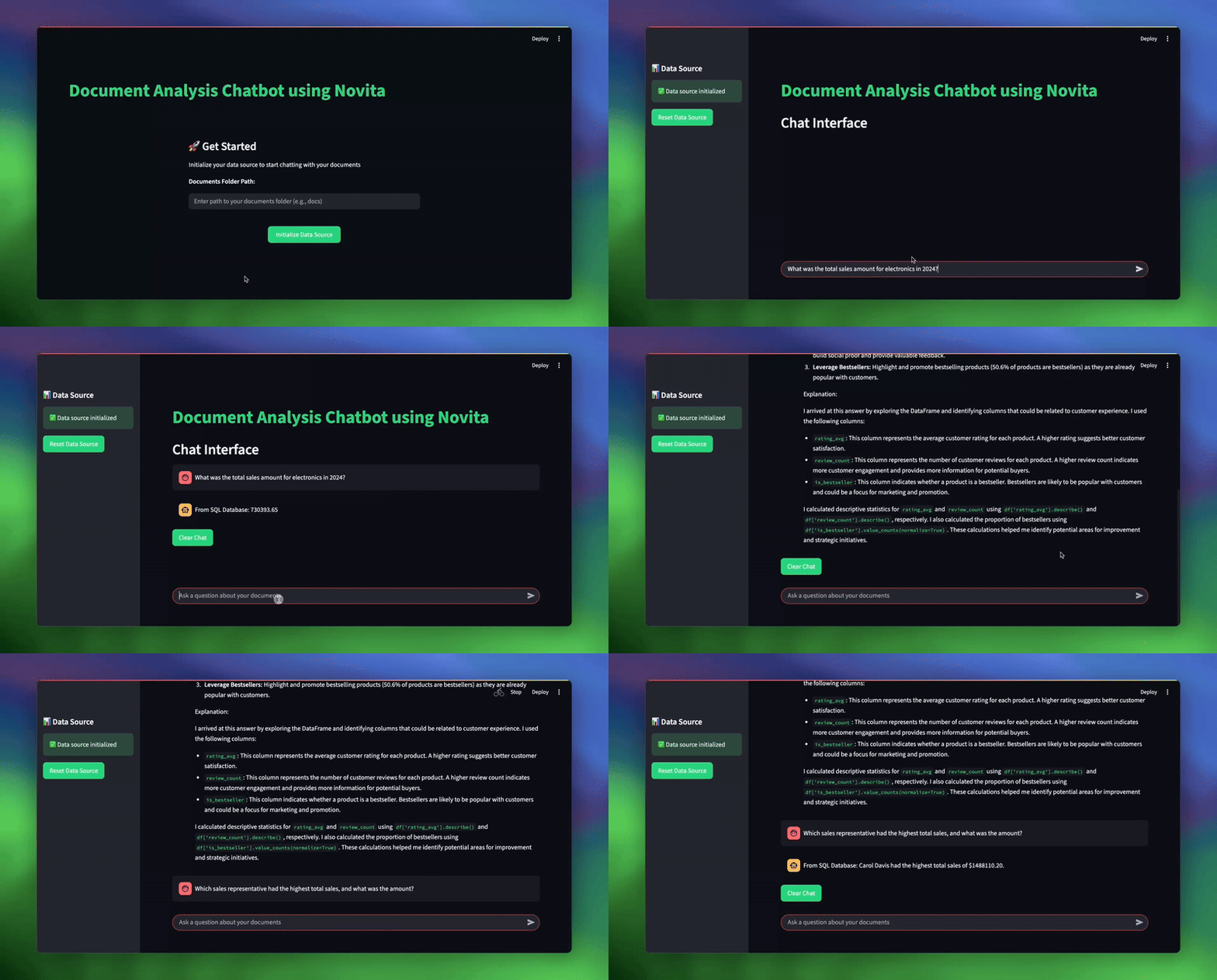
初始化後,你可以透過輸入你的文件路徑(例如 sample_documents)並詢問各種業務問題來測試系統:
| # 用於測試系統的範例查詢 topic_1 = “What was the total sales amount for electronics in 2024?” topic_2 = “What are our key strategic initiatives for customer experience?” topic_3 = “Which sales representative had the highest total sales, and what was the amount?” |
結論
透過本教學,我們建立了一個基於 RAG 的分析系統,展示了現代 AI 如何轉變商業智慧工作流程。透過在單一智慧介面下結合多種資料處理方法,我們創建了一個能夠處理分析師每天面臨的各種業務問題的工具。該系統的主要優勢包括:
- 智慧查詢路由:自動為每個問題決定最佳資料來源。
- 多格式支援:處理 SQL 資料庫、CSV 檔案、Excel 試算表和文字文件。
- 穩健的錯誤處理:提供故障轉移機制和清晰的錯誤訊息。
- 基於聊天的互動:無需技術專業知識。
- 內建驗證與確認:確保可靠的結果。
你可以擴展此應用程式,以納入更多來源、更進階的分析技術以及自訂的商業邏輯。現在你已經掌握了這些知識,請繼續嘗試使用 Novita AI 建立你自己的代理,或將其整合到你現有的專案中。
Novita AI 是一個全能雲端平台,能助你實現 AI 抱負。整合 API、無伺服器、GPU 實例——你需要的經濟高效工具。消除基礎設施負擔,免費開始,讓你的 AI 願景成為現實。