无数AI公司正推出智能体式的商业智能系统,这些系统能立即分析你的数据并提供全面洞察,无需复杂的SQL查询或手动解析电子表格。例如,一个RAG驱动的销售分析系统可以在几秒钟内回答“我们上季度最畅销的产品是什么?”这样的问题,而不是花费数小时。
RAG驱动的销售分析系统通过使用AI智能体解决这些问题,这些智能体能够自主推理、做出决策并协调外部工具,从而在整个数据生态系统中实现自然语言查询。无需学习数据库模式或电子表格公式,智能体就能分解你的查询、确定最佳数据源、执行有针对性的分析,并提供带有适当引用来源的全面数据驱动答案。
例如,你可以使用不同的LLM、自定义文档格式,或调整智能体的分析和行为方式,以产生特定的业务输出。在本教程中,你将学习如何使用Novita AI的统一LLM API、LangChain的智能体框架以及高级文档处理能力,构建自己的RAG驱动销售分析系统。你将创建一个自动将查询路由到最佳数据源并提供可执行业务洞察的系统。
什么是RAG驱动的销售分析系统?
RAG驱动的销售分析系统利用检索增强生成(Retrieval-Augmented Generation),通过将大型语言模型的能力与能够访问实际业务数据的检索层相结合,为零售销售问题提供准确、有依据的答案。
该系统通常包括:
- AI智能体分析查询,并确定是需要结构化数据分析(SQL)、文档分析,还是两者都需要。
- 智能体将查询智能地路由到最合适的数据源——定量分析使用SQL数据库,定性洞察使用文档存储。
- 智能体利用各种工具收集信息,包括用于分析CSV文件的Pandas智能体、用于查询数据库的SQL智能体以及用于检索文档的向量存储。没有这些工具,智能体在工作流程中就无法完成关键操作。
- 智能体使用专门技术处理收集到的信息:对于数值数据进行统计分析,对于文本文档进行语义搜索。
- 分析数据后,智能体创建包含摘要、计算和适当引用的结构化响应。
所需工具
在开始构建之前,我们先搭建必要的工具环境。
Novita AI
为了构建RAG驱动的分析系统,我们需要访问强大的大型语言模型(LLMs)和嵌入模型。Novita AI 提供价格低廉、性能卓越的API,通过单一统一接口即可访问最新的大型语言模型、嵌入模型等。
LangChain
LangChain 是一个开源框架,专为使用LLMs构建应用程序而设计。借助LangChain,你可以创建能够逐步推理、使用工具并与API交互的智能体工作流。对于我们的销售分析系统,我们将利用LangChain来结构化分析过程,使用SQL智能体和文档处理器等工具,并将所有数据合成为结构化洞察。
Streamlit
我们将使用 Streamlit 构建交互式Web界面。它非常适合快速原型设计,能以最少的代码创建专业外观的UI,使本教程易于跟随。
FAISS
对于基于向量的文档检索,FAISS 提供了快速的相似性搜索能力,使我们能够根据用户查询快速找到相关的文档块。
SQLAlchemy & PyMySQL
这些库负责处理SQL数据库操作和MySQL连接,使我们的系统能够直接查询结构化业务数据。
pandas
pandas是CSV数据操作和分析的基础库。我们的系统使用pandas智能体对表格数据执行复杂计算。
系统架构概述
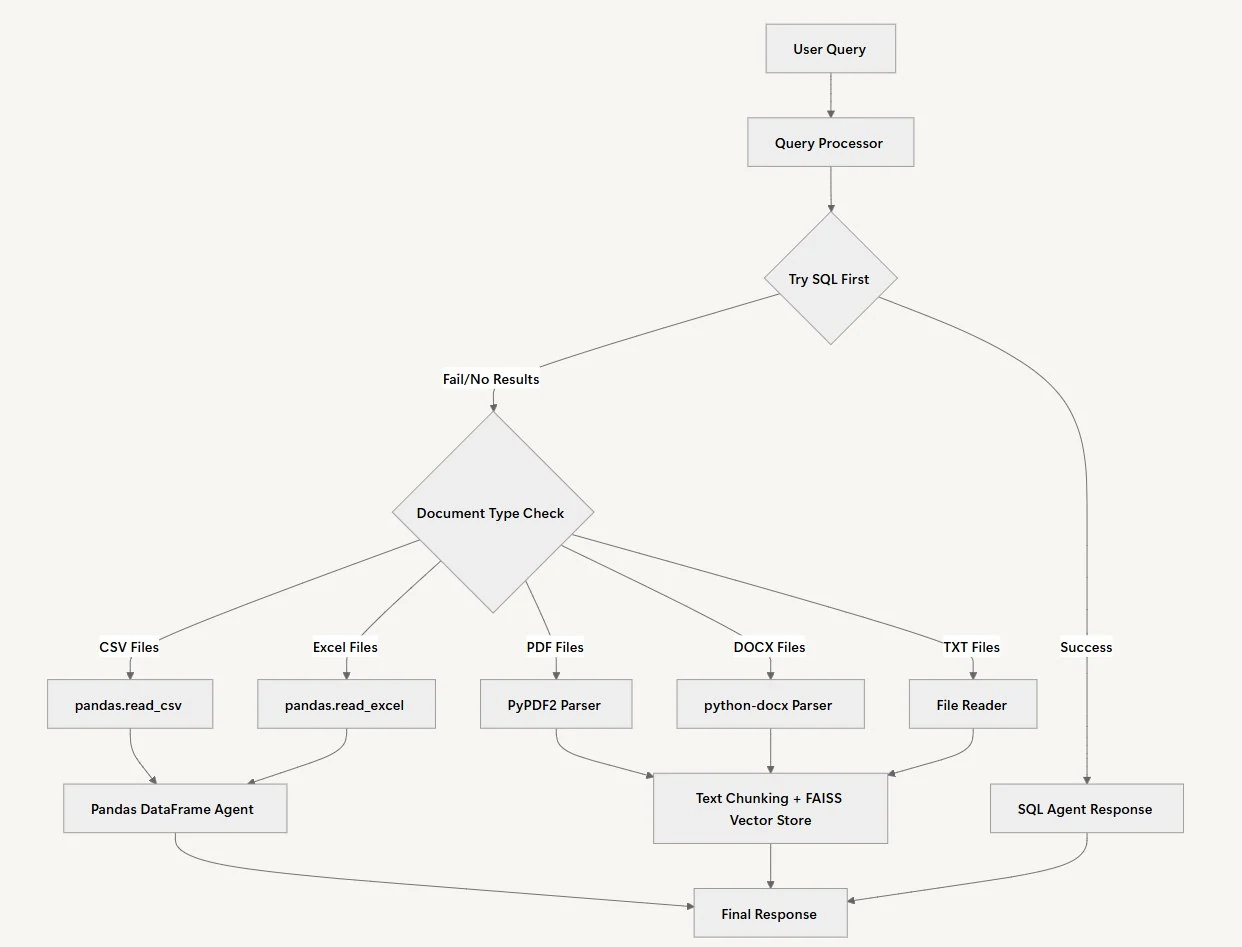
我们的RAG系统通过一个多步骤工作流智能处理用户查询,自动确定每个问题的最佳数据源和处理方法。无需强迫用户知道数据存储在何处,系统会在后台自动选择最佳方式。
查询处理
我们的智能体工作流程的第一步是查询处理。在这种情况下,智能体将验证用户输入的查询,开发一个适合查询上下文的个性化处理计划。然后,它将确定问题需要分析的数据类型:结构化数据、文档分析,或两者兼备。
数据源选择
当用户提交问题时,系统采用直接的方法:首先尝试查询SQL数据库来解决问题。数据源选择之所以合理,是因为结构化数据通常能为量化问题提供最精确的答案。SQL智能体可以快速执行查询,并返回带有正确计算的精确数字。
文档分析
当SQL智能体返回空结果或找不到相关信息时,系统会自动切换到文档分析。文档处理路径因文件类型而异:CSV和Excel文件被加载到pandas DataFrame中以进行复杂数据分析,而PDF、Word文件和文本文档则被分块并使用FAISS进行索引,以便进行语义搜索。
来源管理
正确引用所有来源至关重要,以确保所提供的信息可以追溯到可信的权威来源。工作流程中的这一步有助于建立读者信任,使他们能够验证最终报告中的任何声明或数据。
响应综合
为了将所有收集到的信息串联起来,智能体会整合来自所有分析数据源的洞察,形成连贯的响应。没有这个工作流程阶段,输出可能会是一份支离破碎的报告。
实现RAG驱动的分析工作流
到目前为止,你已经了解了RAG驱动的销售分析系统的基本概念。现在我们来实际实现它。首先,我们执行几个关键步骤:
安装与设置
在继续之前,我们为RAG分析系统建立完整的文件结构。你需要在项目目录中创建以下文件:
| rag-analytics-system/ ├── .env # 环境变量 ├── requirements.txt # Python依赖 ├── query_processor.py # QueryProcessor主类 ├── main.py # Streamlit界面 |
设置依赖项
首先,使用所有必要的依赖项更新 requirements.txt 文件:
| langchain==0.3.26 langchain-openai==0.3.25 python-dotenv==1.1.1 SQLAlchemy==2.0.41 pandas==2.3.0 PyPDF2==3.0.1 faiss-cpu==1.11.0 PyMySQL==1.1.1 cryptography==45.0.4 langchain-experimental==0.3.4 streamlit==1.46.0 openpyxl==3.1.5 python-docx==1.2.0 |
然后登录 Novita AI。登录后,导航到 Manage API Keys 页面,点击 Add New Key 按钮,并输入你的 ** 密钥名称**。
注册后,Novita AI 会提供免费积分供你试用各种模型,因此你在开始构建或实验之前无需担心购买积分。将你的凭证(如之前创建的 Novita API Key)添加到 .env 文件中:
| NOVITA_API_KEY=”your_novita_api_key_here” |
现在,安装项目所需的所有依赖项:
| # 创建虚拟环境 python -m venv rag_analytics_env source rag_analytics_env/bin/activate # 在Windows上: rag_analytics_env\Scripts\activate # 安装依赖项 pip install -r requirements.txt |
构建查询处理器
整个RAG分析工作流封装在一个名为 QueryProcessor 的模块化类中。该类将管理查询路由、SQL分析、文档处理、结果综合以及运行完整分析循环的过程。
QueryProcessor 充当分析系统的中央编排器。与其为不同数据类型构建单独的工具,这种统一的方法使我们能够智能地将查询路由到最合适的分析方法,无论是SQL数据库、CSV文件还是非结构化文档。
首先,我们在 query_processor.py 文件中导入项目所需的库。这些导入为语言模型集成、数据库连接、文档处理和向量存储提供了所需的一切:
connectivity, document processing, and vector storage:
from langchain_openai import ChatOpenAI, OpenAIEmbeddings
from langchain.agents import AgentExecutor, create_react_agent
from langchain_community.agent_toolkits.sql.base import create_sql_agent
from langchain_experimental.agents.agent_toolkits import create_csv_agent, create_pandas_dataframe_agent
from langchain_community.agent_toolkits.sql.toolkit import SQLDatabaseToolkit
from langchain.agents import AgentType
from langchain.text_splitter import RecursiveCharacterTextSplitter
from langchain_community.vectorstores import FAISS
from langchain_community.utilities import SQLDatabase
from langchain.prompts import PromptTemplate
from langchain_community.tools import ReadFileTool
from langchain.schema import Document
import os
from dotenv import load_dotenv
from sqlalchemy.engine import Engine
import glob
import pandas as pd
load_dotenv()
接下来,我们通过Novita API初始化分析智能体,使其能够访问LLM和各种数据处理工具。初始化方法设置了我们需要的所有核心组件:用于理解查询的语言模型、用于文档相似性搜索的嵌入模型,以及用于高效处理大型文档的文本分割器。
class QueryProcessor:
    def __init__(self, documents_folder: str, sql_engine: Engine):
        self.documents_folder = documents_folder
        self.sql_engine = sql_engine
        self.llm = ChatOpenAI(
            model="google/gemma-3-27b-it",
            temperature=0,
            openai_api_key=os.getenv("NOVITA_API_KEY"),
            openai_api_base="<https://api.novita.ai/v3/openai>",
            default_headers={
                "X-Model-Provider": "google"
            }
        )
        self.embeddings = OpenAIEmbeddings(
            model="baai/bge-m3",
            openai_api_key=os.getenv("NOVITA_API_KEY"),
            openai_api_base="<https://api.novita.ai/v3/openai>",
            default_headers={
                "X-Model-Provider": "baai"
            }
        )
        self.text_splitter = RecursiveCharacterTextSplitter(
            chunk_size=1000,
            chunk_overlap=200,
            length_function=len,
        )
        self.sql_agent = None
        self._prepare_data_sources()
构造函数初始化了几个关键组件。我们对LLM使用温度0,以确保一致、事实性的响应,而不是创造性的变化。文本分割器配置了重叠块,以在处理大型文档时保持上下文的连续性。最后调用 _prepare_data_sources() 方法来设置我们的专用智能体。
创建多源数据集成
下一步涉及创建初始化不同数据处理智能体的方法。每个智能体专门处理特定的数据类型和分析任务,就像针对不同类型的问题有不同的专家一样。
   def _prepare_data_sources(self):
        """Prepare both SQL and document data sources"""
        # Prepare SQL agent
        self._prepare_sql_agent()

        # Prepare document agent
        self._prepare_document_agent()

    def _prepare_sql_agent(self):
        """Initialize SQL agent"""
        # Convert SQLAlchemy Engine to LangChain SQLDatabase
        db = SQLDatabase(self.sql_engine)
        toolkit = SQLDatabaseToolkit(db=db, llm=self.llm)
        self.sql_agent = create_sql_agent(
            llm=self.llm,
            toolkit=toolkit,
            agent_type=AgentType.ZERO_SHOT_REACT_DESCRIPTION,
         verbose=True
        )

    def _prepare_document_agent(self):
        """Initialize document agent using ReadFileTool and vector store"""
        # Get all supported files
        supported_files = []
        for ext in ['*.txt', '*.pdf', '*.docx', '*.xlsx', '*.xls', '*.csv']:
            supported_files.extend(glob.glob(os.path.join(self.documents_folder, ext)))

        print(f"\
Found {len(supported_files)} supported files in {self.documents_folder}")

        if supported_files:
            # Create ReadFileTool
            read_file_tool = ReadFileTool()

            # Create tools list
            tools = [read_file_tool]

            # Create the prompt template for the react agent
            prompt = PromptTemplate.from_template("""
            You are a helpful assistant that can answer questions about business documents.
            You have access to the following tools:

            {tools}

            Use the following format:

            Question: the input question you must answer
            Thought: you should always think about what to do
            Action: the action to take, should be one of [{tool_names}]
            Action Input: the input to the action
            Observation: the result of the action
            ... (this Thought/Action/Action Input/Observation can repeat N times)
            Thought: I now know the final answer
            Final Answer: the final answer to the original input question

            Begin!

            Question: {input}
            Thought: I should read the relevant documents to find the answer
            {agent_scratchpad}
            """)

            agent = create_react_agent(self.llm, tools, prompt)
            self.document_agent = AgentExecutor.from_agent_and_tools(
                agent=agent,
                tools=tools,
                verbose=True
            )
            print("\
Document agent initialized successfully")
        else:
            print("\
No documents found in the specified folder.")
_prepare_sql_agent() 方法创建一个专门用于数据库查询的智能体。我们使用 ZERO_SHOT_REACT_DESCRIPTION 智能体类型,这意味着智能体可以在没有具体示例的情况下推理SQL查询,使其能够适应不同的数据库模式。_prepare_document_agent() 方法扫描支持的文件类型,并创建一个灵活的智能体,可以读取各种文档格式。ReAct(推理与行动)提示模板引导智能体完成结构化的思考过程,类似于人类分析师处理文档分析的方式。
文档处理与向量存储
接下来,我们需要处理工作流如何处理不同的文档类型。这部分创建的方法使用pandas智能体处理CSV/Excel文件,并使用向量存储处理非结构化文档。关键点在于,不同类型的数据需要不同的处理策略。
CSV_PROMPT_PREFIX = """
IMPORTANT: You are working with a pandas DataFrame called 'df' that has been loaded with the actual data.
DO NOT create sample data or make up data. Use ONLY the actual DataFrame 'df' that is available to you.
First, explore the DataFrame by:
1. Setting pandas display options to show all columns: pd.set_option('display.max_columns', None)
2. Check the shape of the DataFrame: print(df.shape)
3. Get the column names: print(df.columns.tolist())
4. Check the data types: print(df.dtypes)
5. Look at the first few rows: print(df.head())
6. Then answer the question using the actual data in the DataFrame.
"""
    CSV_PROMPT_SUFFIX = """
- **CRITICAL**: Use ONLY the actual data in the DataFrame. Do NOT create sample data or use fictional data.
- **ALWAYS** before giving the Final Answer, try another method to verify your results.
- Then reflect on the answers of the two methods you did and ask yourself if it answers correctly the original question.
- If you are not sure, try another method.
- FORMAT 4 FIGURES OR MORE WITH COMMAS.
- If the methods tried do not give the same result, reflect and try again until you have two methods that have the same result.
- If you still cannot arrive to a consistent result, say that you are not sure of the answer.
- If you are sure of the correct answer, create a beautiful and thorough response using Markdown.
- **DO NOT MAKE UP AN ANSWER OR USE PRIOR KNOWLEDGE, ONLY USE THE RESULTS OF THE CALCULATIONS YOU HAVE DONE**.
- **ALWAYS**, as part of your "Final Answer", explain how you got to the answer on a section that starts with: "\\
\\
Explanation:\\
".
- In the explanation, mention the column names that you used to get to the final answer.
- Show your work by displaying relevant DataFrame operations and their results.
"""
    def _process_document_query(self, query: str) -> str:
        """Process document query using CSV/Excel agents for tabular data, and LLM for unstructured data."""
        try:
            print(f"\\
Processing query: {query}")

            # Get all supported files
            supported_files = []
            for ext in ['*.txt', '*.pdf', '*.docx', '*.xlsx', '*.xls', '*.csv']:
                supported_files.extend(glob.glob(os.path.join(self.documents_folder, ext)))

            print(f"Found {len(supported_files)} supported files in {self.documents_folder}")

            if not supported_files:
                return "No documents found to search through."

            # Check for CSV/Excel files first
            csv_files = [f for f in supported_files if f.endswith('.csv')]
            excel_files = [f for f in supported_files if f.endswith(('.xlsx', '.xls'))]

            if csv_files:
                csv_file = csv_files[0]
                print(f"\\
Processing CSV file: {csv_file}")
                try:
                    # First try with pandas DataFrame agent
                    df = pd.read_csv(csv_file)
                    print(f"CSV loaded successfully with {len(df)} rows and columns: {df.columns.tolist()}")

                    # Create the agent with improved configuration
                    print("Creating pandas DataFrame agent...")
                    agent = create_pandas_dataframe_agent(
                        self.llm,
                        df,
                        verbose=True,
                        include_df_in_prompt=False,  # Avoid token limits with large DataFrames
                        allow_dangerous_code=True,
                        max_iterations=10,
                        handle_parsing_errors=True
                    )

                    # Process the query with our custom prompt
                    print(f"Processing query with agent: {query}")
                    # Improved prompt that ensures agent uses the actual DataFrame
                    prompt = f"""
You have access to a pandas DataFrame called 'df' with {len(df)} rows and the following columns: {df.columns.tolist()}.
Here are the first few rows of the data:
{df.head().to_string()}
Data types:
{df.dtypes.to_string()}
{self.CSV_PROMPT_PREFIX}
Question: {query}
{self.CSV_PROMPT_SUFFIX}
"""
                    response = agent.invoke({"input": prompt})
                    print(f"Agent response: {response}")
                    return response['output']

                except Exception as e:
                    print(f"Error with pandas DataFrame agent: {str(e)}")
                    print("Trying alternative CSV agent...")

                    # Fallback to CSV agent
                    try:
                        agent = create_csv_agent(
                            self.llm,
                            csv_file,
                            verbose=True,
                            allow_dangerous_code=True
                        )

                        enhanced_query = f"""
{self.CSV_PROMPT_PREFIX}
Question: {query}
{self.CSV_PROMPT_SUFFIX}
"""
                        response = agent.invoke({"input": enhanced_query})
                        return response['output']

                    except Exception as e2:
                        print(f"Error processing CSV file: {str(e2)}")
                        import traceback
                        print(f"Full traceback: {traceback.format_exc()}")
                        return f"Error processing CSV file: {str(e2)}"

            elif excel_files:
                excel_file = excel_files[0]
                print(f"\\
Processing Excel file: {excel_file}")
                try:
                    df = pd.read_excel(excel_file)
                    print(f"Excel loaded successfully with {len(df)} rows and columns: {df.columns.tolist()}")

                    # Create the agent with improved configuration
                    print("Creating pandas DataFrame agent...")
                    agent = create_pandas_dataframe_agent(
                        self.llm,
                        df,
                        verbose=True,
                        include_df_in_prompt=False,  # Avoid token limits with large DataFrames
                        allow_dangerous_code=True,
                        max_iterations=10,
                        handle_parsing_errors=True
                    )

                    # Process the query with our custom prompt
                    print(f"Processing query with agent: {query}")
                    # Improved prompt that ensures agent uses the actual DataFrame
                    prompt = f"""
You have access to a pandas DataFrame called 'df' with {len(df)} rows and the following columns: {df.columns.tolist()}.
Here are the first few rows of the data:
{df.head().to_string()}
Data types:
{df.dtypes.to_string()}
{self.CSV_PROMPT_PREFIX}
Question: {query}
{self.CSV_PROMPT_SUFFIX}
"""
                    response = agent.invoke({"input": prompt})
                    print(f"Agent response: {response}")
                    return response['output']
                except Exception as e:
                    print(f"Error processing Excel file: {str(e)}")
                    import traceback
                    print(f"Full traceback: {traceback.format_exc()}")
                    return f"Error processing Excel file: {str(e)}"

            # For unstructured text files
            print("\\
Processing unstructured text files...")
            all_content = []
            for file_path in supported_files:
                try:
                    if file_path.endswith('.txt'):
                        with open(file_path, 'r', encoding='utf-8') as f:
                            content = f.read()
                        all_content.append(Document(page_content=content, metadata={"source": file_path}))
                except Exception as e:
                    print(f"Error reading file {file_path}: {str(e)}")
                    continue

            if not all_content:
                return "Could not read any documents."

            # Process unstructured text using vector store
            print("Processing text with vector store...")
            chunks = self.text_splitter.split_documents(all_content)
            vector_store = FAISS.from_documents(chunks, self.embeddings)
            relevant_docs = vector_store.similarity_search(query, k=3)
            context = "\\
\\
".join([doc.page_content for doc in relevant_docs])

            print(f"Generated context length: {len(context)}")
            response = self.llm.invoke(
                f"""Based on the following context, answer the question: {query}
                \\
Context:\\
{context}\\
\\
Answer:"""
            )
            return response.content

        except Exception as e:
            print(f"Error processing document query: {str(e)}")
            import traceback
            print(f"Full traceback: {traceback.format_exc()}")
            return f"Error processing document query: {str(e)}"
CSV处理部分包含了详细的提示工程,以确保准确分析。前缀和后缀提示至关重要,因为它们可以防止智能体捏造数据或提供错误结果。智能体尝试多种方法的验证步骤有助于确保准确性,就像细心的分析师会反复核对计算结果一样。我们优先使用pandas DataFrame 智能体而非CSV智能体,因为前者提供了更健壮的数据处理能力,并对大型数据集有更好的性能。回退机制确保如果一种方法失败,我们还有替代方法来处理数据。现在我们来完成 _process_document_query 方法,使其能够处理Excel文件和非结构化文档:
 elif excel_files:
                excel_file = excel_files[0]
                print(f"\\
Processing Excel file: {excel_file}")
                try:
                    df = pd.read_excel(excel_file)
                    print(f"Excel loaded successfully with {len(df)} rows and columns: {df.columns.tolist()}")

                    # Create the agent with improved configuration
                    print("Creating pandas DataFrame agent...")
                    agent = create_pandas_dataframe_agent(
                        self.llm,
                        df,
                        verbose=True,
                        include_df_in_prompt=False,  # Avoid token limits with large DataFrames
                        allow_dangerous_code=True,
                        max_iterations=10,
                        handle_parsing_errors=True
                    )

                    # Process the query with our custom prompt
                    print(f"Processing query with agent: {query}")
                    # Improved prompt that ensures agent uses the actual DataFrame
                    prompt = f"""
You have access to a pandas DataFrame called 'df' with {len(df)} rows and the following columns: {df.columns.tolist()}.
Here are the first few rows of the data:
{df.head().to_string()}
Data types:
{df.dtypes.to_string()}
{self.CSV_PROMPT_PREFIX}
Question: {query}
{self.CSV_PROMPT_SUFFIX}
"""
                    response = agent.invoke({"input": prompt})
                    print(f"Agent response: {response}")
                    return response['output']
                except Exception as e:
                    print(f"Error processing Excel file: {str(e)}")
                    import traceback
                    print(f"Full traceback: {traceback.format_exc()}")
                    return f"Error processing Excel file: {str(e)}"

            # For unstructured text files
            print("\\
Processing unstructured text files...")
            all_content = []
            for file_path in supported_files:
                try:
                    if file_path.endswith('.txt'):
                        with open(file_path, 'r', encoding='utf-8') as f:
                            content = f.read()
                        all_content.append(Document(page_content=content, metadata={"source": file_path}))
                except Exception as e:
                    print(f"Error reading file {file_path}: {str(e)}")
                    continue

            if not all_content:
                return "Could not read any documents."

            # Process unstructured text using vector store
            print("Processing text with vector store...")
            chunks = self.text_splitter.split_documents(all_content)
            vector_store = FAISS.from_documents(chunks, self.embeddings)
            relevant_docs = vector_store.similarity_search(query, k=3)
            context = "\\
\\
".join([doc.page_content for doc in relevant_docs])

            print(f"Generated context length: {len(context)}")
            response = self.llm.invoke(
                f"""Based on the following context, answer the question: {query}
                \\
Context:\\
{context}\\
\\
Answer:"""
            )
            return response.content

        except Exception as e:
            print(f"Error processing document query: {str(e)}")
            import traceback
            print(f"Full traceback: {traceback.format_exc()}")
            return f"Error processing document query: {str(e)}"
SQL数据库集成
现在我们已经处理了文档部分,需要创建智能查询路由系统,决定是使用SQL分析还是文档分析。这是我们系统的核心智能——判断哪个数据源最有可能包含给定问题的答案。
   def process_query(self, query: str) -> str:
        """
        Process query using agents to intelligently decide between SQL and documents
        """
        # First try SQL agent
        try:
            print("\\
Trying SQL Agent...")
            sql_result = self.sql_agent.run(query)
            no_answer_phrases = [
                "no results", "i don't know", "unknown", "not sure", "cannot answer", "don't have", "no data", "n/a"
            ]
            if sql_result and not any(phrase in sql_result.lower() for phrase in no_answer_phrases) and sql_result.strip():
                return f"From SQL Database: {sql_result}"
            else:
                print("SQL Agent could not answer, trying documents...")
        except Exception as e:
            print(f"SQL Agent Error: {str(e)}")
            print("Falling back to documents...")

        # If SQL agent fails or returns no results, try document processing
        try:
            print("\\
Processing documents...")
            doc_result = self._process_document_query(query)
            if doc_result:
                return f"From Documents: {doc_result}"
            else:
                print("Document processing returned no results")
        except Exception as e:
            print(f"Document Processing Error: {str(e)}")

        return "Could not find relevant information in either SQL database or documents."
查询路由逻辑遵循优先级系统:首先尝试SQL数据库,因为SQL数据库通常包含结构化的定量数据,能够快速准确地回答业务问题。如果SQL智能体返回模糊或否定的响应(通过我们的 no_answer_phrases 列表检测),系统会自动回退到文档处理。这种方法模拟了人类分析师的工作方式——首先检查结构化数据源,然后在数据库没有所需信息时转向文档和报告。
创建Streamlit界面
现在我们来构建用户界面,使业务用户能够轻松使用我们的分析系统。Streamlit界面提供了直观的、基于聊天的体验,隐藏了技术复杂性,同时提供了强大的分析功能。将以下代码片段添加到 main.py 文件中:
import streamlit as st
from query_processor import QueryProcessor
import os
from dotenv import load_dotenv
from sqlalchemy import create_engine
# Load environment variables
load_dotenv()
#st.text_input
# Initialize session state
if 'processor' not in st.session_state:
    st.session_state.processor = None
if 'messages' not in st.session_state:
    st.session_state.messages = []
# Set page config
st.set_page_config(
    page_title="Document Analysis Chatbot",
    page_icon="🤖",
    layout="wide"
)
# Custom CSS for button and title styling
st.markdown("""
<style>
    .stButton > button {
        background-color: #23D57C;
        color: white;
        border: none;
        border-radius: 8px;
        padding: 0.5rem 1rem;
        font-weight: 600;
        transition: all 0.3s ease;
    }
    .stButton > button:hover {
        background-color: #1fb36b;
        box-shadow: 0 4px 8px rgba(35, 213, 124, 0.3);
        transform: translateY(-2px);
    }
    .stButton > button:active {
        background-color: #1a9960;
        transform: translateY(0px);
    }
    h1 {
        color: #23D57C !important;
        font-weight: 700;
    }
</style>
""", unsafe_allow_html=True)
# Title and description
st.title("Document Analysis Chatbot using Novita")
这个初始设置创建了一个专业外观的界面和自定义样式。会话状态管理确保用户在交互时不会丢失对话历史记录,也无需重新初始化数据源。自定义CSS提供了视觉反馈,并保持一致的品牌体验。
最终系统集成
让我们通过数据源初始化和聊天功能来完成Streamlit界面。最后一部分将所有组件整合成一个用户友好的应用程序,业务分析师无需专业技术知识即可使用。
# Check if data source is initialized
if st.session_state.processor is None:
    # Center the data source configuration
    st.markdown("<br><br>", unsafe_allow_html=True)

    # Create centered columns
    col1, col2, col3 = st.columns([1, 2, 1])

    with col2:
        st.subheader("🚀 Get Started")
        st.write("Initialize your data source to start chatting with your documents")

        # SQL Database Configuration (hidden)
        db_user = "root"
        db_password = "1234cisco"
        db_host = "localhost"
        db_name = "retail_sales_db"
        # Documents Folder Configuration
        st.write("**Documents Folder Path:**")
        documents_folder = st.text_input(
            "Documents Folder Path",
            placeholder="Enter path to your documents folder (e.g., docs)",
            label_visibility="collapsed"
        )

        st.markdown("<br>", unsafe_allow_html=True)

        # Center the button
        button_col1, button_col2, button_col3 = st.columns([1, 1, 1])
        with button_col2:
            if st.button("Initialize Data Source", use_container_width=True):
                try:
                    # Validate and resolve documents folder path
                    if not documents_folder:
                        st.error("Please provide a documents folder path")
                    else:
                        # Convert to absolute path
                        abs_documents_folder = os.path.abspath(documents_folder)
                        if not os.path.exists(abs_documents_folder):
                            st.error(f"Documents folder not found: {abs_documents_folder}")
                        elif not os.path.isdir(abs_documents_folder):
                            st.error(f"Path is not a directory: {abs_documents_folder}")
                        else:
                            # Initialize query processor with a dummy SQL engine
                             # Create SQL engine
                            connection_string = f"mysql+pymysql://{db_user}:{db_password}@{db_host}/{db_name}"
                            sql_engine = create_engine(connection_string)
                            st.session_state.processor = QueryProcessor(abs_documents_folder, sql_engine)
                            st.success("Data source initialized successfully!")
                            st.rerun()
                except Exception as e:
                    st.error(f"Error initializing data source: {str(e)}")
else:
    # Show data source status in sidebar
    with st.sidebar:
        st.header("📊 Data Source")
        st.success("✅ Data source initialized")
        if st.button("Reset Data Source"):
            st.session_state.processor = None
            st.session_state.messages = []
            st.rerun()
    # Main chat interface
    st.header("Chat Interface")
    # Display chat messages
    for message in st.session_state.messages:
        with st.chat_message(message["role"]):
            st.write(message["content"])
    # Chat input
    if prompt := st.chat_input("Ask a question about your documents"):
        # Add user message to chat history
        st.session_state.messages.append({"role": "user", "content": prompt})
        with st.chat_message("user"):
            st.write(prompt)

        # Process query
        try:
            response = st.session_state.processor.process_query(prompt)

            # Add assistant response to chat history
            st.session_state.messages.append({"role": "assistant", "content": response})
            with st.chat_message("assistant"):
                st.write(response)
        except Exception as e:
            st.error(f"Error processing query: {str(e)}")
    # Add a clear chat button only if there are messages
    if st.session_state.messages:
        if st.button("Clear Chat"):
            st.session_state.messages = []
            st.rerun()
初始化过程包含了健壮的错误处理和路径验证,以防止常见的用户错误。侧边栏提供了清晰的状态信息,聊天界面遵循用户期望的现代AI助手交互模式。系统维护对话历史,允许用户基于之前的问题进行扩展,创建自然分析工作流。当需要时,清除聊天功能让用户可以重新开始。
运行分析系统
现在我们已经构建了RAG驱动的销售分析系统,让我们对其进行测试,看看它在真实业务查询上的表现如何。
首先,创建一个 data_generator.py 文件,并从此处复制Python脚本中的代码来生成示例数据,然后使用以下命令运行脚本:
| python data_generator.py |
这将在 sample_documents 文件夹中创建:
- large_sales_dataset.csv - 10,000条销售记录
- business_strategy_2024.txt - 战略业务文档
- sales_meeting_notes.txt - 会议记录和行动事项
然后启动Streamlit应用程序:
| streamlit run main.py |
应用程序将在你的浏览器中打开,地址为 http://localhost:8501。
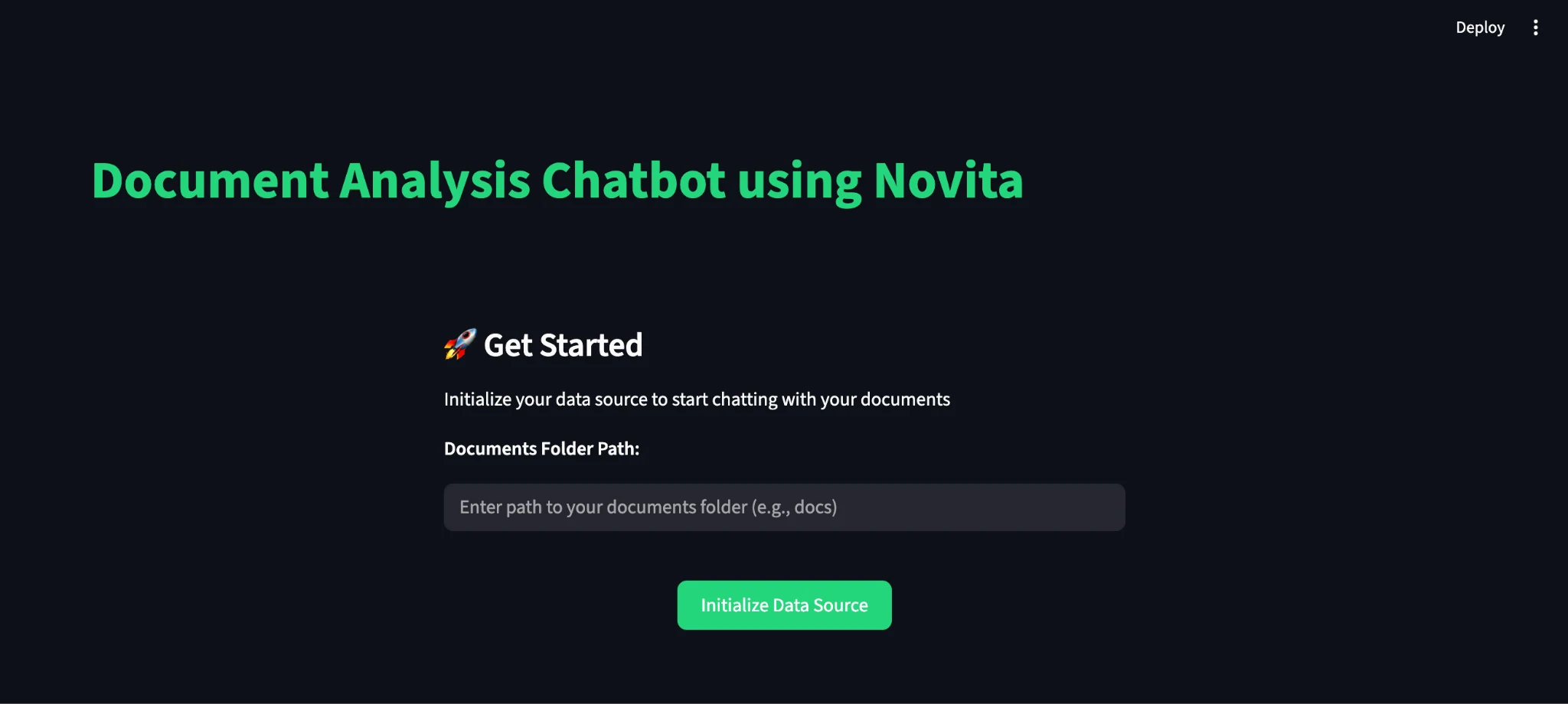
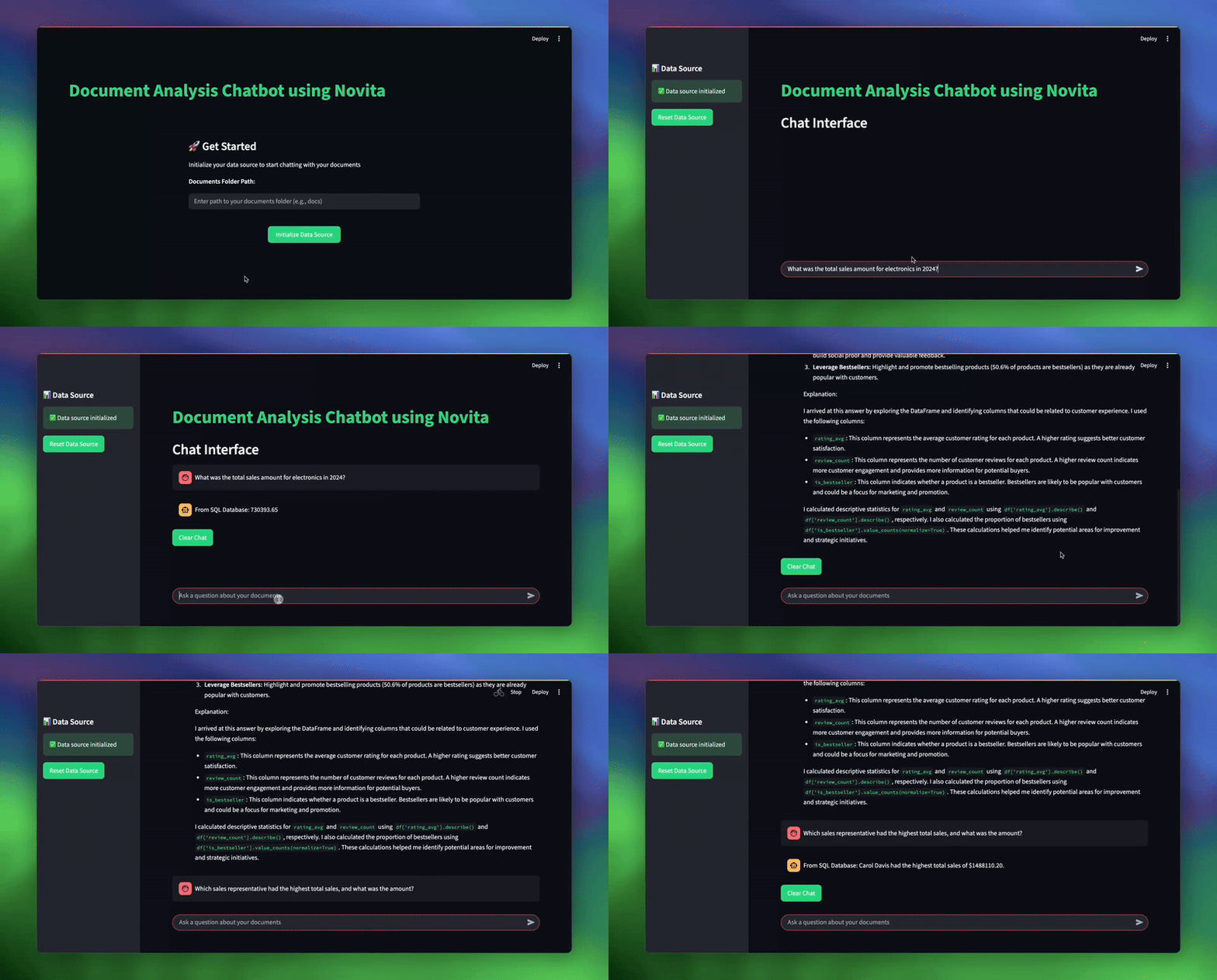
初始化后,你可以输入文档路径为 sample_documents 并测试各种业务问题:
| # 用于测试系统的示例查询 topic_1 = “What was the total sales amount for electronics in 2024?” topic_2 = “What are our key strategic initiatives for customer experience?” topic_3 = “Which sales representative had the highest total sales, and what was the amount?” |
结论
通过本教程,我们构建了一个RAG驱动的分析系统,展示了现代AI如何改变商业智能工作流。通过在单一智能界面下组合多种数据处理方法,我们创建了一个能够处理分析师每天面临的全方位业务问题的工具。该系统的主要优势包括:
- 智能查询路由,自动决定每个问题的最佳数据源
- 多格式支持,处理SQL数据库、CSV文件、Excel电子表格和文本文档
- 健壮的错误处理,提供回退机制和清晰错误信息
- 基于聊天的交互,无需技术专业知识
- 内置验证和校验,确保结果可靠
你可以扩展这个应用程序,集成更多数据源、更高级的分析技术以及自定义业务逻辑。现在你已经掌握了这些知识,尝试使用Novita AI构建自己的智能体,或将其集成到你现有的项目中。
Novita AI 是一个一体化云平台,助力你的AI愿景。集成API、无服务器、GPU实例——你需要的成本效益工具。消除基础设施障碍,免费开始,让你的AI梦想成真。