In today’s fast-paced development environments, users integrating Kimi K2 in Cursor often encounter several challenges such as tool-calling limitations, latency issues, and configuration complexities. These hurdles hinder the smooth deployment of Kimi K2 in real-world coding environments.
This article aims to help developers address these challenges by providing actionable solutions to overcome integration issues, speed concerns, and configuration errors.
Additionally, we will explore Kimi K2’s capabilities in various use cases such as self-hosting, open-source usage, and agentic applications, providing a comprehensive guide on maximizing the model’s potential for coding tasks, reasoning, and beyond.
How Well Does Kimi K2 Work in Cursor?
Kimi K2 integrates smoothly into Cursor and performs exceptionally in technical reasoning and code generation.
1.Integration and Stability
Kimi K2 integrates smoothly into Cursor with minimal setup via custom model configuration. Its Mixture-of-Experts (1 trillion total, 32 billion active parameters) enables large-context reasoning and stable performance. Although full deployment requires about 1.09 TB of disk space, API use remains efficient.
2.Strengths in Coding and STEM Tasks
Both Kimi K2 and Kimi K2-0905 stand out for extreme reasoning and coding strength, but 0905 refines stability, efficiency, and long-context handling.
Kimi K2 and Kimi K2-0905 excel in reasoning, coding, and STEM domains. Both use Moonshot AI’s MoE design with 384 experts (8 active per token), SwiGLU activation, MLA attention, and a 256 K-token context window for full-project reasoning. The 0905 Instruct version enhances stability through optimized expert routing, improves efficiency with SwiGLU and quantized inference, and strengthens coherence and decision quality via RLHF and rubric-based self-evaluation.
3.Agentic Behavior
Refined with reinforcement learning, Kimi K2 handles multi-step tool-use scenarios across hundreds of domains and thousands of tools. In Cursor, it accurately identifies developer intent and executes structured reasoning chains. Its agentic behavior approaches Claude-level performance, with only minor gaps in complex file-system tasks.
How Does Kimi K2 Perform in Coding and Reasoning Tasks?
Kimi K2 and its 0905 Instruct version show state-of-the-art coding and reasoning performance, leading most open models in SWE-Bench and STEM benchmarks.
From Moonshot AI
From Hugging Face
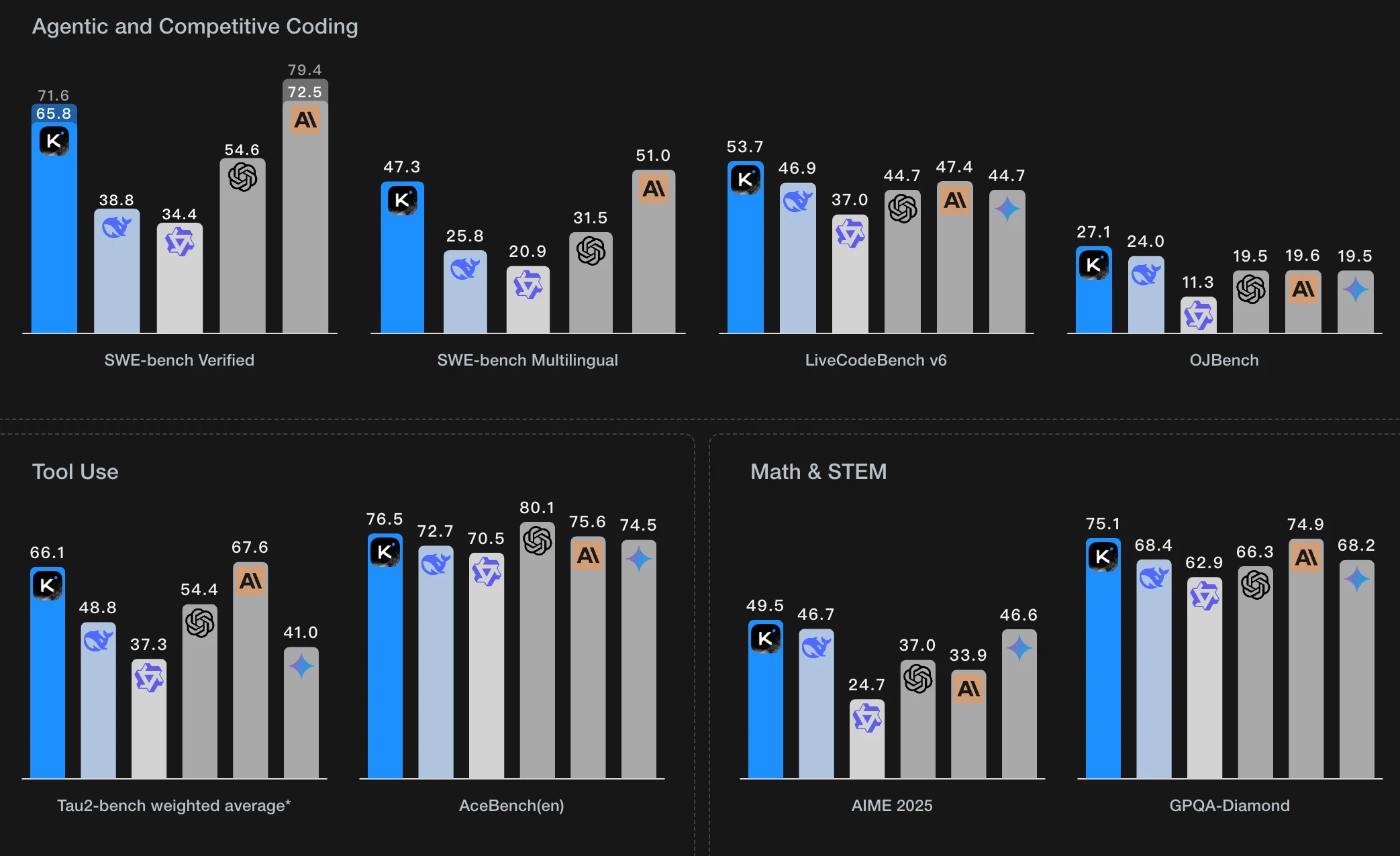
Kimi K2 performs exceptionally well in both coding and reasoning tasks, achieving state-of-the-art results among open models. In coding benchmarks, it scores about 71.6 % on SWE-Bench Verified, surpassing DeepSeek V3, Qwen 3 Coder, and GPT-4 Turbo. On SWE-Bench Multilingual it reaches around 47 %, showing consistent cross-language capability. In LiveCodeBench v6, Kimi K2 records roughly 53.7 %, outperforming most comparable models, while its OJBench result reflects moderate performance in simpler tasks.
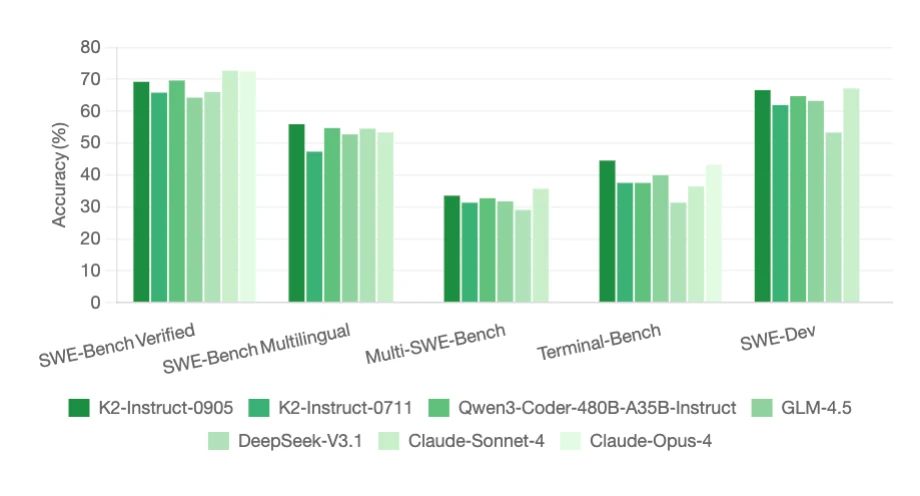
The 0905 Instruct version improves further—gaining 2 – 4 points in SWE-Bench Verified and LiveCodeBench. Overall, Kimi K2 and K2-0905 rank among the strongest open models for structured programming, complex reasoning, and long-context agentic coding in environments like Cursor.
Start a Free Trail to Test Kimi K2 Now!
Kimi K2 vs Claude 4 – Which is More Cost-Effective in Cursor?
For high-volume coding workflows in Cursor, Kimi K2 offers much better cost efficiency; if premium reliability and tooling is required, Claude may justify cost.
| Model | Approx cost (input) | Approx cost (output) |
|---|---|---|
| Kimi K2 | $0.57 / M tokens | $2.30 / M tokens |
| Kimi K2 0905 | $0.6 / M tokens | $2.50 / M tokens |
| Claude Opus 4 | $15 / M tokens | $75 / M tokens |
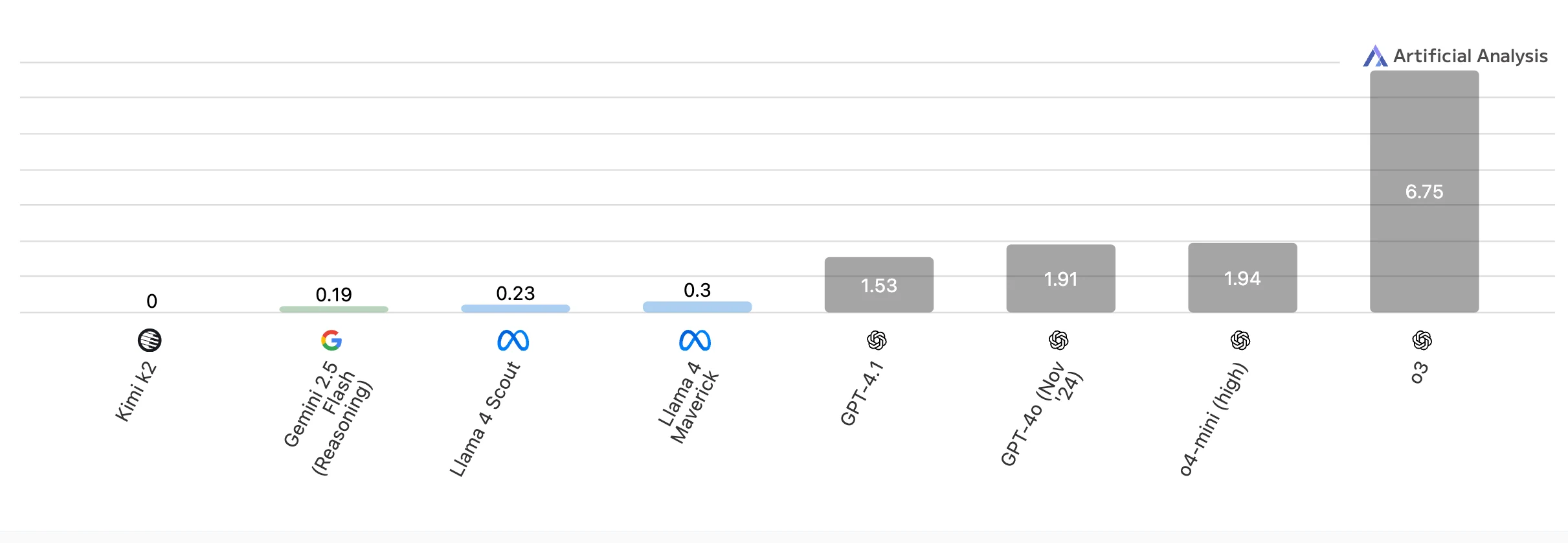
Kimi K2 is a powerhouse in STEM, coding, and tool use, but less dominant in general knowledge. But the price is the lowest among all compatible models!
From Artificial Analysis
Novita AI not only supports Kimi k2’s code agent potential ,but also bypass the regional restrictions of Claude Code, provideing access guides for Trae, Qwen Code and cursor. Novita also provides SLA guarantees with 99% service stability, making it especially suitable for high-frequency scenarios such as code generation and automated testing.
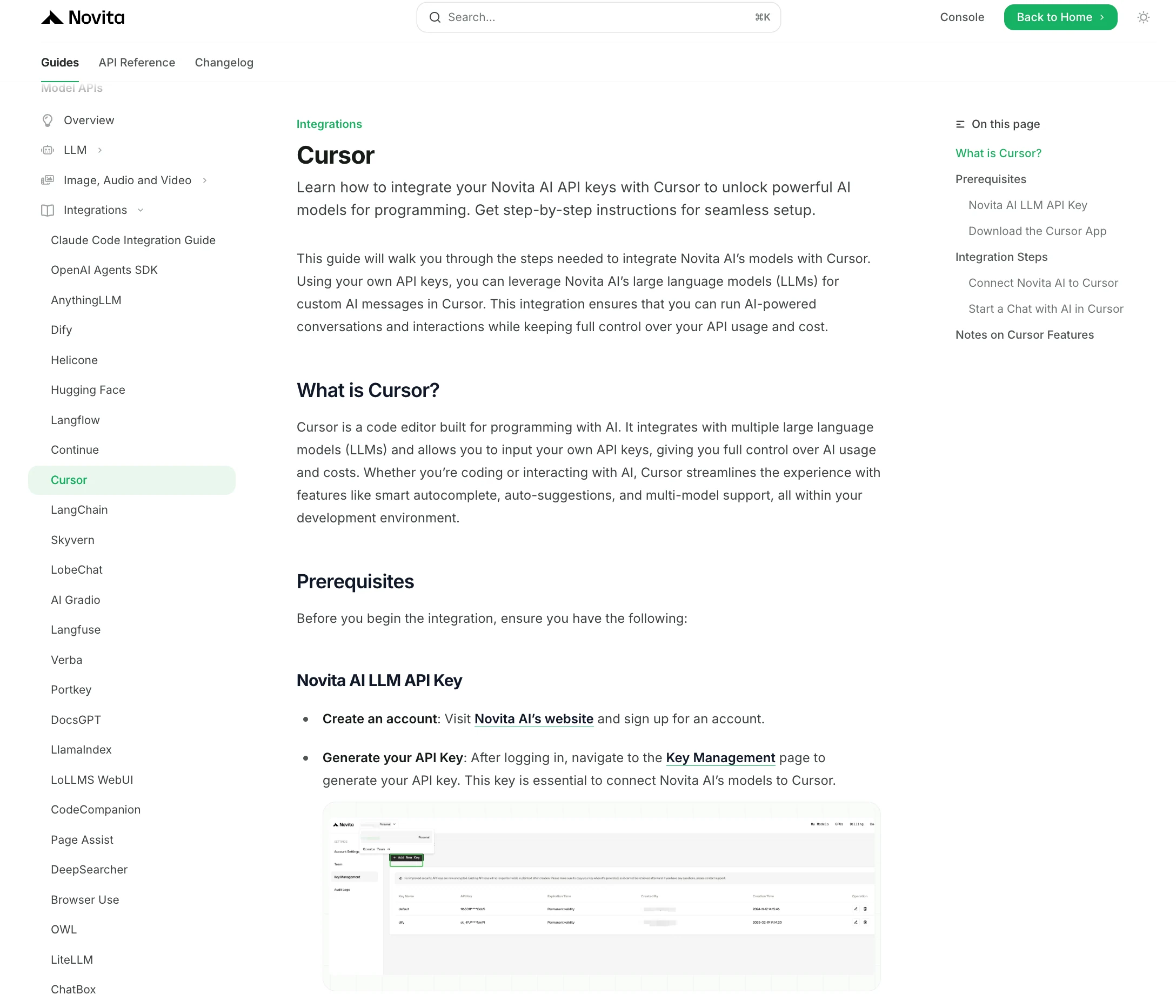
How Can Developers Set up Kimi K2 Step by Step in Cursor?
The First: Get API Key
Step 1: Log in to your account and click on the Model Library button.
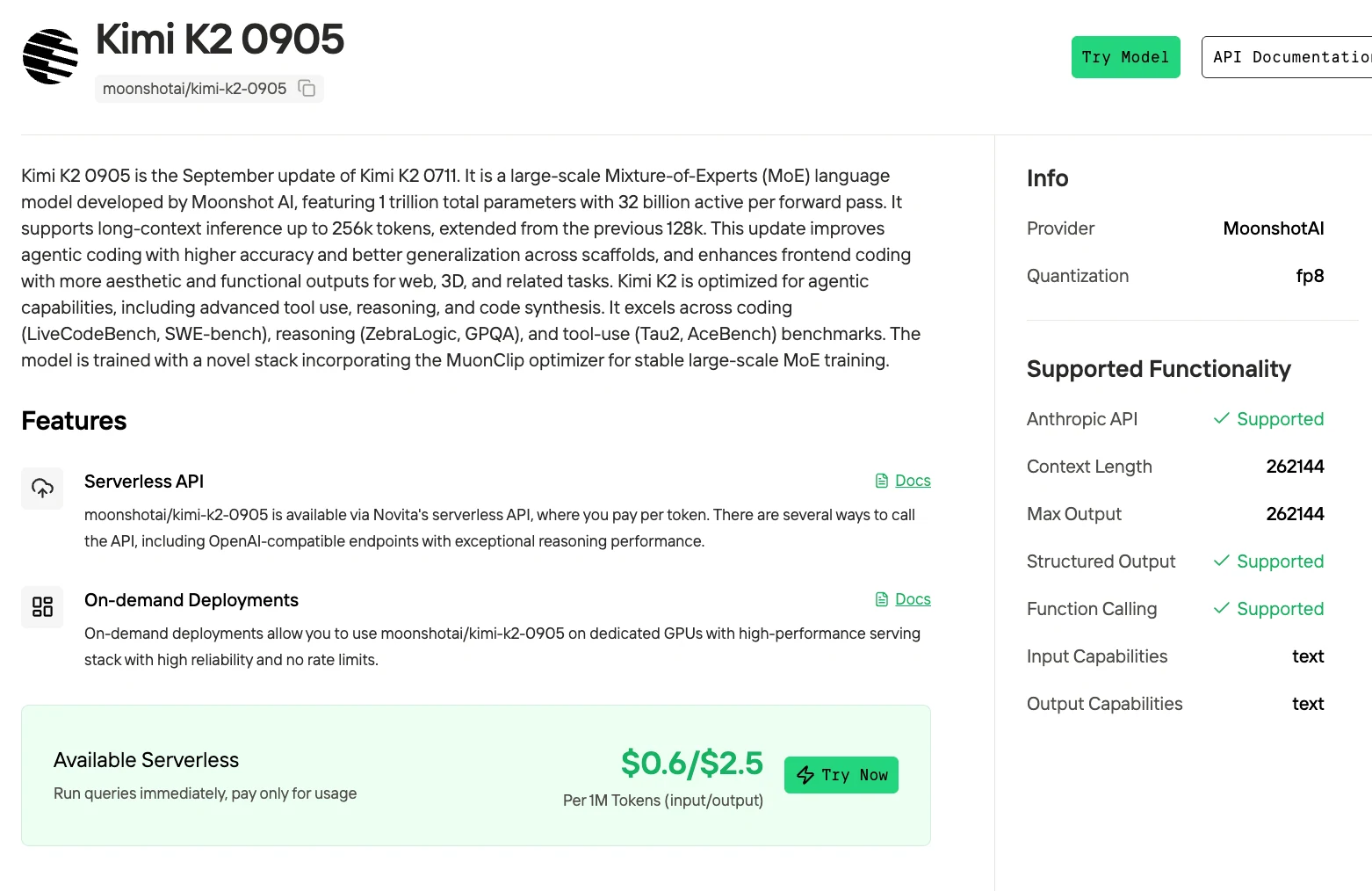
Kimi K2 in Cursor
Step 1: Install and Activate Cursor
- Download the newest version of Cursor IDE from cursor.com
- Subscribe to the Pro plan to enable API-based features
- Open the app and finish the initial configuration
Step 2: Access Advanced Model Settings
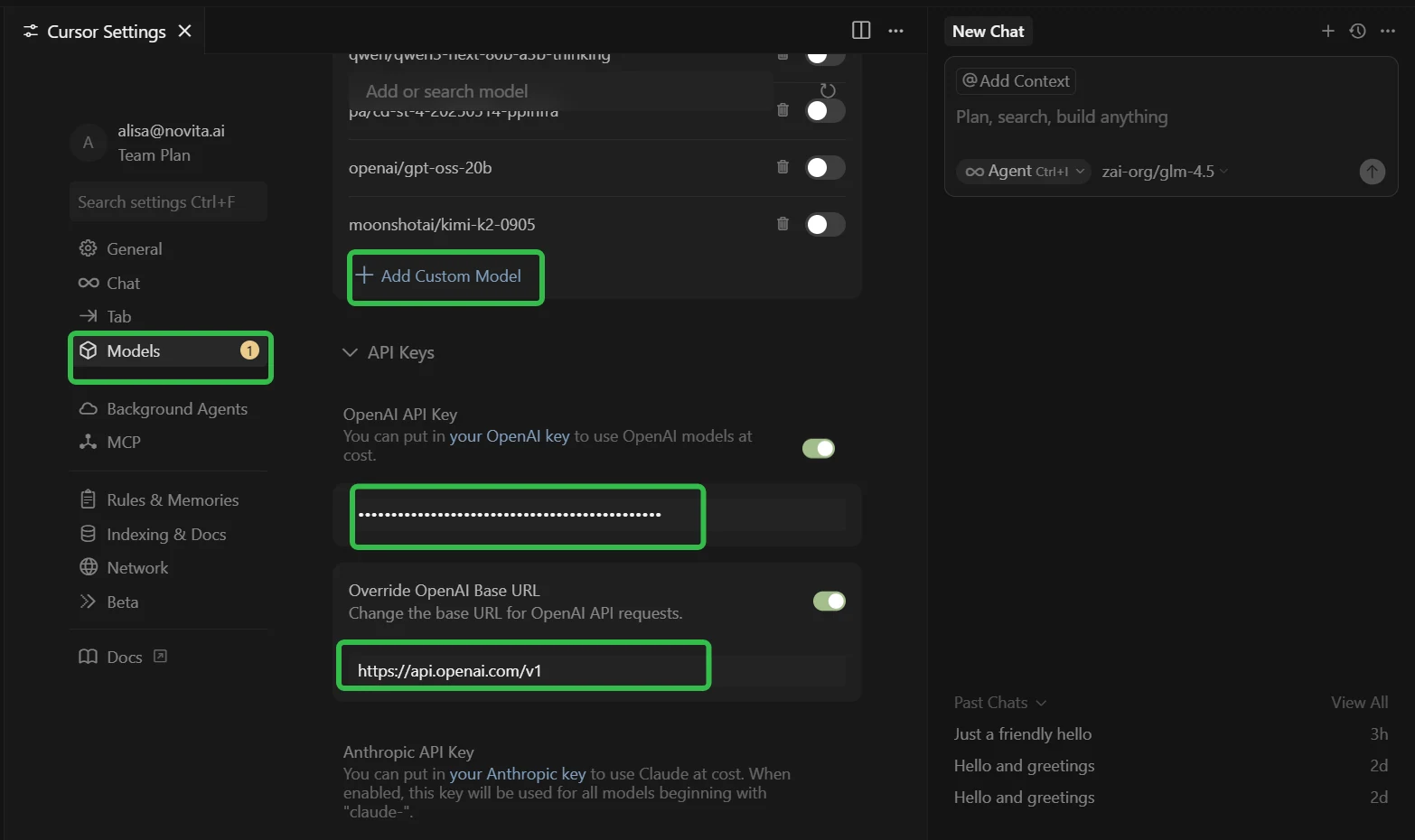
- Open Cursor Settings (use Ctrl + F to find it quickly)
- Go to the “Models” tab in the left menu
- Find the “API Configuration” section
Step 3: Configure Novita AI Integration
- Expand the “API Keys” section
- ✅ Enable “OpenAI API Key” toggle
- ✅ Enable “Override OpenAI Base URL” toggle
- In “OpenAI API Key” field: Paste your Novita AI API key
- In “Override OpenAI Base URL” field: Replace default with:
https://api.novita.ai/openai
Step 4: Add Multiple AI Coding Models
Click ”+ Add Custom Model” and add each model:
- moonshotai/kimi-k2-0905
- moonshotai/kimi-k2-instruct
- openai/gpt-oss-120b
- zai-org/glm-4.6
- deepseek/deepseek-v3.1
Step 5: Test Your Integration
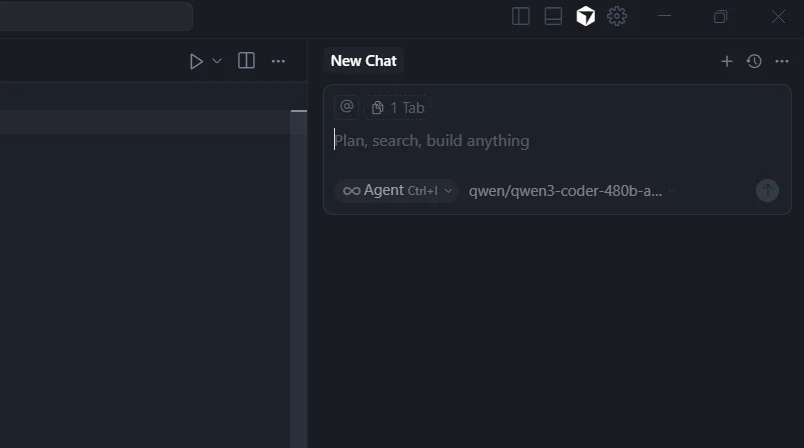
- Start new chat in Ask Mode or Agent Mode
- Test different models for various coding tasks
- Verify all models respond correctly
What Common Errors Occur when Using Kimi K2 in Cursor?
Tool-Calling Support Limitations
- Issue: Kimi K2 in Cursor sometimes doesn’t support tool-calls, leading to errors like “model doesn’t support tools.”
- Solution: Test locally on smaller tasks first, monitor tool-use configurations, and ensure that proper tool integrations are set up.
Latency and Speed Issues
- Issue: Users report that Kimi K2 sometimes has slower response times compared to proprietary models.
- Solution: Monitor latency and adjust token cost per operation. Consider using a fallback model for critical flows.
Setup/Configuration Errors
- Issue: Incorrect API endpoints or provider domain configurations can cause connection failures (e.g., issues between .cn vs .ai).
- Solution: Double-check the endpoint configurations and provider domains to ensure they match the correct model settings.
Context-Window and Memory Limits
- Issue: Kimi K2 has a smaller effective context window compared to some proprietary models, potentially impacting large-scale coding tasks.
- Solution: Keep the context window size under control, use incremental contexts, and monitor token costs for large files or repositories.
Model Drift and Unexpected Behavior
- Issue: Integration is custom, meaning users may experience occasional failures or unexpected outputs as the model adapts to code changes.
- Solution: Implement clear prompts, manage expectations, and handle drift by refining the prompts, maintaining precise control over what the model modifies.
How is Kimi K2 Deployed in Environments Beyond Cursor?
Kimi K2 is deployed in various contexts beyond Cursor including self-hosting, open-source usage, and agentic applications.
Using CLI like Trae,Claude Code, Qwen Code
If you want to use Novita AI’s top models (like Qwen3-Coder, Kimi K2, DeepSeek R1) for AI coding assistance in your local environment or IDE, the process is simple: get your API Key, install the tool, configure environment variables, and start coding.
For detailed setup commands and examples, check the official tutorials:
- Trae : Step-by-Step Guide to Access AI Models in Your IDE
- Claude Code:How to Use Kimi-K2 in Claude Code on Windows, Mac, and Linux
- Qwen Code:How to Use OpenAI Compatible API in Qwen Code (60s Setup!)
Multi-Agent Workflows with OpenAI Agents SDK
Build advanced multi-agent systems by integrating Novita AI with the OpenAI Agents SDK:
- Plug-and-play: Use Novita AI’s LLMs in any OpenAI Agents workflow.
- Supports handoffs, routing, and tool use: Design agents that can delegate, triage, or run functions, all powered by Novita AI’s models.
- Python integration: Simply set the SDK endpoint to
https://api.novita.ai/v3/openaiand use your API key.
Connect API on Third-Party Platforms
OpenAI-Compatible API: Enjoy hassle-free migration and integration with tools such as Cline and Cursor, designed for the OpenAI API standard.
Hugging Face: Use Modeis in Spaces, pipelines, or with the Transformers library via Novita AI endpoints.
Agent & Orchestration Frameworks: Easily connect Novita AI with partner platforms like Continue, AnythingLLM,LangChain, Dify and Langflow through official connectors and step-by-step integration guides.
Kimi K2 proves to be a powerful model, excelling in coding, reasoning, and agentic tasks, especially in environments like Cursor. Despite some integration and speed challenges, these can be mitigated with proper configuration and incremental testing. Kimi K2’s cost-effectiveness and strong performance in benchmarks make it a top choice for developers, particularly when compared to proprietary models like Claude 4. By addressing the common issues such as tool-calling and latency, and leveraging its flexible deployment options, Kimi K2 provides robust support for both high-volume coding workflows and advanced agentic tasks. The 0905 Instruct version offers significant improvements in stability and performance, enhancing the overall experience.
Frequently Asked Questions
What are the main issues when using Kimi K2 in Cursor?
When using Kimi K2 in Cursor, users may encounter issues with tool-calling support, slower response times, setup/configuration errors, and smaller context windows compared to proprietary models. These can be mitigated by testing locally on smaller tasks, adjusting configurations, and refining prompts for better control.
How does Kimi K2 perform in coding and reasoning tasks?
Kimi K2 excels in coding and reasoning tasks, achieving impressive results on benchmarks like SWE-Bench and LiveCodeBench. Its performance in coding is competitive, scoring around 71.6% on SWE-Bench Verified and 53.7% on LiveCodeBench. The 0905 Instruct version further improves by increasing accuracy by 2-4 points.
What is the cost-performance trade-off between Kimi K2 and Claude 4?
Kimi K2 offers significantly better cost efficiency than Claude 4, with a much lower cost per million tokens. For high-volume coding tasks, Kimi K2 provides a more cost-effective solution while still delivering strong performance in reasoning and code generation.
Novita AI is an AI cloud platform that offers developers an easy way to deploy AI models using our simple API, while also providing an affordable and reliable GPU cloud for building and scaling.
Recommend Reading



