Agentic coding is moving beyond autocomplete: modern tools can plan tasks, edit multiple files, run commands, and loop on failures until the result actually works. OpenCode is an open-source, model-agnostic coding agent you can run in the terminal (and also as a desktop app or IDE extension), which makes it a practical way to try this workflow in your own environment.
💡In this guide, you will have:
- Connect Kimi K2.5 to OpenCode via Novita AI’s API
- OpenCode installed and ready to use across your preferred interface (terminal/desktop/IDE)
- Build a small demo project.
What is OpenCode?
OpenCode is an open-source AI coding agent that you can run in multiple developer environments—most commonly as a terminal-based interface (CLI + TUI), but also as a desktop app or an IDE extension.
OpenCode vs Claude Code
OpenCode and Claude Code are both terminal-based AI coding agents, but they take different paths.
- OpenCode is an open-source, provider-agnostic agent: it highlights support for “75+ LLM providers through Models.dev (including local models)” and positions itself as a flexible tool you can wire to different model backends.
- Claude Code, by contrast, is Anthropic’s official Claude-first CLI—a command-line tool to access Claude models in the terminal—plus an official ecosystem for extensions (plugins) and tool/data connections via MCP.
Quick comparison table
| Aspect | OpenCode | Claude Code |
| Positioning | Open-source, multi-model terminal coding agent | Anthropic’s official Claude-first terminal coding agent |
| Model / provider choice | 75+ LLM providers through Models.dev, incl. local models | Built around Claude; extends via MCP + plugins |
| GitHub automation | /opencode or /oc comment triggers; runs on GitHub Actions runner | Extensions focus on plugins/MCP (official ecosystem) |
| Pricing entry point | Tool is open-source; cost depends on your chosen model backend | Claude plans (Pro/Max/Team/Enterprise) |
Why Kimi K2.5?
Kimi K2.5 brings together native multimodality, real tool execution, and large-scale agent orchestration in a single open model. Trained on ~15T mixed vision–text tokens, it spans image/video understanding, code generation, and visual debugging.
From Kimi
Practical takeaways
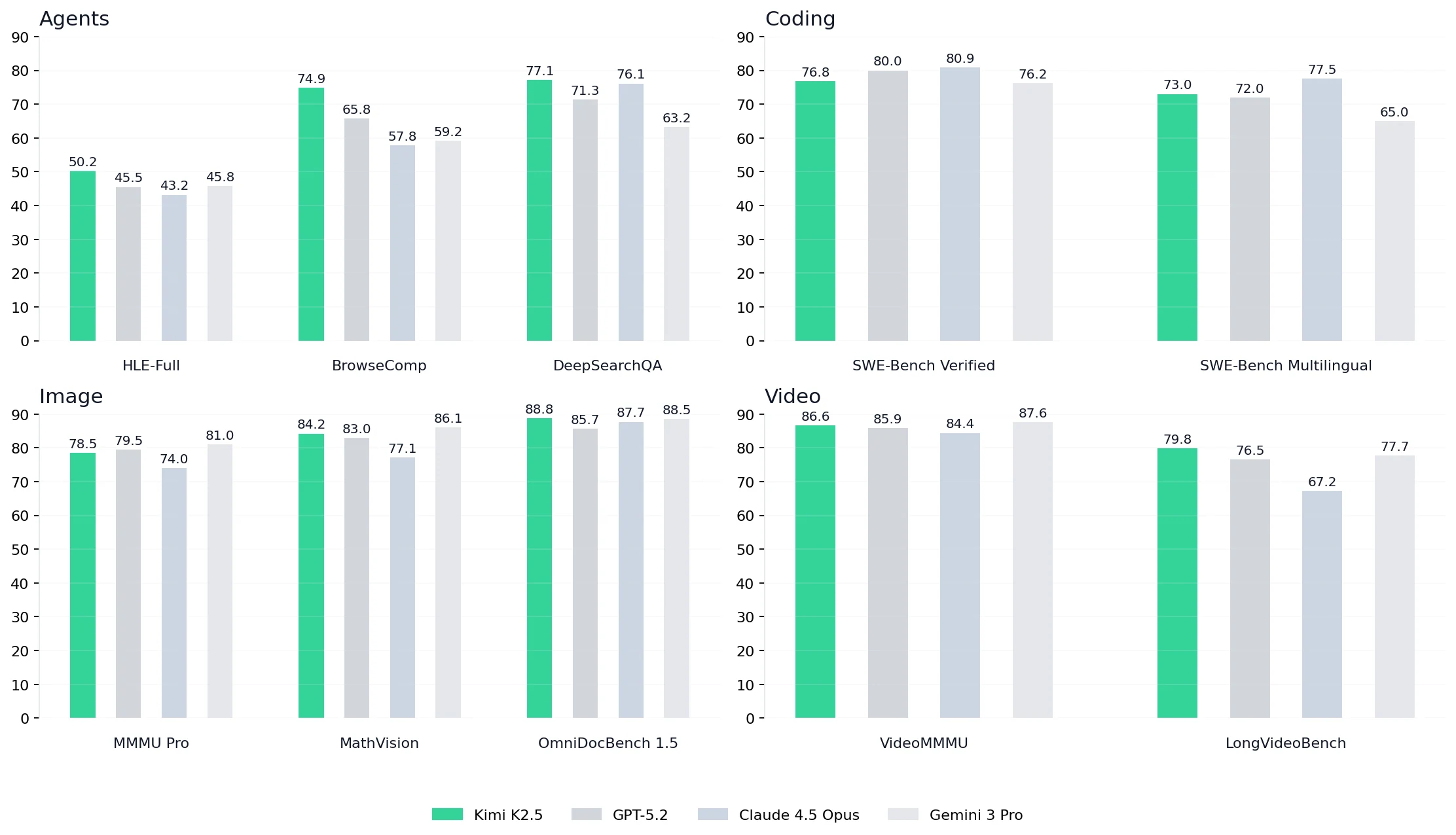
- Stronger agent benchmarks vs GPT-5.2, Claude 4.5 Opus, and Gemini 3 Pro: In the chart, Kimi K2.5 leads on agentic evaluation suites: HLE-Full 50.2, BrowseComp 74.9, DeepSearchQA 77.1. On BrowseComp, K2.5 is ahead of GPT-5.2 (65.8), Claude 4.5 Opus (57.8), and Gemini 3 Pro (59.2)—useful for long-horizon tasks that require browsing, evidence gathering, and iterative refinement.
- Competitive repo-level coding with a multilingual edge: K2.5 hits SWE-Bench Verified 76.8 and SWE-Bench Multilingual 73.0. While Claude 4.5 Opus is slightly higher on Verified (80.0) and Gemini 3 Pro leads there too (80.9), K2.5 stays strongly competitive and stands out in multilingual settings—ahead of GPT-5.2 (72.0) and far ahead of Gemini 3 Pro (65.0)—which matters for multi-file patches in mixed-language repos.
- Stronger image understanding for developer workflows (docs, diagrams, UI): Across image benchmarks, K2.5 is consistently top-tier: MMMU Pro 78.5, MathVision 84.2, OmniDocBench 1.5 88.8—supporting practical tasks like reading technical PDFs, interpreting diagrams, and turning visual requirements into code.
- Video reasoning that helps in real product iteration: For video tasks, K2.5 posts VideoMMMU 86.6 and LongVideoBench 79.8, indicating stronger long-context video comprehension—handy for analyzing product demos, debugging UI recordings, or extracting requirements from walkthroughs.
How to Install OpenCode
OpenCode provides a few installation options. The quickest is the one-line install script, and the most portable is installing the npm package.
macOS / Linux
Recommended:
curl -fsSL https://opencode.ai/install | bashOr (cross-platform):
npm install -g opencode-ai
# or
bun add -g opencode-ai
Start:
opencodeWindows
Recommended:
npm install -g opencode-ai
# or
bun add -g opencode-ai
curl | bashrequires a bash environment (WSL or Git Bash). In PowerShell/CMD, use npm/bun.
Start:
opencodeHow to Use MiniMax M2.1 in OpenCode
Getting Your API Key on Novita AI
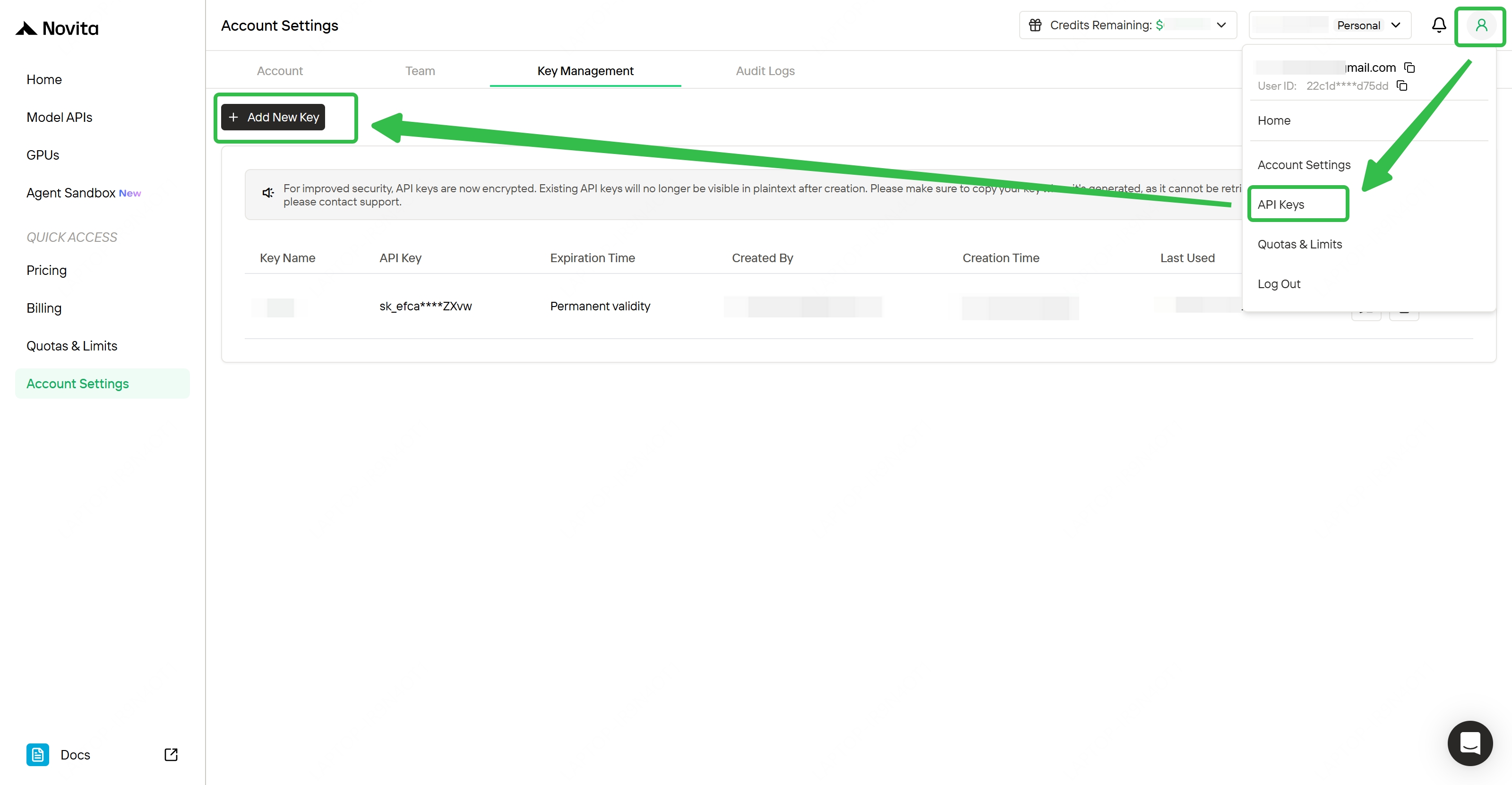
- Step 1: Create or Login to Your Account Visit
[https://novita.ai](https://novita.ai)and sign up or log in. - Step 2: Navigate to Key Management After logging in, find “API Keys”.
- Step 3: Create a New Key Click the “Add New Key” button.
- Step 4: Save Your Key Immediately Copy and store the key as soon as it is generated; it is usually shown only once.
Add your Novita API key to OpenCode
- Launch OpenCode:
opencode- In the OpenCode prompt, run:
/connect- Search and select Novita AI, then paste your Novita API key.
- Select Kimi K2.5 (model id:
moonshotai/kimi-k2.5).
That’s it—OpenCode will route agent requests through Novita AI’s API using the model you selected.
Build Your First Project: Woolf Stream
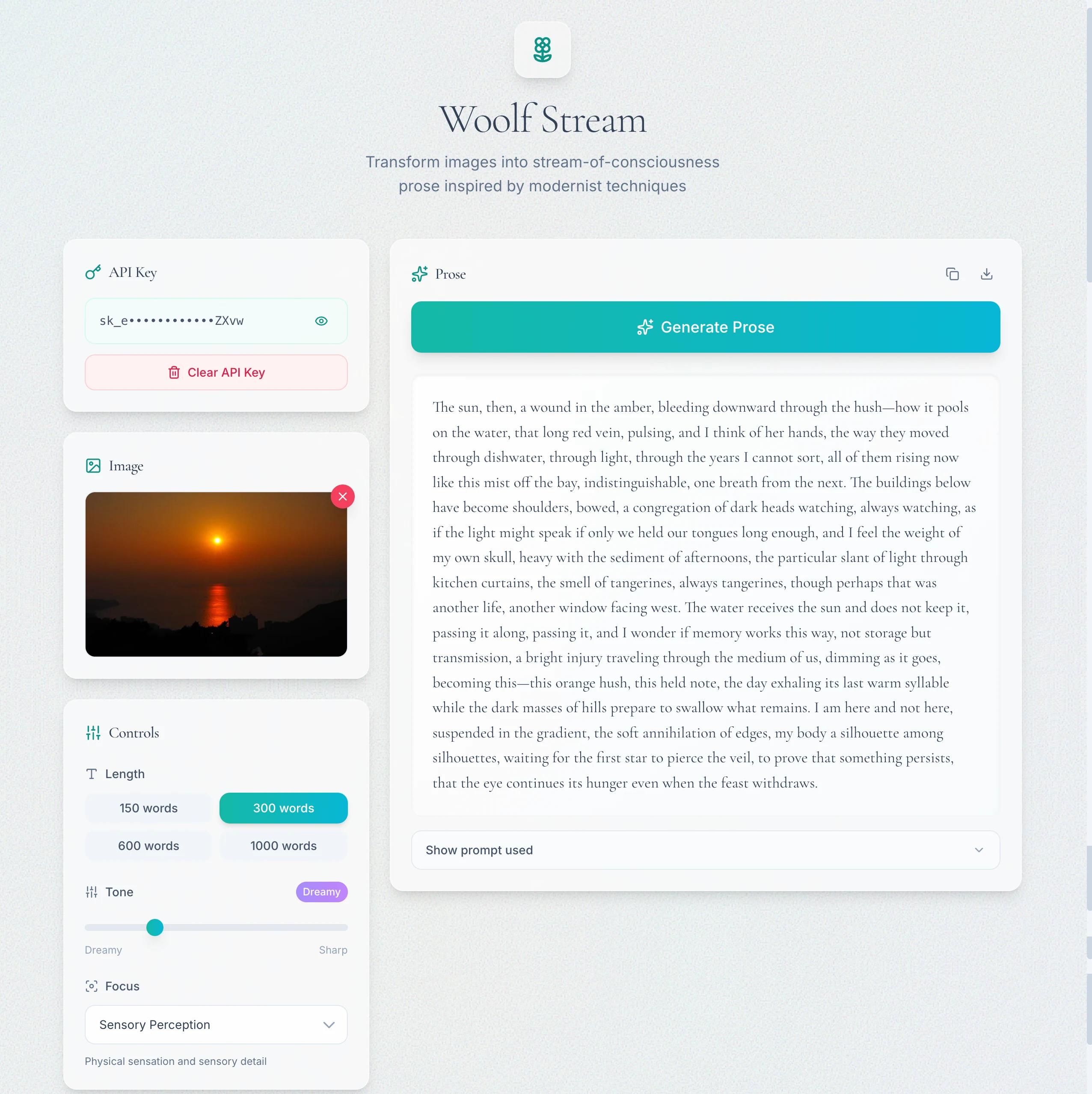
To make the demo instantly visual (and easy to share in screenshots), we’ll build a single-page web app: Woolf Stream. Users upload an image, choose a few creative controls, and the app calls Novita AI’s OpenAI-compatible chat endpoint with Kimi K2.5 (image-in-chat supported) to generate text-only stream-of-consciousness prose inspired by early 20th-century modernist techniques—without quoting or imitating Virginia Woolf verbatim.
What we’ll build
- A one-page Next.js 14 (App Router) demo with TypeScript + TailwindCSS
- API key panel (password input + show/hide, save/clear to localStorage; never hardcode)
- Drag & drop image upload (png/jpg) with preview and client-side base64 data URL conversion
- Controls:
- Length presets: 150 / 300 / 600 / 1000 words
- Tone slider: dreamy ↔ sharp
- Focus dropdown: sensory / memory / time / social gaze
- Generate flow:
- “Generate Prose” button disabled until API key + image exist
- Loading indicator + error panel with HTTP status + troubleshooting hints
- Output:
- A reading card with the generated prose
- Copy button + Download .txt
- “Show prompt used” accordion (for transparency & reproducibility)
Switch to Build mode and execute
In OpenCode, switch to Build mode, then paste the prompt below.
Prompt
Build a single-page demo with Next.js 14 (App Router) + TypeScript + TailwindCSS.
Goal: User uploads an image (png/jpg). The app sends the image to an OpenAI-compatible chat endpoint (image-in-chat supported) and generates a beautiful stream-of-consciousness prose passage inspired by Virginia Woolf’s modernist techniques. Output is TEXT ONLY.
API requirements (strict):
- OpenAI-compatible custom base URL: https://api.novita.ai/openai
- Model: moonshotai/kimi-k2.5
- User enters their own API key (password field + show/hide). Store only in localStorage. Never hardcode.
- Requests include Authorization: Bearer {userKey}.
UI requirements:
- Monet / Water Lilies vibe UI: soft pastel palette, paper texture, subtle brush-stroke gradient background, gentle glow shadows, rounded cards, tiny ripple hover animation. Mobile responsive.
- Components: API key save/clear, drag&drop upload + preview, controls: length (150/300/600/1000 words), tone slider (dreamy↔sharp), focus dropdown (sensory/memory/time/social gaze), Generate button (disabled if missing key or image), loading indicator, error panel.
- Output: rendered prose in a reading card + Copy + Download .txt + “Show prompt used” accordion.
Multimodal call (must):
- Use POST /v1/chat/completions.
- Send messages where content is an array with BOTH:
{type:“text”, text:“…instructions…”}
{type:“image_url”, image_url:{url:“data:image/png;base64,…”}}
- Display the model’s text response.
Writing constraints (important):
- Produce ORIGINAL prose inspired by early 20th-century modernist stream-of-consciousness (lyrical rhythm, interiority, sensory detail, associative leaps, fluid time).
- Do NOT quote or reproduce any Woolf text. Do NOT claim to be Woolf. No direct pastiche lines.
- Anchor to the image: reflect composition, light, colors, mood, implied motion; preserve subject placement.
- Output: one continuous passage (1–3 paragraphs max). No bullet points, no analysis.
Deliver:
- Full runnable code + file tree.
- An API wrapper that injects base_url and user key.
- Client-side image -> base64 data URL.
- Clear errors with HTTP status code and troubleshooting hints.
Run locally
After OpenCode generates the project:
npm install
npm run dev
Open the local URL printed by Next.js (usually http://localhost:3000) and confirm:
- The page renders with the Monet / Water Lilies look-and-feel
- API key save/clear works (stored only in localStorage), and show/hide toggles correctly
- Drag & drop upload works, preview shows the selected image
- “Generate Prose” is disabled until API key + image exist
- Prose is text-only, 1–3 paragraphs, and clearly image-anchored
- Copy + Download
.txtwork - “Show prompt used” reveals the exact prompt sent
- Errors (bad key / network) show HTTP status and clear hints
Demo: Woolf Stream
OpenCode Beyond the Terminal: Desktop App + IDE Integrations
OpenCode is often used in the terminal, but you can also run it as a Desktop app (Beta) or inside your IDE—and in both cases, you can keep using Novita AI’s OpenAI-compatible API. The interface changes, but the model/provider setup stays the same: select minimax/minimax-m2.1.
Desktop app
OpenCode’s Desktop build is available for macOS, Windows, and Linux. If you prefer a standalone UI for longer agent sessions, the Desktop app is a great fit—and it can use the same provider configuration you already created for Novita AI.
IDE integrations
OpenCode provides official integration flows for:
- VS Code
- Cursor
- Zed
- Windsurf
- VSCodium
Conclusion
OpenCode makes it easy to adopt agentic workflows without locking into one vendor. With Kimi K2.5 on Novita AI, you get a practical setup for repo-level iteration and multimodal dev tasks—usable from the terminal (or desktop/IDE) with the same API configuration.
Novita AI is an AI cloud platform that offers developers an easy way to deploy AI models using our simple API, while also providing affordable and reliable GPU cloud for building and scaling.
Frequently Asked Questions
What is OpenCode?
OpenCode is an open-source AI coding agent framework that lets LLMs write, run, and debug code inside a real development environment, speeding up end-to-end builds.
Who is the owner of OpenCode?
OpenCode isn’t owned by a large AI lab like Claude or Gemini. It is an open-source project maintained by the OpenCode team/community, with development led by the creators behind opencode.ai. There’s no proprietary “model owner” — the project is designed to be provider-agnostic and independent of any single LLM vendor.
Is OpenCode better than Claude?
OpenCode isn’t strictly “better” than Claude Code—it’s different. OpenCode is open-source and model-agnostic, making it a better choice if you want flexibility and the freedom to run multiple models (such as Kimi K2.5 via Novita AI) in one agent workflow, while Claude Code is Anthropic’s official, Claude-first CLI that offers the smoothest experience if you’re fully committed to the Claude ecosystem.
Is OpenCode Safe?
Yes, OpenCode does not store any of your code or context data, so that it can operate in privacy sensitive environments.
Is OpenCode Free?
OpenCode is one of those rare open-source tools that makes you pause. It’s currently topping GitHub with over 80k stars—and after trying it, the momentum makes sense. Think of it as an AI coding agent in the same vein as Claude Code, but fully free and open-source.