GLM-4.7 is one of the strongest open-weight model families for coding right now. It is often described by its creators as tracking the Claude Sonnet line on key real-world coding benchmarks, while remaining significantly more accessible in cost and deployment flexibility.
In this guide, you’ll run GLM-4.7 inside Claude Code by routing Claude Code’s requests through Novita AI’s Anthropic-compatible endpoint. This gives you a “Claude Code–style” agent workflow including planning, editing files, running terminal commands while choosing GLM-4.7 as the underlying model.
The Introduction of Claude Code and GLM-4.7
What is Claude Code?
Claude Code is an agentic command‑line interface (CLI) that transforms natural language into working code and multi‑step development workflows. Unlike traditional autocomplete plugins, it behaves like an intelligent coding agent that is capable of:
- Codebase analysis: mapping and explaining entire codebases, including architecture and dependencies.
- File management: creating, editing, and organizing project files autonomously.
- Terminal execution: running commands, installing packages, and managing build or deployment processes.
- Complex workflows; handling advanced tasks such as converting GitHub issues into pull requests.
- Contextual understanding: maintaining awareness of your project structure across interactions.
This agentic approach means Claude Code does not just respond to queries. It participates in your development process, makes decisions, and takes actions to move your project toward your goals.
GLM-4.7: What It’s Good At
GLM4.7, released by Z.ai in December 2025, is the result of several iterations focused on coding, agentic reasoning, and tool use. It uses a 355‑billion‑parameter Mixture‑of‑Experts architecture with sparse activation; this achieves frontier‑level performance while preserving throughput suitable for real‑time workflows.
- Technical Specifications:
| Feature | Specification |
| Architecture | 355B parameter MoE |
| Context Window | 200,000 tokens input |
| Output Capacity | 128,000 tokens |
| Equivalent Capacity | ~600 pages of documentation or 150,000 lines of code |
- Adaptive Reasoning Modes:
| Mode | Description | Best For |
| Interleaved Thinking | Model pauses between actions to verify logic before generating code | Reducing hallucinated function calls |
| Preserved Thinking | Maintains reasoning context across conversation turns | Multi-hour debugging sessions without context degradation |
| Turn-Level Thinking | Toggle deep reasoning on/off per request | Quick syntax queries (off) vs. complex architectural decisions (on) |
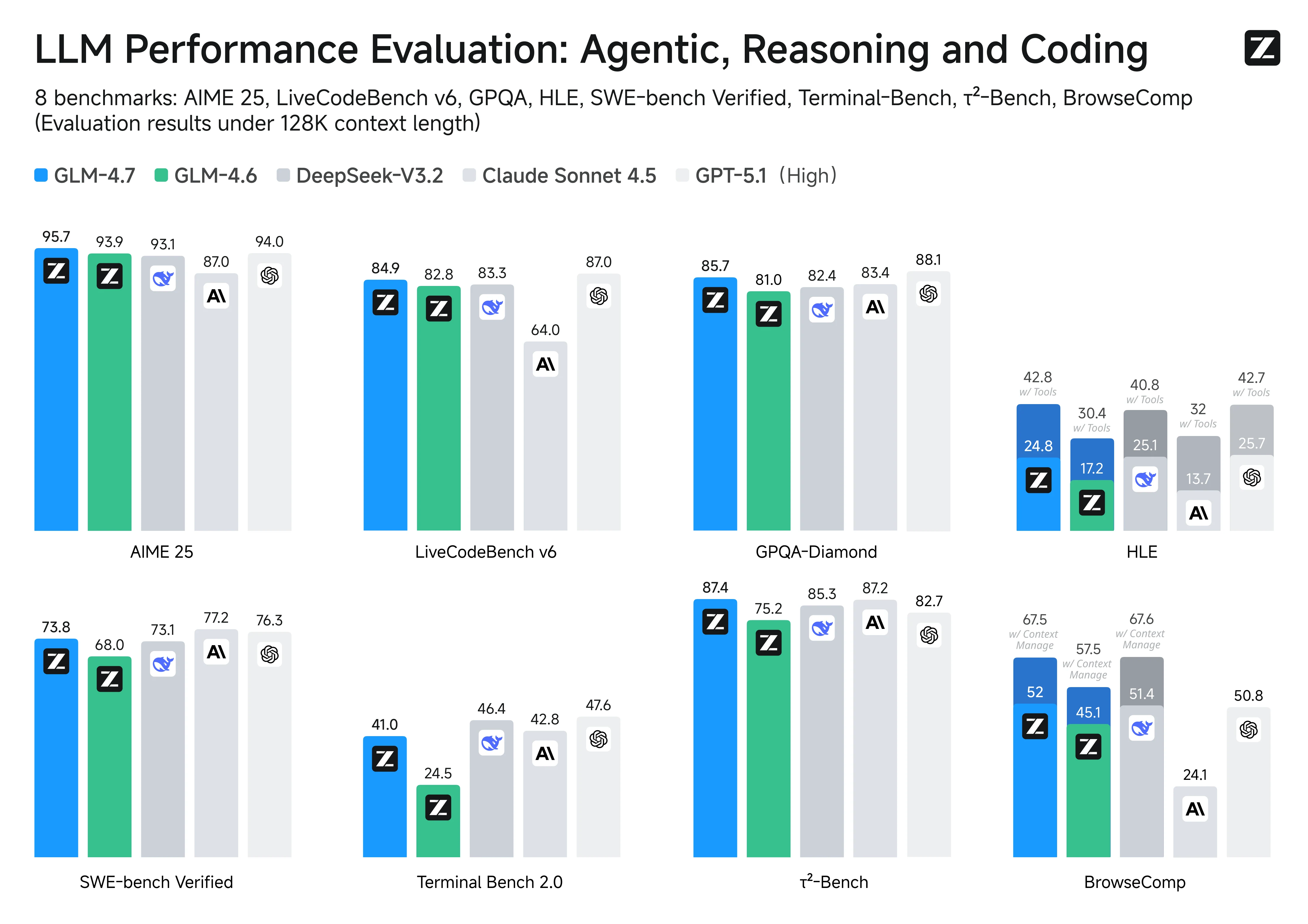
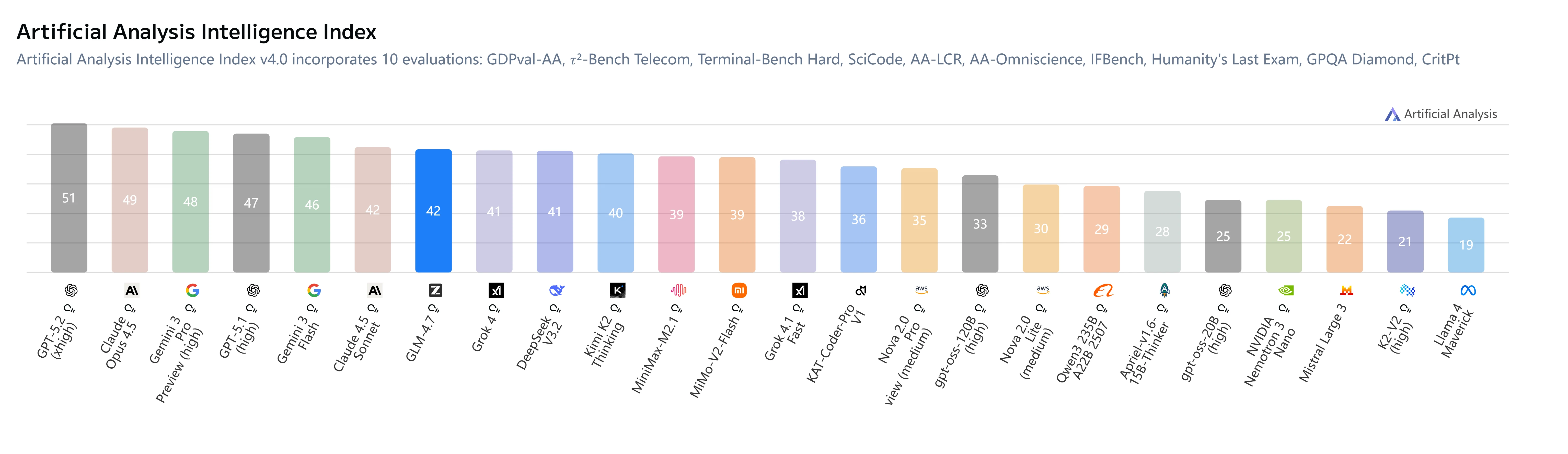
GLM-4.7 demonstrates strong coding and agentic performance across multiple benchmarks such as LiveCodeBench v6 and SWE-bench Verified, surpassing or closely matching Claude Sonnet 4.5 in several key tasks. In reasoning-heavy agent benchmarks like GPQA-Diamond and τ²-Bench, GLM-4.7 also maintains competitive scores, reflecting solid planning and tool-use capabilities. Overall, these results position GLM-4.7 as one of the most capable open-weight alternatives to Claude for real-world coding workflows.
Why Novita AI for GLM-4.7?

We have optimized the deployment of GLM-4.7 to ensure the smoothest coding experience. Key benefits include:
- Highest Throughput: 44.45 tokens per second—17% faster than the next competitor
- Reliability: 99.5% uptime with bf16 precision for good output quality
- Full Caching Support: One of the few providers supporting both cache read AND cache write functionality
- Large Context: 204.8K context window for analyzing entire codebases
Use GLM-4.7 via Novita AI
Step 1: Getting Your API Key on Novita AI
- Create or Login to Your Account
Visit [https://novita.ai](https://novita.ai) and sign up or log in to your existing account
- Navigate to Key Management
After logging in, find “API Keys”
- Create a New Key
Click the “Add New Key” button.
- Save Your Key Immediately
Copy and store the key as soon as it is generated; it is usually shown only once and cannot be retrieved later. Keep the key in a secure location such as a password manager or encrypted notes
Step 2: Installing Claude Code
- Check Node.js version:
First, verify that Node.js 18 or higher is installed on your system:
node -v
# Expected output: v18.x.x or higher (e.g.v20.10.0)
If Node.js is missing or older than v18, download and install a recent version from [https://nodejs.org](https://nodejs.org)
- Installation Command:
Install Claude Code globally using npm:
npm install -g @anthropic-ai/claude-code- Verify Installation:
claude --versionStep 3: Setting Up Environment Variables
On Windows
Set the variables for the current CMD session:
set ANTHROPIC_BASE_URL=https://api.novita.ai/anthropic
set ANTHROPIC_AUTH_TOKEN=<Your_Novita_API_Key>
set ANTHROPIC_MODEL=zai-org/glm-4.7
set ANTHROPIC_SMALL_FAST_MODEL=zai-org/glm-4.7
On macOS and Linux
Export the variables in your shell:
export ANTHROPIC_BASE_URL="https://api.novita.ai/anthropic"
export ANTHROPIC_AUTH_TOKEN="<Your_Novita_API_Key>"
export ANTHROPIC_MODEL="zai-org/glm-4.7"
export ANTHROPIC_SMALL_FAST_MODEL="zai-org/glm-4.7"
Step 4: Starting Claude Code
- Navigate to Your Project Directory
cd <path_to_your_project>- Launch Claude Code
claude .The dot (.) tells Claude Code to operate on the current directory, scanning and working within this project.
After startup, you will see an interactive Claude Code prompt with access to commands such as /init, /model, /review, and more.
Common session‑level commands include:
/init– Initialize Claude Code in the current directory./login– Authenticate with an API provider if needed./logout– Clear stored credentials./memory– View or edit persistent memory./model– View or switch the current model./permissions– Manage file and command permissions./review– Review pending changes before applying them./status– Show current session status./terminal-setup– Configure terminal integration./vim– Toggle Vim keybindings.
Building Your First Project
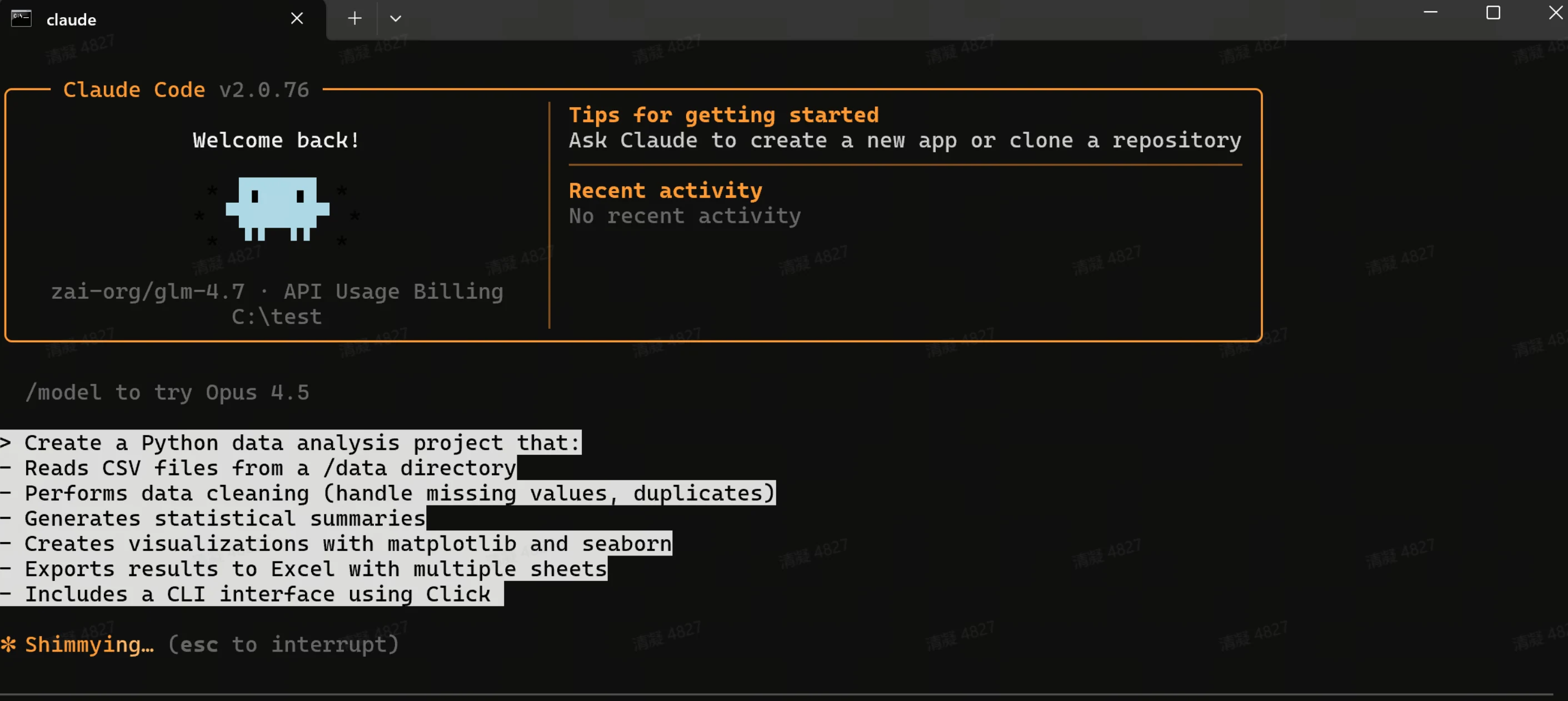
Claude Code excels at transforming detailed project descriptions into functional applications. After entering your prompt, press Enter to begin the task. Claude Code will analyze your requirements, create the necessary files, implement the functionality, and provide a complete project structure with documentation.
Using Claude Code in VSCode or Cursor
Claude Code integrates seamlessly with popular development environments. It enhances your existing workflow rather than replacing it.
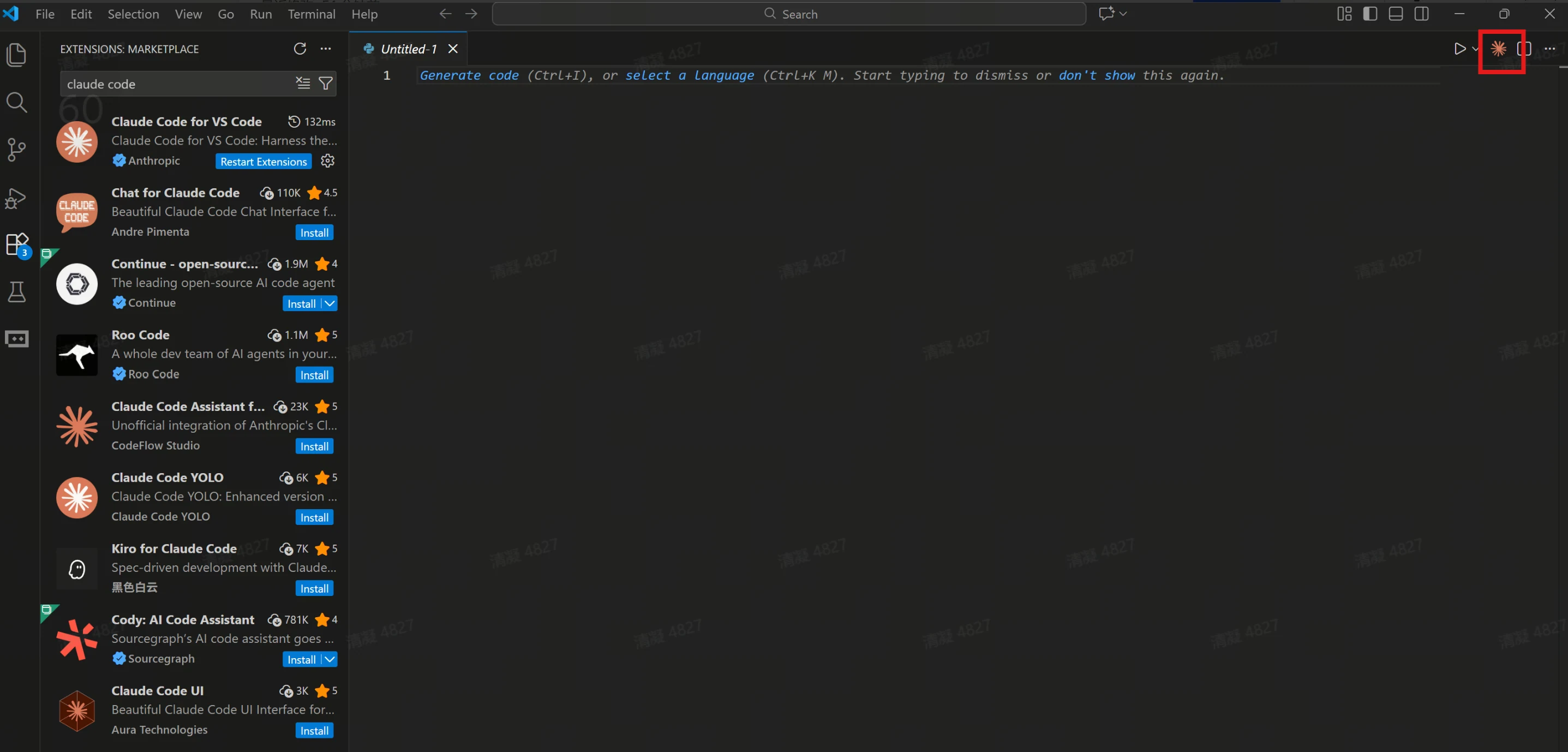
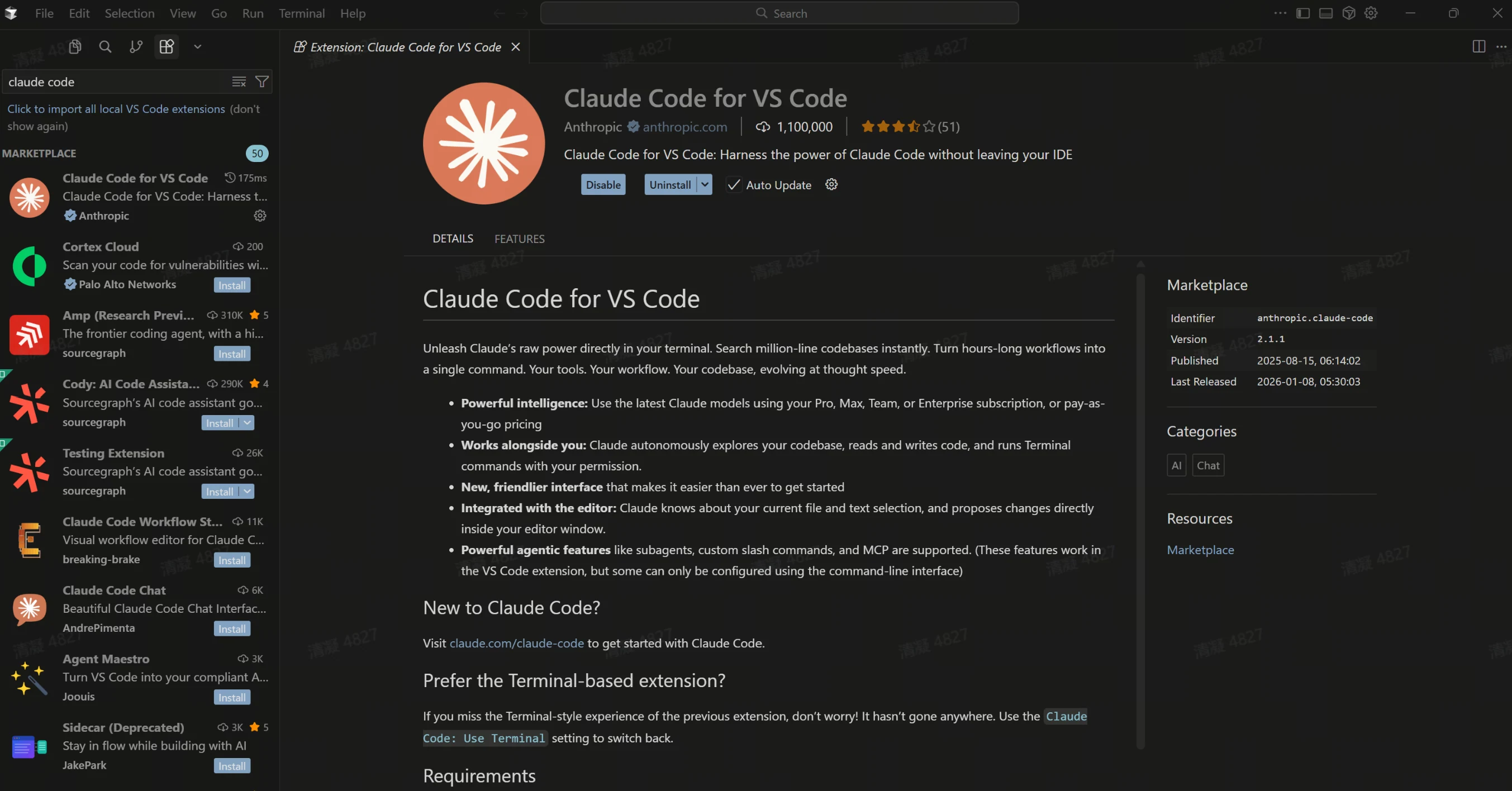
You can use Claude Code directly in the terminal within VSCode or Cursor. This maintains access to your familiar development tools while leveraging AI assistance.
Additionally, Claude Code plugins are available for both VSCode and Cursor. These plugins provide deeper integration with these editors, offering inline AI assistance, code suggestions, and project management features directly within your IDE interface.
Help and Documentation Resources
- Novita AI Resources:
| Resource | Link | Description |
| API Documentation | novita.ai/docs | Complete API reference, parameters, and examples |
| Model Catalog | novita.ai/models | All available models including GLM4.7 |
| Pricing Calculator | novita.ai/pricing | Estimate costs for your usage |
- Anthropic/Claude Code Resources:
| Resource | Link | Description |
| Claude Code Documentation | docs.anthropic.com/claude-code | Official usage guide and tutorials |
| GitHub Repository | github.com/anthropics/claude-code | Source code, issues, and discussions |
GLM4.7 Resources:
| Resource | Link | Description |
| Z.AI Official | https://docs.z.ai/guides/llm/glm-4.7 | Model documentation and research papers |
| Model Card | https://huggingface.co/zai-org/GLM-4.7 | Technical specifications and benchmarks |
Quick Reference Card
| Category | Item/Command | Value/Description |
Environment Setup | ANTHROPIC_BASE_URL | https://api.novita.ai/v3/openai |
| ANTHROPIC_API_KEY | your-novita-api-key | |
| ANTHROPIC_MODEL | zai-org/glm-4.7 | |
Quick Start | Install | npm install -g @anthropic-ai/claude-code |
| Navigate | cd your-project | |
| Run | claude . | |
Useful Commands | /help | Show all commands |
| /doctor | Diagnose issues | |
| /cost | Check token usage | |
| /clear | Reset conversation | |
Support | Novita AI Docs | novita.ai/docs |
| Claude Code Docs | docs.anthropic.com/claude-code |
Conclusion
Throughout this guide, you’ve discovered how to:
- Understand GLM4.7’s advanced architecture and reasoning capabilities
- Set up a Novita AI account and generate API keys
- Install and configure Claude Code for custom model integration
- Configure environment variables across different operating systems
- Build real-world projects using natural language commands
- Integrate Claude Code into VS Code and Cursor for seamless workflows
- Access help resources and documentation for continued learning
Start exploring GLM 4.7 today by signing up at Novita AI, getting your API key, and following this guide to enhance your development workflow with exceptional coding support.
Novita AI is an AI cloud platform that offers developers an easy way to deploy AI models using our simple API, while also providing affordable and reliable GPU cloud for building and scaling.
Frequently Asked Questions
Is GLM-4.7 free?
On Novita AI, GLM-4.7 is pay-per-token: $0.6/M tokens (input), $0.11/M tokens (cache read), and $2.2/M tokens (output)
On Z.ai, access is commonly packaged via a paid Coding Plan (starting at $3/month).
Some platforms may offer limited trials/quotas, but GLM-4.7 itself isn’t universally “free.”
Is GLM-4.7 really good?
For coding + agentic workflows, it’s positioned as a top-tier open model by its publisher. Z.ai reports strong results on coding and agent benchmarks (e.g., LiveCodeBench v6, SWE-bench Verified, BrowseComp, τ²-Bench), and frames it as competitive with Claude Sonnet 4.5 on several measurements
Does GLM-4.7 have vision?
GLM-4.7 is text-only. If you need vision, use a GLM-V variant instead (e.g. GLM-4.6V or GLM-4.5V, which support image inputs depending on the provider)