Key Highlights
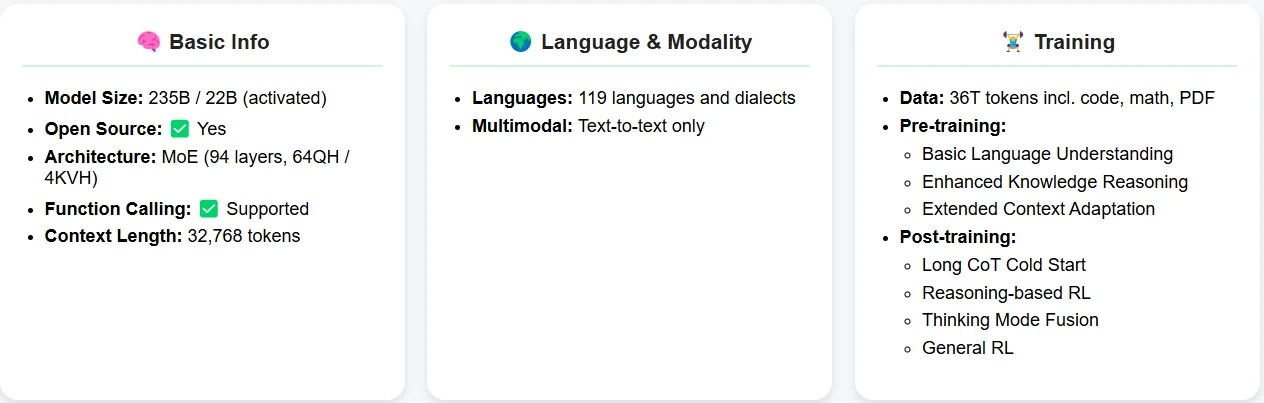
Qwen 3 235B A22B is a powerful Mixture-of-Experts (MoE) model designed for advanced reasoning, coding, and multilingual tasks.
Running it locally demands ~1128GB of VRAM—equivalent to 16× A100 or 16× H100 GPUs—making it inaccessible for most individual developers.
How to Access Qwen 3 235B A22B via API: 3 Simple Methods:
1.Direct API Integration using OpenAI-compatible endpoints
2.Multi-Agent Workflows with OpenAI Agents SDK
3.Third-Party Integrations via Hugging Face, LangChain, Dify, and more
Qwen 3 235B A22B is one of the most capable large language models available today, with top-tier performance in reasoning, mathematics, and multilingual tasks. However, with a VRAM requirement exceeding 1TB, running it locally is nearly impossible for most developers. Fortunately, API-based access makes it possible to harness this power without the heavy infrastructure.
What is Qwen 3 235B A22B?
Qwen 3 235B A22B Benchmark
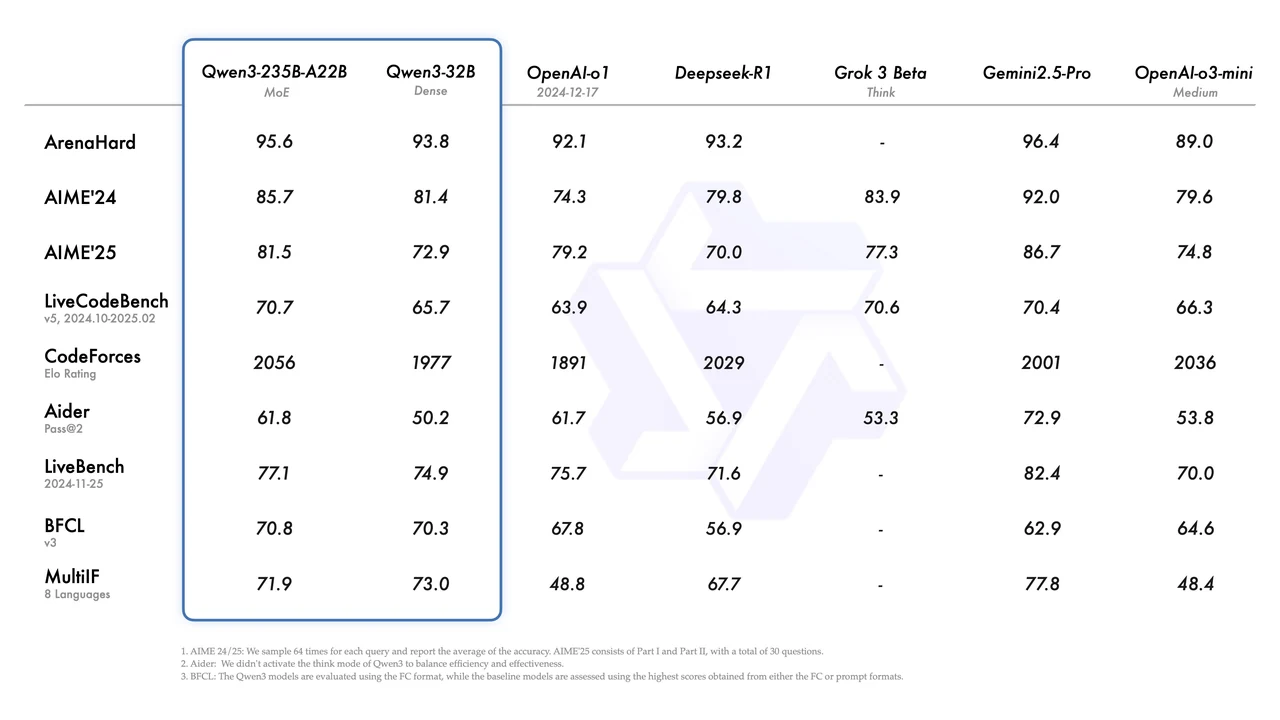
From Qwen
Qwen 3 235B A22B Hardware Requirements
Running Qwen 3 235B A22B locally demands ~1128GB of VRAM, equivalent to:
- 16× A100 (80GB) GPUs
- or 16× H100 (80GB) GPUs
This setup is far beyond the reach of most individual developers or small teams.
API Is the Smarter Choice for Most Developers
- Zero setup or hardware costs
- Instant access to cutting-edge models
- Scalable usage based on your needs
- Continuous model updates and maintenance
Option 1: Direct API Integration
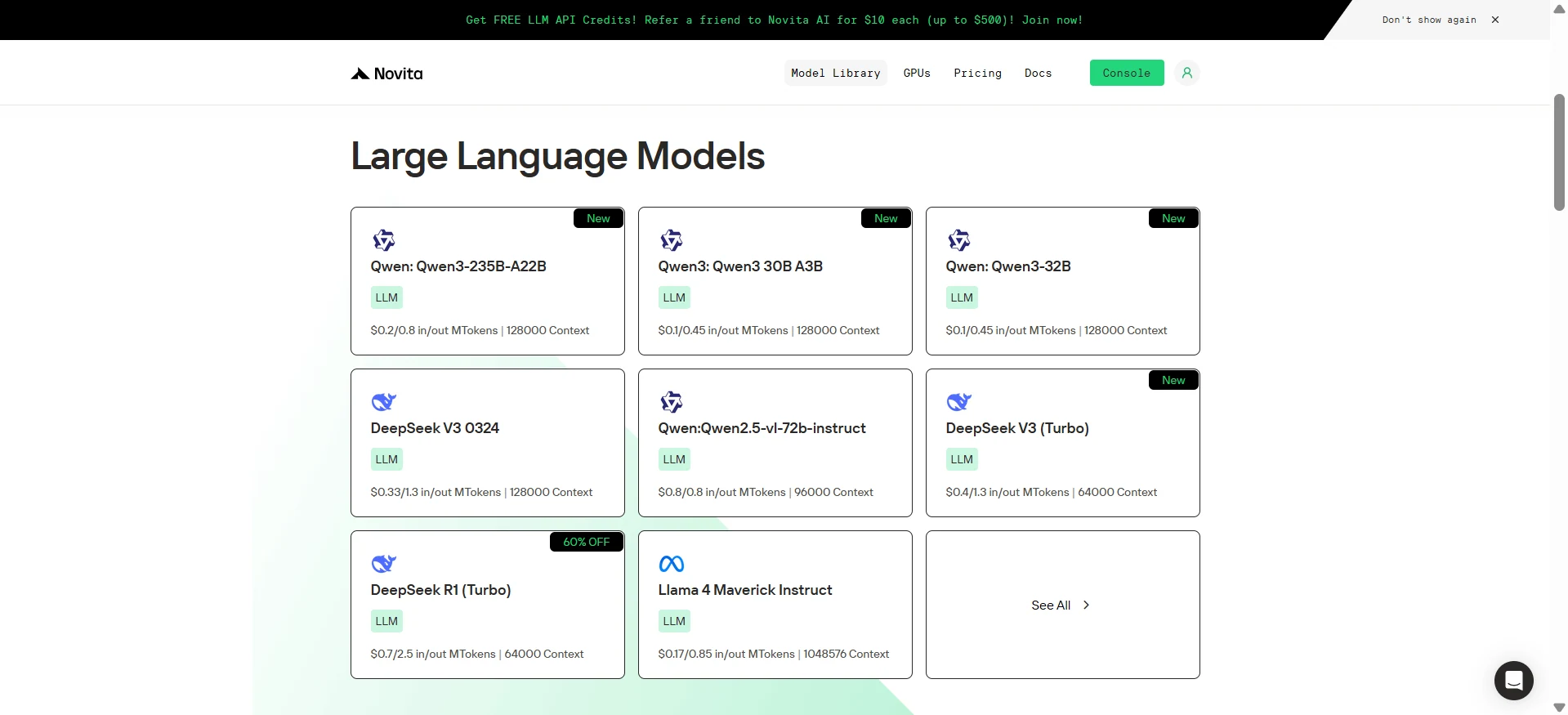
Step 1: Log In and Access the Model Library
Log in to your account and click on the Model Library button.

Step 2: Choose Your Model
Browse through the available options and select the model that suits your needs.
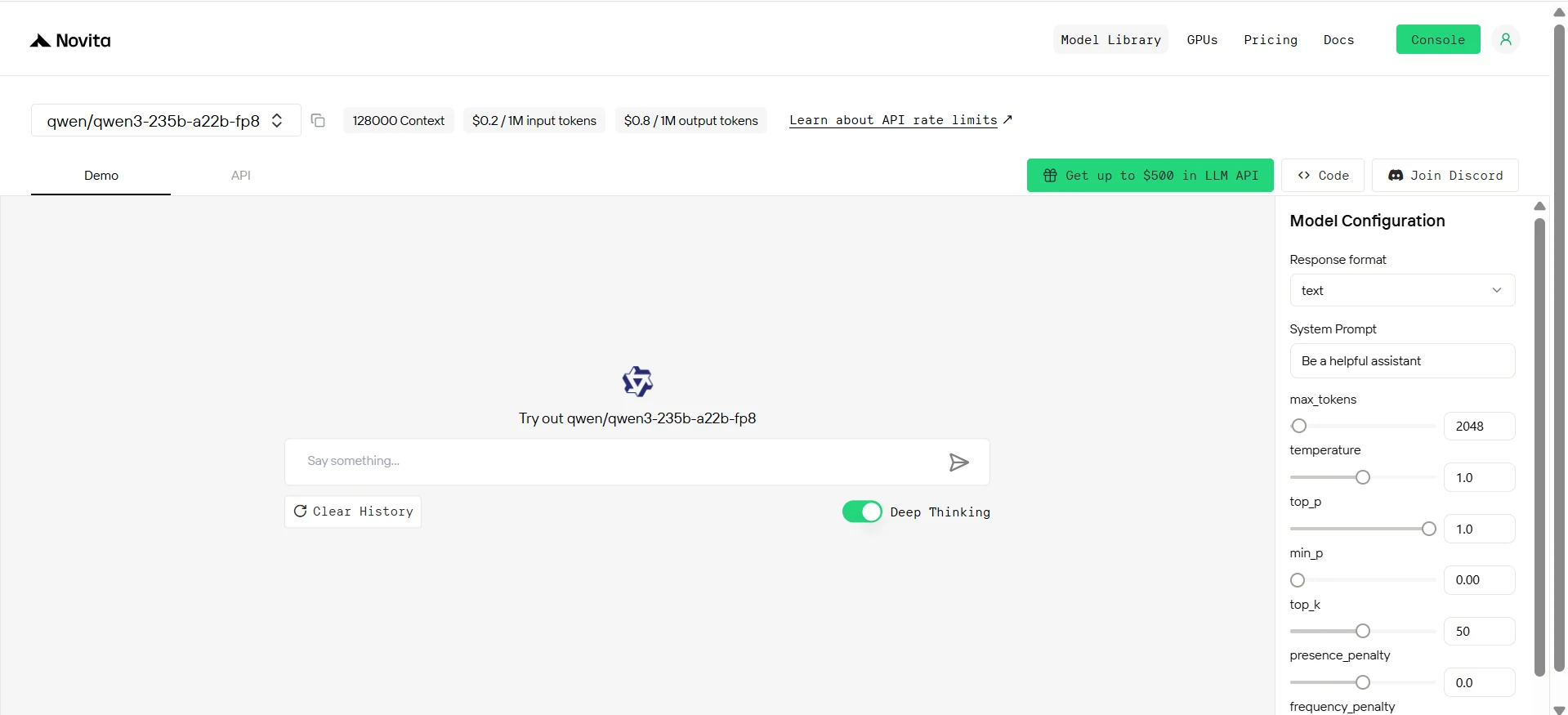
Step 3: Start Your Free Trial
Begin your free trial to explore the capabilities of the selected model.
Step 4: Get Your API Key
To authenticate with the API, we will provide you with a new API key. Entering the “Settings“ page, you can copy the API key as indicated in the image.

Step 5: Install the API
Install API using the package manager specific to your programming language.
After installation, import the necessary libraries into your development environment. Initialize the API with your API key to start interacting with Novita AI LLM. This is an example of using chat completions API for python users.
from openai import OpenAI

from openai import OpenAI

client = OpenAI(
    base_url="https://api.novita.ai/v3/openai",
    api_key="<YOUR Novita AI API Key>",
)

model = "qwen/qwen3-235b-a22b-fp8"
stream = True # or False
max_tokens = 2048
system_content = """Be a helpful assistant"""
temperature = 1
top_p = 1
min_p = 0
top_k = 50
presence_penalty = 0
frequency_penalty = 0
repetition_penalty = 1
response_format = { "type": "text" }

chat_completion_res = client.chat.completions.create(
    model=model,
    messages=[
        {
            "role": "system",
            "content": system_content,
        },
        {
            "role": "user",
            "content": "Hi there!",
        }
    ],
    stream=stream,
    max_tokens=max_tokens,
    temperature=temperature,
    top_p=top_p,
    presence_penalty=presence_penalty,
    frequency_penalty=frequency_penalty,
    response_format=response_format,
    extra_body={
      "top_k": top_k,
      "repetition_penalty": repetition_penalty,
      "min_p": min_p
    }
  )

if stream:
    for chunk in chat_completion_res:
        print(chunk.choices[0].delta.content or "", end="")
else:
    print(chat_completion_res.choices[0].message.content)
Option 2: Multi-Agent Workflows with OpenAI Agents SDK
The OpenAI Agents SDK is a production-grade evolution of OpenAI’s SWARM project, designed to simplify the development of intelligent, collaborative, and secure AI agents. At its core are LLM-based agents that can be configured with custom instructions, roles, and external tools. The SDK offers powerful features such as automatic function-tool conversion with Pydantic validation, built-in agent loops for seamless tool feedback, multi-agent task delegation, and robust security guardrails. Developers benefit from Python-native orchestration, built-in tracing tools for debugging, and high customizability—all within a lightweight framework that requires minimal ramp-up.
1. Set up your Python environment and install the Agents SDK.
python -m venv env
source env/bin/activate
pip install openai-agents
2. Set up your Novita API key.
Go to Console and Get 10 Credits
3. An Example of Handoffs
import os
from openai import AsyncOpenAI
from agents import (
    Agent,
    Runner,
    set_default_openai_api,
    set_default_openai_client,
    set_tracing_disabled,
)

BASE_URL = "https://api.novita.ai/v3/openai"
API_KEY = os.getenv("NOVITA_API_KEY")
MODEL_NAME = os.getenv("MODEL_NAME")

# Because Novita not support the responses API so we use the chat completions API instead.
set_default_openai_api("chat_completions")
set_default_openai_client(AsyncOpenAI(base_url=BASE_URL, api_key=API_KEY))
# Disable tracing for this example
# Refer to https://openai.github.io/openai-agents-python/tracing/#external-tracing-processors-list to use the custom spans.
set_tracing_disabled(disabled=True)

agent = Agent(name="Assistant",
              instructions="You are a helpful assistant", model=MODEL_NAME)

result = Runner.run_sync(
    agent, "Write a haiku about recursion in programming.")
print(result.final_output)

# Code within the code,
# Functions calling themselves,
# Infinite loop's dance.
Option 3: Third-Party Qwen 3 API Integration
1.HuggingFace Integration
Step 1: Configure API Keys on Hugging Face
- Access your account settings dashboard to configure your API keys.
- Input your Novita AI authentication credentials into the Hugging Face platform.
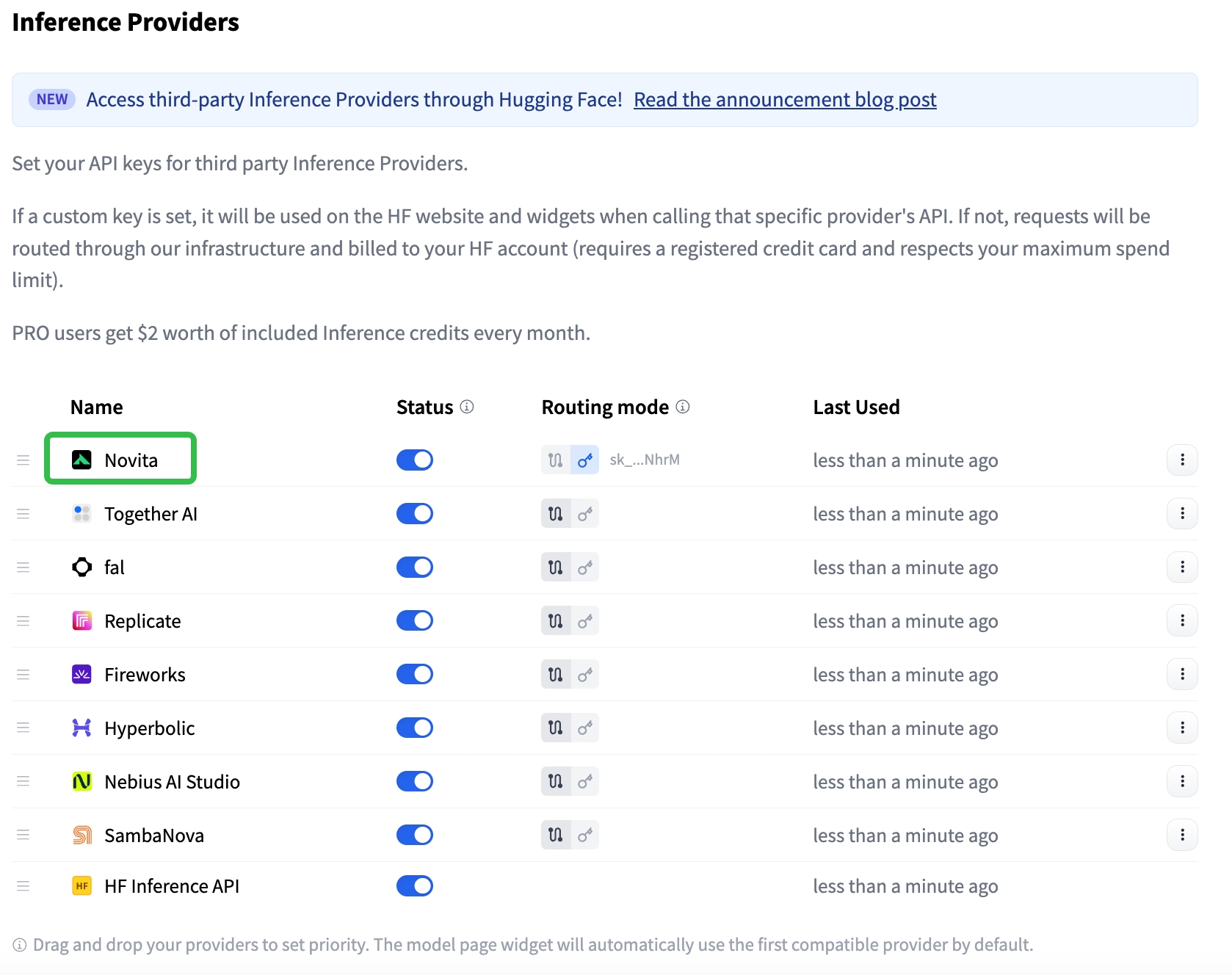
Step 2: Choose Inference API Modes
- Custom Key Mode: Calls are sent directly to the inference provider, utilizing your own API key.
- HF-Routed Mode: In this mode, no provider token is required. Charges are applied to your Hugging Face account instead of the provider’s account.
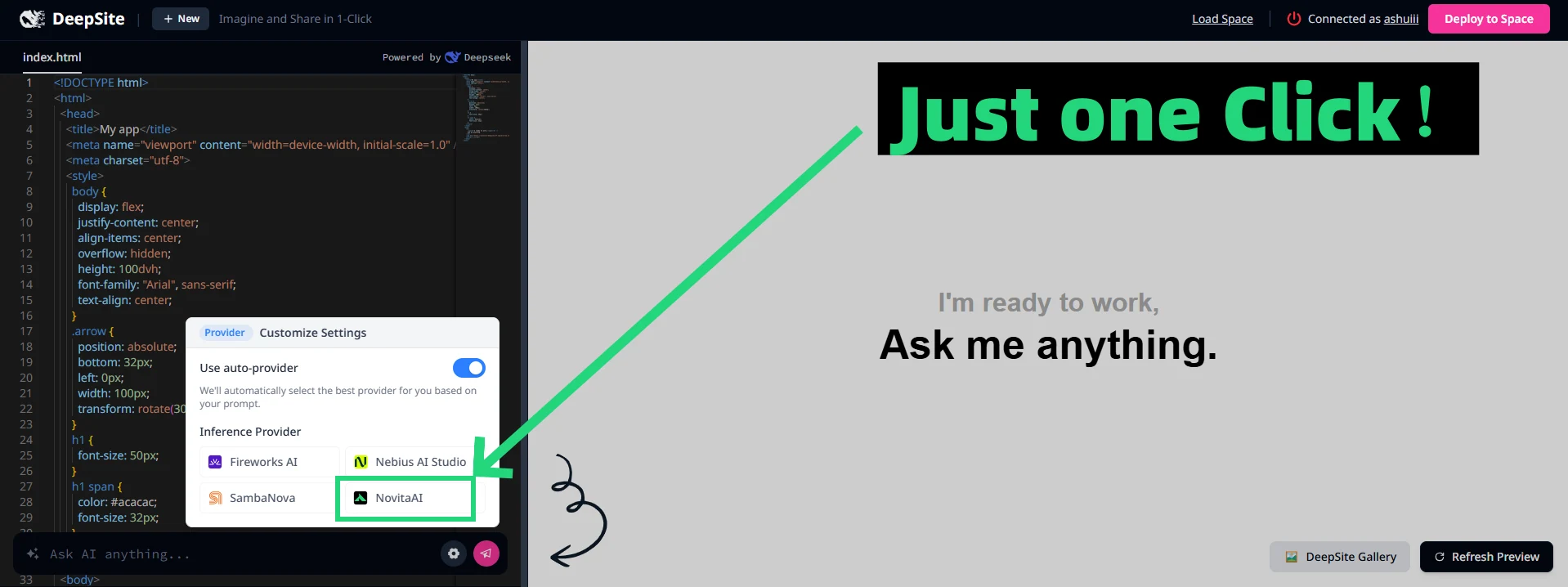
Step 3: Click the settings button, choose Novita AI as your API provider
2.Agent/Framework Integration with Novita AI
Novita AI is a first-class partner with many popular agent frameworks.
You can directly select Novita as your provider within platforms.Each comes with official connectors and step-by-step guides, making integration smooth for multi-agent workflows, tool-calling agents, and complex orchestration tasks.
3. OpenAI-Compatible API Integration
For tools built on the OpenAI API standard, Novita AI provides a drop-in replacement—All you need is a base URL and an API key. This method requires zero refactoring and supports instant migration for apps already using OpenAI-compatible calls.
Frequently Asked Questions
What is Qwen 3 235B A22B?
A state-of-the-art MoE language model by Alibaba with 235B parameters (22B active per forward pass), excelling in logic, math, and multilingual tasks.
Why can’t I run Qwen 3 235B A22B locally?
It requires ~1128GB of VRAM—far beyond consumer-level hardware. You’d need 16× A100 or H100 GPUs.
Is there a free trial to use Qwen 3 235B A22B?
Yes. Novita AI offers free credits to explore the model before committing.
Novita AI is an AI cloud platform that offers developers an easy way to deploy AI models using our simple API, while also providing the affordable and reliable GPU cloud for building and scaling.



