Key Highlights
Advanced Performance
Qwen 2-7B is built on a transformer-based architecture with advanced features like SwiGLU activation, attention QKV bias, and Group Query Attention (GQA) for faster inference and reduced memory usage. It supports a context length of up to 131,072 tokens, making it ideal for long-context tasks.
How to Access Qwen 2-7B Locally
Local access requires high-performance GPUs (e.g., NVIDIA RTX 4080 Super) with a minimum of 15.4 GB VRAM.
How to Access Qwen 2-7B via API
Platforms like Novita AI provide a simple setup, eliminating hardware needs.
Usage Recommendations
Local access is suited for researchers needing full control, while API access is ideal for developers and businesses seeking quick deployment and ease of use.
Qwen 2-7B is a cost-efficient language model optimized for performance, ideal for applications such as natural language understanding and code generation.
What is Qwen 2 7B ?
Qwen 2 - 7B is a state-of-the-art model in the Qwen series, built on transformer-based architecture. It is part of a series of language models ranging from 0.5 to 72 billion parameters, with Qwen 2-7B-Instruct being a fine-tuned, instruction-optimized variant.
Key Features
- Transformer Architecture: Incorporates SwiGLU activation, attention QKV bias, and group query attention.
- Tokenizer: Enhanced tokenizer capable of handling multiple natural languages and programming code.
- Training: Pretrained on extensive datasets and refined via supervised fine-tuning and direct preference optimization.
- Context Length: Supports up to 131,072 tokens for long-context tasks.
- Language Support: Excels in English and Chinese, with additional support for other languages.
Benchmark
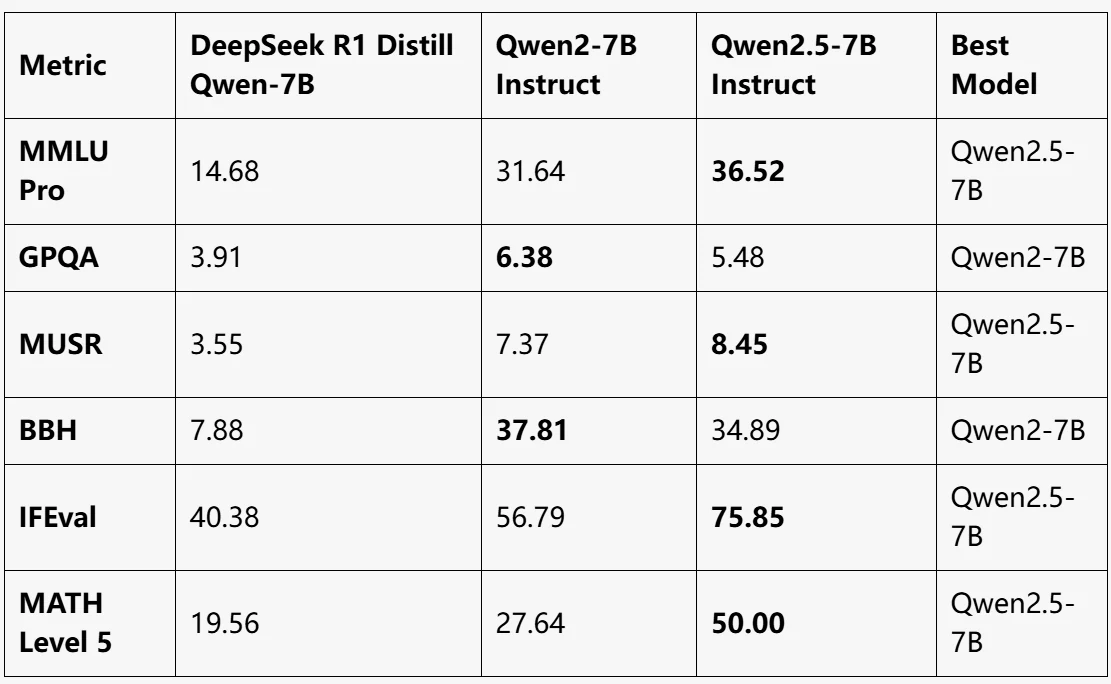
source from LLM EXPLORER
Qwen2.5-7B Instruct:
- Overall best performance, leading in MMLU Pro, MUSR, IFEval, and MATH Level 5.
- Achieves a significant improvement in mathematical reasoning (MATH Level 5: 50).
Qwen2-7B Instruct:
- Best performance in GPQA and BBH.
- A well-rounded model, but slightly behind Qwen2.5-7B in most other metrics.
DeepSeek R1 Distill Qwen-7B:
- Lowest performance across all benchmarks.
- Suitable for lightweight tasks but lags far behind the Qwen2 models in complex benchmarks.
Compared with Other Qwen Models
The Qwen 2 series includes base and instruction-tuned models in five sizes: Qwen2-0.5B, Qwen2-1.5B, Qwen2-7B, Qwen2-57B-A14B, and Qwen2-72B. Below is a summary of the key information for these models:
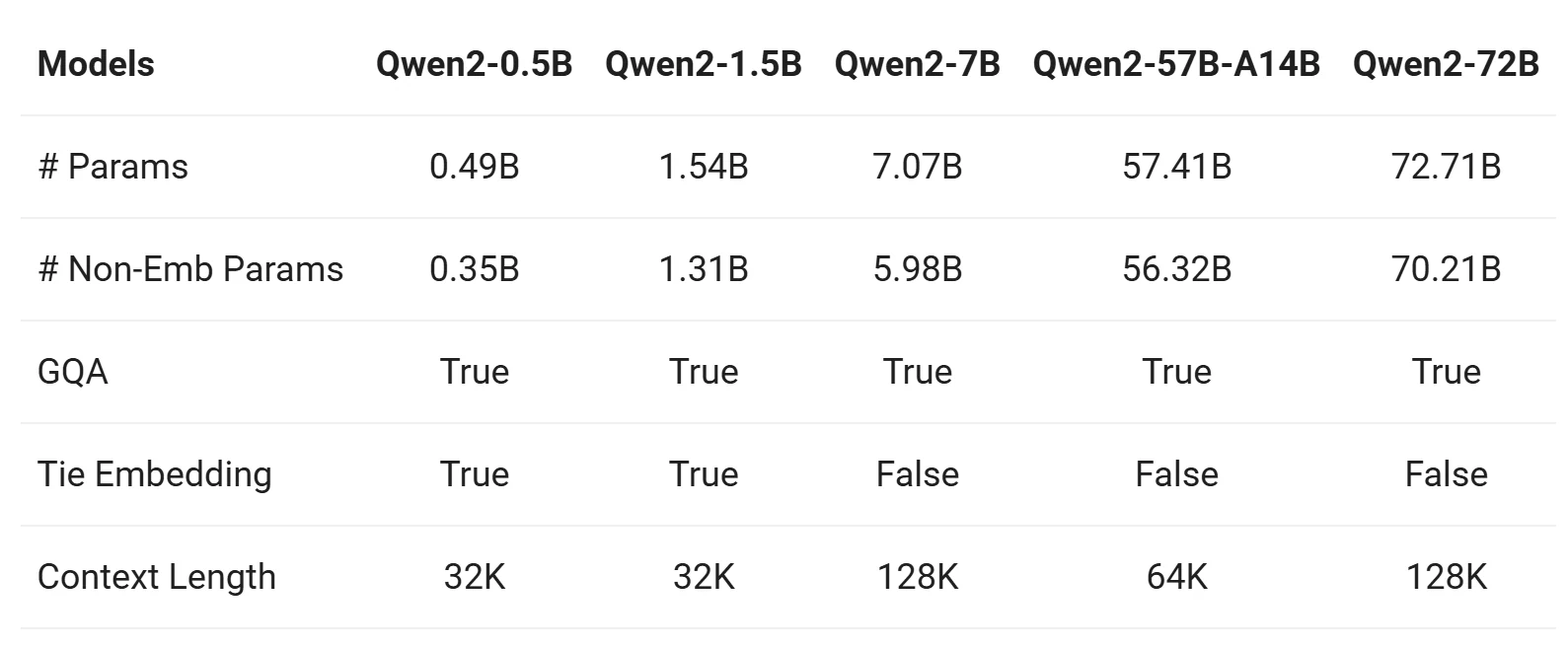
From Qwen
1. Group Query Attention (GQA)
- All models (Qwen2-0.5B, Qwen2-7B, Qwen2-57B, Qwen2-72B) adopt GQA, offering:
- Faster inference speed.
- Reduced memory usage.
- This is a significant improvement compared to Qwen1.5, where only large models (32B and 110B) used GQA.
2. Context Length
-
Base Models (Qwen2-0.5B, Qwen2-7B, Qwen2-57B, Qwen2-72B):
- Pretrained with a context length of 32K tokens.
- Demonstrate strong extrapolation capabilities up to 128K tokens based on perplexity (PPL) evaluation.
-
Instruction-Tuned Models (Qwen2-7B-Instruct, Qwen2-72B-Instruct):
- Evaluated using tasks like “Needle in a Haystack.”
- Perform exceptionally well in long-context tasks, with capabilities extending up to 128K tokens, especially when augmented with YARN.
3. Multilingual Capabilities
-
All Models (Qwen2-0.5B, Qwen2-7B, Qwen2-57B, Qwen2-72B):
- Benefit from improved pretraining datasets that include 27 additional languages beyond English and Chinese.
- Multilingual performance improves with model size, with larger models (Qwen2-57B, Qwen2-72B) excelling in more complex multilingual tasks.
If you want to see a more detailed parameter comparison with other models like Qwen 2.5 72B, you can check out this article: Qwen 2.5 72b vs Llama 3.3 70b: Which Model Suits Your Needs? ; Qwen 2.5 vs Llama 3.2 90B: A Comparative Analysis of Coding and Image Reasoning Capabilities.
How to Access Qwen 2 7B Locally
GPU Recommendations
| Model | VRAM Capacity | Memory Type | Relative Performance | Price Range |
|---|---|---|---|---|
| NVIDIA RTX 4080 Super | 16 GB | GDDR6X | High | ⭐⭐⭐⭐⭐ (High-End) |
| AMD RX 7900 XTX | 24 GB | GDDR6 | High | ⭐⭐⭐⭐⭐ (High-End) |
| NVIDIA RTX 4070 Ti Super | 16 GB | GDDR6X | Medium-High | ⭐⭐⭐⭐ (Upper Mid-End) |
| AMD RX 7600 XT | 16 GB | GDDR6 | Medium | ⭐⭐⭐ (Mid-End) |
| NVIDIA RTX 4060 Ti (16GB) | 16 GB | GDDR6 | Medium | ⭐⭐⭐ (Mid-End) |
Quick Start
from transformers import AutoModelForCausalLM, AutoTokenizer
device = "cuda" # the device to load the model onto

model = AutoModelForCausalLM.from_pretrained(
    "Qwen/Qwen2-7B-Instruct",
    torch_dtype="auto",
    device_map="auto"
)
tokenizer = AutoTokenizer.from_pretrained("Qwen/Qwen2-7B-Instruct")

prompt = "Give me a short introduction to large language model."
messages = [
    {"role": "system", "content": "You are a helpful assistant."},
    {"role": "user", "content": prompt}
]
text = tokenizer.apply_chat_template(
    messages,
    tokenize=False,
    add_generation_prompt=True
)
model_inputs = tokenizer([text], return_tensors="pt").to(device)

generated_ids = model.generate(
    model_inputs.input_ids,
    max_new_tokens=512
)
generated_ids = [
    output_ids[len(input_ids):] for input_ids, output_ids in zip(model_inputs.input_ids, generated_ids)
]

response = tokenizer.batch_decode(generated_ids, skip_special_tokens=True)[0]
How to Access Qwen 2 7B via Novita AI
Step-by-Step Guide
Novita AI is an AI cloud platform that offers developers an easy way to deploy AI models using our simple API, while also providing the affordable and reliable GPU cloud for building and scaling.
Step 1: Log In and Access the Model Library
Log in to your account and click on the Model Library button.

Step 2: Choose Your Model
Browse through the available options and select the model that suits your needs.
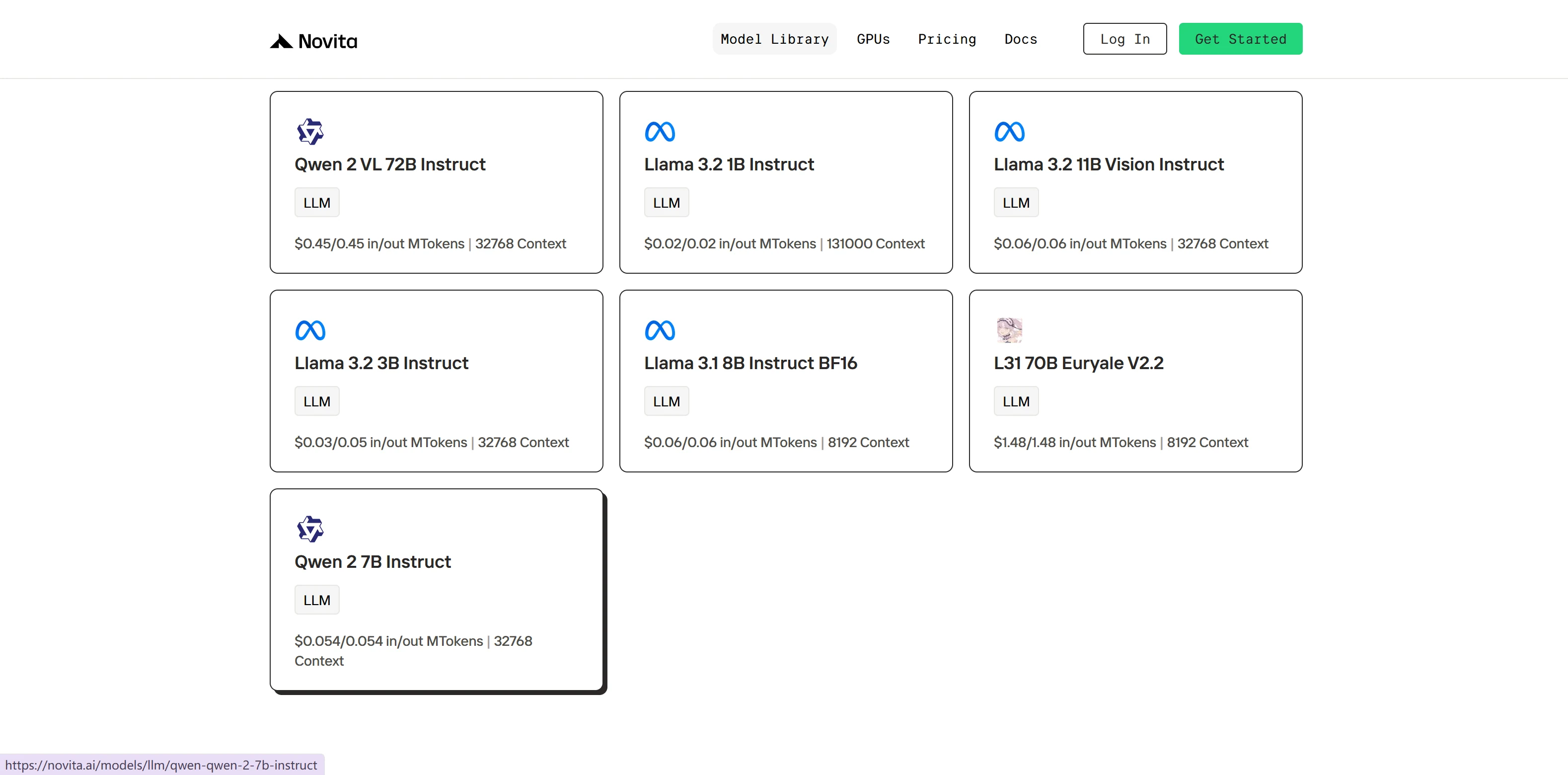
Step 3: Start Your Free Trial
Begin your free trial to explore the capabilities of the selected model.
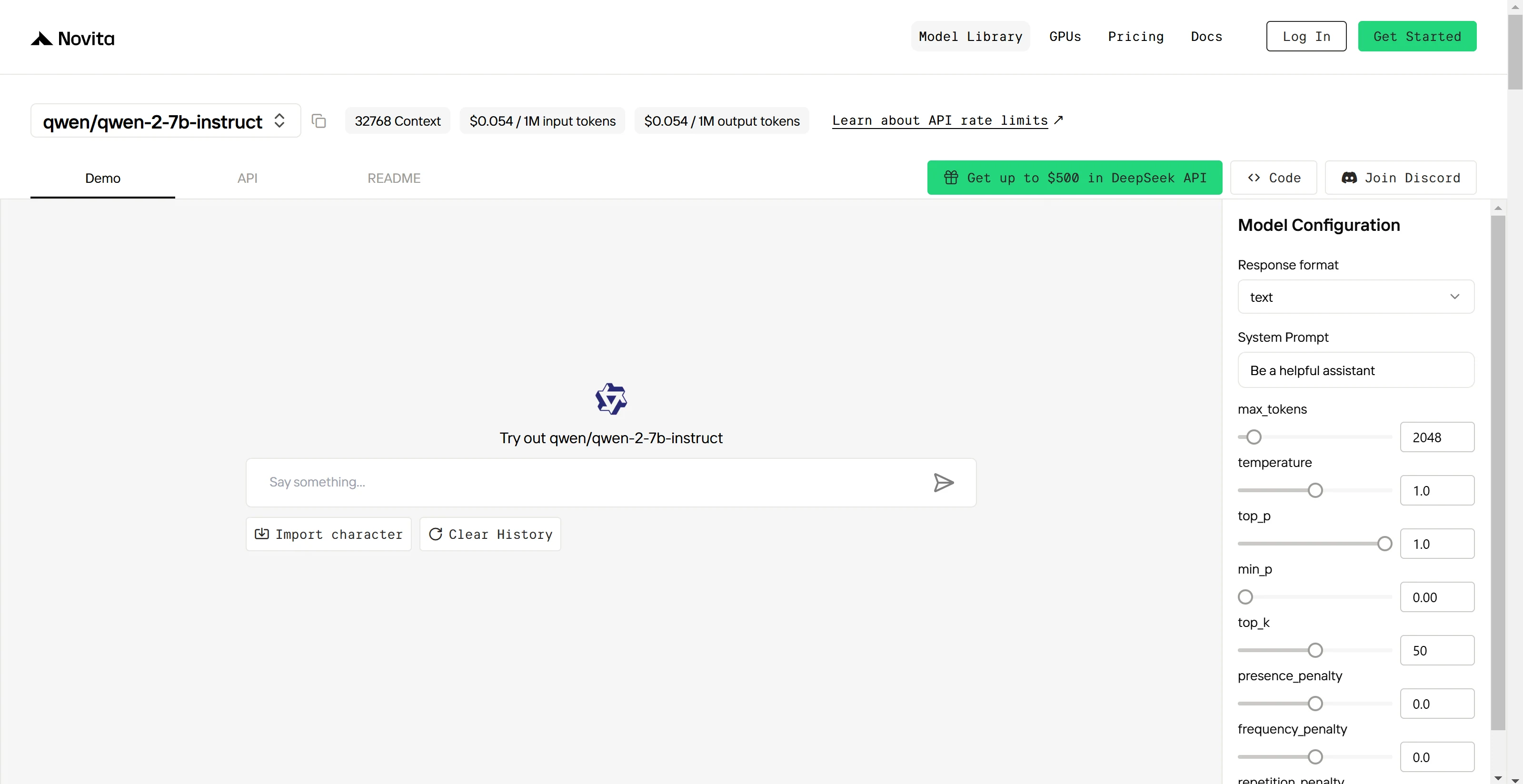
Step 4: Get Your API Key
To authenticate with the API, we will provide you with a new API key. Entering the “Settings“ page, you can copy the API key as indicated in the image.

Step 5: Install the API
Install API using the package manager specific to your programming language.
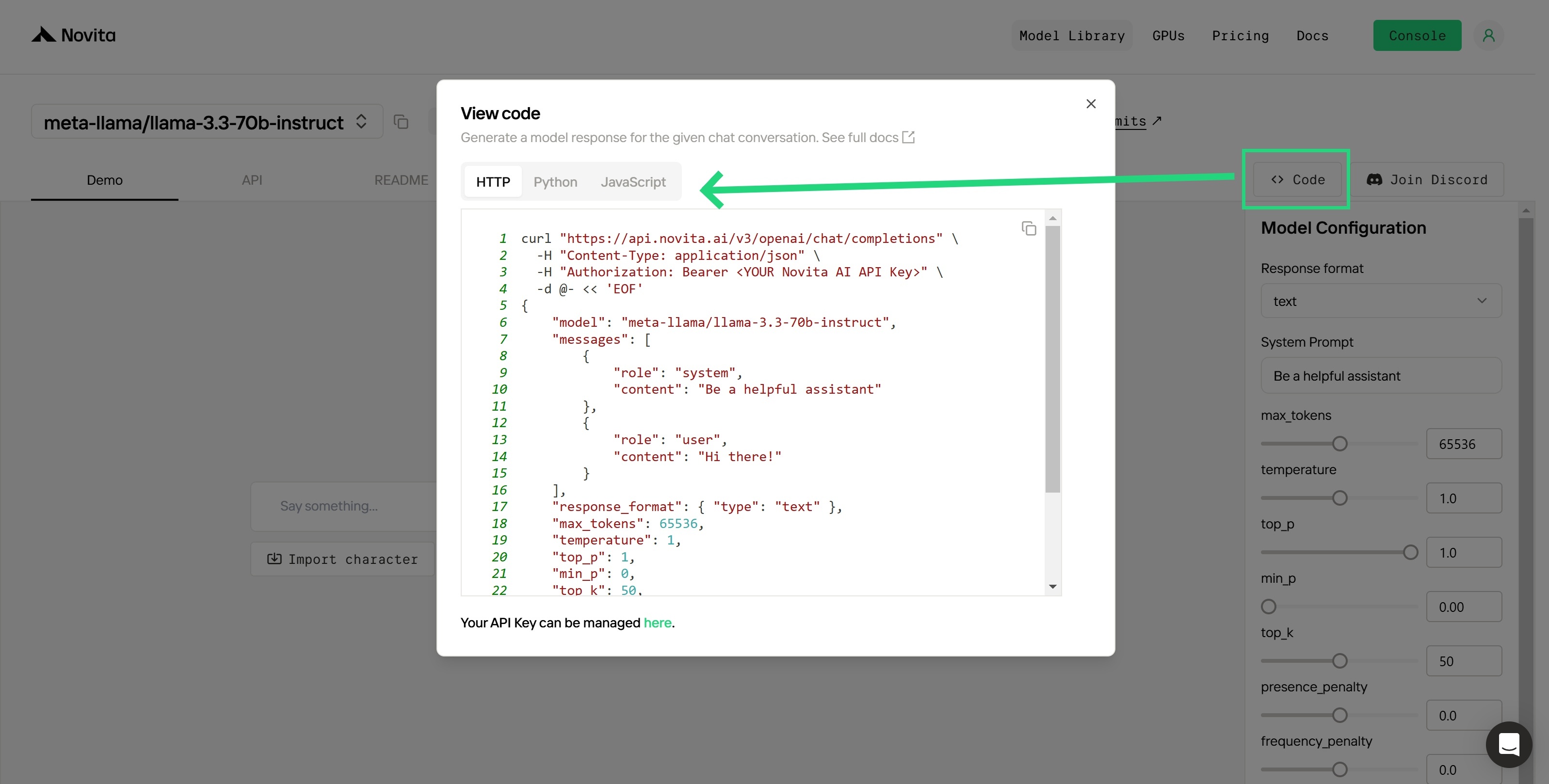
After installation, import the necessary libraries into your development environment. Initialize the API with your API key to start interacting with Novita AI LLM. This is an example of using chat completions API for python users.
from openai import OpenAI

client = OpenAI(
    base_url="https://api.novita.ai/v3/openai",
    api_key="<YOUR Novita AI API Key>",
)

model = "qwen/qwen-2-7b-instruct"
stream = True # or False
max_tokens = 2048
system_content = """Be a helpful assistant"""
temperature = 1
top_p = 1
min_p = 0
top_k = 50
presence_penalty = 0
frequency_penalty = 0
repetition_penalty = 1
response_format = { "type": "text" }

chat_completion_res = client.chat.completions.create(
    model=model,
    messages=[
        {
            "role": "system",
            "content": system_content,
        },
        {
            "role": "user",
            "content": "Hi there!",
        }
    ],
    stream=stream,
    max_tokens=max_tokens,
    temperature=temperature,
    top_p=top_p,
    presence_penalty=presence_penalty,
    frequency_penalty=frequency_penalty,
    response_format=response_format,
    extra_body={
      "top_k": top_k,
      "repetition_penalty": repetition_penalty,
      "min_p": min_p
    }
  )

if stream:
    for chunk in chat_completion_res:
        print(chunk.choices[0].delta.content or "", end="")
else:
    print(chat_completion_res.choices[0].message.content)
Upon registration, Novita AI provides a $0.5 credit to get you started!
If the free credits is used up, you can pay to continue using it.
Which Methods Are Suitable for You?
Comparison of Local vs. API Access
Local Access
Pros:
- Provides more control over the model and its configuration.
- Suitable for handling long texts by leveraging YARN to enhance model length extrapolation.
- No recurring costs.
Cons:
- Requires significant hardware resources, including 15.4 GB of VRAM.
- Complex setup and configuration.
API Access (e.g., Novita AI)
Pros:
- Easy to set up and use, with step-by-step guides provided.
- No need for local hardware resources.
Cons:
- Requires an internet connection.
- Involves costs per token: $0.054 per million input tokens and $0.054 per million output tokens.
- Limited control over model customization and configuration.
Recommendations for Different User Groups
-
Researchers: Local access is generally preferred for flexibility and control over experiments.
-
Developers:
- API access is suitable for building applications and rapid prototyping.
- Local access is better for fine-tuning and custom workflows.
-
Businesses: API access is beneficial for quick integration into services without high upfront costs. Local deployment may suit teams with consistent requirements and the ability to invest in infrastructure.
-
Small Teams/Individuals: API access is generally more practical due to lower startup costs.
-
Users with Limited Technical Skills: API access is preferable as it eliminates the need for deep technical knowledge.
Qwen 2 - 7B is a versatile and powerful model designed for a wide range of applications. It supports both local and API access, allowing users to choose the option that best aligns with their specific needs, available resources, and technical expertise.
Frequently Asked Questions
What are the key architectural features of Qwen2 models?
Qwen2 models employ a transformer-based architecture with features like SwiGLU activation, attention QKV bias, and Grouped Query Attention (GQA).models employ a transformer-based architecture with features like SwiGLU activation, attention QKV bias, and Grouped Query Attention (GQA).
What context lengths do the Qwen2 models support?
The base language models are pre-trained on 32K token context lengths, and some models demonstrate extrapolation capabilities up to 128K tokens in PPL evaluation.
Novita AI is the All-in-one cloud platform that empowers your AI ambitions. Integrated APIs, serverless, GPU Instance — the cost-effective tools you need. Eliminate infrastructure, start free, and make your AI vision a reality.



