
Developers and researchers today face three major challenges when selecting large language models: sustaining long-horizon reasoning, managing context limits, and controlling operational costs. Traditional closed models like Claude Sonnet 4 and GPT-5 offer strong performance but become costly and constrained when handling multi-step or tool-based workflows.
This article introduces Kimi-K2-Thinking—an open, agent-oriented alternative that combines step-by-step reasoning, dynamic tool integration, and massive context capacity. Through comparisons, benchmarks, and setup guides, it explains how Kimi-K2 solves the pain points of coherence, scale, and affordability in long, complex AI tasks.
What Advantages Does Kimi-K2-Thinking Have?
Kimi-K2 Thinking was built as a “thinking agent” that interleaves step-by-step chain-of-thought reasoning with dynamic function/tool calls. Unlike typical models that may drift or lose coherence after a few tool uses, Kimi-K2 maintains stable goal-directed behavior across 200–300 sequential tool invocations without human intervention.
This is a major leap: prior open models tended to degrade after 30–50 steps. In other words, Kimi-K2 can handle hundreds of execute steps in one session while staying on track to solve complex problems.
Anthropic’s Claude was previously known for such “interleaved thinking” with tools, but Kimi-K2 brings this capability to the open-source realm
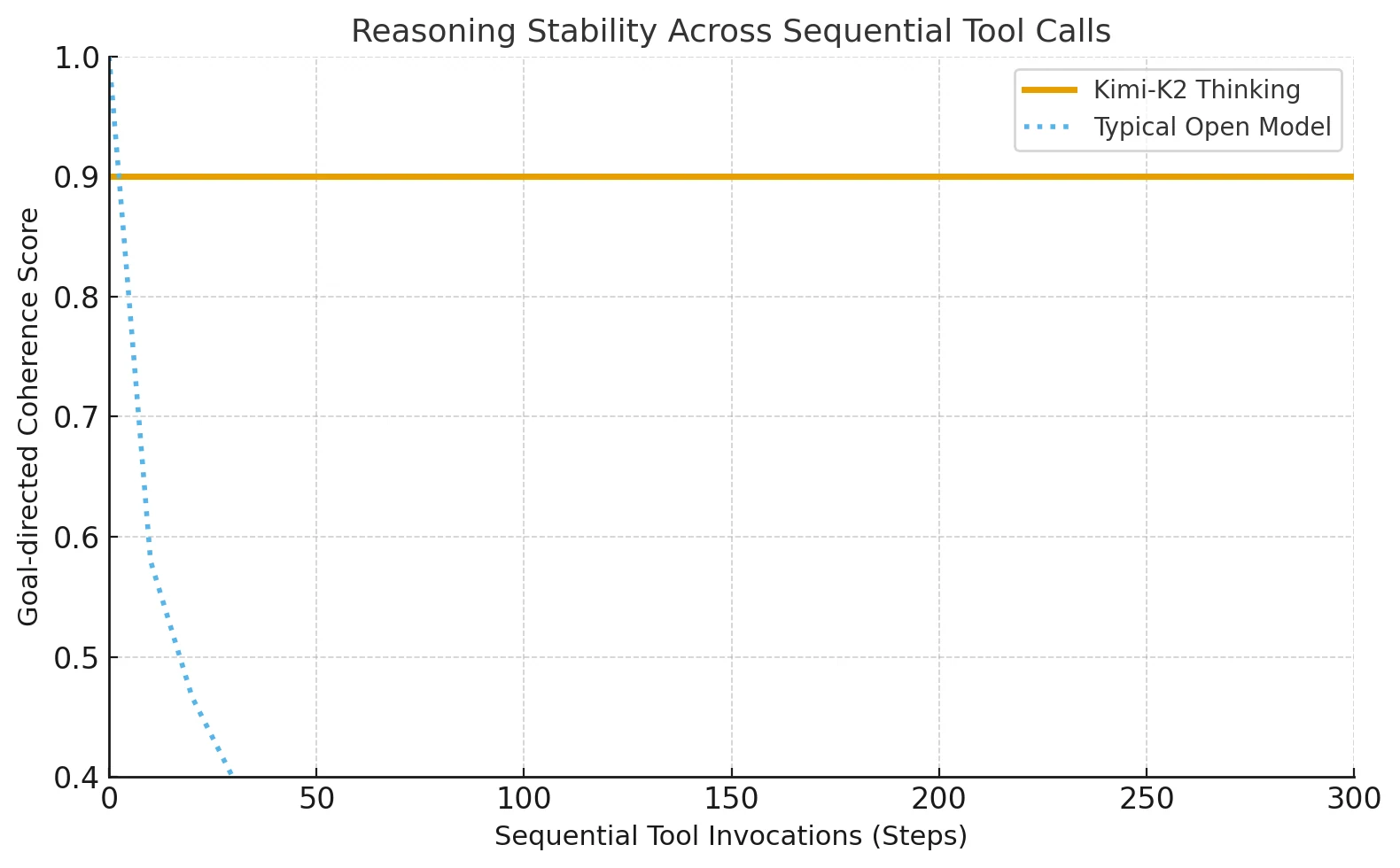
The architecture balances scale, efficiency, and stability—allowing Kimi-K2-Thinking to sustain complex, tool-rich reasoning over long sequences.
| Architecture Feature | Practical Advantage |
|---|---|
| Mixture-of-Experts (MoE) | Expands model capacity without increasing cost; selects the most relevant experts for each task. |
| 1T parameters / 32B activated | Combines large-scale knowledge with efficient computation. |
| 61 layers with 1 dense layer | Keeps reasoning deep yet coherent across steps. |
| 384 experts, 8 active per token | Improves specialization and adaptability to diverse problems. |
| 256K context length | Processes very long inputs and maintains continuity in long reasoning chains. |
| MLA (Multi-Head Latent Attention) | Strengthens long-range focus and reduces memory load. |
| SwiGLU activation | Stabilizes training and supports smooth, precise reasoning. |
Which Model Performs Better, Kimi-K2-Thinking or Sonnet 4?
Kimi-K2 performs close to GPT-5 and Claude on major math benchmarks, but it slightly behind GPT-5 and Claude in MMLU-Pro/Redux, Longform Writing and Code.
Kimi-K2 outperforms when tools are enabled or tasks require long chained reasoning (HLE w/ tools = 44.9 vs Claude 32.0). It bridges the gap between closed models like Claude and open-source systems, excelling in sustained, tool-rich problem solving.
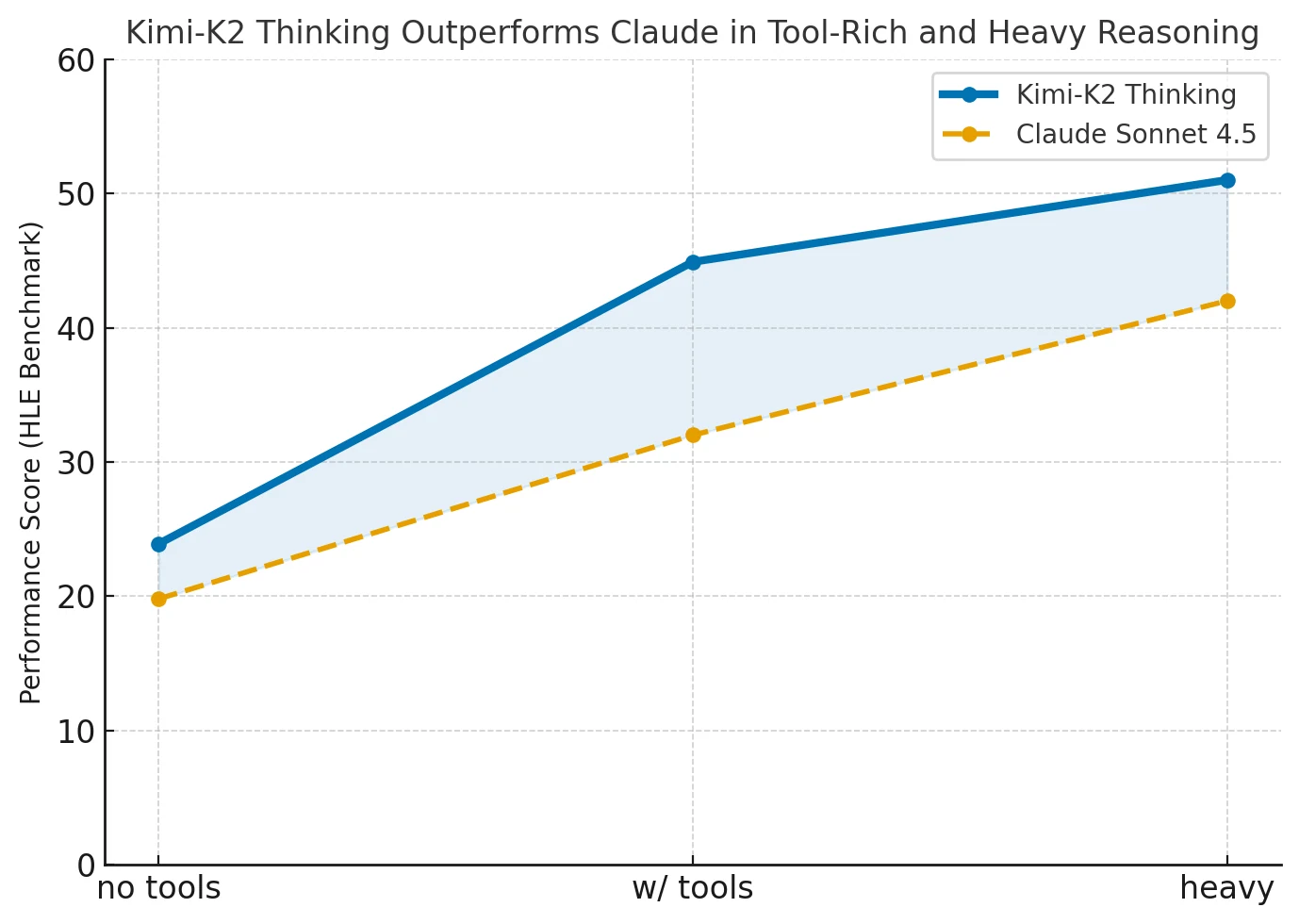
| Category | Benchmark | Setting | Kimi K2 Thinking | GPT-5 (High) | Claude Sonnet 4.5 (Thinking) | Kimi K2 0905 | DeepSeek-V3.2 | Grok-4 |
|---|---|---|---|---|---|---|---|---|
| Reasoning / Math | HLE | no tools | 23.9 | 26.3 | 19.8 | 7.9 | 19.8 | 25.4 |
| HLE | w/ tools | 44.9 | 41.7 | 32.0 | 21.7 | 20.3 | 41.0 | |
| HLE | heavy | 51.0 | 42.0 | – | – | – | 50.7 | |
| AIME25 | no tools | 94.5 | 94.6 | 87.0 | 51.0 | 89.3 | 91.7 | |
| AIME25 | w/ python | 99.1 | 99.6 | 100.0 | 75.2 | 58.1 | 98.8 | |
| AIME25 | heavy | 100.0 | 100.0 | – | – | – | 100.0 | |
| HMMT25 | no tools | 89.4 | 93.3 | 74.6 | 38.8 | 83.6 | 90.0 | |
| HMMT25 | w/ python | 95.1 | 96.7 | 88.8 | 70.4 | 49.5 | 93.9 | |
| HMMT25 | heavy | 97.5 | 100.0 | – | – | – | 96.7 | |
| IMO-AnswerBench | no tools | 78.6 | 76.0 | 65.9 | 45.8 | 76.0 | 73.1 | |
| GPQA | no tools | 84.5 | 85.7 | 83.4 | 74.2 | 79.9 | 87.5 | |
| General Tasks | MMLU-Pro | no tools | 84.6 | 87.1 | 87.5 | 81.9 | 85.0 | – |
| MMLU-Redux | no tools | 94.4 | 95.3 | 95.6 | 92.7 | 93.7 | – | |
| Longform Writing | no tools | 73.8 | 71.4 | 79.8 | 62.8 | 72.5 | – | |
| HealthBench | no tools | 58.0 | 67.2 | 44.2 | 43.8 | 46.9 | – | |
| Agentic Search | BrowseComp | w/ tools | 60.2 | 54.9 | 24.1 | 7.4 | 40.1 | – |
| BrowseComp-ZH | w/ tools | 62.3 | 63.0 | 42.4 | 22.2 | 47.9 | – | |
| Seal-0 | w/ tools | 56.3 | 51.4 | 53.4 | 25.2 | 38.5 | – | |
| FinSearchComp-T3 | w/ tools | 47.4 | 48.5 | 44.0 | 10.4 | 27.0 | – | |
| Frames | w/ tools | 87.0 | 86.0 | 85.0 | 58.1 | 80.2 | – | |
| Coding Tasks | SWE-bench Verified | w/ tools | 71.3 | 74.9 | 77.2 | 69.2 | 67.8 | – |
| SWE-bench Multilingual | w/ tools | 61.1 | 55.3 | 68.0 | 55.9 | 57.9 | – | |
| Multi-SWE-bench | w/ tools | 41.9 | 39.3 | 44.3 | 33.5 | 30.6 | – | |
| SciCode | no tools | 44.8 | 42.9 | 44.7 | 30.7 | 37.7 | – | |
| LiveCodeBench V6 | no tools | 83.1 | 87.0 | 64.0 | 56.1 | 74.1 | – | |
| OJ-Bench (cpp) | no tools | 48.7 | 56.2 | 30.4 | 25.5 | 38.2 | – | |
| Terminal-Bench | w/ simulated tools (JSON) | 47.1 | 43.8 | 51.0 | 44.5 | – | – |
- no tools: pure language reasoning, no external tools.
- w/ tools: can call external tools (e.g., search, code).
- w/ python: uses only Python for computation.
- w/ simulated tools (JSON): simulates tool calls in JSON format.
- heavy: high-intensity, long-chain reasoning test.
How Large Is the Cost Gap Between Kimi-K2-Thinking and Claude Sonnet 4?
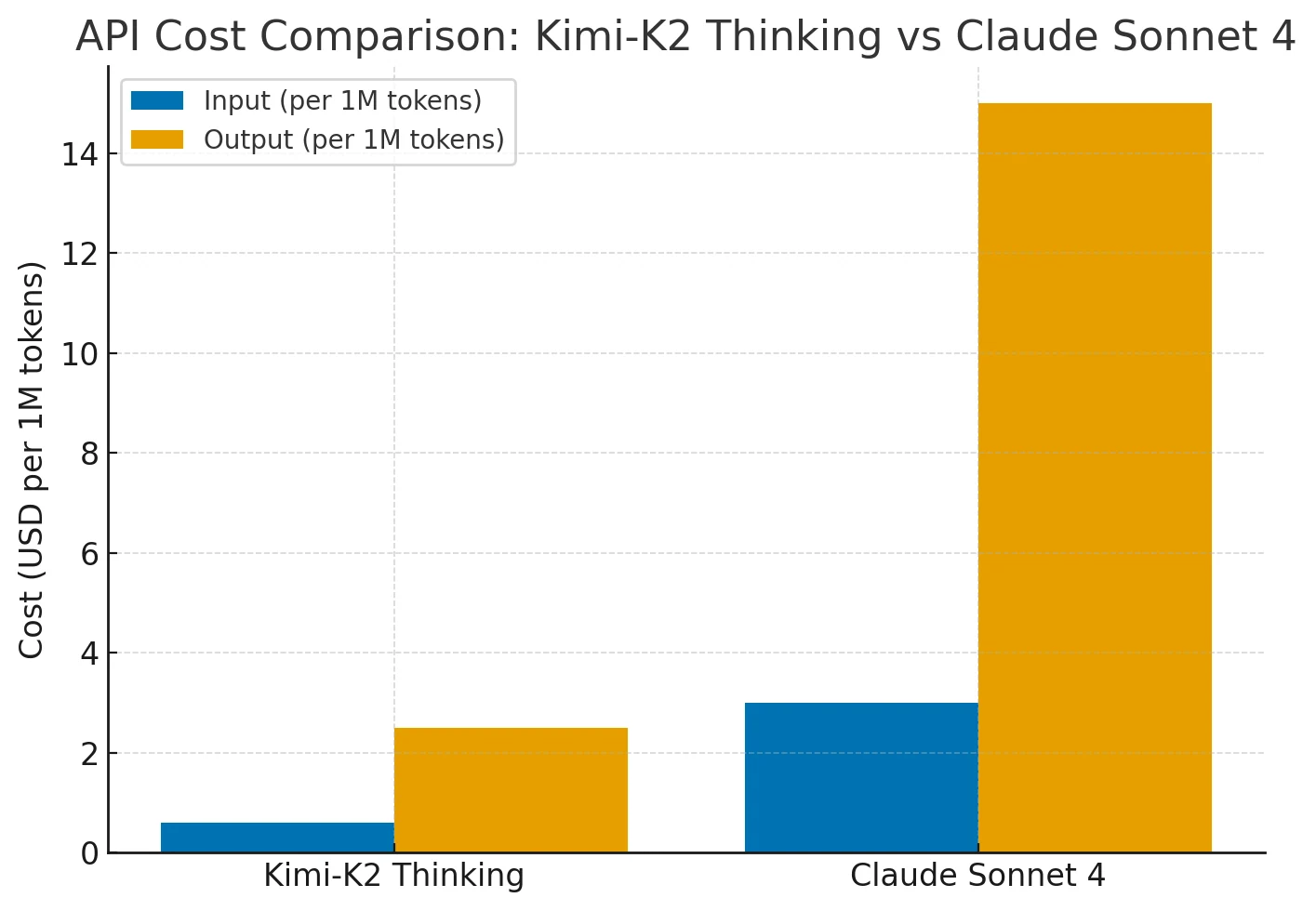
Kimi-K2 delivers similar capabilities to Claude Sonnet 4 at roughly 75–80% lower cost. Its pricing stays flat even for long contexts (up to 256K tokens) or frequent tool use, while Claude’s costs rise sharply for extended contexts and agent actions. In short, Kimi-K2 offers Claude/GPT-level performance with far better cost efficiency for complex, long-horizon reasoning tasks.
How to Use Kimi-K2-Thinking in Claude Code?
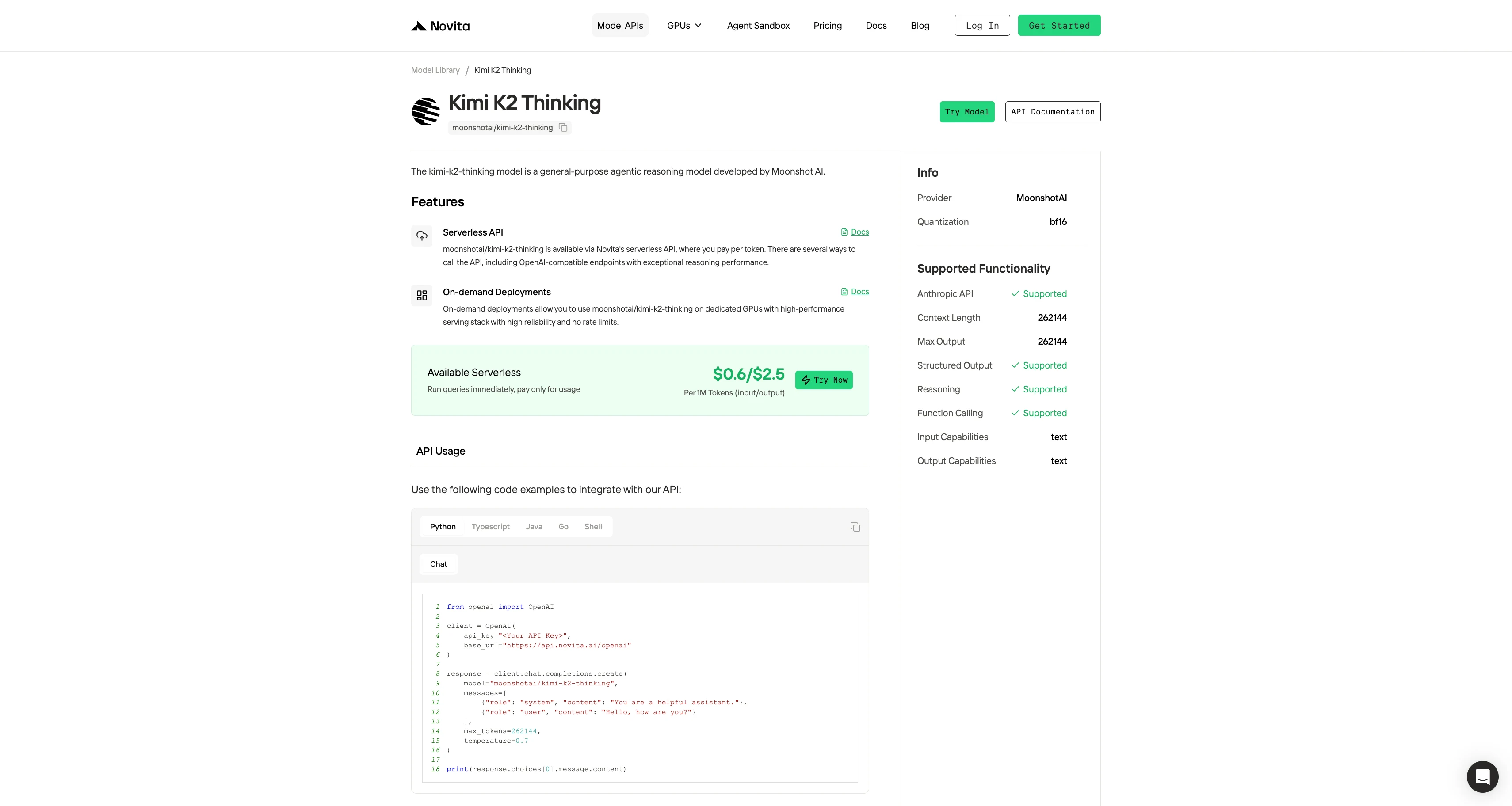
Novita AI currently offers the most affordable full-context Kimi-K2-Thinking API.
Novita AI provides APIs with 262K context, and costs of $0.6/input and $2.5/output, supporting structured output and function calling, which delivers strong support for maximizing Kimi K2 Thinking”s code agent potential.
The First: Get API Key
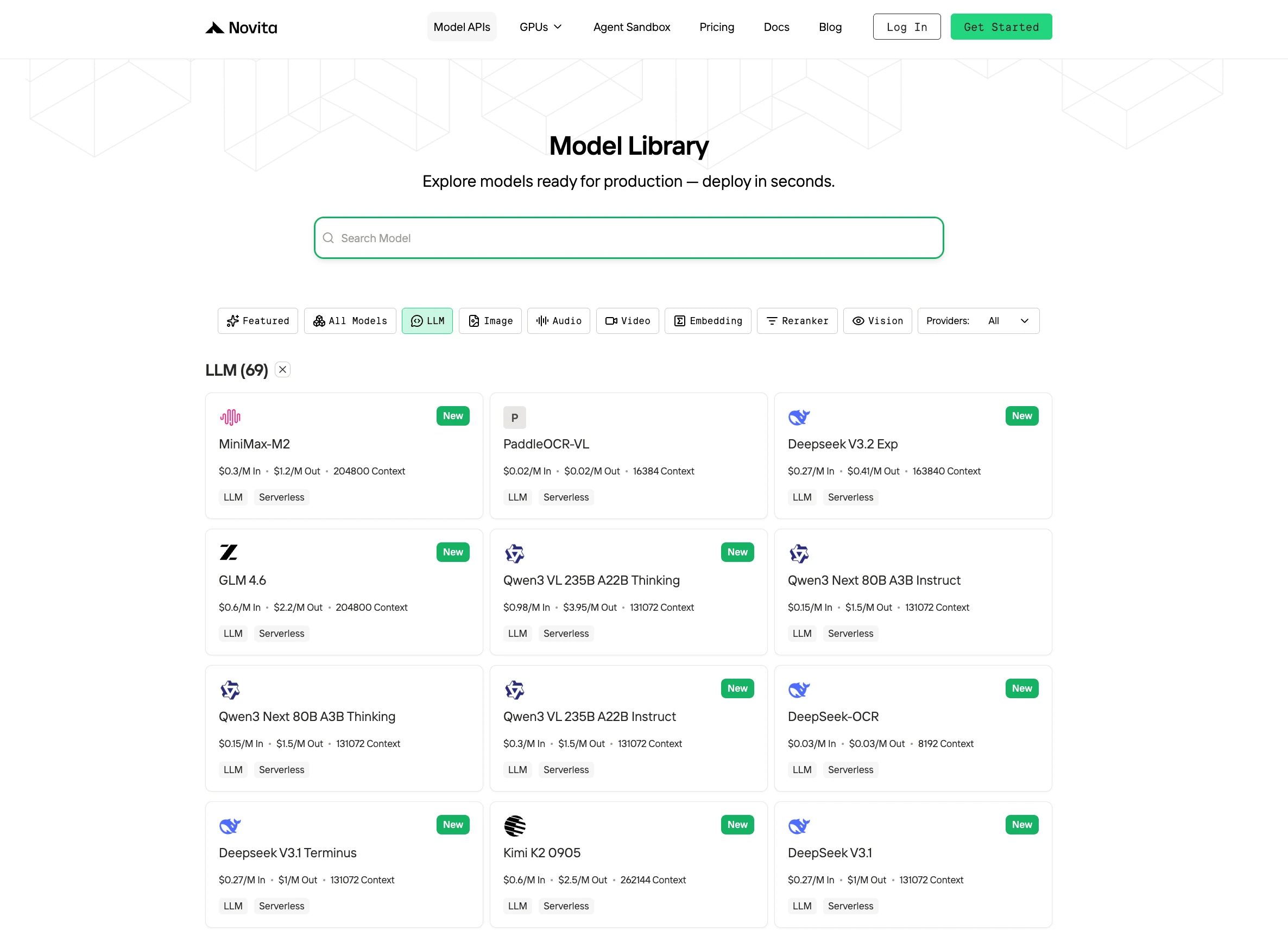
Step 1: Log in to your account and click on the Model Library button.

Step 2: Choose Your Model
Browse through the available options and select the model that suits your needs.
Step 3: Start Your Free Trial
Begin your free trial to explore the capabilities of the selected model.
Step 4: Get Your API Key
To authenticate with the API, we will provide you with a new API key. Entering the “Settings“ page, you can copy the API key as indicated in the image.

Step 5: Install the API
Install API using the package manager specific to your programming language.
After installation, import the necessary libraries into your development environment. Initialize the API with your API key to start interacting with Novita AI LLM. This is an example of using chat completions API for python users.
from openai import OpenAI

client = OpenAI(
    api_key="<Your API Key>",
    base_url="https://api.novita.ai/openai"
)

response = client.chat.completions.create(
    model="moonshotai/kimi-k2-thinking",
    messages=[
        {"role": "system", "content": "You are a helpful assistant."},
        {"role": "user", "content": "Hello, how are you?"}
    ],
    max_tokens=262144,
    temperature=0.7
)

print(response.choices[0].message.content)
Use Kimi-K2-Thinking with Claude Code
Step 1: Installing Claude Code
Before installing Claude Code, ensure your system meets the minimum requirements. Node.js 18 or higher must be installed on your local environment. You can verify your Node.js version by running node --version in your terminal.
For Windows
Open Command Prompt and execute the following commands:
npm install -g @anthropic-ai/claude-code
npx win-claude-code@latest
The global installation ensures Claude Code is accessible from any directory on your system. The npx win-claude-code@latest command downloads and runs the latest Windows-specific version.
For Mac and Linux
Open Terminal and run:
npm install -g @anthropic-ai/claude-codeMac users can proceed directly with the global installation without requiring additional platform-specific commands. The installation process automatically configures the necessary dependencies and PATH variables.
Step 2 :Setting Up Environment Variables
Environment variables configure Claude Code to use Kimi-K2 through Novita AI’s API endpoints. These variables tell Claude Code where to send requests and how to authenticate.
For Windows
Open Command Prompt and set the following environment variables:
set ANTHROPIC_BASE_URL=https://api.novita.ai/anthropic
set ANTHROPIC_AUTH_TOKEN=<Novita API Key>
set ANTHROPIC_MODEL="moonshotai/kimi-k2-thinking"
set ANTHROPIC_SMALL_FAST_MODEL="moonshotai/kimi-k2-thinking"
Replace <Novita API Key> with your actual API key obtained from the Novita AI platform. These variables remain active for the current session and must be reset if you close the Command Prompt.
For Mac and Linux
Open Terminal and export the following environment variables:
export ANTHROPIC_BASE_URL="https://api.novita.ai/anthropic"
export ANTHROPIC_AUTH_TOKEN="<Novita API Key>"
export ANTHROPIC_MODEL="moonshotai/kimi-k2-thinking"
export ANTHROPIC_SMALL_FAST_MODEL="moonshotai/kimi-k2-thinking"
Step 3: Starting Claude Code
With installation and configuration complete, you can now start Claude Code in your project directory. Navigate to your desired project location using the cd command:
cd <your-project-directory>
claude .
The dot (.) parameter instructs Claude Code to operate in the current directory. Upon startup, you’ll see the Claude Code prompt appear in an interactive session.
This indicates the tool is ready to receive your instructions. The interface provides a clean, intuitive environment for natural language programming interactions.
Step 4: Using Claude Code in VSCode or Cursor
Claude Code integrates seamlessly with popular development environments. It enhances your existing workflow rather than replacing it.
You can use Claude Code directly in the terminal within VSCode or Cursor. This maintains access to your familiar development tools while leveraging AI assistance.
Additionally, Claude Code plugins are available for both VSCode and Cursor.
How Can Enable Quick Switching Between Claude, GLM, and Kimi Models?
If you want to dynamically switch between different large language models (e.g. Anthropic’s Claude, Zhipu’s GLM, and Moonshot’s Kimi) in your development workflow, there are strategies to do so without heavy code changes. This section explains how to quickly swap models using unified APIs and configuration toggles.
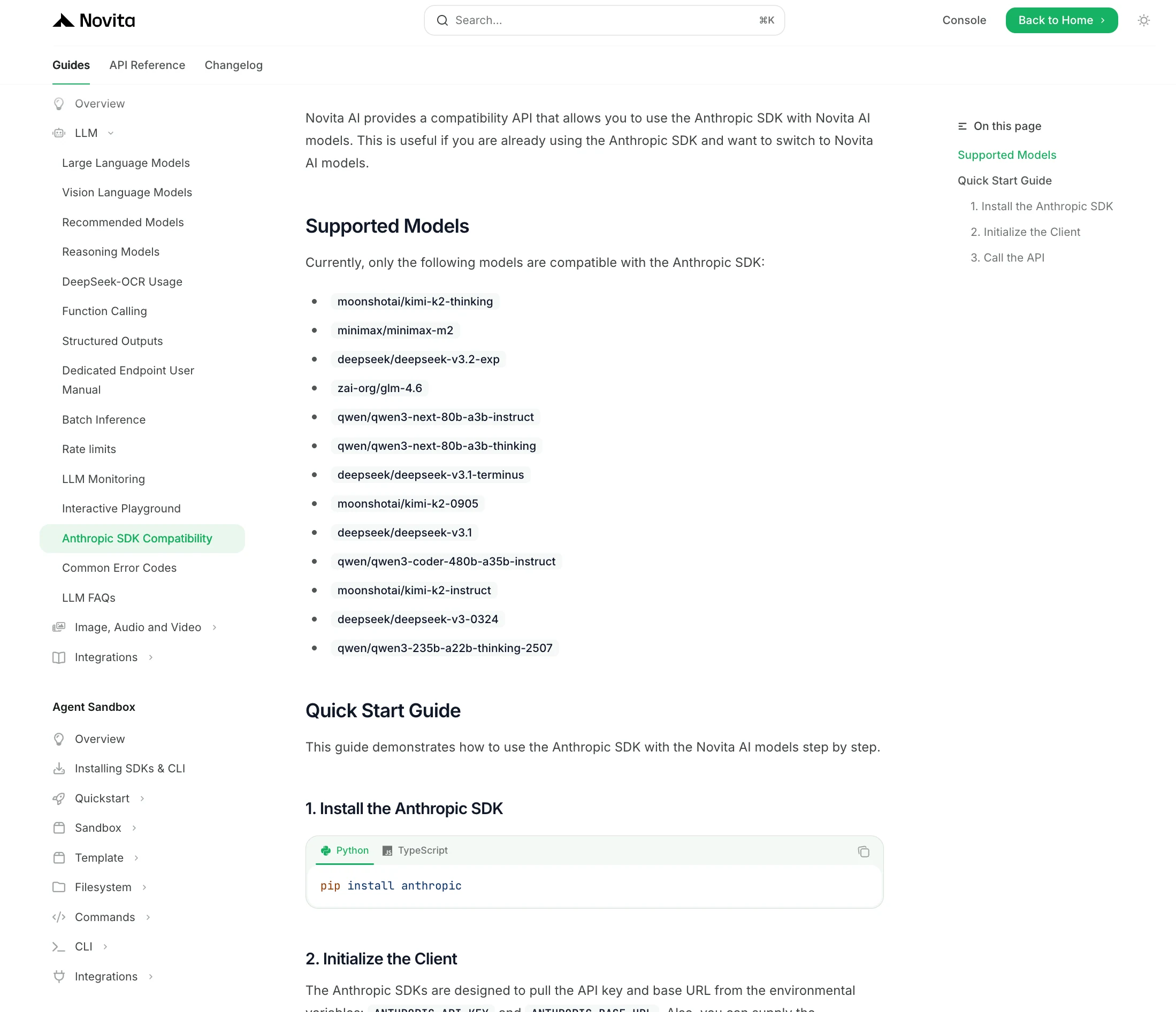
Using Environment Variables (Claude Code approach):
If you’re working with tools like Claude Code or an SDK tied to a specific API, you can switch models simply by adjusting your environment configuration. Novita AI provides multiple model options that you can experiment with to find the best fit.
Using a Unified API Gateway:
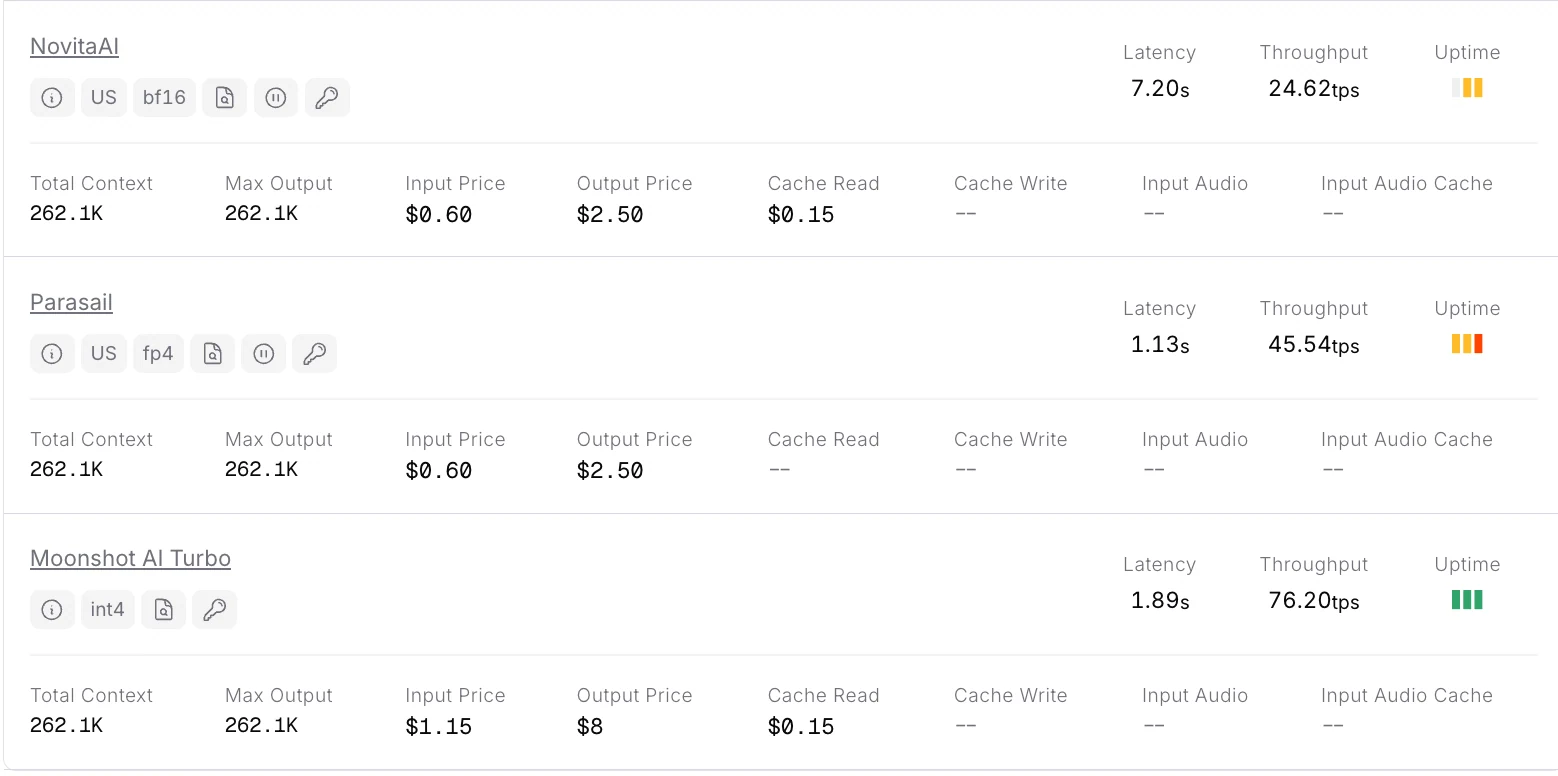
A more flexible approach is to use an API service that hosts multiple models under one interface. OpenRouter is one such platform that provides an OpenAI-compatible REST API to access models from different vendors. With OpenRouter, you make requests to a single endpoint (api.openrouter.ai) and specify which model to use in the request. This allows quick switching simply by changing a model name parameter, rather than juggling different URLs or auth methods.
from openai import OpenAI

client = OpenAI(
  base_url="https://openrouter.ai/api/v1",
  api_key="<OPENROUTER_API_KEY>",
)

completion = client.chat.completions.create(
  extra_headers={
    "HTTP-Referer": "<YOUR_SITE_URL>", # Optional. Site URL for rankings on openrouter.ai.
    "X-Title": "<YOUR_SITE_NAME>", # Optional. Site title for rankings on openrouter.ai.
  },
  extra_body={},
  model="moonshotai/kimi-k2-thinking",
  messages=[
              {
                "role": "user",
                "content": "What is the meaning of life?"
              }
            ]
)
print(completion.choices[0].message.content)
Tips for Using Kimi-K2-Thinking in Claude Code
Kimi-K2 can write and debug code but benefits from guidance. Its strength lies in reasoning and complex problem solving, not rote code recall. It may over-engineer front-end tasks, so it performs best on reasoning-heavy or tool-driven projects.
- Use recommended params: Set
temperature=1.0to unlock full reasoning; lower temps can cause conservative or looping behavior. Adjust Claude Code defaults if needed. - Leverage large context: K2 supports ~256K tokens. Load big codebases/docs up front to cut hallucinations; watch token spend and split extreme inputs.
- Expect “thinking” traces: In agent mode it emits intermediate planning steps. If available, read the reasoning stream to debug progress; ask for a brief summary if it stalls.
- Ensure tool compatibility: Keep Claude Code/agent SDKs updated so Anthropic-style tool calls execute. If issues persist, use Moonshot’s Kimi CLI.
- Guide broad tasks: Give concrete goals and constraints. Break large projects into milestones to avoid over-engineering.
- Monitor cost; use Turbo sparingly: Long sessions consume many tokens. K2-Turbo is faster/cheaper for quick prototypes, but trades depth for speed.
Under What Conditions Should Developers Switch to Kimi-K2-Thinking?
When to Use Kimi-K2 Thinking — Task Characteristics and Matching Strengths
1. Long-Horizon / Agentic Tasks
Task traits: multi-step workflows, autonomous tool calls, continuous reasoning (e.g., research assistants, data-mining agents, or auto-coders).
Kimi-K2 solves: maintains coherent reasoning across hundreds of steps; integrates planning, searching, and coding without drifting—where GPT-5 or Claude may lose focus over long sequences.
2. Large-Context Tasks
Task traits: require feeding long documents, full codebases, or multi-file inputs at once.
Kimi-K2 solves: offers a native 256 K token context with flat pricing; processes massive input without chunking or the high long-context fees seen in Claude or GPT-4.
3. Cost-Sensitive Deployments
Task traits: large-scale runs or tight budgets (millions of tokens daily).
Kimi-K2 solves: delivers Claude/GPT-level reasoning at roughly 4–6× lower cost, making advanced reasoning affordable for startups and sustained workloads.
4. Domain Benchmark Parity
Task traits: complex reasoning, structured QA, or mathematical logic where closed models used to dominate.
Kimi-K2 solves: matches or exceeds GPT-5 and Claude 4.5 on AIME, HMMT, and GPQA Diamond, proving that open models can now perform at frontier levels in reasoning-heavy domains.
Kimi-K2-Thinking bridges the gap between closed proprietary systems and open innovation. It delivers near-Claude performance with 75–80% lower cost, supports 256K context windows, and sustains hundreds of reasoning or tool-use steps without drift. For developers needing deep reasoning, agentic workflows, or open-source deployment, Kimi-K2 offers a practical, scalable, and transparent solution that redefines cost-efficiency in advanced AI reasoning.
Frequently Asked Questions
What makes Kimi-K2-Thinking different from Claude Sonnet 4?
Kimi-K2 maintains coherent reasoning across 200–300 tool calls and costs up to 5× less, while Claude Sonnet 4’s price rises sharply with longer contexts and tool actions.
Is Kimi-K2-Thinking suitable for coding?
Yes. It can write and debug code effectively, but it performs best on reasoning-heavy or multi-step tool-driven projects rather than simple one-shot coding.
How large is Kimi-K2-Thinking’s context window?
It supports 256K tokens by default, enabling full codebase or document reasoning in one pass—without the premium long-context charges found in Claude or GPT models.
Novita AI is the All-in-one cloud platform that empowers your AI ambitions. Integrated APIs, serverless, GPU Instance — the cost-effective tools you need. Eliminate infrastructure, start free, and make your AI vision a reality.
Recommend Reading
How to Access Qwen 3 Coder: Qwen Code; Claude Code; Trae
Should Small Teams Replace Sonnet 4.5 With MiniMax-M2 in Claude Code?



