Refer your friends to Novita AI and both of you will earn $10 in LLM API credits—up to $500 in total rewards.
To support the developer community, Qwen2.5-7B, Qwen 3 0.6B, Qwen 3 1.7B, Qwen 3 4B is currently available for free on Novita AI.
Imagine an AI that not only tells you the weather but actually checks it live; one that not only explains concepts, but generates personalized reports, charts, or even schedules a meeting for you. Paired with GLM Z1 9B 0414, a powerful lightweight model fine-tuned for reasoning, multilingual dialogue, and visual generation (HTML/SVG), Function Calling becomes even more practical. Together, they enable smart assistants
What is Function Calling?
https://www.youtube.com/watch?v=Qor2VZoBib0
Function calling allows large language models (LLMs) to interact with external tools, APIs, and services. Instead of relying only on training data, a model can now:
- Decide when external help is needed
- Choose the correct function to call
- Generate properly structured parameters
- Incorporate the results into its reply
Think of it like giving an AI a calculator, calendar, or travel app to assist with tasks.
How Function Calling Works
- User Input → Model receives and analyzes the query
- Function Selection → Determines the relevant tool or API
- Parameter Generation → Builds a structured input (e.g., JSON)
- Function Execution → Executes the function and retrieves results
- Response Integration → Returns a complete answer to the user
Example: “What’s the weather in Tokyo?”
| Step | Description |
| User Input | “What’s the weather in Tokyo?” |
| Identify Need | Requires real-time data |
| Select Function | Call `getWeather(location, units)` |
| Generate Parameters | { “location”: “Tokyo”, “units”: “celsius” } |
| Execute API | Request weather API |
| Final Response | “It’s 22°C and sunny in Tokyo today.” |
What is GLM Z1 9B 0414?
Model Specifications
- Parameters: 9 billion (9B), lightweight design balancing performance and resource efficiency.
- Context Window: 32K, supporting long-text processing and complex tasks.
Performance Advantages
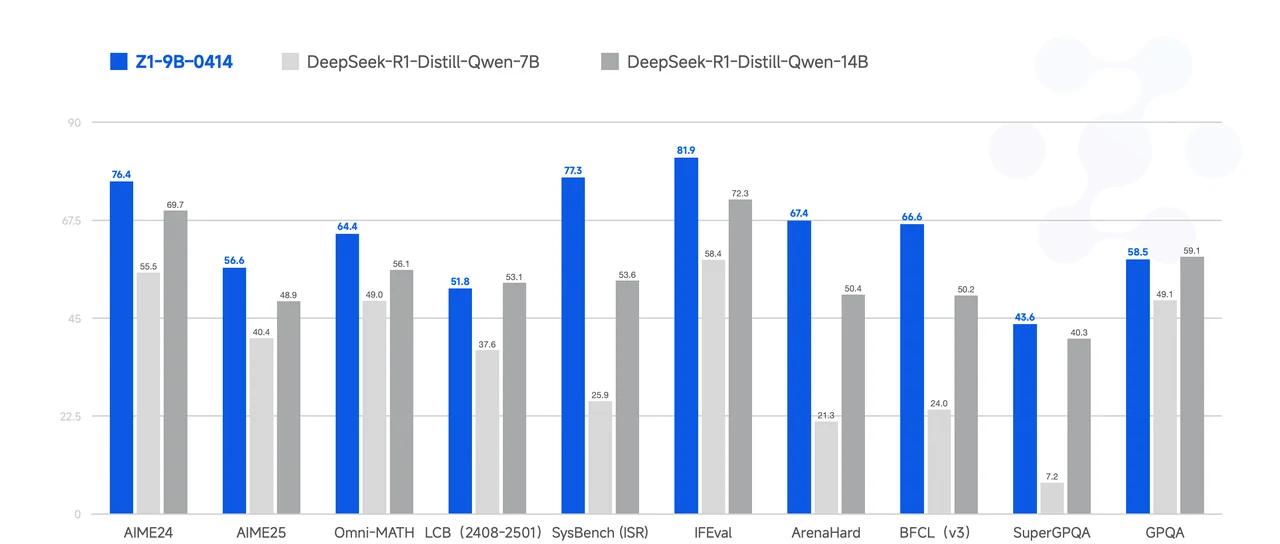
- High Performance-to-Size Ratio: Excels in mathematical reasoning, general tasks, and complex reasoning scenarios, making it ideal for lightweight deployments.
- Key Strengths:
- Mathematical Reasoning: Outstanding performance in tasks such as AIME24, AIME25, and Omni-MATH.
- Code Generation: Strong results in tasks like LCB (2408–2501).
- Instruction Following and Q&A: Excels in SysBench (ISR), IFEval, and ArenaHard tasks.
- Comprehensive Tool Integration: Performs well in tasks like BFCL (v3).
Training and Optimization
- Pretraining Data: Built on 15T of high-quality data from GLM-4-32B, including extensive reasoning-type synthetic data, enhancing logic and reasoning capabilities.
- Post-Training Optimization: Utilizes Human Preference Alignment to optimize performance in dialogue scenarios.
GLM Z1 9B 0414 Extended Capabilities
-
Multilingual Support
- Supports 26 languages, with robust performance in Chinese and English, making it ideal for global applications.
-
Text Generation and Visualization
- Text-to-Text: Handles diverse text generation tasks.
- Visual Output: Capable of generating structured HTML and SVG content, enhancing interactivity and usability.
-
Data and Training Strengths
- Extensive Pretraining: Trained on 15T high-quality data spanning broad domains, including synthetic reasoning data, ensuring strong generalization capabilities.
- Dialogue Optimization: Fine-tuned with human preference alignment for realistic and responsive dialogue generation.
GLM Z1 9B 0414+Function calling =?

1. Multilingual Applications
- Real-Time Translation:
Utilizing Function Calling to integrate translation APIs, enabling instant and accurate translations across 26 supported languages.- Applications:
- Multilingual customer support systems.
- Real-time subtitles for global conferences and live streams.
- Applications:
- Cross-Language Chatbots:
Seamlessly handle conversations in multiple languages, leveraging dialogue optimization and Function Calling for cultural and contextual accuracy.- Applications:
- Global e-commerce platforms.
- Multilingual educational chatbots.
- Applications:
2. Dynamic Text Generation
- Content Personalization:
Use Function Calling to access user data and generate personalized recommendations or reports in natural text.- Applications:
- Personalized learning plans for education platforms.
- Tailored marketing content for e-commerce.
- Applications:
- Automated Report Generation:
Combine text generation with Function Calling to fetch real-time data (e.g., sales, analytics) and produce structured business reports.- Applications:
- Business intelligence dashboards.
- Financial or operational summaries.
- Applications:
3. Visualization-Powered Applications
- Interactive Content Generation:
Leverage Function Calling to generate structured HTML and SVG elements for enhanced interactivity and visualization.- Applications:
- Dynamic charts and graphs for data analysis platforms.
- Interactive learning modules or infographics for educational tools.
- Applications:
- Web Content Automation:
Automatically generate visual components for dynamic web pages or applications.- Applications:
- Automated newsletter creation.
- Interactive web design assistants.
- Applications:
4. Dialogue-Driven Intelligent Assistants
- Smart Assistants with Real-Time Data Access:
Use dialogue optimization and Function Calling to retrieve real-time data (e.g., weather, news, stock prices) and provide actionable responses.- Applications:
- Virtual personal assistants.
- Real-time travel and event planners.
- Applications:
- Task Automation:
Function Calling enables assistants to execute tasks such as scheduling, sending emails, or managing IoT devices.- Applications:
- Smart home systems (e.g., controlling lights, thermostats).
- Office automation tools (e.g., meeting scheduling, email drafts).
- Applications:
5. Advanced Training and Reasoning Applications
- Educational Tools:
Combine reasoning abilities with Function Calling to fetch and analyze educational content, create quizzes, or solve mathematical problems.- Applications:
- Adaptive learning platforms.
- Math and science tutoring assistants.
- Applications:
- Scientific Research Assistance:
Generate insights or analyze datasets using reasoning pretraining and Function Calling for external data retrieval.- Applications:
- Tools for researchers in scientific or technical fields.
- Automated literature review assistants.
- Applications:
6. Multimodal Applications
- Multimodal Content Assistants:
Integrate text generation and visual capabilities to produce multimodal outputs like visual explanations or interactive guides.- Applications:
- Interactive medical diagnosis tools (e.g., combining text explanations with annotated visuals).
- Product assembly or repair instructions with text and diagrams.
- Applications:
- Creative Content Generation:
Use visual output capabilities to create artistic visuals, infographics, or advertisements.- Applications:
- Creative writing or design assistants.
- Ad copy and graphic creation for marketing campaigns.
- Applications:
How to Use GLM Z1 9B 0414 Function Calling via Novita AI
Novita AI has been launched support capability descriptions for each LLM, which you can directly view in the [console](https://novita.ai/models-console/?utm_source=blog_llm&utm_medium=article&utm_campaign=/ llama-4-maverick-function-calling/) and [docs](https://novita.ai/docs/guides/llm-function-calling/?utm_source=blog_llm&utm_medium=article&utm_campaign= llama-4-maverick-function-calling).
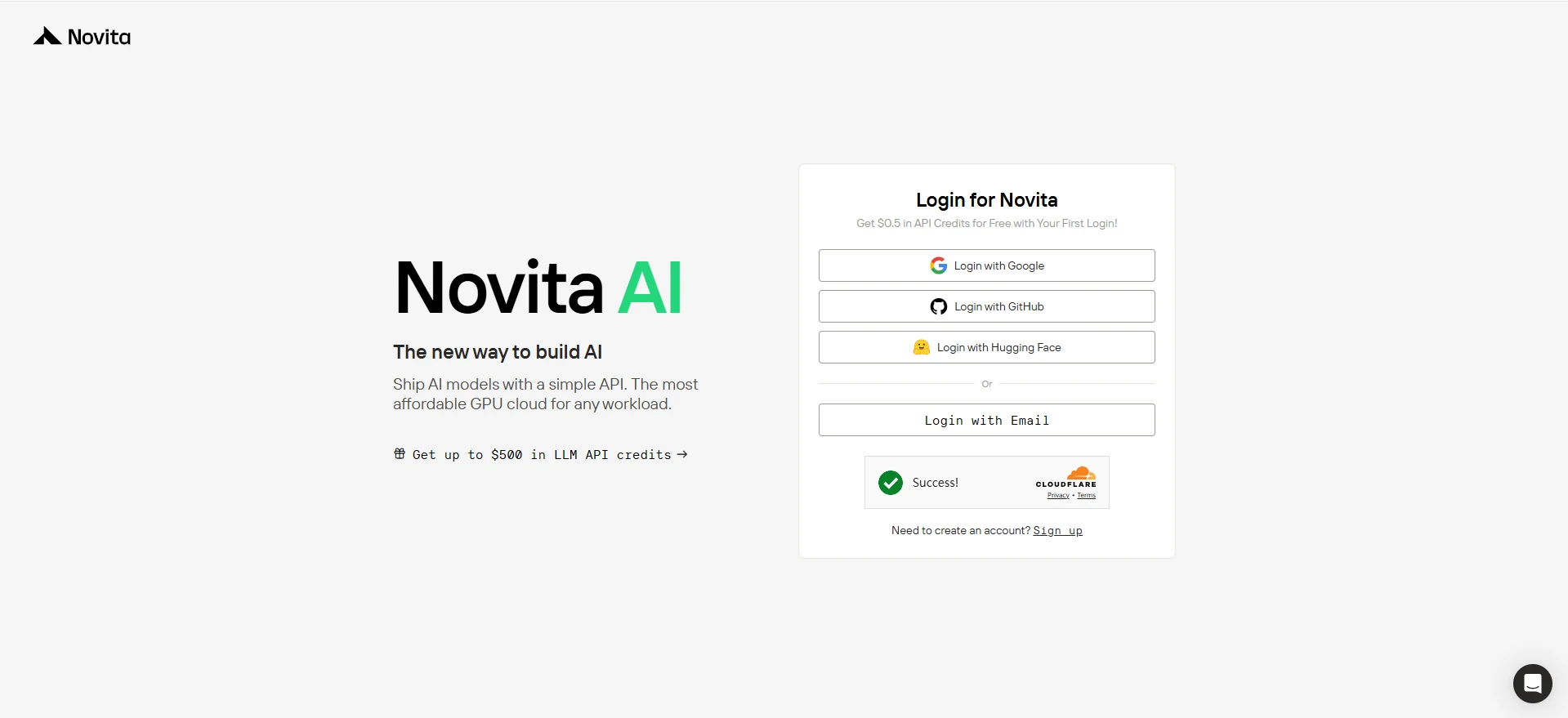
Step 1: Log in Novita AI
Once you land on the Novita AI homepage, simply hit the “Log In” or “Get Started” button at the top right. You can easily log in with Google, GitHub, Hugging Face, or just your Email—your choice!
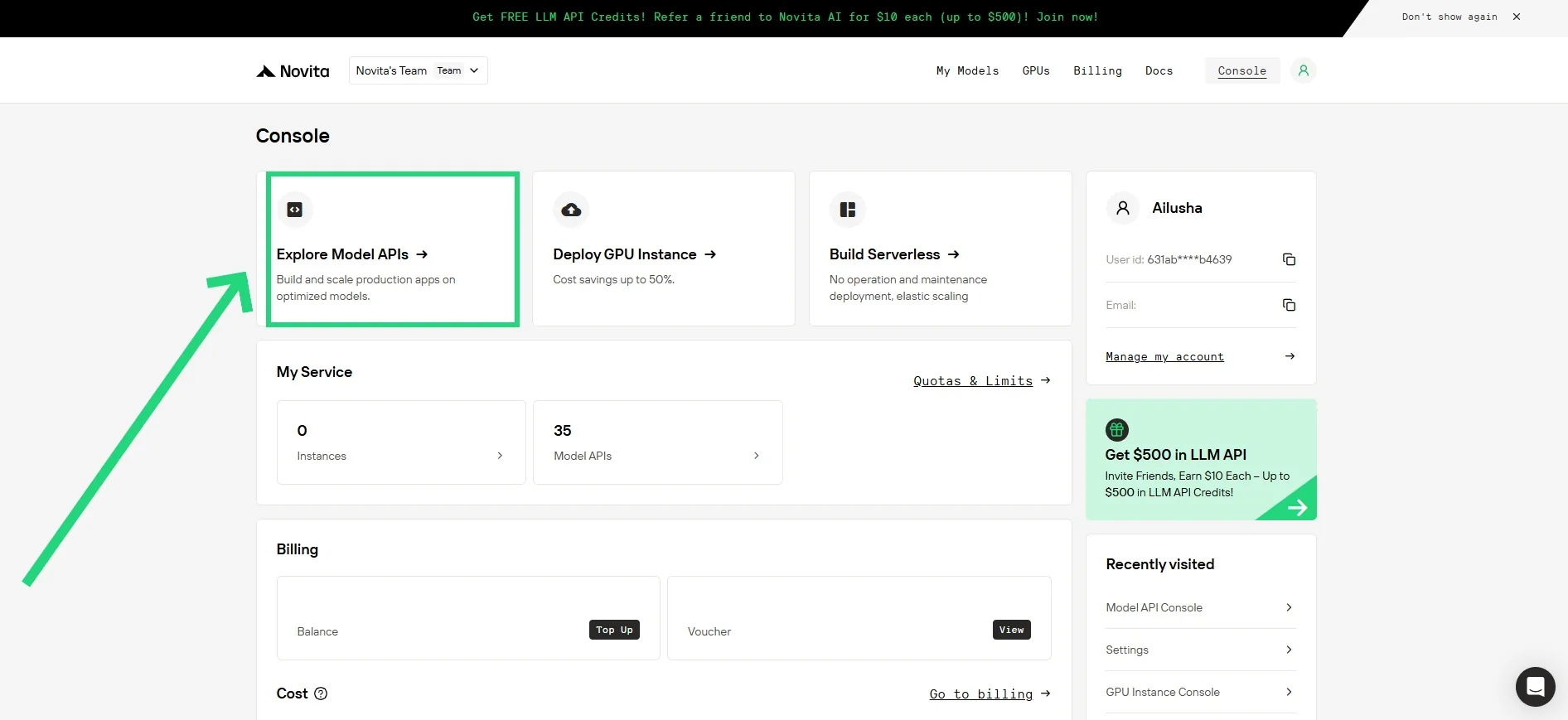
Step2: Click “Model API” in Console!
Once you’re logged in, you’ll be directed to the Novita Console dashboard. From the top, click on “Model API”. This section gives you access to a full list of available models, along with detailed information about their capabilities—including whether they support Function Calling and Structured Outputs.
Step3: Choose your Model and Check it!
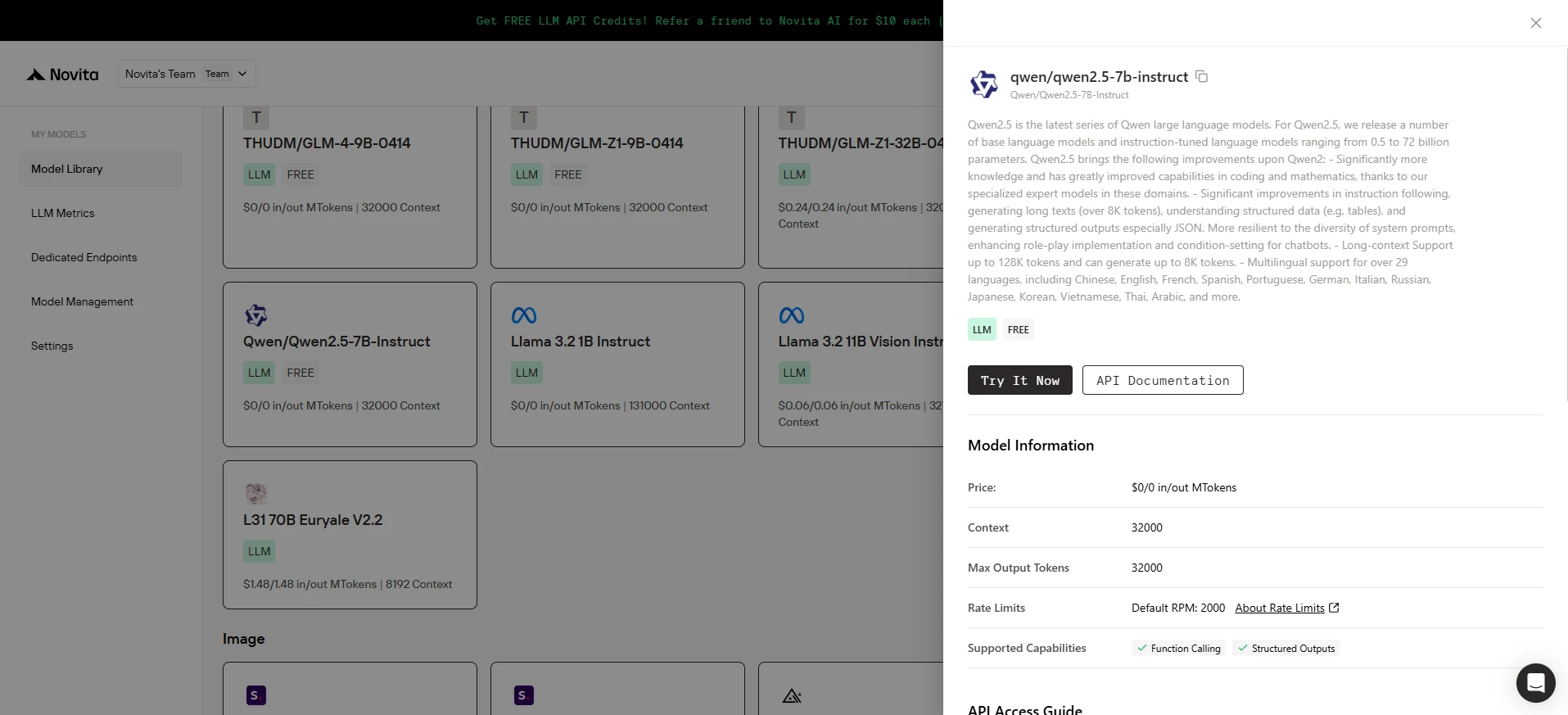
Just find the model you’re interested in, click on it, and a panel will pop up on the right. Under “Supported Capabilities,” you’ll instantly see whether Function Calling and Structured Outputs are supported.
Step4: Initialize the Client
First, you need to initialize the client with your Novita API key.
from openai import OpenAI
import json

client = OpenAI(
    base_url="https://api.novita.ai/v3/openai",
    # Get the Novita AI API Key from: https://novita.ai/settings/key-management.
    api_key="<YOUR Novita AI API Key>",
)

model = "thudm/glm-z1-9b-0414"
Step 5: Define the Function to Be Called
Next, define the Python function that the model can call. In this example, it’s a function to get weather information.
# Example function to simulate fetching weather data.
def get_weather(location):
    """Retrieves the current weather for a given location."""
    print("Calling get_weather function with location: ", location)
    # In a real application, you would call an external weather API here.
    # This is a simplified example returning hardcoded data.
    return json.dumps({"location": location, "temperature": "60 degrees Fahrenheit"})
Step 6: Construct the API Request with Tools and User Message
Now, create the API request to the Novita endpoint. This request includes the tools parameter, defining the functions the model can use, and the user’s message.
tools = [
    {
        "type": "function",
        "function": {
            "name": "get_weather",
            "description": "Get weather of an location, the user shoud supply a location first",
            "parameters": {
                "type": "object",
                "properties": {
                    "location": {
                        "type": "string",
                        "description": "The city and state, e.g. San Francisco, CA",
                    }
                },
                "required": ["location"]
            },
        }
    },
]

messages = [
    {
        "role": "user",
        "content": "What is the weather in San Francisco?"
    }
]

# Let's send the request and print the response.
response = client.chat.completions.create(
    model=model,
    messages=messages,
    tools=tools,
)

# Please check if the response contains tool calls if in production.
tool_call = response.choices[0].message.tool_calls[0]
print(tool_call.model_dump())
Output:
{'id': '0', 'function': {'arguments': '{"location": "San Francisco, CA"}', 'name': 'get_weather'}, 'type': 'function'}Function Calling + GLM Z1 9B = an intelligent, modular, and multilingual assistant that can talk, think, and act. Whether you’re building real-time dashboards, language bots, or scientific tools, this combo bridges LLM reasoning with action. Thanks to Novita AI’s plug-and-play support, developers can now easily bring these capabilities into their products with minimal code and maximum flexibility.
Frequently Asked Questions
What exactly does Function Calling enable?
Function Calling lets LLMs choose, execute, and respond with results from external tools like weather APIs, databases, or custom functions.
What makes GLM Z1 9B special for Function Calling?
Its reasoning strength, multilingual support, and HTML/SVG generation make it ideal for dynamic, interactive, and global applications.
Is Function Calling hard to implement?
No. With Novita AI, you just define a function, provide a schema, and use their API to integrate the model’s response with tool output.
Novita AI is the All-in-one cloud platform that empowers your AI ambitions. Integrated APIs, serverless, GPU Instance — the cost-effective tools you need. Eliminate infrastructure, start free, and make your AI vision a reality.



