GLM-4.5V is one of the most powerful vision-language models (VLMs) available today. With 106B total parameters and 12B active parameters, it combines the reasoning strength of GLM-4.5 with advanced visual encoders for images, documents, and video. This unmatched capability comes at a cost: VRAM. How much memory does it take to run the world’s strongest VLM locally?
How Much VRAM Does GLM 4.5V Need?
GLM-4.5V is the vision-language variant of GLM-4.5, featuring the same architecture as the “Air” model with 106 billion total parameters and 12 billion active parameters, but enhanced with visual encoders for processing images and videos. This vision component significantly increases memory requirements.
| GLM 4.5V | 106B | 12B | 128K tokens | Multimodal: vision, text, documents, videos |
Optimal VRAM for running GLM-4.5V is around 640 GB on 8xH100 GPU, which is just enough to handle inference in FP16, including the active parameters, visual encoder, and intermediate image tensors. While 640 GB is sufficient for typical use, higher-resolution images or full 128k token contexts may require additional memory or multiple GPUs for optimal performance.
GLM 4.5V VRAM vs Other VLMs
| Model | Parameters | VRAM Requirement (Inference) |
|---|---|---|
| GLM‑4.1V‑Thinking (9B) | 9B active | 22–24 GB |
| GLM‑4.5V | 106B total / 12B active | 48 GB |
| Gemma 3 27B | 27B | 70GB |
| Qwen 2.5‑VL (72B) | 72B | 384 GB |
| Kimi VL A3B Thinking 2506 | 16.4GB | 12GB |
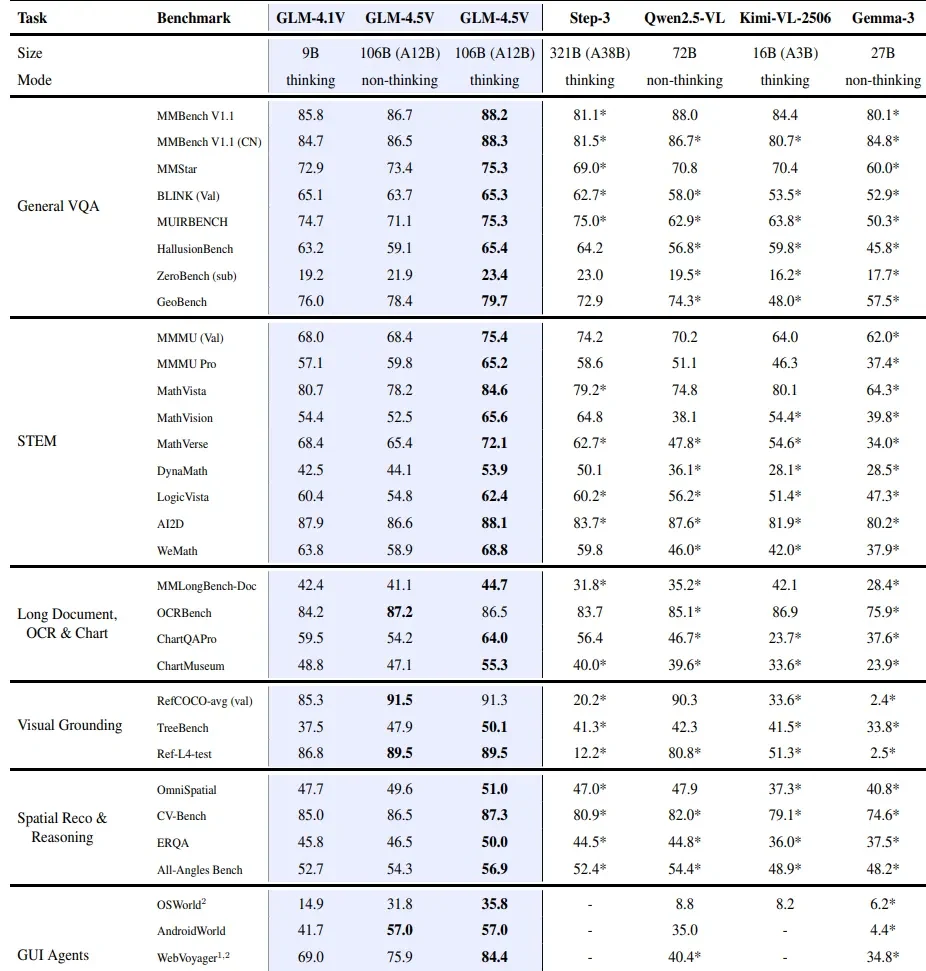
GLM 4.5V Performance vs Other VLMs
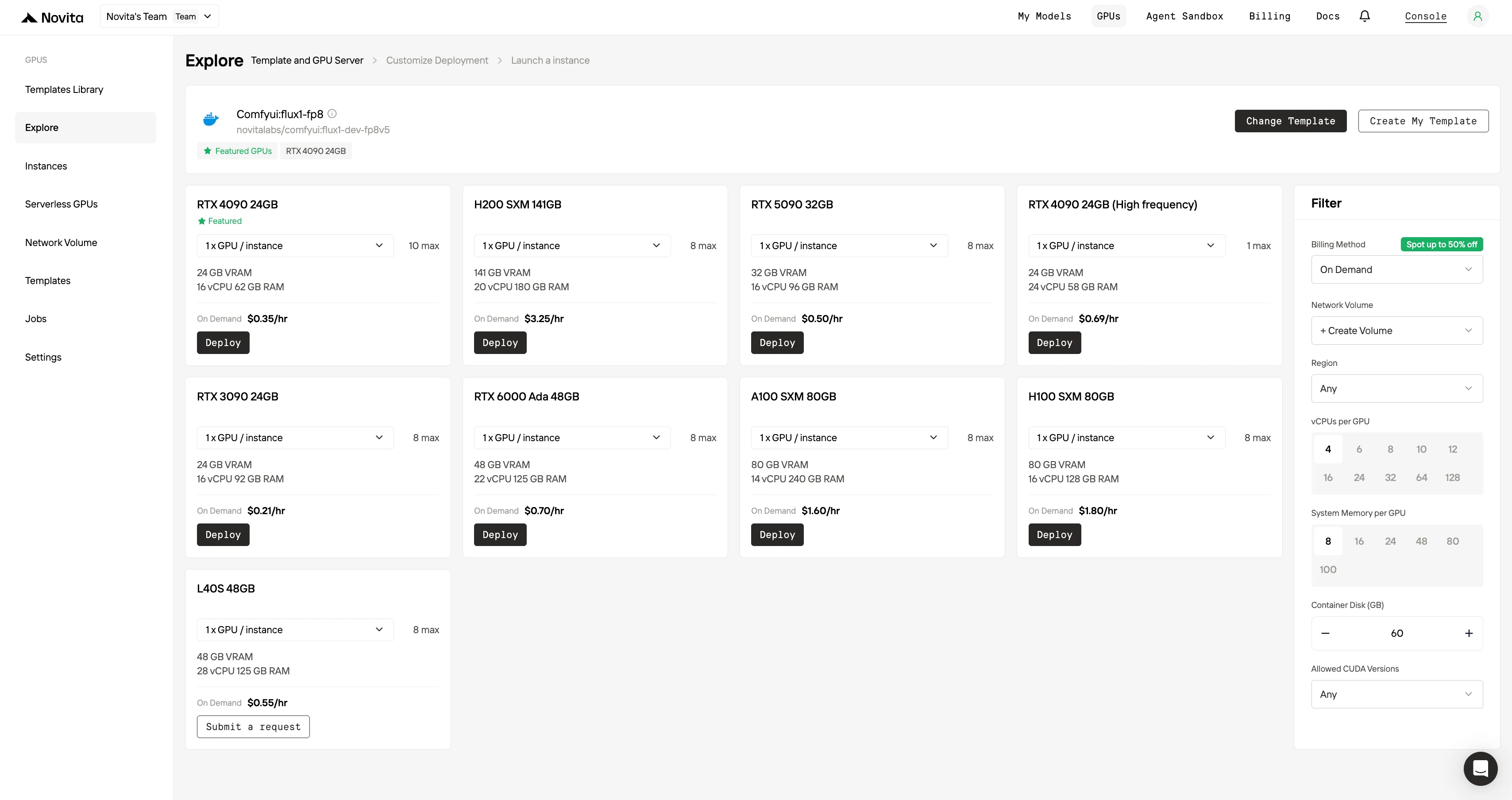
What GPU is Recommended for Running GLM 4.5V?
1. A6000 / L40S (≈48 GB)
- Why it’s great: Matches GLM‑4.5V’s FP16 VRAM requirement (~48 GB) exactly, allowing the full model (active parameters + vision module) to fit on a single GPU.
- Best for: Cost-effective, single-GPU deployments without multi-GPU complexity.
- Trade-offs: Lower memory bandwidth and compute performance compared to A100/H100. Limited for 128K context or fine-tuning workloads.
2. A100 80GB
- Why it’s reliable: With 80 GB of HBM2e memory, it comfortably runs GLM‑4.5V and can support light fine-tuning. Well-established in LLM training and inference.
- Best for: Balanced training and inference workloads, especially when FP8 is not essential.
- Trade-offs: Slower inference compared to H100; lacks native FP8 support. Older generation hardware.
3. H100 80GB
- Why it excels: Delivers the highest throughput and efficiency. Supports FP8 for reduced VRAM usage and fast inference—ideal for long-context (128K token) and high-demand deployments.
- Best for: Full-scale, low-latency inference in production environments with large inputs or multiple concurrent requests.
- Trade-offs: Highest cost, limited availability, and requires the latest software stack (CUDA 12+, PyTorch nightly) for FP8 support.
Troubleshooting GLM 4.5V VRAM Errors
1. Quantization
- Use 4-bit or 8-bit weights to reduce VRAM (e.g., 12B → ~6 GB).
- Tools:
GPTQ,LLAMA.cpp,Unsloth GGUF. - Quantize KV cache too for long-context efficiency.
2. MoE Offloading
- Keep active 12B on GPU, offload inactive experts to CPU.
- Needs fast interconnect and high CPU RAM (≥1 TB for full model).
- Use
device_map="auto"with DeepSpeed or Accelerate.
3. Limit Context Length
- Reducing 128k → 32k/8k cuts memory by 4–16×.
- Enables inference on 12–16 GB GPUs.
- Stream long input in chunks if needed.
4. KV Cache Optimization
- Use float16 / int8 / int4 precision.
- Move KV cache to CPU if GPU RAM is tight (slower but workable).
5. Use Smaller Components
- Prefer GLM-4.5-Air (text-only).
- Offload vision encoder or use external image models (e.g., CLIP).
- Air is nearly 2× faster and good for most NLP tasks.
6. Memory-Efficient Fine-Tuning
- Apply LoRA, QLoRA, gradient checkpointing.
- Always fine-tune Air unless vision is required.
- 4×80 GB GPUs for Air vs. 16×80 GB for full GLM.
7. Inference Engine Tweaks
- Use efficient engines:
vLLM,SGLang. - On H100: Split into 2×40GB via MIG for multi-instance inference.
Optimizing GLM 4.5V for Low VRAM Environments
CUDA OOM on Load: Use quantized models + device_map="auto" + clear cache.
OOM During Inference: Lower max_new_tokens; trim context; offload cache.
FP8 Errors: Avoid on unsupported GPUs; switch to FP16/BF16.
Repetition/Garbage Output: Can result from low-precision cache or overload.
Memory Fragmentation: Restart environment; reduce batch size; disable autotuning.
CPU RAM OOM: Monitor usage; avoid large models if RAM is low.
Framework Errors: Validate memory configs; read error logs for tensor/device issues.
If You Want a More Convenient Way, You Can Choose API!
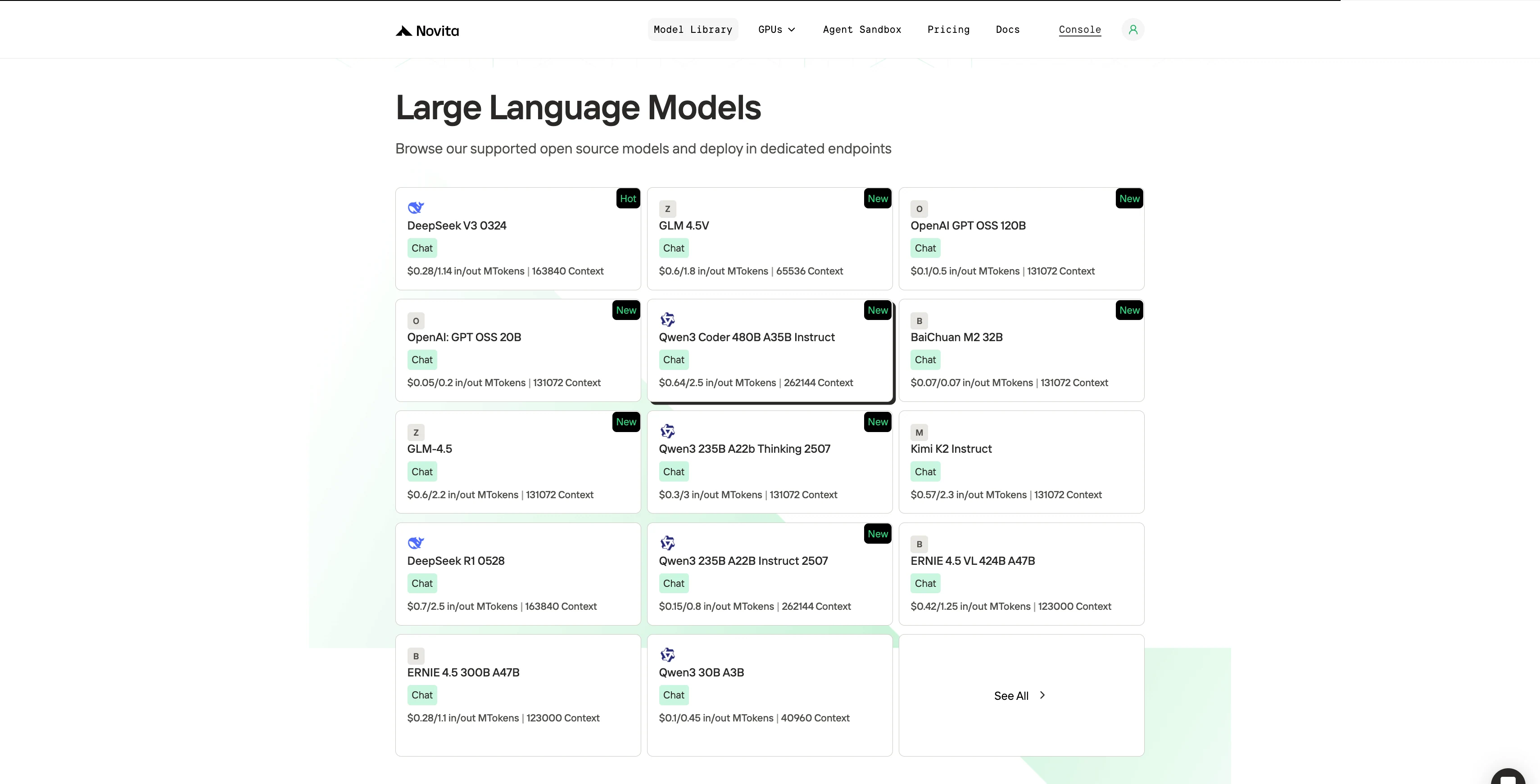
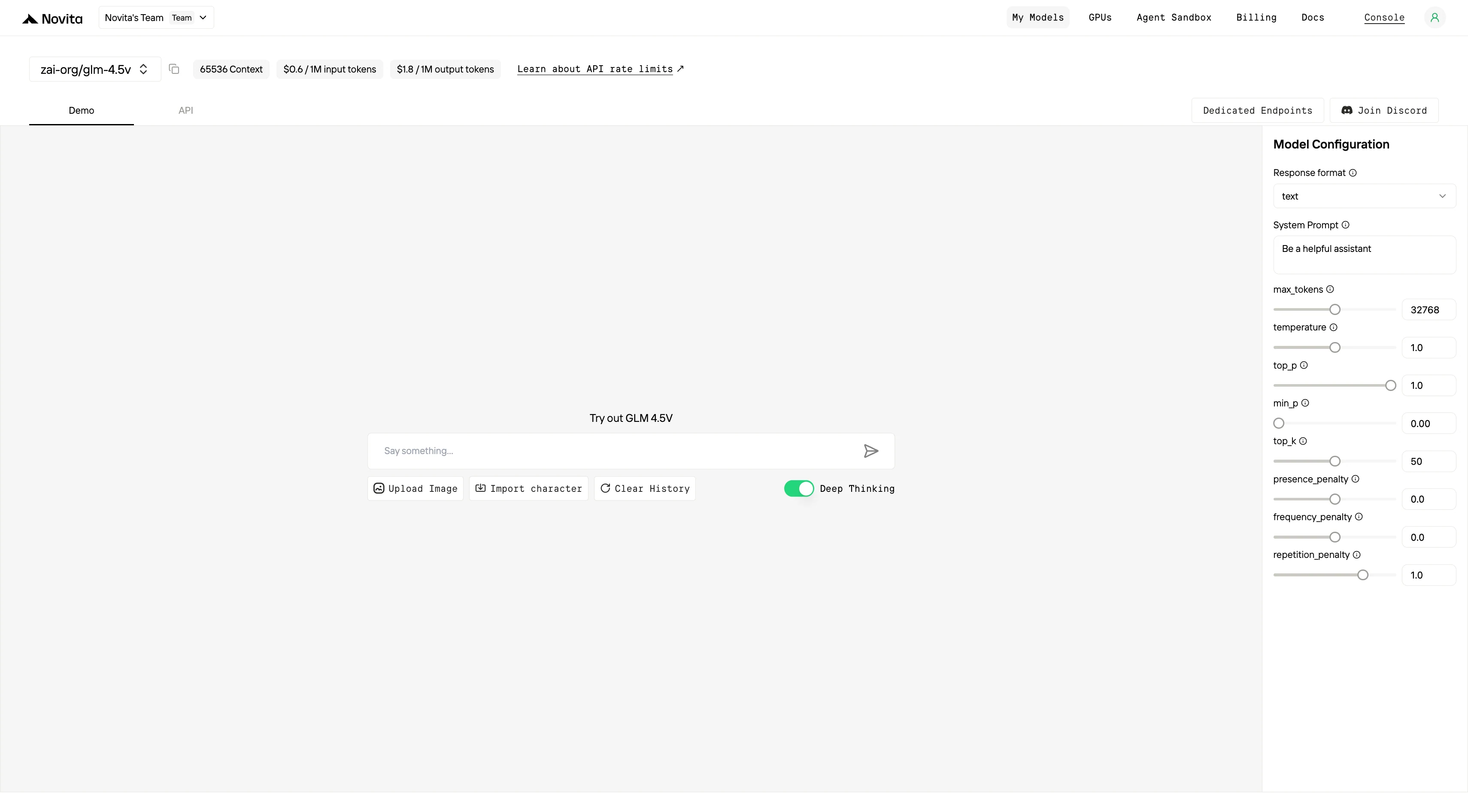
Novita AI’s GLM-4.5V API offers 65.5K context, with input priced at $0.60/1K tokens, output at $1.80/1K tokens, and function calling and structured outputs supported.
Step 1: Log In and Access the Model Library
Log in to your account and click on the Model Library button.

Step 2: Choose Your Model
Browse through the available options and select the model that suits your needs.
Step 3: Start Your Free Trial
Begin your free trial to explore the capabilities of the selected model.
Step 4: Get Your API Key
To authenticate with the API, we will provide you with a new API key. Entering the “Settings“ page, you can copy the API key as indicated in the image.

Step 5: Install the API
Install API using the package manager specific to your programming language.
After installation, import the necessary libraries into your development environment. Initialize the API with your API key to start interacting with Novita AI LLM. This is an example of using chat completions API for python users.
from openai import OpenAI

client = OpenAI(
    base_url="https://api.novita.ai/openai",
    api_key="<YOUR Novita AI API Key>",
)

model = "zai-org/glm-4.5v"
stream = True # or False
max_tokens = 32768
system_content = "Be a helpful assistant"
temperature = 1
top_p = 1
min_p = 0
top_k = 50
presence_penalty = 0
frequency_penalty = 0
repetition_penalty = 1
response_format = { "type": "text" }

chat_completion_res = client.chat.completions.create(
    model=model,
    messages=[
        {
            "role": "system",
            "content": system_content,
        },
        {
            "role": "user",
            "content": "Hi there!",
        }
    ],
    stream=stream,
    max_tokens=max_tokens,
    temperature=temperature,
    top_p=top_p,
    presence_penalty=presence_penalty,
    frequency_penalty=frequency_penalty,
    response_format=response_format,
    extra_body={
      "top_k": top_k,
      "repetition_penalty": repetition_penalty,
      "min_p": min_p
    }
  )

if stream:
    for chunk in chat_completion_res:
        print(chunk.choices[0].delta.content or "", end="")
else:
    print(chat_completion_res.choices[0].message.content)
GLM-4.5V sets a new benchmark for multimodal AI, but local deployment demands serious GPU power. 48 GB VRAM (A6000/L40S) is the minimum for standard inference, while 640 GB across 8×H100 GPUs is recommended for full 128K-context and high-resolution multimodal workloads.
In short: VRAM determines performance. API determines convenience.
How much VRAM does GLM-4.5V need locally?
At least 48 GB for baseline inference. For full-scale workloads with long context and heavy vision input, expect 640 GB (8×H100 GPUs).
What if I don’t have that much VRAM?
Use quantization (4-bit/8-bit), reduce context length, optimize KV cache, or apply MoE offloading to cut memory requirements.
Which GPUs are best for GLM-4.5V?
A6000 / L40S (48 GB): Single-GPU inference, cost-effective.
A100 (80 GB): Reliable for inference and light fine-tuning.
H100 (80 GB): Best throughput, FP8 support, ideal for production.
Novita AI is the All-in-one cloud platform that empowers your AI ambitions. Integrated APIs, serverless, GPU Instance — the cost-effective tools you need. Eliminate infrastructure, start free, and make your AI vision a reality.



