Struggling with document parsing across multiple languages? Need to extract text, tables, formulas, and charts from complex documents without investing in expensive infrastructure?
PaddleOCR-VL on Novita AI GPU instance is your answer. This state-of-the-art OCR solution delivers enterprise-grade document parsing in just 5 minutes of setup—no complex configuration, no hardware investment, no hassle.
With 109 language support, recognition of complex elements including handwritten text and historical documents, and fast inference speeds, PaddleOCR-VL achieves what traditional OCR systems can’t: accuracy, efficiency, and versatility in one compact package.
👉 Start deploying PaddleOCR-VL now with our pre-configured GPU template.
This step-by-step guide shows you exactly how to deploy PaddleOCR-VL on Novita AI GPU instance, run your first OCR inference, and start processing documents immediately. Whether you’re digitizing invoices, analyzing research papers, or extracting data from forms, you’ll have a production-ready solution running in minutes.
What is PaddleOCR-VL?
PaddleOCR-VL is a SOTA (state-of-the-art) and resource-efficient vision-language model specifically designed for document parsing. Unlike traditional OCR systems that consume massive computational resources or struggle with complex layouts, PaddleOCR-VL delivers exceptional accuracy while maintaining minimal resource consumption.
The Technology Behind PaddleOCR-VL
At its core, PaddleOCR-VL-0.9B combines:
- NaViT-style dynamic resolution visual encoder for accurate image processing
- ERNIE-4.5-0.3B language model for intelligent text understanding
- Compact architecture (0.9B parameters) for fast, efficient inference
This innovative integration enables the model to recognize complex document elements—text, tables, formulas, charts—across 109 languages without requiring expensive GPU hardware or lengthy processing times.
Proven Performance
Through comprehensive evaluations on widely used public benchmarks and in-house testing, PaddleOCR-VL achieves SOTA performance in both page-level document parsing and element-level recognition. The model significantly outperforms existing pipeline-based solutions and exhibits strong competitiveness against top-tier vision-language models (VLMs), making it the go-to choice for production environments.
Why Choose PaddleOCR-VL for Document Parsing?
1. Compact Yet Powerful Architecture
Resource efficiency meets high performance. PaddleOCR-VL’s novel vision-language architecture is specifically designed for resource-efficient inference while achieving outstanding element recognition results.
The integration of a NaViT-style dynamic high-resolution visual encoder with the lightweight ERNIE-4.5-0.3B language model significantly enhances recognition capabilities and decoding efficiency. You get high accuracy with reduced computational demands—perfect for cost-effective, practical document processing applications.
2. SOTA Performance on Complex Documents
Best-in-class accuracy where it matters most. PaddleOCR-VL achieves state-of-the-art performance in:
- Page-level document parsing: Complete document understanding and structure recognition
- Element-level recognition: Precise extraction of individual components
The model excels at recognizing challenging content that trips up traditional OCR systems:
- ✅ Complex tables with merged cells and nested structures
- ✅ Mathematical formulas and equations
- ✅ Charts, graphs, and diagrams
- ✅ Handwritten text with varying styles
- ✅ Historical documents with degraded quality
- ✅ Mixed-language documents
This versatility makes PaddleOCR-VL suitable for virtually any document type or scenario you encounter.
3. Extensive Multilingual Support (109 Languages)
True global reach. PaddleOCR-VL supports 109 languages, covering:
- Major global languages: Chinese, English, Japanese, Korean, Latin
- Diverse scripts: Russian (Cyrillic), Arabic, Hindi (Devanagari), Thai
- Regional languages: And many more
This broad language coverage substantially enhances the applicability of the system to multilingual and globalized document processing scenarios. Process documents from any market, any region, any language—without switching tools or models.
4. Fast Inference Speeds
Time is money. PaddleOCR-VL delivers fast inference speeds that make it highly suitable for practical deployment in real-world scenarios. The compact 0.9B parameter model processes documents quickly without sacrificing accuracy, enabling high-throughput document processing workflows.
How to Deploy PaddleOCR-VL on Novita AI (5-Minute Guide)
Ready to deploy PaddleOCR-VL on Novita AI GPU instance? Follow these 8 simple steps to get your SOTA OCR service running in minutes.
Step 1: Go to PaddleOCR-VL Template
You can directly access the PaddleOCR-VL GPU Template .
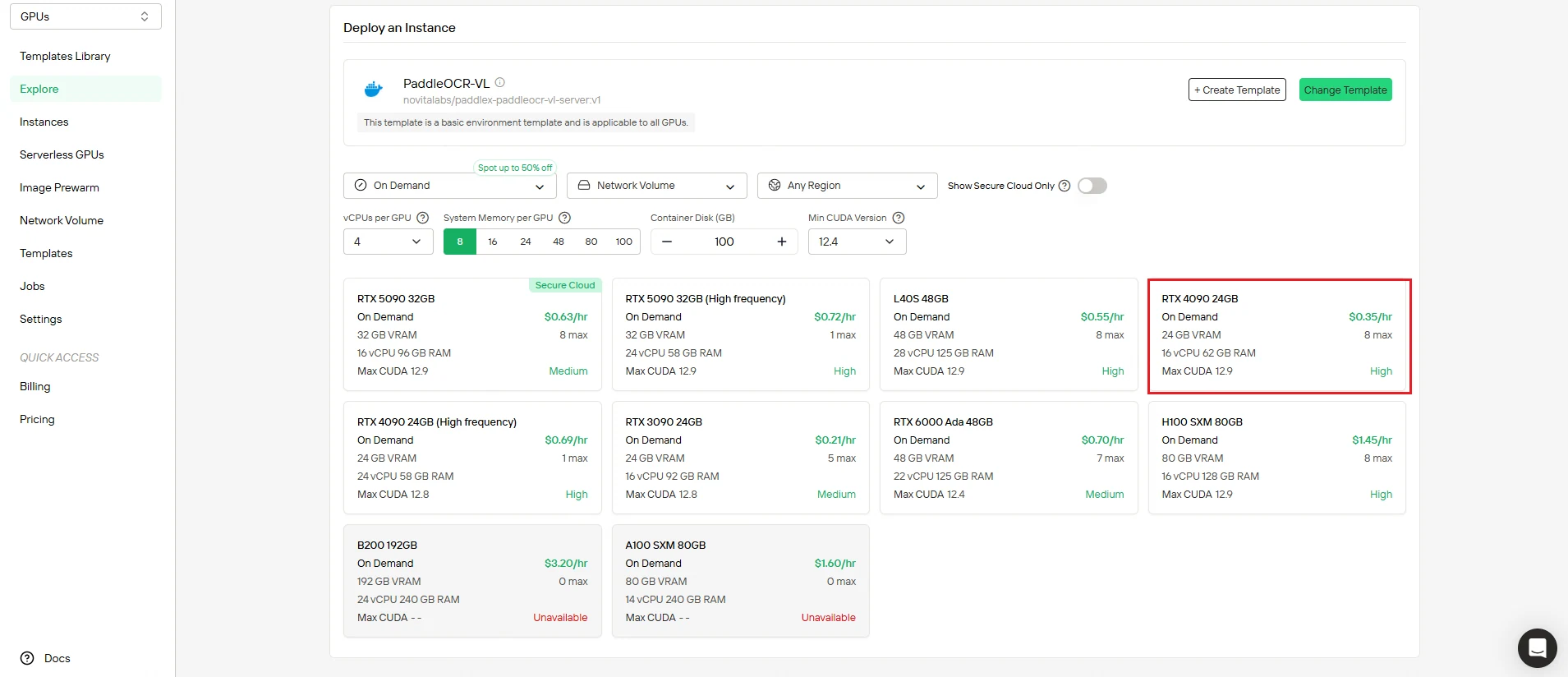
Step 2: Configure Your GPU Instance
Set up infrastructure parameters to match your processing requirements:
- Memory allocation: Choose RAM capacity based on workload
- Storage requirements: Allocate disk space for model files and processing
- Network settings: Configure connectivity for API access
Select Deploy to implement your configuration.
Pro Tip: Start with recommended settings for typical document processing workloads, then scale as needed.
Step 3: Review Configuration and Deploy
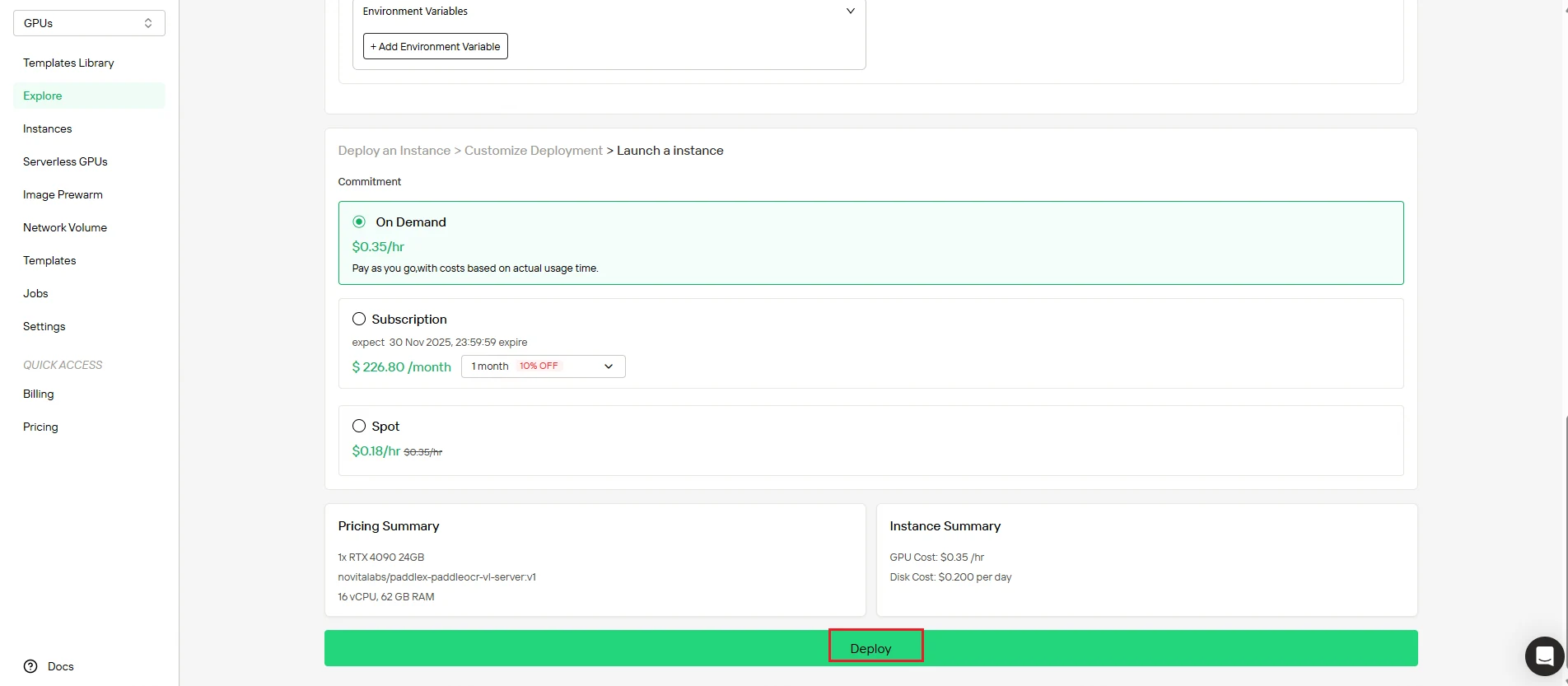
Double-check your settings before deployment:
- Verify compute resources match your requirements
- Review cost summary to ensure budget alignment
- Confirm network and storage configurations
When satisfied, click Deploy to start the creation process. Novita AI handles all the backend complexity automatically.
Step 4: Monitor Instance Creation
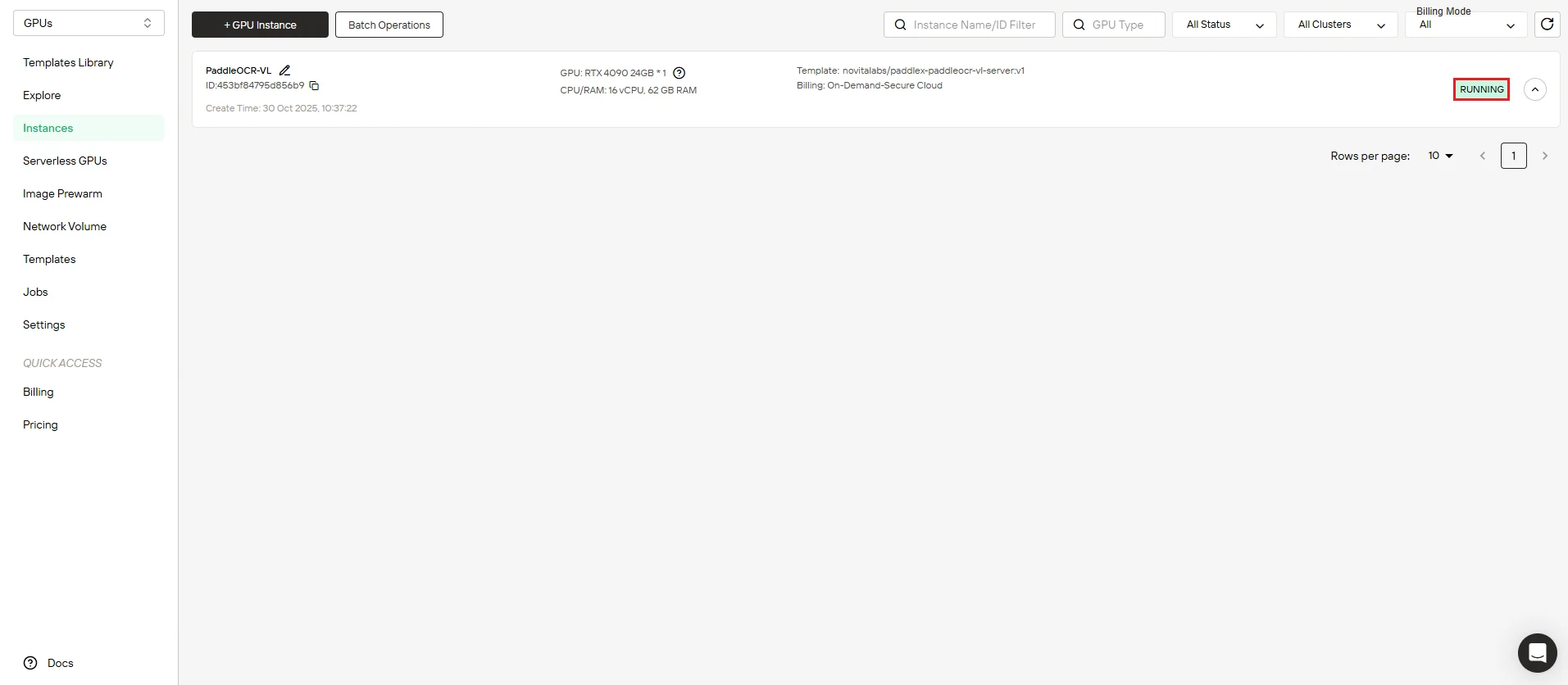
After initiating deployment, the system automatically redirects you to the instance management page. Your instance is created in the background—no manual intervention required.
Track the progress in real-time from the dashboard.
Step 5: Track Image Download Progress
Watch your instance come online. The dashboard displays real-time progress of the PaddleOCR-VL image download. Your instance status transitions from “Pulling” to “Running” once deployment completes successfully.
Click the arrow icon next to your instance name to view detailed progress information and deployment logs.
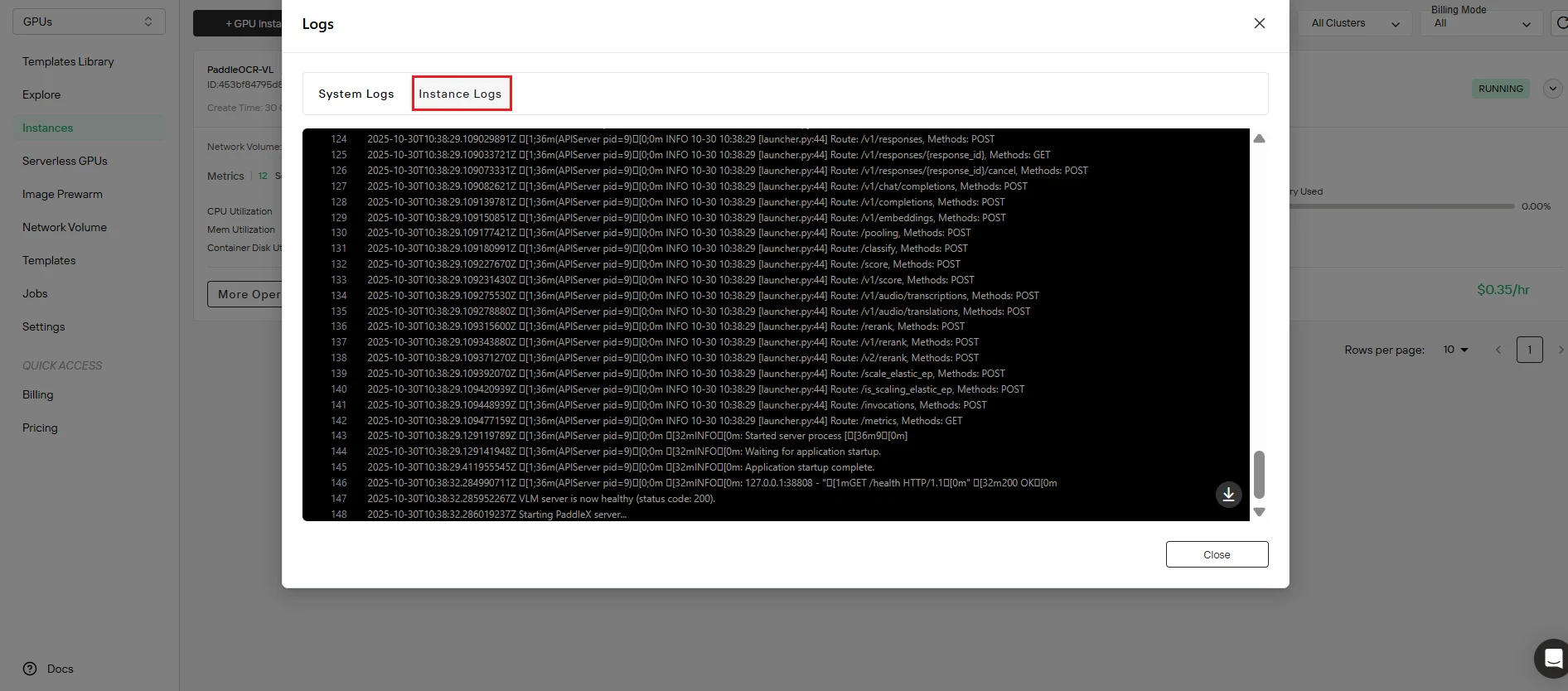
Step 6: Verify Service Status
Confirm successful deployment. Click the Logs button to access instance logs and verify that the PaddleOCR-VL service has started properly. Look for initialization messages confirming:
- Service launch completed
- API endpoint active and listening
- Model loaded successfully
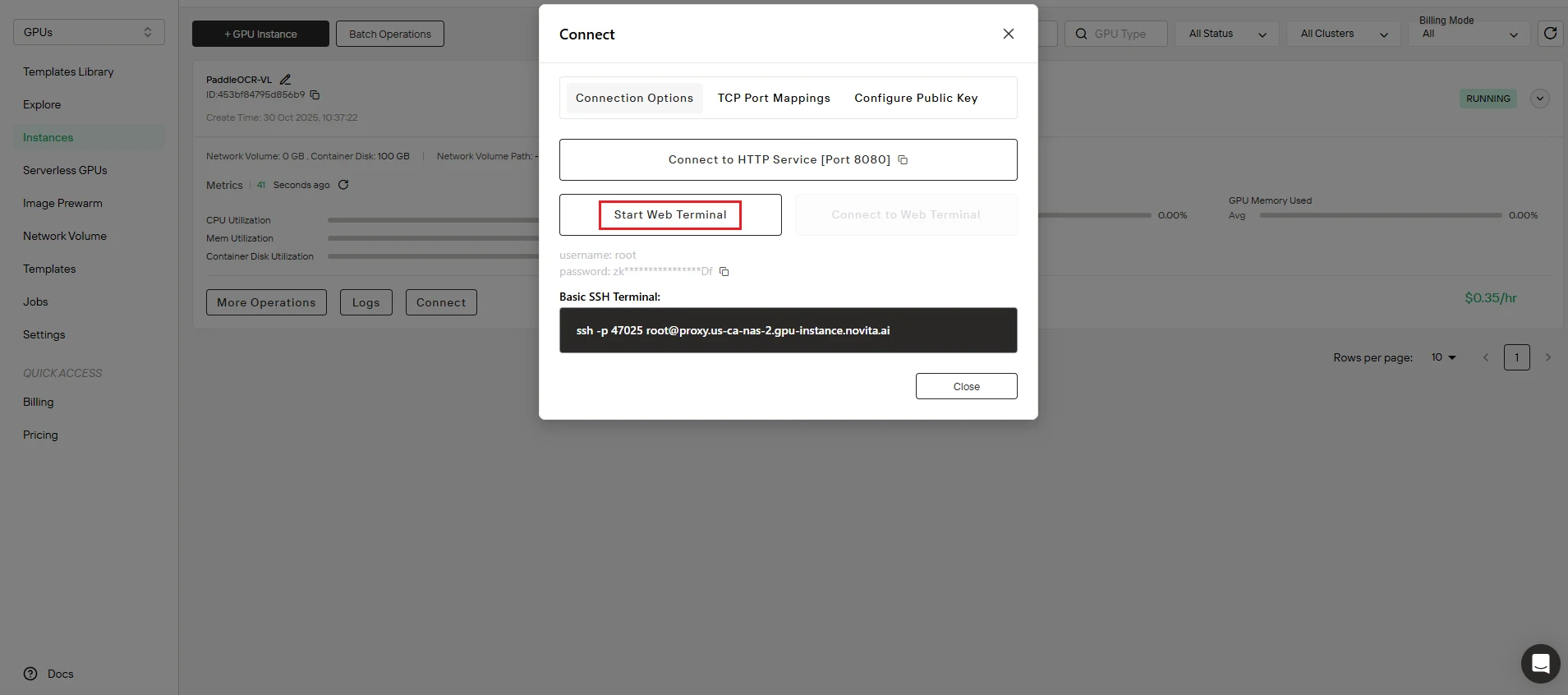
Step 7: Access Development Environment
Launch your workspace. Navigate to the Connect interface and initialize Start Web Terminal to gain command-line access to your instance.
🎉 Congratulations! Your PaddleOCR-VL service is now fully operational and ready to process OCR requests. Total time: approximately 5 minutes.
Running Your First OCR Inference
Now that your PaddleOCR-VL instance is running on Novita AI GPU, let’s process your first document. This demo demonstrates the complete workflow from image preparation to result extraction.
Step 1: Create Python Test Script
Create a file named test.py with the following code:
import base64
import requests
import pathlib

API_URL = "http://localhost:8080/layout-parsing"  # Service URL

image_path = "./demo.jpg"

# Encode local image to Base64
with open(image_path, "rb") as file:
    image_bytes = file.read()
    image_data = base64.b64encode(image_bytes).decode("ascii")

payload = {
    "file": image_data,  # Base64 encoded file content or file URL
    "fileType": 1,  # File type, 1 means image file
}

# Call the API
response = requests.post(API_URL, json=payload)

# Process the API response data
assert response.status_code == 200
result = response.json()["result"]
for i, res in enumerate(result["layoutParsingResults"]):
    print(res["prunedResult"])
    md_dir = pathlib.Path(f"markdown_{i}")
    md_dir.mkdir(exist_ok=True)
    (md_dir / "doc.md").write_text(res["markdown"]["text"])
    for img_path, img in res["markdown"]["images"].items():
        img_path = md_dir / img_path
        img_path.parent.mkdir(parents=True, exist_ok=True)
        img_path.write_bytes(base64.b64decode(img))
    print(f"Markdown document saved at {md_dir / 'doc.md'}")
    for img_name, img in res["outputImages"].items():
        img_path = f"{img_name}_{i}.jpg"
        pathlib.Path(img_path).parent.mkdir(exist_ok=True)
        with open(img_path, "wb") as f:
            f.write(base64.b64decode(img))
        print(f"Output image saved at {img_path}")
What this script does:
- Encodes your image to Base64 format
- Sends it to the PaddleOCR-VL API endpoint
- Receives structured parsing results
- Saves extracted content as markdown documents
- Exports embedded images
Step 2: Download Test Image
Use the official PaddleOCR test case for your first inference:
bash
curl https://raw.githubusercontent.com/PaddlePaddle/PaddleOCR/main/tests/test_files/book.jpg -o demo.jpgThis downloads a sample document image (book.jpg) to test your OCR setup. The official test file is available at: PaddleOCR GitHub Repository
Step 3: Configure API Endpoint
Update your script with the correct endpoint:
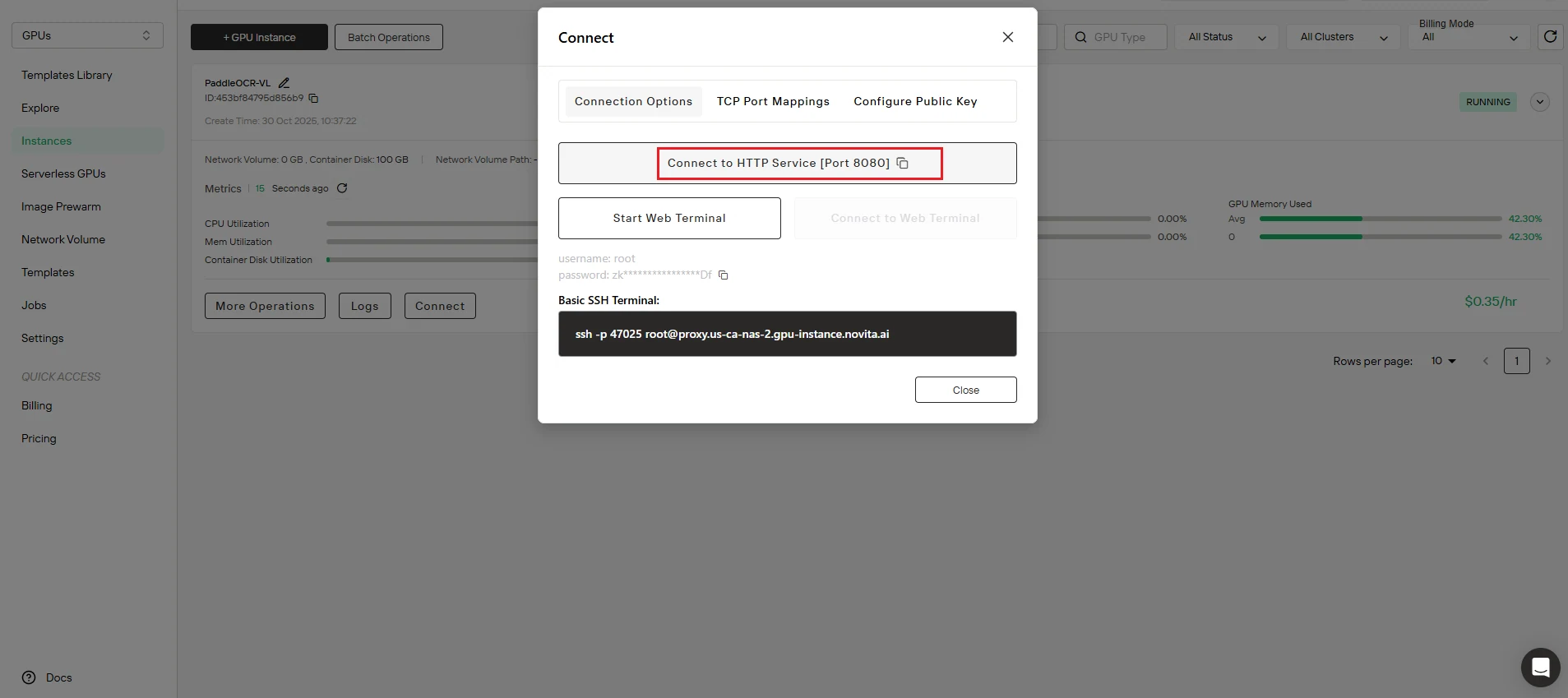
- Copy the port mapping address from your Novita AI instance dashboard
- Replace
http://localhost:8080/layout-parsingintest.pywith your actual API endpoint URL
Example: Your endpoint might look like http://your-instance-id.novita.ai:8080/layout-parsing
Step 4: Execute OCR Processing
Run your test script:
bash
python test.pyExpected output:
- Console displays the extracted text structure
- Markdown documents saved to
markdown_0/doc.md - Embedded images extracted to separate files
- Confirmation messages showing output file locations
That’s it! You’ve successfully processed your first document with PaddleOCR-VL on Novita AI GPU instance.
Real-World Applications
Deploy PaddleOCR-VL on Novita AI GPU instance to power diverse document processing workflows:
Financial Services
- Invoice processing: Extract line items, totals, vendor information
- Receipt digitization: Automate expense reporting and reconciliation
- Bank statement parsing: Convert statements to structured data
Academic & Research
- Research paper analysis: Extract text, formulas, tables from publications
- Textbook digitization: Convert educational materials to searchable formats
- Historical document preservation: Digitize archives with degraded text quality
Legal & Compliance
- Contract analysis: Extract clauses, terms, signatures
- Regulatory document processing: Parse compliance filings and reports
- Legal discovery: Convert case documents to searchable text
Healthcare
- Medical record digitization: Convert patient charts to structured data
- Prescription processing: Extract medication information from forms
- Insurance claim parsing: Automate claim document processing
E-commerce & Retail
- Product catalog extraction: Parse supplier datasheets and specifications
- Multilingual product descriptions: Process international catalogs
- Inventory document processing: Digitize stock lists and manifests
Government Services
- Form processing: Automate citizen service document handling
- ID verification: Extract information from identification documents
- Permit and license processing: Parse application documents
The 109 language support and complex element recognition make PaddleOCR-VL ideal for global organizations handling diverse document types.
Conclusion
Deploy PaddleOCR-VL on Novita AI GPU instance in 5 minutes and unlock state-of-the-art document parsing capabilities without infrastructure complexity. With SOTA performance, 109 language support, and efficient resource usage, you get enterprise-grade OCR that’s both powerful and practical.
Key Takeaways:
✅ 5-minute deployment with pre-configured templates
✅ SOTA accuracy for text, tables, formulas, and charts
✅ 109 languages for global document processing
✅ Complex element recognition including handwritten and historical documents
✅ Fast inference speeds for high-throughput workflows
✅ Resource-efficient with compact 0.9B parameter model
Whether you’re processing invoices, digitizing research papers, analyzing legal documents, or handling multilingual content, PaddleOCR-VL on Novita AI delivers production-ready results from day one.
Ready to Transform Your Document Workflow?
Don’t let complex OCR setup slow you down. Deploy PaddleOCR-VL on Novita AI GPU instance today and start processing documents in minutes, not hours.
👉 Deploy PaddleOCR-VL GPU Template Now
Get instant access to the pre-configured PaddleOCR-VL template with all dependencies and optimizations included. Just click, configure, and deploy—your SOTA OCR service will be running in 5 minutes.
Why thousands of developers choose Novita AI:
- Zero infrastructure management
- Pay-as-you-go pricing with no upfront costs
- Pre-configured templates for instant deployment
- Scalable GPU resources on demand
- 24/7 support and comprehensive documentation
Start your deployment now—your first OCR inference is just 5 minutes away.
Frequently Asked Questions
How long does it take to deploy PaddleOCR-VL on Novita AI?
Approximately 5 minutes from template selection to running instance.
What languages does PaddleOCR-VL support?
109 languages including Chinese, English, Japanese, Korean, Russian, Arabic, Hindi, Thai, and many more.
Can PaddleOCR-VL recognize handwritten text?
Yes, PaddleOCR-VL excels at recognizing handwritten text and historical documents with degraded quality.
What types of document elements can PaddleOCR-VL extract?
Text, tables, mathematical formulas, charts, and other complex document elements.
Do I need GPU experience to deploy on Novita AI?
No, the pre-configured template handles all technical setup automatically. Just click the PaddleOCR-VL GPU Template link and follow the simple steps.
How much does it cost to run PaddleOCR-VL on Novita AI?
Novita AI offers pay-as-you-go pricing. You only pay for the GPU time you actually use, with no upfront costs or long-term commitments.
Novita AI is an AI cloud platform that offers developers an easy way to deploy AI models using our simple API, while also providing affordable and reliable GPU cloud for building and scaling.




