Key Highlights
Powerful Yet Efficient: Matches larger models’ performance with reduced resource needs.
Benchmark Leader: Excels in AIME 2024 and SWE-bench Verified, surpassing OpenAI-o1-mini.
Multilingual Support: Handles 29+ languages, including Chinese, English, and French.
Advanced Features: Supports long texts (8K+ tokens), structured outputs, and role-play scenarios.
Easy to Access: Available via Ollama for local deployment or Novita AI API for integration.
Refer your friends to Novita AI and both of you will earn $10 in LLM API credits—up to $500 in total rewards.
To support the developer community, Qwen2.5-7B, Qwen 3 0.6B, Qwen 3 1.7B, Qwen 3 4B is currently available for free on Novita AI.
The DeepSeek R1 Distill Qwen 32B is a cutting-edge distilled model offering the power of larger models with significantly lower hardware requirements. Its fine-tuned architecture delivers superior performance, consistently outperforming models like OpenAI-o1-mini in benchmarks. Designed for efficiency and accessibility, it supports local deployment and seamless API integration, making it ideal for developers, researchers, and businesses alike.
Deepseek R1 Distill Qwen 32B Basic Introduction
Basic Info
Model Size
32.8B
Open Source
Yes
Architecture
Transformer
Language Support
Multilingual support for over 29 languages, including:
Chinese English French Spanish Portuguese German Italian Russian Japanese Korean Vietnamese Thai Arabic and more…
Key Highlights
- Significant improvements in instruction following and generating long texts (over 8K tokens).
- Enhanced understanding of structured data (e.g., tables) and generating structured outputs, especially JSON.
- More resilient to diverse system prompts, improving role-play implementation and condition-setting for chatbots.
Multimodal Capability
Supports text-to-text transformations.
Training
Fine-tuned Qwen 2.5 32B with DeepSeek R1 as the teacher to achieve performance similar to larger models.
DeepSeek really has done something special with distilling the big R1 model into other open-source models. Especially the fusion with Qwen-32B seems to deliver insane gains across benchmarks and makes it go-to model for people with less VRAM, pretty much giving the overall best results compared to LLama-70B distill. Easily current SOTA for local LLMs, and it should be fairly performant even on consumer hardware.
Benchmark
| Benchmark | DeepSeek-R1-32B | OpenAI-o1-mini | Other Model |
|---|---|---|---|
| AIME 2024 | 72.6% | 63.6% | Llama-70B: 70.0%, QwQ-32B: 50.0% |
| Codeforces | 71.5% | 60.0% | Llama-70B: 57.5%, QwQ-32B: 54.5% |
| GPQA Diamond | 62.1% | 60.0% | Llama-70B: 65.2%, QwQ-32B: 54.5% |
| MATH-500 | 75.7% | 90.0% | Llama-70B: 94.5%, QwQ-32B: 90.6% |
| MMLU | 90.8% | 88.5% | Llama-70B: 91.8%, QwQ-32B: 90.6% |
| SWE-bench Verified | 49.2% | 36.8% | Llama-70B: 57.5%, QwQ-32B: 41.6% |
Deepseek R1 Distill Qwen 32B excels in AIME 2024 and SWE-bench Verified, slightly outperforms OpenAI-o1-mini in some tasks, but generally lags behind larger models like Deepseek R1 Llama 70B in benchmarks requiring advanced reasoning or mathematical capabilities.
How to Access Deepseek R1 Distill Qwen 32B Locally
Hardware Requirements
Model Size: 73.21 GB
- 1 × H100 (80GB): High-performance GPU for training.
- 1 × A100 (80GB): High-memory GPU for large datasets.
- 2 × L40s (96GB): Advanced inference GPUs with enhanced memory.
- 4 × RTX 4090 (96GB): High-power GPUs for distributed tasks.
Step-by-Step Installation Guide
# Guide: Install and Use DeepSeek-R1 with Ollama

# 1. Install Ollama
# Visit the Ollama website, download and install the version for your OS:
# https://ollama.ai/

# 2. Download the DeepSeek-R1 Model
# Open your terminal and run the command below to download the model
# (using the 7B parameter version as an example):
ollama run deepseek-r1:7b
# Wait for the download to complete. The time required will depend on your network speed.

# 3. Verify Installation and Start the Model
# Verify that the model has been successfully downloaded:
ollama list
# Ensure "deepseek-r1" appears in the list.

# Start the 32B version of the model:
ollama run deepseek-r1:32b

# 4. Usage Examples
# Ask a query:
>>> "Explain quantum computing in simple terms."

# Generate code:
>>> "Write a Python function to calculate the Fibonacci sequence."
Challenges in Local Deployment
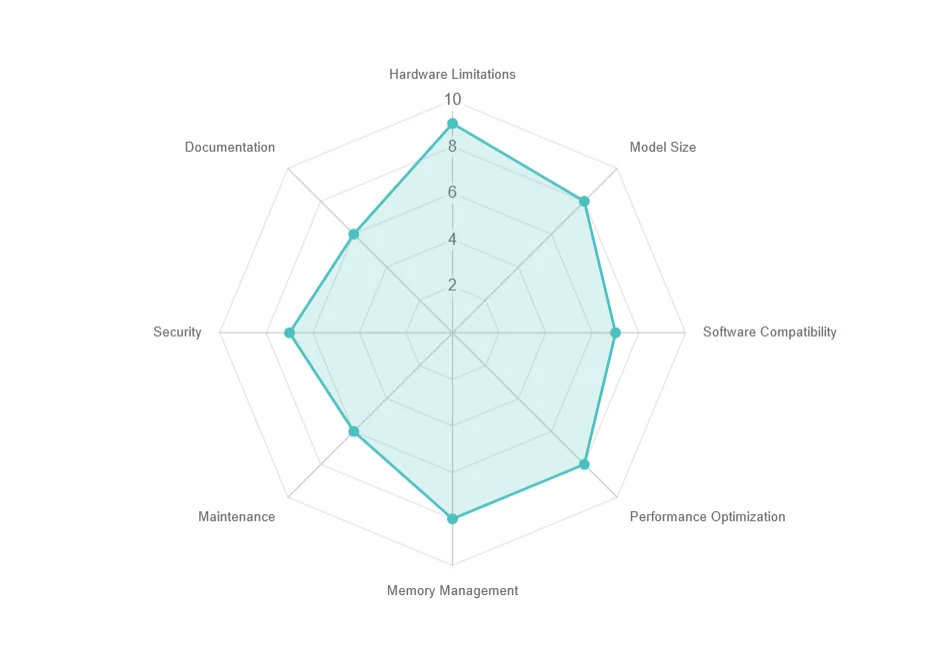
- Hardware Limitations: High resource needs, expensive upgrades.
- Model Size: Large storage (e.g., 70+ GB), slow downloads.
- Software Compatibility: Dependency and OS issues.
- Performance Optimization: Latency, batching, and parallelism challenges.
- Memory Management: GPU memory limits and out-of-core execution trade-offs.
- Maintenance: Frequent updates and compatibility problems.
- Security: Ensuring data privacy in local environments.
- Documentation: Limited support and troubleshooting difficulties.
How to Access Deepseek R1 Distill Qwen 32B via Novita AI
Novita AI is an AI cloud platform that offers developers an easy way to deploy AI models using our simple API, while also providing the affordable and reliable GPU cloud for building and scaling.
Step 1: Log In and Access the Model Library
Log in to your account and click on the Model Library button.

Try Deepseek R1 Distill Qwen 32B Demo Now!
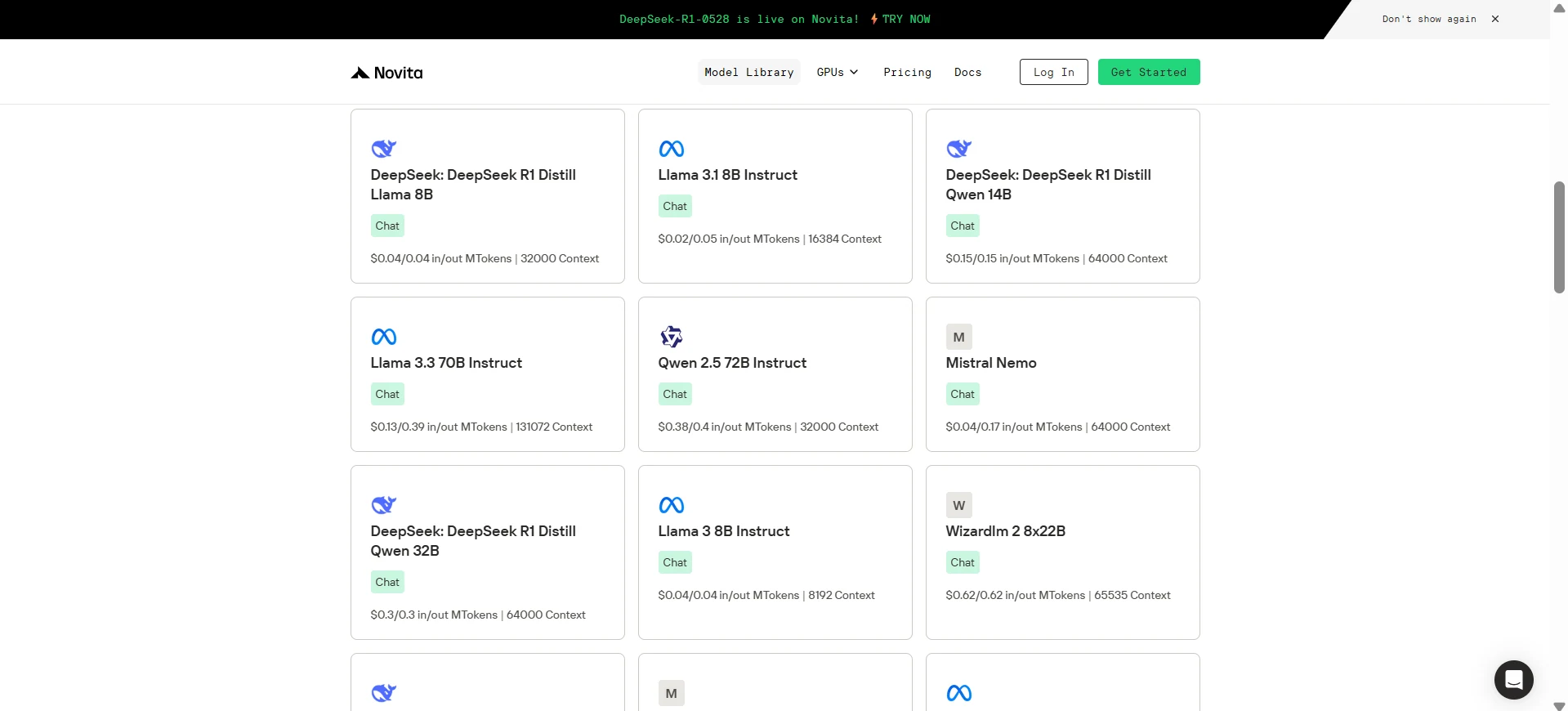
Step 2: Choose Your Model
Browse through the available options and select the model that suits your needs.
Step 3: Start Your Free Trial
Begin your free trial to explore the capabilities of the selected model.
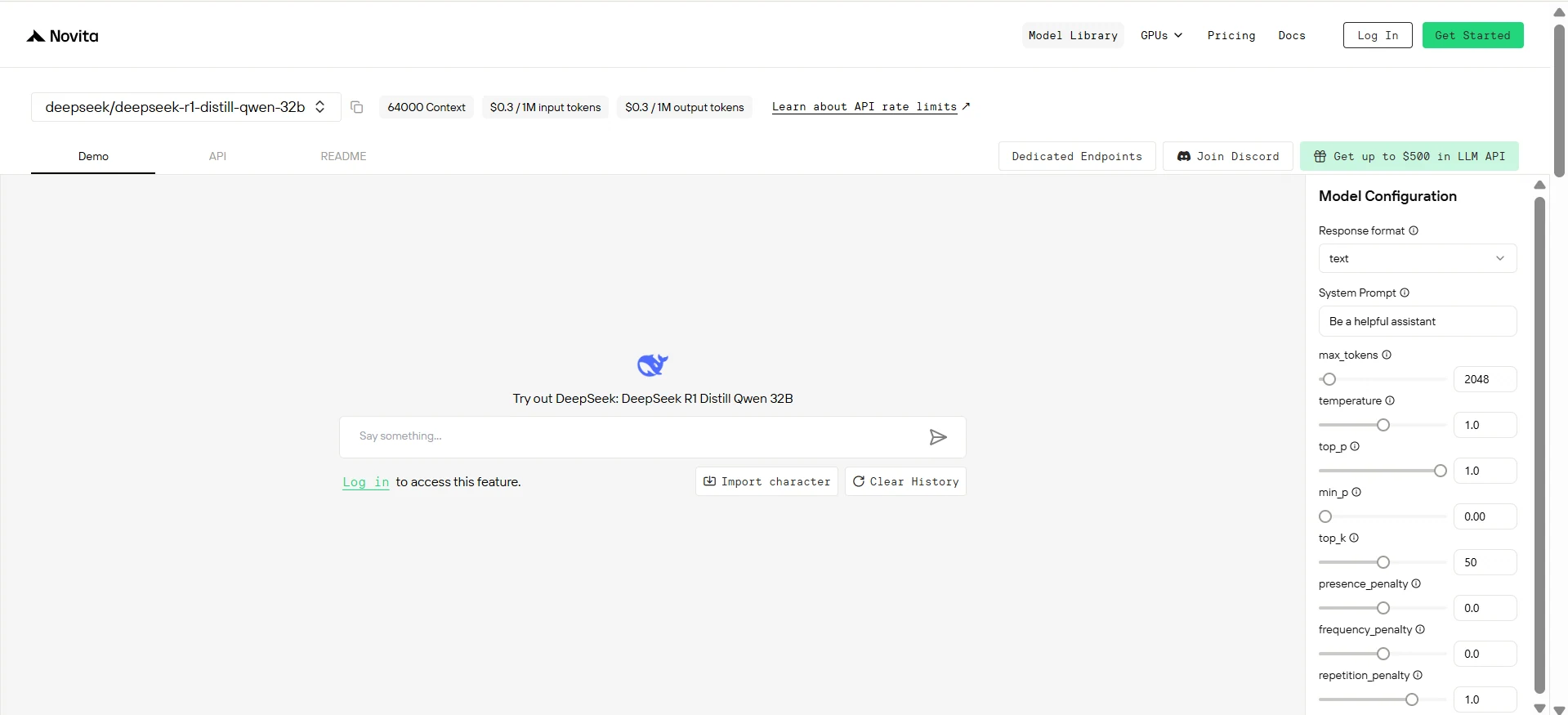
Step 4: Get Your API Key
To authenticate with the API, we will provide you with a new API key. Entering the “Settings“ page, you can copy the API key as indicated in the image.

Step 5: Install the API
Install API using the package manager specific to your programming language.
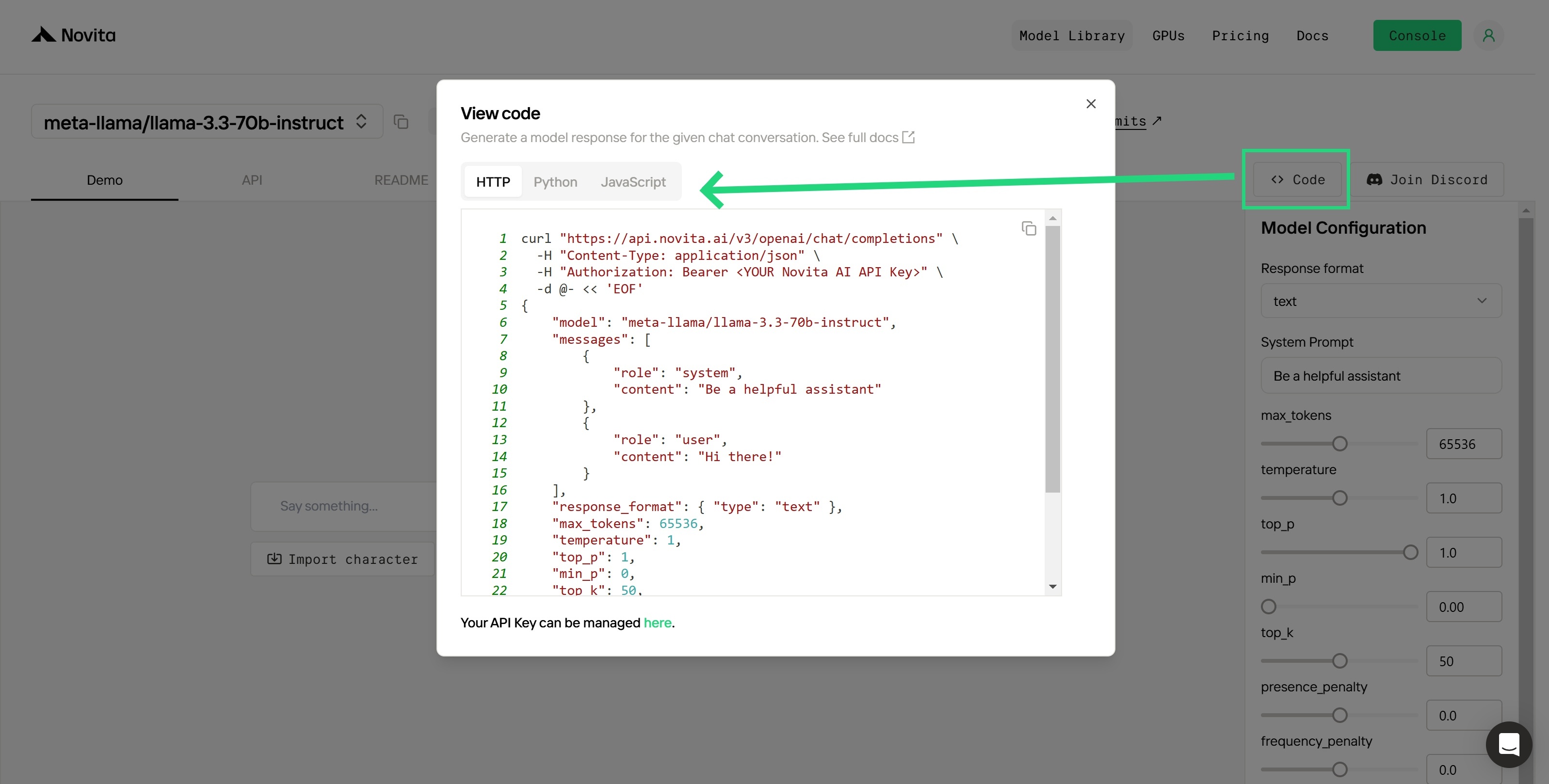
After installation, import the necessary libraries into your development environment. Initialize the API with your API key to start interacting with Novita AI LLM. This is an example of using chat completions API for python users.
from openai import OpenAI

client = OpenAI(
    base_url="https://api.novita.ai/v3/openai",
    api_key="<YOUR Novita AI API Key>",
)

model = "deepseek/deepseek-r1-distill-qwen-32b"
stream = True # or False
max_tokens = 2048
system_content = """Be a helpful assistant"""
temperature = 1
top_p = 1
min_p = 0
top_k = 50
presence_penalty = 0
frequency_penalty = 0
repetition_penalty = 1
response_format = { "type": "text" }

chat_completion_res = client.chat.completions.create(
    model=model,
    messages=[
        {
            "role": "system",
            "content": system_content,
        },
        {
            "role": "user",
            "content": "Hi there!",
        }
    ],
    stream=stream,
    max_tokens=max_tokens,
    temperature=temperature,
    top_p=top_p,
    presence_penalty=presence_penalty,
    frequency_penalty=frequency_penalty,
    response_format=response_format,
    extra_body={
      "top_k": top_k,
      "repetition_penalty": repetition_penalty,
      "min_p": min_p
    }
  )

if stream:
    for chunk in chat_completion_res:
        print(chunk.choices[0].delta.content or "", end="")
else:
    print(chat_completion_res.choices[0].message.content)
Which Methods Are Suitable for You?
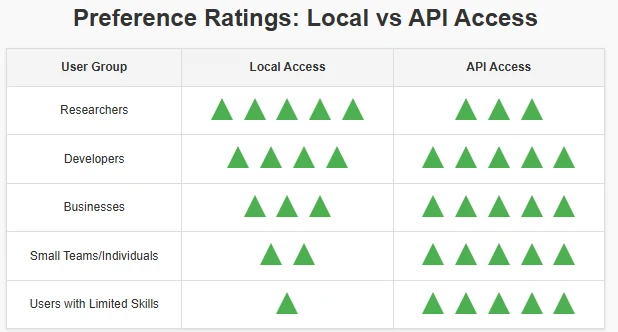
The DeepSeek R1 Distill Qwen 32B model is a state-of-the-art local language model offering superior performance in instruction following, structured data handling, and multilingual support. Its fine-tuning with DeepSeek R1 as a teacher ensures efficiency, making it suitable for researchers, developers, and businesses. Despite its hardware requirements, it provides a balance between performance and accessibility, excelling in benchmarks like AIME 2024 and SWE-bench Verified.
Frequently Asked Questions
What are the key features of DeepSeek R1 Distill Qwen 32B?
Multilingual support for 29+ languages.
Handles long texts (8K+ tokens) and structured data like JSON.
Supports text-to-text transformations and advanced role-play scenarios.
Which benchmarks highlight its performance?
AIME 2024: 72.6% accuracy (outperforms OpenAI-o1-mini).
SWE-bench Verified: 49.2% accuracy (ahead of Llama-70B).
Consistent performance across other benchmarks like MATH-500 and MMLU.
What are the hardware requirements?
Model size: 73.21 GB.
Recommended GPUs: 1 × H100 (80GB) or A100 (80GB).
2 × L40s (96GB) or 4 × RTX 4090 (96GB).
Novita AI is the All-in-one cloud platform that empowers your AI ambitions. Integrated APIs, serverless, GPU Instance — the cost-effective tools you need. Eliminate infrastructure, start free, and make your AI vision a reality.



