Modern developers often struggle to turn advanced reasoning models into practical, tool-rich systems. Even powerful models like Claude or GPT require complex setups to integrate coding, debugging, and data workflows efficiently. This is where Trae becomes the true enabler of Kimi-K2-Thinking.
By combining Trae’s all-in-one development environment with Kimi-K2-Thinking’s long-horizon reasoning, developers gain a seamless way to build autonomous, multi-tool AI workflows. Trae provides model integration, tool orchestration, and real-time debugging inside one unified interface, while Kimi-K2-Thinking delivers stable, 200-plus-step reasoning with 256K-token context and efficient cost scaling.
This article explains under what conditions developers should switch to Kimi-K2-Thinking, how Trae and Novita AI together make deployment effortless, and why this stack turns complex reasoning into a practical, affordable development advantage.
Under What Conditions Should Developers Switch to Kimi-K2-Thinking?
When your workflow requires long-term reasoning, multi-tool coordination, and minimal supervision — Kimi-K2-Thinking becomes your ideal engine.
Automated Data Analysis
Tools: Python / SQL / Plotly
Use it when: You need multi-step reasoning—data → clean → model → visualize → report.
Why Kimi-K2: Keeps track across hundreds of tool calls with stable logic.
Research & Literature Review
Tools: Web search / Citation parsers / Summarizers
Use it when: You must read, compare, and synthesize large volumes of text.
Why Kimi-K2: Sustains long-context understanding and structured summarization.
Intelligent Customer Support
Tools: Retrieval APIs / CRM systems / Sentiment models
Use it when: Conversations span multiple turns and data sources.
Why Kimi-K2: Maintains memory and orchestrates tool responses seamlessly.
AI-Assisted Coding
Tools: Code interpreter / Debugger / Compiler
Use it when: You need automated planning, testing, and error correction.
Why Kimi-K2: Iterates through full development loops autonomously.
Marketing Automation
Tools: Analytics dashboards / A-B testing APIs / Keyword tools
Use it when: Campaigns require data-driven optimization over time.
Why Kimi-K2: Runs repeated evaluations and refines creative strategies.
Enterprise Knowledge Agents
Tools: Databases / Search engines / Slack connectors
Use it when: Teams need unified, continuously updated insights.
Why Kimi-K2: Coordinates tool usage with long-term reasoning memory.
Test Kimi K2 Thinking for Free Now!
What Did Kimi K2 Thinking Revolutionize in Open-source Models?
Kimi-K2’s architecture balances scale, efficiency, and stability, enabling it to perform tool-rich reasoning over long sequences without loss of coherence.
A New Standard for Long-Horizon Reasoning
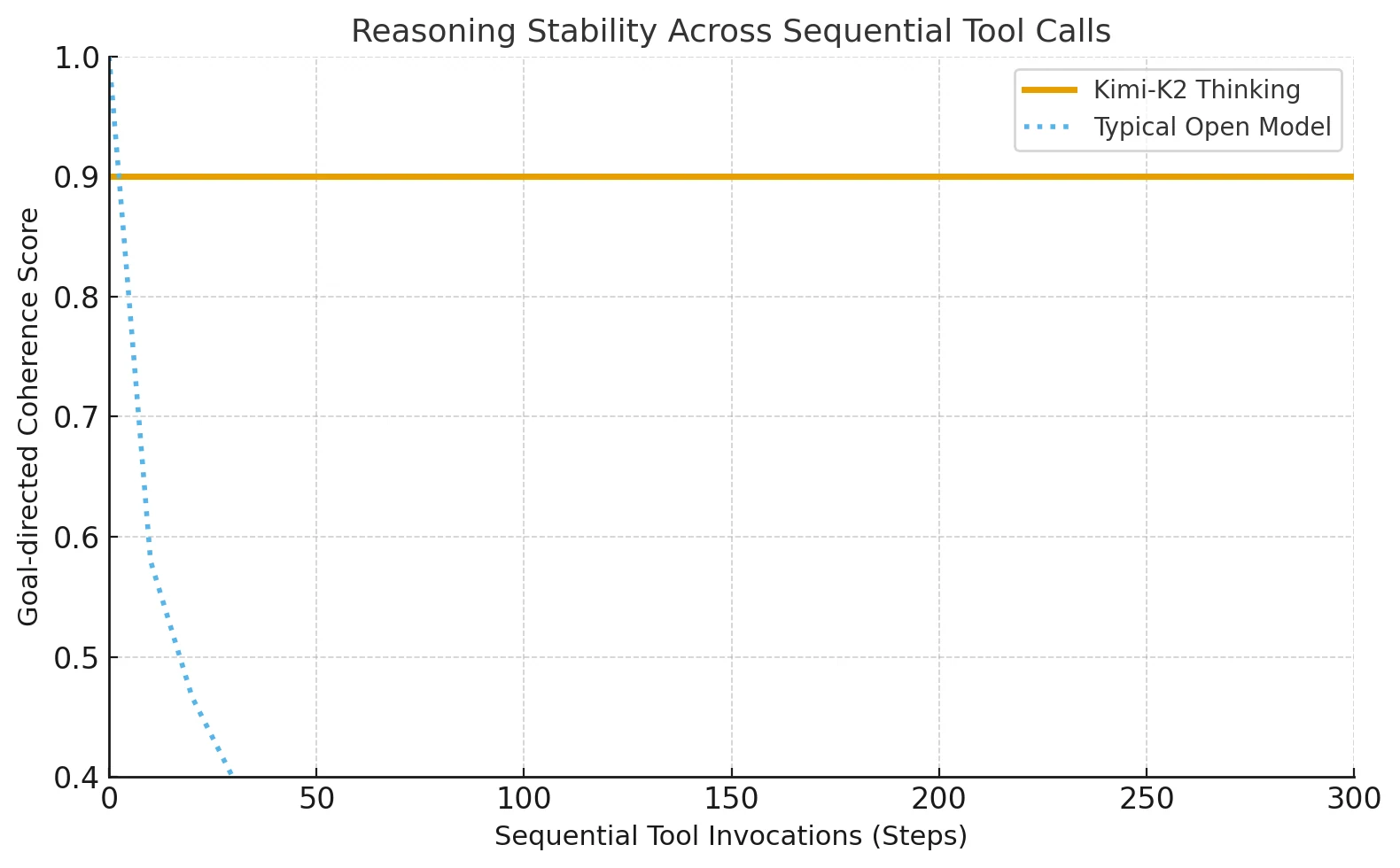
Kimi-K2-Thinking introduces an advanced thinking-agent architecture that interleaves structured reasoning with adaptive tool use. It can complete 200–300 consecutive tool calls without losing direction or coherence.
Most open models previously broke down after about 30–50 steps, but Kimi-K2 sustains accuracy through long tasks that require stepwise reasoning.
From Closed Systems to Open Thinking Agents
Before Kimi-K2, only Anthropic’s Claude could maintain such interleaved tool reasoning. Kimi-K2 extends this method to open-source ecosystems, letting independent developers access stable, long-form cognitive chains once exclusive to closed AI platforms.
Core System Architecture
| Component | Functional Role |
|---|---|
| Mixture-of-Experts (MoE) | Increases dynamic capacity while keeping compute cost constant. |
| 1T parameters / 32B activated | Balances scale with efficient token-wise routing. |
| 61 total layers + 1 dense backbone | Preserves depth while ensuring signal stability. |
| 384 experts, 8 active per token | Enhances adaptability to varied reasoning contexts. |
| 256K token window | Enables continuity in ultra-long tasks. |
| Multi-Head Latent Attention (MLA) | Improves cross-step focus and reduces memory strain. |
| SwiGLU activation | Smooths gradient flow and stabilizes deep reasoning. |
Which Model Performs Better, Kimi-K2-Thinking or Sonnet 4?
Performance Comparison
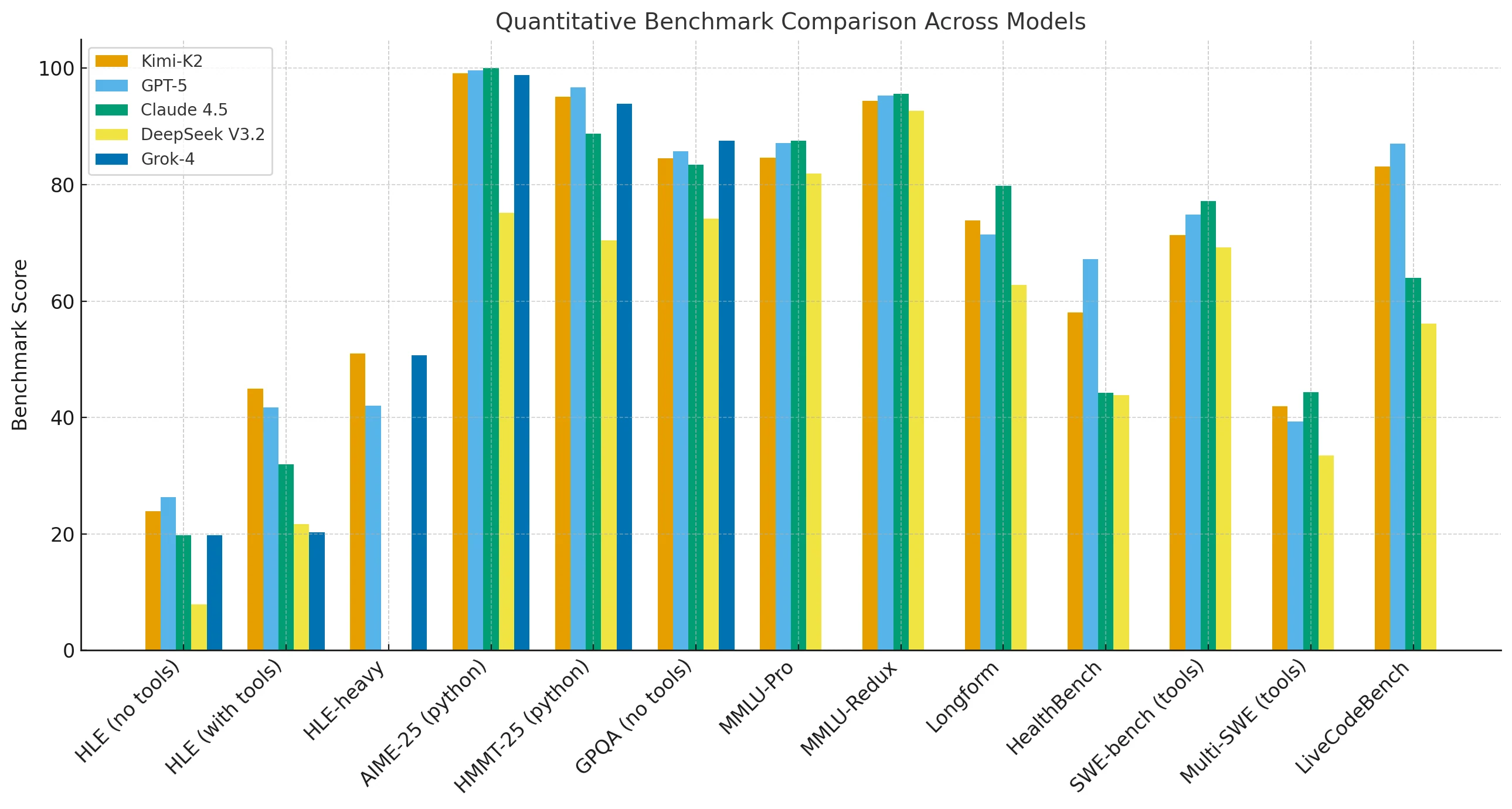
Kimi-K2-Thinking performs close to GPT-5 and Claude in major reasoning and math benchmarks. It slightly trails on MMLU-Pro, Redux, long-form writing, and code generation tasks, yet outperforms when external tools are available or when reasoning chains are extended.
In high-length-execution (HLE) settings with tools, Kimi-K2 reaches 44.9, compared to Claude’s 32.0, demonstrating its strength in sustained, multi-tool reasoning.
Cost Efficiency
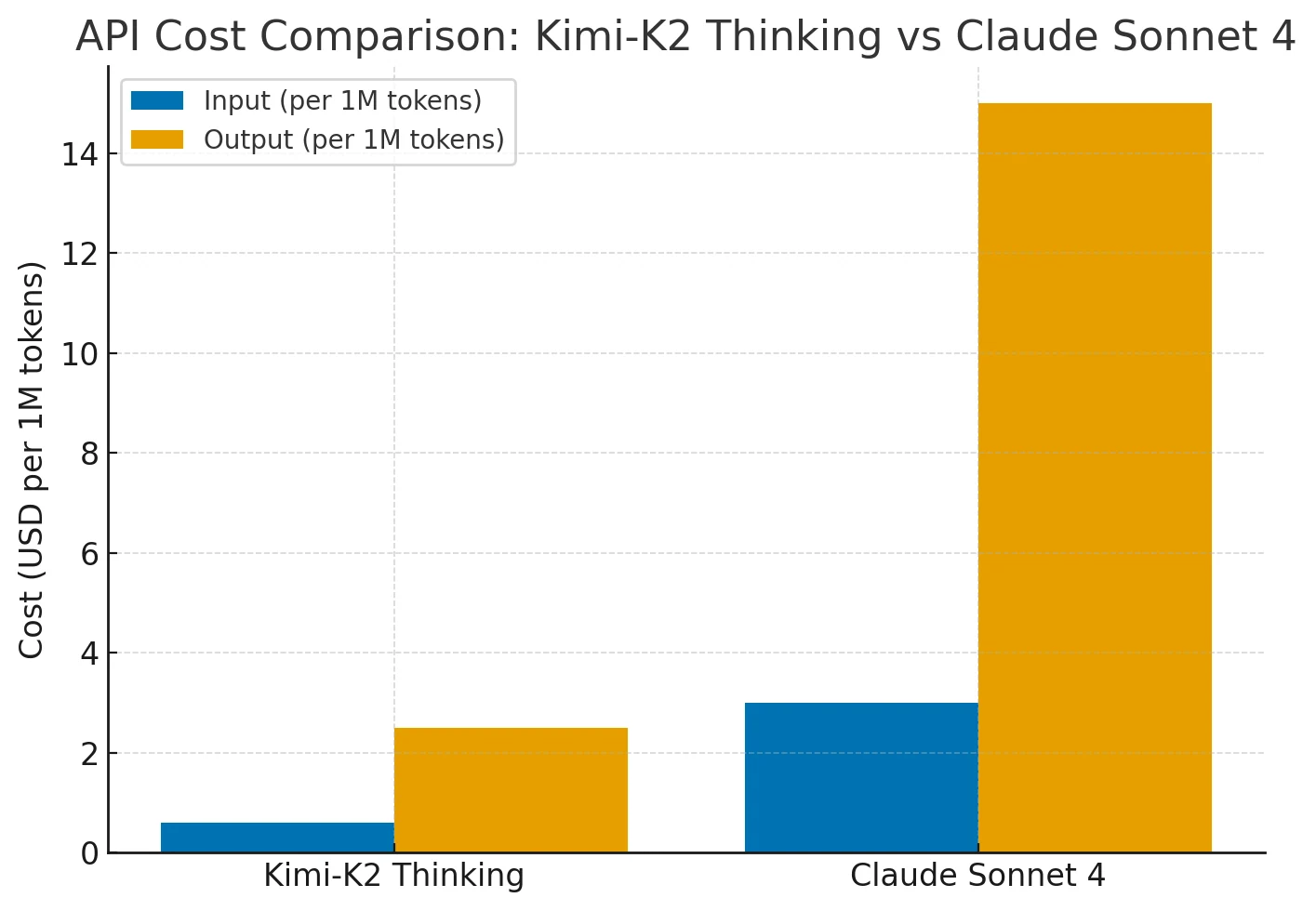
Kimi-K2 provides performance comparable to Claude Sonnet 4 at 75–80 % lower cost. Its pricing remains flat across long contexts (up to 256 K tokens) and frequent tool use, while Claude’s cost scales sharply with context length and agent actions.
Kimi-K2 therefore delivers Claude/GPT-level capability with superior cost-to-performance efficiency for extended reasoning tasks.
How to Use Kimi-K2-Thinking in Trae?
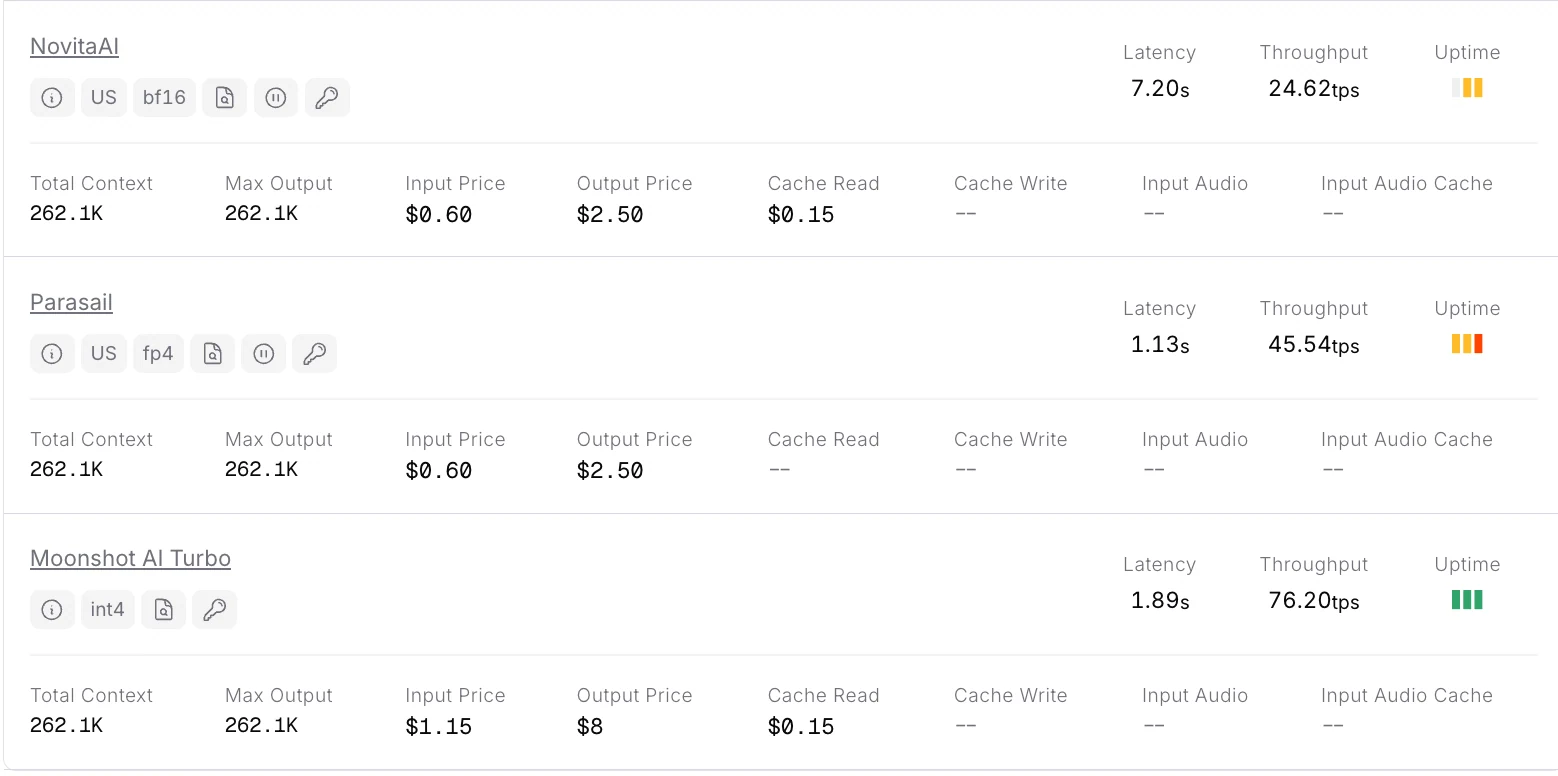
Novita AI currently offers the most affordable full-context Kimi-K2-Thinking API.
Novita AI provides APIs with 262K context, and costs of $0.6/input and $2.5/output, supporting structured output and function calling, which delivers strong support for maximizing Kimi K2 Thinking”s code agent potential.
The First: Get API Key
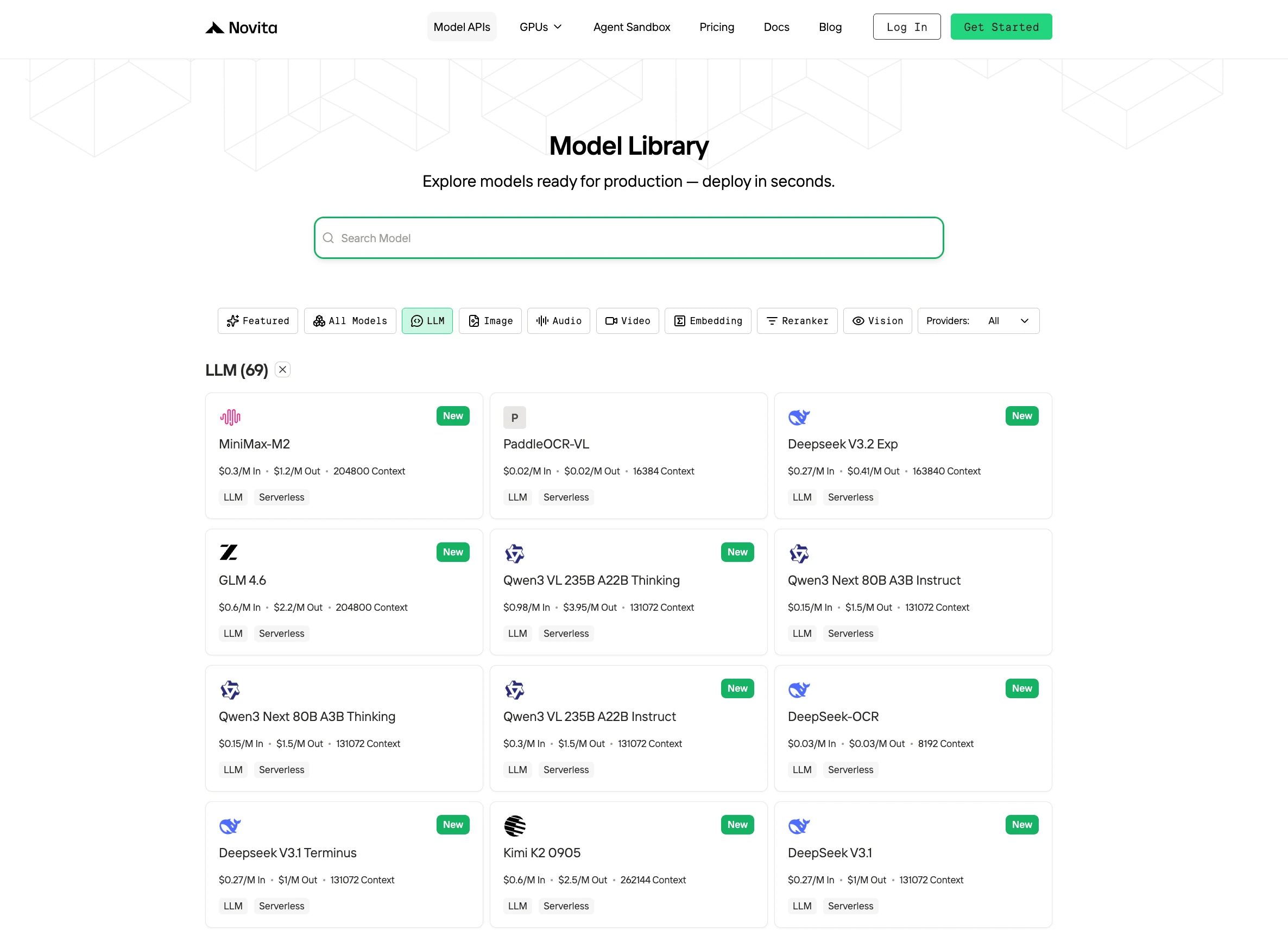
Step 1: Log in to your account and click on the Model Library button.

Step 2: Choose Your Model
Browse through the available options and select the model that suits your needs.
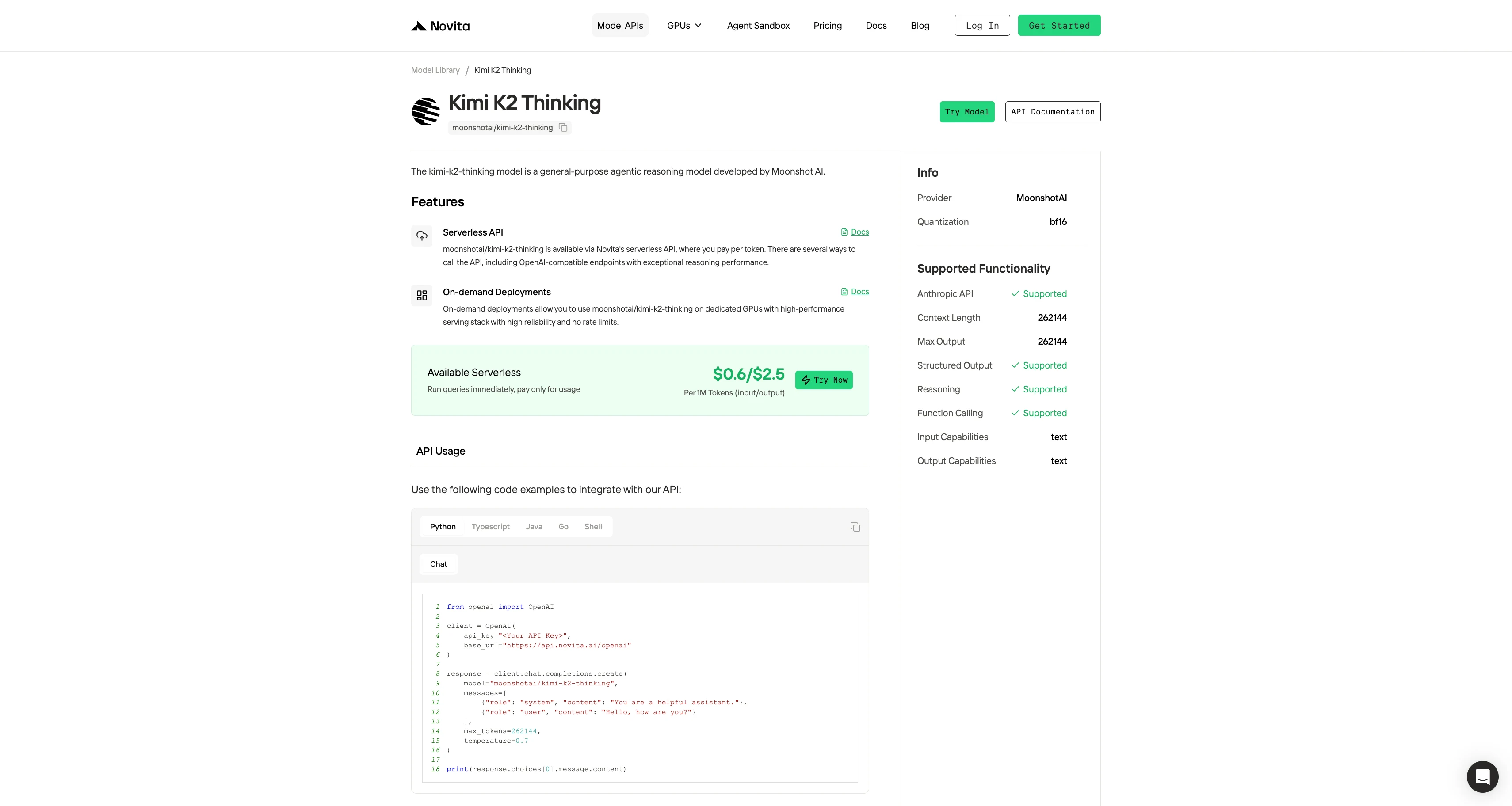
Step 3: Start Your Free Trial
Begin your free trial to explore the capabilities of the selected model.
Step 4: Get Your API Key
To authenticate with the API, we will provide you with a new API key. Entering the “Settings“ page, you can copy the API key as indicated in the image.

Step 5: Install the API
Install API using the package manager specific to your programming language.
After installation, import the necessary libraries into your development environment. Initialize the API with your API key to start interacting with Novita AI LLM. This is an example of using chat completions API for python users.
from openai import OpenAI

client = OpenAI(
    api_key="<Your API Key>",
    base_url="https://api.novita.ai/openai"
)

response = client.chat.completions.create(
    model="moonshotai/kimi-k2-thinking",
    messages=[
        {"role": "system", "content": "You are a helpful assistant."},
        {"role": "user", "content": "Hello, how are you?"}
    ],
    max_tokens=262144,
    temperature=0.7
)

print(response.choices[0].message.content)
Kimi K2 Thinking with Trae
Step 1: Open Trae and Access Models
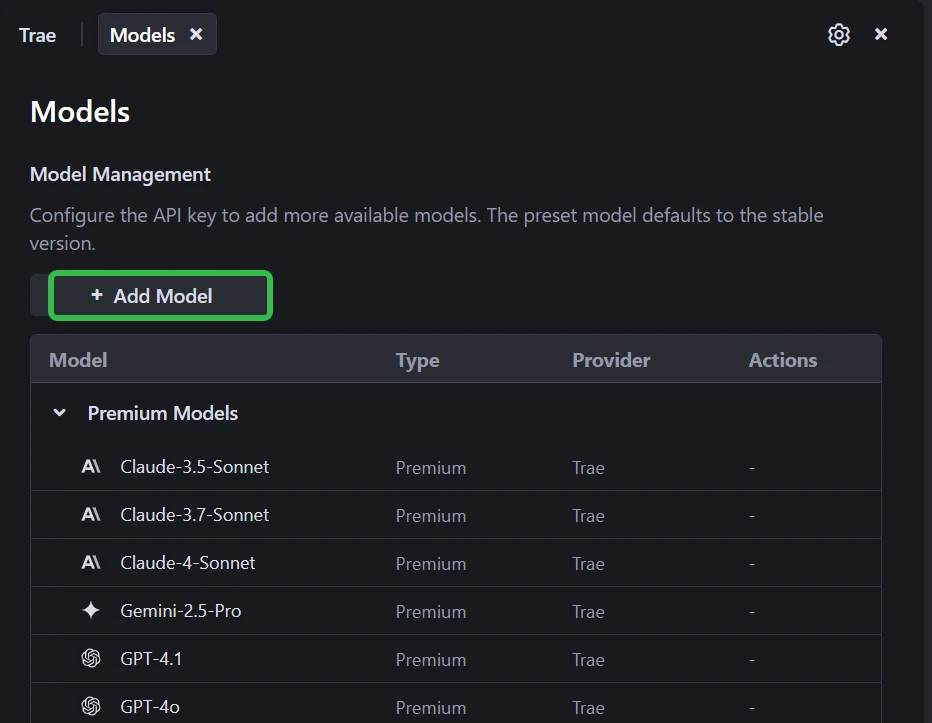
Launch the Trae app. Click the Toggle AI Side Bar in the top-right corner to open the AI Side Bar. Then, go to AI Management and select Models.
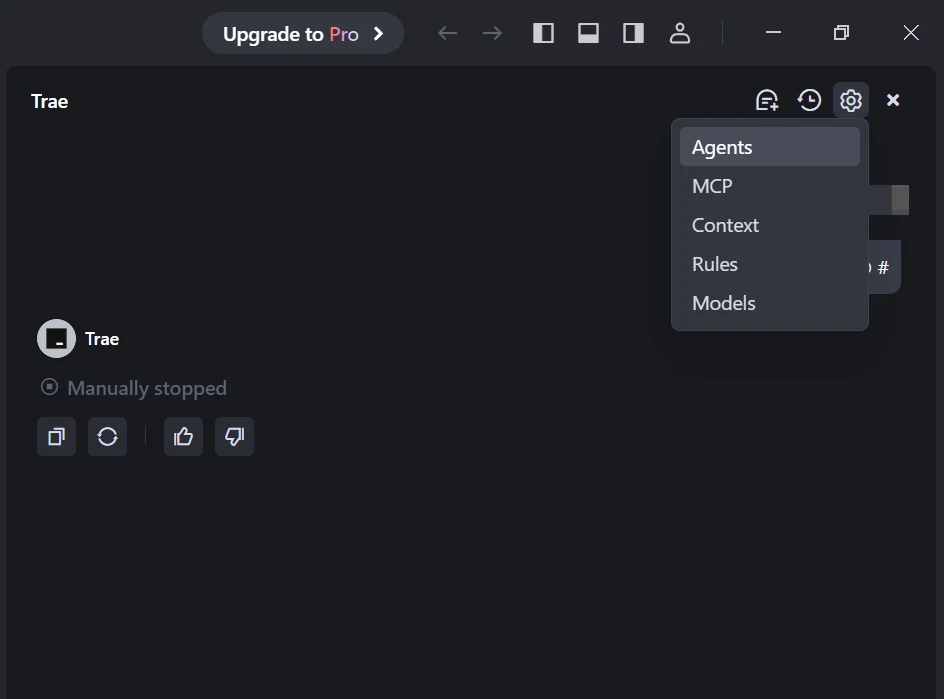
Step 2: Add a Custom Model and Choose Novita as Provider
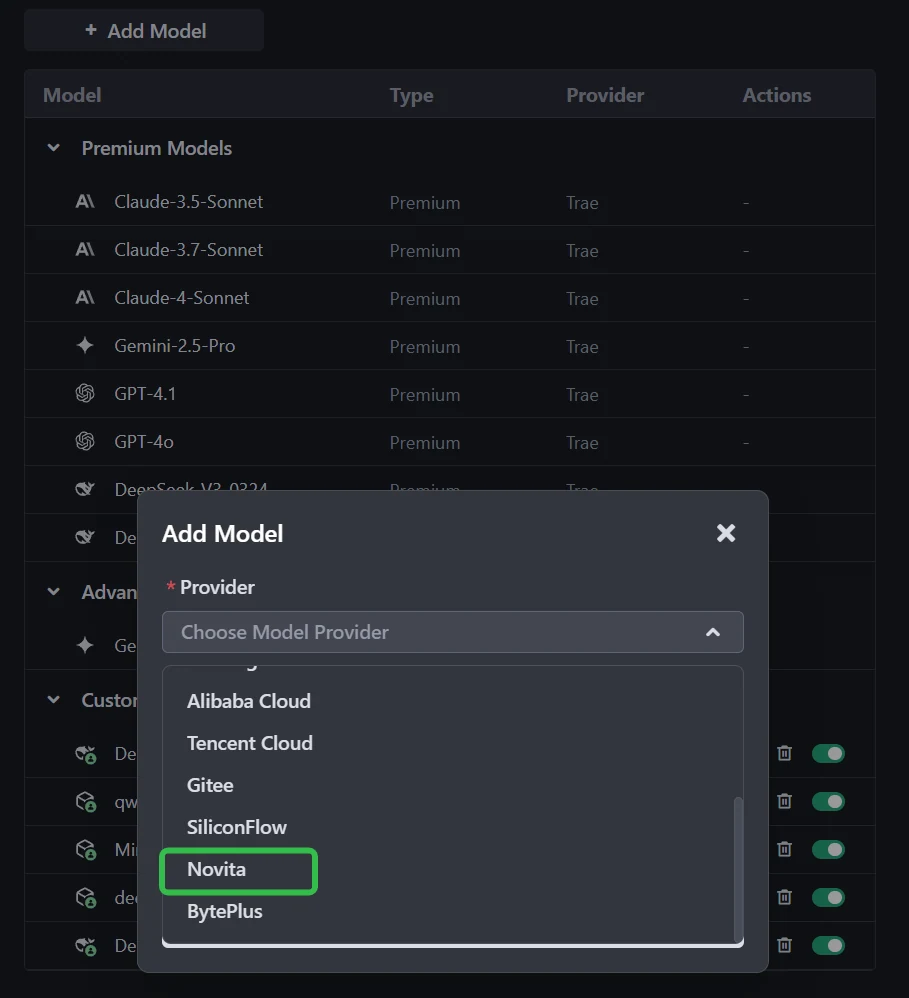
Click the Add Model button to create a custom model entry. In the add-model dialog, select Provider = Novita from the dropdown menu.
Step 3: Select or Enter the Model
From the Model dropdown, pick your desired model (DeepSeek-R1-0528, Kimi K2 thinking, DeepSeek-V3-0324, or MiniMax-M1-80k). If the exact model isn’t listed, simply type the model ID that you noted from the Novita library. Ensure you choose the correct variant of the model you want to use.
Step 5: Enter Your API Key
Copy the Novita AI API key from your Novita console and paste it into the API Key field in Trae.
Step 6: Save the Configuration
Click Add Model to save. Trae will validate the API key and model selection in the background!
Tips for Using Kimi-K2-Thinking in Trae
Here are practical tips for using Kimi‑K2‑Thinking in Trae for developers:
1. Define the goal clearly
Start your prompt with a clear high-level objective. For example:
“Your goal is to analyse this dataset and produce a report summarising insights, then generate code to visualise key metrics.”
This plays into K2’s strength of long-chain reasoning and tool orchestration.
2. Include the system role + constraints
Use a system prompt such as:
“You are an AI assistant built with Kimi-K2-Thinking. Ensure you restate all constraints before proceeding.”
Restating constraints helps reduce mistakes in multi-step reasoning. (Skywork)
3. Enable tool-calling environment in Trae
When using Trae, configure the model call to include available tools (e.g., search, database query, code execution). K2 can decide when and how to call tools.
4. Set appropriate parameters
- Use temperature ≈ 1.0 for balanced reasoning performance.
- If tasks are logic/analysis-heavy, keep temperature lower (0.1-0.3) to reduce randomness.
- Be mindful with context length: while K2 supports up to 256k tokens, extremely long inputs may slow response.
5. Break down tasks for better control
Instead of “solve this in one step”, use prompts like:
“1) Outline 3 possible approaches. 2) Evaluate each approach. 3) Choose one and execute.”
This helps K2 maintain structure and improves answer quality.
6. Validate outputs and reasoning
Ask the model to output its reasoning chain or assumptions. For instance:
“List the assumptions you made and the constraints you verified before proceeding.”
This is useful for auditing in complex projects.
7. Match model to task types
Use K2 for:
- Multi-step reasoning, planning, research workflows
- Tasks requiring tool orchestration and long chains
For simpler or latency-critical tasks, a lighter model may be more efficient.
8. Monitor cost & latency
K2’s reasoning and tool use generate more tokens and take longer than basic models. Budget accordingly when deployed via Trae.
If you like, I can draft a Trae configuration template (YAML/JSON) for integrating K2-Thinking with these best practices.
Why Developers Choose Novita AI with Trae
| Core Dimension | Key Value | Clear Explanation |
|---|---|---|
| 💰 Control Costs | Manage API usage and billing independently | You control your API key and budget—no hidden markup or intermediary fees. |
| 🚀 Access New Models First | Instant access to the latest AI models | DeepSeek, LLaMA, and Mistral are immediately available once hosted on Novita. |
| 📈 Scalable Plans | Grow from prototype to production easily | Pay-as-you-go pricing scales smoothly with your project size. |
| 🧩 All-in-One Dev Environment | Integrated development and AI toolkit | Code, analyze, and collaborate directly within Trae—no external tools needed. |
| 🔄 Seamless Workflow | Unified interface and automation | Write, debug, and call AI functions all in one consistent environment. |
Kimi-K2-Thinking redefines open-source intelligence by combining deep reasoning stability with efficient tool orchestration. It sustains hundreds of sequential tool calls, maintains coherence across long contexts, and delivers Claude-level performance at a fraction of the cost.
For any developer handling agentic workflows, automated research, or long-form analytical coding, Kimi-K2-Thinking provides a scalable, transparent, and affordable foundation for next-generation AI development.
Frequently Asked Questions
When should developers switch to Kimi-K2-Thinking?
Switch when your project involves multi-step reasoning, frequent tool use, or large context windows—scenarios where Kimi-K2-Thinking maintains accuracy and logic while other models drift or overcharge.
How is Kimi-K2-Thinking different from Claude Sonnet 4?
Kimi-K2-Thinking sustains 200–300 tool calls with stable reasoning and costs roughly 75–80 % less, while Claude Sonnet 4’s pricing grows steeply with longer contexts and frequent agent actions.
Can Kimi-K2-Thinking handle full-stack development tasks?
Yes. Kimi-K2-Thinking automates data processing, code generation, debugging, and iterative improvement inside Trae or Novita AI’s tool-calling setup.
Novita AI is the All-in-one cloud platform that empowers your AI ambitions. Integrated APIs, serverless, GPU Instance — the cost-effective tools you need. Eliminate infrastructure, start free, and make your AI vision a reality.
Recommend Reading
How to Access Qwen 3 Coder: Qwen Code; Claude Code; Trae
How to Use GLM-4.6 in Cursor to Boost Productivity for Small Teams



