AI-driven software development is advancing rapidly, fueled by two major forces: increasingly capable open-source models and deeply integrated AI development environments. GPT-OSS, OpenAI’s open-weight model family, stands out for its powerful reasoning, agentic capabilities, and extensive customizability. On the other side of this shift stands Codex — a next-generation coding assistant that goes far beyond basic autocompletion. It reads context across files, understands intent, and assists in writing, debugging, and refactoring code interactively. In essence, Codex turns the act of programming into a dialogue rather than a set of manual keystrokes.
This guide will show you how to use GPT OSS in Codex —from setup and configuration to executing your first coding tasks—so you can tap the model potential and streamline your coding workflow.
What is GPT OSS 120B?
GPT-OSS-120B is OpenAI’s open-weight large language model designed for developers seeking flexibility, transparency, and control. Distributed under the Apache 2.0 license, it allows full commercial freedom—developers can build, deploy, and monetize applications without copyleft restrictions or patent concerns.
| GPT OSS 120B | Detail |
|---|---|
| Layers | 36 |
| Total Parameters | 117 B |
| Active Parameters per Token | 5.1 B |
| Total Experts | 128 |
| Active Experts per Token | 4 |
| Context Length | 128K |
Built for scalable reasoning, GPT OSS 120B introduces an adjustable reasoning effort mechanism that lets users balance output depth and latency through low, medium, or high modes. It also provides full chain-of-thought access, enabling developers to inspect its internal reasoning for debugging, transparency, and quality assurance (though this trace is not intended for end-user display). The model supports agentic functionality such as function calling, web browsing, Python execution, and structured output generation. Under the hood, MXFP4 post-training quantization ensures its efficient inference.
Key Highlights
💻 Coding Performance
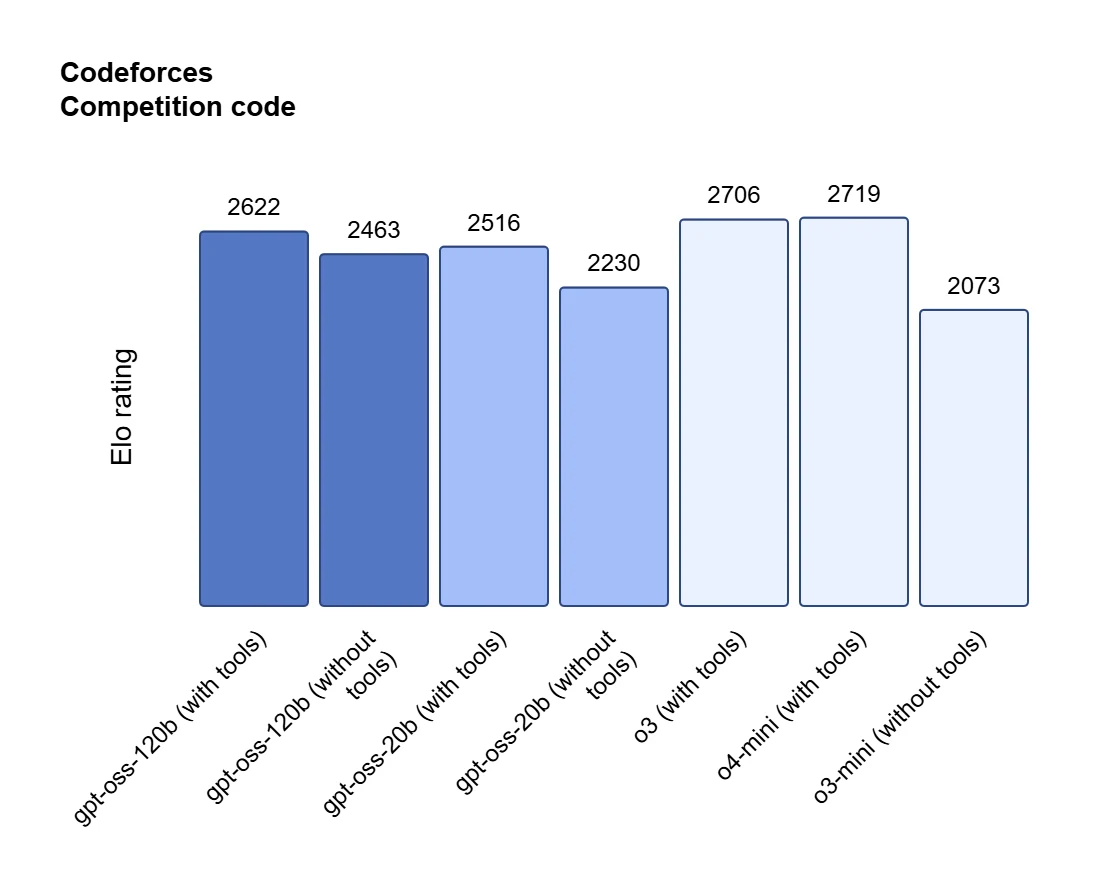
GPT OSS 120B stands out as an engineering-grade assistant for real software workflows. It can perform massive codebase transformations, like removing deprecated methods, upgrading dependencies, or fixing build errors with high precision. The model genuinely understands code structure, generating documentation grounded in actual logic rather than heuristics.
In practice, GPT OSS 120B can even generate complete, one-shot Python CLI tools, including parameter parsing and help documentation, and serves as a cross-environment knowledge base for stacks such as SQL Server and PowerShell—boosting API discoverability and onboarding speed. When linked to databases in read-only mode, it automates complex data cleaning through intelligent, multi-step tool calls within a single workflow.
🔬 Knowledge and STEM Strength
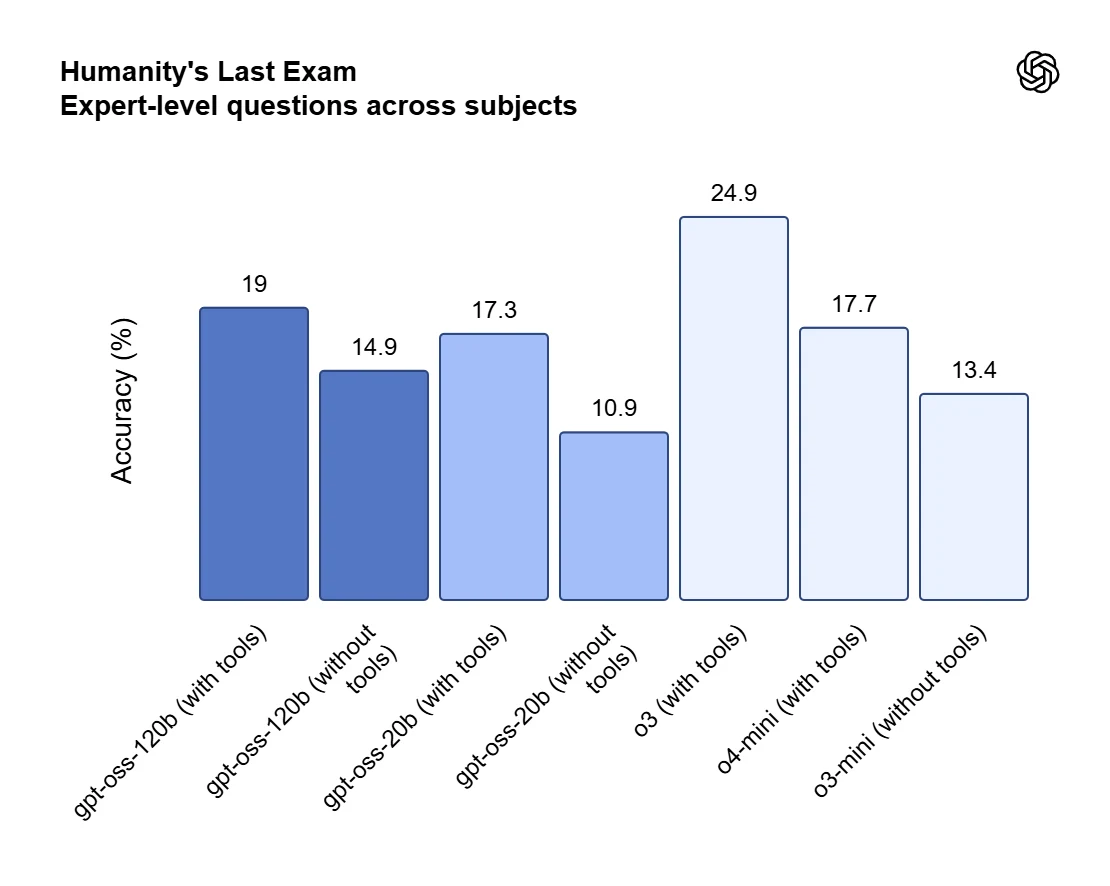
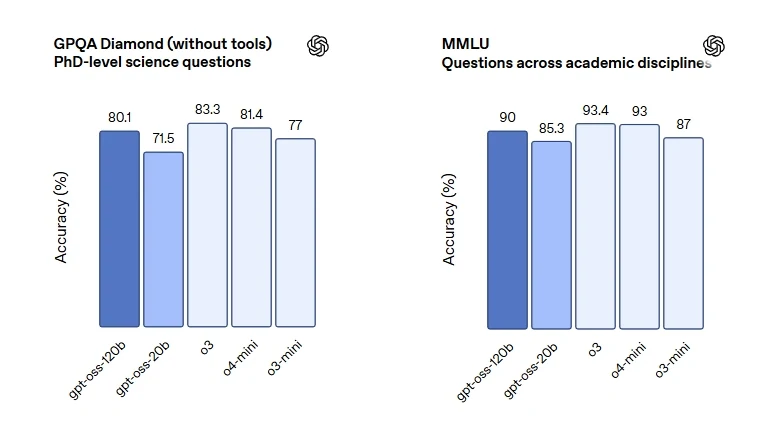
Beyond programming, GPT OSS 120B exhibits advanced STEM proficiency, mastering computer science, mathematics, and engineering fundamentals for research-oriented tasks. It performs exceptionally in technical brainstorming, hypothesis exploration, and structured idea generation, making it a valuable self-learning companion for those studying machine learning or quantitative subjects.
⚙️ General Utility and Reliability
Finally, GPT-OSS-120B excels at cross-model reviewing, refining outputs from other LLMs with superior precision. It handles structured summarization, generating well-formatted tables and concise briefs that highlight critical details. Thanks to its consistent instruction following, it accurately executes complex, multi-step prompts and maintains reliability across repeated tasks.
Why Use GPT OSS 120B in Codex
When you integrate gpt-oss-120B into the Codex environment, you’re combining two strengths: the interactive coding assistance of Codex and the deep reasoning logic of gpt-oss-120B.
Codex stands out in several ways:
- Goes beyond basic autocompletion — understands files, dependencies, and overall project context.
- Supports complete workflows such as debugging, refactoring, and test generation instead of just snippet completion.
- Integrates seamlessly with the developer’s toolchain — terminal, IDE, and version control — acting as a co-developer rather than a separate app.
Why GPT OSS 120B Amplifies Coding Benefits
By equipping Codex with GPT OSS 120B as the underlying engine, you elevate these advantages:
- Deeper reasoning means Codex isn’t just completing code but thinking through multi-step logic, cross-file interactions and architectural decisions.
- Transparent reasoning-traces allow you to inspect how suggestions were generated, reinforcing trust and improving fine-tuning for your codebase.
- Open-weight licensing and deployability provide flexibility: you can deploy locally for private codebases or integrate via API for shared teams, without being locked into a vendor’s ecosystem.
- The agentic features of GPT OSS 120B (function-calling, structured outputs) align with Codex workflows: automation of routine refactors, generation of tests, agentic orchestration of builds or code reviews become more feasible.
How to Use GPT OSS 120B in Codex: Prerequisites Overview
To use GPT OSS 120B inside Codex, you’ll need three things in place:
- An API key for GPT OSS 120B: Recommended to obtain from Novita AI, stored in a configuration file for seamless integration.
- The Codex CLI: Installed globally so you can call the agent directly from your terminal.
- A working environment: Node.js 18 or higher, plus npm for package management.
Once you’ve completed these steps, you’ll be fully set up to link Codex with GPT OSS 120B and begin experimenting. The setup is simple and can be done within minutes.
How to Use GPT OSS 120B in Codex: Step-by-Step Guide
Step 1: Get Your API Key on Novita AI
Create an Novita AI account andThe first step is to generate an API key from the Novita AI platform. Then go to Key Management and select Add New Key.
This API Key acts as your access credential. Since it is only shown once, copy it immediately and save it in a secure place. It will be needed for the steps below.
Novita AI provides first-class Codex support for a range of state-of-the-art models, such as:
openai/gpt-oss-120bzai-org/glm-4.5deepseek/deepseek-v3.1qwen/qwen3-coder-480b-a35b-instructmoonshotai/kimi-k2-0905google/gemma-3-12b-it
Step 2: Install Codex CLI
Node.js 18+ is required
node -vInstall via npm (Recommended)
npm install -g @openai/codexInstall via Homebrew (macOS)
brew install codexVerify Installation
codex --versionIntegrate GPT OSS 120B via Novita AI API
Create a Codex config file and set GPT OSS 120B as the default model.
- macOS/Linux:
~/.codex/config.toml - Windows:
%USERPROFILE%\.codex\config.toml
Basic Configuration Template
model = "openai/gpt-oss-120b"
model_provider = "novitaai"

[model_providers.novitaai]
name = "Novita AI"
base_url = "https://api.novita.ai/openai"
http_headers = {"Authorization" = "Bearer YOUR_NOVITA_API_KEY"}
wire_api = "chat"
Step3: Getting Started
Launch Codex CLI
codexBasic Usage Examples
Code Generation:
> Create a Python class for handling REST API responses with error handlingProject Analysis:
> Review this codebase and suggest improvements for performanceBug Fixing:
> Fix the authentication error in the login functionTesting:
> Generate comprehensive unit tests for the user service moduleWorking with Existing Projects
Navigate to your project directory before launching Codex CLI:
cd /path/to/your/project
codex
The Codex CLI automatically analyzes your project layout, reads your existing files, and keeps track of the overall codebase context throughout your session.
Frequently Asked Questions
What is gpt oss?
GPT OSS is an open-weight model family developed to give developers full control over deployment, fine-tuning, and reasoning behavior without proprietary restrictions.
Can I use gpt-oss-120B directly inside Codex?
Yes. Codex supports integration through Novita AI APIs, allowing you to connect gpt-oss-120B for interactive code generation and debugging.
What are some common use cases for gpt-oss-120B in Codex?
Developers use it for code explanation, debugging, automated documentation, intelligent refactoring, and creating agentic tools that handle multi-file reasoning.
Novita AI is an AI cloud platform that offers developers an easy way to deploy AI models using our simple API, while also providing the affordable and reliable GPU cloud for building and scaling.



