Key Highlights
LLaMA 3.3 70B: Meta’s advanced 70-billion-parameter language model, offering an optimal balance between performance and efficiency, excelling particularly in instruction-following tasks and multilingual applications.
DeepSeek R1: A reasoning-focused language model developed by DeepSeek AI, specifically designed to enhance logical and computational reasoning through reinforcement learning, showcasing expert-level performance in coding and problem-solving scenarios.
RTX 4090 GPU: An advanced high-performance GPU with notable computational capabilities; however, its limited GPU memory poses significant challenges when fine-tuning large-scale models like LLaMA 3.3 70B and DeepSeek R1.
Cloud GPU Instances: Provide a practical and scalable alternative for fine-tuning large-scale models, offering flexible resource allocation, simplified deployment processes, and reliable performance.
You can use GPU Instances from Novita AI — Upon registration, there are 60GB free in the Container Disk and 1GB free in the Volume Disk, and if the free limit is exceeded, additional charges will be incurred.
Meta’s Llama 3.3 70B and DeepSeek AI’s DeepSeek R1 are high-quality, open-source large language models that have attracted considerable attention from the community. Given their openness, performance, and flexibility, many users are interested in fine-tuning these models to better align them with their specific use cases and requirements.
Understanding Models
DeepSeek R1
- Release Date: January 21, 2025
- Model Scale:
- Key Features:
- Model Size: 671B parameters (37B active/token)
- Tokenizer: Enhanced tokenizer with self-reflection tags
- Supported Languages: Multilingual with cultural adaptation
- Multimodal: Text-only
- Context Window: 128K tokens
- Storage Formats: Q8/Q5 quantization support
- Architecture: Mixture of Experts (MoE) + RL-enhanced training pipeline
- Training Method: Built on V3 base with RL pipeline (SFT → RL → SFT → RL)
- Training Data: V3 base + RL optimization data
Llama 3.3 70B
- Release Date: December 6, 2024
- Model Scale:
- Key Features:
- Model Size: 70B parameters
- Supported Languages: English, German, French, Italian, Portuguese, Hindi, Spanish, and Thai.
- Multimodal: Text-only
- Context Window: 131K tokens
- Architecture: Grouped-Query Attention (GQA) to improve processing efficiency and inference scalability
- Training Data: a massive dataset of 15 trillion tokens
- Training Method: It uses supervised fine-tuning (SFT) and reinforcement learning with human feedback (RLHF).
The principal distinction between DeepSeek R1 and Llama 3.3 70B lies in their reinforcement learning methodologies. While Llama 3.3 70B employs Reinforcement Learning from Human Feedback (RLHF), incorporating direct human evaluation to align with human preferences, DeepSeek R1 implements an iterative machine-driven reinforcement cycle (SFT → RL → SFT → RL) that relies less on human intervention.
What Is Fine-Tuning?
Fine-tuning involves customizing a pre-trained Large Language Model (LLM) to enhance its performance for a specific task or dataset. Rather than training a model from scratch, fine-tuning leverages the existing knowledge embedded within a pre-trained model, resulting in improved accuracy, relevance, and efficiency.
The Benefits of Fine-Tuning
Improved Accuracy and Relevance:
Adapting a model to specific tasks significantly enhances its performance. For instance, fine-tuning an LLM with actual customer service dialogues leads to more accurate and contextually relevant chatbot responses.
Reduced Bias:
Fine-tuning models using carefully selected, diverse datasets helps mitigate biases inherent in the original pre-trained model, resulting in fairer and more balanced outputs.
Optimized Resource Efficiency:
By building upon the existing knowledge encoded in pre-trained models, fine-tuning saves computational time and resources compared to training entirely new models from scratch.
Superior Performance with Smaller Models:
Often, a smaller fine-tuned model can surpass the performance of a larger general-purpose base model, offering efficiency gains without compromising quality.
Reduced Reliance on Complex Prompt Engineering:
Fine-tuning simplifies the process of generating optimal outputs, decreasing the need for intricate and time-consuming prompt engineering.
How Does Fine-Tuning Work?
Fine-tuning adjusts the parameters of a pre-trained LLM to better suit a specific task or dataset. Common fine-tuning strategies and techniques include:
- Supervised Learning:
Training the model using labeled datasets, such as annotated customer inquiries, sentiment-labeled reviews, or medical records, enabling the model to learn explicit associations between inputs and desired outputs. - Self-Supervised Learning:
Allowing the model to learn from unlabeled but carefully curated text corpora, strengthening its ability to recognize patterns and context. - Reinforcement Learning:
Training models via a reward-based feedback mechanism, guiding the model to improve output quality iteratively. - Parameter-Efficient Fine-Tuning (PEFT):
Updating only a small subset of the model’s parameters while keeping the majority frozen. Techniques such as Low-Rank Adaptation (LoRA) enable efficient fine-tuning with significantly reduced hardware requirements.
What Is Needed to Fine-Tune LLaMA 3.3 70B and Deepseek R1?
GPU Needs
| Model | Parameter Size | GPU Configuration |
|---|---|---|
| DeepSeek-R1-Distill-Llama-8B | 4.9B | 1 x NVIDIA RTX 4090 (24GB VRAM) with model sharding |
| DeepSeek-R1-Distill-Qwen-14B | 9.0B | 1 x NVIDIA A100 (40GB VRAM) or 2 x RTX 4090 (24GB VRAM) with tensor parallelism |
| DeepSeek-R1-Distill-Qwen-32B | 32B | 2 x NVIDIA A100 (40GB VRAM) or 1 x NVIDIA H100 (80GB VRAM) or 4 x RTX 4090 (24GB VRAM) with tensor parallelism |
| DeepSeek-R1-Distill-Llama-70B | 70B | 4 x NVIDIA A100 (40GB VRAM) or 2 x NVIDIA H100 (80GB VRAM) or 8 x RTX 4090 (24GB VRAM) with heavy parallelism |
| DeepSeek-R1:671B | 671B (37 billion active parameters) | 16 x NVIDIA A100 (40GB VRAM) or 8 x NVIDIA H100 (80GB VRAM), requires a distributed GPU cluster with InfiniBand |
| Llama 3.3 70B | 70B | 1 x NVIDIA A100 (40GB VRAM), requires approximately 40GB of GPU VRAM. A minimum of 24GB VRAM is recommended for local use, while 40-48 GB is ideal for optimal performance. |
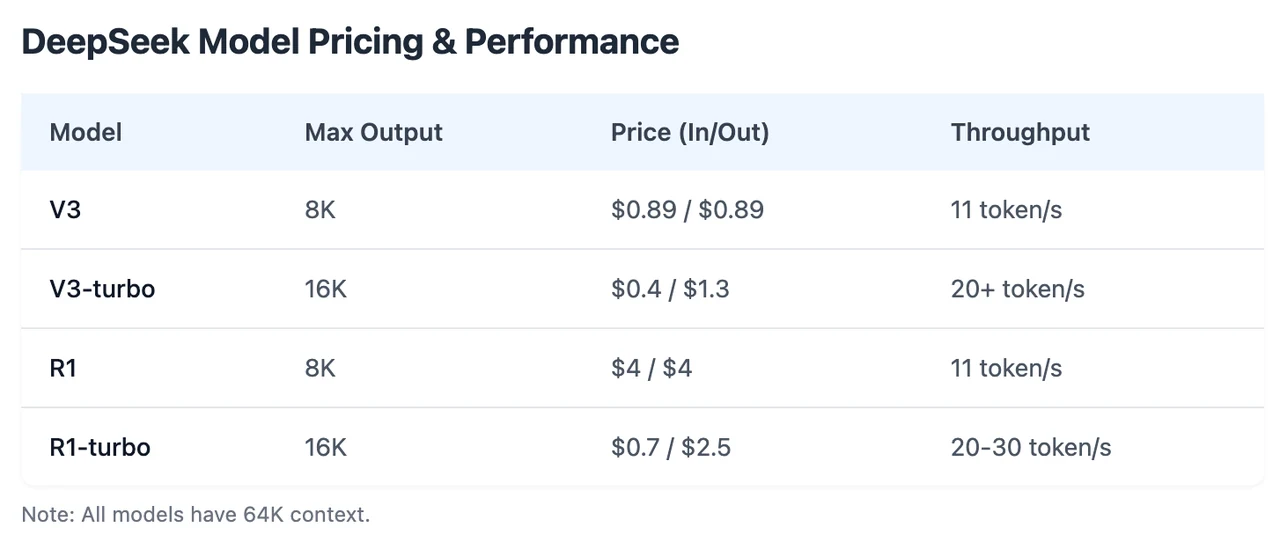
However, Novita AI launches a Turbo version with 3x throughput and a limited-time 20% discount!
You can directly start a free trail on Novita Playground!
Dataset Requirements
A high-quality dataset is essential for successful fine-tuning. Ideally, the dataset should be closely aligned with the specific task, sufficiently large to significantly enhance model performance, diverse enough to prevent overfitting, and properly structured with clear instructions, inputs, and expected outputs. While a minimum of approximately 1,000–2,000 high-quality examples is recommended to achieve meaningful results, an optimal dataset typically ranges between 10,000 and 50,000 examples for best performance.
Is RTX 4090 Suitable for Locally Fine-Tuning LLaMA 3.3 70B and Deepseek R1?
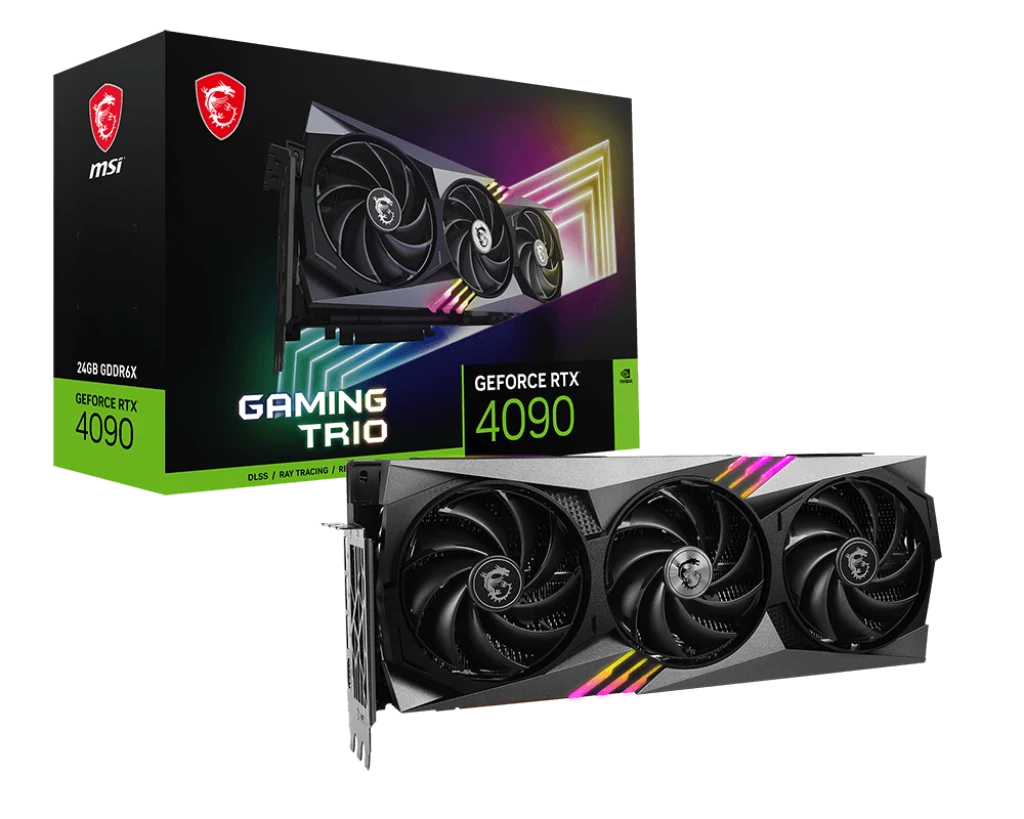
rtx 4090
RTX 4090 Specifications and Performance Overview
The NVIDIA GeForce RTX 4090 is built on NVIDIA’s latest Ada Lovelace architecture, featuring:
- Power Consumption: Typical TDP around 450W, requiring effective cooling solutions.
- CUDA Cores: 16,384 CUDA cores
- VRAM Capacity: 24GB GDDR6X
- Memory Bandwidth: Approximately 1,008 GB/s
- Compute Capability: 8.9
- FP32 Performance: Approximately 82.6 TFLOPS
- Tensor Cores: 512 fourth-generation tensor cores specialized in accelerating AI workloads, including deep learning training and inference tasks.
- NVLink Support: Not supported on the RTX 4090, limiting multi-GPU connectivity to standard PCIe lanes (no high-bandwidth interconnect).
Suitability Analysis of LLaMA 3.3 70B on RTX 4090
LLaMA 3.3 70B has approximately 70 billion parameters, so ideal GPU VRAM for full-parameter fine-tuning or inference is around 40–48GB, significantly exceeding RTX 4090’s 24GB VRAM.
- Direct fine-tuning or inference without optimization is not feasible on a single RTX 4090 due to VRAM constraints.
- Inference can be performed by aggressively quantizing the model (e.g., INT4/INT8), but this would involve some quality trade-offs in model performance.
- Multi-GPU setups (4–8 RTX 4090 GPUs) with heavy parallelism, such as tensor parallelism or model sharding, become necessary to handle a 70B model efficiently.
Suitability Analysis of DeepSeek R1 on RTX 4090
DeepSeek R1 comes in multiple sizes (4.9B distilled up to 671B full size). Suitability depends heavily on the variant considered:
- Smaller Distilled Variants (4.9B to 9B):
These smaller distilled models (e.g., DeepSeek-R1-Distill-Llama-8B) can comfortably fit within RTX 4090’s 24GB VRAM, especially when using model sharding or quantization techniques. RTX 4090 is a suitable choice for fine-tuning and inference at this scale. - Medium Variant (32B):
DeepSeek-R1-Distill-Qwen-32B variant requires multiple RTX 4090 GPUs with tensor parallelism or heavy sharding. Single RTX 4090 is insufficient for fine-tuning or inference without significant optimization and quantization. - Larger Variants (70B and 671B):
DeepSeek-R1-Distill-Llama-70B and original DeepSeek R1 (671B) far exceed RTX 4090’s VRAM capacity. They require high-end, multi-GPU setups (e.g., multiple A100 or H100 GPUs) and specialized parallelization strategies. A single RTX 4090 is clearly unsuitable without extensive model pruning, heavy quantization, and significant performance compromise.
Recommended Practical Approach for RTX 4090 Users:
Users with a single RTX 4090 should prioritize smaller distilled variants of DeepSeek R1 (4.9B–9B), as these models offer good performance and simpler deployment workflows. Those committed to using larger models (LLaMA 3.3 70B or DeepSeek larger variants) should consider:
Multiple RTX 4090 GPUs with tensor parallelism or model sharding. Aggressive optimization techniques (PEFT, quantization) to reduce VRAM requirements, accepting possible trade-offs in quality and performance.
Alternative Solutions – Cloud GPU
Why Choose Cloud GPU Instances?
Cloud GPU instances present a viable alternative to local fine-tuning, especially for large models like Llama 3.3 70B and Deepseek R1. They provide:
- Scalable GPU resources based on workload demand
- Access to high-performance GPUs such as NVIDIA A100 or V100
- Cost-effective pay-as-you-go pricing models
- Simplified deployment workflows
- The ability to circumvent local hardware limitations
Novita AI GPU Instance Services
Compare with other GPU cloud, our price have the biggest advantages. Here is a table for you:
| Service Provider | Price of rtx 4090 (1x GPU per hour) |
|---|---|
| Novita AI | $0.35 |
| Vast AI | $0.316-$1.073 |
| CoreWeave | No service |
Usage Guide
Novita AI is an AI cloud platform that offers developers an easy way to deploy AI models using our simple API, while also providing the affordable and reliable GPU cloud for building and scaling.
Step1:Register an account
If you’re new to Novita AI, begin by creating an account on our website. Once you’re registered, head to the “GPUs” tab to explore available resources and start your journey.
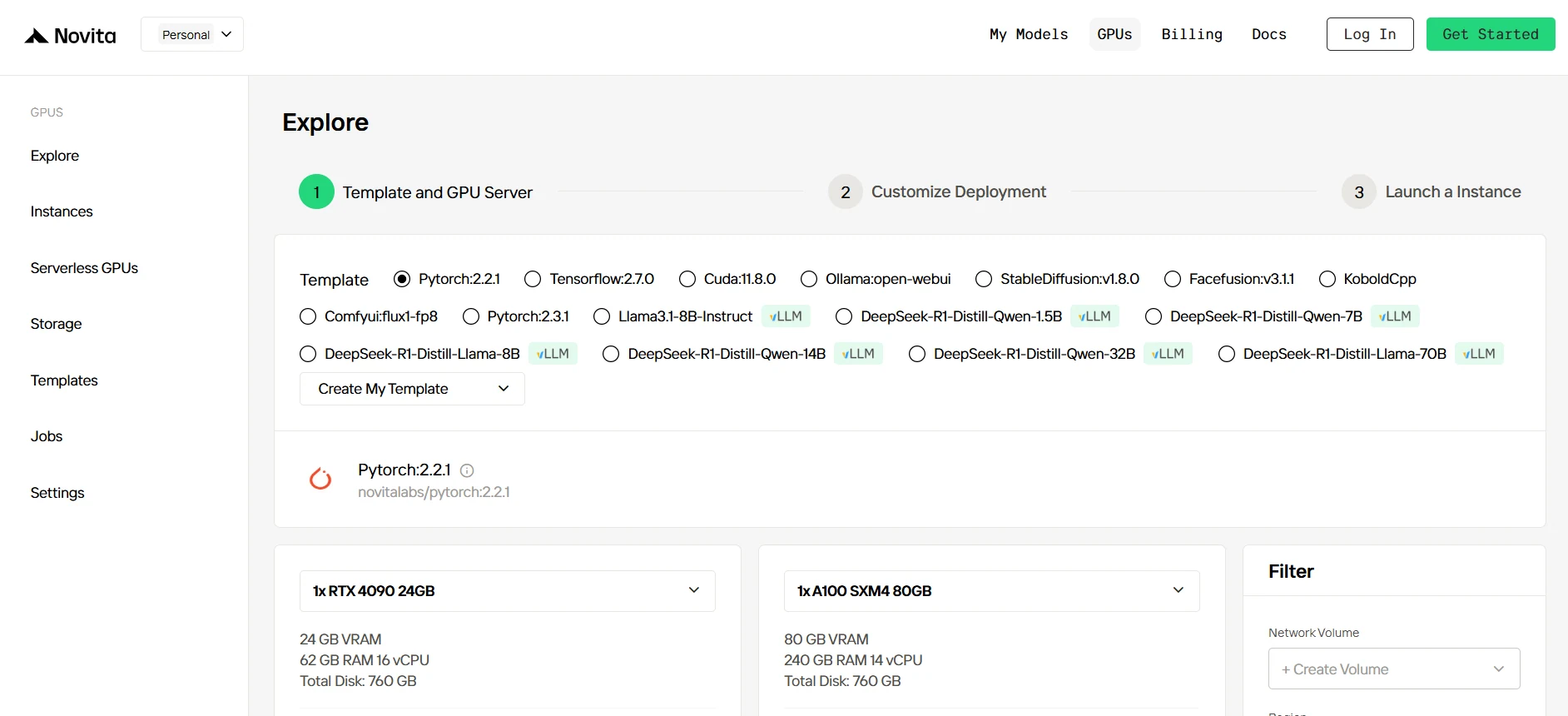
Step2:Exploring Templates and GPU Servers
Start by selecting a template that matches your project needs, such as PyTorch, TensorFlow, or CUDA. Choose the version that fits your requirements, like PyTorch 2.2.1 or CUDA 11.8.0. Then, select the A100 GPU server configuration, which offers powerful performance to handle demanding workloads with ample VRAM, RAM, and disk capacity.
Try Novita AI’s High-Performance GPUs
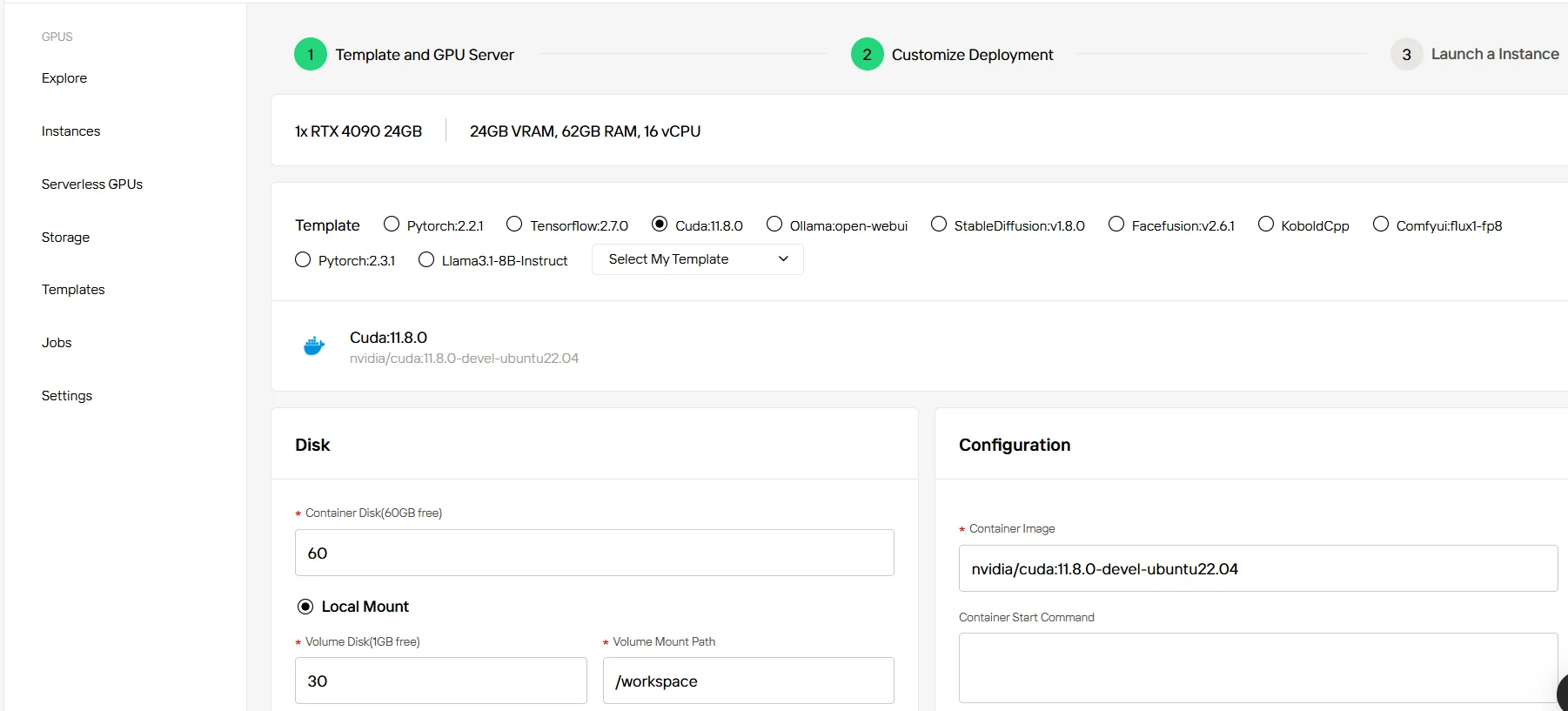
Step3:Tailor Your Deployment
After selecting a template and GPU, customize your deployment settings by adjusting parameters like the operating system version (e.g., CUDA 11.8). You can also tweak other configurations to tailor the environment to your project’s specific requirements.
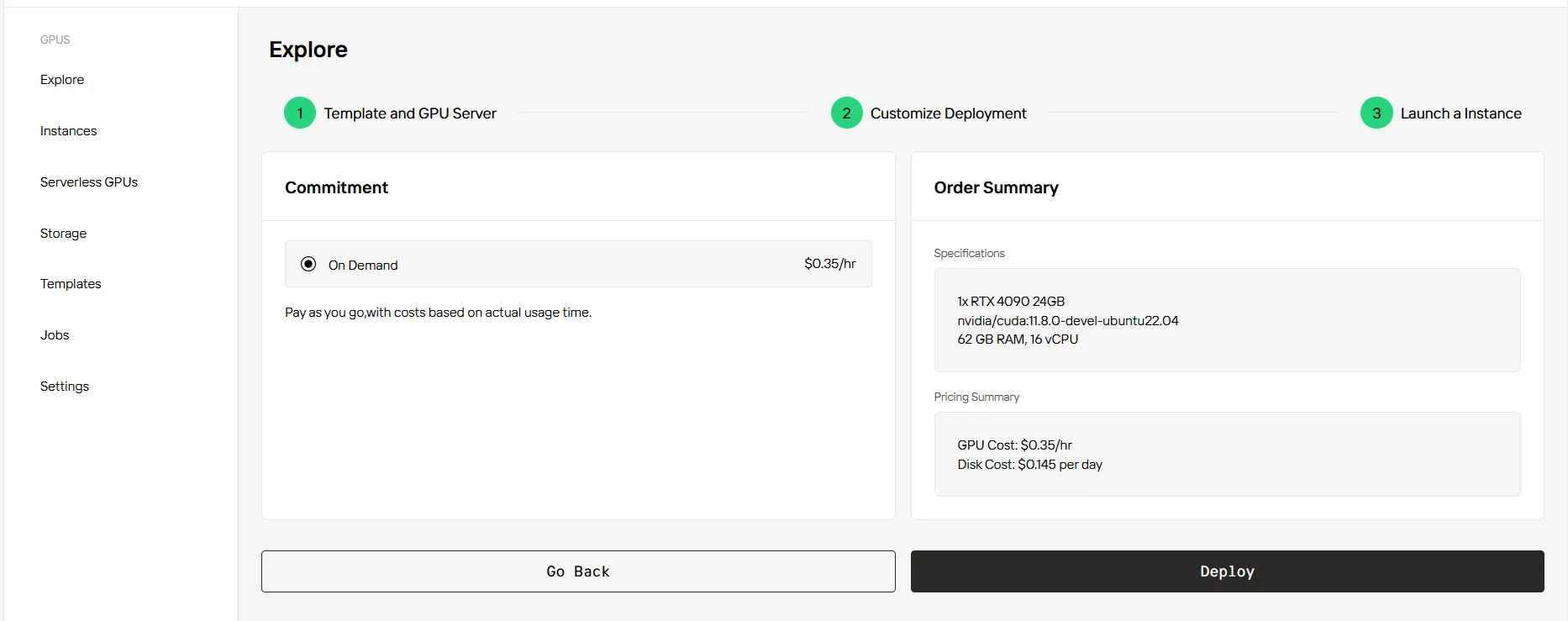
Step4:Launch an instance
Once you’ve finalized the template and deployment settings, click “Launch Instance” to set up your GPU instance. This will start the environment setup, enabling you to begin using the GPU resources for your AI tasks.
Fine-tuning significantly enhances model performance and relevance, enabling tailored solutions optimized for specific applications. When working with large-scale models such as Llama 3.3 70B and Deepseek R1, local hardware may face significant constraints, making cloud-based GPU instances an ideal choice to efficiently manage resource-intensive workloads. Platforms like Novita AI provide accessible, reliable, and cost-effective cloud GPU services, simplifying the fine-tuning and deployment processes and empowering users to fully leverage advanced large language models.
Frequently Asked Questions
Llama 3.3 70B size in GB?
The Llama 3.3 70B model is approximately 40-42 GB in size, depending on the quantization level and specific version downloaded; most commonly reported as around 42 GB.
Which GPU servers are recommended for DeepSeek-R1?
NVIDIA H100 offers the best performance. You can check this article: How many H100 GPUs are needed to Fine-tune DeepSeek R1?
[Novita AI](https://novita.ai/?utm_source=blog_GPU&utm_medium=article&utm_campaign= llama-3-3-deepseek-r1-on-rtx-4090) is an AI cloud platform that offers developers an easy way to deploy AI models using our simple API, while also providing the affordable and reliable GPU cloud for building and scaling.
Recommend Reading
How to Select the Best GPU for LLM Inference: Benchmarking Insights
Why LLaMA 3.3 70B VRAM Requirements Are a Challenge for Home Servers?