주요 하이라이트
Novita AI가 DeepSeek V3 0324 를 출시했습니다! 또한 이 버전은 함수 호출 을 완전히 지원합니다.
DeepSeek V3 0324는 MoE 아키텍처, 다국어 지원, 함수 호출 및 최적화된 코드 생성을 결합하여 탁월한 정확성과 개발 효율성을 제공합니다.
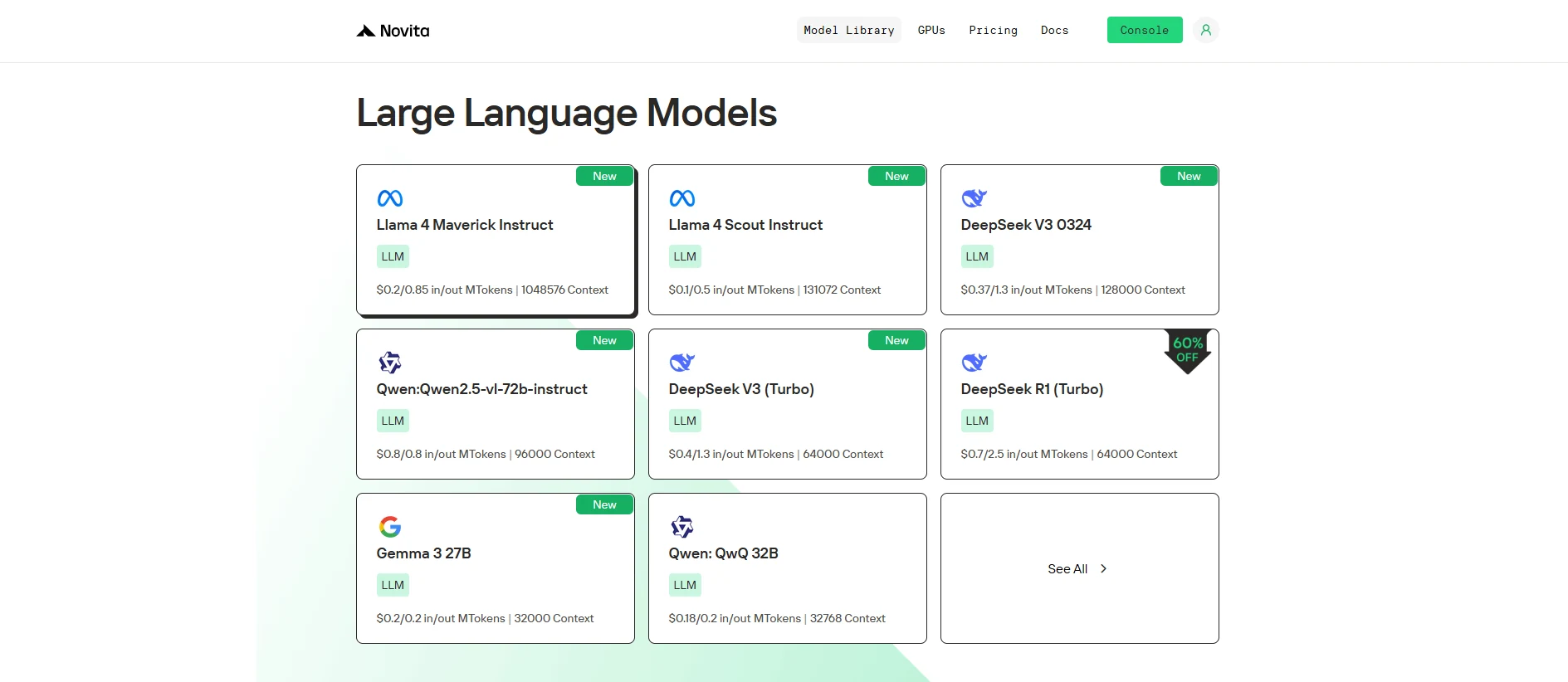
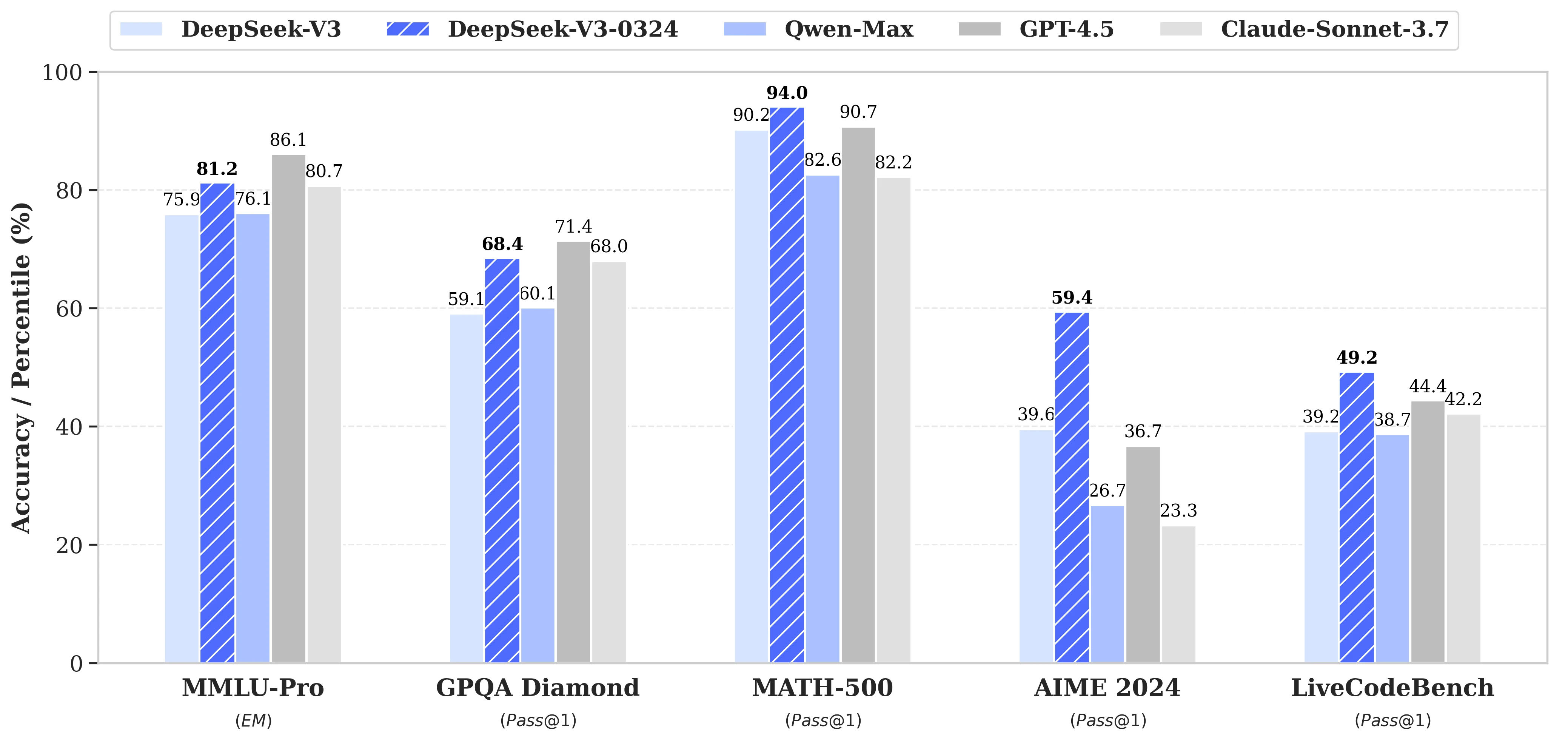
DeepSeek V3 0324는 탁월한 아키텍처와 함수 호출 지원으로 AI 역량을 재정의합니다. 텍스트-텍스트 애플리케이션용으로 설계되어 고품질 코드를 만들고 인터페이스 통합을 자동화하려는 개발자에게 이상적입니다. 복잡한 시나리오를 쉽게 처리할 수 있어 최첨단 개발에 더욱 적합한 선택입니다.
DeepSeek V3 0324란?
| 기본 정보 | 출시일 | 2025년 3월 24일 |
| 모델 크기 | 671B 파라미터 (토큰당 37B 활성) | |
| 오픈소스 | 오픈 | |
| 아키텍처 | Mixture-of-Experts (MoE) | |
| 기능 | 함수 호출 지원 | |
| 언어 지원 | 지원 다국어 | 중국어 기능 강화 |
| 멀티모달 | 멀티모달 기능 | 멀티모달 모델 아님, 텍스트-텍스트 |
| 훈련 | 훈련 데이터 | 14.8조 개의 다양한 토큰 |
| 정밀도별 모델 크기 | 텐서 유형 | BF16/F8_E4M3/F32 |
DeepSeek V3 0324 + 함수 호출
DeepSeek V3 0324는 함수 호출을 지원하며 향상된 프론트엔드 코드 생성 기능을 갖추고 있어 프론트엔드 개발에 큰 개선을 가져옵니다.
첫째, DeepSeek V3 0324는 HTML, CSS, JavaScript 생성에서 명확한 최적화를 보여줍니다. 반응형 디자인과 컴포넌트 기반 개발에 적합한 깔끔하고 의미론적인 코드를 생성합니다. 이를 통해 개발자는 페이지 구조와 기본 상호작용 로직을 빠르게 구축하여 개발 효율성을 높일 수 있습니다.
둘째, 함수 호출 메커니즘을 통해 모델이 외부 인터페이스를 호출할 수 있으므로 검색, 양식 제출, 동적 데이터 로딩과 같은 일반적인 프론트엔드 시나리오를 더 효과적으로 처리할 수 있습니다. 함수 호출을 통해 모델은 사용자 의도를 이해할 수 있을 뿐만 아니라 함수 호출 로직을 생성하여 프론트엔드와 백엔드 간의 원활한 협업을 가능하게 합니다.
요약하면, DeepSeek V3 0324와 함수 호출의 결합으로 모델은 고품질 프론트엔드 코드를 생성하면서 인터페이스 통합을 자동화할 수 있습니다. 검색, 추천, 데이터 상호작용과 같은 프론트엔드 기능을 구축하는 데 적합하며 개발 효율성과 전반적인 협업을 크게 향상시킵니다.
Novita AI를 통해 DeepSeek V3 0324 함수 호출 사용 방법
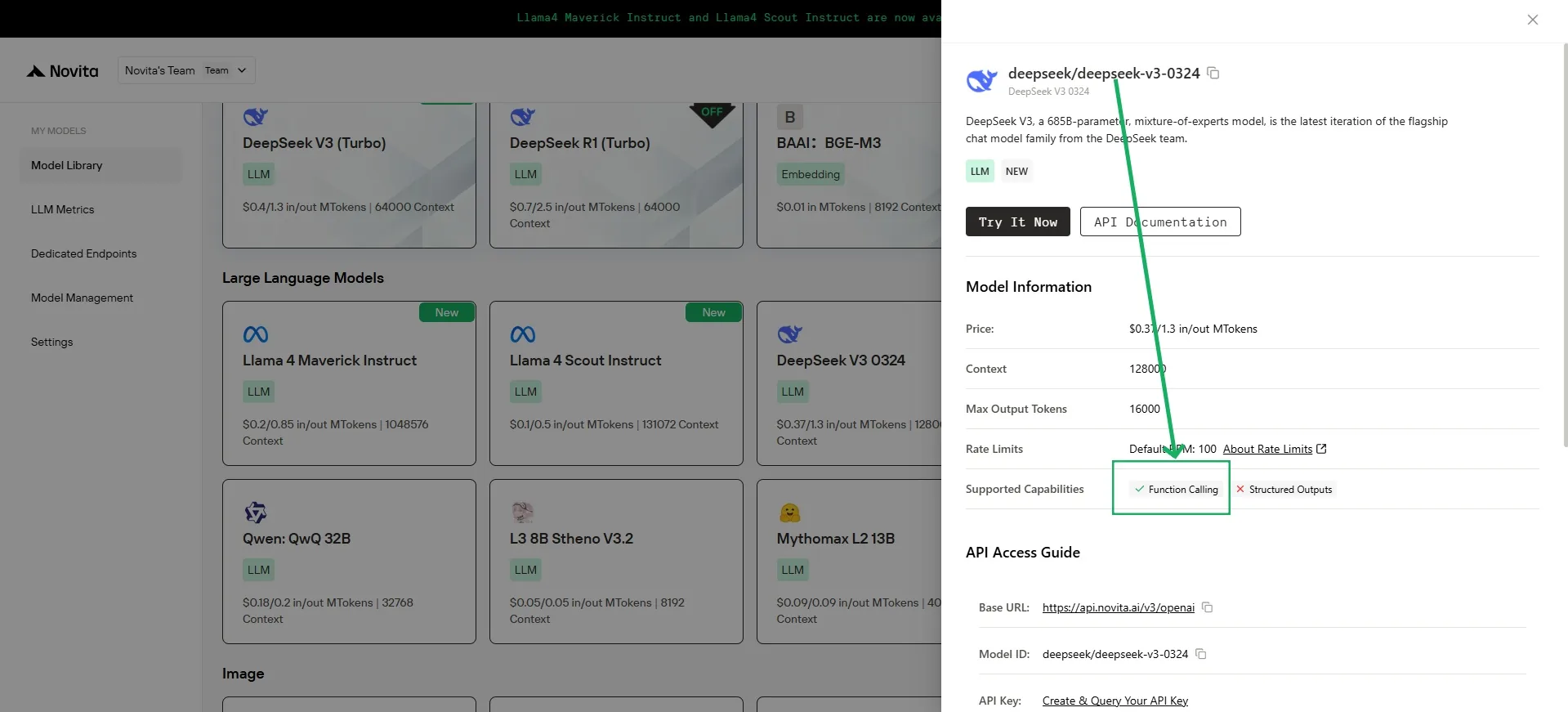
Novita AI는 각 LLM에 대한 지원 기능 설명을 제공하며, [콘솔](https://novita.ai/models-console/?utm_source=blog_llm&utm_medium=article&utm_campaign=/ llama-4-maverick-function-calling/) 및 [문서](https://novita.ai/docs/guides/llm-function-calling/?utm_source=blog_llm&utm_medium=article&utm_campaign= llama-4-maverick-function-calling)에서 직접 확인할 수 있습니다.
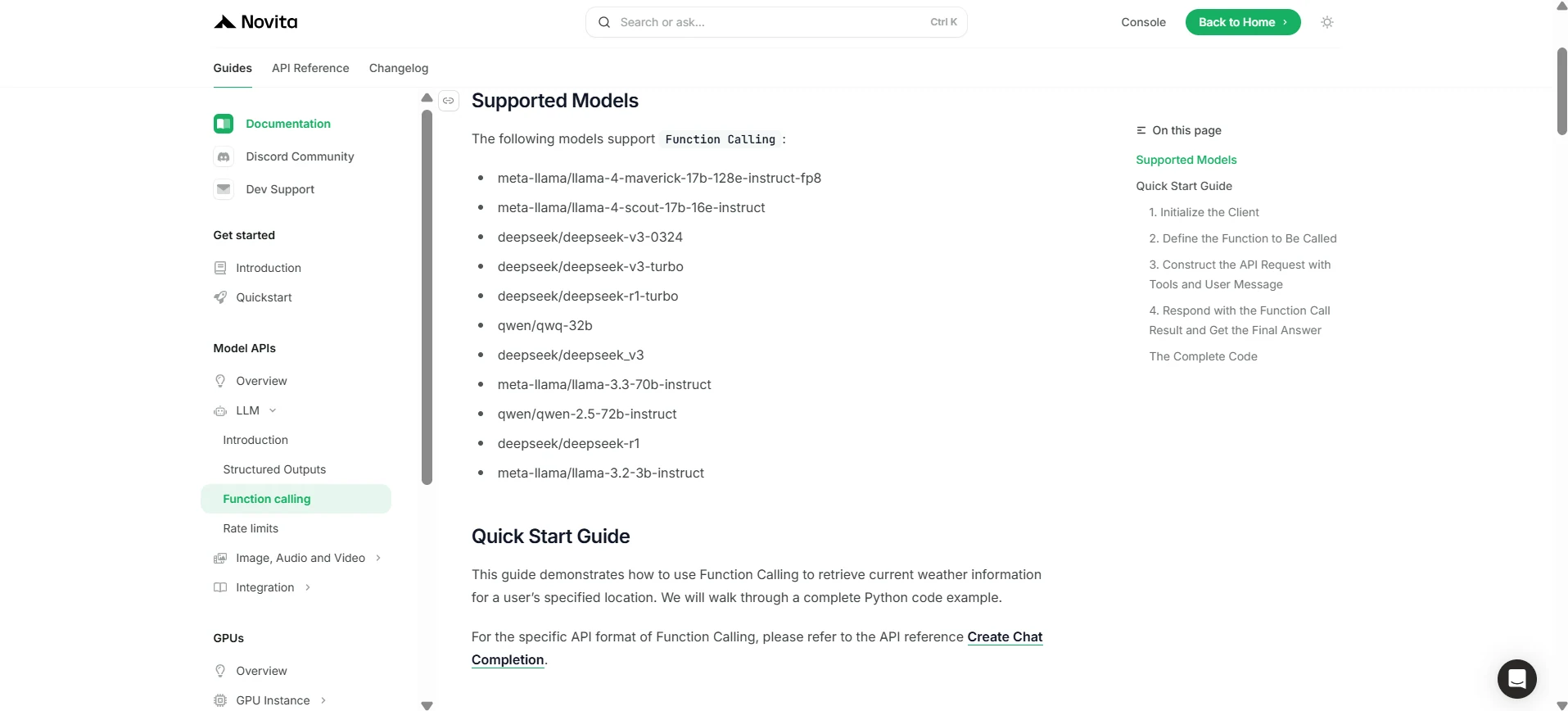
1. 클라이언트 초기화
먼저 Novita API 키로 클라이언트를 초기화해야 합니다.
from openai import OpenAI
import json

client = OpenAI(
    base_url="https://api.novita.ai/v3/openai",
    # Get the Novita AI API Key from: https://novita.ai/settings/key-management.
    api_key="<YOUR Novita AI API Key>",
)

model = "deepseek/deepseek-v3-0324"
- 호출할 함수 정의
다음으로, 모델이 호출할 수 있는 Python 함수를 정의합니다. 이 예시에서는 날씨 정보를 가져오는 함수입니다.
# Example function to simulate fetching weather data.
def get_weather(location):
    """Retrieves the current weather for a given location."""
    print("Calling get_weather function with location: ", location)
    # In a real application, you would call an external weather API here.
    # This is a simplified example returning hardcoded data.
    return json.dumps({"location": location, "temperature": "60 degrees Fahrenheit"})
2. 도구 및 사용자 메시지로 API 요청 구성
이제 Novita 엔드포인트에 API 요청을 생성합니다. 이 요청에는 tools 매개변수(모델이 사용할 수 있는 함수 정의)와 사용자 메시지가 포함됩니다.
tools = [
    {
        "type": "function",
        "function": {
            "name": "get_weather",
            "description": "Get weather of an location, the user shoud supply a location first",
            "parameters": {
                "type": "object",
                "properties": {
                    "location": {
                        "type": "string",
                        "description": "The city and state, e.g. San Francisco, CA",
                    }
                },
                "required": ["location"]
            },
        }
    },
]

messages = [
    {
        "role": "user",
        "content": "What is the weather in San Francisco?"
    }
]

# Let's send the request and print the response.
response = client.chat.completions.create(
    model=model,
    messages=messages,
    tools=tools,
)

# Please check if the response contains tool calls if in production.
tool_call = response.choices[0].message.tool_calls[0]
print(tool_call.model_dump())
3. 출력
{'id': '0', 'function': {'arguments': '{"location": "San Francisco, CA"}', 'name': 'get_weather'}, 'type': 'function'}
4. 함수 호출 결과로 응답하고 최종 답변 가져오기
다음 단계는 함수 호출을 처리하고 get_weather 함수를 실행한 후 결과를 다시 모델에 보내 사용자에게 최종 응답을 생성하도록 하는 것입니다.
# Ensure tool_call is defined from the previous step
if tool_call:
    # Extend conversation history with the assistant's tool call message
    messages.append(response.choices[0].message)

    function_name = tool_call.function.name
    if function_name == "get_weather":
        function_args = json.loads(tool_call.function.arguments)
        # Execute the function and get the response
        function_response = get_weather(
            location=function_args.get("location"))
        # Append the function response to the messages
        messages.append(
            {
                "tool_call_id": tool_call.id,
                "role": "tool",
                "content": function_response,
            }
        )

    # Get the final response from the model, now with the function result
    answer_response = client.chat.completions.create(
        model=model,
        messages=messages,
        # Note: Do not include tools parameter here.
    )
    print(answer_response.choices[0].message)
5. 출력
{'id': '0', 'function': {'arguments': '{"location": "San Francisco, CA"}', 'name': 'get_weather'}, 'type': 'function'}
DeepSeek V3 0324는 고급 함수 호출과 강력한 언어 지원, 최적화된 코드 생성을 결합하여 이전 모델을 능가하는 차세대 AI 모델입니다. 복잡한 개발 시나리오를 효율적으로 처리할 수 있어 현대 개발자에게 강력하고 필수적인 도구입니다.
자주 묻는 질문
함수 호출이란 무엇인가요?
LLM이 외부 도구나 API를 트리거하여 작업을 수행하고 데이터를 검색할 수 있게 해줍니다.
Novita AI에서 DeepSeek V3 0324 함수 호출을 어떻게 시작할 수 있나요?
DeepSeek V3 0324를 사용하려면 Novita AI API 키로 Novita AI 클라이언트를 초기화하고, 호출 가능한 Python 함수를 정의하며, 도구를 포함한 API 요청을 구성하고, 모델의 도구 호출을 처리하세요. 자세한 단계는 Novita AI 문서를 참조하십시오.
DeepSeek V3 0324가 다른 모델보다 나은 이유는 무엇인가요?
DeepSeek V3 0324는 반응형 디자인과 동적 상호작용을 위한 깔끔하고 의미론적인 프론트엔드 코드(HTML, CSS, JavaScript)를 생성하는 데 탁월합니다.
Novita AI는 AI 비전을 실현하는 올인원 클라우드 플랫폼입니다. 통합 API, 서버리스, GPU 인스턴스 등 비용 효율적인 도구를 제공합니다. 인프라를 걱정하지 말고 무료로 시작하여 AI 비전을 현실로 만드세요.