主なハイライト
Novita AI は Deepseek V3 0324 を導入しました!さらに、このバージョンは ** 関数呼び出し** を完全にサポートしています。
DeepSeek V3 0324 は、MoE アーキテクチャ、多言語サポート、関数呼び出し、最適化されたコード生成を組み合わせ、比類のない精度と開発効率を実現します。
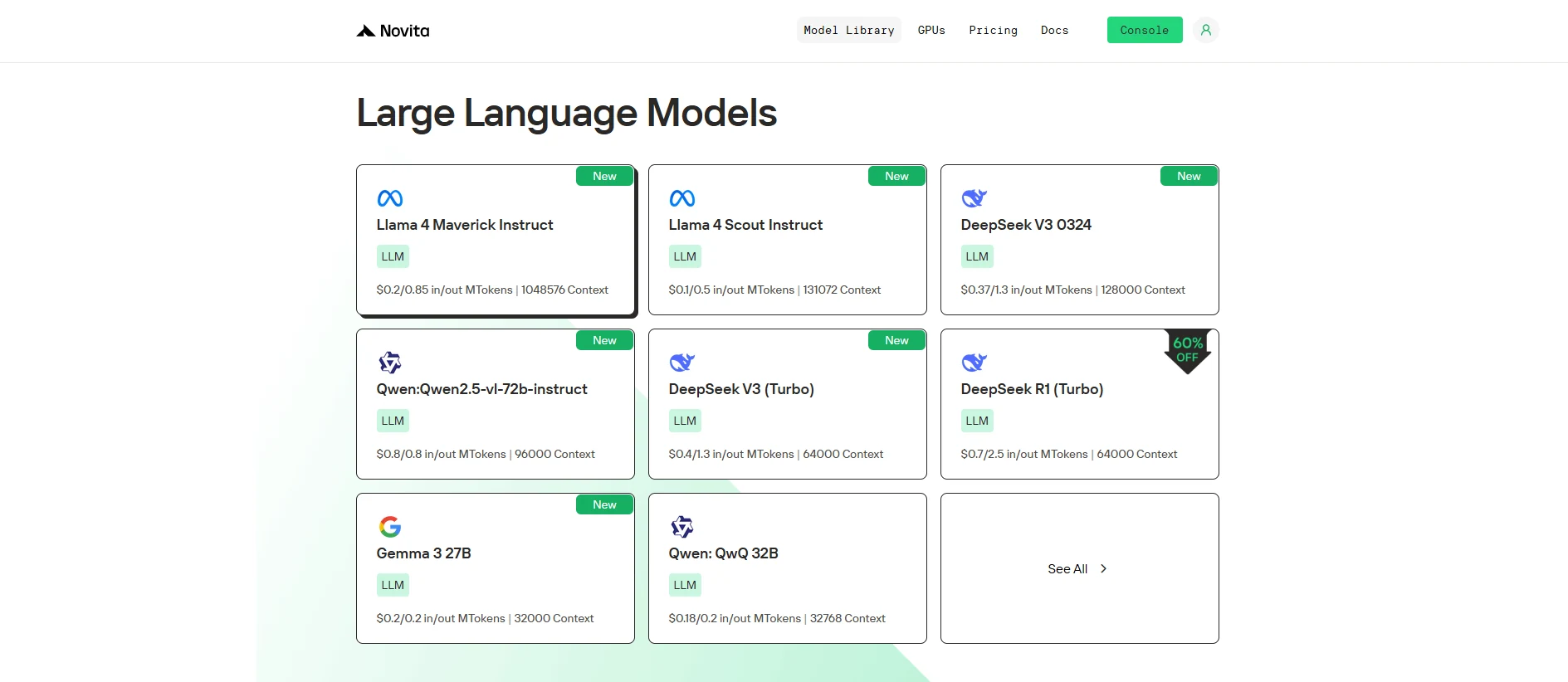
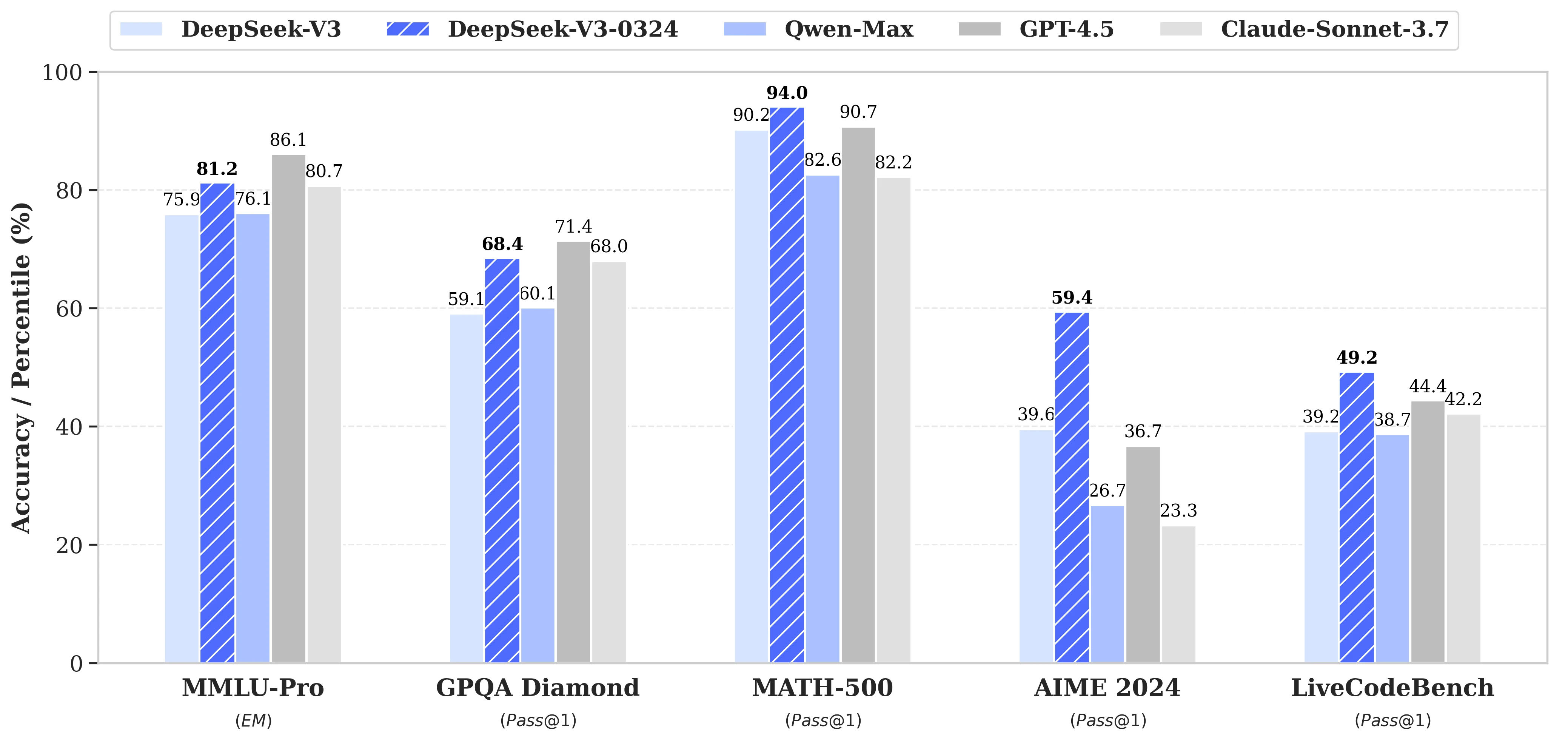
DeepSeek V3 0324 は、その卓越したアーキテクチャと関数呼び出しのサポートにより、AI の能力を再定義します。テキスト間アプリケーション向けに設計されており、高品質なコードの作成とインターフェース統合の自動化を目指す開発者に最適です。複雑なシナリオを容易に処理できるため、最先端の開発に優れた選択肢となります。
Deepseek V3 0324 とは?
| 基本情報 | リリース日 | 2025年3月24日 |
| モデルサイズ | 671B パラメーター(37B アクティブ/トークン) | |
| オープンソース | オープン | |
| アーキテクチャ | Mixture-of-Experts (MoE) | |
| 機能 | 関数呼び出しをサポート | |
| 言語サポート | 対応多言語 | 中国語の能力が向上 |
| マルチモーダル | マルチモーダル機能 | マルチモーダルモデルではない、テキスト間 |
| トレーニング | トレーニングデータ | 14.8 兆トークンの多様なデータ |
| 精度別モデルサイズ | テンソルタイプ | BF16/F8_E4M3/F32 |
Deepseek V3 0324 + 関数呼び出し
DeepSeek V3 0324 は関数呼び出しをサポートし、フロントエンドコード生成能力が強化されており、フロントエンド開発に大きな改善をもたらします。
まず、DeepSeek V3 0324 は HTML、CSS、JavaScript の生成において明確な最適化を示します。レスポンシブデザインやコンポーネントベースの開発に適した、クリーンでセマンティックなコードを生成します。これにより、開発者はページ構造と基本的なインタラクションロジックを迅速に構築し、開発効率を向上させることができます。
次に、関数呼び出しメカニズムにより、モデルが外部インターフェースを呼び出すことが可能になり、検索、フォーム送信、動的データロードなどの一般的なフロントエンドシナリオをより効果的に処理できます。関数呼び出しを通じて、モデルはユーザーの意図を理解するだけでなく、関数呼び出しロジックを生成し、フロントエンドとバックエンドのシームレスな連携を実現します。
まとめると、DeepSeek V3 0324 と関数呼び出しの組み合わせにより、モデルは高品質なフロントエンドコードを生成しながら、インターフェース統合を自動化できます。検索、レコメンデーション、データインタラクションなどのフロントエンド機能の構築に適しており、開発効率と全体的なコラボレーションを大幅に向上させます。
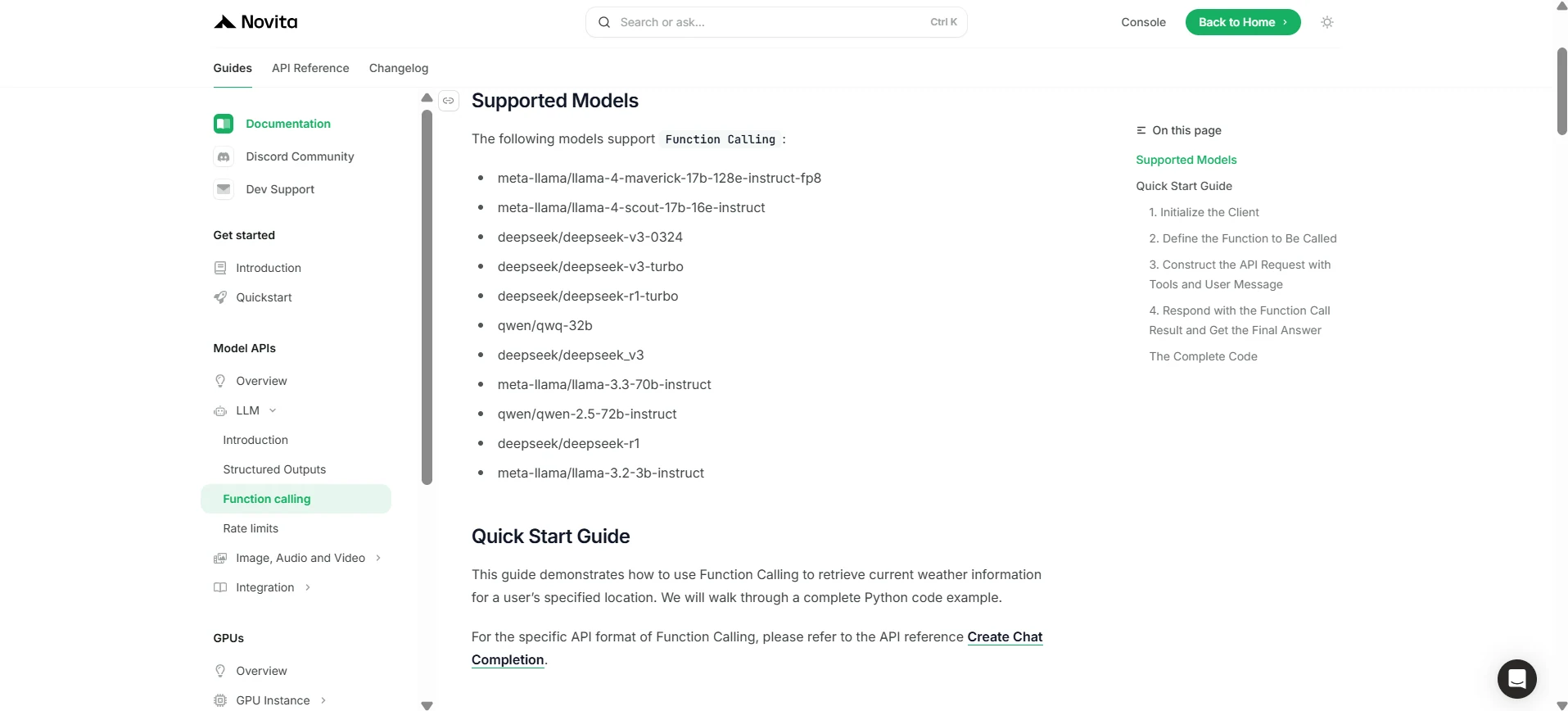
Novita AI を介した Deepseek V3 0324 関数呼び出しの使用方法
Novita AI は各 LLM のサポート機能説明を公開しており、[コンソール](https://novita.ai/models-console/?utm_source=blog_llm&utm_medium=article&utm_campaign=/ llama-4-maverick-function-calling/) と [ドキュメント](https://novita.ai/docs/guides/llm-function-calling/?utm_source=blog_llm&utm_medium=article&utm_campaign= llama-4-maverick-function-calling) で直接確認できます。
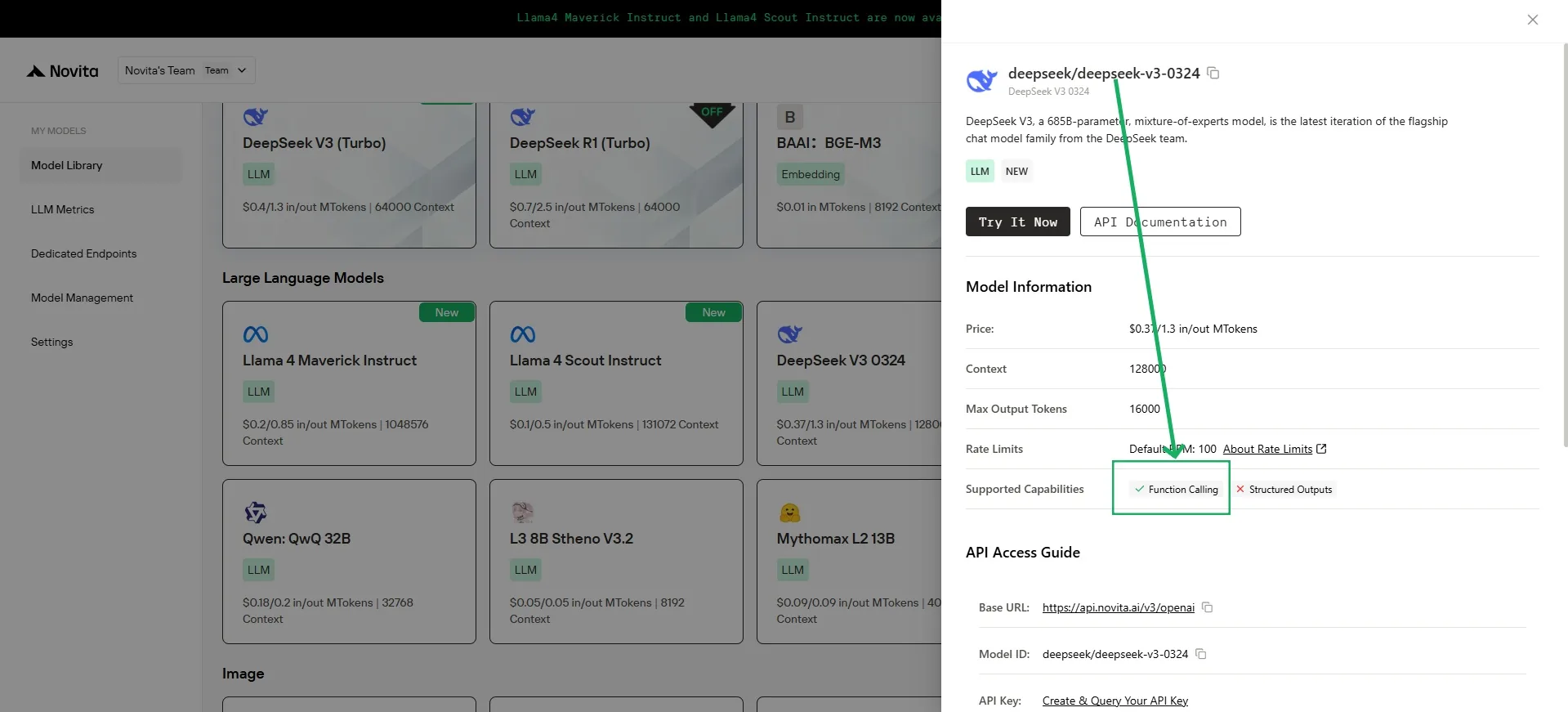
1. クライアントの初期化
まず、Novita API キーを使用してクライアントを初期化する必要があります。
from openai import OpenAI
import json

client = OpenAI(
    base_url="https://api.novita.ai/v3/openai",
    # Get the Novita AI API Key from: https://novita.ai/settings/key-management.
    api_key="<YOUR Novita AI API Key>",
)

model = "deepseek/deepseek-v3-0324"
- 呼び出す関数の定義
次に、モデルが呼び出せる Python 関数を定義します。この例では、天気情報を取得する関数です。
# Example function to simulate fetching weather data.
def get_weather(location):
    """Retrieves the current weather for a given location."""
    print("Calling get_weather function with location: ", location)
    # In a real application, you would call an external weather API here.
    # This is a simplified example returning hardcoded data.
    return json.dumps({"location": location, "temperature": "60 degrees Fahrenheit"})
2. ツールとユーザーメッセージを含む API リクエストの構築
次に、Novita エンドポイントへの API リクエストを作成します。このリクエストには、モデルが使用できる関数を定義する tools パラメーターとユーザーメッセージが含まれます。
tools = [
    {
        "type": "function",
        "function": {
            "name": "get_weather",
            "description": "Get weather of an location, the user shoud supply a location first",
            "parameters": {
                "type": "object",
                "properties": {
                    "location": {
                        "type": "string",
                        "description": "The city and state, e.g. San Francisco, CA",
                    }
                },
                "required": ["location"]
            },
        }
    },
]

messages = [
    {
        "role": "user",
        "content": "What is the weather in San Francisco?"
    }
]

# Let's send the request and print the response.
response = client.chat.completions.create(
    model=model,
    messages=messages,
    tools=tools,
)

# Please check if the response contains tool calls if in production.
tool_call = response.choices[0].message.tool_calls[0]
print(tool_call.model_dump())
3. 出力
{'id': '0', 'function': {'arguments': '{"location": "San Francisco, CA"}', 'name': 'get_weather'}, 'type': 'function'}
4. 関数呼び出し結果で応答し、最終回答を取得
次のステップは、関数呼び出しを処理し、get_weather 関数を実行し、その結果をモデルに送り返してユーザーへの最終応答を生成することです。
# Ensure tool_call is defined from the previous step
if tool_call:
    # Extend conversation history with the assistant's tool call message
    messages.append(response.choices[0].message)

    function_name = tool_call.function.name
    if function_name == "get_weather":
        function_args = json.loads(tool_call.function.arguments)
        # Execute the function and get the response
        function_response = get_weather(
            location=function_args.get("location"))
        # Append the function response to the messages
        messages.append(
            {
                "tool_call_id": tool_call.id,
                "role": "tool",
                "content": function_response,
            }
        )

    # Get the final response from the model, now with the function result
    answer_response = client.chat.completions.create(
        model=model,
        messages=messages,
        # Note: Do not include tools parameter here.
    )
    print(answer_response.choices[0].message)
5. 出力
{'id': '0', 'function': {'arguments': '{"location": "San Francisco, CA"}', 'name': 'get_weather'}, 'type': 'function'}
DeepSeek V3 0324 は、高度な関数呼び出しと堅牢な言語サポート、最適化されたコード生成を組み合わせることで、以前のモデルを凌駕する次世代 AI モデルです。複雑な開発シナリオを効率的に処理できるため、現代の開発者にとって強力で不可欠なツールです。
よくある質問
関数呼び出しとは?
LLM が外部ツールや API をトリガーしてタスクを実行し、データを取得できるようにするものです。
Novita AI で DeepSeek V3 0324 関数呼び出しを始めるには?
DeepSeek V3 0324 を使用するには、API キーで Novita AI クライアントを初期化し、呼び出し可能な Python 関数を定義し、ツールを含む API リクエストを構築し、モデルのツール呼び出しを処理します。詳細な手順については Novita AI ドキュメントをご覧ください。
なぜ DeepSeek V3 0324 は他のモデルより優れているのですか?
DeepSeek V3 0324 は、レスポンシブデザインと動的インタラクションのためのクリーンでセマンティックなフロントエンドコード(HTML、CSS、JavaScript)の生成に優れています。
Novita AI は、AI の野望を実現するオールインワンのクラウドプラットフォームです。統合 API、サーバーレス、GPU インスタンス — コスト効率の高いツールを提供します。インフラストラクチャを排除し、無料で始めて、AI ビジョンを現実にしましょう。