Key Highlights
Qwen2.5-7B is a mid-sized open-source LLM with 7.6B parameters, 128K context support, and robust general-purpose performance.
Qwen2.5-7B can be deployed locally with GPUs (e.g., RTX 4090), but high-precision formats like FP32 require costly hardware setups.
For broader accessibility, API access via Novita AI offers a scalable, cost-effective alternative, fully compatible with OpenAI’s SDK.
Refer your friends to Novita AI and both of you will earn $10 in LLM API credits—up to $500 in total rewards. To support the developer community, Qwen2.5-7B is currently available for free on Novita AI.
Qwen2.5-7B is a versatile open-source LLM designed for general tasks, balancing power and efficiency. With support for over 29 languages and a massive 128K context length, it enables long-form reasoning and broad application coverage.
What is Qwen 2.5 7B ?
Qwen 2.5 7B is a powerful mid-sized open-source language model with 7.6 billion parameters, supporting 128K context and optimized for general-purpose tasks.
Model Overview
- Model Size: 7.61B parameters
- Open Source: Open
- Architecture: Transformers with RoPE, SwiGLU, RMSNorm, and Attention QKV bias
- Context Length: 128 tokens
Language & Multimodal
- Supported Languages: Supports over 29 multilingual languages
- Multimodal Capability: Text-to-text only
Training Details
- Training Data Volume: Trained on a dataset comprising over 18 trillion tokens
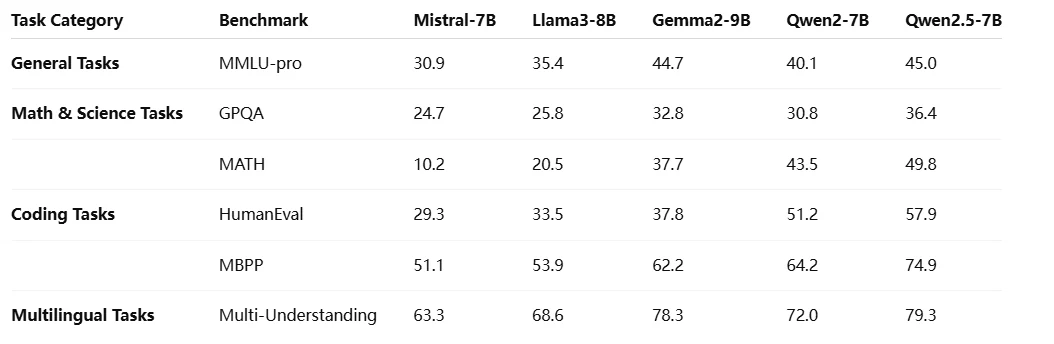
Benchmark
Compared with Other Qwen 2.5 Models
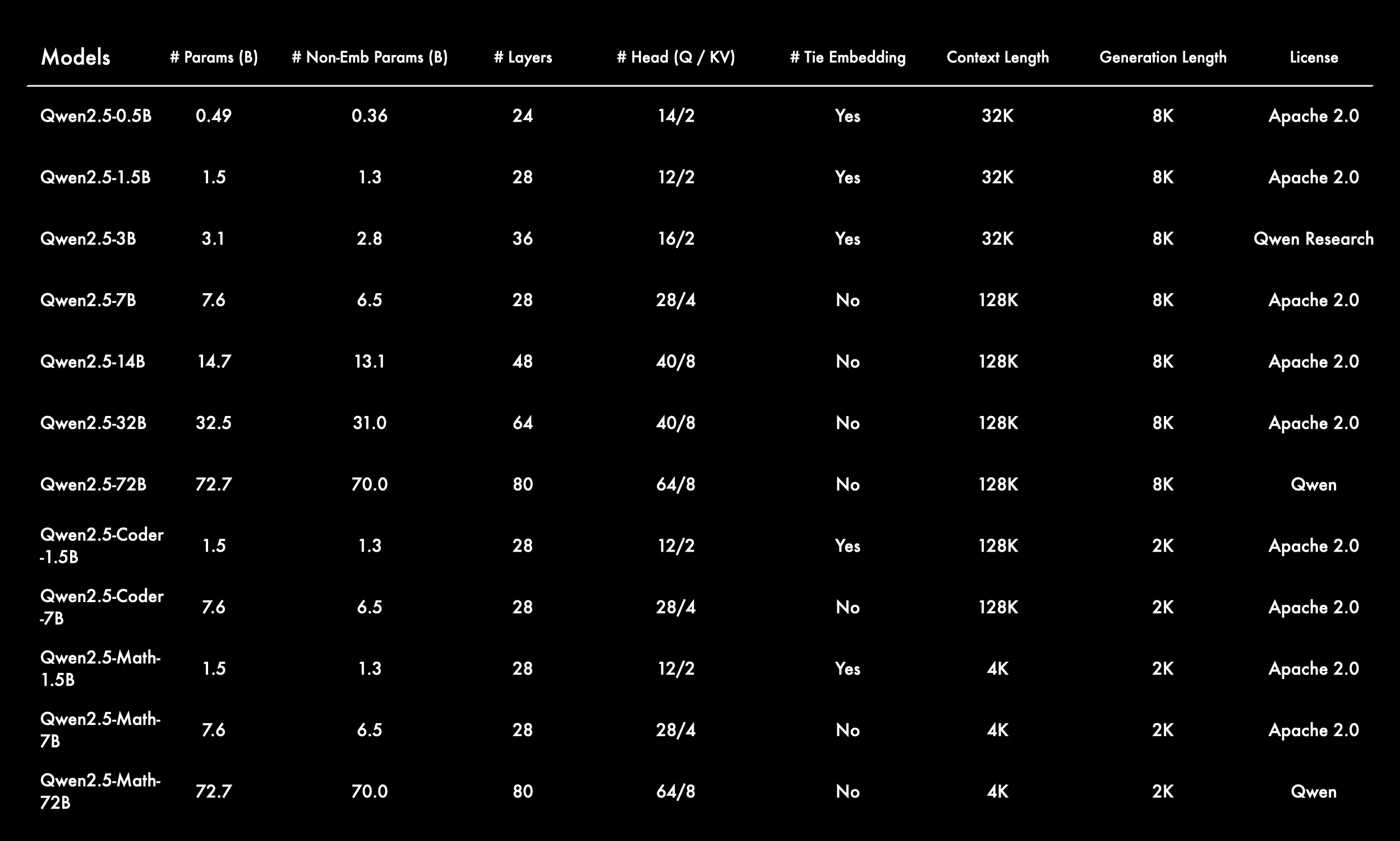
The Qwen 2.5 series offers a scalable family of models ranging from 0.5B to 72B parameters, including general, coding, and math variants, designed to meet diverse needs from lightweight deployment to high-performance AI applications.
From Qwen
-
Wide Range of Model Sizes for Different Use Cases
The Qwen 2.5 series spans from 0.5B to 72B parameters, including general-purpose, Coder, and Math variants—providing flexibility for diverse tasks and compute budgets. -
Larger Models Feature Long Context Windows
Most models support 128K or 32K context lengths, enabling long-form reasoning and multi-turn conversations. Only the Math models use shorter 4K contexts, optimized for dense computations. -
Tie Embedding Used Selectively
Tie embedding is enabled for smaller and specialized models (e.g., 1.5B variants), likely to reduce parameter count, while larger models disable it to enhance representation power. -
Architecture Scales Predictably with Model Size
- Layers: from 24 up to 80
- Attention heads: from 14/2 to 64/8 (Q/KV split)
This reflects a structured scaling strategy with increasing depth and width.
-
Specialized Coder and Math Models Have Shorter Generation Lengths
These models use 2K generation length and are optimized for domain-specific tasks like code generation or mathematical reasoning—favoring precision over context span.
How to Access Qwen 2.5 7B Locally
GPU Recommendations
| Quantization | Model Size | Recommended GPU | VRAM Requirement | Estimated GPU Cost (USD) |
|---|---|---|---|---|
| FP16 | ~16.1 GB | 1× RTX 4090 (24GB) | ≥24 GB | ~$1,600–$1,800 |
| FP32 | ~32.2 GB | 2× RTX 4090 (24GB each) | ≥48 GB | ~$3,200–$3,600 |
| 4-bit (Q4) | ~4.02 GB | RTX 3060 (12GB) | ≥8 GB | ~$300–$350 |
Quick Start
from transformers import AutoModelForCausalLM, AutoTokenizer
device = "cuda" # the device to load the model onto

model = AutoModelForCausalLM.from_pretrained(
    "Qwen/Qwen2.5-7B-Instruct",
    torch_dtype="auto",
    device_map="auto"
)
tokenizer = AutoTokenizer.from_pretrained("Qwen/Qwen2-7B-Instruct")

prompt = "Give me a short introduction to large language model."
messages = [
    {"role": "system", "content": "You are a helpful assistant."},
    {"role": "user", "content": prompt}
]
text = tokenizer.apply_chat_template(
    messages,
    tokenize=False,
    add_generation_prompt=True
)
model_inputs = tokenizer([text], return_tensors="pt").to(device)

generated_ids = model.generate(
    model_inputs.input_ids,
    max_new_tokens=512
)
generated_ids = [
    output_ids[len(input_ids):] for input_ids, output_ids in zip(model_inputs.input_ids, generated_ids)
]

response = tokenizer.batch_decode(generated_ids, skip_special_tokens=True)[0]
While running Qwen2.5-7B locally offers full control and faster response times, the upfront cost of purchasing high-end GPUs—especially for full-precision (FP32) deployment—can be significantly higher than using a pay-as-you-go API. For developers or teams with limited budgets, API access often proves to be a much more cost-effective and scalable solution.
How to Access Qwen 2.5 7B via API?
Novita AI is an AI cloud platform that offers developers an easy way to deploy AI models using our simple API, while also providing the affordable and reliable GPU cloud for building and scaling.
You can begin your free trial to explore the capabilities of the selected model. After installation, import the necessary libraries into your development environment. Initialize the API with your API key to start interacting with Novita AI LLM. This is an example of using chat completions API for python users.
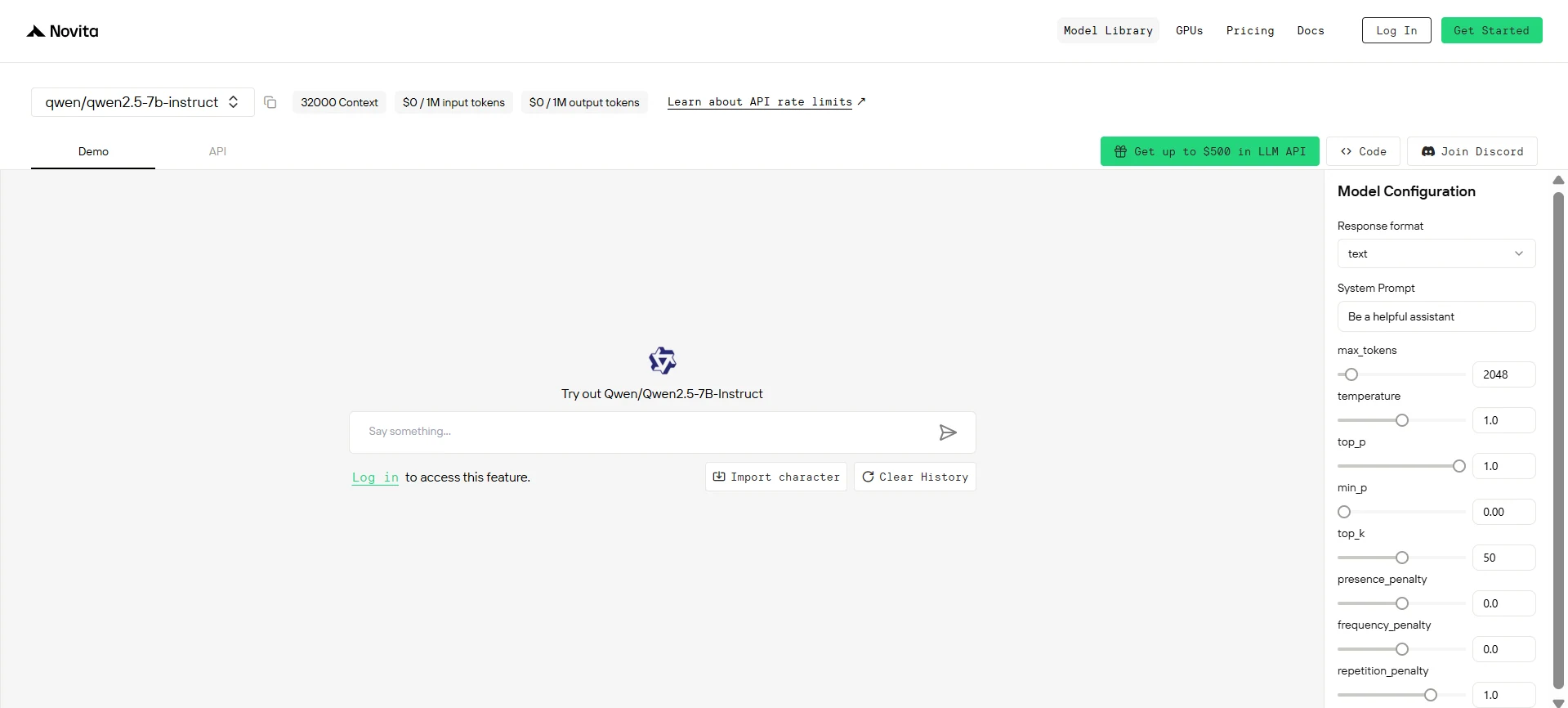
Direct API Integration
from openai import OpenAI

client = OpenAI(
    base_url="https://api.novita.ai/v3/openai",
    api_key="<YOUR Novita AI API Key>",
)

model = "qwen/qwen2.5-7B-Instruct"
stream = True # or False
max_tokens = 2048
system_content = """Be a helpful assistant"""
temperature = 1
top_p = 1
min_p = 0
top_k = 50
presence_penalty = 0
frequency_penalty = 0
repetition_penalty = 1
response_format = { "type": "text" }

chat_completion_res = client.chat.completions.create(
    model=model,
    messages=[
        {
            "role": "system",
            "content": system_content,
        },
        {
            "role": "user",
            "content": "Hi there!",
        }
    ],
    stream=stream,
    max_tokens=max_tokens,
    temperature=temperature,
    top_p=top_p,
    presence_penalty=presence_penalty,
    frequency_penalty=frequency_penalty,
    response_format=response_format,
    extra_body={
      "top_k": top_k,
      "repetition_penalty": repetition_penalty,
      "min_p": min_p
    }
  )

if stream:
    for chunk in chat_completion_res:
        print(chunk.choices[0].delta.content or "", end="")
else:
    print(chat_completion_res.choices[0].message.content)
Multi-Agent Workflows with OpenAI Agents SDK
Build advanced multi-agent systems by integrating Novita AI with the OpenAI Agents SDK:
- Plug-and-play: Use Novita AI’s LLMs in any OpenAI Agents workflow.
- Supports handoffs, routing, and tool use: Design agents that can delegate, triage, or run functions, all powered by Novita AI’s models.
- Python integration: Simply point the SDK to Novita’s endpoint (
https://api.novita.ai/v3/openai) and use your API key.
On Third-Party Platforms
- Hugging Face: Use Qwen 3 in Spaces, pipelines, or with the Transformers library via Novita AI endpoints.
- Agent & Orchestration Frameworks: Easily connect Novita AI with partner platforms like Continue, AnythingLLM,LangChain, Dify and Langflow through official connectors and step-by-step integration guides.
- OpenAI-Compatible API: Enjoy hassle-free migration and integration with tools such as Cline and Cursor, designed for the OpenAI API standard.
Whether running Qwen2.5-7B locally or via API, developers gain access to a powerful toolset. However, the local deployment costs for GPUs like RTX 4090 can be prohibitive, making Novita AI’s API integration a smarter and more scalable choice for most teams.
Frequently Asked Questions
How can I run Qwen 2.5 7B locally?
Use a high-end GPU such as an RTX 4090. FP16 requires ~24GB VRAM, while FP32 needs ~48GB. You’ll also need to install the Transformers library and load the model with AutoModelForCausalLM.
How does API access compare to running the model locally?
API access eliminates upfront GPU costs and offers elastic scalability. Local deployment offers control but is far more expensive for full-precision setups.
How to access Qwen 2.5 7B via API?
Novita AI provides a plug-and-play OpenAI-compatible API.
Novita AI is the All-in-one cloud platform that empowers your AI ambitions. Integrated APIs, serverless, GPU Instance — the cost-effective tools you need. Eliminate infrastructure, start free, and make your AI vision a reality.



