MiniMax M1 represents a significant leap in AI language model technology, introducing powerful long context reasoning capabilities and flexible deployment options. This comprehensive guide walks you through accessing and implementing MiniMax M1, offering the tools needed to enhance AI-powered projects.
Key Highlights
MiniMax M1:456B parameter MoE model, 1M context.
Using MiniMax M1 via API
Easy, OpenAI-compatible API.
Customizable parameters, free trial available.
Using MiniMax M1 Locally
Step-by-Step Installation Guide.
Connect MiniMax M1 on Third-Party Platforms
Seamlessly integrate MiniMax M1 through Hugging Face Spaces, agent frameworks, and OpenAI-compatible APIs for streamlined development workflows.
For a limited time, new users can claim **$10 in free credits**to explore and build with LLM API on Novita AI.
What is MiniMax M1?
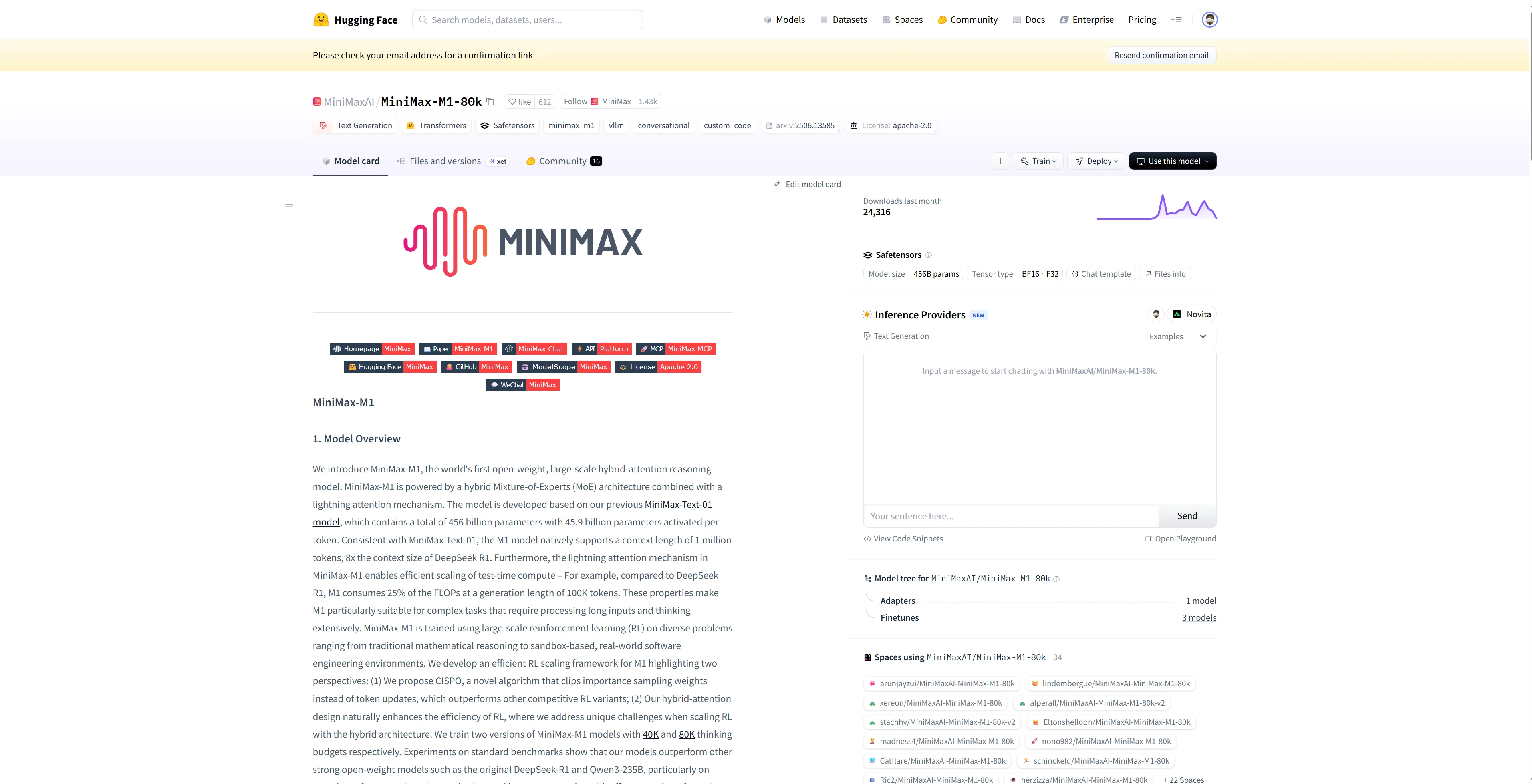
MiniMax M1 is the world’s first open-source large-scale hybrid-expert reasoning model. It combines a Mixture-of-Experts (MoE) architecture with the innovative Lightning Attention mechanism, designed specifically for ultra-long context reasoning and complex tasks. MiniMax supports function calling, its ability to process up to 1 million tokens of context makes it ideal for research, software development, mathematical reasoning, and other demanding applications.
| Basic Info | Details |
| Release Date | June 2025 |
| Model Size | 456B parameters (45.9B active) |
| Architecture | Hybrid Mixture-of-Experts (MoE) with Lightning Attention |
| Context Length | 1M tokens |
| Training | Large-scale Reinforcement Learning on diverse problem sets |
| Special Features | Efficient scaling of test-time compute, hybrid attention for RL |
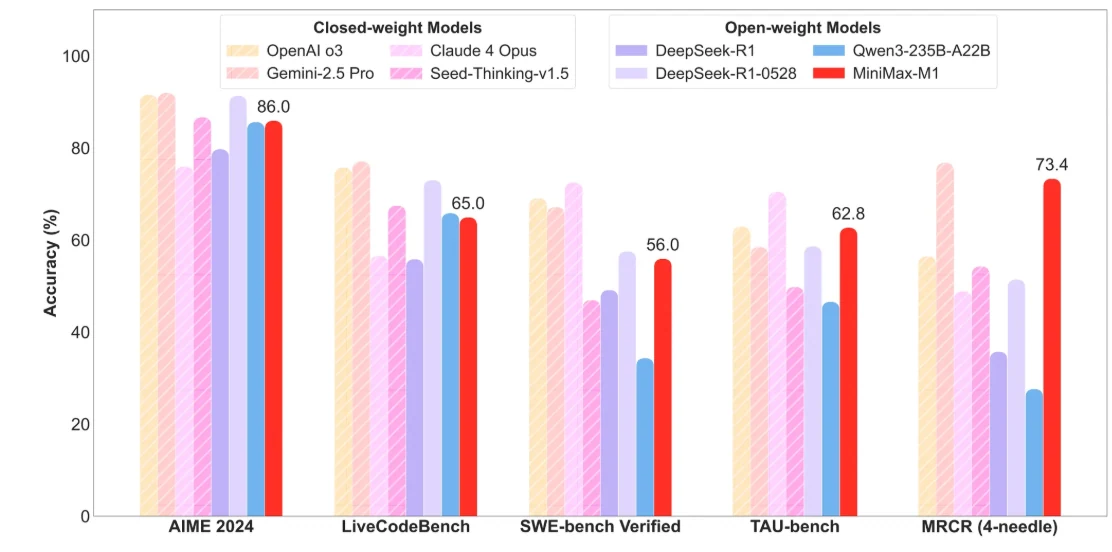
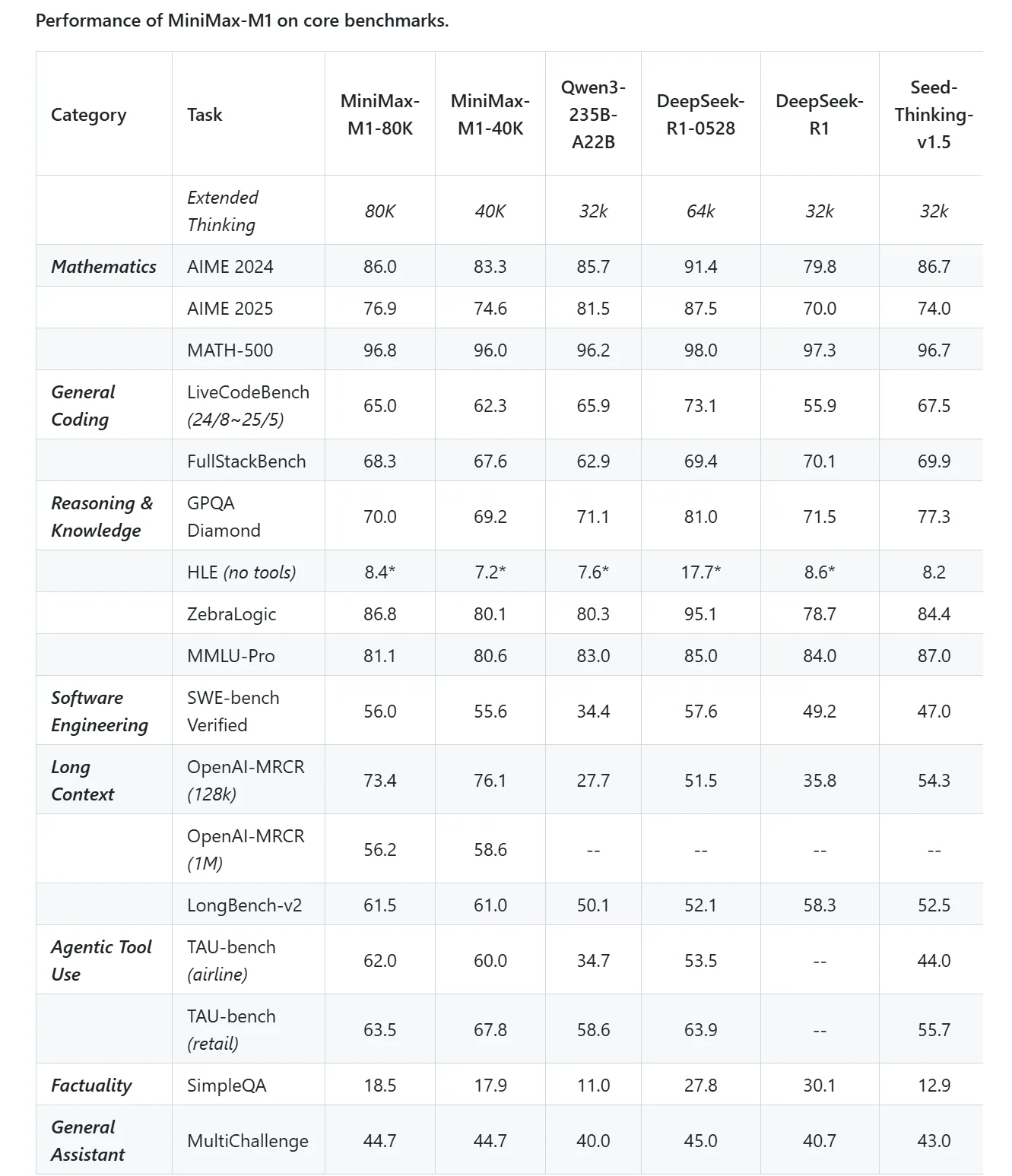
Minimax M1
Efficient Long-Context Processing:
- Supports long context window, enabling processing of extremely long documents, technical codebases, and multi-turn conversations in a single pass.
- Uses a hybrid Mixture-of-Experts (MoE) architecture with lightning attention for efficient inference, reducing computational cost to about 25% of comparable dense models.
- Ideal for enterprises handling large-scale knowledge bases, research papers, and agentic workflows requiring deep contextual understanding.
Cost-Effective Deployment:
- Offers competitive API pricing at $0.55 per million input tokens and $2.2 per million output tokens.
Open-Source and Research Friendly:
- Fully open-weight model encouraging community fine-tuning and integration, supporting domain-specific customization in fields like legal, medical, and scientific research.
- Supports function calling and agentic AI tool use, enabling complex workflows and multi-step reasoning.
Using MiniMax M1 via API
Novita AI is an AI cloud platform that offers developers an easy way to deploy AI models using our simple API, while also providing the affordable and reliable GPU cloud for building and scaling.
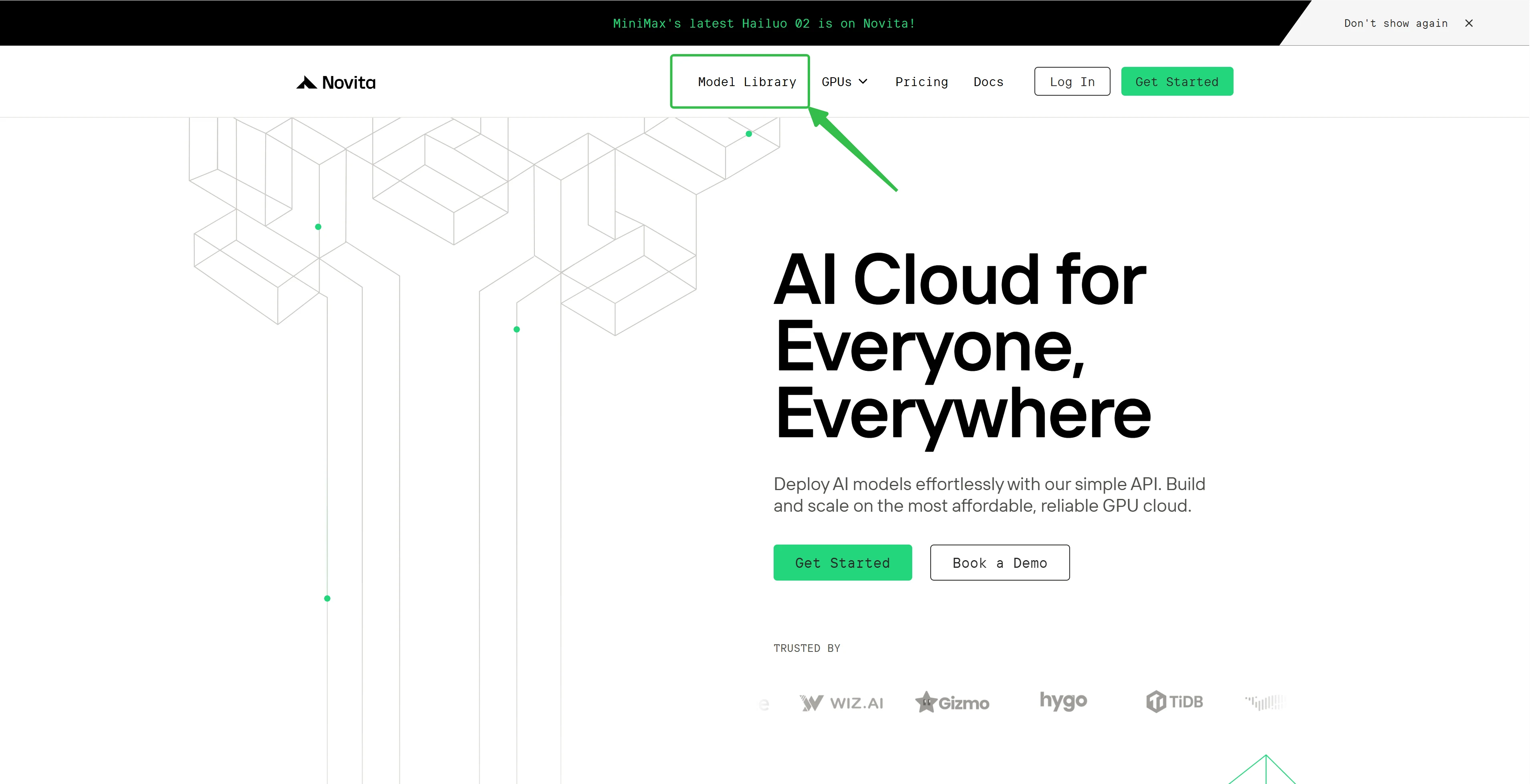
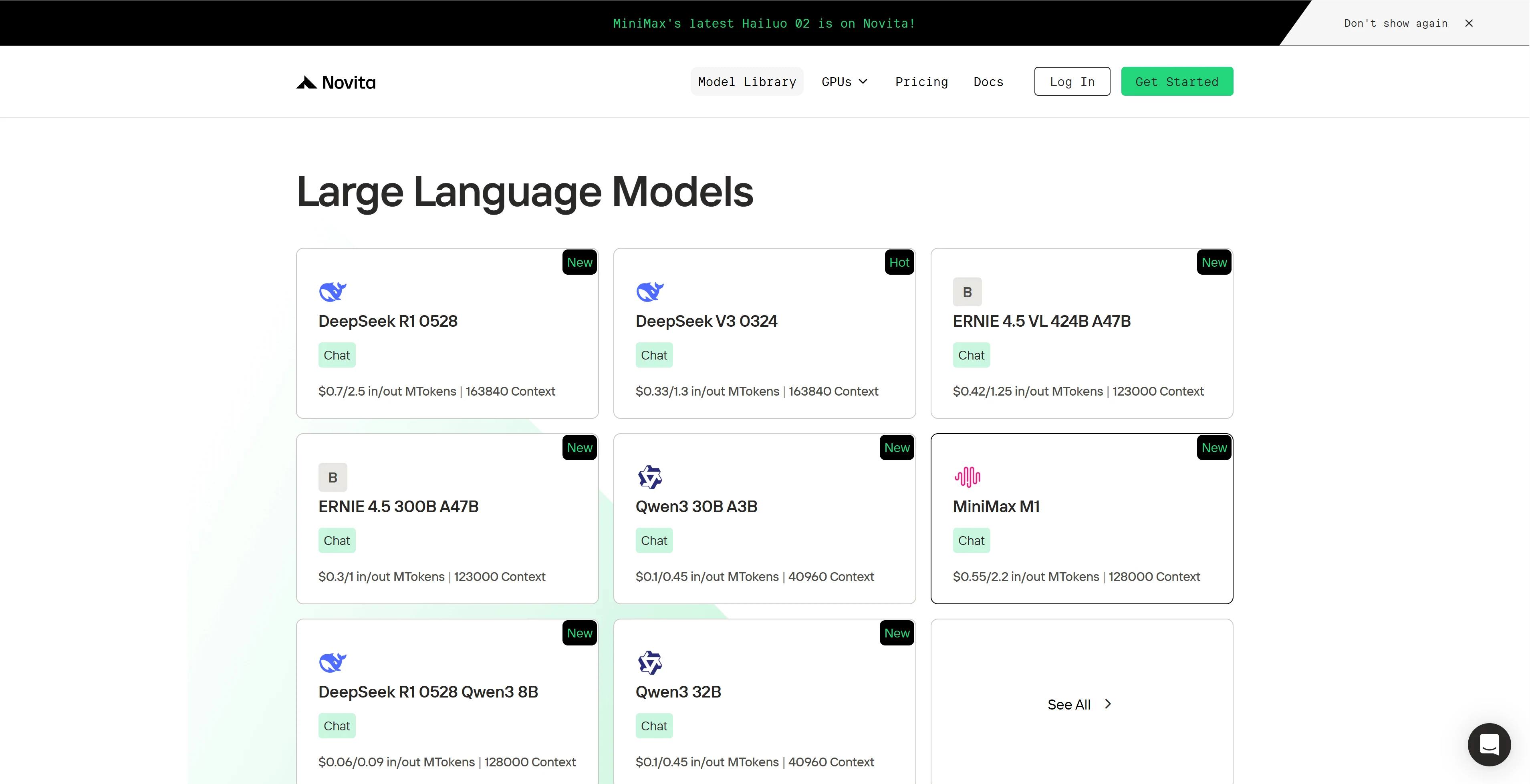
Step 1: Log In and Access the Model Library
Log in to your account and click on the Model Library button.
Step 2: Choose Your Model
Browse through the available options and select the model that suits your needs.
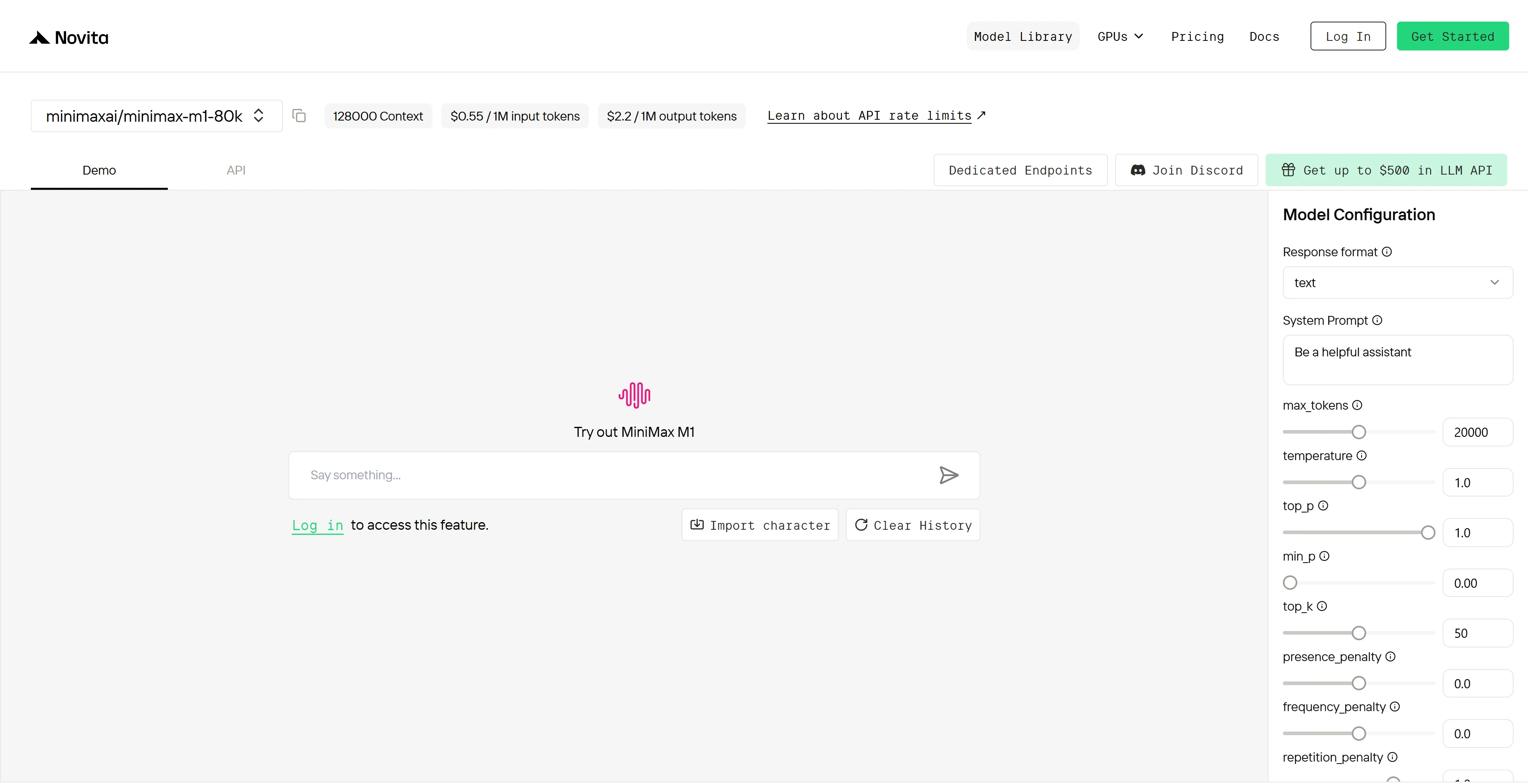
Step 3: Start Your Free Trial
Begin your free trial to explore the capabilities of the selected model.
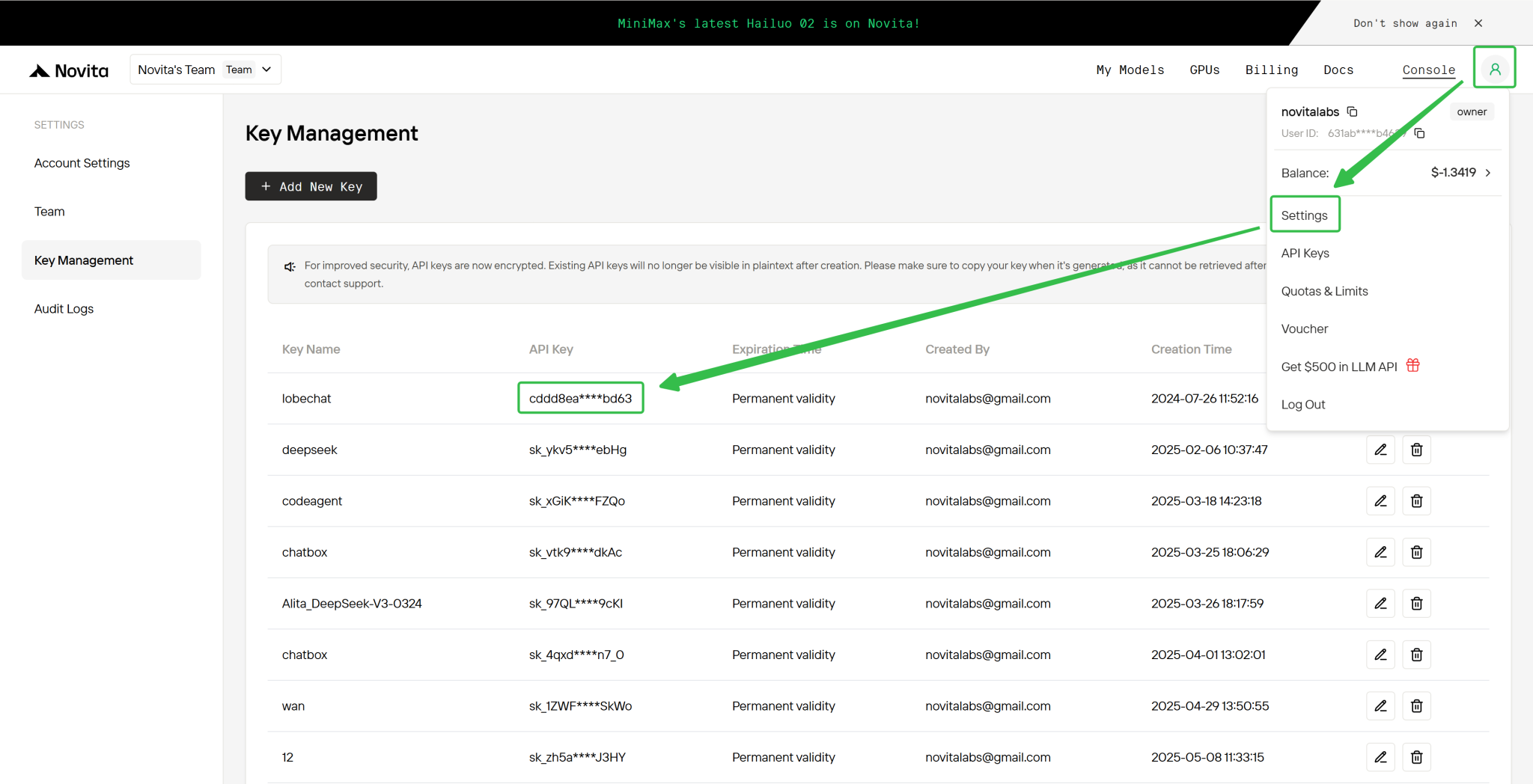
Step 4: Get Your API Key
To authenticate with the API, we will provide you with a new API key. Entering the “Settings“ page, you can copy the API key as indicated in the image.
Step 5: Install the API
Install API using the package manager specific to your programming language.
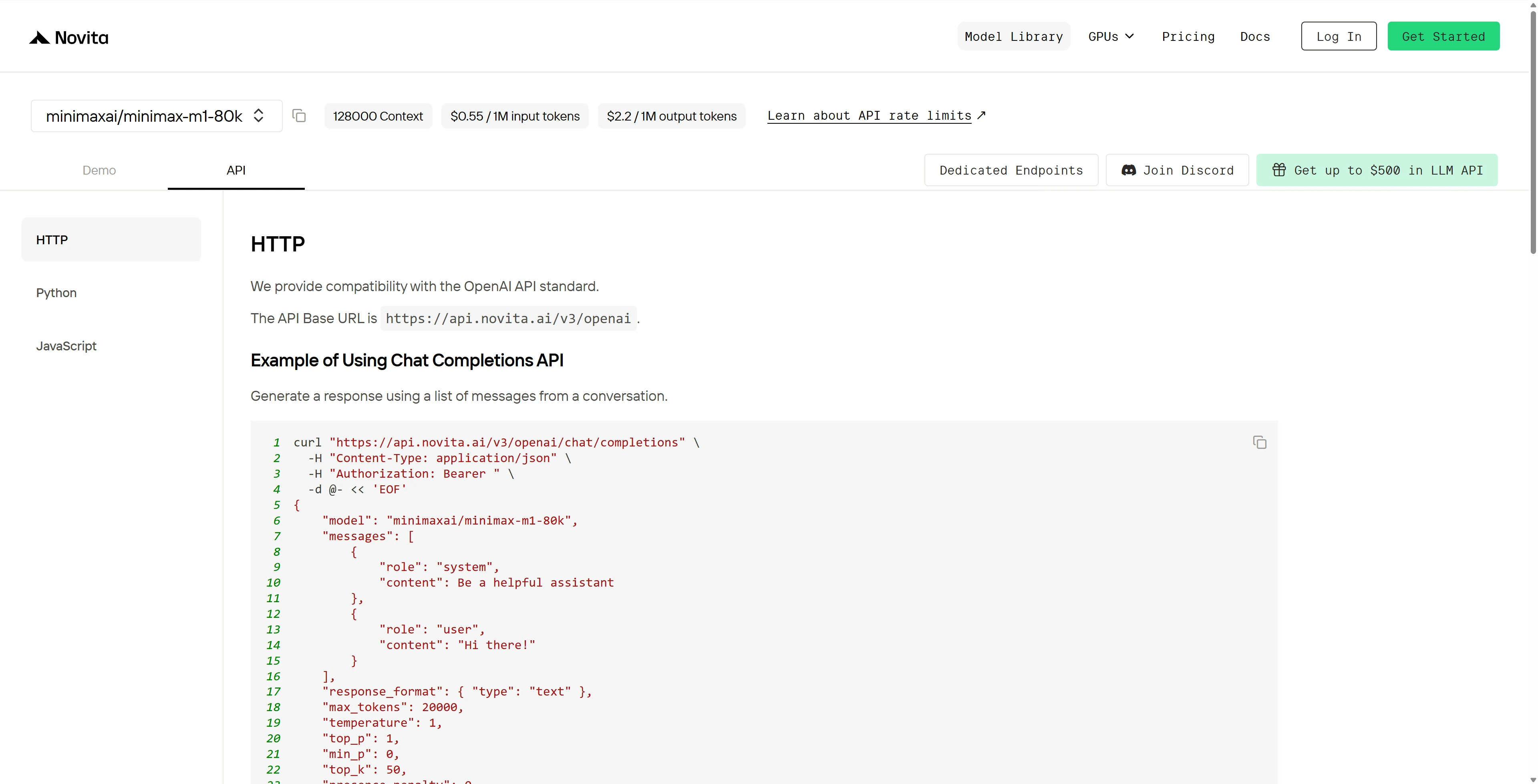
After installation, import the necessary libraries into your development environment. Initialize the API with your API key to start interacting with Novita AI LLM. This is an example of using chat completions API for python users.
from openai import OpenAI

client = OpenAI(
    base_url="https://api.novita.ai/v3/openai",
    api_key="",
)

model = "minimaxai/minimax-m1-80k"
stream = True # or False
max_tokens = 20000
system_content = ""Be a helpful assistant""
temperature = 1
top_p = 1
min_p = 0
top_k = 50
presence_penalty = 0
frequency_penalty = 0
repetition_penalty = 1
response_format = { "type": "text" }

chat_completion_res = client.chat.completions.create(
    model=model,
    messages=[
        {
            "role": "system",
            "content": system_content,
        },
        {
            "role": "user",
            "content": "Hi there!",
        }
    ],
    stream=stream,
    max_tokens=max_tokens,
    temperature=temperature,
    top_p=top_p,
    presence_penalty=presence_penalty,
    frequency_penalty=frequency_penalty,
    response_format=response_format,
    extra_body={
      "top_k": top_k,
      "repetition_penalty": repetition_penalty,
      "min_p": min_p
    }
  )

if stream:
    for chunk in chat_completion_res:
        print(chunk.choices[0].delta.content or "", end="")
else:
    print(chat_completion_res.choices[0].message.content)
Run Minimax M1 locally
Step-by-Step Installation Guide
# Step 1: Install Python and Create a Virtual Environment
# Make sure Python 3.8+ is installed, then create and activate a virtual environment.
python3 -m venv minimax_env
source minimax_env/bin/activate  # On Windows, use `minimax_env\Scripts\activate`

# Step 2: Install Required Libraries
pip install torch torchvision torchaudio --index-url https://download.pytorch.org/whl/cu118  # GPU optimized PyTorch
pip install vllm huggingface-hub  # vLLM for serving MiniMax M1, and Hugging Face utilities

# Step 3: (Optional) Login to Hugging Face if you want to pull models later
pip install huggingface-cli
huggingface-cli login  # Follow prompts to authenticate

# Step 4: Download MiniMax M1 Model (if not already done)
# Replace <model-name> with actual MiniMax M1 repo name on Hugging Face
huggingface-cli download MiniMaxAI/MiniMax-M1-80k --local-dir ./minimax-m1

# Step 5: Set Environment Variable for Fast Loading (Linux/macOS)
export SAFETENSORS_FAST_GPU=1

# Step 6: Launch MiniMax M1 API Server with vLLM
# Adjust --tensor-parallel-size according to your GPU count
python3 -m vllm.entrypoints.api_server \
  --model ./minimax-m1 \
  --tensor-parallel-size 8 \
  --trust-remote-code \
  --max_model_len 8192 \
  --dtype bfloat16

# Step 7: Test Inference with curl (in a new terminal)
curl -X POST http://localhost:8000/generate \
  -H "Content-Type: application/json" \
  -d '{"prompt": "Explain quantum computing in simple terms.", "max_tokens": 100}'

# Step 8: (Optional) Python inference example
python3 -c "
import requests
response = requests.post('http://localhost:8000/generate', json={
    'prompt': 'Explain quantum computing in simple terms.',
    'max_tokens': 100
})
print(response.json())
"
GPU Memory Requirements:
- Minimum: 640GB VRAM
- Recommended: 1,128GB VRAM (8 x H200 SXM 141GB configuration) for optimal performance
Connect MiniMax M1 on Third-Party Platforms
- Hugging Face: Use MiniMax M1 in Spaces, pipelines, or with the Transformers library via Novita AI endpoints.
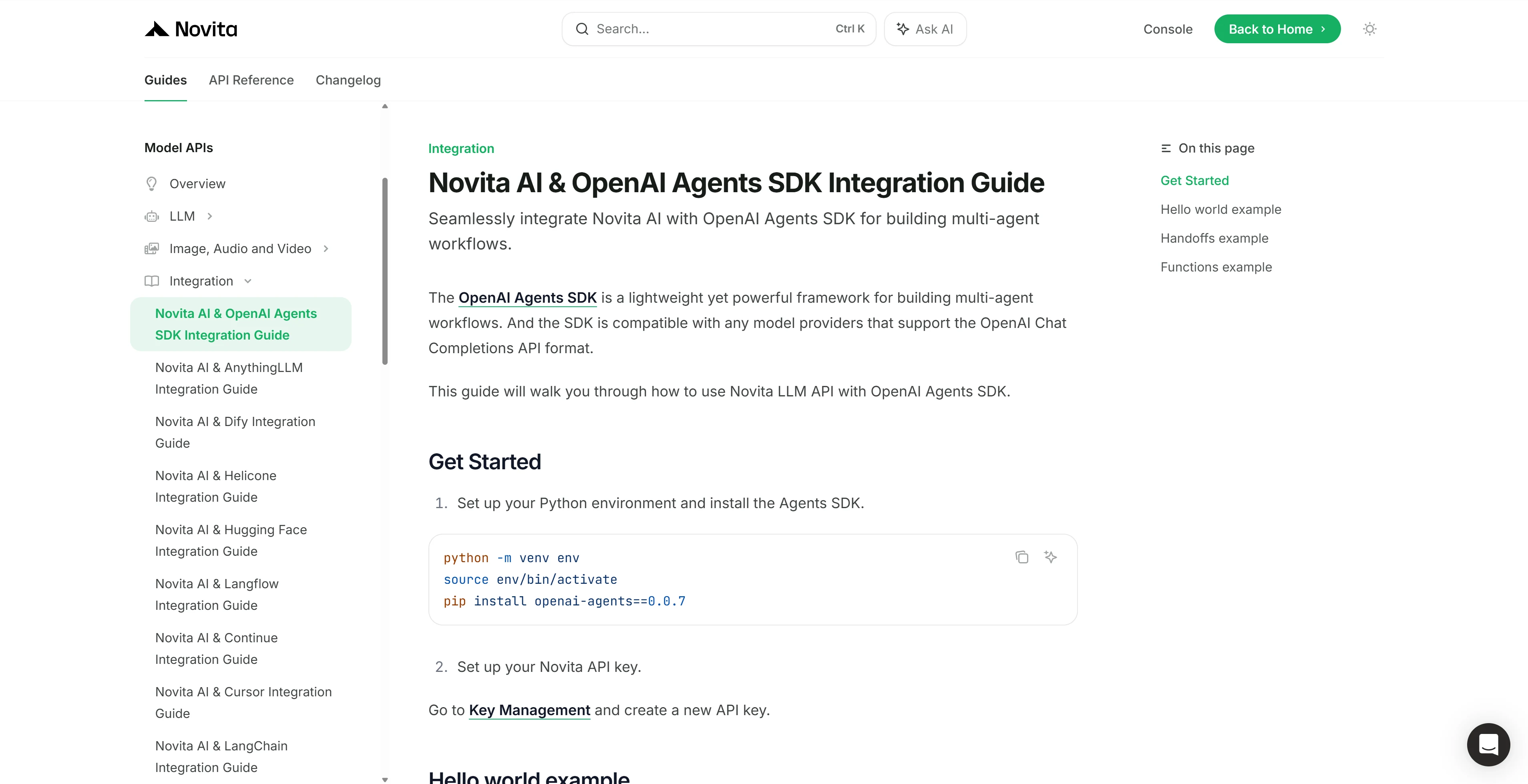
- Agent & Orchestration Frameworks: Easily connect Novita AI with partner platforms like Continue, AnythingLLM,LangChain, Dify and Langflow through official connectors and step-by-step integration guides.
- OpenAI-Compatible API: Enjoy hassle-free migration and integration with tools such as Cline and Cursor, designed for the OpenAI API standard.
Novita AI has integrated with 20+ platforms, and detailed tutorials can be found in the docs.
MiniMax M1 is a groundbreaking large-scale hybrid-attention reasoning model that excels in handling ultra-long context lengths and complex reasoning tasks. It features a hybrid Mixture-of-Experts (MoE) architecture combined with a lightning attention mechanism, enabling efficient and scalable inference. You can use MiniMax M1 via API or connect it on third-party platforms.
For a limited time, new users can claim **$10 in free credits**to explore and build with LLM API on Novita AI.
Frequently Asked Questions
How to use MiniMax AI free?
You can try MiniMax AI demo free on Novita AI. New users can claim **$10 in free credits**to explore and build with LLM API on Novita AI.
What hardware is needed to run MiniMax M1 locally?
Minimum: 640GB VRAM
Recommended: 1,128GB VRAM (8 x H200 SXM 141GB configuration) for optimal performance
Is MiniMax M1 open source?
Yes, MiniMax M1 is fully open source and available on platforms like Hugging Face.
About Novita AI
Novita AI is an AI cloud platform that offers developers an easy way to deploy AI models using our simple API, while also providing the affordable and reliable GPU cloud for building and scaling.



