GPT OSS is OpenAI’s first open-source series of GPT models, designed to make advanced language capabilities accessible to everyone. It is available in two sizes: GPT OSS 120B (approximately 117 billion parameters) and GPT OSS 20B (21 billion parameters). Unlike previous OpenAI models, GPT OSS offers open weights under a permissive license, allowing you to download and run the model on your own hardware.
This guide will introduce you to the basics of GPT OSS, highlight its improvements and requirements, and walk you through how to use it in practice.
Getting Sarted with GPT OSS: A Beginner’s Guide
GPT OSS Architecture
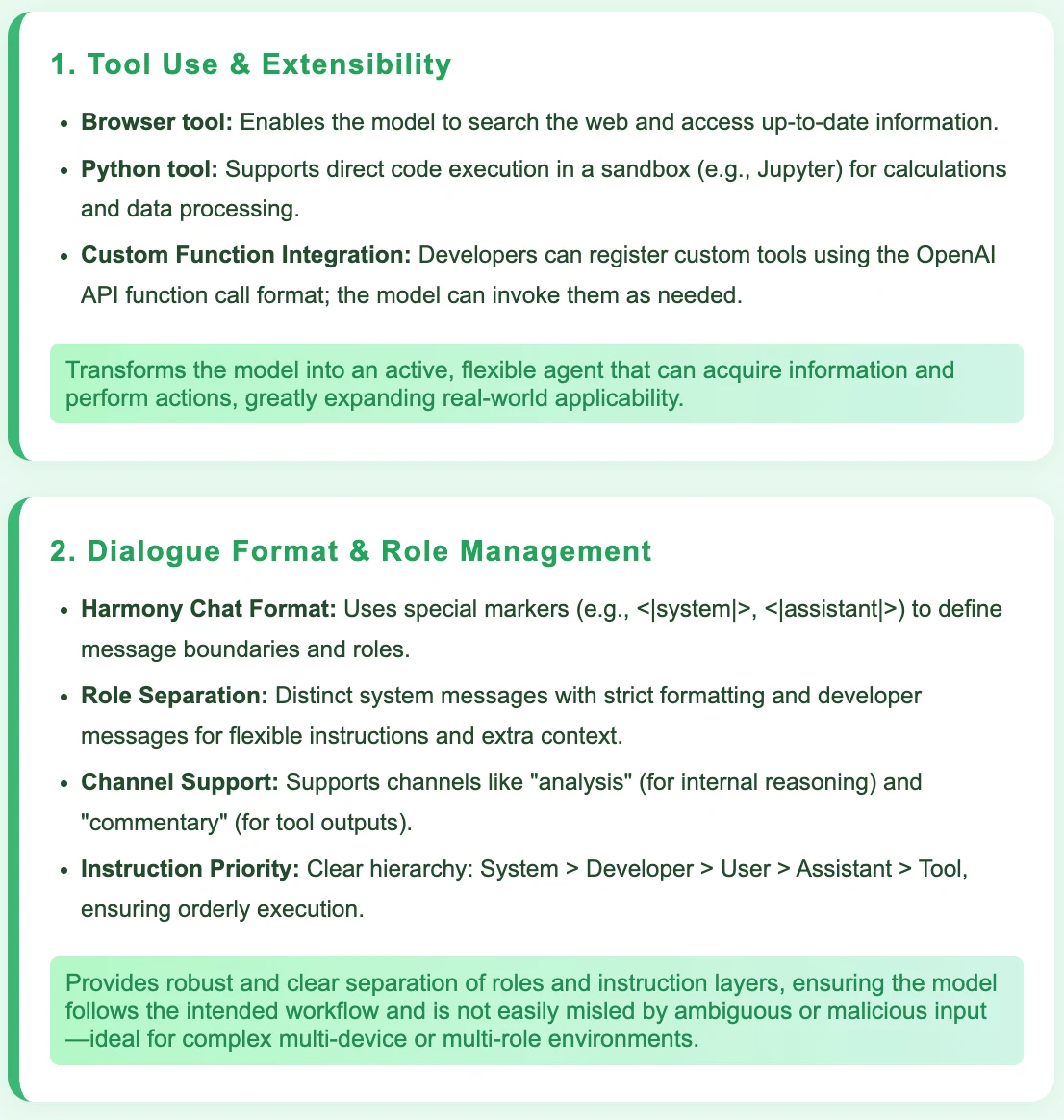
- MoE technology with sparse activation for efficient inference
- Autoregressive Transformer + MoE architecture
- RoPE (Rotary Position Embedding)
- Alternating global and local window attention for long sequence support
- o200k_harmony tokenizer, compatible with OpenAI Responses API
- Direct compatibility with OpenAI model interfaces
Highly Efficient and Scalable
- By using MoE (Mixture-of-Experts) with sparse activation and a Transformer architecture, the models can handle a huge number of parameters while still running quickly and efficiently. This makes it easier to scale up the model size without a huge increase in computing resources.
Capable of Handling Very Long Contexts
- With support for up to 128k tokens, RoPE for position encoding, and a combination of global and local attention, the models can process much longer texts or conversations than most other models. This is especially useful for long documents or multi-turn dialogue.
Easy to Integrate and Use
- The o200k_harmony tokenizer and direct compatibility with OpenAI APIs mean that these models can be used as drop-in replacements in existing OpenAI workflows. This lowers the barrier for developers to adopt and deploy the models.
GPT OSS System Requirements
| Model | Layers | Total Params | Active Params Per Token | Total Experts | Active Experts Per Token | Context Length | Single GPU VRAM Requirement |
| gpt-oss-120b | 36 | 117B | 5.1B | 128 | 4 | 128k | 80GB |
| gpt-oss-20b | 24 | 21B | 3.6B | 32 | 4 | 128k | 16GB |
GPT OSS Training
1. Data Quality & Coverage
- Scale: Trained on trillions of tokens from massive text corpora.
- Content Focus: Includes both specialized (STEM, programming code) and general knowledge.
- Safety Filtering: Rigorous filtering for harmful and sensitive content, especially biosafety.
Strength:
Combines broad general knowledge with deep expertise in technical fields, while maintaining high data safety and reliability.
2. Training Process & Compute
-
Compute Investment:
- GPT-OSS-120B: ~2.1 million H100 GPU-hours (comparable to top proprietary models)
- GPT-OSS-20B: ~one-sixth of that
-
Architecture: Autoregressive Transformer + MoE
Strength:
Massive compute ensures state-of-the-art performance and model robustness.
3. Post-Training & Alignment
-
Fine-Tuning:
- Supervised instruction fine-tuning
- High-compute reinforcement learning stage
-
Alignment Techniques:
- Chain-of-Thought (CoT) reinforcement learning
- Strict alignment with safety and ethical standards
Strength:
Enables advanced step-by-step reasoning, complex problem solving, and strong alignment with safety guidelines.
4. Flexibility & Practicality
- Reasoning Modes: Supports low, medium, and high reasoning effort, configurable by developers to balance accuracy, latency, and cost.
Strength:
Offers practical flexibility for different use cases and computational budgets.
GPT OSS Improvement
Differences Between GPT OSS and GPT 4
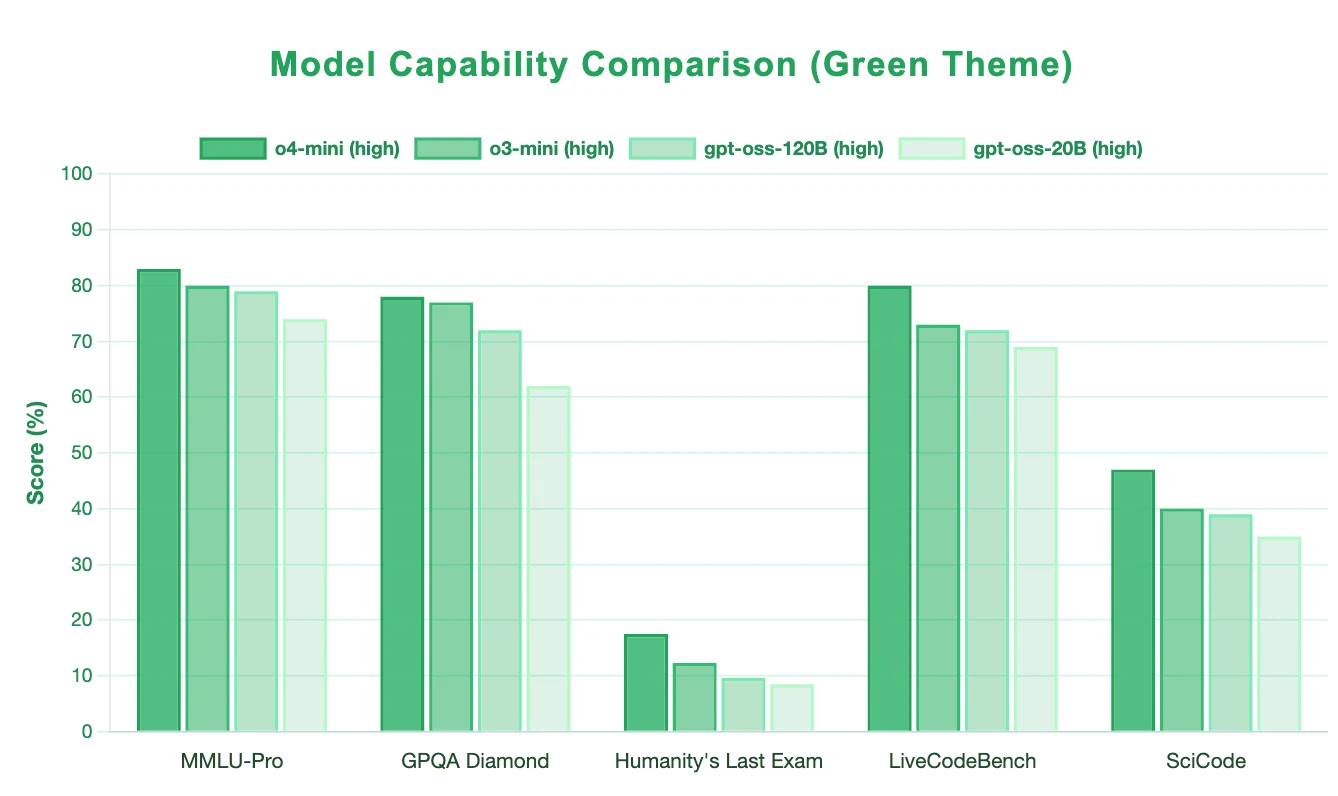
GPT-OSS, especially the 120B model, demonstrates strong capabilities in reasoning, scientific knowledge, and coding, closely approaching mainstream large models. However, GPT-4 (o4-mini) still leads in all major benchmarks, including general reasoning, scientific reasoning, advanced challenge tasks, and code generation. GPT-OSS is competitive and suitable for demanding scenarios, but GPT-4 remains the top performer in terms of accuracy and universality.
Where Can I Download GPT OSS?
GPT OSS Requirements
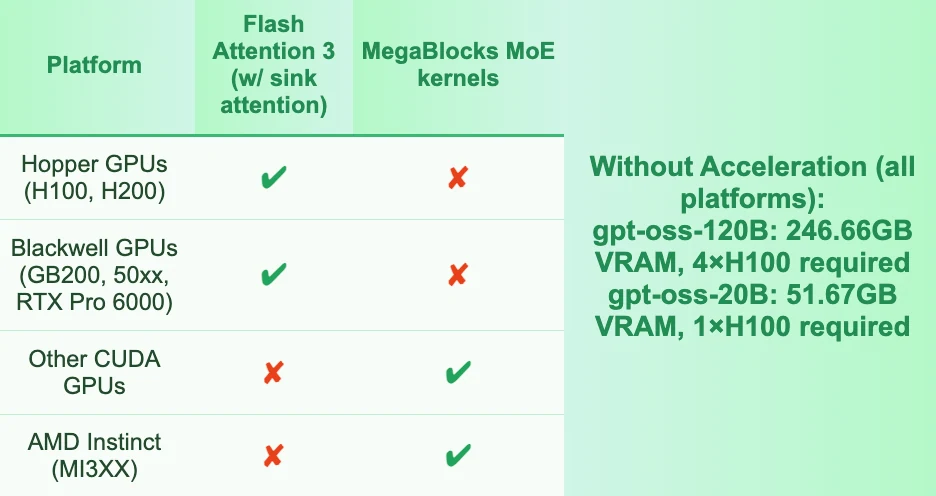
Acceleration Technologies & Resource Usage
Download GPT OSS Methods
| Method | Pros | Hardware | Typical Use |
|---|---|---|---|
| Transformers | Official, flexible, great community | All major GPUs | Local inference, finetuning |
| Llama.cpp | Lightweight, cross-platform, fast | CUDA/Metal/Vulkan | Edge/consumer/lightweight deployments |
| vLLM | High throughput, optimized | Hopper preferred | Inference servers, scalable APIs |
| transformers serve | One-command API server | Any | Local API prototyping/testing |
| torchrun/accelerate | Multi-GPU/distributed inference | Multi-GPU | Large model inference/training |
1. Using Transformers
Works on most GPUs, especially Hopper/Blackwell (H100/H200/GB200/50xx).
Installation
pip install --upgrade accelerate transformers kernels
# (Optional) For PyTorch 2.8 with Triton 3.4:
pip install torch==2.8.0 --index-url https://download.pytorch.org/whl/test/cu128
pip install git+https://github.com/triton-lang/triton.git@main#subdirectory=python/triton_kernels
Basic Inference Example
from transformers import AutoModelForCausalLM, AutoTokenizer

model_id = "openai/gpt-oss-20b"
tokenizer = AutoTokenizer.from_pretrained(model_id)
model = AutoModelForCausalLM.from_pretrained(
    model_id,
    device_map="auto",
    torch_dtype="auto",
)

messages = [{"role": "user", "content": "How many rs are in the word 'strawberry'?"}]
inputs = tokenizer.apply_chat_template(
    messages, add_generation_prompt=True, return_tensors="pt", return_dict=True
).to(model.device)
generated = model.generate(**inputs, max_new_tokens=100)
print(tokenizer.decode(generated[0][inputs["input_ids"].shape[-1]:]))
Optimizations Supported
- mxfp4 + Triton 3.4 (for Hopper/Blackwell GPUs: fastest and lowest memory use)
- Flash Attention 3 (for Hopper GPUs, using
attn_implementation="kernels-community/vllm-flash-attn3") - MegaBlocks MoE kernels (for non-Hopper/Blackwell CUDA or AMD, using
use_kernels=True, more memory use than mxfp4)
2. Llama.cpp
- Native mxfp4 + Flash Attention support.
- Cross-platform: Metal, CUDA, Vulkan.
- Easy install:
- macOS:
brew install llama.cpp - Windows:
winget install llama.cpp
- macOS:
- Recommended: use with llama-server
llama-server -hf ggml-org/gpt-oss-120b-GGUF -c 0 -fa --jinja --reasoning-format none
# Then access http://localhost:8080 in browser
3. vLLM (Optimized Inference Engine)
- Supports Flash Attention 3 (Sink Attention), best on Hopper GPUs.
- use in Python:
from vllm import LLM llm = LLM("openai/gpt-oss-120b", tensor_parallel_size=2) output = llm.generate("San Francisco is a")Where Can I Run GPT OSS via API?
Novita AI provides GPT-OSS 120B
APIs with 131K context and costs of $0.1/input and $0.5/output. Novita AI also provides GPT-OSS 20B with 131 context and costs of $0.05/input and $0.2/output ,delivering strong support for maximizing GPT OSS’s code agent potential.Novita AI
Step 1: Log In and Access the Model Library
Log in to your account and click on the Model Library button.

Step 2: Choose Your Model
Browse through the available options and select the model that suits your needs.
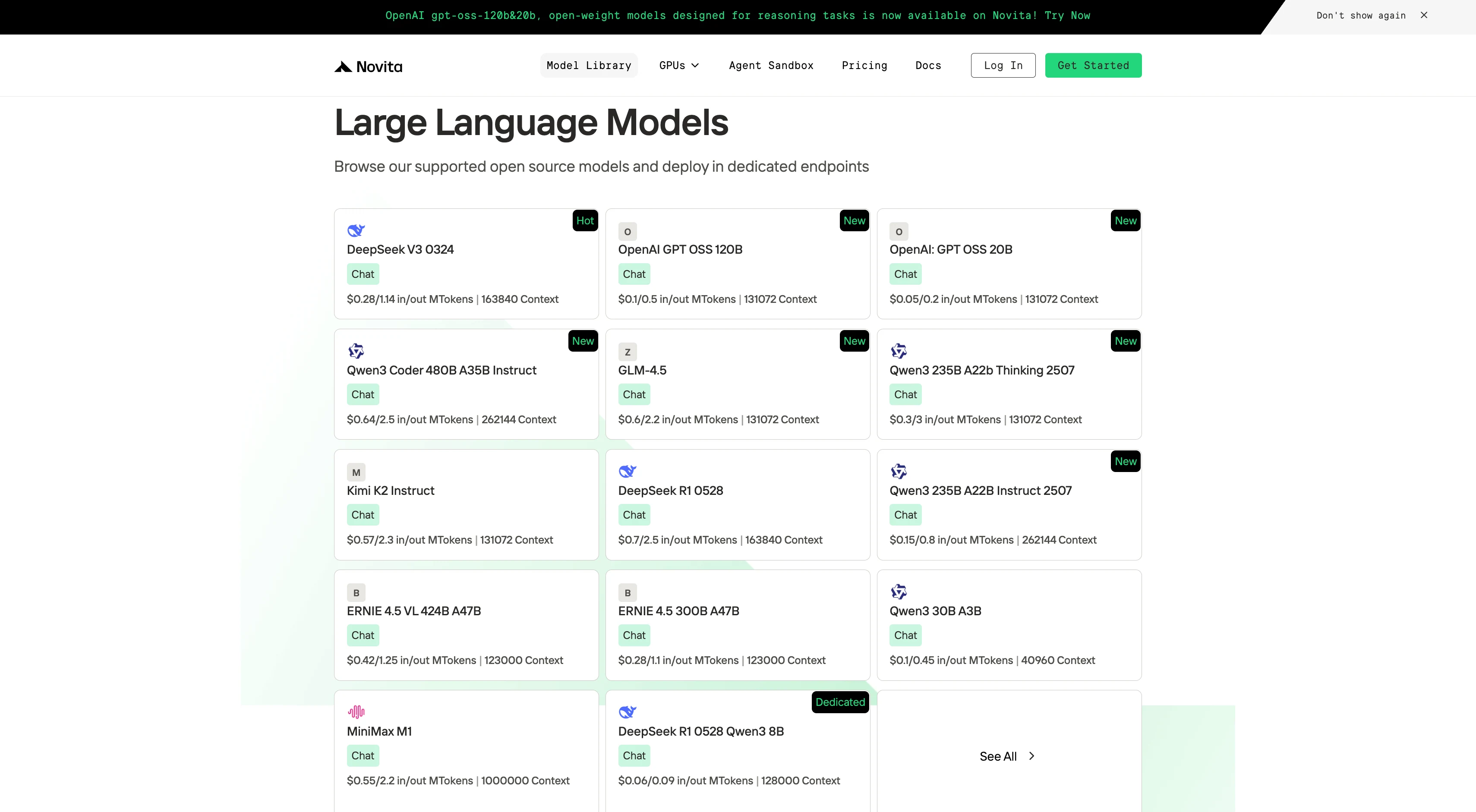
Step 3: Start Your Free Trial
Begin your free trial to explore the capabilities of the selected model.
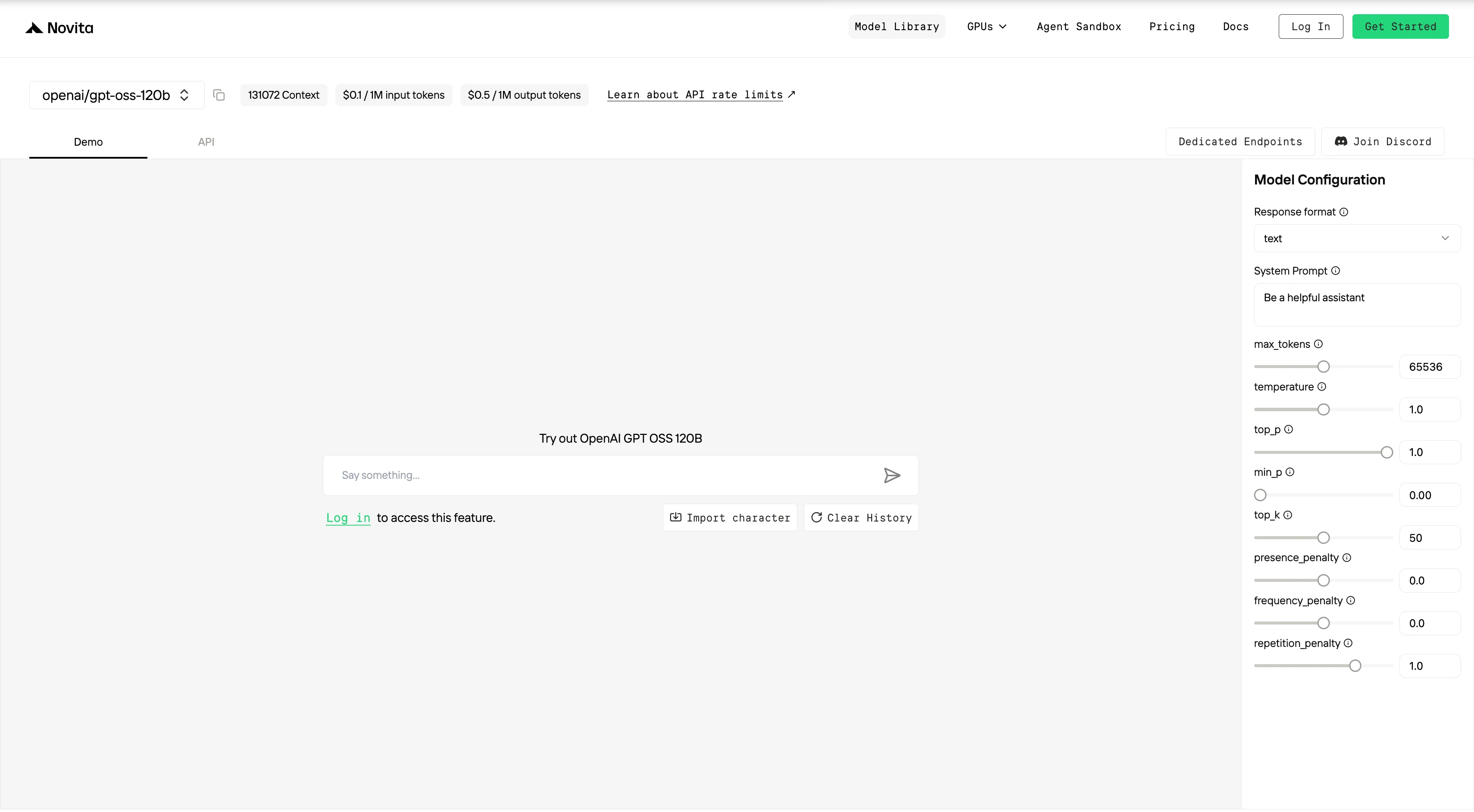
Step 4: Get Your API Key
To authenticate with the API, we will provide you with a new API key. Entering the “Settings“ page, you can copy the API key as indicated in the image.

Step 5: Install the API
Install API using the package manager specific to your programming language.
After installation, import the necessary libraries into your development environment. Initialize the API with your API key to start interacting with Novita AI LLM. This is an example of using chat completions API for python users.
from openai import OpenAI

client = OpenAI(
    base_url="https://api.novita.ai/v3/openai",
    api_key="",
)

model = "openai/gpt-oss-120b"
stream = True # or False
max_tokens = 65536
system_content = ""Be a helpful assistant""
temperature = 1
top_p = 1
min_p = 0
top_k = 50
presence_penalty = 0
frequency_penalty = 0
repetition_penalty = 1
response_format = { "type": "text" }

chat_completion_res = client.chat.completions.create(
    model=model,
    messages=[
        {
            "role": "system",
            "content": system_content,
        },
        {
            "role": "user",
            "content": "Hi there!",
        }
    ],
    stream=stream,
    max_tokens=max_tokens,
    temperature=temperature,
    top_p=top_p,
    presence_penalty=presence_penalty,
    frequency_penalty=frequency_penalty,
    response_format=response_format,
    extra_body={
      "top_k": top_k,
      "repetition_penalty": repetition_penalty,
      "min_p": min_p
    }
  )

if stream:
    for chunk in chat_completion_res:
        print(chunk.choices[0].delta.content or "", end="")
else:
    print(chat_completion_res.choices[0].message.content)
How to Choose the Right Chat Template with GPT-OSS
1. Regular Conversation or Q&A – Only Show the Final Result to Users
Scenario:
You’re building a chatbot and only want users to see the final answer.
For example: “What’s the weather in Shanghai tomorrow?” or “Write me a leave request.”
Recommended Practice:
- Only display the content after
<|channel|>final<|message|>to the user. - Do not show the model’s reasoning or analysis to users.
2. Debugging or Understanding Model Reasoning
Scenario:
You’re a developer and want to see how the model arrives at its answers step by step.
Or you’re working on prompt engineering and want to inspect the model’s chain-of-thought.
Recommended Practice:
- Print or log the content from
<|channel|>analysis<|message|>for yourself or your development team. - Still, in the user interface, only display the final answer.
3. Training or Fine-tuning the Model
Scenario:
You’re preparing training data and want the model to learn both the reasoning process and the final answer.
You hope the model will generate its own chain-of-thought in the future.
Recommended Practice:
- In your training samples, only include the chain-of-thought for the last assistant turn; do not add reasoning to every turn.
- Use the structure
{"thinking": "...", "content": "..."}and ensure only the final assistant message includes thethinkingfield.
4. When Tool Calls or External Plugins Are Involved
Scenario:
You’re building a bot (with GPT OSS) that can call external tools, like checking the weather or stock prices.
The tool-calling process needs to use the model’s analysis for correct operation.
Recommended Practice:
- Pass the
<|channel|>analysis<|message|>content to your tool-handling or orchestration module for decision-making. - The user should still only see the final answer, but the analysis is used in the backend process.
5. Strict Role, Time, or Capability Control
Scenario:
You want every conversation to include system information, such as model identity, date, or reasoning strength.
For example, when deploying an enterprise assistant or an exam bot.
Recommended Practice:
- At the start of the chat, use
"system"or"developer"roles to provide context, or set them via chat template parameters likemodel_identityorreasoning_effort.
With advanced MoE (Mixture-of-Experts) architecture, support for very long contexts, and seamless compatibility with OpenAI APIs, GPT OSS is both easy to integrate and highly performant. Whether you’re doing research, building chatbots, or developing advanced tools and agents, GPT OSS offers a new standard for open, scalable, and safe large language models.
Frequently Asked Questions
What are the main features of GPT OSS?
Open-source and Open Weights: Download and run on your own hardware.
Two Model Sizes: 120B (~117B params, 80GB VRAM) and 20B (~21B params, 16GB VRAM).
Modern Architecture: Sparse MoE, long context (up to 128k tokens), global/local attention, RoPE.
API Compatibility: Works as a drop-in replacement for OpenAI’s API.
What are the hardware requirements?
GPT OSS 120B: 80GB GPU VRAM (H100, H200, GB200 recommended).
GPT OSS 20B: 16GB GPU VRAM.
How can I access GPT OSS via API?
Novita AI provides API access for both 120B and 20B models with generous context windows and affordable pricing.
Just sign up, get your API key, and use the OpenAI-compatible endpoint.
Novita AI is an AI cloud platform that offers developers an easy way to deploy AI models using our simple API, while also providing an affordable and reliable GPU cloud for building and scaling.



