GPT-OSS-20B, released by OpenAI in August 2025, is an open-weight model that marks a significant step forward for accessible AI development. Designed as a lighter alternative within the GPT-OSS family, it strikes a balance between efficiency and performance. With a particular emphasis on reasoning, usability, and adaptability, it offers developers a practical tool for exploring advanced AI across a wide range of environments.
This article will introduce the essential information about GPT-OSS-20B, underline its key highlights, and provide a clear guide on how to access the model through different pathways.
GPT-OSS-20B: Basic Introduction
| Feature | GPT-OSS-20B |
| Parameter | 21B in total, 3.6B activated |
| Architecture | Transformer-based, MoE enabled |
| Context Length | 128K Tokens |
| Multimodal | text-only |
| Chain-of-Thought | Supported |
| Liscence | Apache 2.0 |
| Training Data | mostly English, text-only dataset, with a focus on STEM, coding, and general knowledge |
GPT-OSS-20B: Key Highlights
1) Accessible & deployment-friendly
Released under a permissive Apache-2.0 license, GPT-OSS-20B can be used commercially without copyleft constraints. The weights are MXFP4-quantized, letting the model run within 16 GB of memory—a fit for edge devices, local inference, and rapid iteration without heavy infrastructure.
2) Reasoning on demand (latency ↔ quality control)
You can set three reasoning efforts—low, medium, high—with a single sentence in the system message. This makes it easy to trade off latency and performance per task instead of picking one global setting.
3) Competitive capability profile
Post-training follows the o4-mini recipe (supervised fine-tuning + a high-compute RL stage). On common benchmarks, GPT-OSS-20B delivers results similar to o3-mini, while remaining lightweight enough for on-device scenarios.
4) Agentic workflows, end-to-end
Built for agents with strong instruction following and tool use: function calling, web browsing, Python code execution, and Structured Outputs for schema-safe JSON. In agentic evaluations and domain tests like HealthBench, it shows strong tool use and CoT reasoning, in some cases surpassing proprietary baselines.
5) Customizable and transparent for builders
The model is fine-tunable to your domain and provides full chain-of-thought visibility to aid debugging and auditability (meant for developers, not for end users). Together with structured outputs, this shortens iteration loops and improves observability in production.
6) Safety aligned with frontier standards
Internal safety evaluations indicate parity with OpenAI’s frontier models, advancing open-weight safety baselines so developers don’t have to trade openness for responsible defaults.
Differences between GPT-OSS-20B and GPT-4o
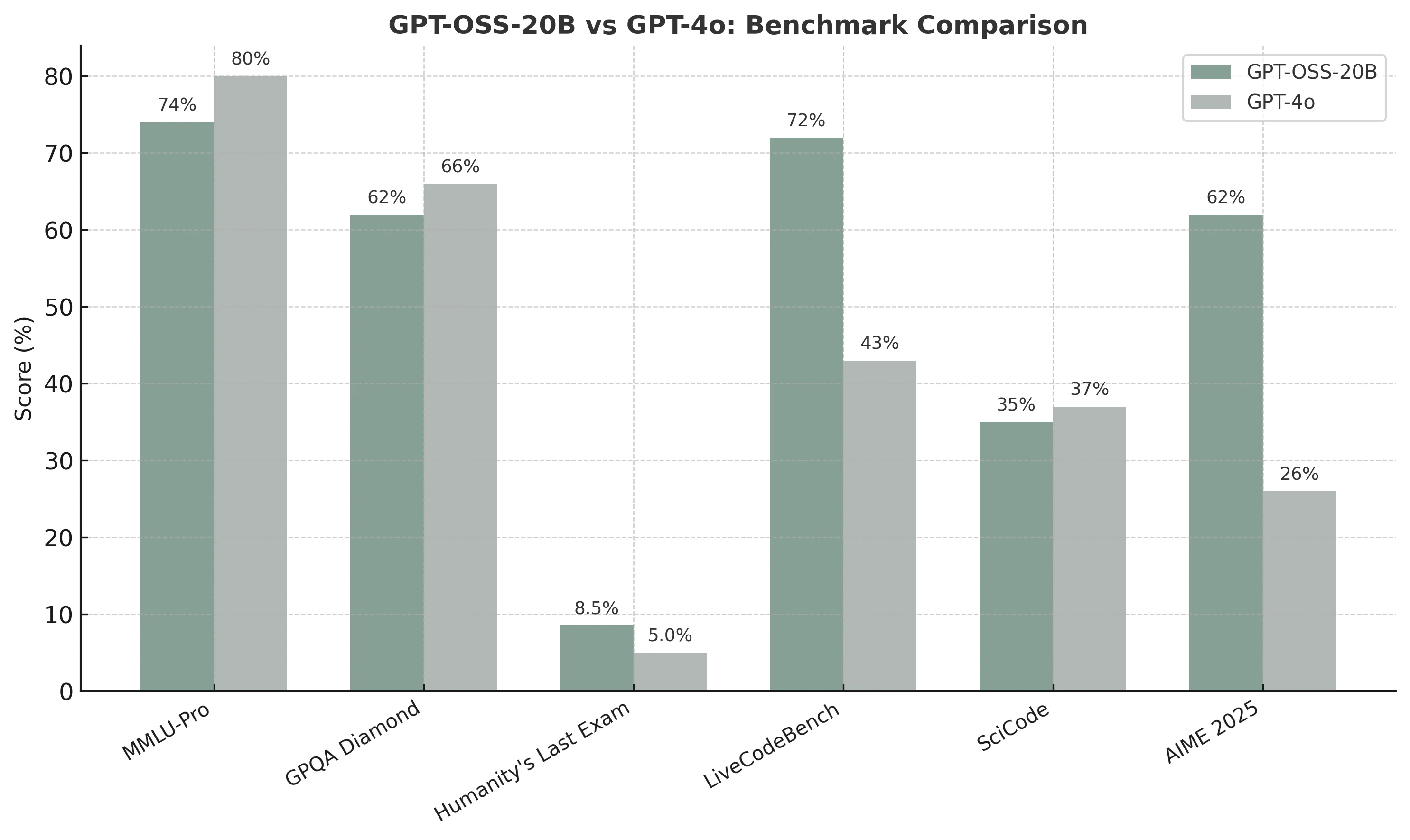
GPT-OSS-20B stands out as a developer-friendly, open-weight model that offers impressive strengths in areas where agility matters most. It shows strong capability in coding and mathematical reasoning, making it particularly valuable for rapid prototyping, research tasks, and specialized applications that benefit from structured problem-solving. These results highlight GPT-OSS-20B’s ability to deliver competitive performance despite its lighter footprint and accessibility.
Where it lags behind GPT-4o is in broad, knowledge-intensive reasoning. GPT-4o remains stronger in multi-disciplinary benchmarks and general-purpose understanding, giving it the edge for use cases that demand maximum accuracy across diverse domains.
Overall, GPT-OSS-20B carves out a distinct role: it may not match GPT-4o’s general coverage, but its open-weight nature, efficiency, and standout performance in targeted domains make it an attractive choice for developers and researchers seeking flexibility without heavy infrastructure costs.
How to Access GPT-OSS-20B: Local Deployment
One of the key advantages of gpt-oss-20b is that it can run locally on a single 16 GB GPU thanks to MXFP4 quantization. Developers can choose from several open-source tools depending on their needs:
- Transformers: The easiest way to start. Use the Hugging Face
pipelineor chat template to automatically apply the Harmony response format, or serve the model as an OpenAI-compatible API withtransformers serve. - vLLM: A high-performance inference engine that can spin up an OpenAI-compatible webserver with just one command, ideal for low-latency and concurrent workloads.
- PyTorch / Triton: Reference implementations are available for developers who want full control or production-grade deployment.
- Ollama: For consumer hardware, simply pull and run the model with
ollama run gpt-oss:20b, making local inference accessible without coding. - LM Studio: A desktop GUI option. Download the model with
lms get openai/gpt-oss-20band interact through a user-friendly interface.
Alternatively, you can also download the model weights directly from the Hugging Face Hub with huggingface-cli download, or install via pip install gpt-oss to run the official chat demo.
While local deployment is fully supported, not every team has the hardware or wants to manage the overhead of setup and maintenance. For those cases, Novita AI’s on-demand GPU Instances provide a practical alternative—giving you instant access to powerful GPUs (such as NVIDIA H100 or H200) without the complexity of infrastructure management. This way, you can experiment with GPT-OSS-20B at scale while keeping deployment simple and cost-efficient.
How to Access GPT-OSS-20B: API Integration
Novita AI provides GPT-OSS-20B APIs with 131K context and costs of $0.05 / 1M input Tokens and $0.2/ 1M output Tokens .
Option 1: Direct API Integration (Python Example)
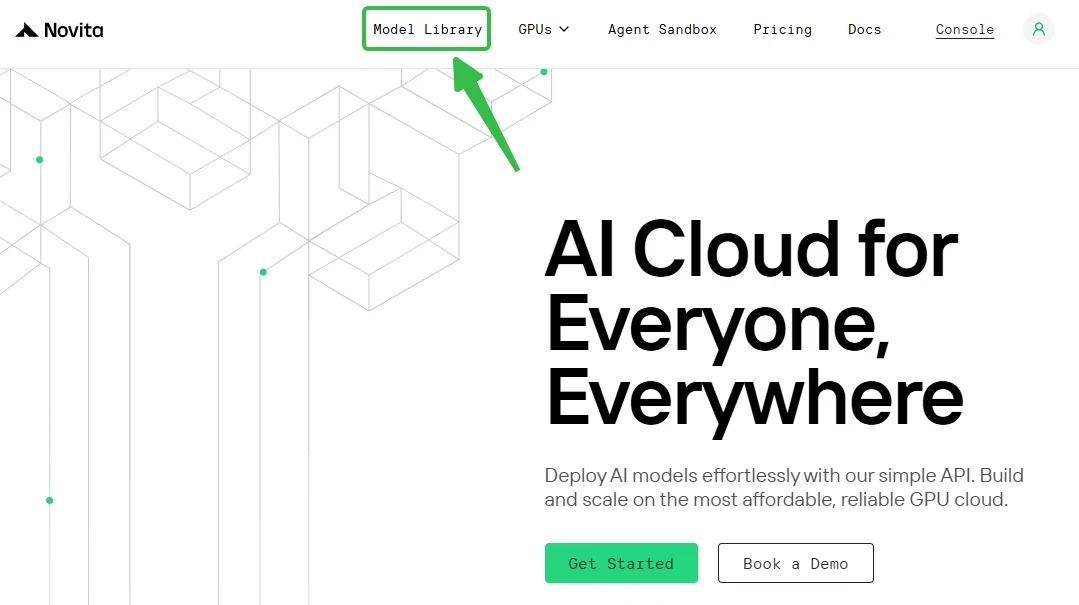
Step 1: Log In and Access the Model Library
Log in or sign up to your account and click on the Model Library button.
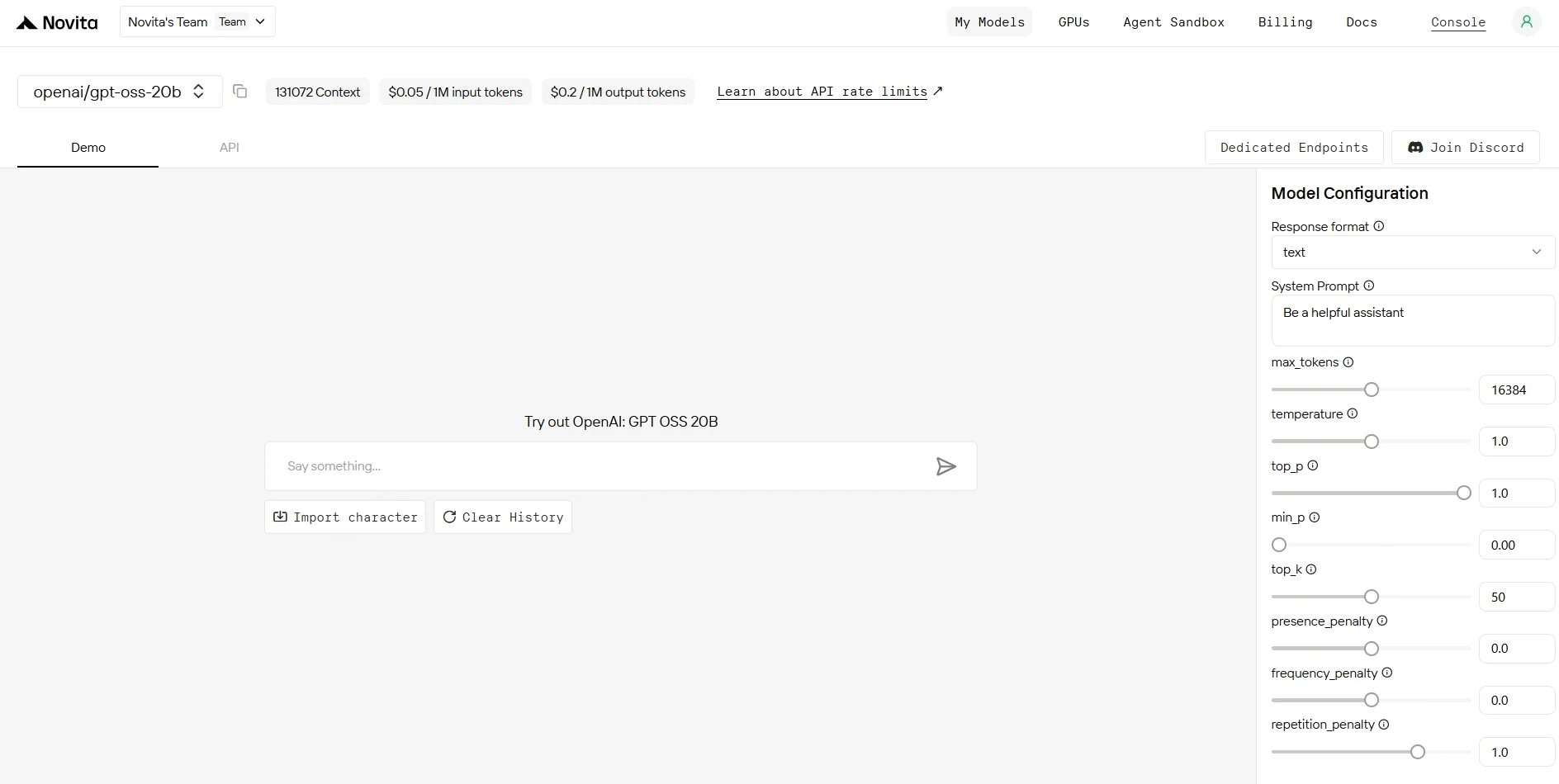
Step 2: Choose Your Model
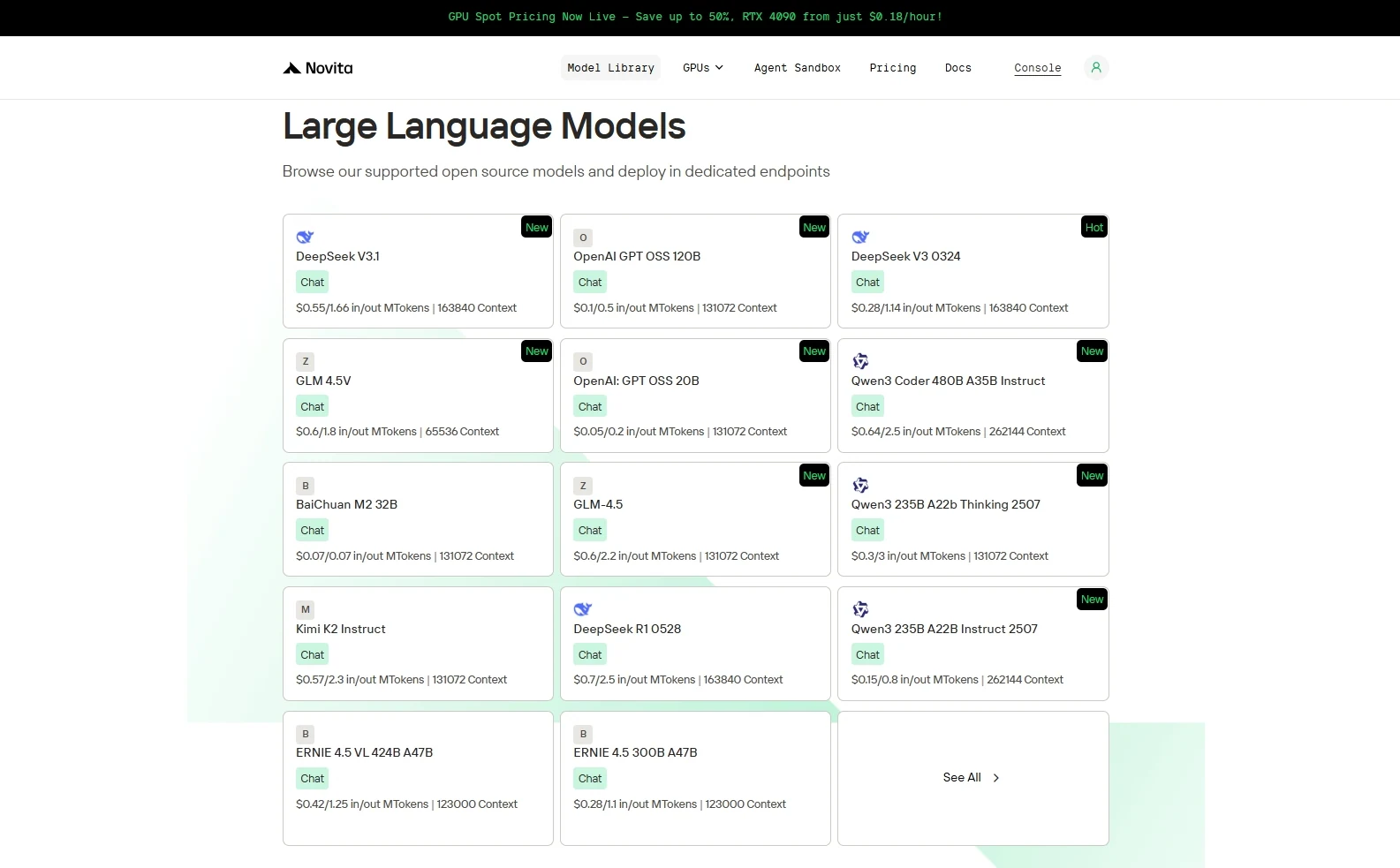
Step 3: Start Your Free Trial
Explore the available options and choose the model that best fits your needs.
Step 4: Get Your API Key
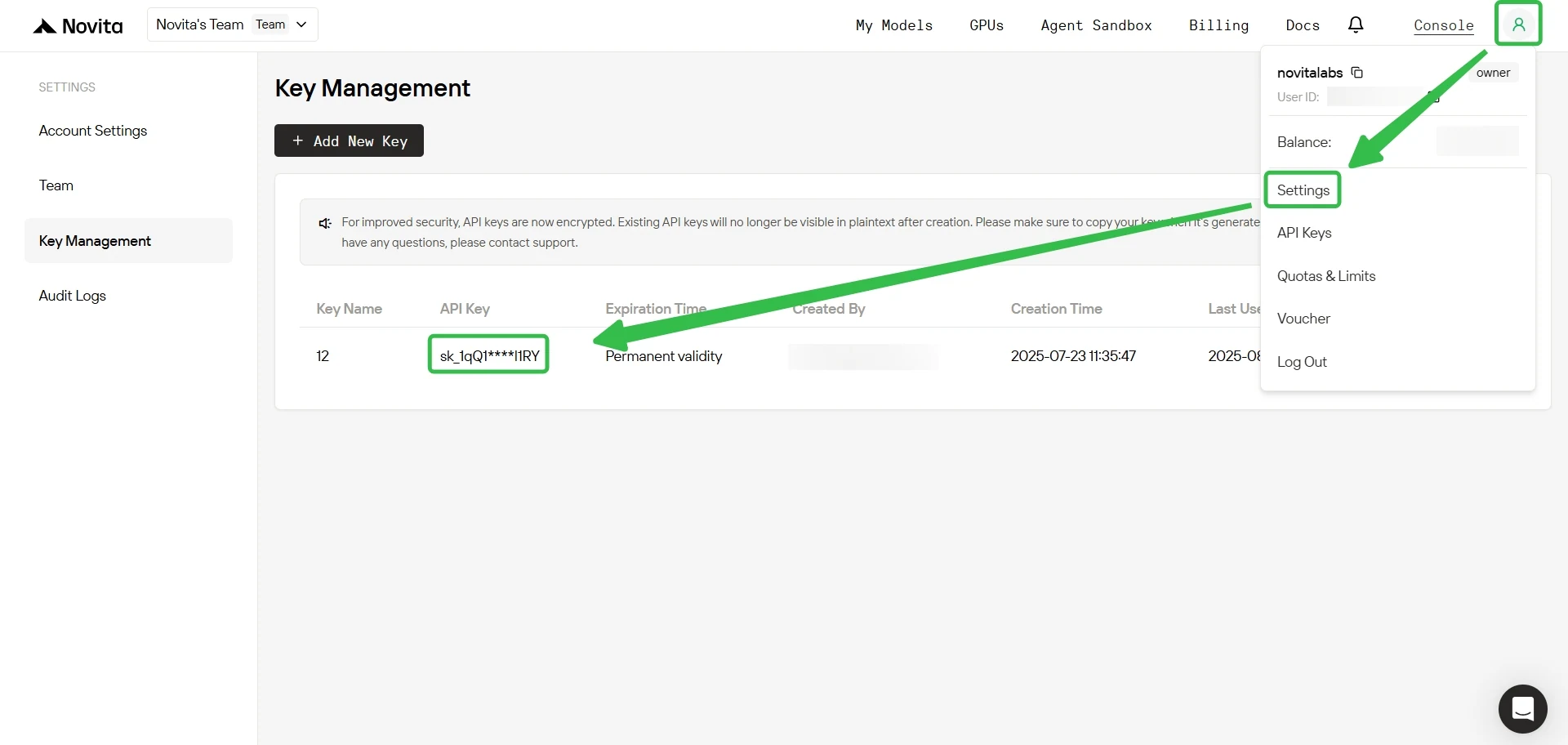
To authenticate with the API, we will provide you with a new API key. Entering the “Settings“ page, you can copy the API key as indicated in the image.
Step 5: Install the API
Install API using the package manager specific to your programming language.
After installation, import the necessary libraries into your development environment. Initialize the API with your API key to start interacting with Novita AI LLM. This is an example of using chat completions API for python users.
from openai import OpenAI

client = OpenAI(
    base_url="https://api.novita.ai/v3/openai",
    api_key="",
)

model = "openai/gpt-oss-20b"
stream = True # or False
max_tokens = 65536
system_content = ""Be a helpful assistant""
temperature = 1
top_p = 1
min_p = 0
top_k = 50
presence_penalty = 0
frequency_penalty = 0
repetition_penalty = 1
response_format = { "type": "text" }

chat_completion_res = client.chat.completions.create(
    model=model,
    messages=[
        {
            "role": "system",
            "content": system_content,
        },
        {
            "role": "user",
            "content": "Hi there!",
        }
    ],
    stream=stream,
    max_tokens=max_tokens,
    temperature=temperature,
    top_p=top_p,
    presence_penalty=presence_penalty,
    frequency_penalty=frequency_penalty,
    response_format=response_format,
    extra_body={
      "top_k": top_k,
      "repetition_penalty": repetition_penalty,
      "min_p": min_p
    }
  )

if stream:
    for chunk in chat_completion_res:
        print(chunk.choices[0].delta.content or "", end="")
else:
    print(chat_completion_res.choices[0].message.content)
Option 2: Multi-Agent Workflows with the OpenAI Agents SDK
Build sophisticated multi-agent systems powered by GPT-OSS:
- Plug-and-Play Integration: Seamlessly incorporate GPT-OSS into any OpenAI Agents workflow.
- Enhanced Agent Capabilities: Enable handoffs, routing, and tool use with stronger reasoning performance.
- Scalable Architecture: Design agents that take advantage of GPT-OSS’s unified reasoning, coding, and agentic features.
How to Access GPT-OSS-20B: Third-Party Platform Integration
Development Tools: Integrate with popular IDEs and development environments like Cursor, Trae and Cline through OpenAI-compatible APIs and Anthropic-compatible APIs.
Orchestration Frameworks: Connect with LangChain, Dify, CrewAI, Langflow, and other AI orchestration platforms using official connectors.
Hugging Face Integration: Novita AI serves as an official inference provider of Hugging Face, ensuring broad ecosystem compatibility.
Conclusion
GPT-OSS-20B shows that open-weight models can be both powerful and practical—combining reasoning strength with deployment flexibility. Whether through local setups or cloud-based solutions, it offers multiple pathways for developers to experiment, customize, and deploy. This balance of accessibility and capability makes GPT-OSS-20B a valuable option for anyone looking to explore advanced AI without unnecessary barriers.
Frequently Asked Questions
Novita AI is an AI cloud platform that offers developers an easy way to deploy AI models using our simple API, while also providing the affordable and reliable GPU cloud for building and scaling.



