This article is designed to help you understand what makes GLM 4.5 unique and, more importantly, how you can access and start using it for your projects. Whether you are a beginner looking for an easy entry point or a developer seeking deeper integration through APIs or local deployment, this guide will walk you through all available options. By the end, you’ll be equipped with practical steps to unlock the full potential of GLM-4.5 in your own workflows.
What is GLM 4.5?
GLM-4.5 is the latest advancement in the GLM family, built on a sophisticated Mixture-of-Experts (MoE) architecture and specially optimized for agentic applications. The model is available in two variants:
- GLM-4.5 (Flagship Model):
355 billion total parameters, with 32 billion active parameters. - GLM-4.5-Air (Efficient Variant):
106 billion total parameters, with 12 billion active parameters.
GLM 4.5’s Key Architecture Innovations
-
Deeper Model Structure:
- Reduced width (smaller hidden dimension and fewer experts) while increasing depth (more layers) to achieve superior reasoning capabilities.
-
Pre-training on a Massive Corpus:
- The model is pre-trained on an enormous general corpus containing 15 trillion tokens, ensuring broad and comprehensive knowledge coverage.
-
Open-Source RL Infrastructure (“slime”):
- A highly flexible, efficient, and scalable reinforcement learning (RL) platform specifically designed for large-scale agentic RL tasks.
-
Specialized RL Phases:
- Dedicated RL training stages are used to cultivate expert models for advanced reasoning and agentic tasks, such as coding, information-seeking, and general tool use.
-
Enhanced Information-Seeking QA:
- Information-seeking question answering is strengthened by incorporating human-in-the-loop strategies and content obfuscation techniques.
-
Skill Consolidation:
- Knowledge and skills acquired through RL and supervised learning are distilled into a single, robust expert model, resulting in strong and well-rounded performance across a wide range of tasks.
Tasks GLM 4.5 is Best Suited For and Benchmark
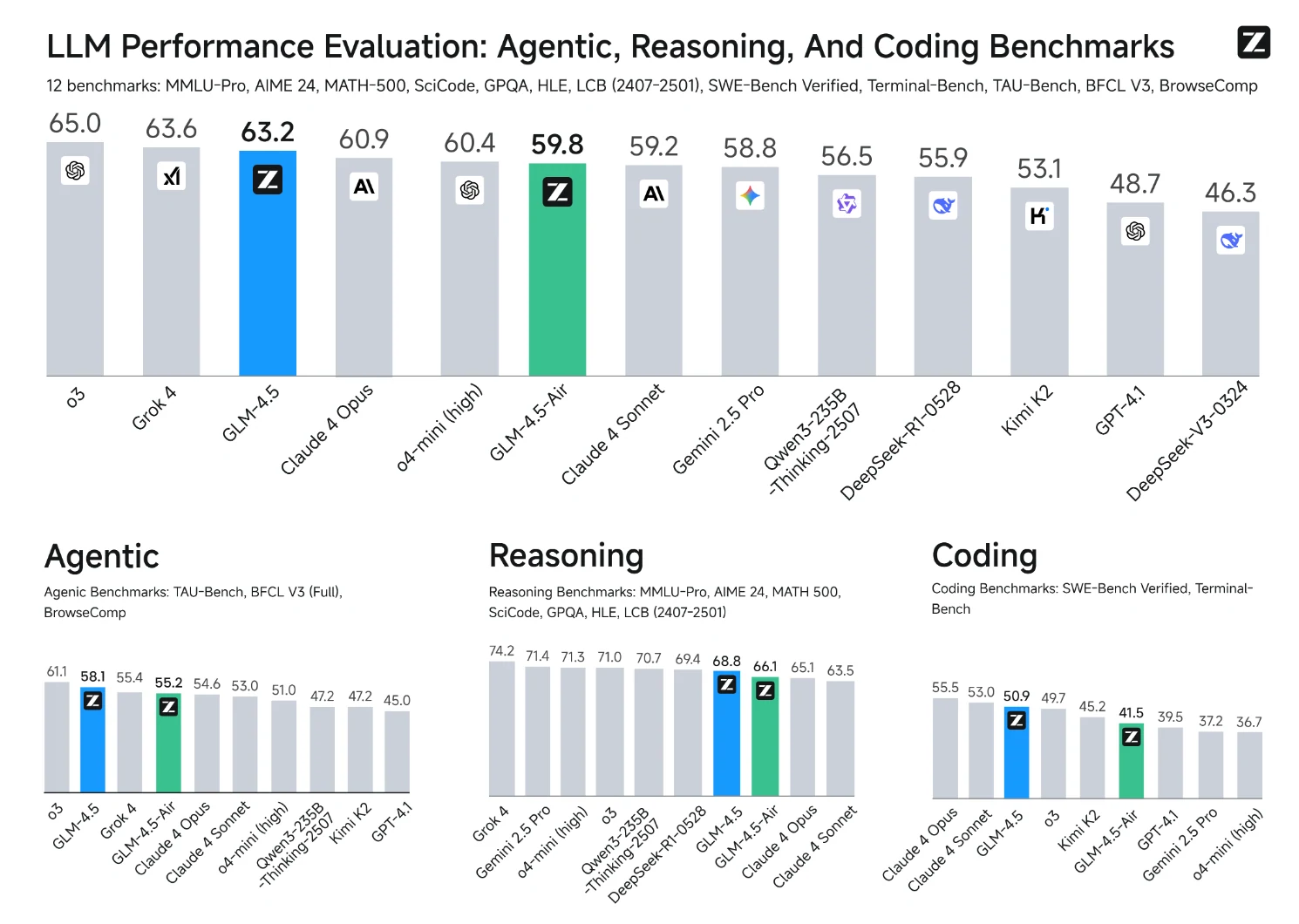
From Z.AI
Agentic Tasks
GLM 4.5 is specifically optimized for autonomous agent applications:
- Native function calling capabilities without external orchestration
- Web browsing and multi-turn tool usage
- Autonomous task planning and execution
- Integration with coding frameworks like Claude Code, Roo Code, and Trae
Coding and Software Development
The model demonstrates exceptional coding capabilities:
- Full-stack web development (frontend, backend, database management)
- Code generation from scratch and debugging existing projects
- Terminal operations and command-line interface tasks
- Algorithm implementation and optimization
- Real-world software engineering problem solving

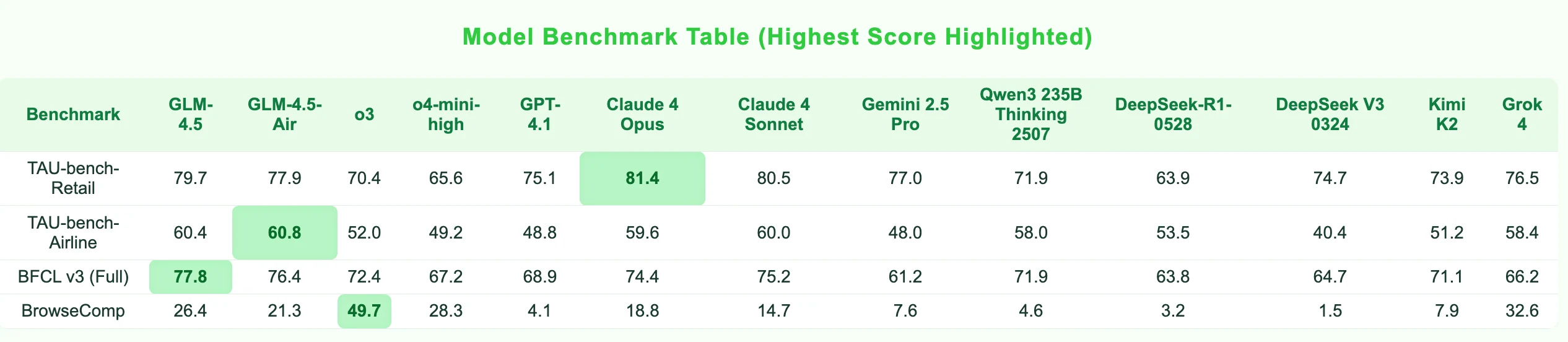
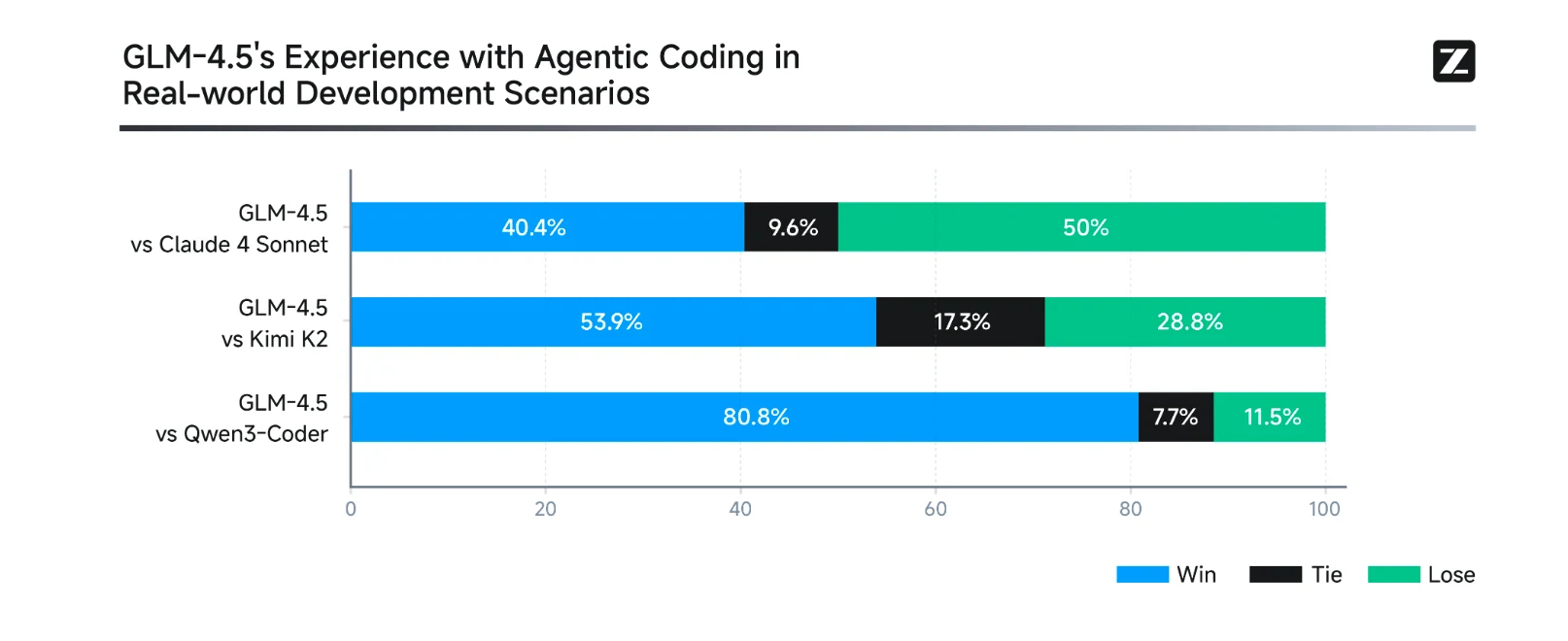
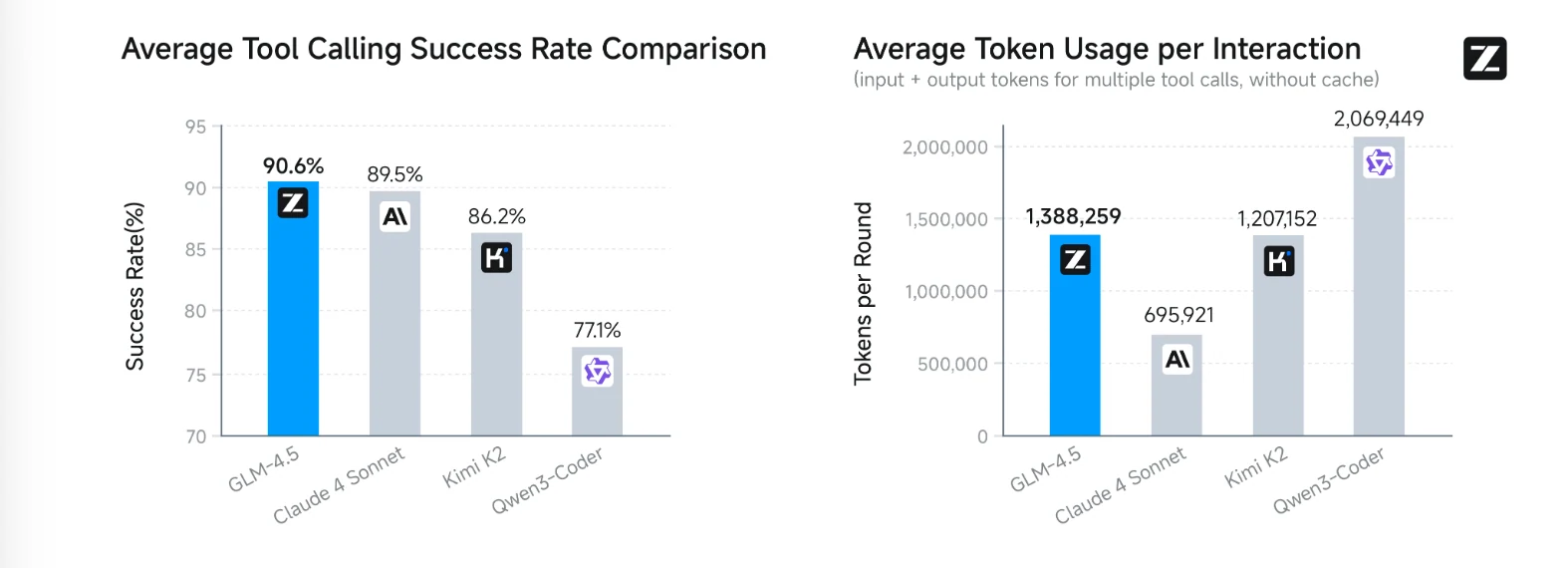
GLM-4.5’s coding abilities were evaluated alongside several leading models on a wide variety of programming tasks. Testing was carried out in controlled environments using consistent standards. Results show that GLM-4.5 performs reliably and competitively, especially in tool use, where it achieved the highest average success rate among all models tested.
From Z.AI
From Z.AI
Complex Reasoning
GLM-4.5 excels at sophisticated reasoning tasks:
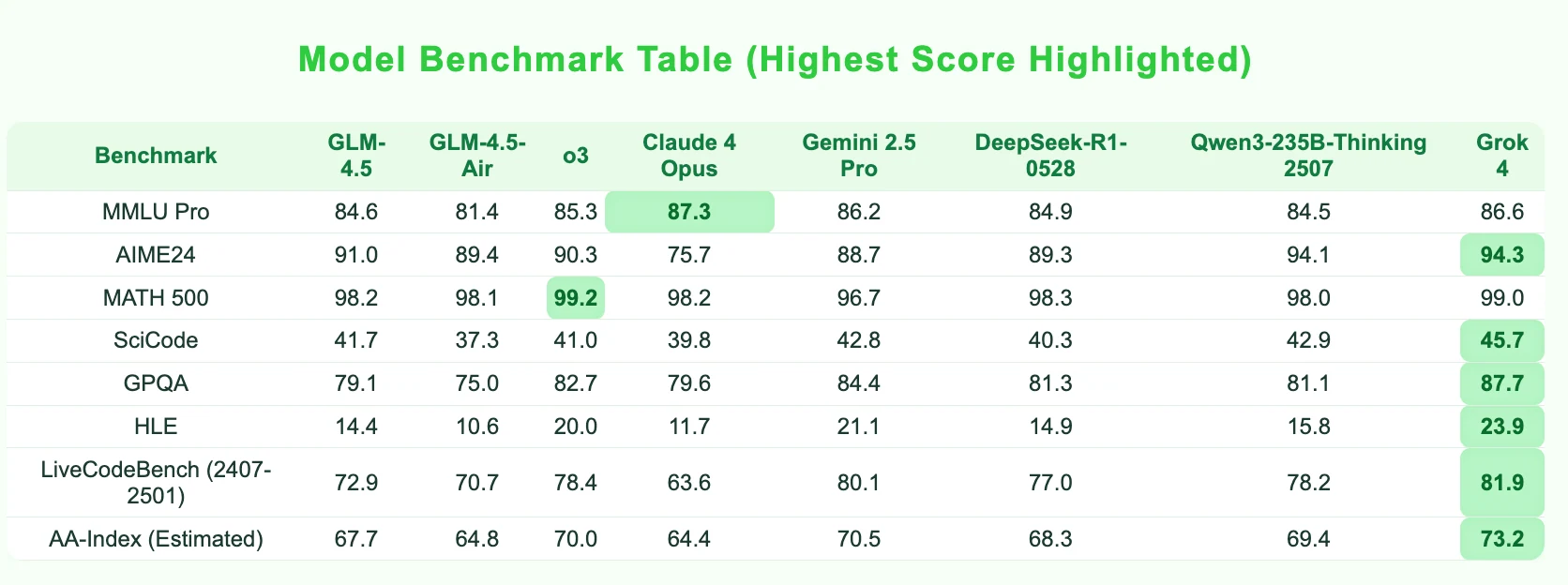
- Mathematical problem solving (AIME, MATH benchmarks)
- Scientific reasoning and analysis
- Logical problem solving and multi-step inference
- Long-context comprehension and analysis
So, is GLM 4.5 Suitable for Begginner Developers?
1.Development Tool Integration
- Seamless with popular tools: Works with Claude Code, Roo Code, and more
- Command-line learning: Built-in support for terminal operations
- Database support: Helps manage databases in full-stack projects
2.Code with Plain Language
- Natural language programming: Just describe what you want, and GLM will generate the code
- Example: “Create a BMI calculator webpage” – it can generate both frontend and backend code
3.Explains Code and Fixes Errors
- Code explanation: GLM tells you what each line of code does
- Debug help: If there’s an error, it explains the issue and how to fix it
How to Access GLM 4.5?
GLM 4.5 offers multiple access methods to accommodate different user needs and technical requirements:
1. Web Interface (Easiest for Beginners)
2. API Access (For Developers)
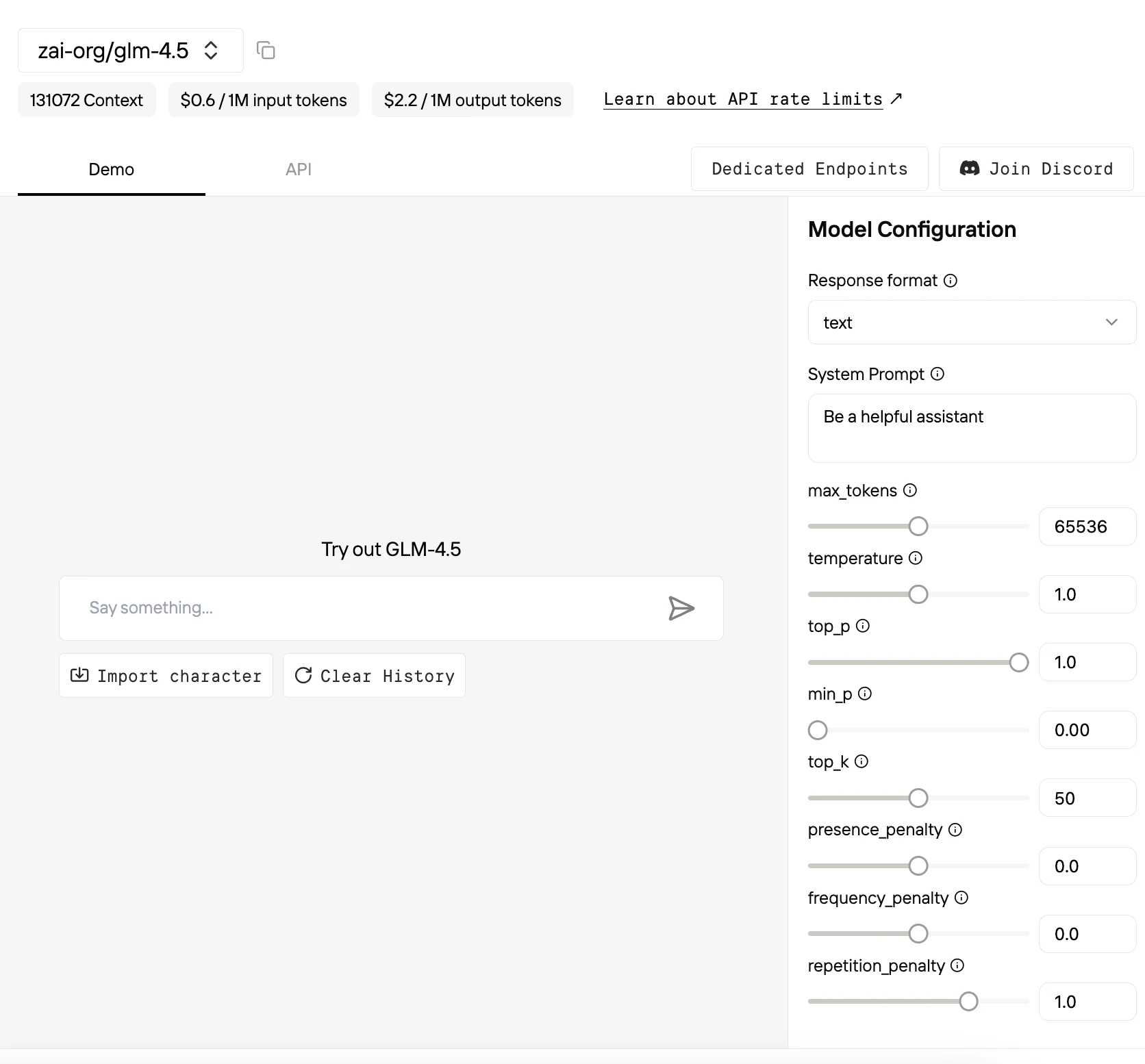
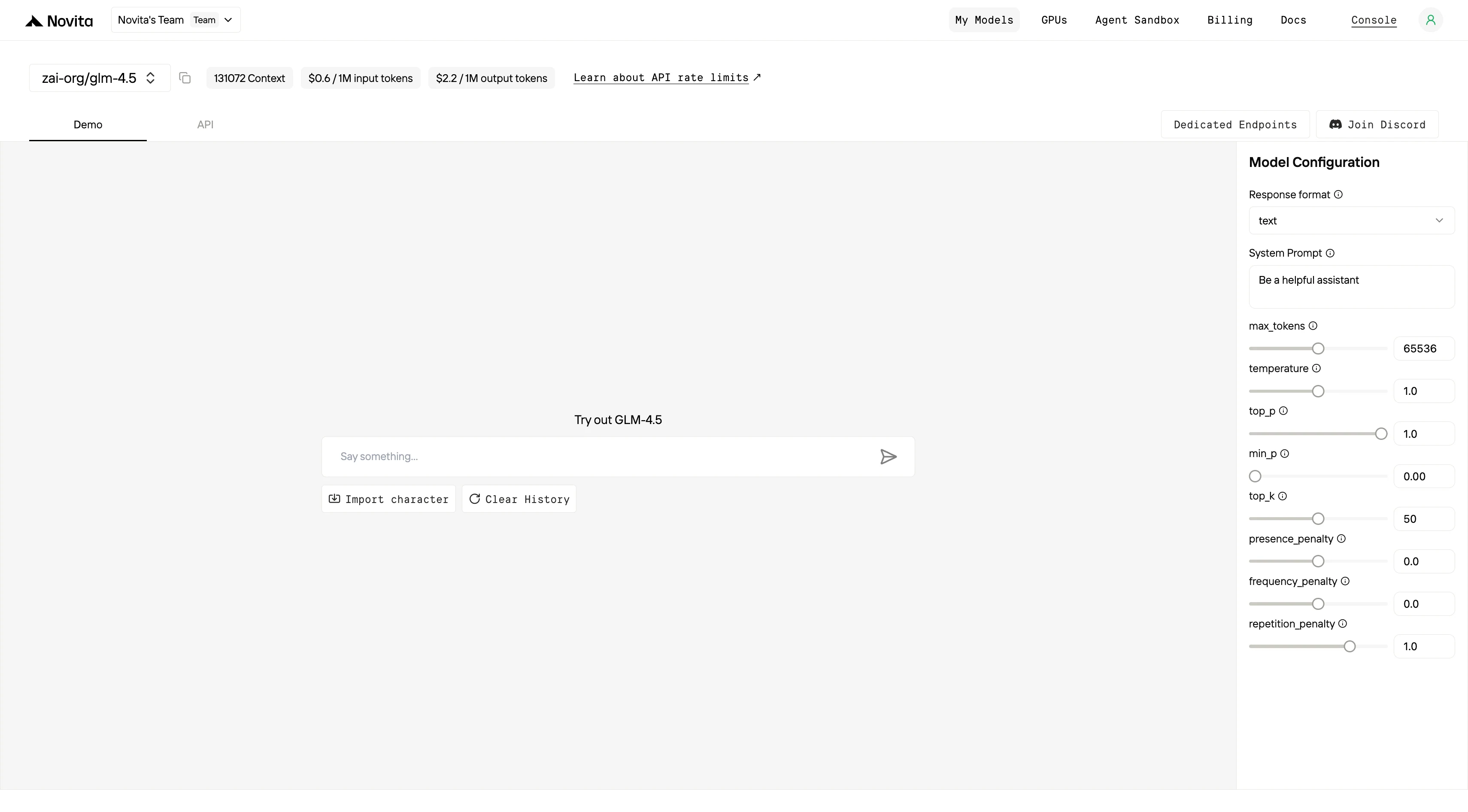
Novita AI provides APIs with 131K context, and costs of $0.6/input and $2.2/output, delivering strong support for maximizing GLM 4.5’s code agent potential.
Novita AI
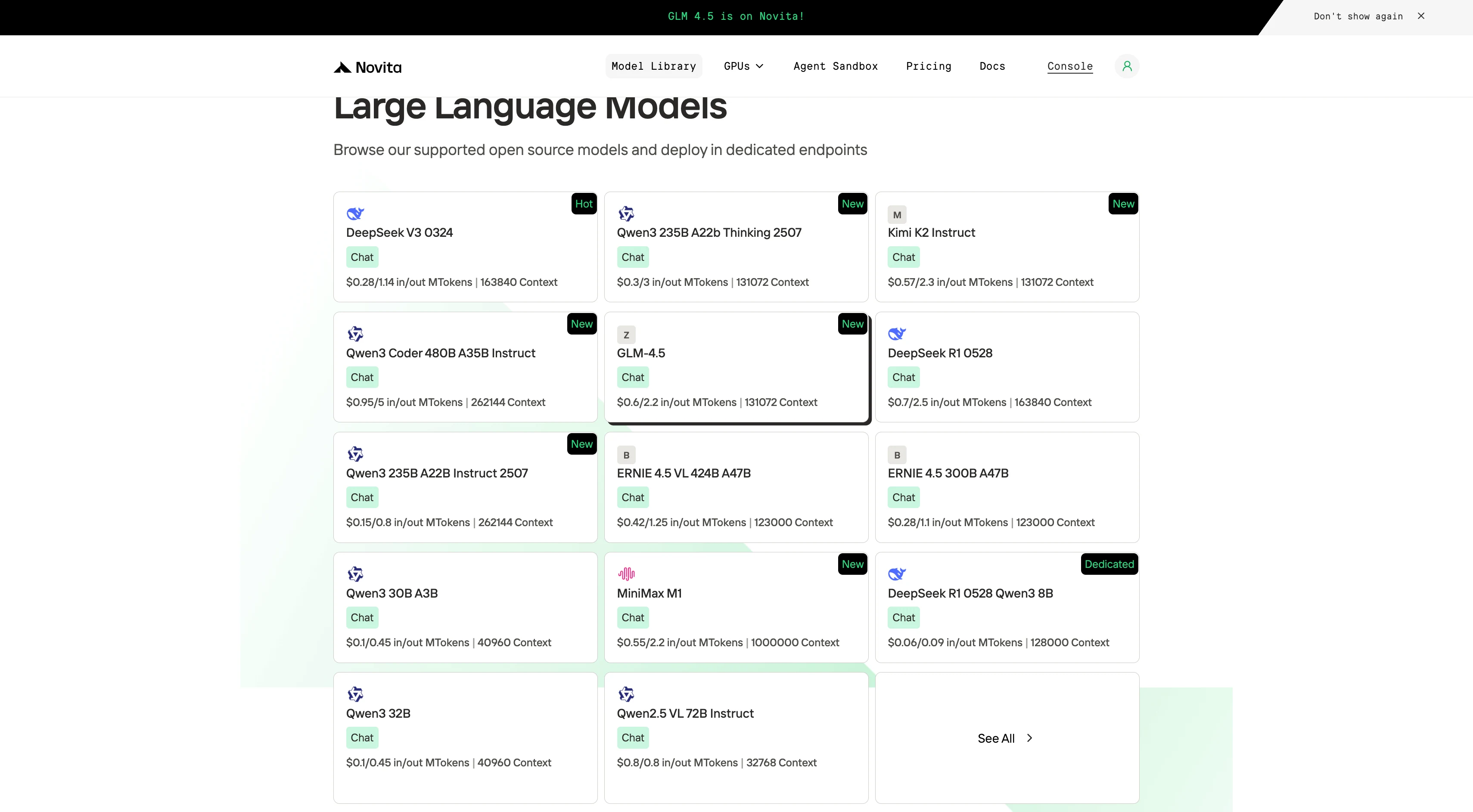
Step 1: Log In and Access the Model Library
Log in to your account and click on the Model Library button.

Step 2: Choose Your Model
Browse through the available options and select the model that suits your needs.
Step 3: Start Your Free Trial
Begin your free trial to explore the capabilities of the selected model.
Step 4: Get Your API Key
To authenticate with the API, we will provide you with a new API key. Entering the “Settings“ page, you can copy the API key as indicated in the image.

Step 5: Install the API
Install API using the package manager specific to your programming language.
After installation, import the necessary libraries into your development environment. Initialize the API with your API key to start interacting with Novita AI LLM. This is an example of using chat completions API for python users.
from openai import OpenAI

client = OpenAI(
    base_url="https://api.novita.ai/v3/openai",
    api_key="<YOUR Novita AI API Key>",
)

model = "zai-org/glm-4.5"
stream = True # or False
max_tokens = 65536
system_content = ""Be a helpful assistant""
temperature = 1
top_p = 1
min_p = 0
top_k = 50
presence_penalty = 0
frequency_penalty = 0
repetition_penalty = 1
response_format = { "type": "text" }

chat_completion_res = client.chat.completions.create(
    model=model,
    messages=[
        {
            "role": "system",
            "content": system_content,
        },
        {
            "role": "user",
            "content": "Hi there!",
        }
    ],
    stream=stream,
    max_tokens=max_tokens,
    temperature=temperature,
    top_p=top_p,
    presence_penalty=presence_penalty,
    frequency_penalty=frequency_penalty,
    response_format=response_format,
    extra_body={
      "top_k": top_k,
      "repetition_penalty": repetition_penalty,
      "min_p": min_p
    }
  )

if stream:
    for chunk in chat_completion_res:
        print(chunk.choices[0].delta.content or "", end="")
else:
    print(chat_completion_res.choices[0].message.content)
3. Local Deployment (Advanced Users)
Requirements:
- GLM-4.5: Significant GPU resources (Maybe need about 700B VRAM)
- GLM-4.5-Air: 16GB GPU memory (12GB with INT4 quantization)
Installation Steps:
- Download model weights from HuggingFace or ModelScope
- Choose inference framework: vLLM or SGLang supported
- Follow deployment guide in the official GitHub repository
4. Integration
Using CLI like Trae,Claude Code, Qwen Code
If you want to use Novita AI’s top models (like Qwen3-Coder, Kimi K2, DeepSeek R1) for AI coding assistance in your local environment or IDE, the process is simple: get your API Key, install the tool, configure environment variables, and start coding.
For detailed setup commands and examples, check the official tutorials:
- Trae : Step-by-Step Guide to Access AI Models in Your IDE
- Claude Code:How to Use Kimi-K2 in Claude Code on Windows, Mac, and Linux
- Qwen Code:How to Use OpenAI Compatible API in Qwen Code (60s Setup!)
Multi-Agent Workflows with OpenAI Agents SDK
Build advanced multi-agent systems by integrating Novita AI with the OpenAI Agents SDK:
- Plug-and-play: Use Novita AI’s LLMs in any OpenAI Agents workflow.
- Supports handoffs, routing, and tool use: Design agents that can delegate, triage, or run functions, all powered by Novita AI’s models.
- Python integration: Simply set the SDK endpoint to
https://api.novita.ai/v3/openaiand use your API key.
Connect API on Third-Party Platforms
OpenAI-Compatible API: Enjoy hassle-free migration and integration with tools such as Cline and Cursor, designed for the OpenAI API standard.
Hugging Face: Use Modeis in Spaces, pipelines, or with the Transformers library via Novita AI endpoints.
Agent & Orchestration Frameworks: Easily connect Novita AI with partner platforms like Continue, AnythingLLM,LangChain, Dify and Langflow through official connectors and step-by-step integration guides.
GLM 4.5 stands out as a powerful, versatile AI model for agentic applications, coding, and complex reasoning, representing a significant leap forward for China’s AI ecosystem. With multiple access options—from simple web interfaces to APIs and local deployment—GLM-4.5 is accessible to everyone, from beginners to advanced developers. Its strong performance and flexible integration make it an excellent choice for building intelligent, autonomous solutions.
Frequently Asked Questions
Who should use GLM 4.5?
GLM-4.5 is ideal for developers, researchers, and businesses seeking advanced AI agent capabilities, especially for coding, automation, and knowledge tasks.
What are the hardware requirements for running GLM 4.5 locally?
The flagship model requires significant GPU resources, while the Air version can run on GPUs with as little as 12GB (with INT4 quantization).
How can beginners try GLM 4.5?
Simply use the web interface—no installation or coding experience is needed.
Novita AI is an AI cloud platform that offers developers an easy way to deploy AI models using our simple API, while also providing an affordable and reliable GPU cloud for building and scaling.



