Choosing the right large language model (LLM) is about balancing reasoning depth, speed, hardware cost, and integration needs.
This article compares GPT‑OSS‑120B and Qwen‑3 235B (Thinking 2507) — two of the most capable open‑source models today.
You’ll learn how they differ in architecture, performance, resource requirements, coding abilities, and real‑world use cases, so you can decide which fits your application best — from low‑latency chatbots to high‑accuracy Code systems.
GPT OSS 120B vs Qwen3 235B thinking 2507: Architecture
Architecture Details
| Feature | GPT-OSS-120B | Qwen3-235B-Thinking-2507 |
|---|---|---|
| Total Parameters | 117B | 235B |
| Activated Parameters / Token | 5.1B | 22B |
| Activation Ratio | 4.36% | 9.36% |
| Transformer Layers | 36 | 94 |
| MoE Experts | 128 | 128 |
| Experts Activated / Token | 4 | 8 |
| Attention Mechanism | Alternating dense + locally banded sparse attention, GQA | Not explicitly stated (likely standard + optimizations) |
| Quantization | MXFP4 (4-bit) | Not stated |
| Native Context Length | 128K | 32K |
| Extended Context Length | Not stated (native already 128K) | 262K+ (via YaRN, etc.) |
Performance Benchmark
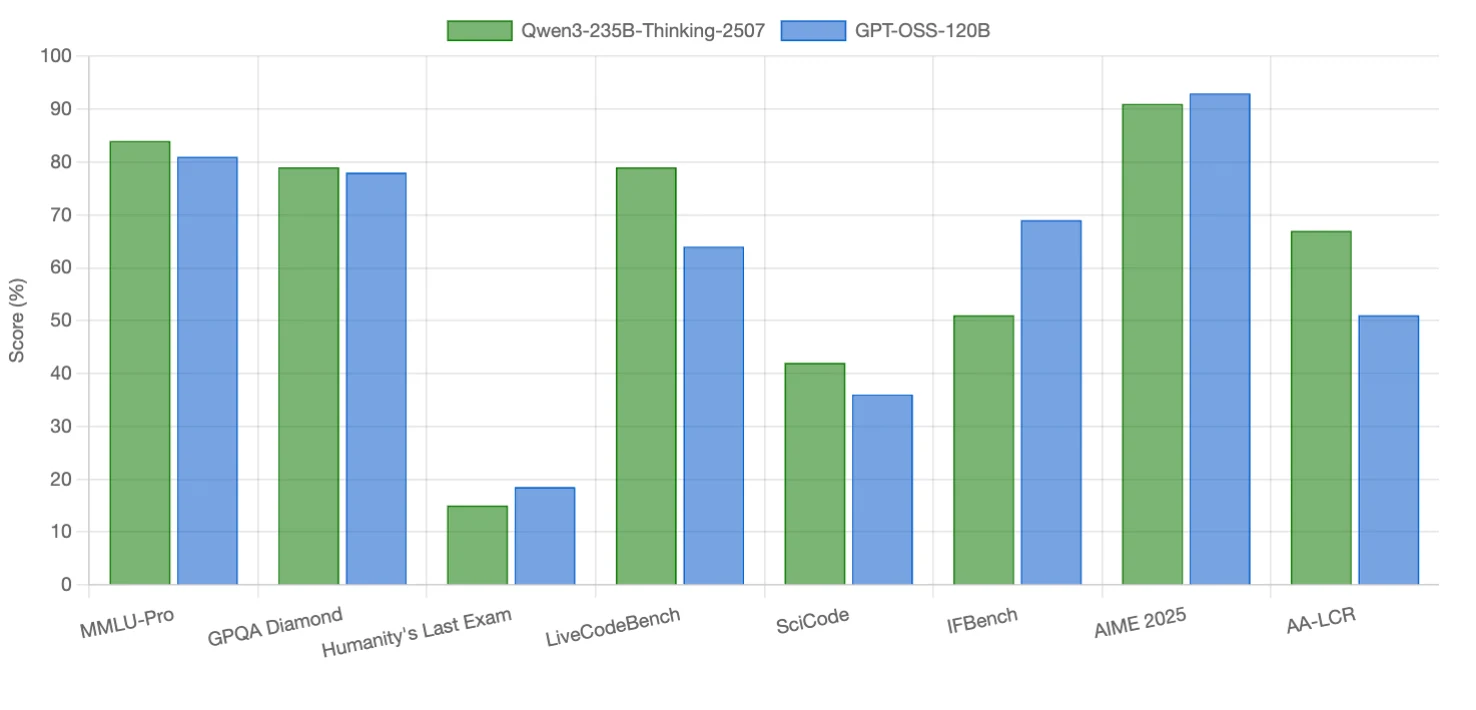
Qwen3-235B-Thinking-2507 excels in coding tasks and long-context reasoning, with small edges in some reasoning benchmarks. GPT-OSS-120B outperforms in instruction following, competition math, and one reasoning-heavy benchmark. Both models are competitive in scientific reasoning (nearly tied).
GPT OSS 120B vs Qwen3 235B thinking 2507: Resource Requirements
GPU Needs
| Model | Quantization | VRAM Required | GPU Requirement* |
|---|---|---|---|
| Qwen3-235B-Thinking-2507 | FP16 | 611.09 GB | 8 × 80 GB H100/A100 |
| FP8 | 606.67 GB | 8 × 80 GB H100/A100 | |
| INT8 | 606.67 GB | 8 × 80 GB H100/A100 | |
| INT4 | 604.45 GB | 8 × 80 GB H100/A100 | |
| GPT-OSS-120B | FP16 | 246.34 GB | 4 × 80 GB H100/A100 |
| Q8 | 124.03 GB | 2 × 80 GB H100/A100 | |
| Q4 | 62.87 GB | 1 × 80 GB H100/A100 |
Owing to its use of MXFP4 quantization, GPT OSS 120B is capable of running on a single 80 GB GPU, including models like the NVIDIA H100 or A100.
As for GPU pricing, you can click the button below to get more information.
API Access
Novita AI is an AI cloud platform that offers developers an easy way to deploy AI models using our simple API, while also providing an affordable and reliable GPU cloud for building and scaling.
| Model | Context Length | Input Price | Output Price |
| Qwen3-235B-Thinking-2507 | 131072 Context | $0.3 / 1M | $3.0/ 1M |
| GPT-OSS-120B | 131072 Context | $0.1 / 1M | $0.5 / 1M |
GPT-OSS-120B vs Qwen-3 235B Thinking 2507: Key Differences
Differences in Capabilities
| Feature | GPT-OSS-120B | Qwen3-235B (Thinking 2507) |
|---|---|---|
| Adjustable reasoning depth | ✅ Yes (Low / Medium / High options) | ❌ No (Fixed maximum reasoning) |
| Always outputs Chain-of-Thought (CoT) | ❌ No (Hidden by default) | ✅ Yes (<think> tags) |
| Developer-accessible hidden reasoning | ✅ Yes | ❌ No |
| Switch between thinking / fast mode | ✅ Yes (Fast mode available) | ❌ No (Thinking mode only) |
| Tool use capability | ✅ Supported | ✅ Supported |
| Public safety evaluation results | ✅ Yes (Adversarial safety testing) | ❌ Limited mention |
| Apache 2.0 open-source license | ✅ Yes | ✅ Yes |
Differences in Application
| If you need… | Choose GPT-OSS-120B | Choose Qwen-3 235B (Thinking 2507) |
|---|---|---|
| Run on limited hardware | ✅ Single 80 GB GPU possible (e.g. 1× NVIDIA H100) thanks to MoE + MXFP4 compression; also has 20B variant for 16 GB VRAM edge devices | ❌ Requires multi-GPU server (e.g. 4×40 GB or 8×80 GB GPUs) for full performance |
| Lower latency & inference cost | ✅ Optimized for speed and efficiency | ❌ Higher latency and compute cost |
| Maximum reasoning depth (always on) | ❌ Reasoning depth adjustable (low/med/high) | ✅ Always runs at maximum reasoning depth with visible <think> trace |
| Best for research-grade reasoning (math proofs, complex code, scientific multi-hop) | ❌ High-quality but tuned for balance | ✅ Top-tier open-model performance in math, coding competitions, and structured logic |
| General-purpose chatbot / production AI assistant | ✅ Strong instruction-following, tool use, low-latency deployment | ❌ Possible, but heavier and slower |
| Integration with existing OpenAI API/tools | ✅ API-compatible with OpenAI tools, Harmony chat format | ❌ Uses Qwen-specific chat template & tools (SGLang, Qwen-Agent) |
| Multilingual interaction | ⚠️ Primarily English-optimized | ✅ Strong multilingual capability |
GPT OSS 120B vs Qwen 3 235B Thinking 2507: Code Generation
| Aspect | GPT-OSS-120B | Qwen3-235B (Thinking 2507) |
|---|---|---|
| Function Calling (OpenAI API spec) | ✅ Native support — trained to output function_call / tool_calls JSON exactly per OpenAI schema; stable out-of-the-box. | ❌ No native support — can mimic via prompt engineering, but requires external parsing/validation for stability. |
| Tool Integration | ✅ Directly compatible with OpenAI’s ecosystem (Python interpreter, web search, code execution) via API. | ⚠️ Uses Qwen-Agent / SGLang for tool integration; different schema, requires adaptation if migrating from OpenAI format. |
| Code Output Length & Style | Concise by default; may produce partial solutions when prioritizing speed/efficiency (adjustable reasoning depth). | Longer, more complete, compilable functions by default, with more edge-case handling and comments. |
| Reasoning in Code Generation | Adjustable reasoning depth (low/medium/high); can skip verbose reasoning for faster code output. | Always outputs full reasoning trace in <think> tags before code, with more detailed explanations embedded. |
GPT OSS 120B vs Qwen 3 235B Thinking 2507: High-accuracy, Low-latency Chatbot
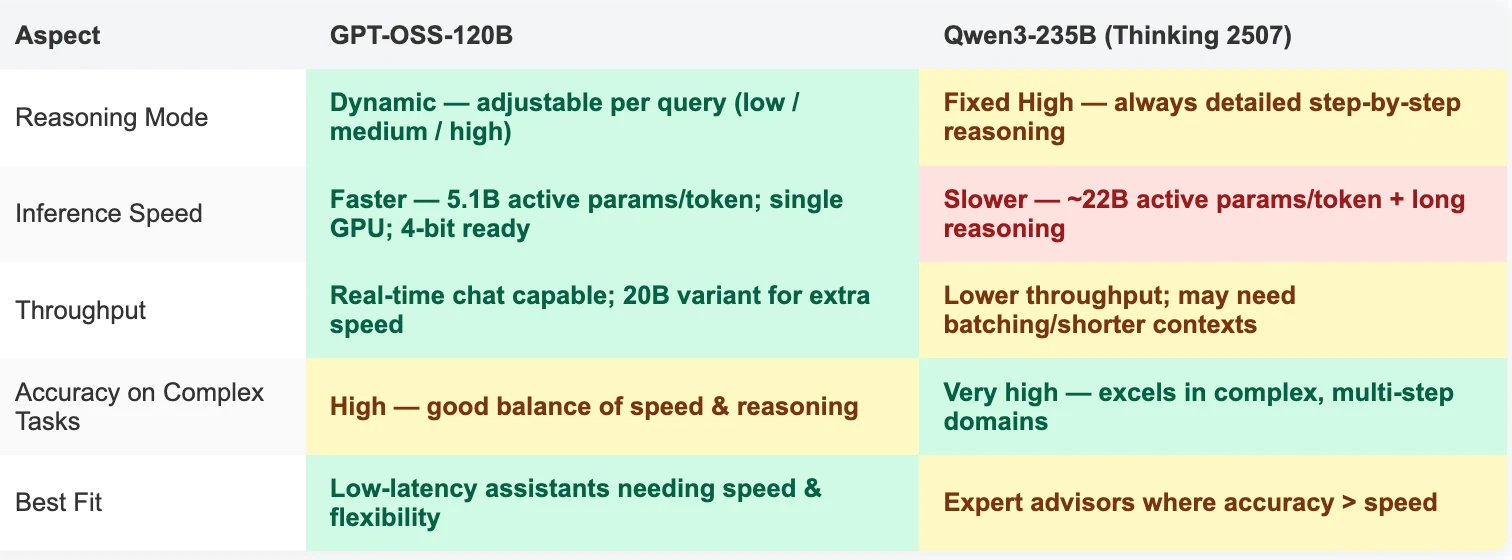
You can adjust the reasoning level that suits your task across three levels:
- Low: Fast responses for general dialogue.
- Medium: Balanced speed and detail.
- High: Deep and detailed analysis.
The reasoning level can be set in the system prompts, e.g., “Reasoning: high”.
How to Access GPT OSS 120B and Qwen3 235B Thinking 2507 via Cost Effectively and Fast API?
Step 1: Log In and Access the Model Library
Log in to your account and click on the Model Library button.

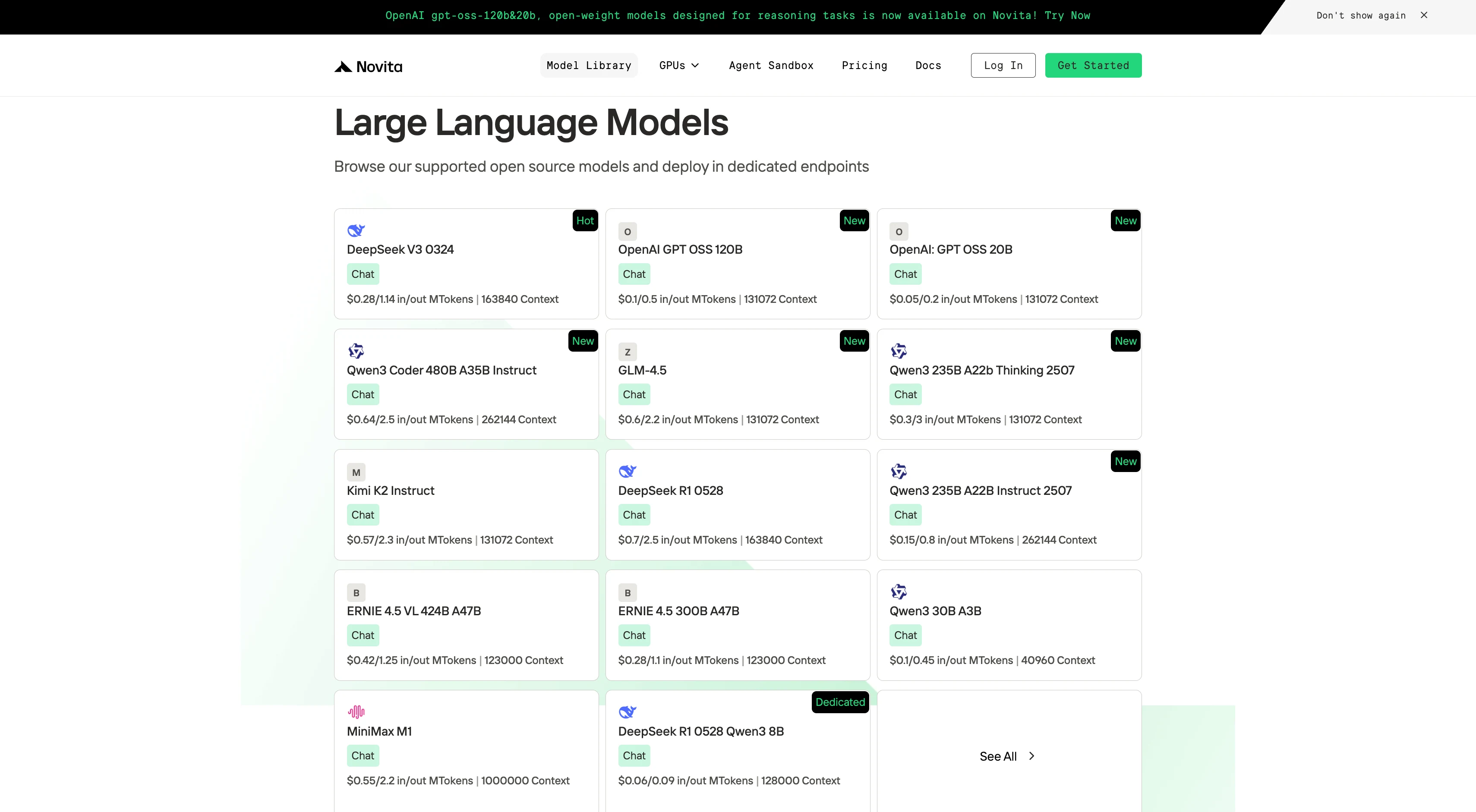
Step 2: Choose Your Model
Browse through the available options and select the model that suits your needs.
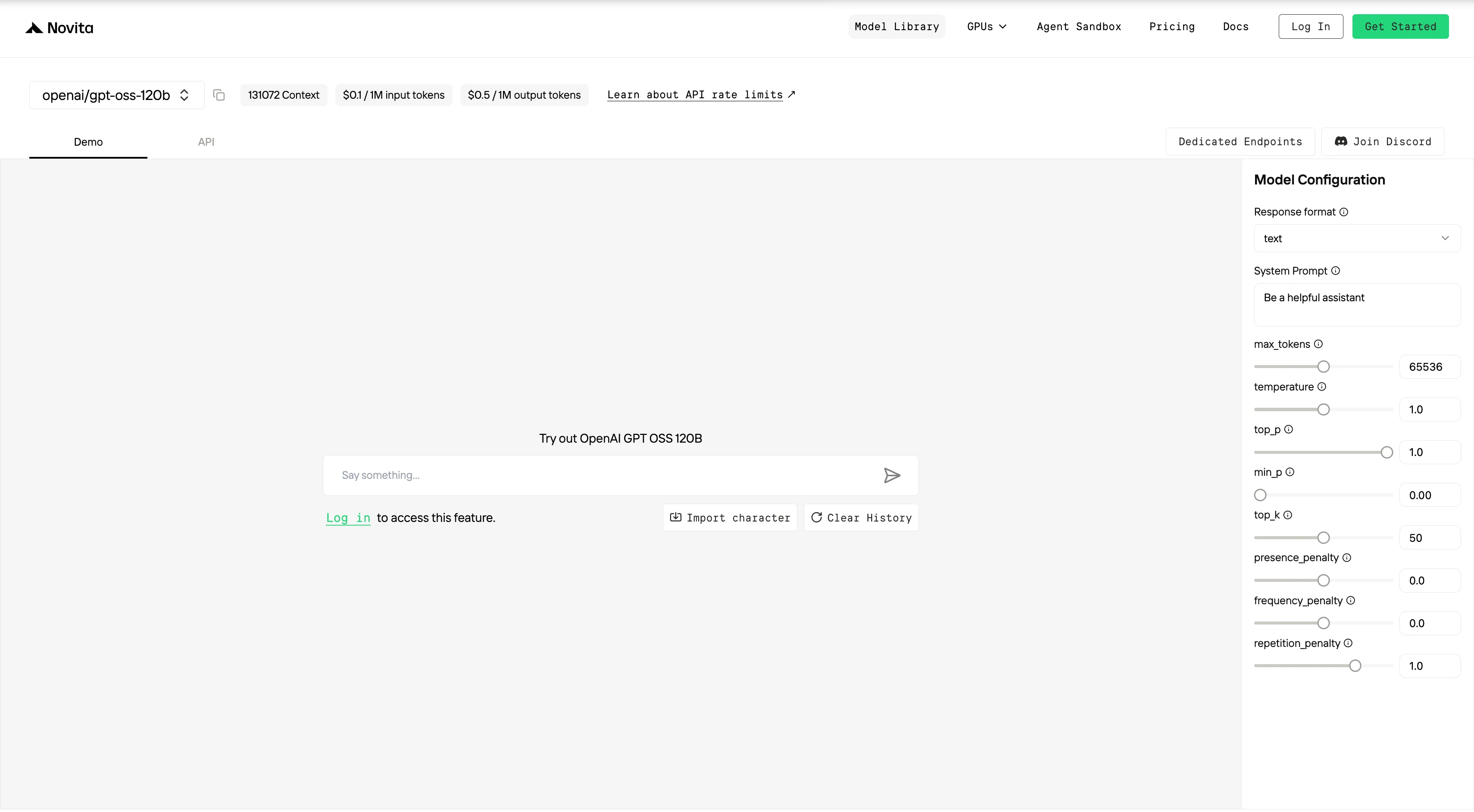
Step 3: Start Your Free Trial
Begin your free trial to explore the capabilities of the selected model.
Step 4: Get Your API Key
To authenticate with the API, we will provide you with a new API key. Entering the “Settings“ page, you can copy the API key as indicated in the image.

Step 5: Install the API
Install API using the package manager specific to your programming language.
After installation, import the necessary libraries into your development environment. Initialize the API with your API key to start interacting with Novita AI LLM. This is an example of using chat completions API for python users.
from openai import OpenAI

client = OpenAI(
    base_url="https://api.novita.ai/v3/openai",
    api_key="",
)

model = "openai/gpt-oss-120b"
stream = True # or False
max_tokens = 65536
system_content = ""Be a helpful assistant""
temperature = 1
top_p = 1
min_p = 0
top_k = 50
presence_penalty = 0
frequency_penalty = 0
repetition_penalty = 1
response_format = { "type": "text" }

chat_completion_res = client.chat.completions.create(
    model=model,
    messages=[
        {
            "role": "system",
            "content": system_content,
        },
        {
            "role": "user",
            "content": "Hi there!",
        }
    ],
    stream=stream,
    max_tokens=max_tokens,
    temperature=temperature,
    top_p=top_p,
    presence_penalty=presence_penalty,
    frequency_penalty=frequency_penalty,
    response_format=response_format,
    extra_body={
      "top_k": top_k,
      "repetition_penalty": repetition_penalty,
      "min_p": min_p
    }
  )

if stream:
    for chunk in chat_completion_res:
        print(chunk.choices[0].delta.content or "", end="")
else:
    print(chat_completion_res.choices[0].message.content)
- GPT‑OSS‑120B is the go‑to for developers needing flexibility, speed, and easier deployment.
- Runs on a single 80 GB GPU (or smaller 20B variant for edge devices).
- Adjustable reasoning depth (
low/medium/high) for per‑query trade‑offs between speed and accuracy. - Native support for OpenAI API function calling and tool integration.
- Ideal for production assistants, interactive apps, and cost‑sensitive deployments.
- Qwen‑3 235B (Thinking 2507) is built for maximum reasoning accuracy every time.
- Always operates in high‑reasoning mode with
<think>traces. - Excels in complex coding, math proofs, and long‑context reasoning.
- Multilingual and strong in research‑grade tasks, but requires multi‑GPU setups and accepts slower responses.
- Best suited for expert advisors where correctness outweighs speed.
- Always operates in high‑reasoning mode with
Bottom line:
If speed and efficiency are your priority → choose GPT‑OSS‑120B.
If accuracy for complex reasoning is non‑negotiable → choose Qwen‑3 235B (Thinking 2507).
Frequently Asked Questions
Can Qwen‑3 235B use OpenAI’s function calling API?
Not natively. It can mimic the format via prompt engineering, but you’ll need external parsing and validation for stable results. GPT‑OSS‑120B supports it out‑of‑the‑box.
Which model needs less hardware?
GPT‑OSS‑120B — it can run on a single 80 GB GPU thanks to MXFP4 quantization. Qwen‑3 235B requires at least 4–8 GPUs for full performance.
Which is better for real‑time chat?
GPT‑OSS‑120B — lower latency, adjustable reasoning, and smaller active parameters make it more responsive.
Novita AI is an AI cloud platform that offers developers an easy way to deploy AI models using our simple API, while also providing an affordable and reliable GPU cloud for building and scaling.