AI agents are finally moving beyond “chat” and into “get work done.” Claude Cowork is one of the clearest signals: an agent that can actually operate on your desktop—organize files, generate reports, and run multi-step tasks end-to-end
But once the excitement wears off and you start thinking about daily use (or rolling it out to a team), two questions show up fast:
- Cost: agent workflows can be heavy and frequent, and subscription tiers can get expensive at scale.
- Control: desktop agents touch real files and real systems—so you want clearer boundaries, flexibility, and options.
In this post, we’ll walk through a practical alternative: Eigent, an open-source “AI workforce” desktop app, powered by Novita AI via API.
🔑What you’ll get by the end:
- A working desktop agent setup (Eigent)
- A configured Novita API key + model
- A paper-finder demo workflow you can reuse
- A quick tour of other ways to run Eigent (self-hosted / enterprise)
What is Claude Cowork
Claude Cowork is an AI agent experience designed to do real desktop tasks—not just answer questions. In practice, that means it can take a goal like “clean up these files” or “turn these screenshots into a report,” then execute multiple steps using tools—while keeping you in the loop.
The reason it’s been blowing up is simple: it makes the agent promise feel tangible. Instead of “here’s a suggestion,” it’s “here’s the completed output.”
The catch is that, historically, access has been tied to paid tiers that can feel costly for individuals—and especially for teams. And even when availability evolves, cost predictability remains a real concern once you run agents at scale.
What is Eigent : A Claude Cowork Alternative
Eigent positions itself as an open-source, Cowork-style desktop experience—built around the idea of an AI workforce: multiple agents collaborating to complete complex workflows.
Why this matters:
- Multi-agent workflows: Instead of one assistant doing everything sequentially, you can assign roles (planner / executor / reviewer) and run steps in parallel.
- Tool ecosystem: Eigent supports tool integrations so agents can interact with files and services.
- Model freedom: You can choose your model provider—cloud, local inference, so you’re not locked into one vendor.
Eigent has attracted strong community interest on GitHub, which makes it a compelling starting point for desktop agent workflows.
Eigent on GitHub (10.9k stars, as of Jan 23, 2026)
How to Use Eigent Desktop
Get an API Key
Eigent needs an API key from an LLM provider so it can call a model during agent runs. If you already have a provider you use day-to-day, you can start there.
💡In this tutorial, we’ll use Novita AI because it integrates smoothly with both OpenAI- and Anthropic-compatible APIs, making it easy to switch models based on your speed, cost, and reasoning needs.
🎉Novita offers multiple models across different tradeoffs (speed / cost / reasoning / code). You can browse the full catalog here: https://novita.ai/models
🙌For this tutorial we’ll use:
- Model: zai-org/glm-4.7; Base URL: https://api.novita.ai/openai
Guide:
- Step 1: Create or Login to Your Account
Visit [**https://novita.ai**](https://novita.ai) and sign up or log in to your existing account
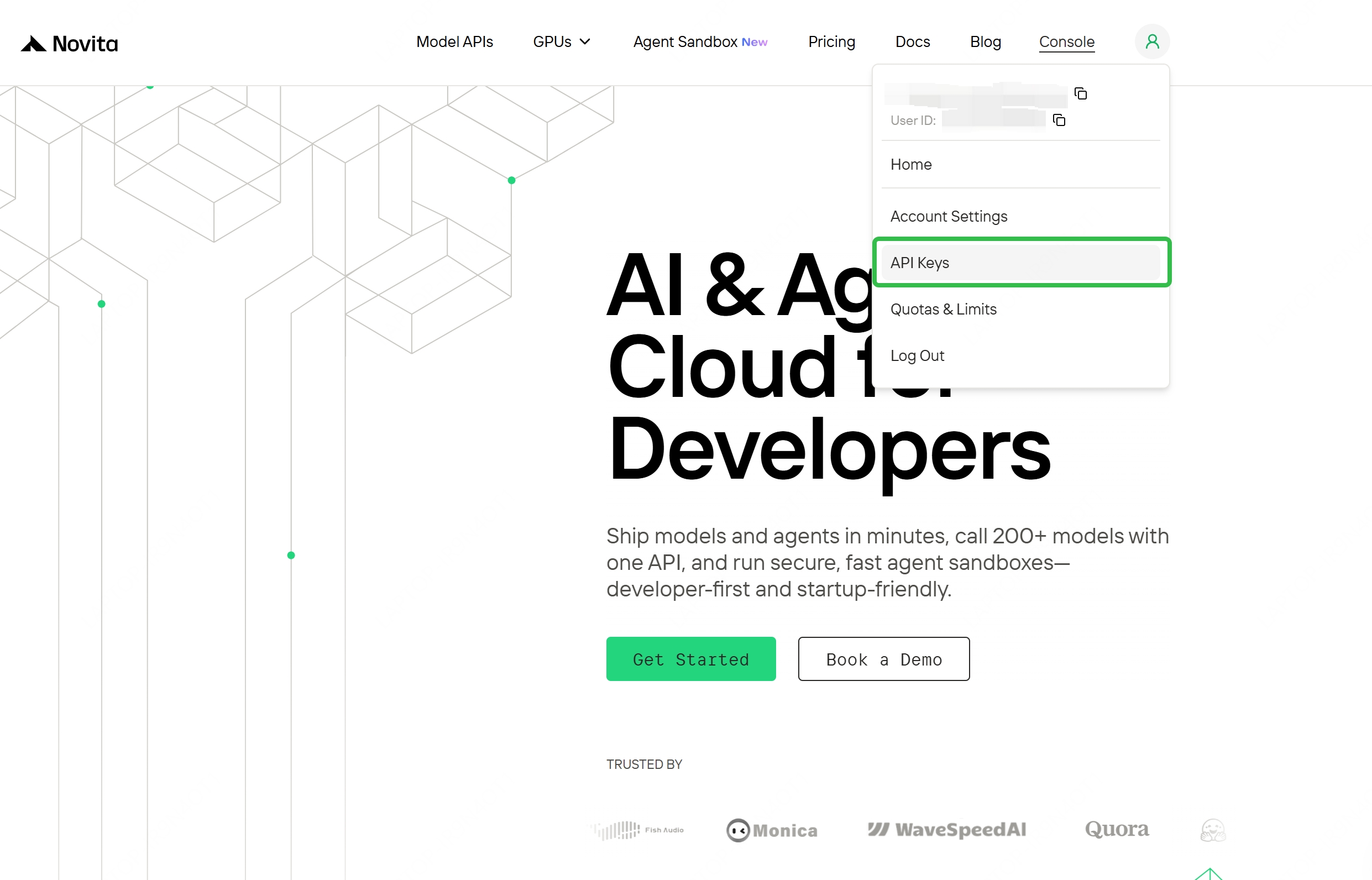
- Step 2: Navigate to Key Management
After logging in, find “API Keys”
- Step 3: Create a New Key
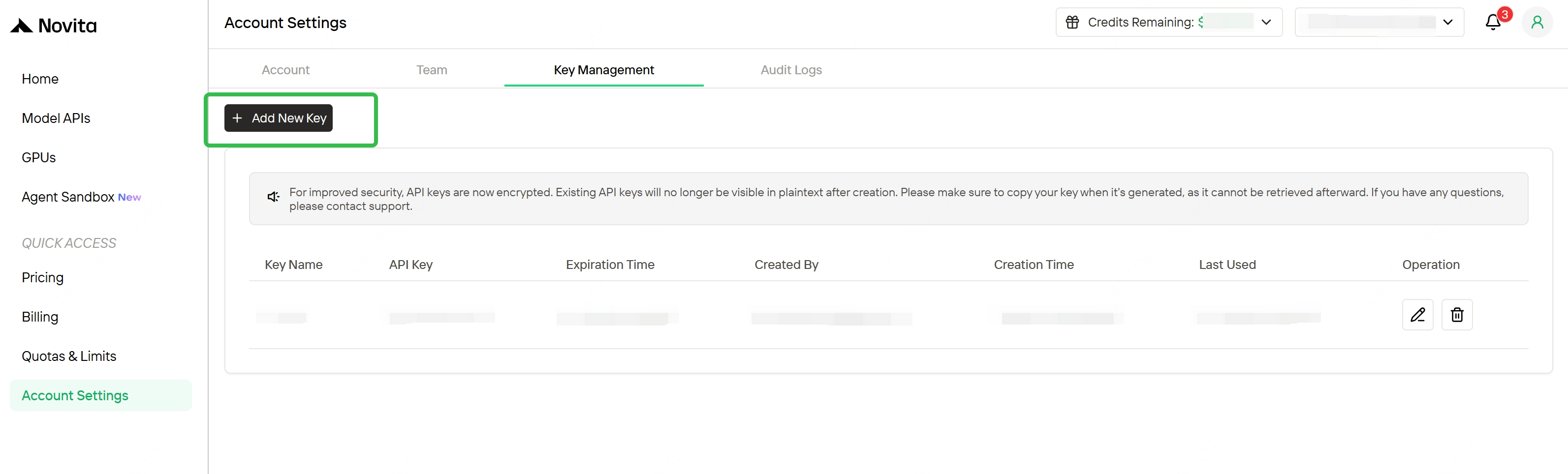
Click the “Add New Key” button.
- Step 4: Save Your Key Immediately
Copy and store the key as soon as it is generated; it is usually shown only once and cannot be retrieved later. Keep the key in a secure location such as a password manager or encrypted notes
Download and Install Eigent Desktop App
- You can download here: https://www.eigent.ai/
- macOS: open the downloaded
.dmgand drag Eigent into Applications - Windows: run the downloaded
.exeinstaller
Configure Novita API in Eigent
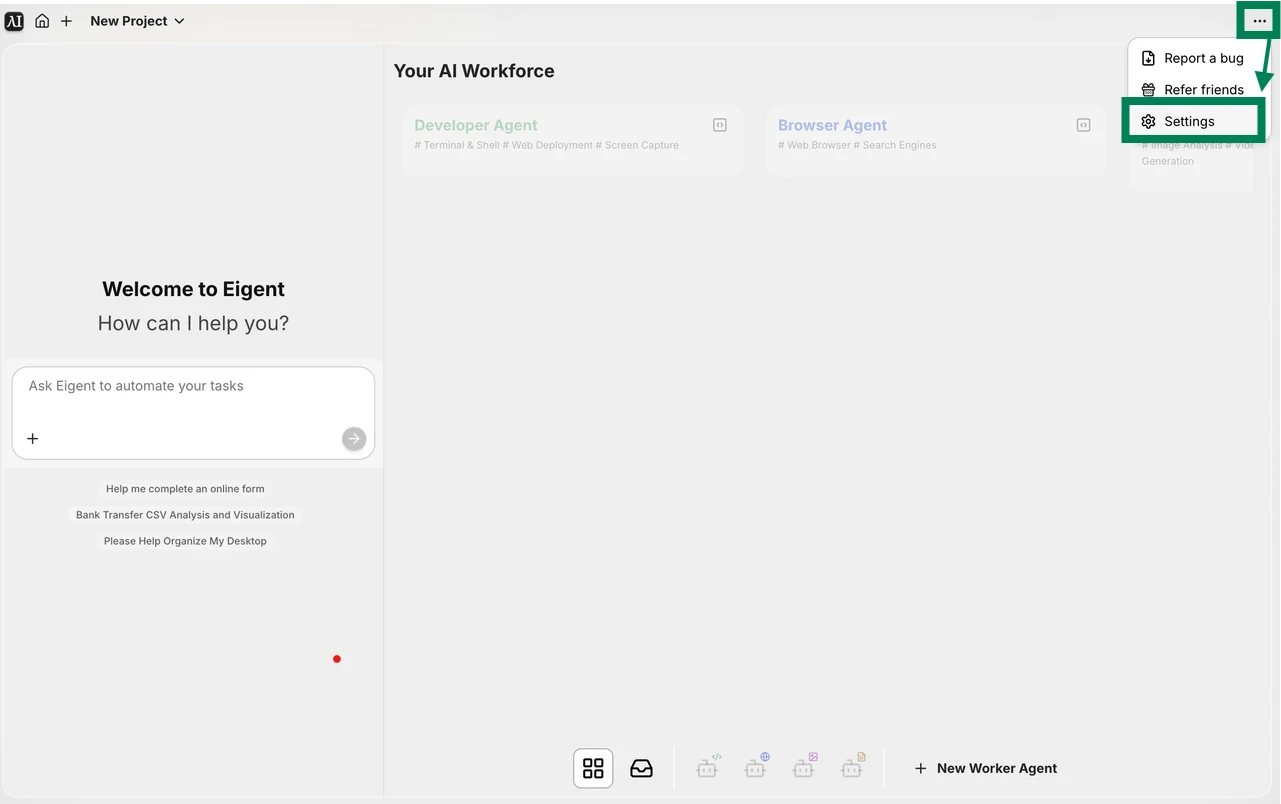
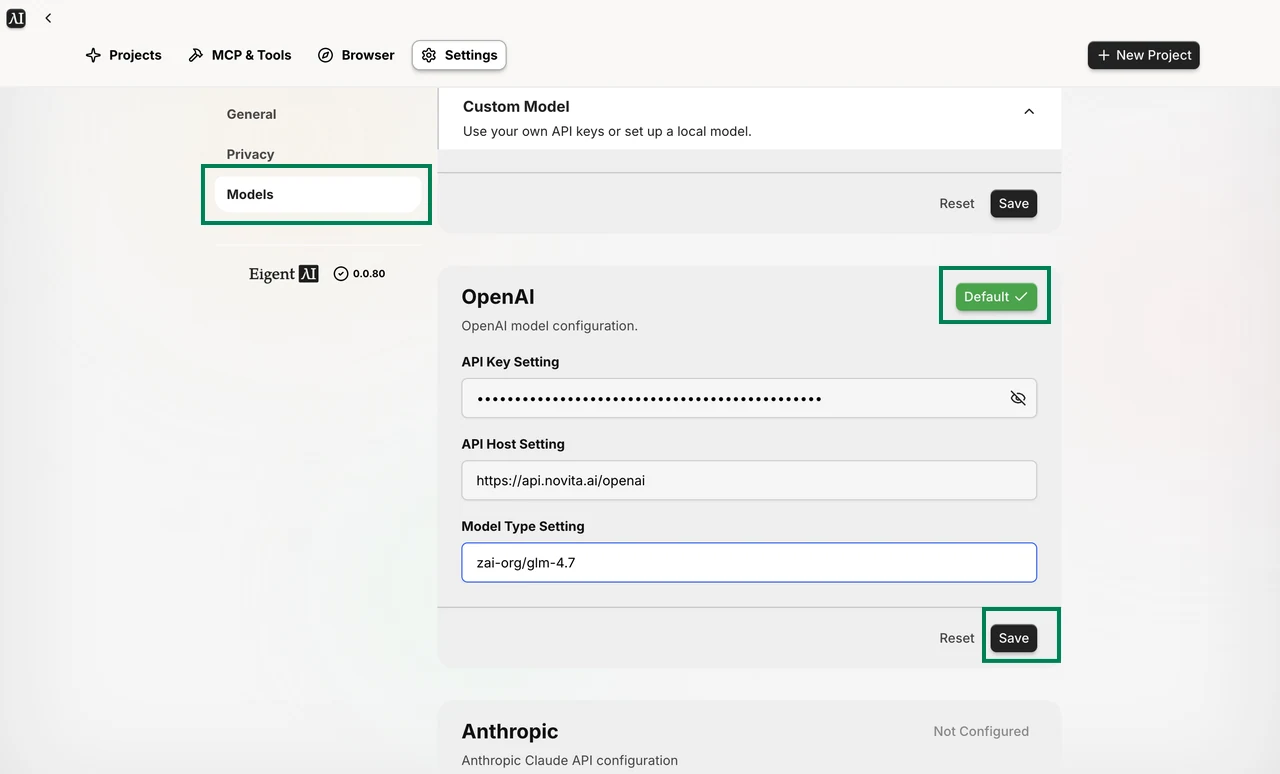
In Eigent, First, click the three-dot menu in the top-right corner, then click Settings.
Click Models. Then, under Custom Model, enter the following parameters:
- API Key Setting: your Novita key
- API Host Setting: https://api.novita.ai/openai
- Model Type Setting: zai-org/glm-4.7
Finally, click Save and set it as the default.
Why GLM-4.7 here? For agent-style workflows, you want a model that’s comfortable with multi-step execution and tool-centric reasoning—and GLM-4.7 is a strong default to start with.
A Simple Eigent Demo
Here’s the simplest useful desktop agent task: find all academic papers on my Desktop. It’s read-only, fast to verify, and immediately practical.
Prompt
Help me find all academic papers on my desktop.
What happens behind the scenes
Eigent interprets this as a desktop search task and then:
- Scans your Desktop folder (and any visible items in it)
- Identifies paper-like files, mainly by file type (
.pdf) and common academic naming patterns - Excludes obvious non-paper files (e.g.,
.py,.csv,.parquet, images, installers) - Returns a clean list of matches with absolute file paths (so you can click-to-open or copy into the next step)
Result
Demo: Find Academic Papers on Your Desktop
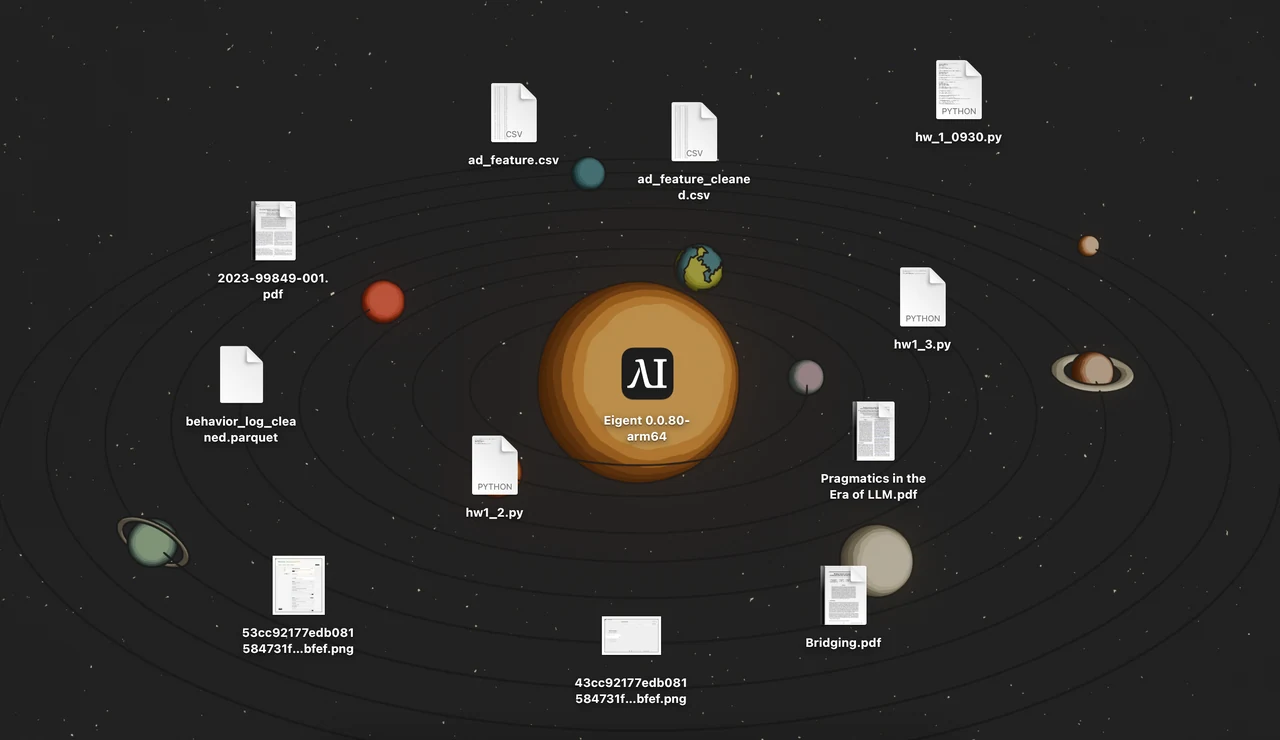
Files on the Desktop
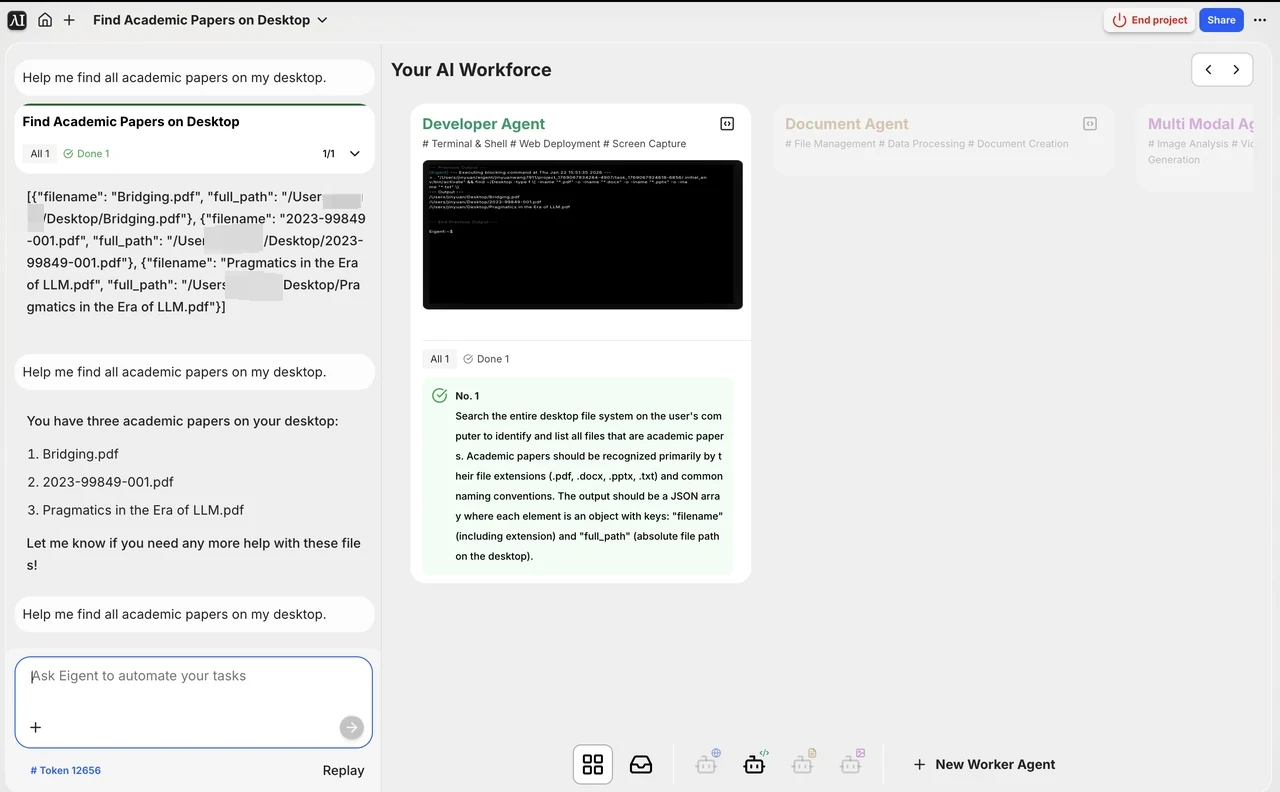
Results
Other Ways to Use Eigent
Self-Hosted (Community Edition)
If you want maximum control (privacy, internal tooling, or custom modifications), self-hosting is a good fit when:
- You need sensitive data to stay inside your infrastructure
- You want to integrate internal tools/APIs
- You want to manage user access and logs centrally
Enterprise Edition
For larger orgs, enterprise deployments typically focus on:
- SSO / access control
- Audit logs and governance
- Centralized templates and workflow distribution
- Support and SLA
If your goal is “roll this out to a whole team,” this is the path where admin controls matter.
Conclusion
Claude Cowork helped popularize a powerful idea: an AI that can actually operate like a coworker and ship outcomes, not just suggestions.
But you don’t need to be locked into a single vendor—or a high subscription tier—to get that experience. With Eigent as the open-source desktop agent layer, and Novita AI providing an OpenAI-compatible API endpoint, you can build a flexible setup that’s easier to scale, optimize, and iterate on.
Attribution & Disclaimer
This post references the project Eigent . All trademarks and product names are the property of their respective owners. This article is an independent tutorial and is not affiliated with or endorsed by the Eigent project.
Novita AI is an AI cloud platform that offers developers an easy way to deploy AI models using our simple API, while also providing the affordable and reliable GPU cloud for building and scaling.
Frequently Asked Questions
What is Claude Cowork?
A desktop agent experience that turns “chat” into “task execution”—it can plan and run multi-step work (with tools) to produce results, not just responses.
How much does Claude Cowork cost?
Claude Cowork is tied to Claude’s paid plans; pricing starts at $20/month (Pro), with Max starting at $100/person/month.
Are there alternatives to Claude Cowork?
Yes, there are both commercial “desktop AI agent” products and open-source options (e.g., Eigent) that can run multi-step workflows and connect to your preferred model/API.



