The Model Context Protocol (MCP) is an innovative open standard developed by Anthropic. It creates a standardized communication layer between AI models and external data sources or tools. By functioning as a “USB-C for AI,” MCP solves the complex “M×N integration problem.” Traditionally, connecting AI systems to multiple external services was challenging and time-consuming.
For developers, MCP eliminates the need for custom integrations with each tool or data source. This streamlines workflows and reduces technical complexity. MCP also helps AI models overcome limitations like knowledge cutoffs and the inability to interact with real-world systems. This makes MCP essential for building context-aware AI applications.
Understanding Model Context Protocol (MCP)
MCP transforms how AI systems interact with external tools and data sources. It provides a universal interface, eliminating the need for custom integrations.
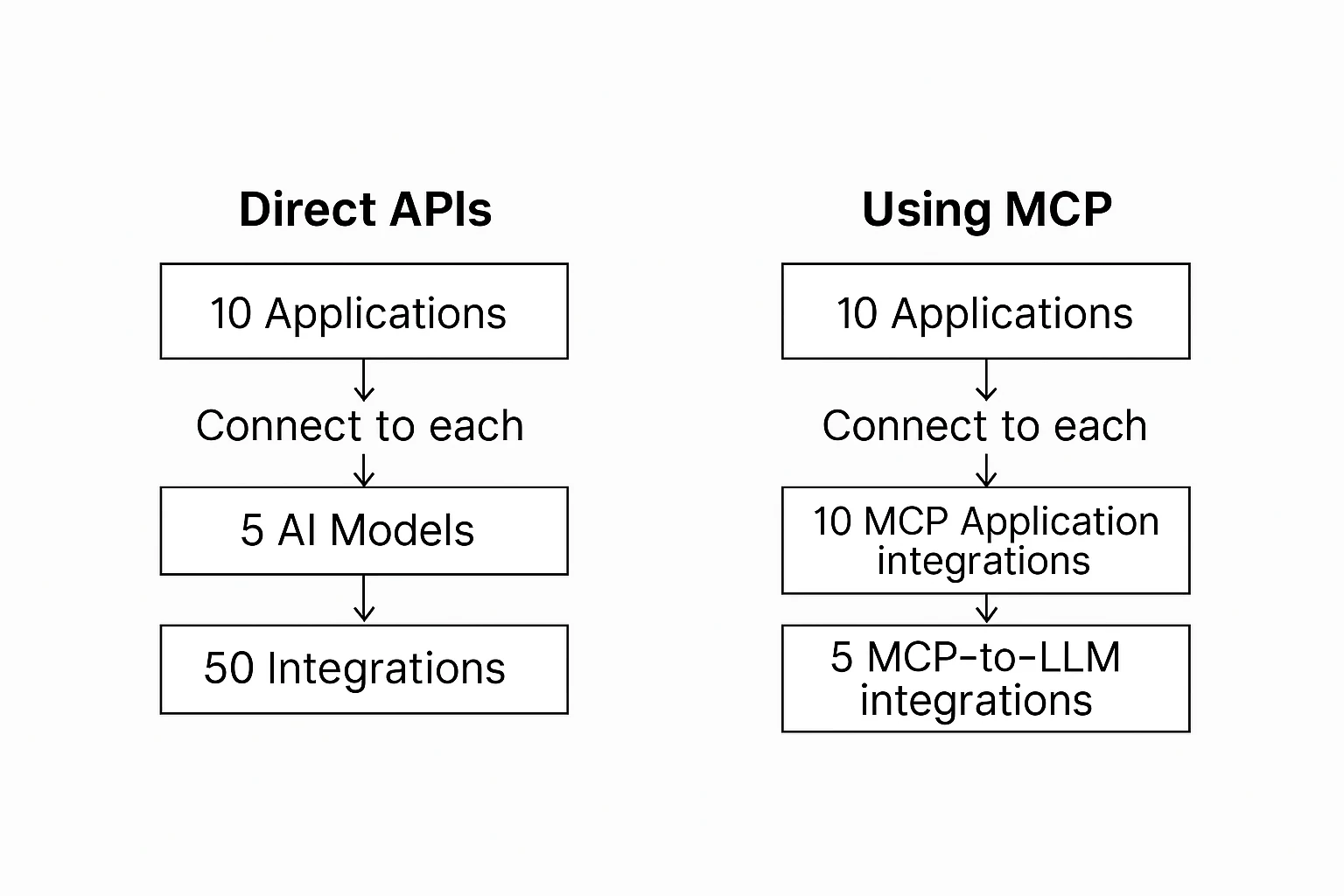
Anthropic developed MCP to solve the “M×N integration problem.” When M AI models need to connect with N tools, traditional methods require M×N separate integrations. This leads to complex and brittle codebases. MCP decouples AI models from specific tools, creating an abstraction layer. Any MCP-compatible model can work with any MCP-compatible tool.
This is similar to how USB standardized peripheral connections. With MCP, a new tool can be used by all compatible models without extra integration work. Developers can connect their models to specialized tools and real-time data sources. This allows AI applications to access current information, perform calculations, and interact with external services.
MCP is designed for future growth, making it a long-term solution for AI applications.
Architecture and Components of MCP
MCP has a three-part architecture that enables seamless communication between AI systems and external resources. It consists of hosts, clients, and servers.
- Hosts are AI applications that use language models to perform tasks. The host manages interactions and decides when to use external tools.
- Clients act as intermediaries, translating between models and external tools. They handle communication, authentication, and error management. Clients simplify integration by providing a standardized interface.
- Servers are the external tools, data sources, or services that enhance AI models. These can be search engines, databases, APIs, or real-time data feeds. Each server follows MCP’s standardized interface, allowing seamless integration.
MCP defines a structured communication flow:
- Requests are sent from hosts to servers via clients when the model needs information or actions.
- Responses return results from servers to hosts.
- Notifications send asynchronous updates from servers to hosts when new information is available.
MCP supports multiple transport mechanisms, including STDIO for local integrations and Server-Sent Events (SSE) for distributed systems. Security features ensure only authorized applications access external tools, making it ideal for enterprise environments.
Benefits of MCP for Developers
MCP offers numerous advantages that improve AI application development:
- Reduced Integration Complexity MCP eliminates the need for custom integrations with each external tool. Developers can focus on building features rather than managing integrations.
- Faster Development MCP reduces integration work by up to 60-70%. This efficiency is valuable when deploying applications in dynamic environments.
- Dynamic Tool Discovery AI models can discover and use new tools at runtime without code changes. Applications gain new capabilities automatically as tools become available.
- Enhanced AI Capabilities Language models have limitations in calculations, real-time data access, and system interactions. MCP connects models to specialized tools, improving accuracy and performance.
- Lower Maintenance Overhead Traditional API integrations break when external APIs change. MCP abstracts these changes, reducing maintenance work.
MCP vs. Traditional API Integrations
MCP differs from traditional API integrations in several ways:
- Integration Model: Traditional integrations require custom connections for each tool. MCP uses a hub-and-spoke model, reducing integration work.
- Flexibility: MCP is more stable and adapts to changes automatically. Traditional integrations break when APIs update.
- Implementation Complexity: MCP standardizes communication, while traditional integrations require handling different authentication and error management processes.
- Maintenance: Traditional API maintenance takes up to 40-60% of development resources. MCP reduces this by centralizing maintenance tasks.
- Scalability: MCP ensures consistent performance, while traditional integrations face bottlenecks when scaling.
Implementing MCP in Your Projects
To integrate the Model Context Protocol (MCP) into your AI applications, follow these steps:
- Choose an MCP Client Library Select an open-source MCP client library compatible with your programming language. For Python, the
mcplibrary provides a high-level client interface for connecting to MCP servers. - Configure Authentication Generate API keys for MCP and any external tools you plan to use. Store these credentials securely using environment variables to prevent exposure.
- Deploy in a Scalable Environment Adopt a deployment strategy that supports automatic scaling to handle varying workloads. Implement connection pooling and caching mechanisms to optimize performance and resource utilization.
- Test Before Deployment Thoroughly test your MCP integration using mock tools or staging environments to simulate interactions. Validate the functionality and performance to ensure reliability before deploying to production.
- Monitor Performance Continuously monitor tool usage, response times, and error rates using monitoring platforms like Prometheus or Grafana. This proactive approach helps in identifying and resolving issues promptly, ensuring optimal performance.
- Adopt MCP Gradually Begin by integrating MCP with essential tools in your application. Once stabilized, gradually expand the integration to include additional tools and services, allowing for controlled implementation and minimizing potential disruptions.
By following these steps, you can effectively implement MCP in your projects, enhancing the capabilities and efficiency of your AI applications.
Conclusion
MCP is a game-changing standard for AI integration. It simplifies development, reduces maintenance, and enhances AI capabilities. As AI ecosystems grow, standardized protocols like MCP will become essential. By adopting MCP today, developers prepare for the next generation of AI advancements.
About Novita AI
Novita AI is an AI cloud platform that offers developers an easy way to deploy AI models using our simple API, while also providing an affordable and reliable GPU cloud for building and scaling.
Frequently Asked Questions
What is the Model Context Protocol (MCP)?
MCP is an open standard for dynamic interaction between AI models and external data sources. It provides a standardized communication framework for connecting AI systems with various tools and environments.
What are the key benefits of using MCP?
MCP offers standardized integration, real-time data updates, and improved scalability. It simplifies development and enhances the developer experience.
How does MCP differ from traditional APIs?
MCP uses a single protocol for all tools and supports real-time, bidirectional communication. It also enables automatic tool discovery, unlike traditional APIs.
Who can use MCP and what are some example applications?
MCP is for developers integrating AI with diverse tools. Examples include AI-powered IDEs, chatbots, and data analytics platforms.
How can developers get started with MCP?
Developers can start with pre-built MCP servers and follow the quickstart guide. For Claude specifically, use claude mcp add in Claude Code or edit the JSON config for Claude Desktop — see the Claude MCP Configuration Guide for complete setup instructions. They can also explore available SDKs and contribute to open-source projects.