OpenClaw has exploded in popularity as the go-to AI agent framework in 2026, but its default settings can burn through tokens fast. This guide shows how to deploy Qwen 3.5 Series (27B, 35B-A3B, 122B-A10B, 397B-A17B) via Novita AI to build powerful, cost-efficient agents that scale without breaking the bank.
What Is OpenClaw — and Why Is Everyone Using It?
OpenClaw (formerly Clawdbot) has become the most talked-about AI agent framework in 2026, dominating discussions across developer communities, enterprise AI teams, and tech media. Bloomberg called it “the AI marvel powering China’s agent boom,” while TechNode reported that Chinese firms are racing to adopt OpenClaw for everything from customer service bots to internal automation workflows.
- Multi-model routing: Connect to any LLM provider (OpenAI, Anthropic, local models) and dynamically route tasks to the best model for the job.
- Messaging platform integration: Deploy agents directly into Telegram, WhatsApp, Discord, iMessage, and more — no custom UI needed.
- Extensible skills system: Add capabilities like file operations, web search, code execution, and workflow automation through a plugin architecture.
But there’s a catch: OpenClaw is token-hungry. Default configurations can consume 5-10x more tokens than necessary, with features like heartbeat polling alone costing a lot on high-end models.
For developers running 24/7 agents or deploying multiple instances, token costs can spiral fast. The solution? Pair OpenClaw with cost-efficient, high-performance models like Qwen 3.5 Series on Novita AI.
What Is Qwen 3.5 Series — and Why Use It in OpenClaw?
Qwen 3.5 Series is Alibaba Cloud’s latest family of large language models, designed for production workloads that demand both intelligence and efficiency. The lineup includes four variants optimized for different use cases:
- Qwen 3.5 27B: Balanced reasoning and speed for general-purpose agent tasks.
- Qwen 3.5 35B-A3B: Enhanced parameter efficiency for complex multi-step reasoning.
- Qwen 3.5 122B-A10B: High-end capability for advanced reasoning, code generation, and long-context understanding.
- Qwen 3.5 397B-A17B: Maximum intelligence for the most demanding tasks requiring deep reasoning and comprehensive analysis.
Why Qwen 3.5 Series is Ideal for OpenClaw
When building AI agents with OpenClaw, you need models that deliver strong performance across reasoning, tool use, and instruction following — without excessive cost. Qwen 3.5 Series checks all the boxes:
- Strong agent-oriented training: The models are fine-tuned for multi-turn dialogue, tool calling, and long-context reasoning — exactly what OpenClaw agents need.
- Flexible sizing: Choose 27B for lightweight tasks, 35B-A3B for balanced workloads, 122B-A10B for advanced reasoning, or 397B-A17B when you need maximum intelligence.
- Cost efficiency: Novita AI’s pricing for Qwen 3.5 is significantly lower than comparable models, making it practical to run 24/7 agents at scale.
Qwen 3.5 vs. Other Agent Models
| Model | Best For | Typical Use in OpenClaw |
| Qwen 3.5 27B | General reasoning, task automation | Heartbeat checks, file management, message routing |
| Qwen 3.5 35B-A3B | Complex workflows, multi-step planning | Code review, document generation, research tasks |
| Qwen 3.5 122B-A10B | Advanced reasoning, long-context analysis | Deep research, complex debugging, strategic planning |
| Qwen 3.5 397B-A17B | Maximum intelligence, comprehensive analysis | Multi-domain research, enterprise-grade decision support |
| MiniMax M2.5 | Balanced cost/performance | Good default choice |
| Kimi K2.5 | Multimodal tasks | Screenshot analysis, UI automation |
| GLM-5 | Long-context reasoning | Log analysis, large document processing |
Pricing on Novita AI (Per 1M Tokens)
| Model | Input Cost | Output Cost |
| Qwen 3.5 27B | $0.30 | $2.40 |
| Qwen 3.5 35B-A3B | $0.25 | $2.00 |
| Qwen 3.5 122B-A10B | $0.40 | $3.20 |
| Qwen 3.5 397B-A17B | $0.60 | $3.60 |
How to Use Qwen 3.5 Series in OpenClaw (6 Steps)
Preparation
Before starting, ensure you have:
- A Linux, macOS, or Windows (WSL2/PowerShell) environment with internet access
- Node.js 22+ installed
- An active Novita AI account with API key
Step 1: Get Your Novita AI API Key
- Visit Novita AI and create an account (or log in)
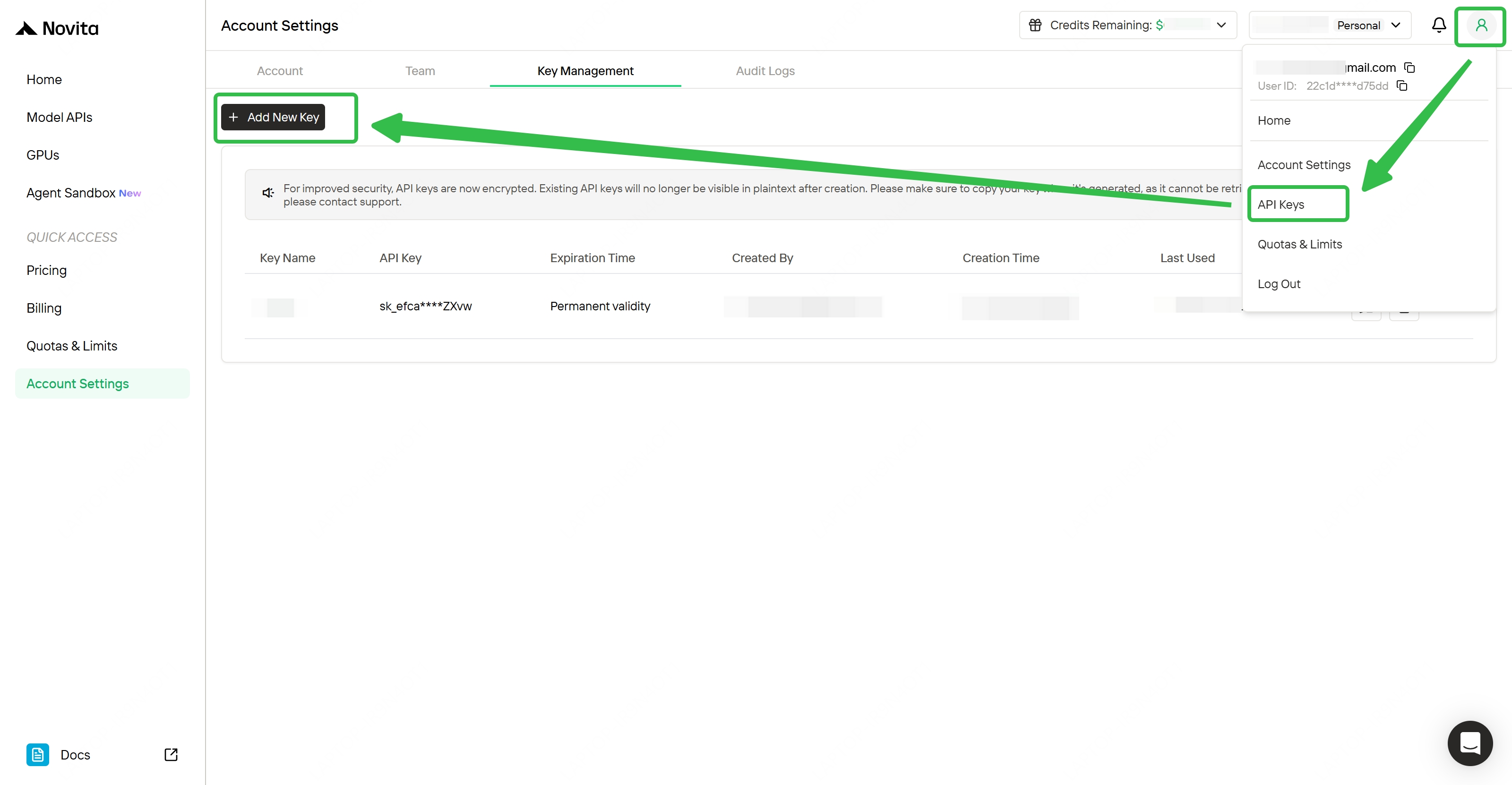
- Navigate to API Keys in your dashboard
- Click Add new key and copy it immediately (it’s only shown once)
- Store the key securely — you’ll need it in Step 4
Create Your Account and Get API Key!
Step 2: Install OpenClaw
Run the one-line installer for your platform:
macOS / Linux / WSL2:
curl -fsSL https://openclaw.ai/install.sh | bashWindows (PowerShell):
irm https://openclaw.ai/install.ps1 | iexThe installer will:
- Download and configure the OpenClaw CLI
- Install required dependencies
- Set up the Gateway service
Wait for the installation to complete, then verify:
openclaw --versionStep 3: Run the OpenClaw Configuration Wizard
Start the interactive setup:
openclaw configYou’ll configure four main sections: Workspace, Model, Gateway, and Channels. We’ll walk through each below.
3.1 Workspace Configuration
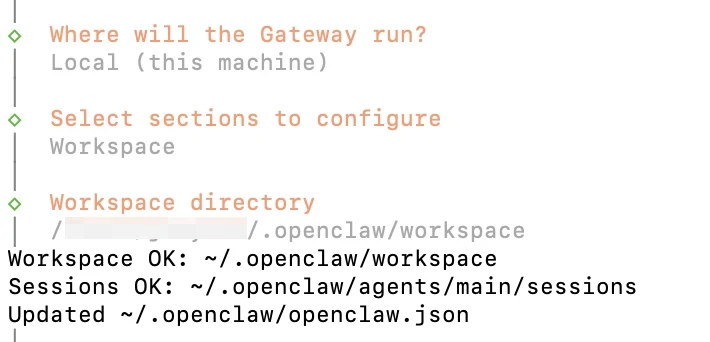
- Where will the Gateway run? → Select Local (for most users)
- Select sections to configure → Choose Workspace
This sets up your local environment for agent execution.
3.2 Model Configuration
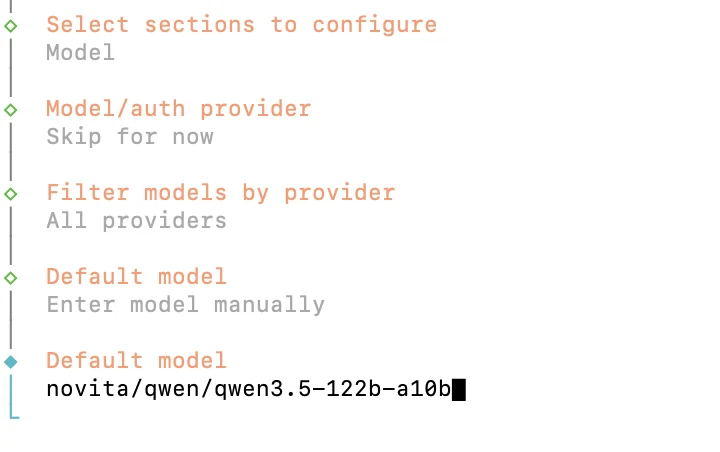
- Select sections to configure → Choose Model
- Model/auth provider → Select Skip for now
- Filter models by provider → Choose All providers
- Default model → Select Enter model manually
- Default model → Enter:
novita/qwen/qwen3.5-122b-a10b
Understanding model identifiers:
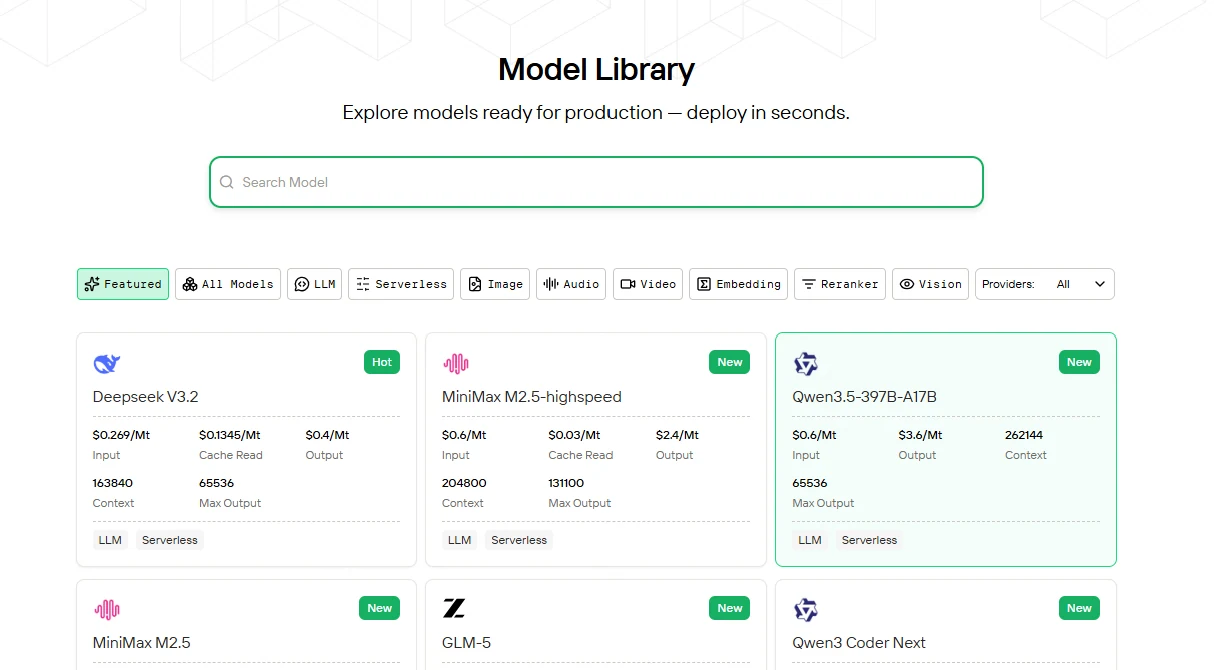
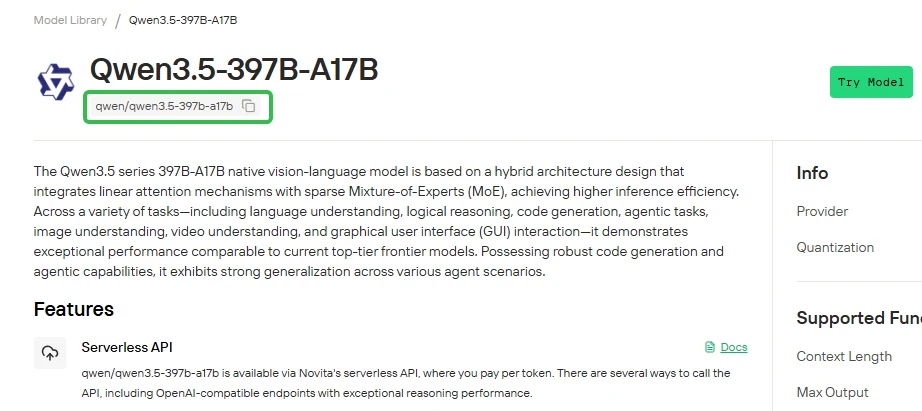
- Novita Model ID (on Novita platform):
qwen/qwen3.5-122b-a10b - OpenClaw format (requires provider prefix):
novita/qwen/qwen3.5-122b-a10b
When configuring OpenClaw, always use the format novita/<model-id>. For Qwen 3.5 Series:
novita/qwen/qwen3.5-27bnovita/qwen/qwen3.5-35b-a3bnovita/qwen/qwen3.5-122b-a10bnovita/qwen/qwen3.5-397b-a17b
You can find available model IDs on the Novita website, and replace the model ID with any other supported model (keep the novita/ provider prefix).
3.3 Gateway Configuration
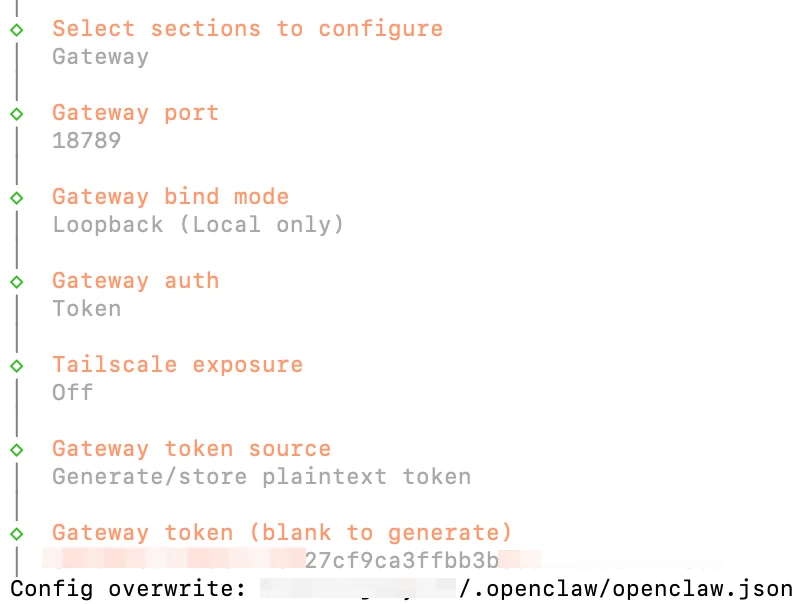
- Gateway port → Default:
18789(or customize if needed) - Gateway bind mode → Select Loopback (Local only) for security
- Gateway auth → Choose Token authentication
- Tailscale exposure → Select Off (unless you need remote access)
- Gateway token source → Choose Generate/store plaintext token
- Gateway token → Leave blank to auto-generate (or set a custom token)
3.4 Channels (Optional: Telegram Example)
If you want to deploy your agent to a messaging platform:
- Select sections to configure → Choose Channels
- Configure/Link → Select Telegram (Bot API)
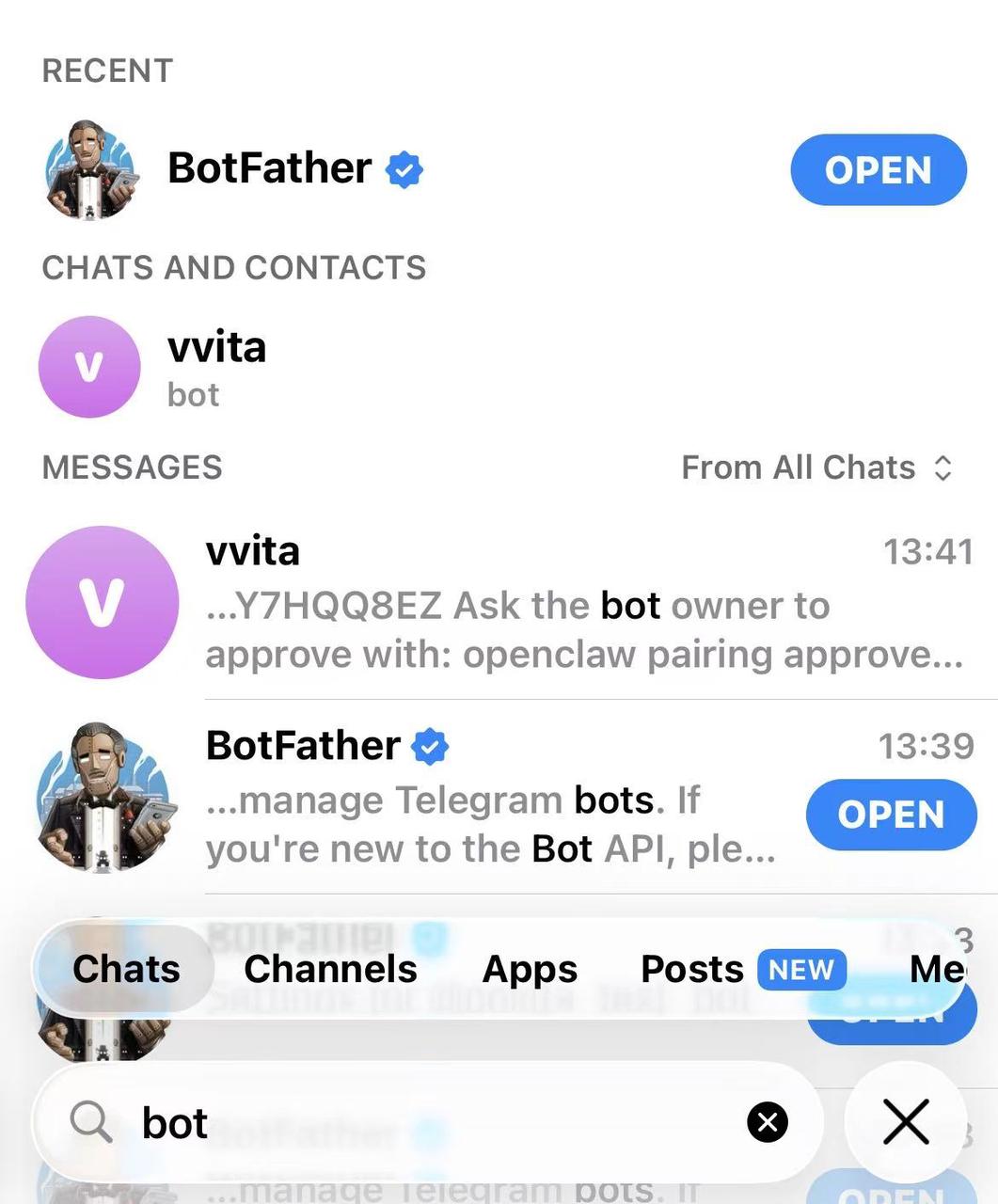
- Telegram Bot Token → Enter your bot token from @BotFather
- Choose DM access policy Select Pairing (users must pair before chatting)
How to get a Telegram Bot Token:
- Open Telegram and search for
@BotFather - Send
/newbotand follow the prompts - Copy the bot token provided
Step 4: Configure Novita AI API Integration
The wizard doesn’t auto-configure Novita API credentials, so we’ll add them manually.
Open your OpenClaw config file:
open ~/.openclaw/openclaw.jsonAdd this block under "models" . Only update one field:
 "models": {
    "providers": {
      "novita": {
        "baseUrl": "https://api.novita.ai/openai/v1",
        "apiKey": "<Your API Key>",
        "api": "openai-completions",
        "models": [
          {
            "id": "qwen/qwen3.5-122b-a10b",
            "name": "Qwen3.5-122B (Novita)",
            "reasoning": false,
            "input": [
              "text"
            ],
            "cost": {
              "input": 0,
              "output": 0,
              "cacheRead": 0,
              "cacheWrite": 0
            },
            "contextWindow": 262144,
            "maxTokens": 65536
          }
        ]
      }
    }
  },
Step 5: Start the OpenClaw Gateway
Install and launch the Gateway service:
openclaw gateway install
openclaw gateway restart
Verify the Gateway is running:
openclaw gateway statusStep 6: Pair Your Messaging Platform (Telegram Example)
If you configured Telegram in Step 3.4:
- Open your Telegram bot and send
/start - The bot will reply with a pairing code (e.g.,
ABC123) - Approve the pairing in your terminal:
openclaw pairing approve --channel telegram ABC123Your Telegram account is now paired! Send a message to test:
Hello! What's the weather today?The agent will respond using Qwen 3.5 122B-A10B (your default model).
Optimizing Token Usage: Choosing the Right Model for Each Task
One of Qwen 3.5 Series’ biggest advantages in OpenClaw is flexible sizing. Instead of using the largest model for everything, route tasks intelligently:
Recommended Model Selection
| Task Type | Recommended Model | Why |
| Heartbeat checks, status updates | Qwen 3.5 27B | Fast, cheap, good enough for simple queries |
| File summaries, web searches | Qwen 3.5 27B or 35B-A3B | Balanced reasoning without overkill |
| Code generation, multi-step workflows | Qwen 3.5 35B-A3B or 122B-A10B | Strong instruction following + tool use |
| Complex debugging, research synthesis | Qwen 3.5 122B-A10B | High-level reasoning depth + long-context support |
| Enterprise decision support, multi-domain research | Qwen 3.5 397B-A17B | Maximum intelligence for mission-critical tasks |
Conclusion
OpenClaw’s explosive growth in 2026 has proven the demand for flexible, powerful AI agent frameworks — but unchecked token consumption can make deployment unsustainable. By pairing OpenClaw with Qwen 3.5 Series on Novita AI, developers gain:
- Cost efficiency: Up to 80% savings vs. premium models, with flexible sizing (27B → 397B)
- Production-ready performance: Strong reasoning, tool use, and long-context support
- Scalability: Run 24/7 agents without burning budgets
Whether you’re building customer support bots, internal automation workflows, or research assistants, this combination delivers enterprise-grade capabilities at startup-friendly prices.
Ready to deploy? Grab your Novita AI API key and start building smarter, cheaper agents today.
Novita AI is a leading AI cloud platform that provides developers with easy-to-use APIs and affordable, reliable GPU infrastructure for building and scaling AI application.
Frequently Asked Questions
What is OpenClaw?
OpenClaw is an open-source AI agent framework that connects language models to messaging platforms (Telegram, Discord, etc.) and enables task automation through skills like file operations, web search, and workflow orchestration. It’s exploded in popularity in 2026 for its flexibility and ease of deployment.
Why is OpenClaw so token-intensive?
By default, OpenClaw loads extensive context (files, memory, session history) into every request, which can multiply token usage by 5-10x. Features like heartbeat polling can cost $6.84/day on premium models if not optimized.
Is OpenClaw free?
Yes, OpenClaw itself is open-source and free. However, the LLM APIs it connects to (like Qwen 3.5 via Novita AI) charge based on token usage.
How much can I save by using Qwen 3.5 Series on Novita AI?
Compared to premium models like Claude Opus, Qwen 3.5 Series costs 80-95% less while maintaining 90%+ of the reasoning capability. With smart model routing (27B for simple tasks, 122B for complex ones), users report 60-80% token cost reductions overall.