Minimax M2 is the newest cutting-edged lightweight large language model built for optimal coding and agentic AI workflow, combining efficiency with robust reasoning capabilities. Yet an essential question remains: how much GPU memory does it take to run efficiently? VRAM determines whether you can deploy it locally, on enterprise hardware, or through the cloud. This article explores Minimax M2’s VRAM requirements and compares different deployment paths, from local setups to API-based solutions.
Minimax M2: Basics and Highlights
| Feature | Minimax M2 |
|---|---|
| Parameter | 230B with 10B activated |
| Architecture | Mixure-of-Experts |
| Context Window | 204K Tokens |
| Open Source | Yes |
| Thinking Mode | Think + Non-Think |
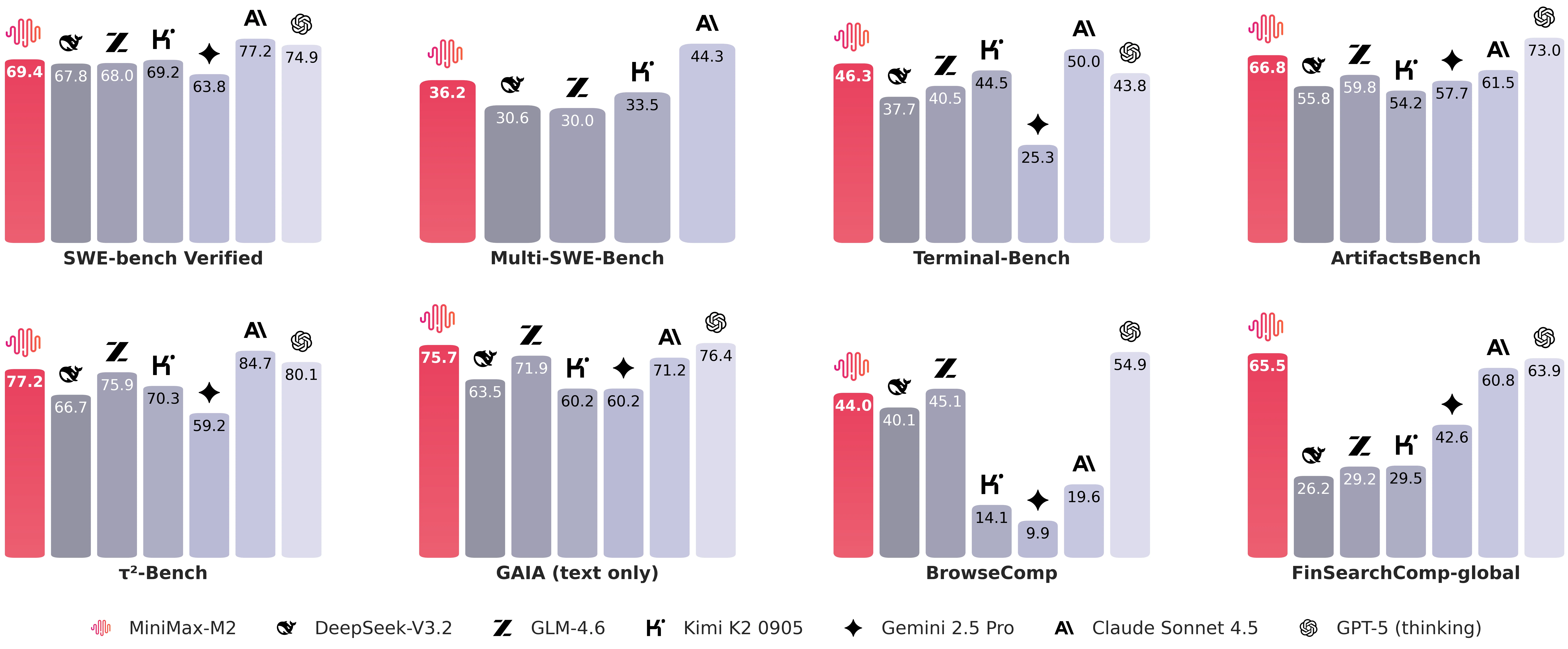
Minimax M2 Benchmark
Key Highlights
Exceptional Intelligence
MiniMax-M2 shows exceptional general intelligence across domains such as math, science, reasoning, instruction following, coding, and agent-based tasks. It currently ranks as the top open-source model worldwide by composite score.
End-to-End Coding Excellence
Built for complete developer workflows, MiniMax-M2 handles multi-file edits, iterative code-run-fix cycles, and automated test repairs with ease. Its strong results on Terminal-Bench and SWE-Bench-like benchmarks confirm its reliability in real coding environments—from IDEs to CI systems—across multiple programming languages.
Robust Agentic Capabilities
MiniMax-M2 effectively plans and executes long, multi-step toolchains that span shells, browsers, retrieval systems, and code runners. In BrowseComp-style evaluations, it reliably finds difficult-to-access information, keeps reasoning transparent, and recovers smoothly from partial execution errors.
Optimized Architecture
With 10 billion active parameters out of a 230 billion-parameter architecture, MiniMax-M2 offers lower latency, reduced costs, and high throughput for both interactive agents and large-batch inference—embodying a new generation of deployable models that remain outstanding in coding and agentic performance.
What is VRAM?
VRAM (Video Random Access Memory) refers to the GPU’s dedicated memory that stores model parameters, weights, and intermediate computation data. In LLMs (large language models), VRAM plays a decisive role that dictates whether a model can even be loaded, how long its context window can extend, and what batch sizes are feasible. Unlike regular system RAM, VRAM offers extremely high bandwidth to sustain the intensive matrix operations central to transformer architectures. Simply put, VRAM is the key limiting factor in both inference and training: insufficient capacity leads to out-of-memory crashes, shorter contexts, and heavy reliance on slower offloading.
Minimax M2 VRAM Requirements
| Quantization | Weights Only (Approx.) | Recommended GPU |
| Q8_0 (8-bit) | 243 GB | Nvidia H100 ×4 |
| Q6_K (6-bit) | 188 GB | Nvidia H100 ×3 |
| Q4_0 (4-bit) | 130 GB | Nvidia A100 ×2 |
| Q2_K (2-bit) | 83.3 GB | RTX 6000 Ada ×2 |
| Aspect | Local Deployment | Cloud GPU | API Access |
|---|---|---|---|
| Initial Investment | >$100,000 ( NVIDIA GPU Cluster, plus hardware setup) | Pay-per-hour model with no major upfront costs | Pay-as-you-go pricing with zero hardware investment |
| Infrastructure | Requires GPUs, cooling systems, and stable power supply | GPU instances (H100, A100, RTX 6000 Ada, etc.) available on demand via Novita AI | Fully managed by Novita AI’s optimized infrastructure |
| Technical Expertise | Requires ML/DevOps expertise for setup, drivers, and environment management | Basic setup only; minimal operational overhead compared to local deployment | Only basic API integration knowledge needed |
| Maintenance | Continuous monitoring, driver updates, and hardware maintenance | Novita AI manages drivers, updates, and infrastructure; users maintain their applications | No maintenance required |
| Scalability | Limited by local hardware capacity | Elastic scaling—easily add or release GPU instances as workloads change | Instantly scalable with flexible resource allocation |
| Reliability | Dependent on local hardware stability | Backed by SLA guarantees and robust cloud infrastructure | Enterprise-grade SLA and optimized runtime |
| Performance | Varies by GPU model and configuration | Enterprise-grade performance with flexible instance selection | Optimized by provider for consistent high performance |
| Data Privacy | Full local control over data | Dependent on provider policies | Dependent on provider policies |
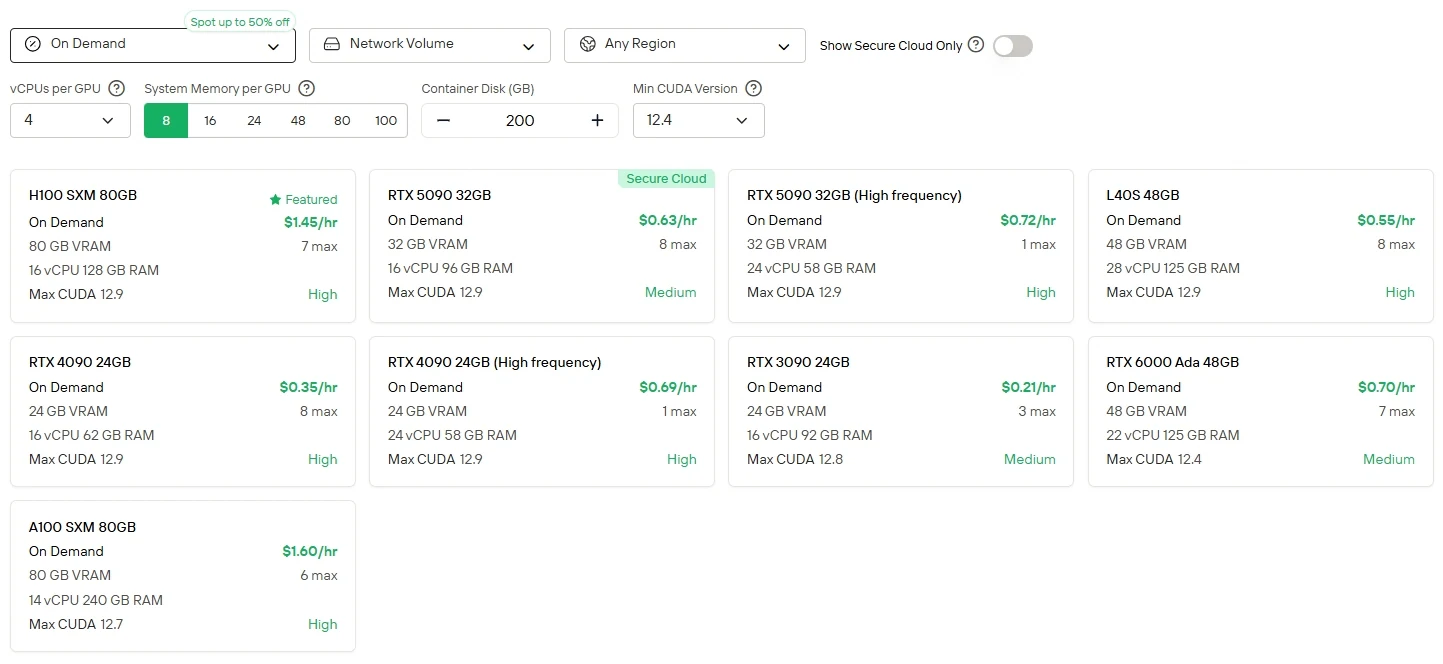
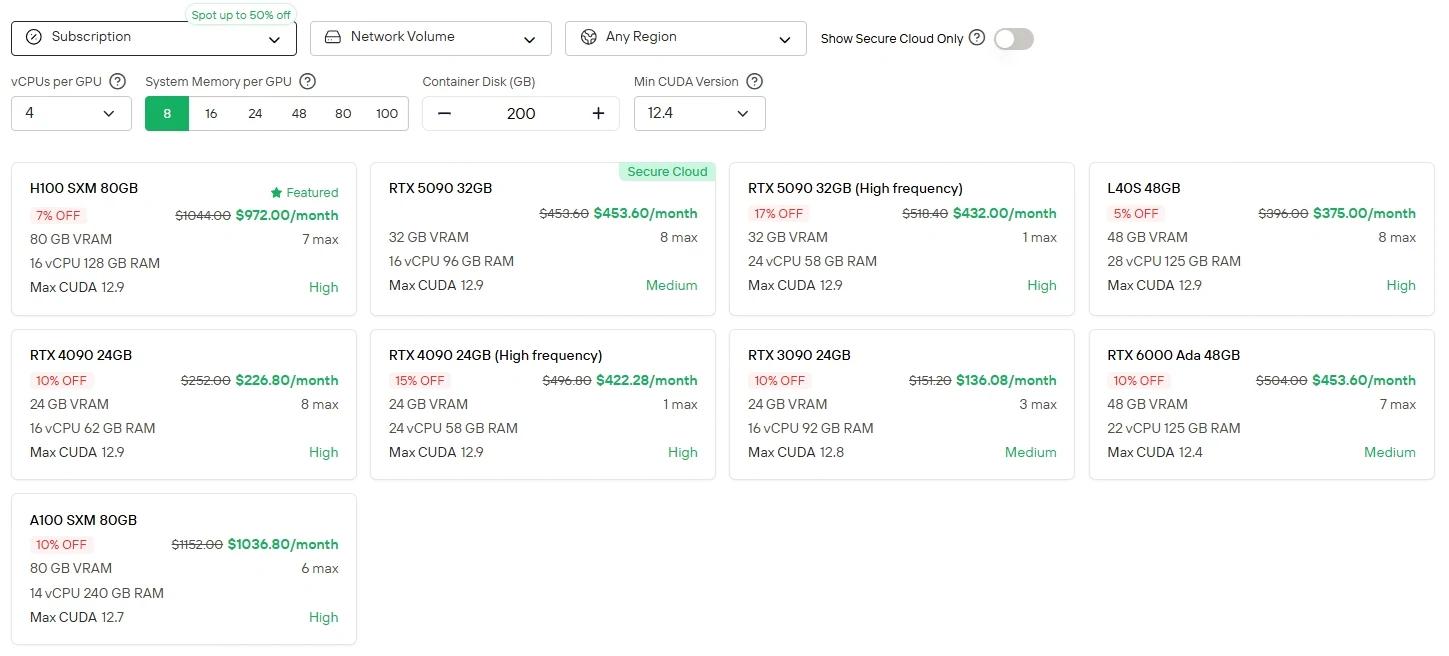
For users who prefer direct control and GPU flexibility, Novita AI offers Cloud GPU instances service (including H100, A100, TX 6000 Ada, etc.) with different billing modes, enabling high-performance deployment without the burden of local hardware setup.
Novita AI provides Minimax M2 APIs with 204K context window at costs of $0.3/1M tokens input and $1.2/1M tokens output, providing affordable access to cutting-edge agentic capabilities.
How to Access Minimax M2 via API
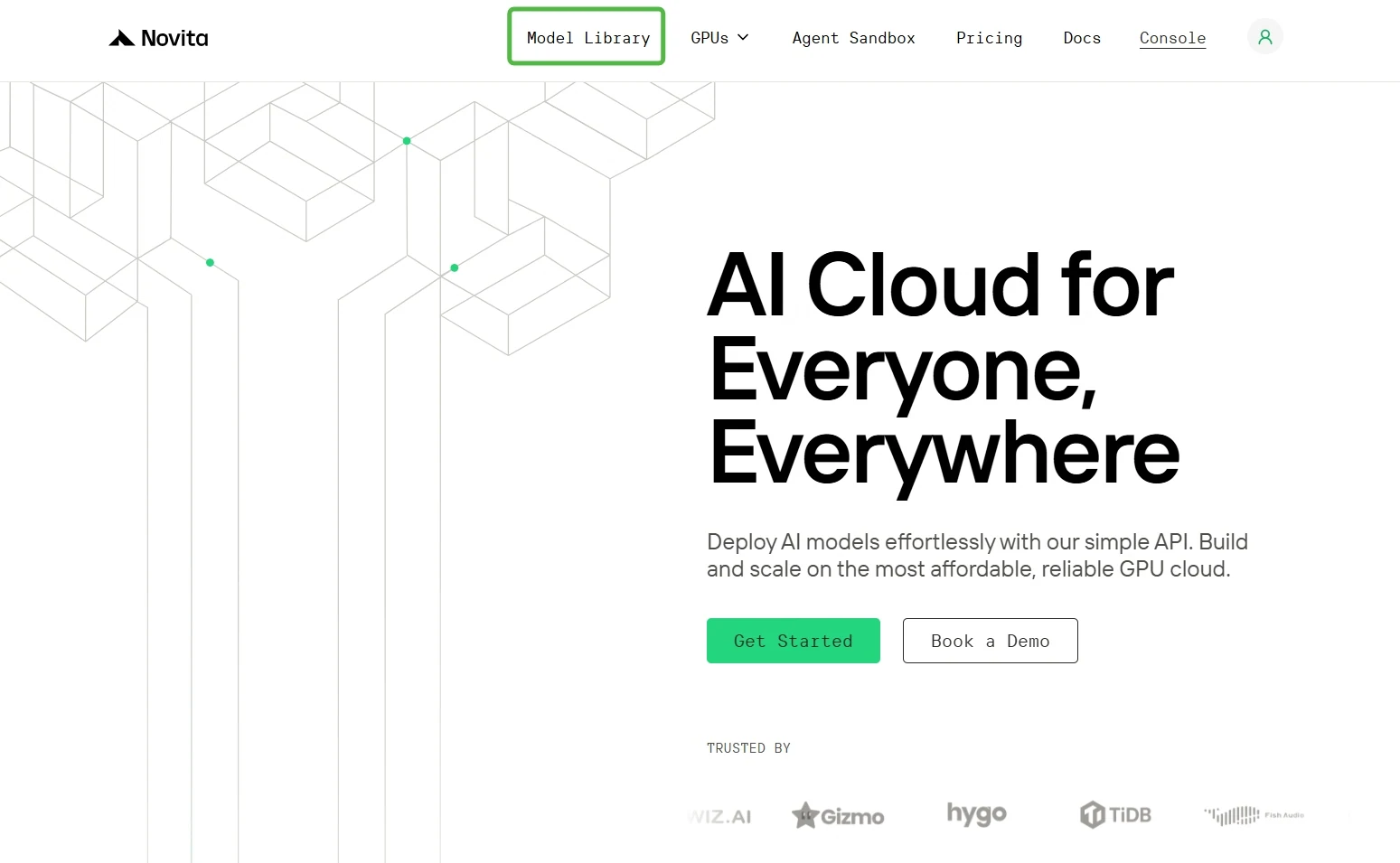
Step 1: Log In and Access the Model Library
Log in to your account and click on the Model Library button.
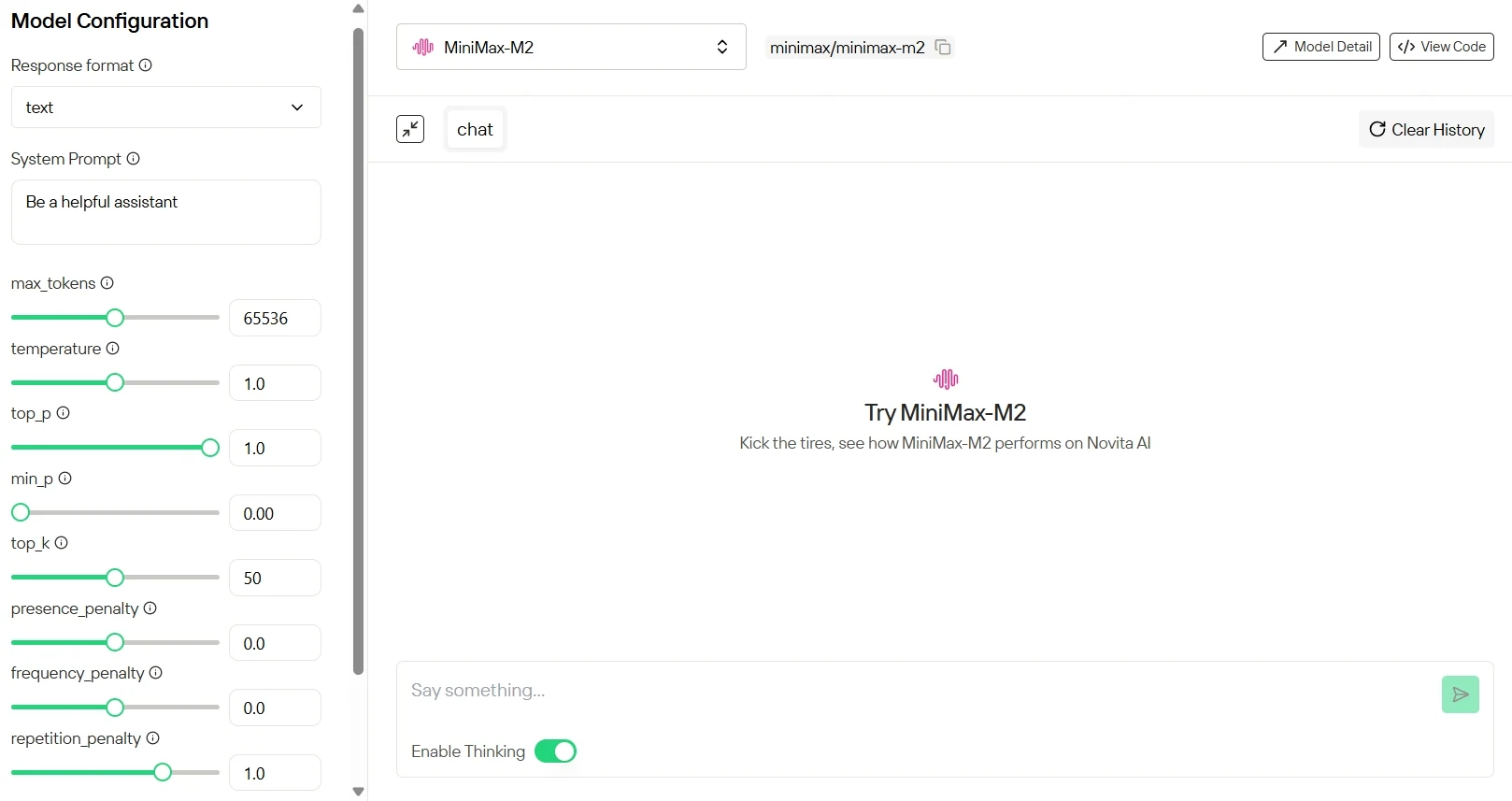
Step 2: Start Your Free Trial
Select your modal and begin your free trial to explore the capabilities of the selected model.
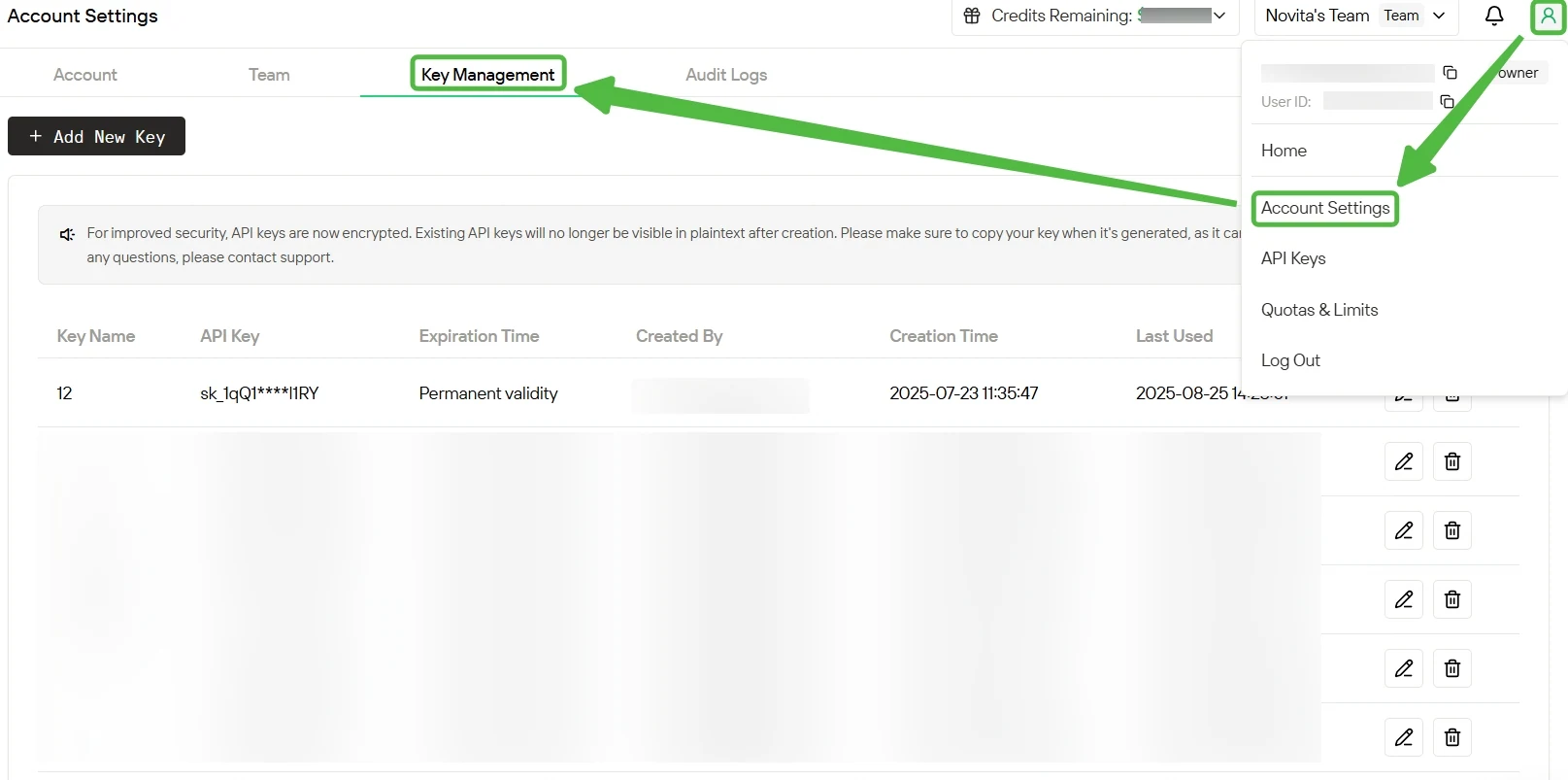
Step 3: Get Your API Key
To authenticate with the API, we will provide you with a new API key. Entering the “Settings“ page, you can copy the API key as indicated in the image.
Step 4: Install the API
Install API using the package manager specific to your programming language.
After installation, import the necessary libraries into your development environment. Initialize the API with your API key to start interacting with Novita AI LLM. This is an example of using chat completions API for python users.
from openai import OpenAI

client = OpenAI(
    api_key="<Your API Key>",
    base_url="https://api.novita.ai/openai"
)

response = client.chat.completions.create(
    model="minimax/minimax-m2",
    messages=[
        {"role": "system", "content": "You are a helpful assistant."},
        {"role": "user", "content": "Hello, how are you?"}
    ],
    max_tokens=131072,
    temperature=0.7
)

print(response.choices[0].message.content)
Conclusion
Minimax M2 pushes the boundaries of intelligent performance through its Mixture-of-Experts design, but that power comes with serious hardware demands. Even under aggressive quantization, the model still requires over 80 GB of VRAM, placing it well beyond the reach of most consumer GPUs. This makes local deployment largely impractical, while cloud-based API providers like Novita AI remain the most reliable way to harness Minimax M2‘s capabilities.
Frequently Asked Questions
What is Minimax M2?
Minimax M2 is a large-scale Mixture-of-Experts (MoE) language model developed by MiniMax AI built for max coding and agentic AI workflow.
How much VRAM do I need to run Minimax M2?
To run Minimax M2, you’d need approximately:
243 GB VRAM at 8-bit
188 GB VRAM at 6-bit
130 GB VRAM at 4-bit
83 GB VRAM at 2-bit
Can I access Minimax M2 through an API?
Yes. You can access Minimax M2 via API on Novita AI with 204K context window at costs of $0.3/1M tokens input and $0.12/1M tokens output
Novita AI is an AI cloud platform that offers developers an easy way to deploy AI models using our simple API, while also providing an affordable and reliable GPU cloud for building and scaling.



