DeepSeek 3.1 is the next-generation large language model designed for advanced reasoning, coding, and agentic workflows. With its hybrid thinking mode, smarter tool calling, and higher thinking efficiency, it delivers reliable performance for demanding real-world tasks while staying flexible for different developer needs.
At the same time, Codex offers a lightweight yet versatile command-line interface (CLI). It allows you to work with large language models directly from your terminal. You can send prompts, debug code without relying on a heavy IDE.
This guide will walk you through how to use DeepSeek 3.1 inside Codex —— from installation and setup to running your first coding tasks. Then, you can unlock powerful model capabilities in a streamlined developer workflow.
What is DeepSeek 3.1: Basics and Highlights
| Feature | Detail |
| Parameters | 671B in total, 37B activated |
| Architecture | Mixture-of-Experts |
| Open Source | Yes |
| Context Length | 128K |
| Thinking Mode | Hybrid (Think + Non-Think) |
| Image Input Support | Yes |
| Language Support | Excels in Chinese and English, support for over 100 languages |
| License | MIT |
Key Highlights
Architecture & Training
- Hybrid Thinking Mode – Supports both thinking and non-thinking modes by simply switching templates, balancing depth and speed.
- Extended Long-Context Training – Two-phase extension to 32K and 128K, scaled with hundreds of billions of tokens for stronger comprehension.
- Efficient FP8 Training – Trained with UE8M0 FP8 format on weights and activations for better efficiency and compatibility with microscaling data formats.
- Smarter Post-Training Optimization – Enhanced dataset and fine-tuning improve tool usage, reasoning, and real-world coding tasks.
Agentic Capabilities
- Smarter Tool Calling – Post-training significantly boosts performance in tool usage and multi-step agent tasks.
- Flexible Task Execution – Runs toolchains and agent workflows without heavy orchestration, well-suited for modern frameworks.
Coding Strengths
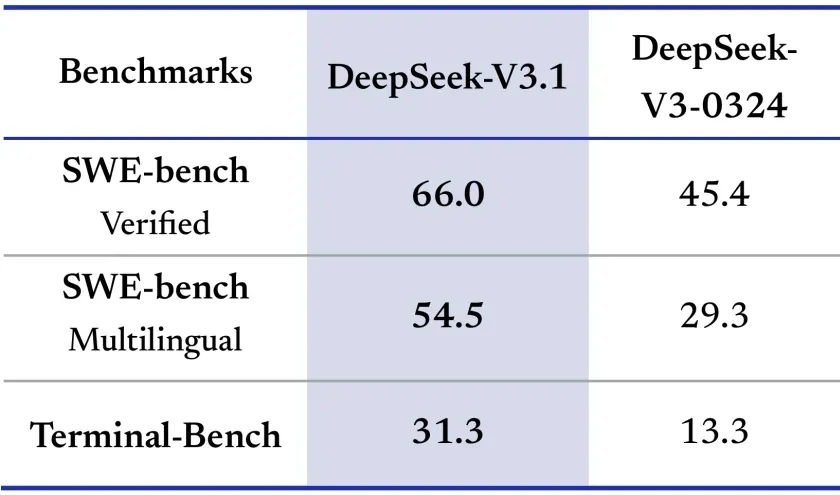
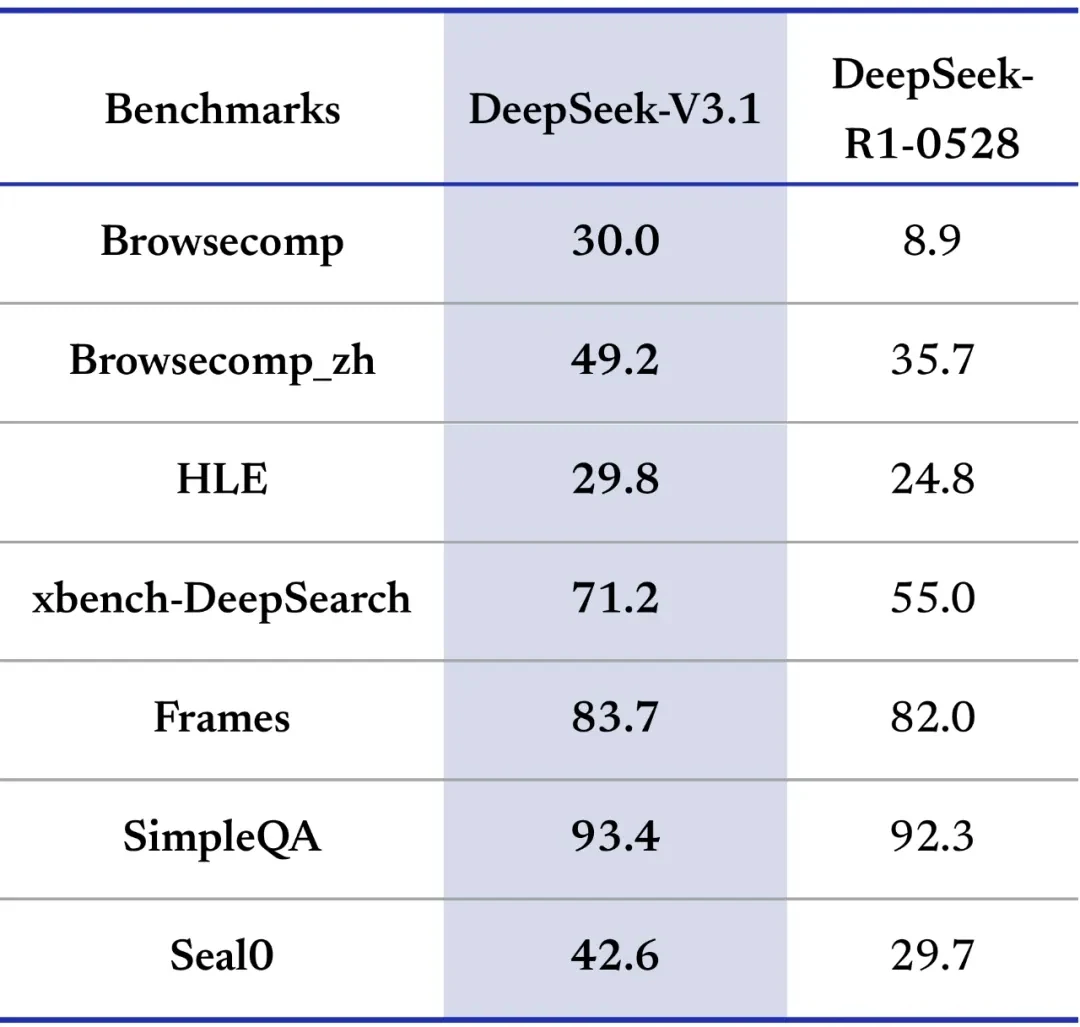
- Superior Benchmark Performance – Large gains on SWE-bench, Terminal-Bench, and xBench-DeepSearch, showing strong applied coding ability.
- Practical for Development – Excels at software debugging, terminal operations, and real-world engineering problem solving.
- Multilingual Support – Effective across English and multilingual coding benchmarks.
Reasoning Power
- Higher Thinking Efficiency – DeepSeek-V3.1-Think achieves answer quality comparable to DeepSeek-R1-0528 but responds more quickly.
- Broad Problem-Solving – Strong results across scientific, logical, and open-domain reasoning tasks.
- Extended Context Handling – Maintains high accuracy over very long inputs, ensuring reliability in complex workflows.
Why Use DeepSeek 3.1 in Codex
DeepSeek 3.1 on its own is already a capable model—but when paired with Codex, it becomes far more practical for daily development. Codex isn’t just a wrapper; it’s a terminal-native interface that makes large language models feel natural inside the command line, right where many developers prefer to work.
Codex as a Developer’s Companion
Unlike heavy IDE integrations or web dashboards, Codex is designed to be lightweight and fast. You can call DeepSeek 3.1 directly, test results instantly, and manage different API providers without leaving the terminal. For developers who want speed, focus, and direct control, this CLI approach is especially valuable.
Key Advantages of Using DeepSeek 3.1 in Codex
| Advantage | What It Means for Developers |
|---|---|
| Direct model access | Run prompts and see outputs immediately inside the terminal. |
| Automated workflows | Chain tasks—generate → test → refine—without extra tools. |
| Flexible integration | Switch between DeepSeek and other providers with minimal effort. |
| Lightweight setup | No bulky IDE plugins, just a simple CLI install. |
Benefits of Using DeepSeek 3.1 over Native Codex Models
Native Codex models work well for general-purpose coding, but DeepSeek 3.1 not only delivers strong coding and agent performance—it also offers a clear cost advantage that makes it stand out.
- Robust coding and agent performance – Combines strong results on coding benchmarks with reliable tool calling and multi-step planning, making it well-suited for both development and agent workflows.
- Cost advantage – DeepSeek 3.1 delivers these advanced capabilities at a much lower price point than native Codex options
Current pricing on Novita AI: 131072 Context, $0.27/1M input tokens, $1.0/1M output tokens
Real-World Scenarios
- Rapid prototyping – Generate a functional script in seconds and run it right away.
- Fast debugging – Iterate on SQL queries or code snippets with minimal overhead.
- Enterprise workflows – Combine high performance with cost savings in compliance-focused environments.
In short, Codex makes DeepSeek 3.1 not just a high-performing model, but an affordable, everyday tool for coding, reasoning, and agent-driven development.
How to Use DeepSeek 3.1 in Codex: Prerequisites Overview
To use DeepSeek 3.1 inside Codex, you’ll need three things in place:
- An API key for DeepSeek 3.1: Recommended to obtain from Novita AI, stored in a configuration file for seamless integration.
- The Codex CLI: Installed globally so you can call the agent directly from your terminal.
- A working environment: Node.js 18 or higher, plus npm for package management.
Once everything is prepared, you can link Codex with DeepSeek 3.1 and start experimenting. The setup is lightweight, taking only a few minutes.
How to Use DeepSeek 3.1 in Codex: Step-by-Step Guide
Step 1: Get Your API Key on Novita AI
Create a Novita AI account and generate an API key from the Novita AI platform. Then go to Key Management and select Add New Key.
This API Key acts as your access credential. Since it is only shown once, copy it immediately and save it in a secure place. It will be needed for the steps below.
Novita AI provides first-class Codex support for a range of state-of-the-art models, such as:
deepseek/deepseek-v3.1zai-org/glm-4.5qwen/qwen3-coder-480b-a35b-instructmoonshotai/kimi-k2-0905openai/gpt-oss-120bgoogle/gemma-3-12b-it
Step 2: Install Codex CLI
Node.js 18+ is required
node -vInstall via npm (Recommended)
npm install -g @openai/codexInstall via Homebrew (macOS)
brew install codexVerify Installation
codex --versionConfiguring DeepSeek 3.1 via Novita AI API
Create a Codex config file and set DeepSeek 3.1 as the default model.
- macOS/Linux:
~/.codex/config.toml - Windows:
%USERPROFILE%\.codex\config.toml
Basic Configuration Template
model = "deepseek/deepseek-v3.1"
model_provider = "novitaai"

[model_providers.novitaai]
name = "Novita AI"
base_url = "https://api.novita.ai/openai"
http_headers = {"Authorization" = "Bearer YOUR_NOVITA_API_KEY"}
wire_api = "chat"
Step3: Getting Started
Launch Codex CLI
codexBasic Usage Examples
Code Generation:
> Create a Python class for handling REST API responses with error handlingProject Analysis:
> Review this codebase and suggest improvements for performanceBug Fixing:
> Fix the authentication error in the login functionTesting:
> Generate comprehensive unit tests for the user service moduleWorking with Existing Projects
Navigate to your project directory before launching Codex CLI:
cd /path/to/your/project
codex
Codex CLI will automatically understand your project structure, read existing files, and maintain context about your codebase throughout the session.
Conclusion
DeepSeek 3.1 delivers reliable coding performance, efficient reasoning, and strong agent capabilities, while Codex provides a lightweight interface to run it seamlessly in the terminal. Together, they form a workflow that is quick to set up, easy to use, and adaptable for both everyday coding tasks and more complex agent-driven projects.
For developers, this pairing removes friction: the versatility of DeepSeek 3.1 combined with Codex’s streamlined CLI experience makes advanced model power accessible without leaving the terminal.
Frequently Asked Questions
What is DeepSeek 3.1?
DeepSeek 3.1 is a state-of-the-art large language model designed for reasoning, coding, and agent tasks, featuring hybrid thinking mode, smarter tool calling, and efficient long-context handling.
How do I connect DeepSeek 3.1 to Codex?
After installing Codex, you just need to get your API key from Novita AI and choose DeepSeek 3.1 as the model in Codex. The process is minimal and takes only a few minutes.
Why should I use DeepSeek 3.1 instead of native Codex models?
Because it combines strong coding and agent abilities with a much lower cost, making it both powerful and affordable.
Novita AI is an AI cloud platform that offers developers an easy way to deploy AI models using our simple API, while also providing the affordable and reliable GPU cloud for building and scaling.



