
Keyhighlights
Advanced Performance: Excels in math and coding benchmarks.
Open Source: Accessible for research, modification, and deployment.
Cost Efficiency: Offers performance comparable to OpenAI’s o1 at a fraction of the cost.
4 Free Ways: Online Platforms, Locally, API, AI Playgrounds
DeepSeek R1 is a cutting-edge reasoning model designed to rival OpenAI’s o1, excelling in complex tasks such as logical inference, mathematics, and programming. Its open-source nature and focus on advanced reasoning capabilities make it a highly valuable tool for developers and businesses. However, R1 is priced higher compared to DeepSeek V3. To help you get started, here are four free ways to explore and utilize DeepSeek R1.
Overview of Deepseek R1
DeepSeek-R1 is designed to tackle tasks requiring logical reasoning, advanced mathematics, and programming. It builds upon DeepSeek-R1-Zero by combining reinforcement learning with supervised fine-tuning to improve output clarity and coherence. DeepSeek-R1 achieves performance comparable to OpenAI-o1 across math, code, and reasoning tasks.
Get $20 credits and start a free trail on Deepseek R1 now!
Key Features
- Model Size: 671B parameters (37B active/token)
- Tokenizer: Enhanced tokenizer with self-reflection tags
- Supported Languages: Multilingual with cultural adaptation
- Multimodal: Text-only
- Context Window: 128K tokens
- Storage Formats: Q8/Q5 quantization support
- Architecture: Mixture of Experts (MoE) + RL-enhanced training pipeline
- Training Method: Built on V3 base with RL pipeline (SFT → RL → SFT → RL)
- Training Data: V3 base + RL optimization data
Performance Benchmarks
DeepSeek-R1 excels in math, achieving top scores of 97.3% on MATH-500 and 79.8% on AIME 2024, outperforming competitors. In coding, it stands out with 49.2% on SWE-bench Verified and 65.9% on Live Code Bench, showcasing its well-rounded expertise across both domains.
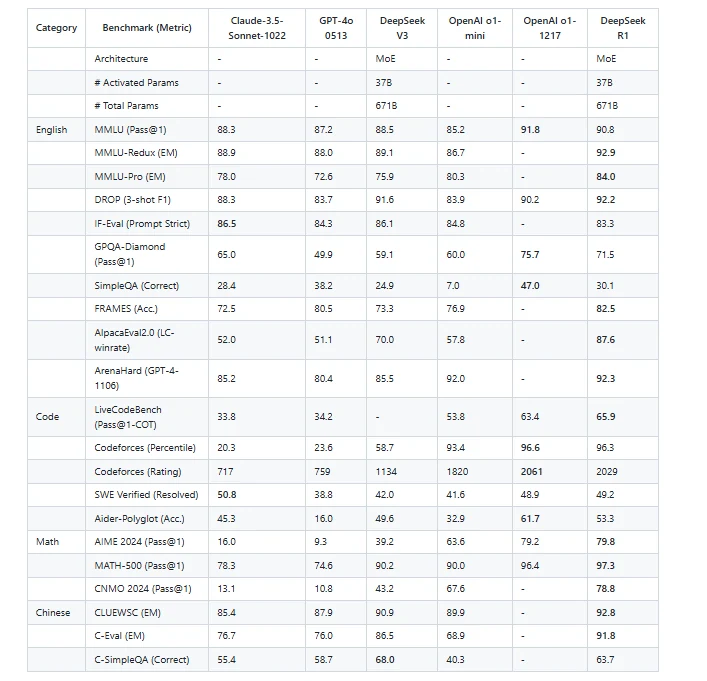
All models are evaluated with a maximum generation length of 32,768 tokens, using specific sampling parameters (temperature 0.6, top-p 0.95, and 64 responses per query) to calculate pass@1 for benchmarks.
DeepSeek-R1-Distill Models
Distillation, or knowledge distillation, is a machine learning method that transfers knowledge from a larger model to a smaller one. The aim is to develop a more efficient model that can achieve similar performance to the larger model.
DeepSeek has also released distilled versions of R1, offering smaller models that retain much of the original model’s capabilities while being more computationally efficient. These models are fine-tuned using data generated by DeepSeek-R1 and are available in sizes from 1.5 billion to 70 billion parameters.
- deepseek/deepseek-r1-distill-qwen-14b
- deepseek/deepseek-r1-distill-qwen-32b
- deepseek/deepseek-r1-distill-llama-70b
- deepseek/deepseek-r1-distill-llama-8b
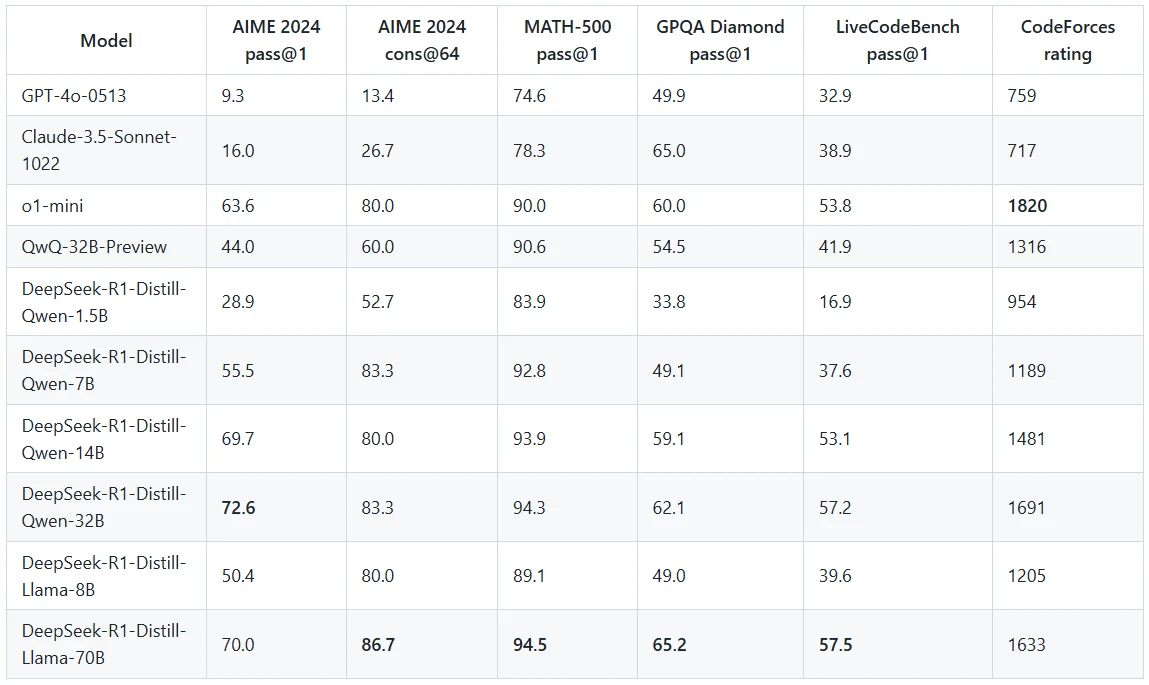
Source: DeepSeek’s release paper
1.Use Online Platforms to Access Deepseek R1 (e.g. Novita AI)
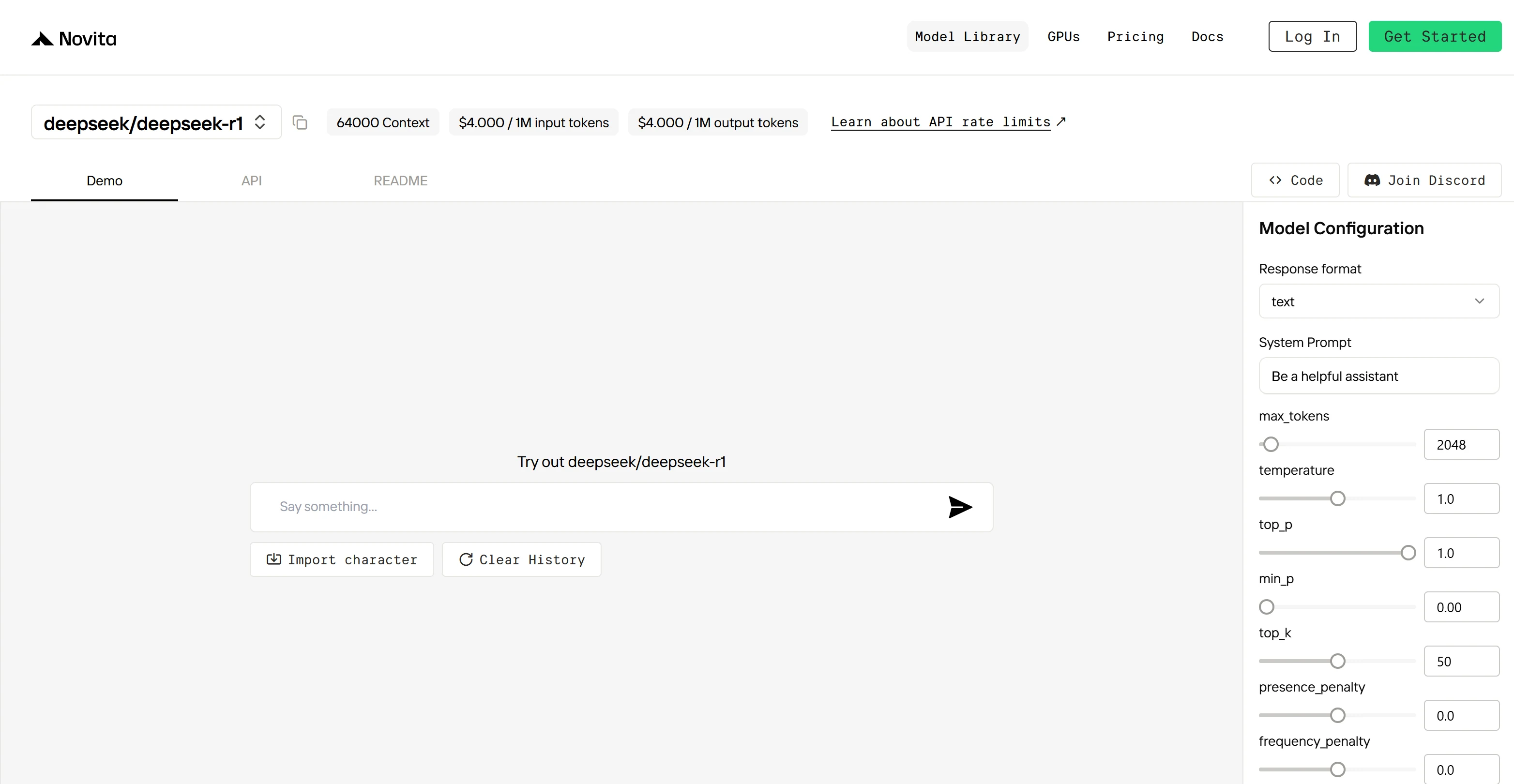
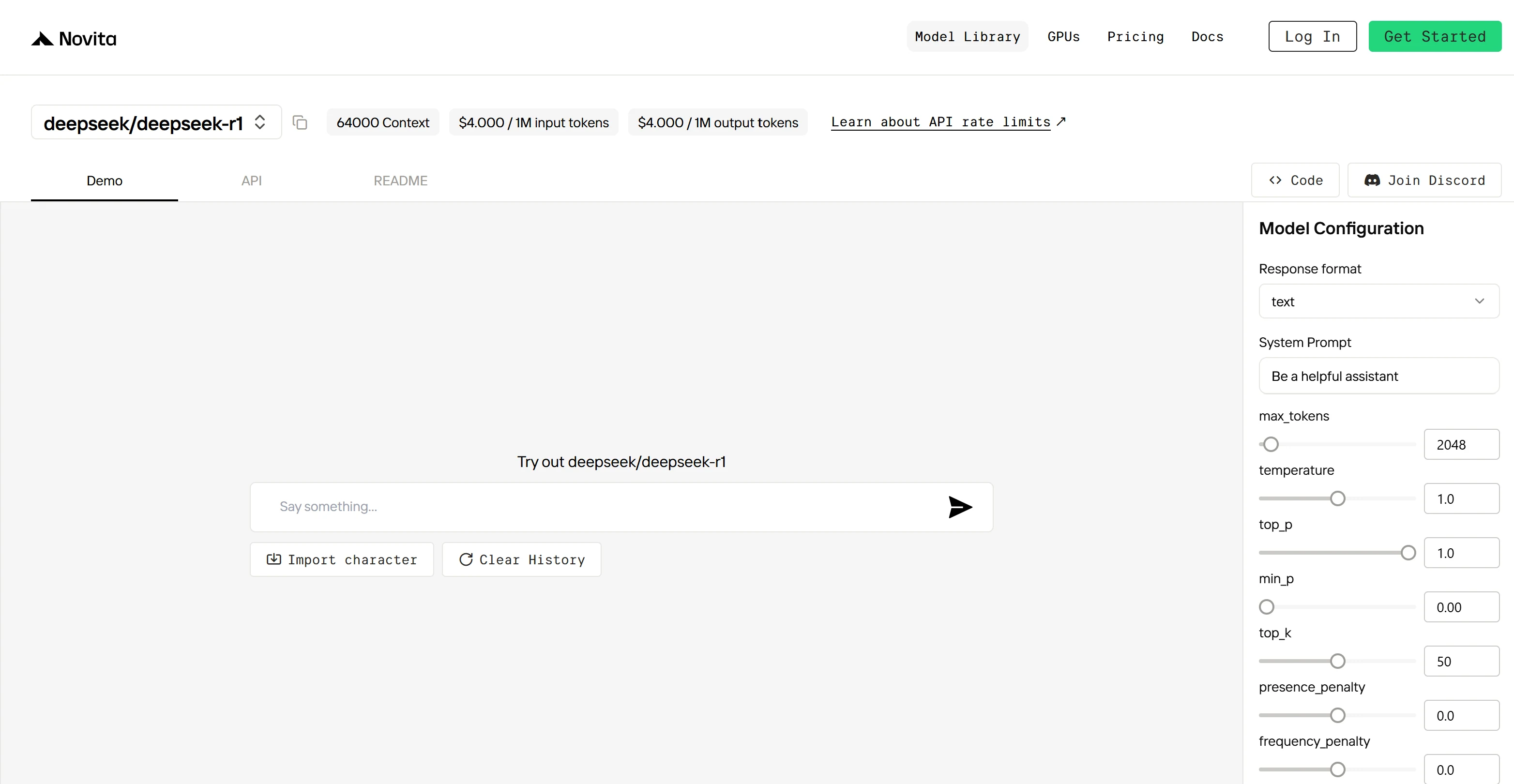
You can access DeepSeek-R1 through the Novita AI platform, which provides a straightforward way to interact with the model. To get started, simply go to the chat page and register. However, please note that the online platform does not support saving chat history from previous sessions.
Additionally, Novita AI offers a parameter adjustment panel, allowing you to customize settings such as max tokens, temperature, and more to suit your specific use case.
Get $20 credits at Novita AI now!
2.Run Deepseek R1 Locally
1. Install Ollama
- Visit the Ollama website, download and install the version for your OS.
2. Download DeepSeek-R1 Model
- Open your terminal and run (using the 7B parameter version as an example): bashCopy
ollama run deepseek-r1:7b(Wait for download completion; time depends on network speed.)
ollama run deepseek-r1:7b3. Verify & Run
- Verify Installation:
ollama list # Check if "deepseek-r1" appears in the list- Start the Model:
ollama run deepseek-r1:7b4. Usage Examples
- Ask a Query: bashCopy
>>> "Explain quantum computing in simple terms." - Generate Code: bashCopy
>>> "Write a Python function to calculate the Fibonacci sequence."
3.Access Free Deepseek R1 APIs (e.g. Novita AI)
Novita AI is an AI cloud platform that offers developers an easy way to deploy AI models using our simple API, while also providing the affordable and reliable GPU cloud for building and scaling.
Step 1: Log In and Access the Model Library
Log in to your account and click on the Model Library button.

Step 2: Choose Your Model
Browse through the available options and select the model that suits your needs.
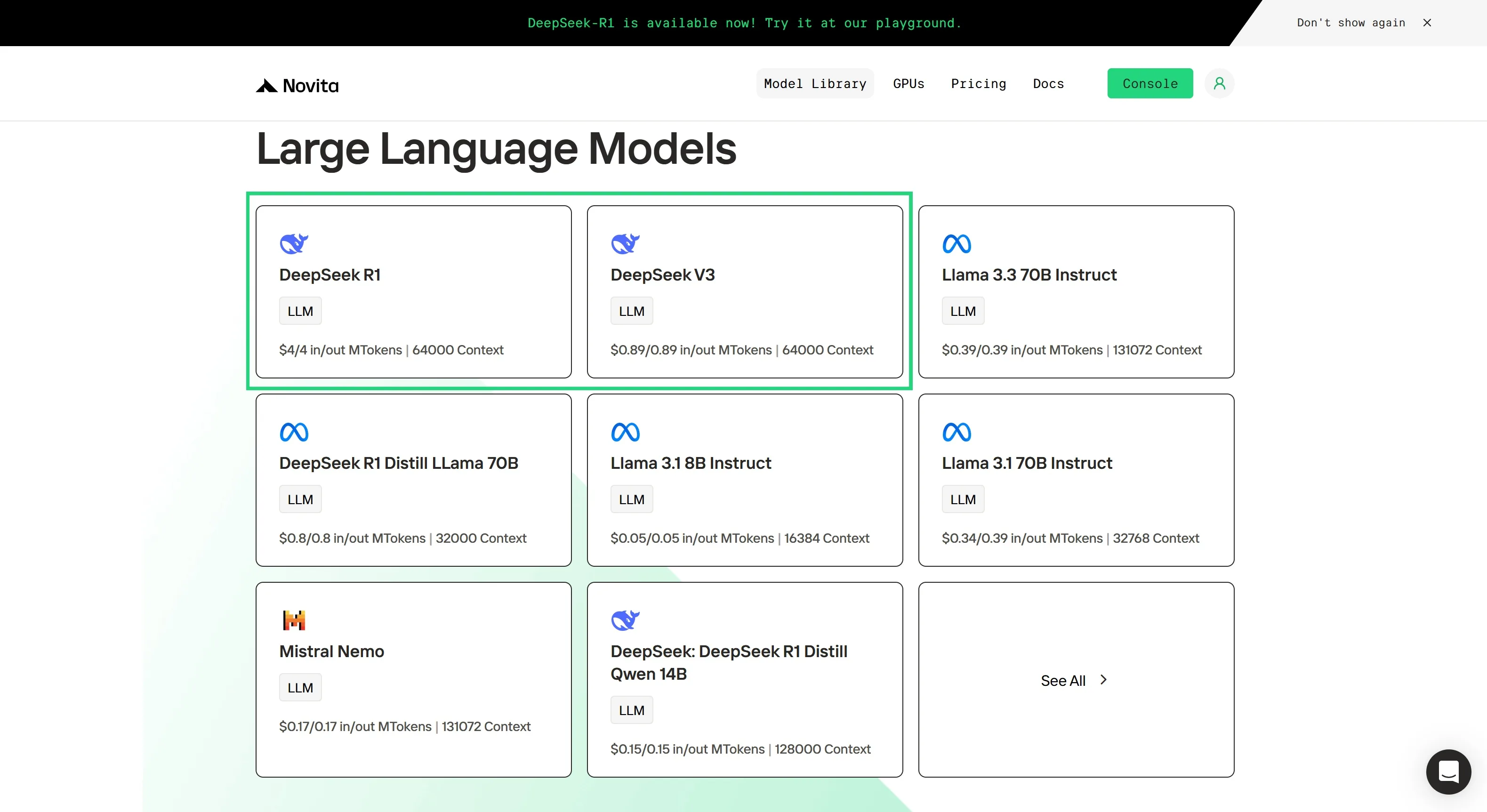
Step 3: Start Your Free Trial
Begin your free trial to explore the capabilities of the selected model.
Step 4: Get Your API Key
To authenticate with the API, we will provide you with a new API key. Entering the “Settings“ page, you can copy the API key as indicated in the image.

Step 5: Install the API
Install API using the package manager specific to your programming language.
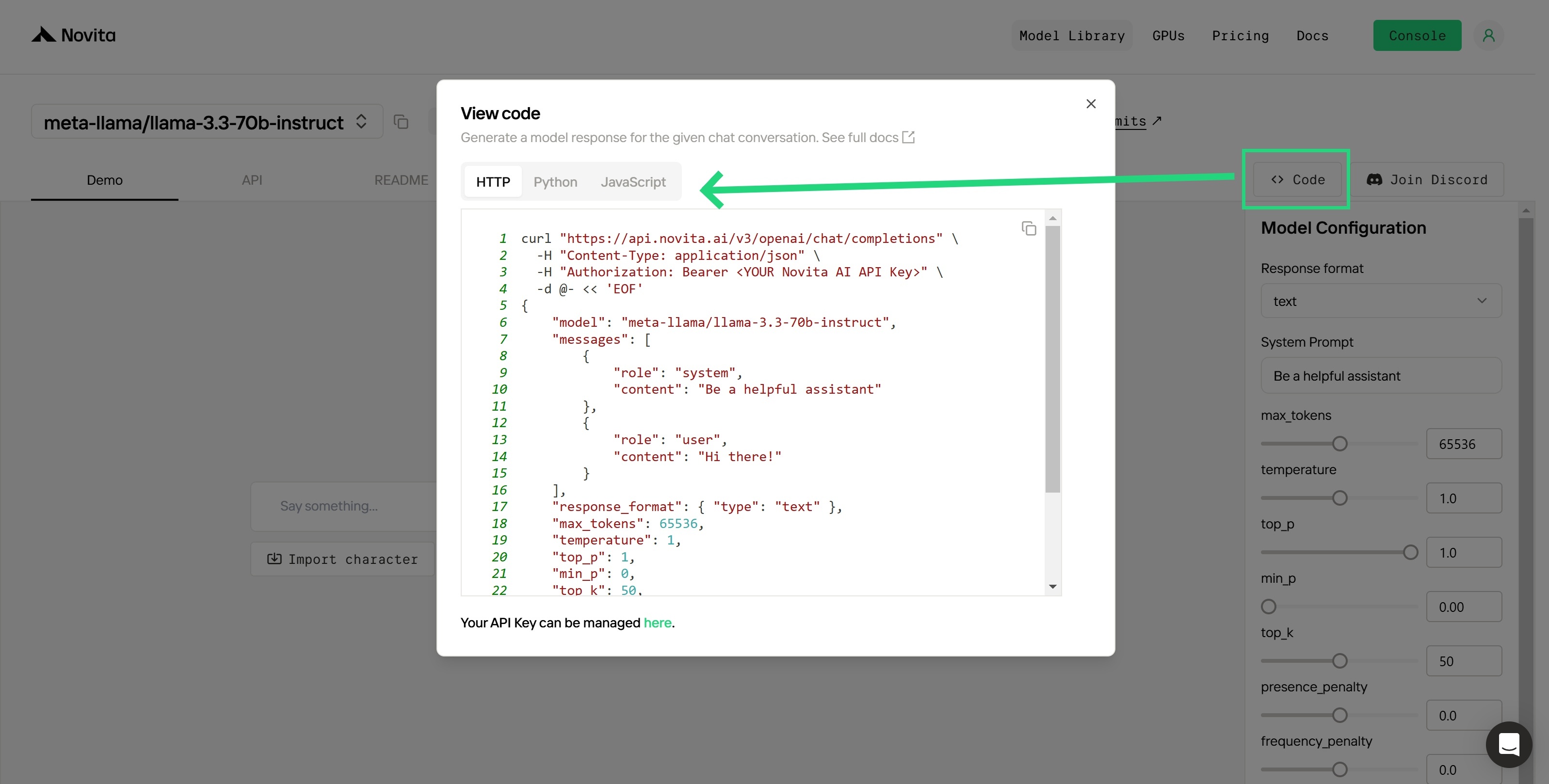
After installation, import the necessary libraries into your development environment. Initialize the API with your API key to start interacting with Novita AI LLM. This is an example of using chat completions API for python users.
from openai import OpenAI
client = OpenAI(
base_url="https://api.novita.ai/v3/openai",
api_key="<YOUR Novita AI API Key>",
)
model = "deepseek/deepseek_r1"
stream = True # or False
max_tokens = 2048
system_content = """Be a helpful assistant"""
temperature = 1
top_p = 1
min_p = 0
top_k = 50
presence_penalty = 0
frequency_penalty = 0
repetition_penalty = 1
response_format = { "type": "text" }
chat_completion_res = client.chat.completions.create(
model=model,
messages=[
{
"role": "system",
"content": system_content,
},
{
"role": "user",
"content": "Hi there!",
}
],
stream=stream,
max_tokens=max_tokens,
temperature=temperature,
top_p=top_p,
presence_penalty=presence_penalty,
frequency_penalty=frequency_penalty,
response_format=response_format,
extra_body={
"top_k": top_k,
"repetition_penalty": repetition_penalty,
"min_p": min_p
}
)
if stream:
for chunk in chat_completion_res:
print(chunk.choices[0].delta.content or "", end="")
else:
print(chat_completion_res.choices[0].message.content)
4.Experiment Deepseek R1 on Hugging Face
Step 1: Configure API Keys
- Navigate to your user account settings to manage your API keys.
- Add your custom API keys of Novita AI to the Hugging Face.
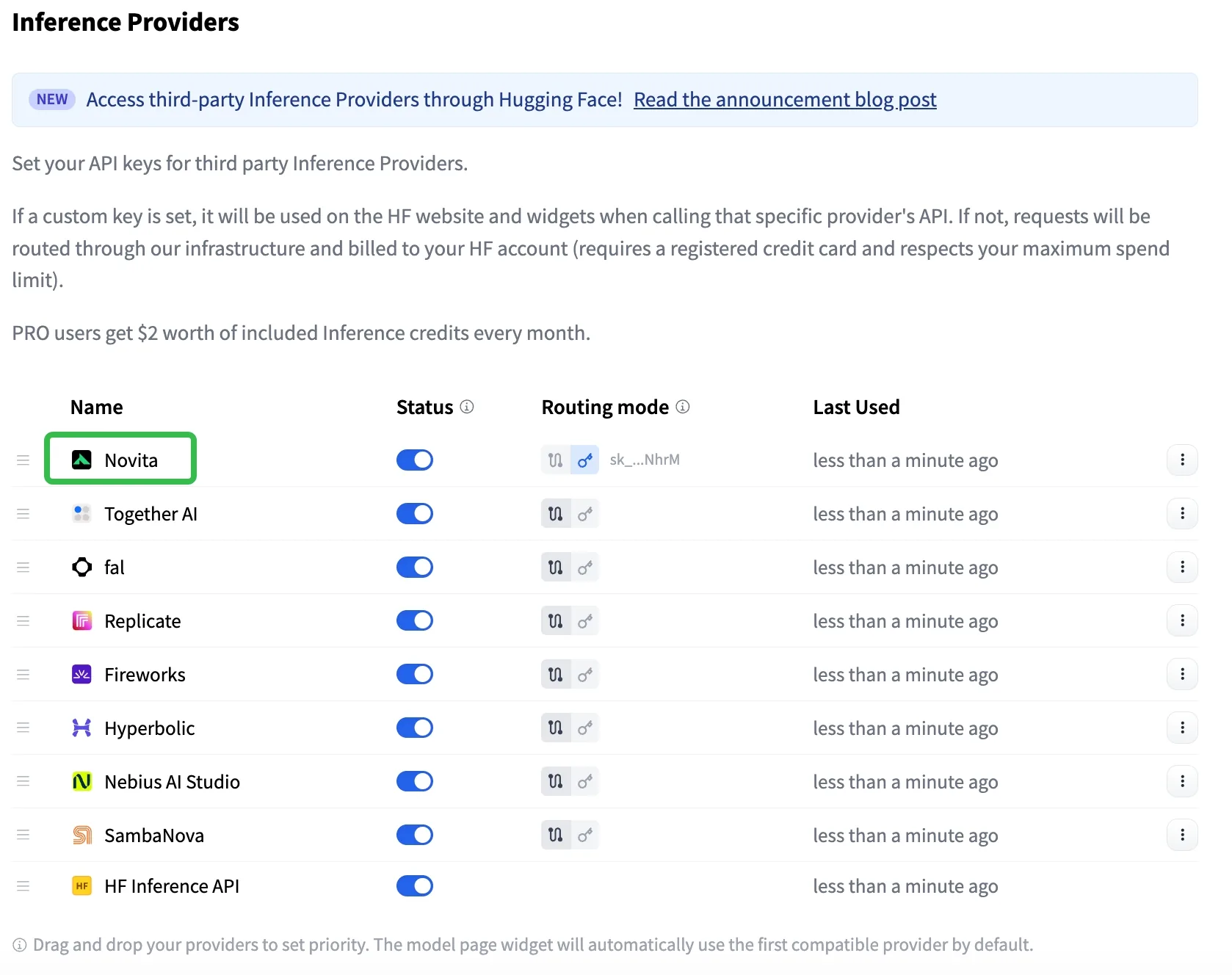
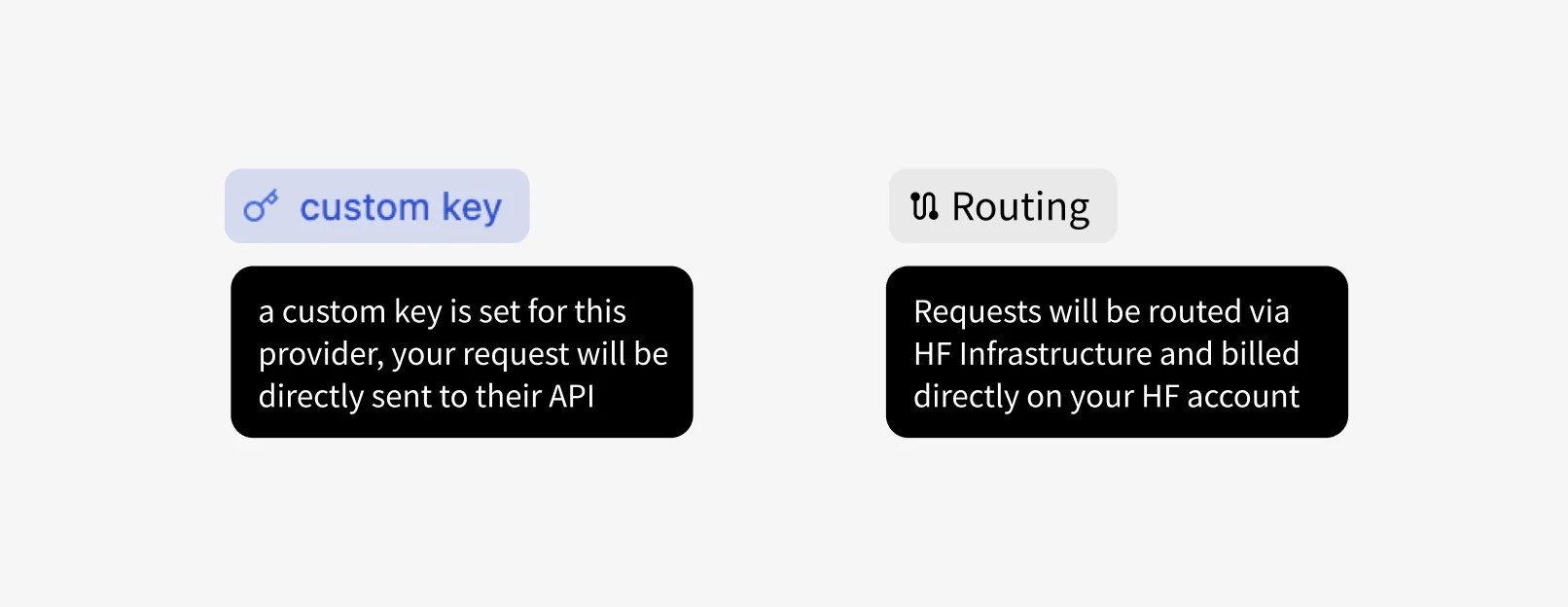
Step 2: Choose Inference API Modes
- Custom Key Mode: Calls are sent directly to the inference provider, utilizing your own API key.
- HF-Routed Mode: In this mode, no provider token is required. Charges are applied to your Hugging Face account instead of the provider’s account.
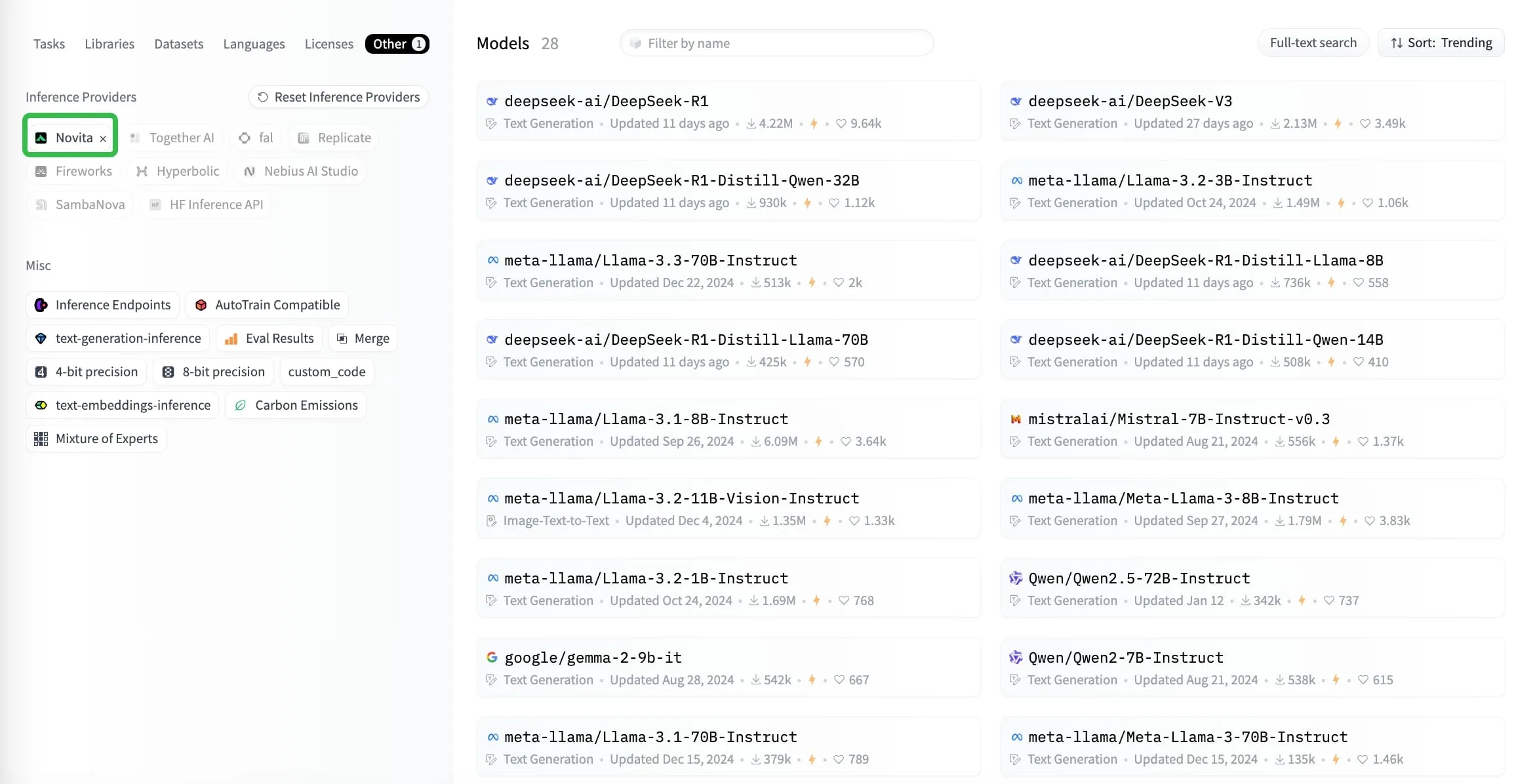
Step 3: Explore Compatible Providers on Model Pages
- Model pages display third-party inference providers compatible with the selected model (the ones that are compatible with the current model, sorted by user preference).
Experimenting on AI Playgrounds is an excellent way to explore the capabilities of Llama 3 models without the need for advanced technical skills or setup. Whether you’re using HuggingChat for creative projects, Meta AI Web for seamless integration into daily apps, or Perplexity Labs for extended experiments, these platforms make cutting-edge AI accessible and practical for users of all levels.
Frequently Asked Question
Is DeepSeek R1 better than OpenAI’s o1?
DeepSeek R1 offers comparable performance, especially in reasoning tasks, and is open source and more cost-effective.
What tasks are best suited for DeepSeek R1?
Reasoning-intensive tasks like math solving, coding, and industry-specific applications.
Can DeepSeek-R1 be fine-tuned for specific tasks or industries?
Yes, DeepSeek-R1 can be fine-tuned for specific tasks, provided you have the necessary computational resources and data.
Novita AI is the All-in-one cloud platform that empowers your AI ambitions. Integrated APIs, serverless, GPU Instance — the cost-effective tools you need. Eliminate infrastructure, start free, and make your AI vision a reality.



