随着AI行业逐渐认识到大语言模型(LLM)的推理能力,我们决定赋予其更强的代理能力,让它们能够执行更复杂的操作。这类大语言模型被称为智能体(agents)。
由此,单智能体系统应运而生。但很快人们发现,让单个智能体承担多项任务并不是构建代理系统的最优方案。更好的做法是使用多个智能体,每个智能体负责执行专属任务,协同完成用户定义的目标。
然而,新的问题也随之出现:管理多个智能体远比管理单个智能体复杂。为解决这一问题,市面上出现了多个多智能体系统框架,其中最具潜力的之一便是CrewAI。
CrewAI能够帮助开发者构建多智能体系统。通过CrewAI,你可以管理智能体、任务以及整个工作流。在本文中,我们将结合CrewAI与Novita平台提供的丰富大语言模型,构建实用且智能的多智能体系统。
什么是多智能体系统?我们为什么需要它?
自大语言模型(LLM)问世以来,人们探索了多种方法提升其自主性。其中最流行的方案之一是论文《语言模型中推理与行动的协同》中提出的ReAct模式。LangChain等框架很快实现了ReAct,为LLM赋予了代理能力。
AutoGPT等工具则更进一步,构建了更强大的AI智能体,仅通过文本提示即可执行用户所需的几乎所有任务。尽管这些单智能体系统展现出巨大潜力,但也存在诸多局限:单个智能体通常依赖单一LLM处理所有任务,由此会引发几个关键问题:
- 上下文限制:单个智能体需要使用同一个上下文窗口管理所有任务。随着工作流推进,智能体最终会耗尽上下文空间。
- 复杂度升高:随着任务量增加,单个智能体的推理难度会大幅提升,更容易出现幻觉或执行失败。
- 单点故障:单个智能体负责所有任务,没有冗余备份。如果它无法处理某项任务,整个系统就会完全失效。
- 缺乏并行能力:任务只能串行处理,没有内置支持让智能体并行工作以提升效率。
多智能体系统正是为解决这些痛点而生。与依赖单个智能体处理多项任务不同,多智能体系统将职责分配给多个协同工作的智能体。由于每个智能体只需管理自己的工作流部分,整体上下文负载降低,从而避免了上下文长度超限等问题。
多智能体架构还支持针对不同场景使用不同模型:部分模型可针对特定任务微调,部分可搭配预设提示词,部分可配备专用工具,还有部分可针对推理场景优化。这种多样性不仅提升了系统性能,还支持并行处理,让多智能体系统比单智能体系统速度更快、效率更高。
构建多智能体系统需要两个核心组件:提供大语言模型的模型供应商,以及管理整个代理工作流的多智能体框架。在本文中,我们将以Novita作为模型供应商,CrewAI作为首选框架。
为什么你需要CrewAI这类框架
构建多智能体系统的复杂度远高于构建单智能体系统。例如,你可以通过函数调用为Novita上的任意模型配备工具,轻松将其转化为智能体。但一旦开始连接多个智能体,复杂度会急剧上升:你需要管理多个动态组件,包括:
- 通信与任务委派:你需要协调智能体之间的通信方式,以及任务在智能体之间的流转规则。
- 工具管理:如果没有框架,你需要手动管理工具定义和JSON schema,这很快就会变得混乱不堪。
- 代理架构与模式:多智能体框架通常内置了对成熟代理模式的支持。如果从零开始构建,你需要持续跟进这些不断演进的模式并自行实现。
- 可观测性:如果没有框架,你还需要自行搭建工具来监控、调试和可视化智能体的交互与运行表现。
多智能体框架可以帮助管理所有这些复杂度。在本文中,我们将选择CrewAI作为我们的框架。相比其他框架,CrewAI有多重优势:它以简洁性著称,使用直观的概念对多智能体系统进行建模;它成熟且经过充分验证;同时能为开发者提供出色的使用体验。
了解CrewAI的核心概念
要使用CrewAI构建多智能体系统,你需要熟悉该框架引入的几个核心概念。以下是本文将会用到的主要概念的简要介绍:
- 智能体(Agents)
- 任务(Tasks)
- 团队(Crews)
- 流程(Processes)
- 工作流(Flows)
智能体
智能体是CrewAI的核心,代表由LLM驱动的实际AI工作者。CrewAI中的每个智能体都由三个要素定义:角色、引导其决策的目标,以及塑造其个性的背景故事。这些要素都以发送给LLM的文本提示词形式呈现。智能体还可以配备工具,供其选择执行特定操作。CrewAI中智能体的核心目标是完成分配的任务。
任务
任务定义了需要完成的工作。在CrewAI中,你可以创建任务,既可以直接将其分配给特定智能体,也可以让符合任务要求的智能体主动认领。每个任务通常包含清晰的描述、预期输出,以及其他相关参数,例如可选的负责处理该任务的智能体。
团队
这是CrewAI的核心概念。在CrewAI中,一组协同工作以完成任务的智能体被称为一个团队(crew)。团队同时定义了其中智能体的工作流。
流程
流程是预定义的工作流,用于指导团队如何执行任务。CrewAI支持两种主要流程类型:
- 顺序流程:团队中的智能体一次处理一个任务。
- 分层流程:在此流程中,一个智能体担任管理者,负责协调其他智能体并按需委派任务。
工作流(Flows)
流程是预定义的工作流,而CrewAI的工作流(Flows)则赋予开发者设计自定义智能体工作流的灵活性。一个工作流可以包含智能体、任务,甚至整个团队,支持更复杂的交互逻辑。
使用Novita构建团队
了解了CrewAI的核心概念后,我们接下来逐步演示如何构建一个团队。在本例中,我们将创建一个旨在帮助用户快速构建最小可行产品(MVP)的团队,该团队由三个专业智能体组成:
- 架构师:定义软件结构并明确MVP范围。该智能体由Novita平台托管的moonshotai/kimi-k2-instruct模型驱动。
- 编码员:实现架构师的方案并编写实际代码。它使用FileWriter工具创建所有项目文件,运行在Novita的qwen/qwen3-coder-480b-a35b-instruct模型上。
- 审核员:分析编码员生成的代码,并通过差异对比形式提出改进建议。与架构师相同,它也使用moonshotai/kimi-k2-instruct模型。
我们的团队将采用顺序流程运行。
安装与配置
方案确定后,我们首先开始配置环境。第一步是安装CrewAI及其内置工具支持:
pip install 'crewai[tools]'
接下来,你需要获取Novita API密钥。获取后,将其作为NOVITA_API_KEY添加到环境变量中:
export NOVITA_API_KEY=your_api_key_here
完成上述步骤后,我们就可以开始构建团队了。
创建大语言模型实例
首先导入所需的依赖项:
import os
from crewai import Agent, Task, Crew, Process, LLM
from crewai_tools import FileWriterTool
接下来,我们创建FileWriterTool的实例,编码员智能体将使用它向磁盘写入文件:
file_writer_tool = FileWriterTool()
工具准备就绪后,现在可以为每个智能体初始化对应的大语言模型:
architect_llm = LLM(
   model="novita/moonshotai/kimi-k2-instruct",
   temperature=0.5,
   api_base="https://api.novita.ai/v3/openai",
   api_key=os.environ['NOVITA_API_KEY']
)

coder_llm = LLM(
   model="novita/qwen/qwen3-coder-480b-a35b-instruct",
   temperature=0.4,
   api_base="https://api.novita.ai/v3/openai",
   api_key=os.environ['NOVITA_API_KEY']
)

reviewer_llm = LLM(
   model="novita/moonshotai/kimi-k2-instruct",
   temperature=0.5,
   api_base="https://api.novita.ai/v3/openai",
   api_key=os.environ['NOVITA_API_KEY']
)
这三个LLM实例对应我们方案中规划的模型,均托管在Novita平台,通过CrewAI访问。底层CrewAI使用LiteLLM连接和管理这些模型。
定义智能体
现在创建三个智能体:
architect = Agent(
   role="Software Architect for MVP Projects",
   goal="Define a basic system structure and simple feature set to guide MVP development",
   backstory="""You specialize in quickly outlining software architectures and project scopes for
minimum viable products. Your plans help guide coders with enough structure to get started while staying lean.""",
   llm=architect_llm,
   verbose=True
)

coder = Agent(
   role="Developer for MVP Projects",
   goal="Implement the MVP using simple, clear code, and write all necessary code files using the FileWriter tool",
   backstory="""You're a practical developer focused on speed. You prioritize working code over polish.
Simulate any runtime behavior if needed, and make sure to keep code clear and modular.""",
   llm=coder_llm,
   verbose=True,
   tools=[file_writer_tool]
)

reviewer = Agent(
   role="Code Reviewer for MVP Projects",
   goal="Read the code files, provide helpful feedback, and write improvements as diffs into a markdown file",
   backstory="""You're a fast but thoughtful reviewer. You check code for clarity, obvious bugs, and
provide improvements as diffs. Instead of modifying code directly, you
save your suggestions in a markdown file
for easy inspection.""",
   llm=reviewer_llm,
   verbose=True,
   tools=[file_writer_tool]
)
每个智能体都被分配了特定的角色、目标和背景故事。
定义任务
接下来为智能体创建任务:
architect_task = Task(
   description="""
Create a basic plan for building a simple MVP version of a {project}.
Focus on the core features, basic file structure, and tech stack.
Make the structure minimal but enough to get a working demo.
""",
   expected_output="""
A simple architectural overview with:
- Project goals
- Key components or files
- Basic data flow or structure
""",
   agent=architect,
   output_file="architecture.md"
)

coder_task = Task(
   description="""
Based on the architect's plan, implement the core parts of the {project} MVP.
Keep it lean and functional. Use the FileWriter tool to save all your code files.
If you need to simulate behavior (e.g. without a real interpreter), do so with clear comments or mocked logic.
""",
   expected_output="""
Working code files saved using the FileWriter tool that implement the key features defined in the plan.
Code should be readable and logically structured.
""",
   agent=coder,
   context=[architect_task]
)

review_task = Task(
   description="""
Review the code files created for the {project} MVP. Read each file using the FileRead tool.
Suggest improvements using diffs. Do not modify the original code files directly.
Instead, save all your suggested diffs into a markdown file using the FileWriter tool.
""",
   expected_output="""
A markdown file containing diff-style suggestions for each file reviewed.
""",
   agent=reviewer,
   context=[coder_task],
   output_file="code_review_diffs.md"
)
创建团队
定义好智能体、对应的大语言模型以及任务后,现在我们将所有组件整合起来,组装成团队:
code_crew = Crew(
   agents=[architect, coder, reviewer],
   tasks=[architect_task, coder_task, review_task],
   process=Process.sequential,
   verbose=True
)
所有配置完成后,现在可以运行团队了:
if __name__ == "__main__":
   code_crew.kickoff(inputs={"project": "Todo App"})
现在我们已经有了一个功能完整的团队,能够根据用户定义的规格生成MVP项目。在上面的示例中,我们要求团队构建一个简单的待办事项应用。
其工作原理如下:
- 架构师智能体首先设计软件架构,并将方案保存到名为architecture.md的文件中。
- 编码员智能体随后获取架构师的输出,创建必要的目录和代码文件,实现待办事项应用。
- 最后,审核员智能体会审查生成的代码,通过差异对比形式提出改进建议,并将反馈保存到名为code_review_diffs.md的文件中。
这种基于团队的开发工作流功能强大且模块化,但也有一些局限:
- 硬编码提示词:将提示词直接嵌入代码后,后续的维护和优化难度会大幅提升。
- 结构分散:智能体和任务以内联方式定义,随着项目规模扩大,脚本会变得混乱且难以导航。
在下一节中,我们将介绍如何通过将智能体定义和任务提示词外置到YAML文件来优化结构。
构建基于类的团队
CrewAI支持创建基于类的团队。我们接下来将之前的代码更新为这种结构。首先创建一个名为config的文件夹,该文件夹将包含定义智能体和任务配置的YAML文件。
我们首先创建名为agents.yaml的文件,作为智能体配置文件:
architect:
 role: >
   Software Architect for MVP Projects
 goal: >
   Define a basic system structure and simple feature set to guide MVP development
 backstory: >
   You specialize in quickly outlining software architectures and project scopes for minimum viable products.
  Your plans help guide coders with enough structure to get started while staying lean.

coder:
 role: >
   Developer for MVP Projects
 goal: >
   Implement the MVP using simple, clear code, and write all necessary code files using the FileWriter tool
 backstory: >
   You're a practical developer focused on speed. You prioritize working code over polish.
  Simulate any runtime behavior if needed, and make sure to keep code clear and modular.

reviewer:
 role: >
   Code Reviewer for MVP Projects
 goal: >
   Read the code files, provide helpful feedback, and write improvements as diffs into a markdown file
 backstory: >
   You're a fast but thoughtful reviewer. You check code for clarity, obvious bugs, and provide improvements
  as diffs. Instead of modifying code directly, you save your suggestions in a markdown file for easy inspection.
该文件定义了每个智能体的角色、目标和背景故事。
接下来,我们创建tasks.yaml文件来存储任务配置:
请将所有建议的差异内容通过FileWriter工具保存到Markdown文件中。
architect_task:
 description: >
   Create a basic plan for building a simple MVP version of a {project}.
  Focus on the core features, basic file structure, and tech stack.
  Make the structure minimal but enough to get a working demo.
 expected_output: >
   A simple architectural overview with:
  - Project goals
  - Key components or files
  - Basic data flow or structure
 agent: architect
 output_file: architecture.md

coder_task:
 description: >
   Based on the architect's plan, implement the core parts of the {project} MVP.
  Keep it lean and functional. Use the FileWriter tool to save all your code files.
  If you need to simulate behavior (e.g. without a real interpreter), do so with clear comments or mocked logic.
 expected_output: >
   Working code files saved using the FileWriter tool that implement the key features defined in the plan.
  Code should be readable and logically structured.
 agent: coder
 context:
   - architect_task

review_task:
 description: >
   Review the code files created for the {project} MVP. Read each file using the FileRead tool.
  Suggest improvements using diffs. Do not modify the original code files directly.
  Instead, save all your suggested diffs into a markdown file using the FileWriter tool.
 expected_output: >
   A markdown file containing diff-style suggestions for each file reviewed.
 agent: reviewer
 context:
   - coder_task
 output_file: code_review_diffs.md
接下来,我们创建基于类的团队。为此,我们需要定义一个类,并使用CrewAI提供的@CrewBase装饰器对其进行装饰:
@CrewBase
class CodeCrew():
   """Three-agent code crew: architect, coder, reviewer"""

   @agent
   def architect(self) -> Agent:
       pass

   @agent
   def coder(self) -> Agent:
       pass

   @agent
   def reviewer(self) -> Agent:
       pass

   @task
   def architect_task(self) -> Task:
       pass

   @task
   def code_task(self) -> Task:
       pass

   @task
   def review_task(self) -> Task:
       pass

   @crew
   def crew(self) -> Crew:
       pass
在这个结构中:
- @agent装饰器用于定义生成智能体的方法。
- @task装饰器用于标记生成任务的方法。
- @crew装饰器用于指定组装整个团队的方法。
现在,我们来看完整的实现代码:
import os
from crewai import Agent, Crew, Process, Task, LLM
from crewai.project import CrewBase, agent, crew, task
from crewai.agents.agent_builder.base_agent import BaseAgent
from typing import List

from crewai_tools import FileWriterTool

# Instantiate tool
file_writer_tool = FileWriterTool()

@CrewBase
class CodeCrew():

   agents: List[BaseAgent]
   tasks: List[Task]

   agents_config = 'config/agents.yaml'
   tasks_config = 'config/tasks.yaml'

   @agent
   def architect(self) -> Agent:
       llm = LLM(
           model="novita/moonshotai/kimi-k2-instruct",
           temperature=0.5,
           api_base="https://api.novita.ai/v3/openai",
           api_key=os.environ['NOVITA_API_KEY']
       )
       return Agent(
           config=self.agents_config['architect'],
           llm=llm,
           verbose=True
       )

   @agent
   def coder(self) -> Agent:
       llm = LLM(
           model="novita/qwen/qwen3-coder-480b-a35b-instruct",
           temperature=0.4,
           api_base="https://api.novita.ai/v3/openai",
           api_key=os.environ['NOVITA_API_KEY']
       )
       return Agent(
           config=self.agents_config['coder'],
           llm=llm,
           verbose=True,
           tools=[file_writer_tool]
       )

   @agent
   def reviewer(self) -> Agent:
       llm = LLM(
           model="novita/moonshotai/kimi-k2-instruct",
           temperature=0.5,
           api_base="https://api.novita.ai/v3/openai",
           api_key=os.environ['NOVITA_API_KEY']
       )
       return Agent(
           config=self.agents_config['reviewer'],
           llm=llm,
           verbose=True,
       )

   @task
   def architect_task(self) -> Task:
       return Task(config=self.tasks_config['architect_task'])

   @task
   def coder_task(self) -> Task:
       return Task(config=self.tasks_config['coder_task'])

   @task
   def review_task(self) -> Task:
       return Task(config=self.tasks_config['review_task'])

   @crew
   def crew(self) -> Crew:
       return Crew(
           agents=self.agents,
           tasks=self.tasks,
           process=Process.sequential,
           verbose=True
       )
这段代码定义了所有必要的方法,包含智能体和任务的属性,同时指定了配置文件路径,供智能体和任务方法加载各自配置使用。
现在,你可以将以下代码添加到脚本中运行团队:
def main():
   code_crew = CodeCrew()
   code_crew.crew().kickoff(inputs={"project": "Todo App"})
if __name__ == '__main__':
   main()
使用Novita构建工作流(Flows)
之前我们构建了一个采用顺序流程的团队,现在我们来探索如何构建遵循自定义工作流的工作流(Flow)。
我们的工作流设计
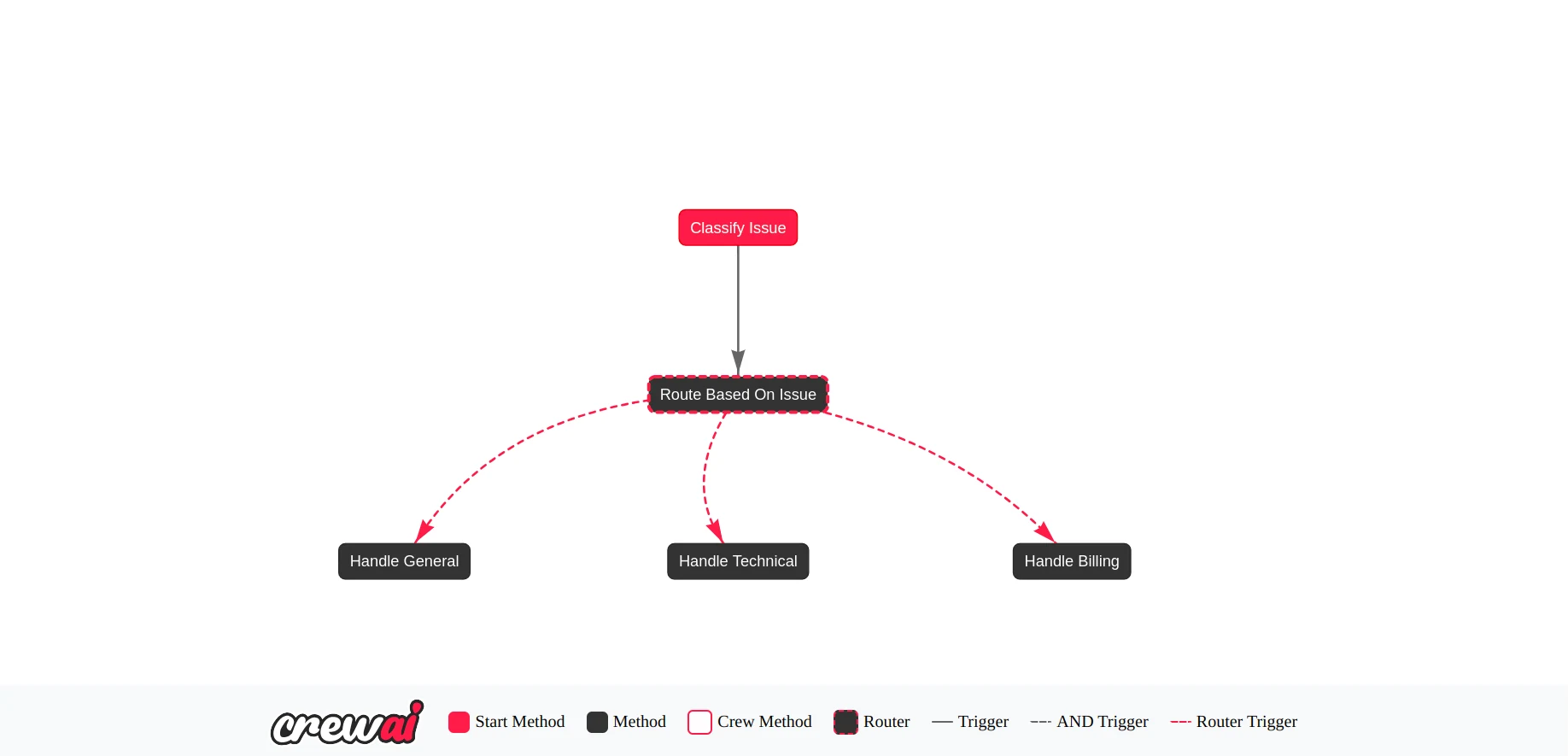
我们想要设计一个客户支持多智能体系统,由一个主导智能体负责分类客户问题,系统根据分类结果判断哪个专业智能体最适合处理该问题。该架构包含四个智能体:
- 客户智能体:这是主导智能体,负责接收客户问题并将其分类为以下三类之一:账单类、技术类或通用类。
- 账单智能体:处理所有与账单相关的问题。
- 技术智能体:处理技术类问题。
- 通用智能体:处理不属于上述类别的任何问题。
定义工作流状态
CrewAI中的工作流具有共享状态,该状态对工作流内的所有智能体和团队都可见。对于我们的客户支持工作流,状态包含问题标签和用户查询内容。
我们首先导入所需的模块并定义状态:
import json
import os
from typing import Literal, Dict, Any
from pydantic import BaseModel, ValidationError
from crewai import Agent, LLM
from crewai.flow.flow import Flow, start, router, listen

# Define the flow state
class SupportState(BaseModel):
   issue: Literal["billing", "technical", "general"] = "general"
   message: str = ""
创建工作流
CrewAI中的工作流基于图结构,采用事件驱动系统处理节点之间的转换。要创建我们的工作流,首先需要一个用于分类问题的节点,随后是一个路由器节点,根据分类结果决定将请求路由到哪个处理节点。
class CustomerSupportFlow(Flow[SupportState]):

   @start()
   def classify_issue(self):
       pass

   @router(classify_issue)
   def route_based_on_issue(self) -> str:
       print(f"📨 Routing to agent for issue type: {self.state.issue}")
       if self.state.issue == "billing":
           return "billing"
       if self.state.issue == "technical":
           return "technical"
       else:
           return "general"

   @listen("billing")
   def handle_billing(self):
       pass

   @listen("technical")
   def handle_technical(self):
       pass

   @listen("general")
   def handle_general(self):
       pass
使用@start()装饰的方法是工作流的入口点,本例中负责问题分类。使用@router()装饰的方法会在classify_issue之后执行,用于决定将请求路由到哪个智能体。其他方法采用事件驱动机制,在收到路由请求时做出响应。
实现工作流方法
现在实现每个方法,并为每个方法分配对应的智能体:
class CustomerSupportFlow(Flow[SupportState]):

   @start()
   def classify_issue(self) -> Dict[str, Any]:
       intake_agent = Agent(
           role="User Intake Agent",
           goal="Classify user support issue and summarize the message",
           backstory="You classify the user query into billing, technical, or general categories.",
           llm=LLM(
               model="novita/qwen/qwen2.5-vl-72b-instruct",
               temperature=0.3,
               api_base="https://api.novita.ai/v3/openai",
               api_key=os.environ["NOVITA_API_KEY"]
           ),
           verbose=True
       )

       prompt = f"""
           A user submitted this message: "{self.state.message}"

           Your task:
           1. Identify whether the issue is "billing", "technical", or "general".
           2. Rephrase or extract the message clearly.

           Respond in valid JSON format like the example below:

           {{
               "issue": "billing",
               "message": "The user has been charged twice for their subscription and is requesting a refund."
           }}
       """

       output = intake_agent.kickoff(prompt, response_format=SupportState)

       try:
           # Parse the JSON string
           print(output.raw)
           parsed_json = json.loads(output.raw)

           # Validate with Pydantic
           validated = SupportState(**parsed_json)

           # Save to state
           self.state.issue = validated.issue
           self.state.message = validated.message

       except (json.JSONDecodeError, ValidationError) as e:
           print("❌ Failed to parse or validate response:", e)
           self.state.issue = "general"

   @router(classify_issue)
   def route_based_on_issue(self) -> str:
       print(f"📨 Routing to agent for issue type: {self.state.issue}")
       if self.state.issue == "billing":
           return "billing"
       if self.state.issue == "technical":
           return "technical"
       else:
           return "general"

   @listen("billing")
   def handle_billing(self):
       agent = Agent(
           role="Billing Agent",
           goal="Handle billing questions, refunds, and invoice issues",
           backstory="You resolve billing-related queries effectively.",
           llm=LLM(
               model="novita/meta-llama/llama-3.3-70b-instruct",
               temperature=0.5,
               api_base="https://api.novita.ai/v3/openai",
               api_key=os.environ["NOVITA_API_KEY"]
           ),
           verbose=True
       )
       result = agent.kickoff(self.state.message)
       print("💰 Billing Agent Response:", result)

   @listen("technical")
   def handle_technical(self):
       agent = Agent(
           role="Technical Support Agent",
           goal="Help users resolve technical issues",
           backstory="You're a technical expert providing troubleshooting support.",
           llm=LLM(
               model="novita/meta-llama/llama-3.1-8b-instruct",
               temperature=0.5,
               api_base="https://api.novita.ai/v3/openai",
               api_key=os.environ["NOVITA_API_KEY"]
           ),
           verbose=True
       )
       result = agent.kickoff(self.state.message)
       print("🛠 Technical Agent Response:", result)

   @listen("general")
   def handle_general(self):
       agent = Agent(
           role="General Support Agent",
           goal="Provide helpful answers to non-technical and non-billing questions",
           backstory="You're friendly and well-informed about our services.",
           llm=LLM(
               model="novita/minimaxai/minimax-m1-80k",
               temperature=0.5,
               api_base="https://api.novita.ai/v3/openai",
               api_key=os.environ["NOVITA_API_KEY"]
           ),
           verbose=True
       )
       result = agent.kickoff(self.state.message)
       print("📋 General Agent Response:", result)
classify_issue方法使用Pydantic确保模型返回有效的响应。配置完成后,我们可以使用以下代码运行工作流:
def run():
   flow = CustomerSupportFlow()
   flow.plot("CustomerSupportFlowPlot")

   # Example input message
   example_input = {
       "message": "Hello, I was charged twice for my subscription and need a refund."
   }

   flow.kickoff(inputs=example_input)

if __name__ == "__main__":
   run()
总结
构建多智能体系统需要两个核心组件:提供丰富模型选择的模型供应商,以及用于编排智能体交互的多智能体框架。在本文中,我们展示了Novita和CrewAI如何高效扮演这两个角色。想要了解更多关于CrewAI的信息,可以查阅其官方文档。如果你希望为团队试验更多模型,可以访问Novita的LLM playground。
代码仓库(含所有配置文件)- https://github.com/novitalabs/Novita-CollabHub/tree/main/examples/novita-crewai
关于Novita AI
Novita AI是一个AI云平台,为开发者提供便捷的API来部署AI模型,同时提供高性价比、稳定可靠的GPU云服务,支持AI应用的构建与扩展。