Integrating AI models into development workflows remains challenging, especially when balancing cost and performance. Claude Code users typically face a dilemma: stick with expensive proprietary models or sacrifice quality for affordability. MiniMax M2.1 solves this problem by offering Claude Code compatibility at significantly lower cost while delivering superior performance on multi-language coding benchmarks. This guide walks you through setting up MiniMax M2.1 in Claude Code, covering configuration, API setup, and optimization for real-world development workflows.
MiniMax M2.1 was released December 23, 2025, as an enhanced version of M2, specifically designed for real-world development and agentic workflows with systematic improvements in Rust, Java, Go, C++, Kotlin, Objective-C, TypeScript, and JavaScript.
What is MiniMax M2.1?
| Specification | Value |
|---|---|
| Developer | MiniMax AI (China) |
| Release Date | December 23, 2025 |
| Architecture | Sparse MoE Transformer |
| Total Parameters | 230B |
| Active Parameters | 10B per token |
| Context Window | 196K |
Why Use MiniMax M2.1 with Claude Code?
1. Dramatic Cost Reduction
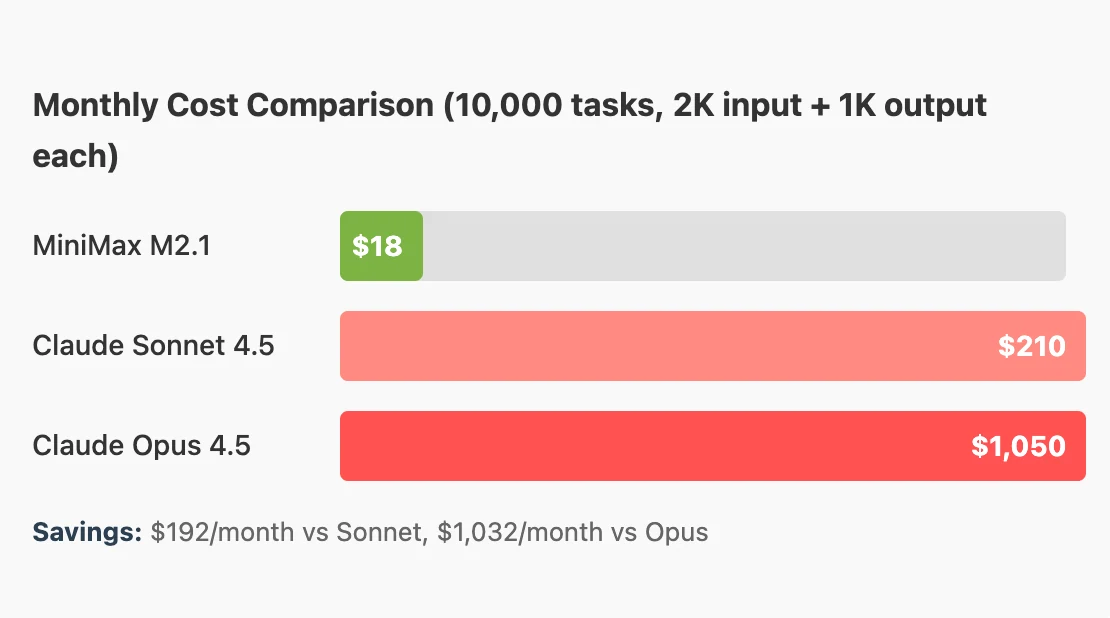
MiniMax M2.1 costs $0.30/$1.20 per 1M input/output tokens—approximately 90% cheaper than Claude 3.5 Sonnet ($3.00/$15.00 per 1M tokens). For teams running thousands of coding tasks monthly, this translates to $4,000+ annual savings per developer without performance trade-offs.
2. Superior Multi-Language Performance
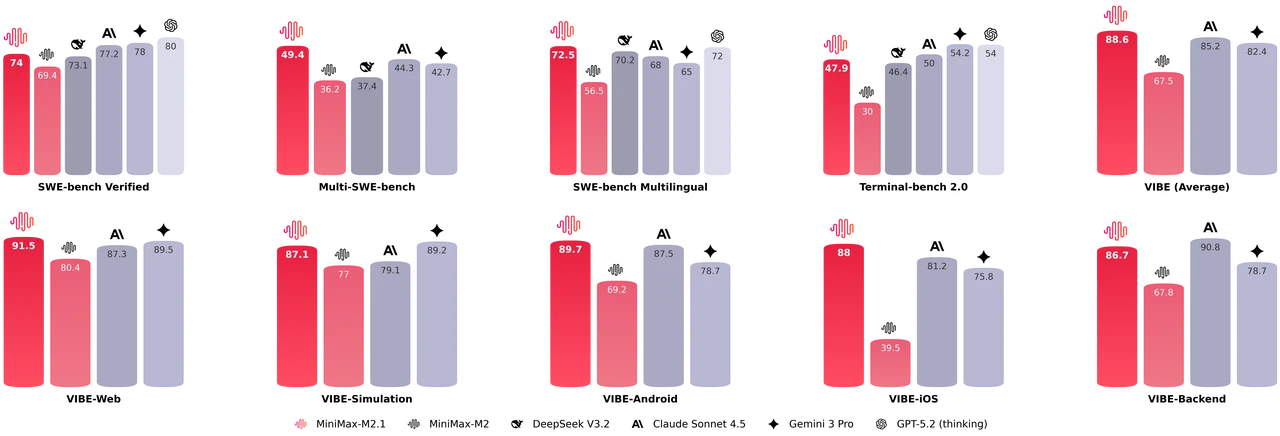
From MInimax
Key Strengths:
- Low-level system development (Rust, C++, Go)
- Mobile native development (Kotlin, Swift, Objective-C)
- Full-stack web development (TypeScript, JavaScript, Python)
3. Anthropic API Compatibility
MiniMax provides an Anthropic-compatible API endpoint, making integration with Claude Code seamless. No wrapper libraries or complex middleware required—simply point Claude Code to MiniMax’s endpoint with your API key.
How to Use Minimax M2.1 in Claude Code?
Prerequisites
Before starting, ensure you have:
- Claude Code installed (VS Code extension or Cursor IDE)
- An Stable API key (get one at platform)
- Node.js 16+ (for npm-based Claude Code installations)
Pricing: Novita AI provides APIs with 1314K context, and costs of $0.3/input and $1.2/output, supporting structured output and function calling, which delivers strong support for maximizing MInimax M2.1‘s code agent potential.
Step-by-Step Setup Guide
Step 1: Installing Claude Code
Before installing Claude Code, ensure your system meets the minimum requirements. Node.js 18 or higher must be installed on your local environment. You can verify your Node.js version by running node --version in your terminal.
For Windows
Open Command Prompt and execute the following commands:
npm install -g @anthropic-ai/claude-codeThe global installation ensures Claude Code is accessible from any directory on your system.
For Mac and Linux
Open Terminal and run:
npm install -g @anthropic-ai/claude-codeMac users can proceed directly with the global installation without requiring additional platform-specific commands. The installation process automatically configures the necessary dependencies and PATH variables.
Step 2 :Setting Up Environment Variables
Environment variables configure Claude Code to use Minimax M2.1 through Novita AI’s API endpoints. These variables tell Claude Code where to send requests and how to authenticate.
For Windows
Open Command Prompt and set the following environment variables:
set ANTHROPIC_BASE_URL=https://api.novita.ai/anthropic
set ANTHROPIC_AUTH_TOKEN=<Novita API Key>
set ANTHROPIC_MODEL="minimax/minimax-2.1"
set ANTHROPIC_SMALL_FAST_MODEL="minimax/minimax-2.1"
Replace <Novita API Key> with your actual API key obtained from the Novita AI platform. These variables remain active for the current session and must be reset if you close the Command Prompt.
For Mac and Linux
Open Terminal and export the following environment variables:
export ANTHROPIC_BASE_URL="https://api.novita.ai/anthropic"
export ANTHROPIC_AUTH_TOKEN="<Novita API Key>"
export ANTHROPIC_MODEL="minimax/minimax-2.1"
export ANTHROPIC_SMALL_FAST_MODEL="minimax/minimax-2.1"
Step 3: Starting Claude Code
With installation and configuration complete, you can now start Claude Code in your project directory. Navigate to your desired project location using the cd command:
cd <your-project-directory>
claude .
The dot (.) parameter instructs Claude Code to operate in the current directory. Upon startup, you’ll see the Claude Code prompt appear in an interactive session.
This indicates the tool is ready to receive your instructions. The interface provides a clean, intuitive environment for natural language programming interactions.
Step 4: Using Claude Code in VSCode or Cursor
Claude Code integrates seamlessly with popular development environments. It enhances your existing workflow rather than replacing it. You can use Claude Code directly in the terminal within VSCode or Cursor. This maintains access to your familiar development tools while leveraging AI assistance. Additionally, Claude Code plugins are available for bot
Optimization Configurations of Using Minimax M2.1 in Claude Code
For Multi-Programming-Language Projects
{
  "model": "MiniMax-M2.1",
  "baseURL": "https://api.novita.ai/anthropic",
  "apiKey": "YOUR_KEY",
  "contextFiles": ["**/*.rs", "**/*.kt", "**/*.swift", "**/*.go"],
  "maxTokens": 8192,
  "includeFileTree": true
}
Adding contextFiles enables the model to read and reference relevant source files from the developer’s codebase when generating responses. By providing real project code as context, the model can better understand the languages in use, the overall structure of the project, and the relationships between modules and files. This leads to more accurate code suggestions, safer refactoring, and more relevant answers, especially in multi-language and multi-module codebases.
For Mobile Development
{
  "model": "MiniMax-M2.1",
  "baseURL": "https://api.minimax.io/anthropic",
  "apiKey": "YOUR_KEY",
  "systemPrompt": "You are an expert mobile developer. Focus on native iOS (Swift/Objective-C) and Android (Kotlin/Java) development with emphasis on performance, accessibility, and platform-specific best practices.",
  "temperature": 0.6,
  "maxTokens": 12000
}
Adding a dedicated system prompt positions the model as a mobile development specialist, guiding it to reason within native iOS and Android ecosystems. This helps the model focus on platform-specific APIs, performance considerations, accessibility requirements, and established best practices, resulting in more relevant guidance and higher-quality code suggestions for real-world mobile applications.
For Agentic Workflows
{
  "model": "MiniMax-M2.1",
  "baseURL": "https://api.minimax.io/anthropic",
  "apiKey": "YOUR_KEY",
  "tools": ["file_search", "code_execution", "web_search"],
  "maxTokens": 16000,
  "agenticMode": true
}
Enabling agentic mode and tool access allows the model to operate as an autonomous agent rather than a single-turn responder. With the ability to search files, execute code, and retrieve external information, the model can plan and carry out multi-step tasks, making it better suited for complex workflows such as automated debugging, codebase analysis, and end-to-end development processes.
Troubleshooting Common Issues of Using Minimax M2.1 in Claude Code
Issue 1: Invalid API Key Error
Error: Invalid API key provided
Status: 401 Unauthorized
Solutions:
- Verify API key at platform→ API Keys
- Check for extra spaces/newlines in
settings.json - Ensure key has “text generation” permissions
- Try regenerating the API key
Issue 2: Slow Response Times
{
  "streamResponse": true,
  "maxTokens": 131072
}
Issue 3: Model Produces Verbose Responses
Adjust system prompt and temperature:
{
  "systemPrompt": "Provide concise, production-ready code. Omit explanatory comments unless explicitly requested.",
  "temperature": 0.5
}
Cost Analysis for Different Team Sizes of Using Minimax M2.1 in Claude Code
| Team Size | Monthly Tasks | MiniMax M2.1 | Claude Sonnet 4.5 | Annual Savings |
|---|---|---|---|---|
| Solo Developer | 500 | $0.90 | $10.50 | $115 |
| Small Team (5) | 10,000 | $18 | $210 | $2,304 |
| Enterprise (50) | 100,000 | $180 | $2,100 | $23,040 |
Assumptions: 2K input + 1K output tokens per task
MiniMax M2.1 transforms Claude Code economics by delivering 49.4% accuracy on Multi-SWE-Bench at 90% lower cost than Claude 3.5 Sonnet. The model’s systematic enhancements in multi-language programming (Rust, Kotlin, Swift, Go, C++) and mobile development (VIBE-Android 89.7, VIBE-Web 91.5) make it particularly valuable for full-stack and mobile teams.
Setup takes under 10 minutes: obtain an API key from platform, configure ~/.claude/settings.json with the Anthropic-compatible endpoint, and start coding. For teams processing thousands of coding tasks monthly, M2.1’s cost reduction translates to $4,000+ annual savings per developer while outperforming Claude Sonnet 4.5 on multilingual benchmarks.
Frequently Asked Questions
Can MiniMax M2.1 completely replace Claude 3.5 Sonnet in Claude Code without quality loss?
Yes, M2.1 outperforms Claude Sonnet 4.5 on Multi-SWE-Bench (49.4% vs 44.3%) and SWE-bench Multilingual (72.5% vs 68%), while costing 90% less. For coding workflows, M2.1 often delivers superior results, especially for multi-language and mobile development tasks.
Does MiniMax M2.1 support all Claude Code features like tool use and agentic workflows?
Yes, M2.1 is specifically designed for agentic workflows and supports tool calling, file operations, API integration, and multi-turn conversations. It’s fully API-compatible with Claude Code’s Anthropic integration through the /anthropic endpoint.
What’s the minimum VRAM required to run MiniMax M2.1 locally with Claude Code?
For local deployment via Ollama, M2.1 requires 80GB VRAM minimum (single A100) for basic inference, or 16GB VRAM with GGUF quantization and CPU offloading (requires 128GB RAM). For API access (recommended), no local GPU required.
Novita AI is the All-in-one cloud platform that empowers your AI ambitions. Integrated APIs, serverless, GPU Instance — the cost-effective tools you need. Eliminate infrastructure, start free, and make your AI vision a reality.
Recommended Reading
Use Minimax M2.1 in Cursor for Cost Efficient Driven Development
DeepSeek vs Qwen: Identify Which Ecosystem Fits Production Needs