DeepSeek V3.1 is the newest flagship model from DeepSeek, designed to advance AI performance with a hybrid reasoning architecture, higher thinking efficiency, and stronger agent capabilities. These innovations give developers a powerful foundation to build smarter applications and streamline real-world tasks.
This guide will introduce DeepSeek V3.1, highlight its core features and benchmark strengths, and show you how to access it through local deployment, APIs, and third-party platforms.
Start Your Free Trial with DeepSeek V3.1 !
Basic Introduction
| Feature | Detail |
| Total parameters | 671B |
| Activated parameters | 37B |
| Context length | 128K |
| Architecture | Transformer-based MoE |
| Thinking mode | Hybrid thinking mode (Think + Non-Think) |
| License | MIT liscense |
Benchmark
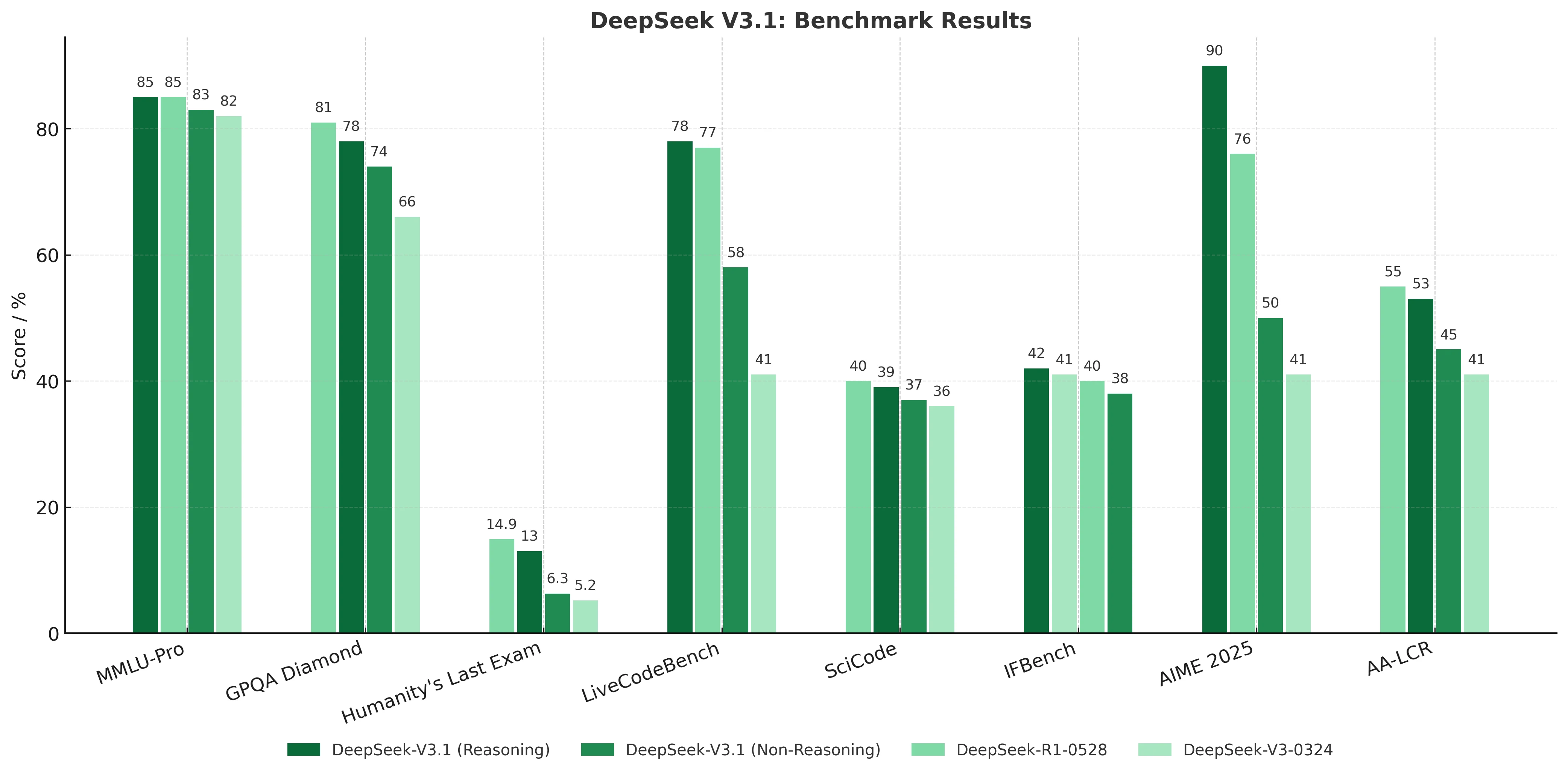
DeepSeek V3.1 (Reasoning) in demanding tasks such as AIME competition math and GPQA scientific reasoning, delivering stronger logical chain construction, long-context comprehension, and more consistent answers, making it ideal for high-precision, depth-oriented applications.
DeepSeek V3.1 (Non-Reasoning) provides balanced performance with greater efficiency and cost-effectiveness for general workloads. Together, they empower developers to flexibly choose between rigorous reasoning depth and practical general-purpose efficiency.
Key Improvements
- Hybrid Inference: DeepSeek V3.1 unites Think and Non-Think modes in one model.
- Faster thinking: DeepSeek V3.1 Think achieves comparable answer quality to DeepSeek-R1-0528, while responding more quickly.
- Stronger agent skills: DeepSeek V3.1 leverages post-training to improve tool use and handle complex multi-step tasks.
How to Access DeepSeek V3.1: Local Deployment
DeepSeek V3.1 Requirements
| Type | VRAM (Approx.) | Recommended Hardware |
| 1-bit | 186 GB | Single high-end GPU / Multi-GPU servers |
| 2-bit | 219 GB | Multi-GPU servers |
| 3-bit | 319 GB | Multi-GPU servers |
| 4-bit | 404 GB | Multi-GPU servers |
| 8-bit | 713 GB | Large GPU clusters |
| 16-bit (BF16) | 1.34 TB | Nvidia H200 8-card cluster |
DeepSeek V3.1 supports local deployment using the following hardware and open-source community software.
- DeepSeek-Infer Demo: A simple and lightweight demo for FP8 and BF16 inference.
- SGLang: Full support for DeepSeek-V3 in BF16 and FP8 modes, with Multi-Token Prediction coming soon.
- LMDeploy: Provides efficient FP8 and BF16 inference for both local and cloud deployment.
- TensorRT-LLM: Currently supports BF16 inference and INT4/INT8 quantization, with FP8 support on the way.
- vLLM: Supports DeepSeek-V3 with FP8 and BF16 for tensor parallelism and pipeline parallelism.
- LightLLM: Delivers efficient single-node or multi-node deployment for FP8 and BF16.
- AMD GPU: Runs DeepSeek-V3 on AMD GPUs via SGLang in both BF16 and FP8 modes.
- Huawei Ascend NPU: Runs DeepSeek-V3 on Huawei Ascend devices in INT8 and BF16 modes.
While DeepSeek V3.1 can be deployed locally with significant hardware requirements, Novita AI also provides optimized cloud GPU solutions (H100 and H200), eliminating the need to manage complex infrastructure.
How to Access DeepSeek V3.1: Using the API
Novita AI provides DeepSeek V3.1 APIs with 163.8K context and costs of $0.55 / 1M input Tokens and $1.66 / 1M output Tokens .
Option 1: Direct API Integration (Python Example)
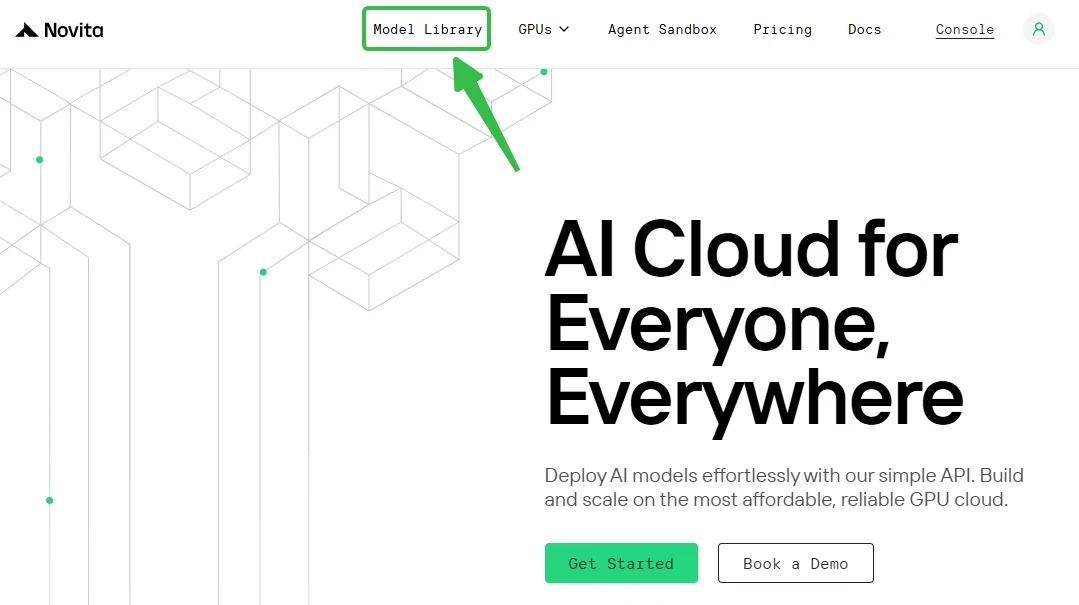
Step 1: Log In and Access the Model Library
Log in or sign up to your account and click on the Model Library button.
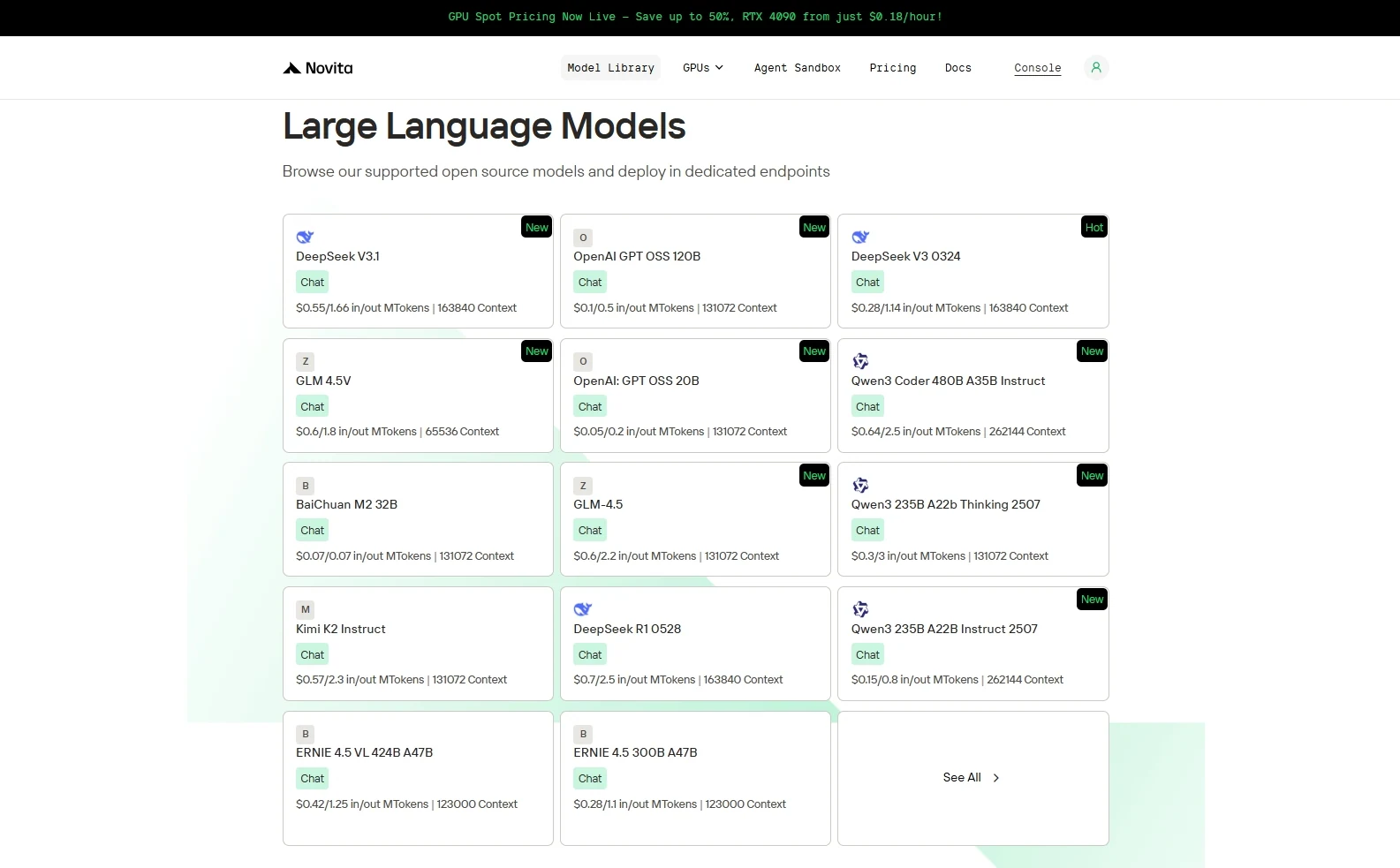
Step 2: Choose Your Model
Browse through the available options and select the model that suits your needs.
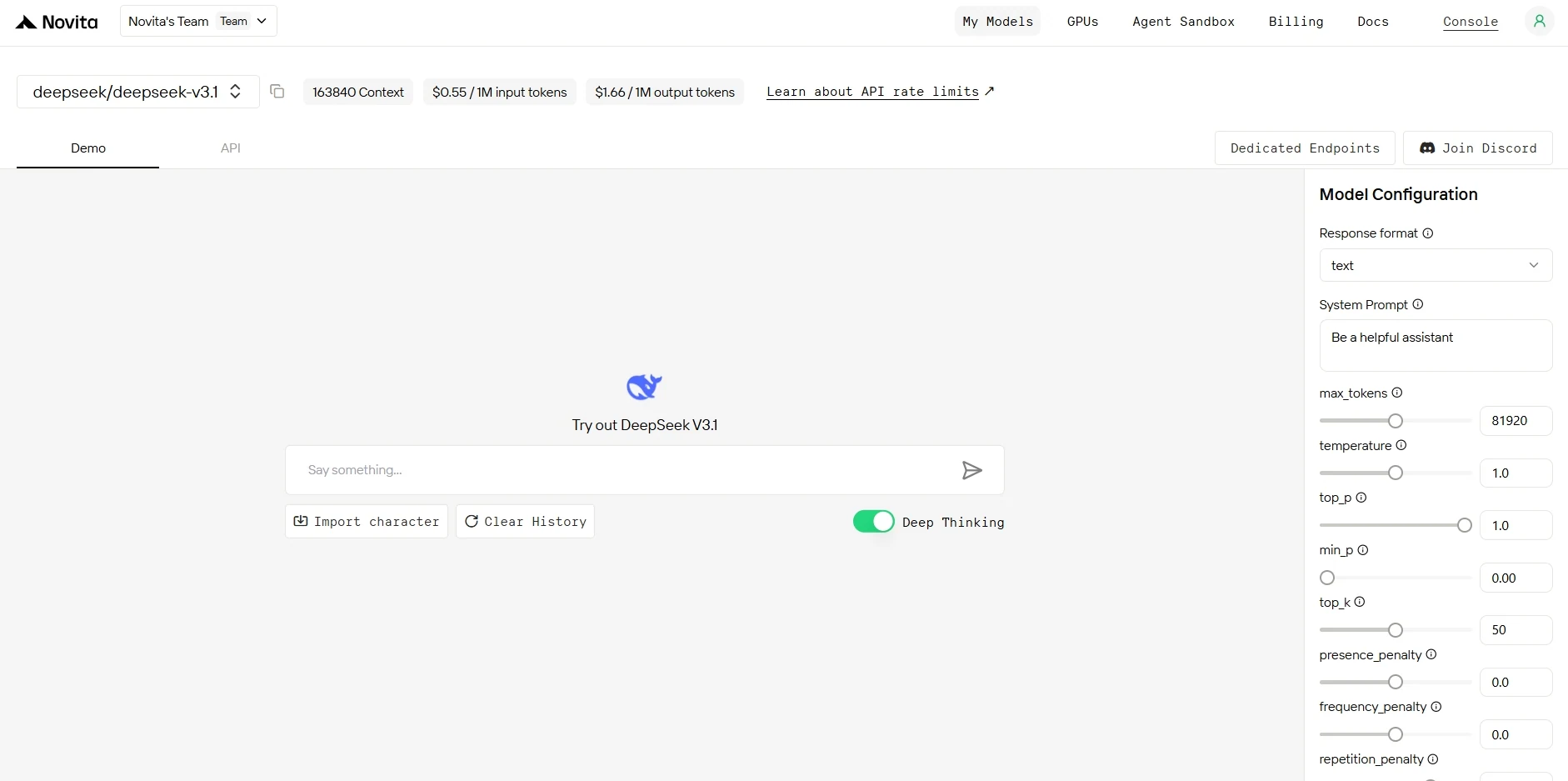
Step 3: Start Your Free Trial
Begin your free trial to explore the capabilities of the selected model.
Step 4: Get Your API Key
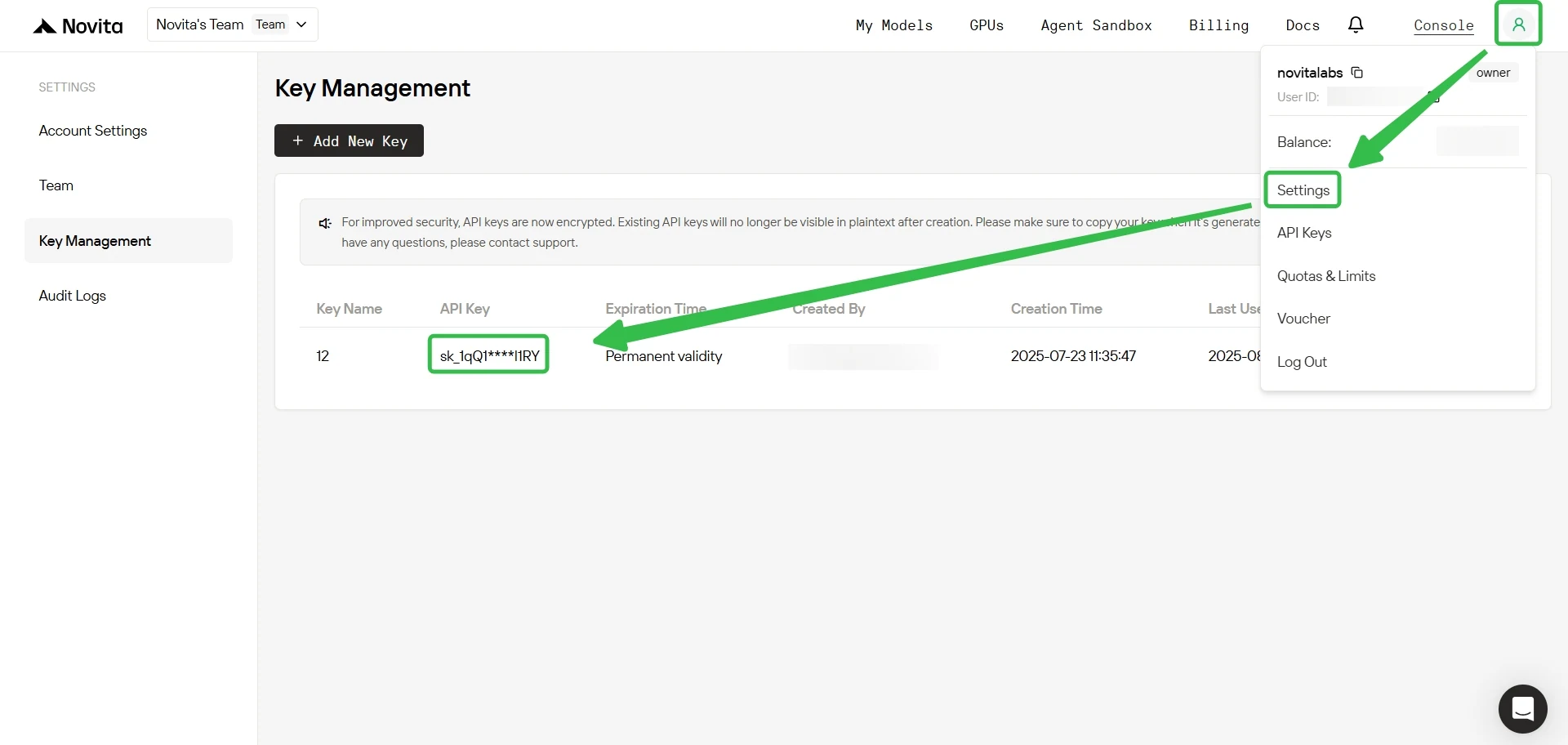
To authenticate with the API, we will provide you with a new API key. Entering the “Settings“ page, you can copy the API key as indicated in the image.
Step 5: Install the API
Install API using the package manager specific to your programming language.
After installation, import the necessary libraries into your development environment. Initialize the API with your API key to start interacting with Novita AI LLM. This is an example of using chat completions API for python users.
from openai import OpenAI

client = OpenAI(
    base_url="https://api.novita.ai/openai",
    api_key="",
)

model = "deepseek/deepseek-v3.1"
stream = True # or False
max_tokens = 81920
system_content = "Be a helpful assistant"
temperature = 1
top_p = 1
min_p = 0
top_k = 50
presence_penalty = 0
frequency_penalty = 0
repetition_penalty = 1
response_format = { "type": "text" }

chat_completion_res = client.chat.completions.create(
    model=model,
    messages=[
        {
            "role": "system",
            "content": system_content,
        },
        {
            "role": "user",
            "content": "Hi there!",
        }
    ],
    stream=stream,
    max_tokens=max_tokens,
    temperature=temperature,
    top_p=top_p,
    presence_penalty=presence_penalty,
    frequency_penalty=frequency_penalty,
    response_format=response_format,
    extra_body={
      "top_k": top_k,
      "repetition_penalty": repetition_penalty,
      "min_p": min_p
    }
  )

if stream:
    for chunk in chat_completion_res:
        print(chunk.choices[0].delta.content or "", end="")
else:
    print(chat_completion_res.choices[0].message.content)
Option 2: Multi-Agent Workflows with OpenAI Agents SDK
Build sophisticated multi-agent systems leveraging DeepSeek-V3.1’s dual-mode capabilities:
- Plug-and-Play Integration: Use DeepSeek V3.1 in any OpenAI Agents workflow
- Advanced Agent Capabilities: Support for handoffs, routing, and tool integration
- Scalable Architecture: Design agents that leverage DeepSeek V3.1’s capabilities
How to Access DeepSeek V3.1: Claude Code Integration
Step 1: Installing Claude Code
Before installing Claude Code, ensure your system meets the minimum requirements. Node.js 18 or higher must be installed on your local environment. You can verify your Node.js version by running node --version in your terminal.
Open Command Prompt (Windows) or Terminal (Mac/Linux) and run:
npm install -g @anthropic-ai/claude-codeOpen ComThe global installation ensures Claude Code is accessible from any directory on your system. The installation process automatically configures the necessary dependencies and PATH variables across all platforms.
Step 2: Setting Up Environment Variables
Environment variables configure Claude Code to use DeepSeek V3.1 through Novita AI’s API endpoints. These variables tell Claude Code where to send requests and how to authenticate.
- For Windows
Open Command Prompt and set the following environment variables:
set ANTHROPIC_BASE_URL=https://api.novita.ai/anthropic
set ANTHROPIC_AUTH_TOKEN=<Novita API Key>
set ANTHROPIC_MODEL=deepseek/deepseek-v3.1
set ANTHROPIC_SMALL_FAST_MODEL=deepseek/deepseek-v3.1
Replace <Novita API Key> with your actual API key obtained from the Novita AI platform. These variables remain active for the current session and must be reset if you close the Command Prompt.
- For Mac and Linux
Open Terminal and export the following environment variables:
export ANTHROPIC_BASE_URL="https://api.novita.ai/anthropic"
export ANTHROPIC_AUTH_TOKEN="<Novita API Key>"
export ANTHROPIC_MODEL="deepseek/deepseek-v3.1"
export ANTHROPIC_SMALL_FAST_MODEL="deepseek/deepseek-v3.1"
Step 3: Starting Claude Code
With installation and configuration complete, you can now start Claude Code in your project directory. Navigate to your desired project location using the cd command:
cd <your-project-directory>
claude .
The dot (.) parameter instructs Claude Code to operate in the current directory. Upon startup, you’ll see the Claude Code prompt appear in an interactive session.
This indicates the tool is ready to receive your instructions. The interface provides a clean, intuitive environment for natural language programming interactions.
Step 4: Building Your First Project
Claude Code excels at transforming detailed project descriptions into functional applications. After entering your prompt, press Enter to begin the task. Claude Code will analyze your requirements, create the necessary files, implement the functionality, and provide a complete project structure with documentation.
How to Access DeepSeek V3.1: Connect with Other Third-Party Platforms
Development Tools: Seamlessly integrate with popular IDEs and development environments like Cursor, Trae, Qwen Code and Cline through OpenAI-compatible APIs and Anthropic-compatible APIs.
Orchestration Frameworks: Connect with LangChain, Dify, CrewAI, Langflow, and other AI orchestration platforms using official connectors.
Hugging Face Integration: Novita AI serves as an official inference provider of Hugging Face, ensuring broad ecosystem compatibility.
FAQ
Novita AI is an AI cloud platform that offers developers an easy way to deploy AI models using our simple API, while also providing the affordable and reliable GPU cloud for building and scaling.
Recommended Reading
DeepSeek-V3.1 Available on Novita AI: Enhanced Context Window & Revolutionary Hybrid Thinking Mode
DeepSeek R1 7B: 90% of DeepSeek R1 Power But 10x Hardware Efficiency



