2026 年,AI 領域迎來了明確的轉折點:從實驗性智慧轉向工業化落地。第一波 AI 浪潮聚焦於對話能力,而當前時代的核心特徵是代理能力。
隨著 Claude Agent SDK 的發布,開發模式已從無狀態 API 轉向有狀態、持久化的執行環境。開發者不再滿足於僅能生成程式碼的代理——他們需要能自主執行、除錯和迭代的系統。與傳統 LLM 每次請求後「遺忘」上下文不同,Claude Agent SDK 現在能維持持續推理循環,自主編寫程式碼、即時除錯並管理複雜檔案系統。
然而,仍存在一個關鍵缺口:基礎設施。要從演示級別邁向生產級數位勞動力,代理需要的的不僅僅是智慧,還需要安全、可擴展、高效能且成本合理的執行環境來完成工作。
學習如何使用 Novita Sandbox 在生產環境中部署並托管 Claude 代理,這是一個 E2B 相容的雲端執行環境,能以高性價比的企業級基礎設施填補上述缺口。
💡 準備好開始構建了嗎?
Novita 提供了完整的、生產就緒的 Claude Agent SDK 範例,包含互動式 CLI、工具實現和最佳實踐。克隆儲存庫 並在幾分鐘內運行你的第一個代理。
核心優勢:專為 Anthropic 打造
1. 真正的「零重構」遷移
Novita 提供了完全相容的 Anthropic API 端點,只需修改一個 baseURL 參數,就能為你現有的 Claude 驅動應用程式添加真實世界的執行能力。
- 原生整合:直接使用
@anthropic-ai/sdk,無需學習新框架。 - 無縫切換:相容所有 Beta 功能,包含
context-management和thinking模式。
import Anthropic from "@anthropic-ai/sdk";

// 只需修改 baseURL 即可無縫切換到 Novita
const anthropic = new Anthropic({
  baseURL: "https://api.novita.ai/anthropic",
  apiKey: process.env.NOVITA_API_KEY,
});

// 所有 Anthropic SDK 的使用方式保持不變
const response = await anthropic.messages.create({
  model: "zai-org/glm-4.7",
  max_tokens: 4096,
  messages: [{ role: "user", content: "Hello, World!" }],
});
2. 雲端隔離「沙盒實驗室」
Novita Sandbox 提供可即時啟動的 Linux 環境,支援檔案系統存取、網路通訊和背景程序:
- 安全隔離:每個請求都在獨立的沙盒中運行,避免程式碼汙染。
- 全棧能力:內建 Node.js、Python 和 Jupyter 環境,支援動態安裝
npm和pip套件。 - 即時預覽:一鍵公開 HTTPS 端口,立即查看生成的頁面。
import { Sandbox } from "novita-sandbox/code-interpreter";

// 幾秒內建立隔離的雲端環境
const sandbox = await Sandbox.create({ timeoutMs: 10 * 60 * 1000 });

// 寫入檔案
await sandbox.files.write("index.html", "<h1>Hello from Sandbox!</h1>");

// 啟動背景服務並取得公開 URL
const handle = await sandbox.commands.run("npx http-server -p 3000", { background: true });
const publicUrl = `https://${sandbox.getHost(3000)}`;

console.log(`🌐 預覽 URL: ${publicUrl}`);
3. 上下文自我修復與智慧感知
利用 Claude 的工具使用能力,代理可以:
- 適配與修復:當運行時發生錯誤時,代理會讀取
stderr並自動重寫程式碼。 - 優化記憶體:結合
contextManagement策略,系統會自動清除舊的程式碼區塊,保持上下文專注。
// 啟用 context-management Beta 功能
// 參考:https://platform.claude.com/docs/en/build-with-claude/context-editing
const response = await anthropic.beta.messages.create({
  model: "zai-org/glm-4.7",
  max_tokens: 4096,
  betas: ["context-management-2025-06-27"],
  contextManagement: {
    edits: [
      {
        type: "clear_tool_uses_20250919",
        trigger: { type: "input_tokens", value: 10000 },  // 超過 10k tokens 時觸發清理
        keep: { type: "tool_uses", value: 2 },            // 保留最後 2 次工具調用
        clear_tool_inputs: true,                          // 同時清除工具輸入
      },
    ],
  },
  tools: TOOLS,
  messages: conversationHistory,
});
運作原理:當對話上下文超過設定的閾值時,API 會自動清除較早的工具調用結果,同時保留最近的關鍵資訊,避免「記憶體汙染」導致代理效能下降。
使用場景:無限可能
| 場景 | Novita Sandbox 的加成 |
|---|---|
| 互動式網頁實驗室 | 僅需一句話即可生成 React/Tailwind 頁面,並即時預覽。 |
| 智慧資料分析 | 動態執行 Python,搭配 Pandas 和 Matplotlib 生成圖表。 |
| AI 自動化測試 | 在隔離環境中運行測試腳本,自動捕獲並修復 bug。 |
| 個人化 IDE 後端 | 為每位使用者提供獨立的雲端執行器,零運維成本。 |
| 自我修復程式碼工作流 | 在閉環中測試生成的 API 程式碼,交付前確保運行正確。 |
快速開始:三步構建互動式代理
無需複雜配置,Novita 讓開發變得簡單。
步驟 1:最小化安裝
npm install @anthropic-ai/sdk novita-sandbox dotenv open
步驟 2:智慧 API 金鑰整合
專案包含互動式金鑰引導功能,即使沒有設定環境變數,程式啟動時也會提示你輸入:
// agent_en.ts 內部邏輯
if (!agent.hasApiKey()) {
  const apiKey = await promptForApiKey(rl);
  agent.setApiKey(apiKey);
}
步驟 3:一鍵啟動互動式 CLI
運行 npm run agent-en 即可進入互動模式,只需輸入你的需求,相容 Anthropic 的模型就會自動完成程式碼生成、服務運行和瀏覽器開啟的操作。
npm run agent-en
核心程式碼解析
📌 工具定義:賦予 AI 「實體能力」
const TOOLS: Anthropic.Beta.Messages.BetaTool[] = [
  {
    name: "write_file",
    description: "Create or modify a file in the sandbox",
    input_schema: {
      type: "object",
      properties: {
        path: { type: "string", description: "File path, e.g., index.html" },
        content: { type: "string", description: "Complete file content" },
      },
      required: ["path", "content"],
    },
  },
  {
    name: "get_preview_url",
    description: "Start the web server and get the preview URL (returns the existing URL if the server is already running)",
    input_schema: { type: "object", properties: {} },
  },
];
📌 代理循環:持續處理直到任務完成
async chat(userMessage: string): Promise<void> {
  // 每次使用者輸入時刷新沙盒超時時間
  await this.refreshSandboxTimeout();

  this.messages.push({ role: "user", content: userMessage });

  // 代理循環——持續處理直到沒有工具調用為止
  let continueLoop = true;
  while (continueLoop) {
    const { response, assistantContent } = await this.streamResponse();
    this.messages.push({ role: "assistant", content: assistantContent });

    // 處理工具調用
    const { hasToolUse, toolResults } = await this.processToolCalls(assistantContent);

    if (hasToolUse && toolResults.length > 0) {
      this.messages.push({ role: "user", content: toolResults });
      continueLoop = true;  // 存在工具調用;繼續循環
    } else {
      continueLoop = false; // 無工具調用;結束
    }

    if (response.stop_reason === "end_turn") {
      continueLoop = false;
    }
  }
}
📌 服務自我修復:智慧檢測與自動重啟
private async handleGetPreviewUrl(): Promise<string> {
  // 驗證程序是否實際運行中
  if (this.previewUrl && this.serverHandle) {
    const processAlive = await this.checkServerProcessAlive();
    if (!processAlive) {
      console.log(`⚠️ 伺服器程序已退出;正在重啟...`);
      this.serverHandle = null;
      this.previewUrl = null;
    }
  }

  // 啟動新伺服器
  this.serverHandle = await this.sandbox.commands.run(
    `npx -y http-server . -p ${CONFIG.serverPort} -c-1`,
    { background: true }
  );

  // 取得公開 URL 並執行健康檢查
  const host = this.sandbox.getHost(CONFIG.serverPort);
  this.previewUrl = `https://${host}`;

  await waitForServer(this.previewUrl, maxRetries, intervalMs);
  await openBrowser(this.previewUrl);

  return `預覽 URL: ${this.previewUrl}`;
}
探索完整範例
Novita 提供了功能完整的 Claude Agent SDK 範例,包含生產就緒的程式碼模式,該範例展示了:
- 互動式 CLI 介面,支援串流回應
- 完整的工具實現(檔案操作、程式碼執行、網頁伺服器管理)
- 上下文管理,支援自動清理
- 錯誤處理與重試邏輯
- 服務健康檢查,支援自動重啟
- 多輪對話,支援持久化狀態
GitHub 儲存庫:Novita-CollabHub/examples/claude-agent
範例快速開始:
# 克隆儲存庫
git clone https://github.com/novitalabs/Novita-CollabHub.git
cd Novita-CollabHub/examples/claude-agent

# 安裝依賴項
npm install

# 設定你的 API 金鑰
export NOVITA_API_KEY=your_api_key_here

# 運行互動式代理
npm run agent-en
多輪對話演示
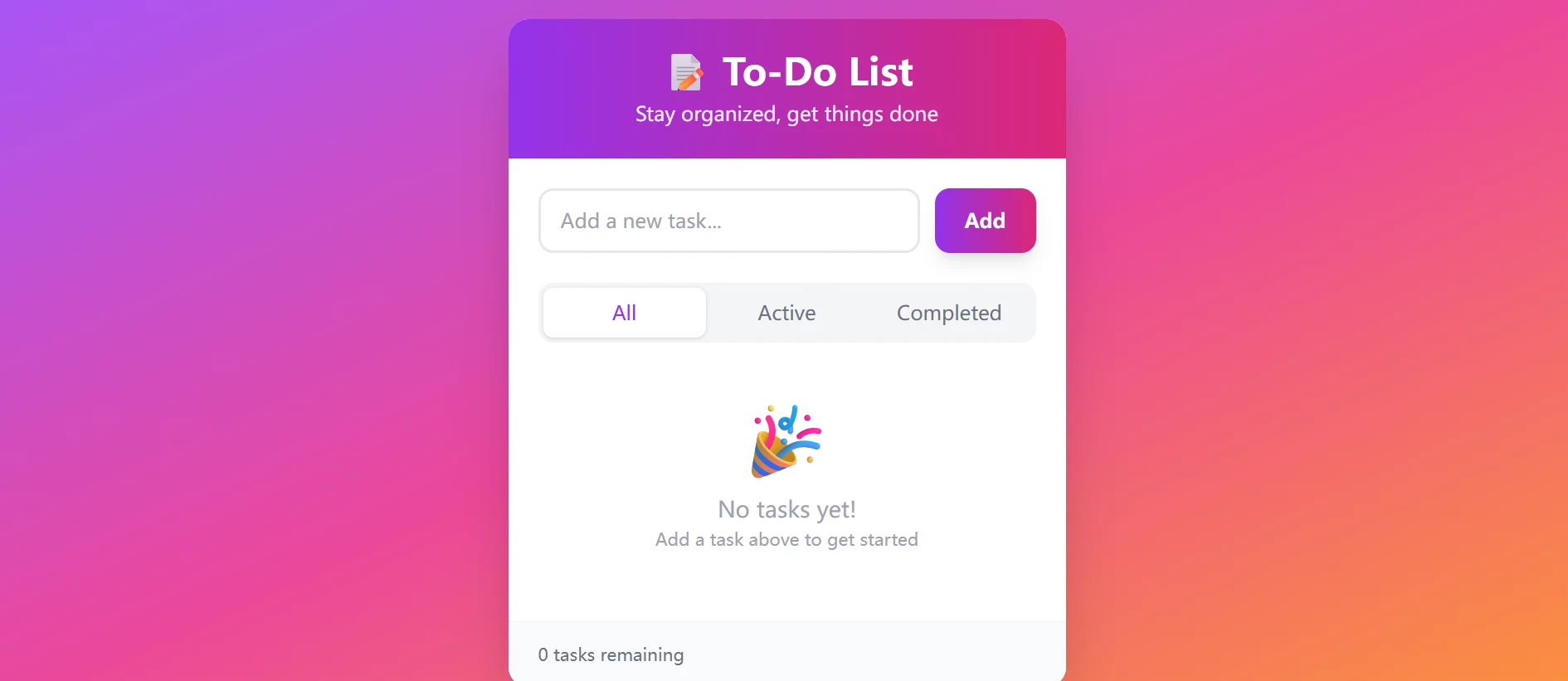
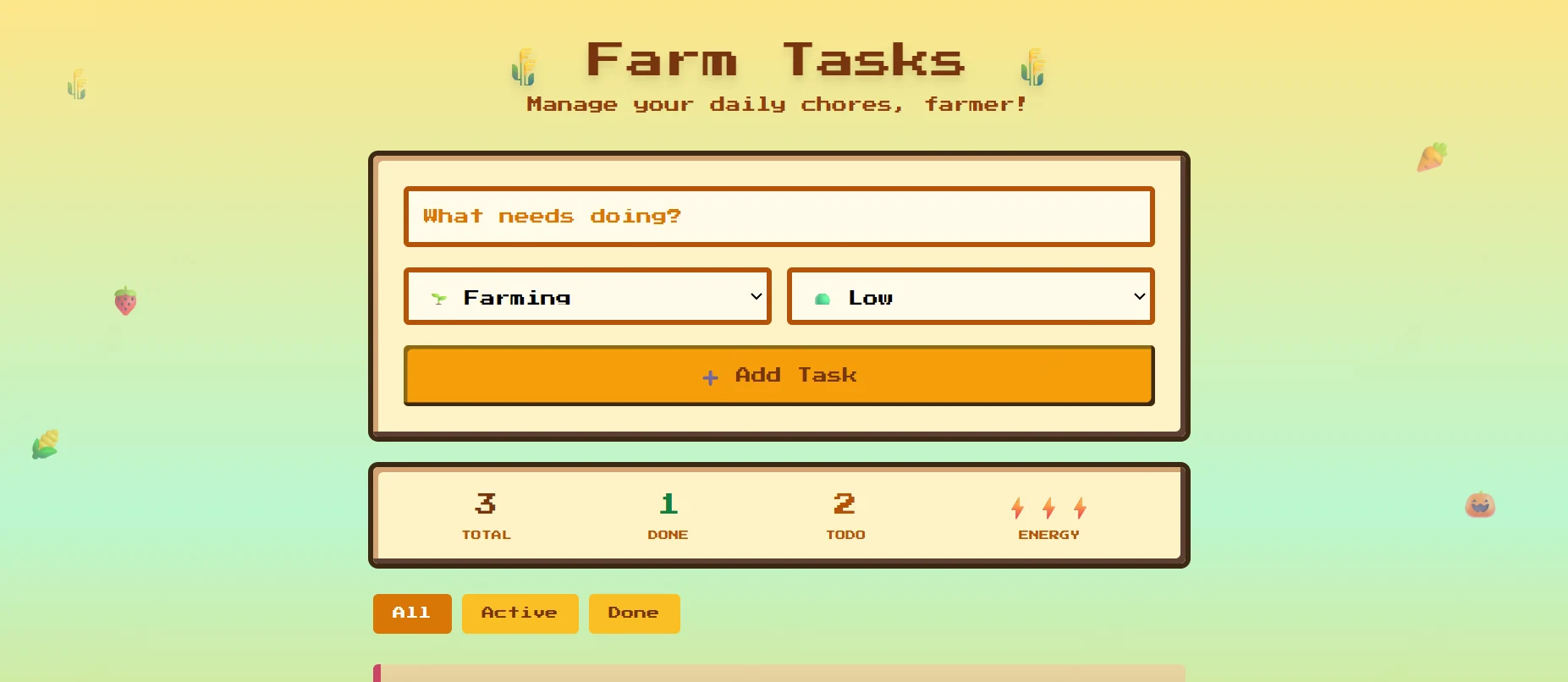
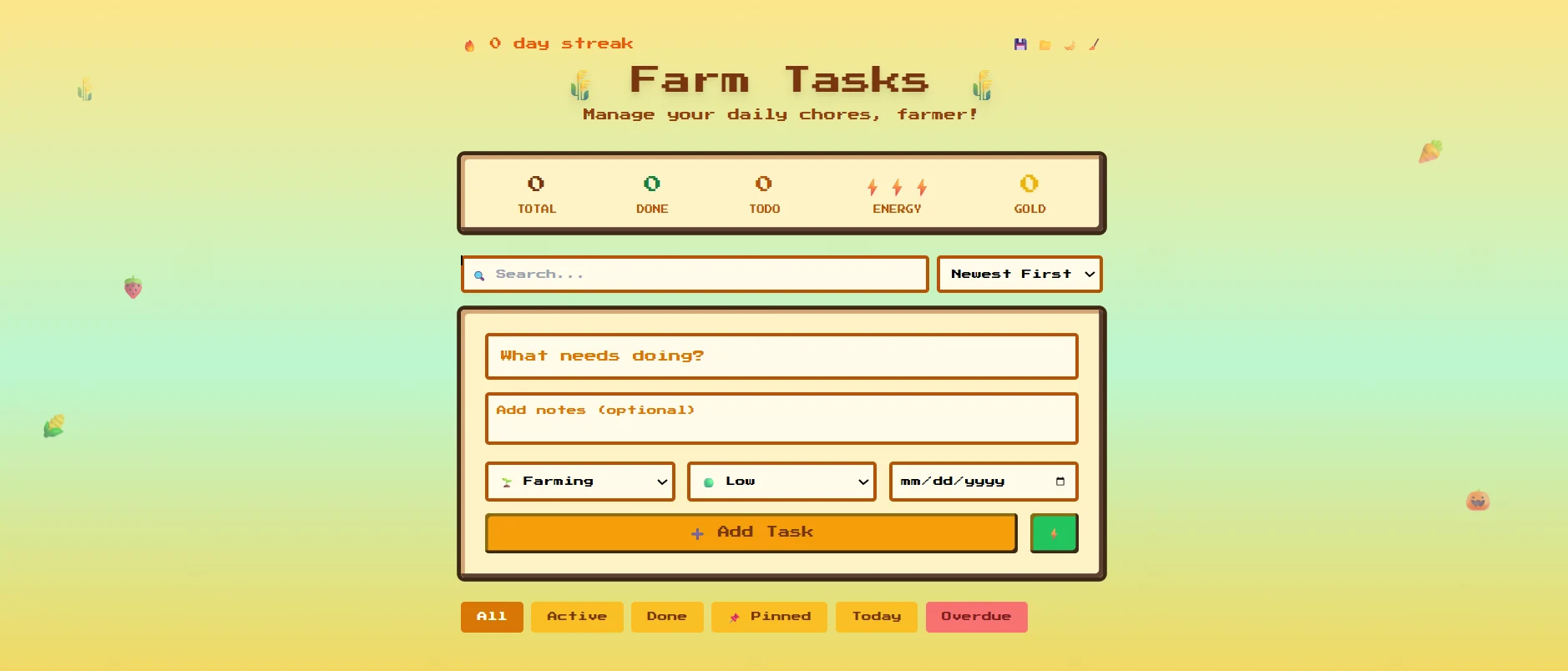
以下是一個完整的多輪對話範例,展示代理如何根據使用者回饋反覆優化頁面:
第 1 輪:構建一個待辦事項清單應用程式
使用者輸入:構建一個待辦事項清單應用程式
第 2 輪:改為星露穀風格
使用者輸入:改為星露穀風格
第 3 輪:新增更多功能
使用者輸入:新增更多功能
總結
在生產環境中部署 Claude Agent SDK 需要傳統雲端平台無法提供的基礎設施。Novita Sandbox 提供了生產就緒的基礎設施,可與 Claude Agent SDK 無縫整合,為你的代理提供在真實世界運作所需的「雙手」,具體包括:
- E2B 相容的雲端執行環境,可與現有工具無縫整合
- 原生相容 Anthropic 的端點,無需重構,只需修改 baseURL 即可
- 安全的容器隔離,適用於不受信任的程式碼執行
- 即時供應,預設配置好執行環境
- 公開 URL 暴露,適用於生成的網頁應用程式
- 背景程序管理,適用於長期運行的服務
今天就開始構建有狀態 AI 代理:
Novita AI 是領先的 AI 雲端平台,為開發者提供易於使用的 API 和成本合理、可靠的 GPU 基礎設施,用於構建和擴展 AI 應用程式。