Pairing Qwen3-Coder-480B-A35B-Instruct with Claude Code creates a developer workflow that feels both powerful and practical. Instead of being limited to lightweight code editors like Cursor, you can now bring the scale of a 480B-parameter Mixture-of-Experts model directly into a simple, terminal-based environment.
Through Novita AI’s Anthropic-compatible API, integration takes only a few configuration steps and works consistently across Windows, Mac, and Linux. Once set up, developers gain access to advanced agentic programming, long-context reasoning, and multi-turn coding workflows—capabilities that make Qwen3-Coder stand out among open-source models.
Current pricing on Novita AI: 262,144 Context, $0.35 / 1M input tokens, $1.5 / 1M output tokens
Qwen3-Coder-480B-A35B-Instruct Highlights
Qwen3-Coder-480B-A35B-Instruct represents Alibaba’s most ambitious step in open coding models. Built on a Mixture-of-Experts architecture with 480B total parameters and 35B active at once, it is designed for agentic coding—not just writing snippets of code, but supporting full programming workflows.
Core Strengths
- Agentic programming: Handles autonomous code generation, debugging, and repository-scale reasoning, comparable to premium closed-source models.
- Extended context: Natively supports 256K tokens, extendable to 1M with YaRN, enabling large-scale, multi-file codebase analysis.
- Multi-turn workflows: Excels at iterative development cycles: planning, tool use, processing feedback, and refining output step by step.
- Broad language coverage: Performs well across multiple programming languages and frameworks, from Python to JavaScript to enterprise stacks.
Qwen3-Coder doesn’t just generate functions in isolation—it is capable of repository-wide understanding and multi-turn collaboration, making it a strong candidate for teams working on complex software projects. With its open availability through platforms like Hugging Face and Novita AI, it bridges the gap between state-of-the-art research and practical developer workflows.
Why Use Qwen3-Coder-480B-A35B-Instruct in Claude Code
Bringing Qwen3-Coder-480B-A35B-Instruct into Claude Code combines the strengths of one of the most powerful open coding models with a lightweight, developer-friendly environment. Together, they create a workflow that is both highly capable and easy to adopt.
Claude Code Advantage
| Feature | What It Means for Developers |
| Codebase-aware | Quickly interprets project structures and dependencies across an entire repository. |
| Command-line native | Runs directly from the terminal—no heavy IDE setup needed. |
| Cross-file editing | Handles multi-file refactoring and contextual code changes. |
| API flexibility | Works with Anthropic’s models by default but also supports third-party endpoints like Qwen3-Coder. |
Why Combine Them?
| Synergy | Outcome |
| Qwen3-Coder’s raw power + Claude Code’s usability | Advanced code reasoning delivered in a simple, intuitive CLI environment. |
| Scales to large projects | Long-context support from Qwen3-Coder plus Claude Code’s repository-level analysis enable smooth handling of enterprise-sized codebases. |
| Experimentation freedom | Developers can switch between Qwen3-Coder and other API-compatible models without leaving their workflow. |
For individual developers, this integration means you can call on a trillion-class coding model without managing complex infrastructure. For teams, it offers a repeatable and flexible workflow that delivers on performance, context length, and developer productivity.
How to Run Qwen3-Coder-480B-A35B-Instruct in Claude Code
Step 1: Get Your API Key on Novita AI
Create an Novita AI account andThe first step is to generate an API key from the Novita AI platform. Then go to Key Management and select Add New Key.
This API Key acts as your access credential. Since it is only shown once, copy it immediately and save it in a secure place. It will be needed for the steps below.
Novita AI now supports all Claude Code models. You can view the full list of supported models here for details
Step 2: Install Claude Code
Claude Code requires Node.js. Make sure your local environment is running Node.js 18 or later by checking:
node --versionIf everything looks good, install Claude Code globally with npm:
npm install -g @anthropic-ai/claude-codeA global installation makes the command available anywhere on your system, so you don’t have to worry about working directory restrictions.
Step 3: Configure Environment Variables
To route traffic through Novita AI and use Qwen3-Coder, you’ll need to set several environment variables. These specify the API endpoint, authentication token, and the model name.
Windows (Command Prompt):
set ANTHROPIC_BASE_URL=https://api.novita.ai/anthropic
set ANTHROPIC_AUTH_TOKEN=<Your-API-Key>
set ANTHROPIC_MODEL=qwen/qwen3-coder-480b-a35b-instruct
set ANTHROPIC_SMALL_FAST_MODEL=qwen/qwen3-coder-480b-a35b-instruct
Mac/Linux (Terminal):
export ANTHROPIC_BASE_URL="https://api.novita.ai/anthropic"
export ANTHROPIC_AUTH_TOKEN="<Your-API-Key>"
export ANTHROPIC_MODEL="qwen/qwen3-coder-480b-a35b-instruct"
export ANTHROPIC_SMALL_FAST_MODEL="qwen/qwen3-coder-480b-a35b-instruct"
Replace <Your-API-Key> with the token generated earlier. To switch to a different model, you can simply update the ANTHROPIC_MODEL environment variable.
Step 4: Start Claude Code
Navigate to the folder where your project files are located and launch Claude Code:
cd <your-project-directory>
claude .
The . tells Claude Code to run in the current directory. Once the prompt appears, you’re ready to interact with Qwen3-Coder directly in a natural language session.
Troubleshooting & Tips
- Token not found? Double-check that the environment variables are set in the same terminal session where you run
claude .. - Persistent configuration: On Mac/Linux, you can add the
exportcommands to your.bashrcor.zshrcfile; on Windows, use System Environment Variables to make them permanent. - Switching models: Simply change the
ANTHROPIC_MODELvariable to another model supported by Novita AI if you want to experiment.
Start with Your First Project!
Claude Code is designed to turn high-level project ideas into working applications. Simply provide a detailed prompt, and with a single command it will interpret your requirements, generate the necessary files, implement the core logic, and deliver a complete project structure—complete with documentation.
Example test prompt:
Create a simple Random Meal Picker web application with the following features:
HTML frontend with modern CSS styling and responsive design
JavaScript logic to randomly suggest meals from a starter dataset
Each result shows a dish name, category and ingredients
Favorites list and last 5 picks stored in local storage
Add Dish form to expand the dataset and persist custom meals
Clean, minimalist interface with smooth animations
Please create all necessary files and explain the project structure.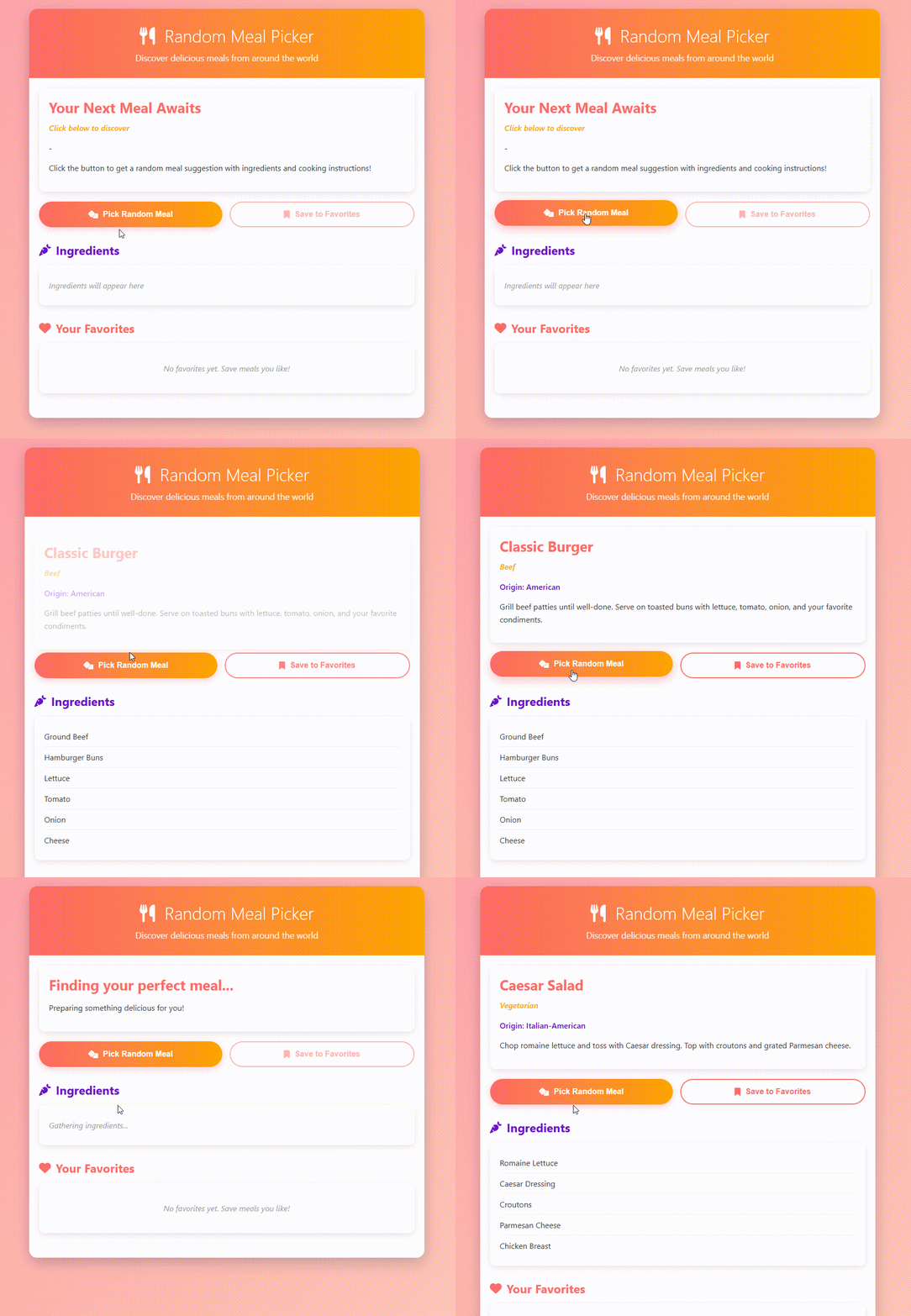
Help and Documentation Resources
Claude Code comes with a built-in help system that can be accessed anytime using the /help command. This brings up a list of available commands, practical usage examples, and troubleshooting tips.
The help function is also context-aware—it tailors the information to your current project and session, so you get guidance that’s immediately relevant.
For developers who need more depth, Novita AI provides in-depth documentation covering advanced configuration, API usage patterns, and best practices. In addition, Anthropic’s official docs offer detailed explanations of Claude Code’s features and capabilities, helping you explore the full potential of the tool.
Conclusion
Integrating Qwen3-Coder-480B-A35B-Instruct with Claude Code through Novita AI brings large-scale coding intelligence into an accessible, cost-efficient workflow. This pairing turns high-level project ideas into production-ready code, enabling faster iteration and greater flexibility for teams of any size. Try Qwen3-Coder in Claude Code today and see how next-generation AI can streamline your software development process.
Frequently Asked Questions
Does Claude Code only work with Anthropic’s own models?
No. While it’s optimized for Anthropic models, it can also connect to third-party models like Qwen3-Coder through Novita AI’s Anthropic-compatible API.
How do I connect Qwen3-Coder-480B-A35B-Instruct to Claude Code through Novita AI?
By setting environment variables to Novita AI’s Anthropic-compatible endpoint, you can route Claude Code requests directly to Qwen3-Coder.
How much does it cost to use Qwen3-Coder-480B-A35B-Instruct via Novita AI?
Pricing starts at $0.35 / 1M input tokens and $1.5 / 1M output tokens, with a context length of 262,144 tokens.
Novita AI is an AI cloud platform that offers developers an easy way to deploy AI models using our simple API, while also providing the affordable and reliable GPU cloud for building and scaling.



