Kimi K2 Thinking represents a major step forward in reasoning-driven AI. Built as a thinking agent, it combines deep logical analysis with dynamic tool use to handle complex, multi-step tasks—from research and problem solving to coding and debugging. Integrated into Codex, it transforms the coding process into an intelligent, interactive workflow where ideas turn into executable code faster and with greater precision.
This guide will walk you through how to use Kimi K2 in Codex from setup and configuration to your first AI-powered coding session, helping you get started faster and code smarter.
What is Kimi K2 Thinking?
Kimi K2 Thinking is the latest state-of-the-art open-source large language model of Moonshot AI, built as a dynamic thinking agent. It combines step-by-step reasoning with real-time tool use, achieving outstanding results in reasoning, coding, and agent benchmarks while maintaining stable, long-horizon performance across hundreds of sequential tasks.
| Feature | Detail |
|---|---|
| Total Parameters | 1T |
| Active Parameters per Token | 32B |
| Total Experts | 384 |
| Active Experts per Token | 8 (1 shared) |
| Context Length | 256K |
Built for scalable reasoning, GPT OSS 120B introduces an adjustable reasoning effort mechanism that lets users balance output depth and latency through low, medium, or high modes. It also provides full chain-of-thought access, enabling developers to inspect its internal reasoning for debugging, transparency, and quality assurance (though this trace is not intended for end-user display). The model supports agentic functionality such as function calling, web browsing, Python execution, and structured output generation. Under the hood, MXFP4 post-training quantization ensures its efficient inference.
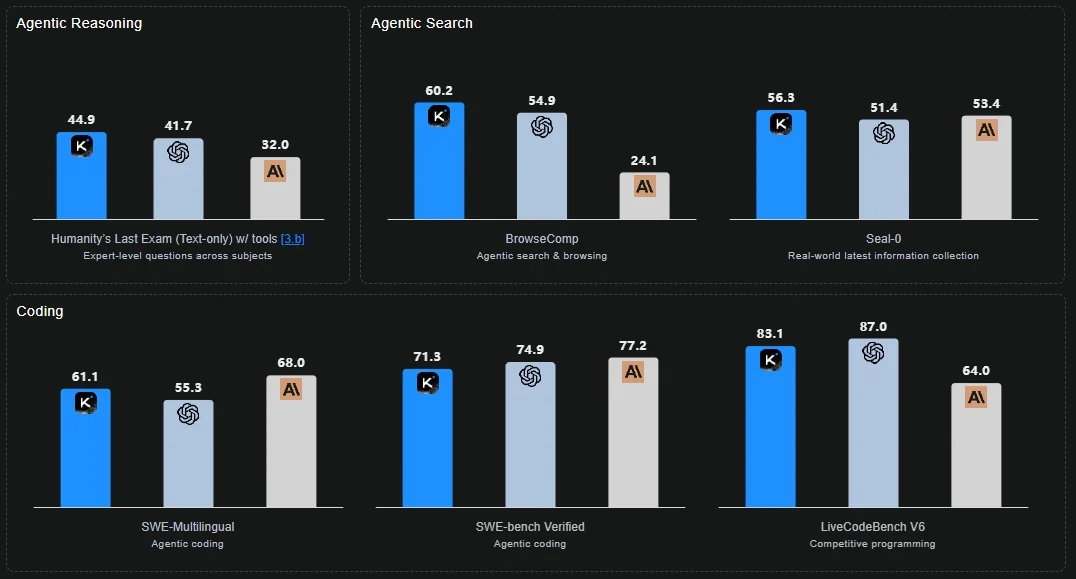
Kimi K2 Thinking vs GPT-5 vs Claude Sonnet 4.5 Thinking
Key Highlights
- Deep Reasoning & Tool Orchestration: Kimi K2 Thinking integrates structured chain-of-thought reasoning with dynamic tool use, enabling it to plan, execute, and adapt across complex, multi-step workflows such as research, analysis, and code generation.
- Advanced Reasoning Performance: Achieved state-of-the-art results on Humanity’s Last Exam (HLE), showcasing exceptional depth in multi-step logic, problem decomposition, and open-ended analytical reasoning.
- Superior Coding & Development Ability: Demonstrates strong generalization across programming languages and frameworks, effectively handling code refactoring, debugging, and multi-file generation tasks with high consistency.
- Agentic Search & Browsing Capability: Excels in BrowseComp and other agent benchmarks by sustaining 200–300 sequential tool calls, performing adaptive cycles of think → search → analyze → code, and maintaining goal alignment throughout long-horizon tasks.
Why Use Kimi K2 Thinking in Codex
When you integrate Kimi K2 Thinking into the Codex environment, you’re combining two advantages: the intelligent coding support of Codex combined with the advanced reasoning and agentic abilities of Kimi K2 Thinking.
Codex stands out in several ways:
- Goes beyond basic autocompletion, understanding files, dependencies, and overall project context.
- Supports complete workflows such as debugging, refactoring, and test generation instead of just snippet completion.
- Integrates seamlessly with the developer’s toolchain such as terminal, IDE, and version control, acting as a co-developer rather than a separate app.
How Kimi K2 Thinking Enhances Coding Capabilities
Kimi K2 Thinking turns Codex into an intelligent coding environment powered by deep reasoning. Instead of merely completing snippets, it understands project structures, plans edits, and executes multi-step workflows with precision. The model bridges human intent and machine execution, allowing developers to code faster and smarter.
- Context-Aware Understanding: Analyzes entire repositories to maintain consistency across files and functions.
- Step-by-Step Problem Solving: Decomposes complex prompts into logical subtasks, reasoning through each step before coding.
- Iterative Debugging & Refinement: Detects and resolves logical or syntax issues through dynamic test–verify–fix loops.
- Autonomous Workflow Execution: Handles long coding sessions with stable reasoning, minimizing manual intervention and context resets.
How to Use Kimi K2 Thinking in Codex: Prerequisites
To use Kimi K2 Thinking inside Codex, you’ll need to have 3 things ready:
- An API key for GPT Kimi K2 Thinking: Recommended to obtain from Novita AI, saved in a configuration file for seamless integration.
- The Codex CLI: Installed globally so you can call the agent directly from your terminal.
- A working environment: Node.js 18 or higher, plus npm for package management.
After completing these steps, you’ll be ready to connect Codex with Kimi K2 Thinking and start exploring right away. The entire setup is quick and takes only a few minutes.
How to Use Kimi K2 Thinking in Codex: Step-by-Step Guide
Step 1: Get Your API Key on Novita AI
Create an Novita AI account and start by generating an API key from the Novita AI platform. Then go to Key Management and choose Add New Key.
This API Key serves as your access credential. Since it’s displayed only once, be sure to copy it right away and store it safely—you’ll need it for the next steps.
Novita AI provides first-class Codex support for a range of advanced large language models, such as:
moonshotai/kimi-k2-thinkingopenai/gpt-oss-120bqwen/qwen3-coder-480b-a35b-instructzai-org/glm-4.5deepseek/deepseek-v3.1google/gemma-3-12b-it
Step 2: Install Codex CLI
Node.js 18+ is required
node -vInstall via npm (Recommended)
npm install -g @openai/codexInstall via Homebrew (macOS)
brew install codexVerify Installation
codex --versionIntegrate Kimi K2 Thinking via Novita AI API
Create a Codex config file and set Kimi K2 Thinking as the default model.
- macOS/Linux:
~/.codex/config.toml - Windows:
%USERPROFILE%\.codex\config.toml
Basic Configuration Template
model = "moonshotai/kimi-k2-thinking"
model_provider = "novitaai"

[model_providers.novitaai]
name = "Novita AI"
base_url = "https://api.novita.ai/openai"
http_headers = {"Authorization" = "Bearer YOUR_NOVITA_API_KEY"}
wire_api = "chat"
Step3: Getting Started
Launch Codex CLI
codexBasic Usage Examples
Code Generation:
> Create a Python class for handling REST API responses with error handlingProject Analysis:
> Review this codebase and suggest improvements for performanceBug Fixing:
> Fix the authentication error in the login functionTesting:
> Generate comprehensive unit tests for the user service moduleWorking with Existing Projects
Go to your project folder before starting the Codex CLI:
cd /path/to/your/project
codex
The Codex CLI automatically examines your project structure, scans existing files, and maintains awareness of the full codebase context during your entire session.
Frequently Asked Questions
What is Kimi K2 Thinking?
Kimi K2 Thinking is Moonshot AI’s latest open-source model designed to think step by step, dynamically use tools, and execute complex coding or analytical tasks with stability and precision.
How to use Kimi K2 integrate with Codex?
You can get your Kimi K2 API key from Novita AI, configure it in Codex settings, and select Kimi K2 as the active model to enable integration.
How does Kimi K2 improve workflow efficiency in Codex?
It plans, executes, and verifies code in cycles, reducing manual intervention and context resets, resulting in faster and more accurate code delivery.
Novita AI is an AI cloud platform that offers developers an easy way to deploy AI models using our simple API, while also providing the affordable and reliable GPU cloud for building and scaling.



