Refer your friends to Novita AI and both of you will earn $10 in LLM API credits—up to $500 in total rewards.
To support the developer community, Qwen2.5-7B, Qwen 3 0.6B, Qwen 3 1.7B, Qwen 3 4B is currently available for free on Novita AI.
Maintaining consistency in AI-generated content has long been a challenge. Short videos, particularly those under 10 seconds, often result in unpredictable plot twists and character inconsistencies. These videos struggle to maintain visual continuity, as AI models typically lack enough time to establish coherent narratives and stable character designs.
To address this challenge, Kling 1.6 introduces a new 10-second video generation mode. This feature, available for trial on Novita AI, provides more time for the AI to refine scene transitions, maintain consistent character appearances, and create more coherent narratives.
Novita AI offers Kling 1.6 at highly affordable rates—just $0.27 for a 720P text-to-video (T2V) 5 second clip, and only $0.46 for a 1080P image-to-video (T2V) 10 second output. The 10-second video only costs twice the price.
The Impact of 5-Second Video Generation on AI Consistency
1. The Unpredictable Plot Twists
Short AI-generated videos often lack the narrative depth to establish context or build coherence. This brevity can lead to unexpected and humorous scenarios. For instance, a video might abruptly transition from a serene park scene to a chaotic alien invasion, leaving viewers bewildered and amused by the sudden plot twist.
This video is the perfect visualisation of how generative AI is basically just machine learning that plays Chinese Whispers with itself. It doesn’t know what it’s going to produce next, and with each frame it starts to no longer understand what it’s meant to be generating and then sees something new in what is left and then takes that in a different direction, so white of a ball of fire or smoke can become snow, which then generates some blue toned shadows that AI starts to think is water etc etc.
2. Character Inconsistencies
Maintaining character consistency in short videos is a challenge for AI. A character might appear with a different hairstyle, outfit, or even species in each frame, creating a comedic effect. These inconsistencies can be both entertaining and a testament to the current limitations of AI in understanding and maintaining continuity.
https://www.youtube.com/watch?v=4MQZjmh01zM
Because AI-generated content has many issues with consistency, that’s why many videos and developers have started sharing tutorials on how to create consistent characters.
10-Second Video Generation: A New Approach to Enhancing Consistency
1. Reduced Scene Changes
- In a shorter video, the AI doesn’t have to handle as many complex scene transitions, which reduces the likelihood of sudden shifts in backgrounds or character details.
- Shorter videos often focus on a smaller set of actions or settings, allowing the AI to maintain visual consistency more easily.
2. Simplified Story Structure
- With less time, the AI can maintain a simpler story, avoiding the chaos that longer narratives might create. Fewer elements in the story make it easier to keep the video coherent.
- This is particularly important for maintaining consistency in characters’ expressions, actions, clothing, and backgrounds.
3. Focus on a Single Action or Expression
- 10-second videos tend to focus on a specific scene or action, allowing the AI to generate that particular segment with greater precision, leading to fewer visual inconsistencies.
- For example, if the AI needs to generate a character’s smile, 10 seconds is enough to maintain consistency in facial expression without the risk of variation.
4. Fewer Detail Changes
- The shorter the video, the less likely it is that small details will change throughout the video. For instance, a character’s hairstyle, outfit, or the background environment is less likely to change in a noticeable way within just 10 seconds.
5. Model Optimization for Shorter Content
- Some video generation models are specifically optimized for shorter videos, like 10-second clips. These models can finely control timing and scene transitions, making them better suited to creating consistent videos.
- The AI can focus on meeting the needs of a brief video more effectively, reducing the variation that might appear in longer formats.
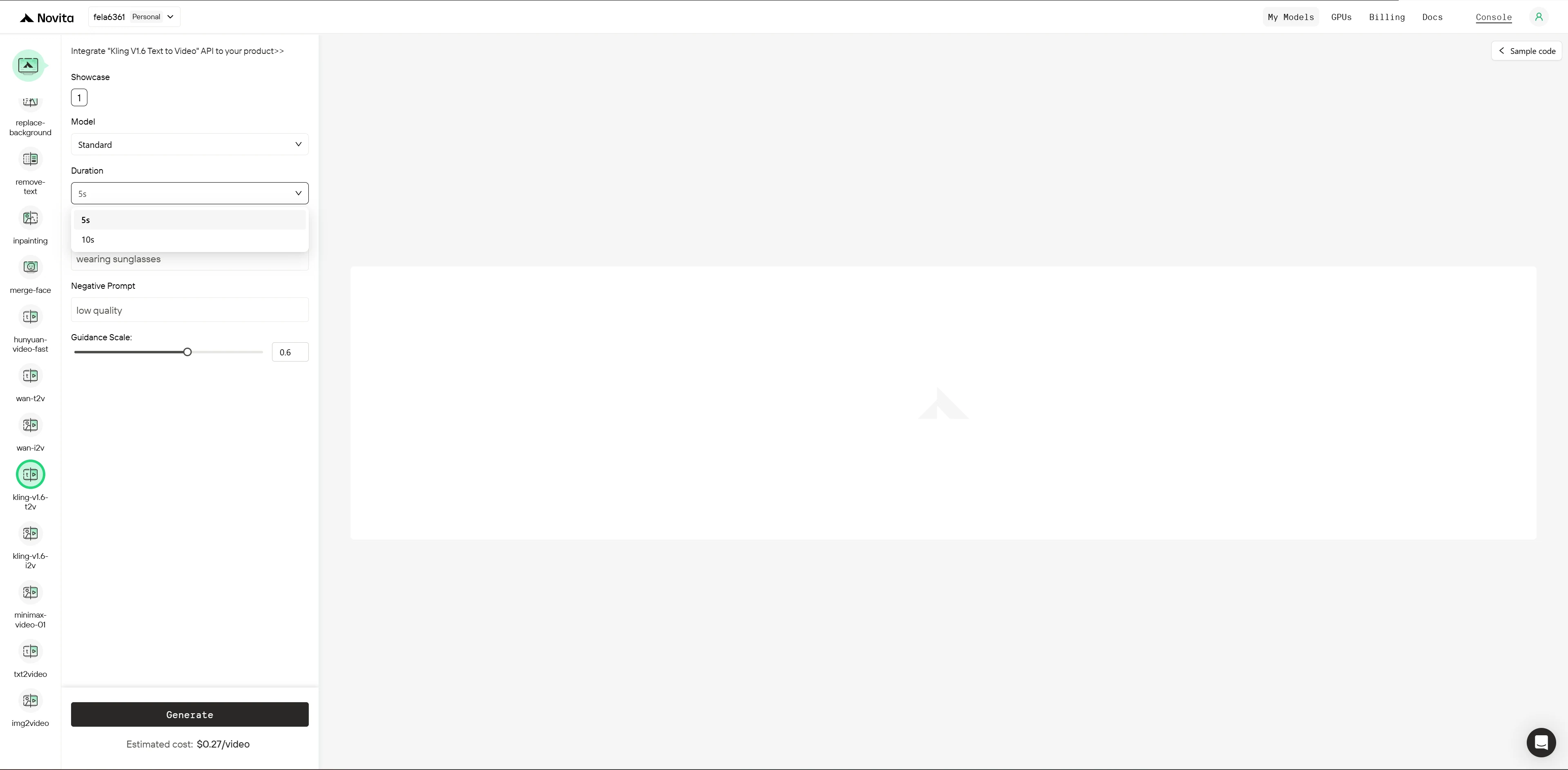
Exciting News! Kling 1.6 T2V Now Generates 10-Second Videos on Novita AI!
Kling 1.6 5s
kling 1.6 10s
- Consistency: Video 10s is more consistent in terms of visual continuity. The longer duration allows for smoother transitions and fewer disruptions in the scene.
- Smoothness: Video 10s shows better smoothness due to its longer duration, giving the AI more room to refine and stabilize character actions and background elements.
- Visual Fidelity: Both videos have similar resolution and frame rate (720p, 24 FPS), so the quality of textures and lighting is comparable. However, the motion consistency is better in Video 10s.
- Storytelling: The longer video (Video 10s) can develop a more coherent narrative, with more frames allowing for more detailed scene transitions and character actions.
What is Kling 1.6?
Key Features of Kling 1.6
User-Friendly Prompt Handling:
Kling 1.6 allows users to generate videos effortlessly by providing simple or detailed text prompts. The model interprets these inputs with high accuracy, producing videos that closely match the described scenes, actions, and environments. Compared to previous versions, Kling 1.6 offers improved prompt processing, delivering more precise and realistic video outputs.
Superior Video Quality and Realism:
Kling 1.6 produces videos in up to 1080p resolution at 30 frames per second, ensuring smooth motion and exceptional visual fidelity. Using advanced techniques like the Diffusion Transformer Architecture, it minimizes flickering and maintains frame coherence, resulting in cinematic-quality visuals with realistic lighting, skin textures, and fluid character movements.
Advanced Motion and Camera Control:
With Kling 1.6, users can customize camera movements such as pan, tilt, zoom, and roll, including combined motions (e.g., panning left while zooming in). These features enable creators to craft dynamic, cinematic storytelling directly from text prompts, adding an extra layer of engagement to the generated videos.
From getimg.ai
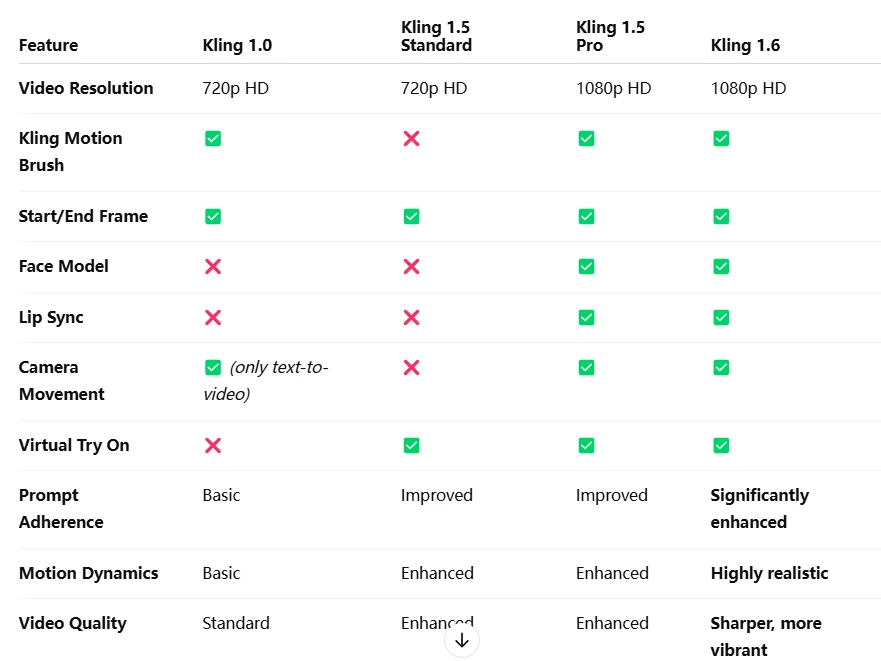
Kling 1.6 vs Kling 1.5 & Kling 1.0
- Faster Rendering: Kling 1.6 achieves up to 30% faster rendering times compared to Kling 1.5 and 1.0, thanks to enhanced GPU acceleration.
- Improved Quality: With the new Diffusion Transformer Architecture, Kling 1.6 offers smoother motion and better visual fidelity compared to previous versions.
- More Flexible Features: The Pro Version of Kling 1.6 introduces advanced features like longer video durations, multi-image referencing, and AI-generated sound, which were not available in earlier versions.
- Enhanced Prompt Handling: Kling 1.6 improves upon prompt processing, delivering more accurate and realistic outputs than Kling 1.5 and 1.0.
How to Access Kling 1.6 T2V 10s?
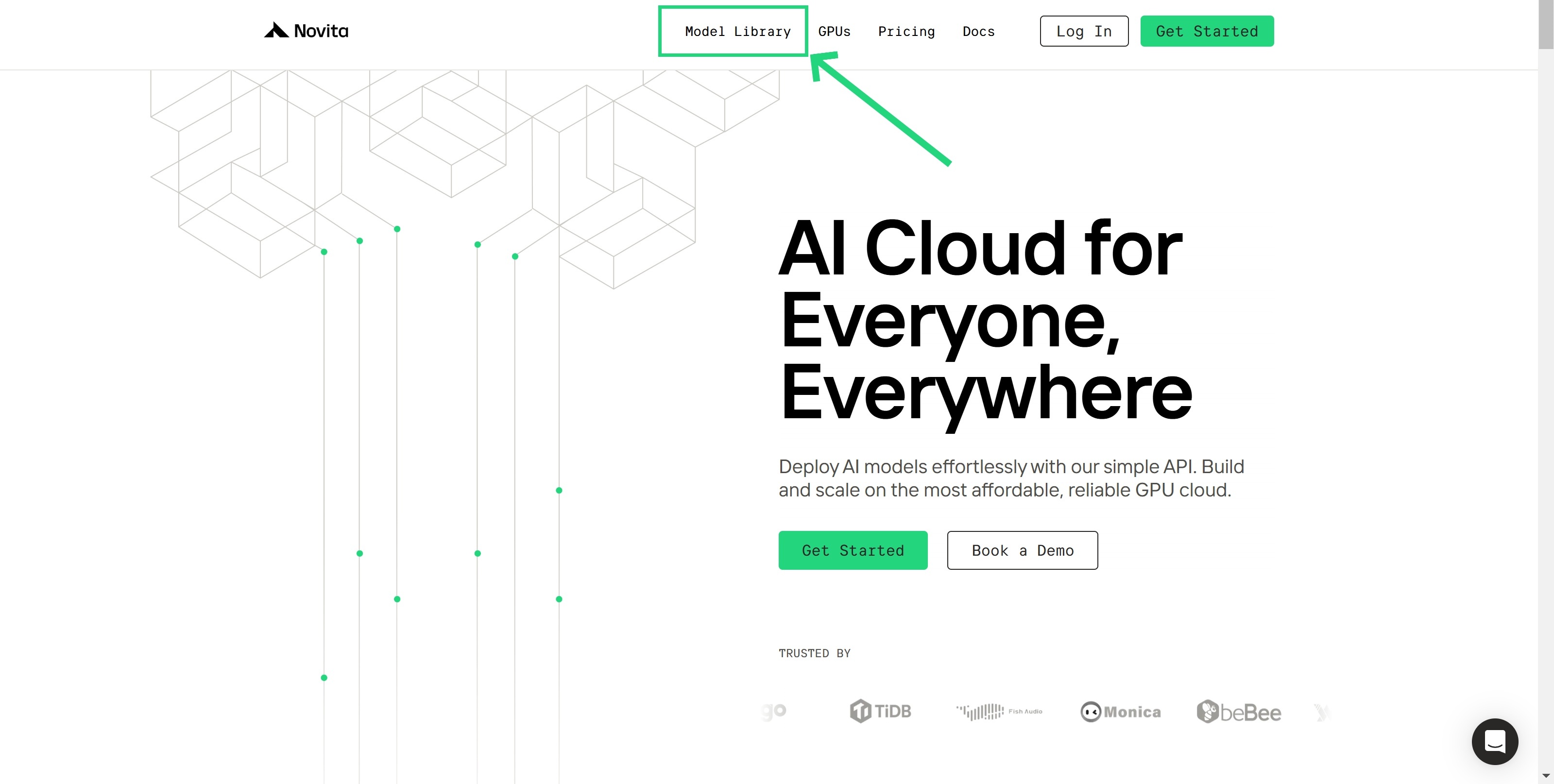
Step 1: Log In and Access the Model Library
Log in to your account and click on the Model Library button.
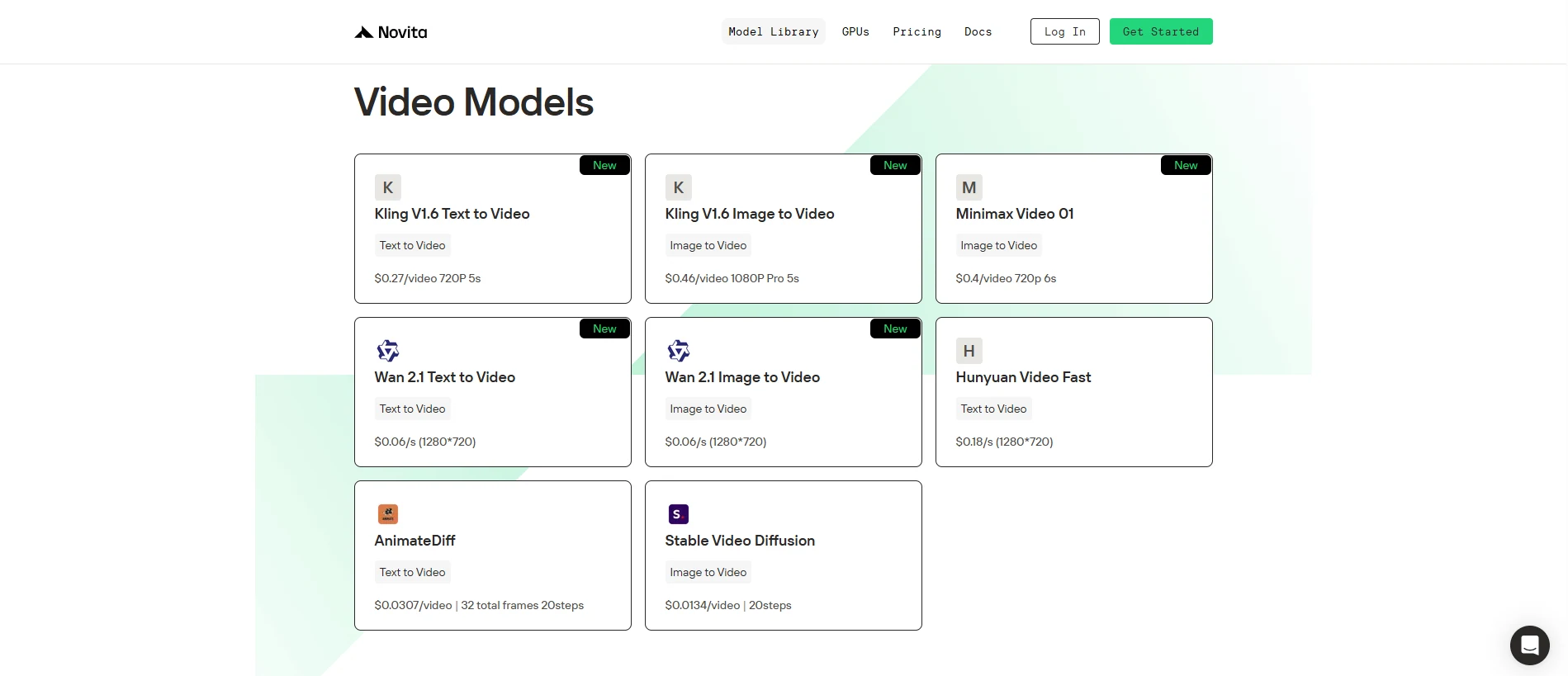
Step 2: Choose Your Model
Browse through the available options and select the model that suits your needs.
Step 3: Start your Free Trail
Step 4: Install the API
Install API using the package manager specific to your programming language.
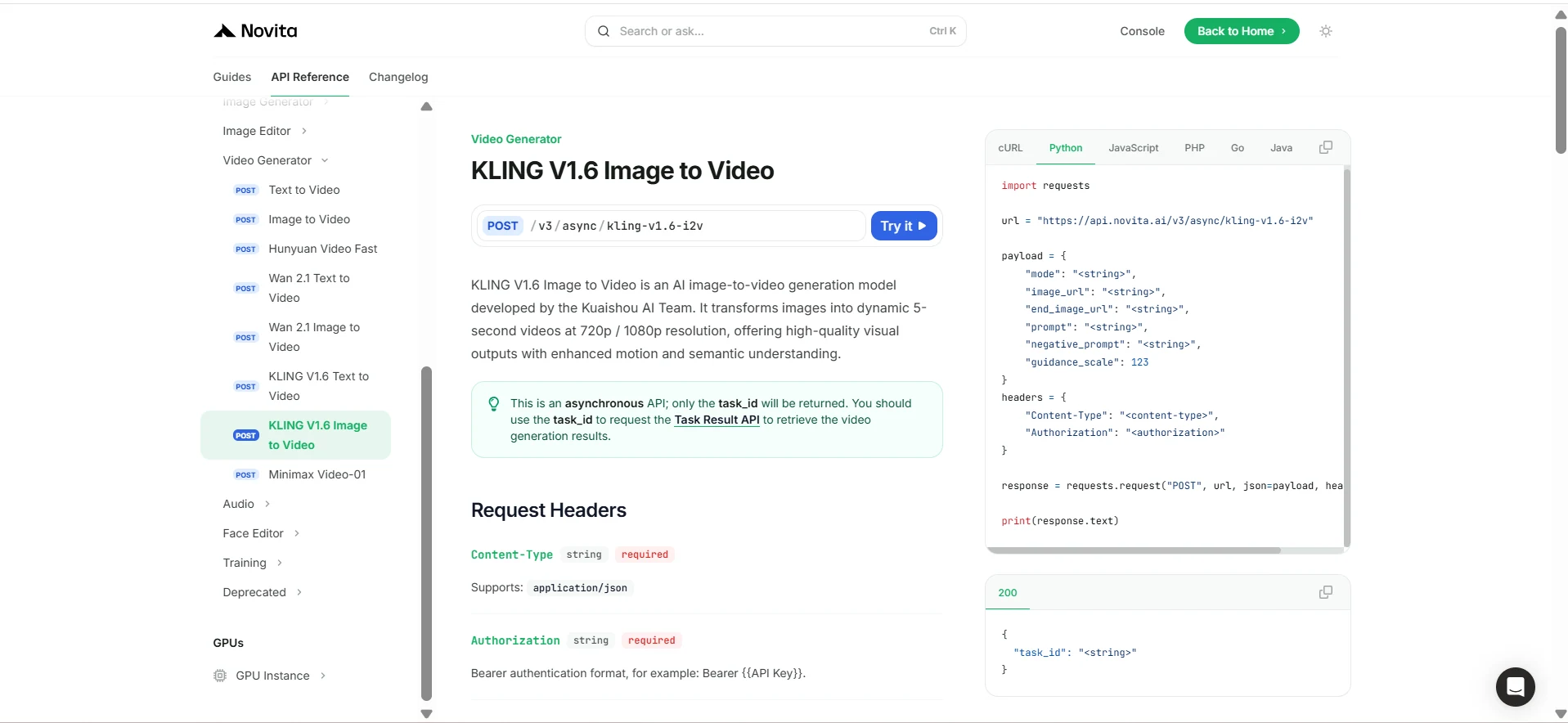
After installation, import the necessary libraries into your development environment. Initialize the API with your API key to start interacting with Novita AI LLM. This is an example of using chat completions API for python users.
import requests

url = "https://api.novita.ai/v3/async/kling-v1.6-i2v"

payload = {
    "mode": "<string>",
    "image_url": "<string>",
    "end_image_url": "<string>",
    "prompt": "<string>",
    "negative_prompt": "<string>",
    "guidance_scale": 123
}
headers = {
    "Content-Type": "<content-type>",
    "Authorization": "<authorization>"
}

response = requests.request("POST", url, json=payload, headers=headers)

print(response.text)
Kling 1.6’s 10-second video generation marks a significant leap forward in AI content creation. By reducing complexity, focusing on simple story structures, and allowing more room for fine-tuning, this enhancement leads to more consistent and visually cohesive videos. It’s an essential upgrade for developers aiming to produce more refined AI-driven video content with fewer inconsistencies, better motion fluidity, and an improved ability to tell coherent stories.
Frequently Asked Questions
What’s the difference between 5-second and 10-second video generation in Kling 1.6?
The key difference is that 10-second videos offer more time for the AI to maintain consistency in character appearances, backgrounds, and movements.
How does Kling 1.6 enhance AI-generated video quality?
Kling 1.6 improves video quality through its Diffusion Transformer Architecture, which minimizes flickering, ensures frame coherence, and enhances visual fidelity.
Can Kling 1.6 generate longer videos than 10 seconds?
Yes, the Pro version of Kling 1.6 supports longer video durations, up to 3 minutes.
Novita AI is the All-in-one cloud platform that empowers your AI ambitions. Integrated APIs, serverless, GPU Instance — the cost-effective tools you need. Eliminate infrastructure, start free, and make your AI vision a reality.