KAT Coder is Kwaipilot’s premier closed-source coding model, created by Kuaishou’s AI research team focused on AI for Software Engineering. As a core member of the Kwaipilot-AutoThink (KAT) lineup, it showcases the series’ most advanced agentic code-generation capabilities. Built on the Qwen family and powered by a Mixture-of-Experts architecture with roughly 72B active parameters (from a pool exceeding 1T), KAT Coder achieves cutting-edge results on demanding software engineering problems.
This guide then shows you how to access the model directly within Cursor, walking you through activation, setup, and practical use so you can integrate KAT Coder into your coding environment with ease.
What is KAT Coder?
KAT Coder is Kwaipilot’s flagship agentic coding model designed for complex software engineering tasks. With a Mixture of Experts architecture and multi-stage training, it supports long-context comprehension, multi-file reasoning, strong tool use, and autonomous task execution, offering high reliability across real development workflows.
Architecture Highlights
• Mixture of Experts design: KAT Coder uses an MoE architecture with approximately seventy two billion active parameters, allowing the model to selectively activate expert pathways for more efficient inference and stronger reasoning performance.
• One trillion total parameters: Although only a portion is active at runtime, the full parameter pool exceeds one trillion, giving the system a wide range of specialized experts that contribute to sophisticated decision making and diverse programming competence.
• Multi-stage training pipeline: Its training process spans mid-training, supervised fine-tuning, reinforcement learning, and agentic reinforcement learning, creating a model that is not only knowledgeable but also capable of planning and adapting across multi-step tasks.
• Long context window: With support for up to one hundred twenty eight thousand tokens, KAT Coder can process entire codebases, follow dependencies across directories, and maintain context through extended reasoning sequences.
• Reinforcement learning innovations: Techniques such as prefix caching, entropy pruning, and the SeamlessFlow distributed RL system improve training stability, reduce computational overhead, and guide the model toward more reliable, low-entropy solutions.
Core Capabilities
• Agentic code generation: KAT Coder can function as an autonomous assistant, orchestrating actions, proposing plans, and completing complex development tasks from start to finish.
• Advanced tool use: The model integrates smoothly with debuggers, code executors, and development environments, enabling it to operate inside realistic engineering workflows.
• Eight task types across eight domains: Its training covers eight major categories, including feature development, bug fixing, refactoring, testing, and documentation, providing broad applicability across software projects.
• Git and pull request proficiency: Because it is trained on real commits and PRs, KAT Coder understands practical version-control patterns and can offer context-aware assistance on repository-level tasks.
• Multi-file reasoning: The model handles complex projects by analyzing relationships across multiple files and maintaining coherent reasoning over long sequences, which is essential for large-scale engineering work.
How KAT Coder Differs from Other Models in the KAT Series?
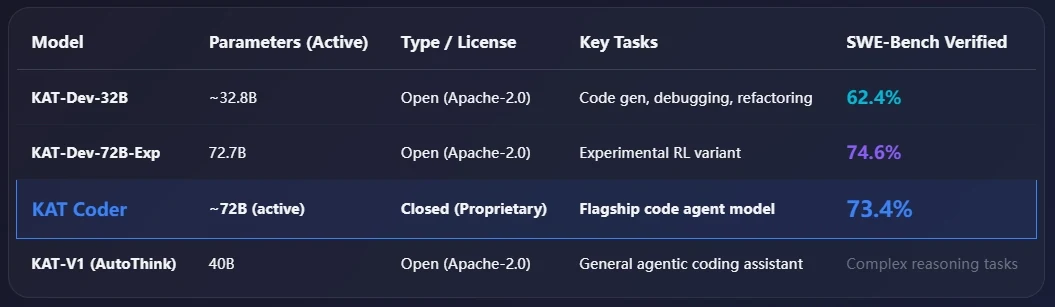
KAT Coder stands out as the flagship model in the KAT Series, offering the strongest balance of scale, stability, and real engineering performance. Although it shares a similar active parameter count with KAT Dev 72B Exp, it differs by being a closed, proprietary system optimized specifically for high-reliability agentic coding. Its seventy three point four percent SWE Bench score surpasses the open-source KAT Dev 32B and approaches the experimental 72B variant, but with far more mature capabilities. Compared with KAT V1, which serves as a general agentic assistant, KAT Coder is purpose-built for full-scale software development tasks.
Why Use KAT Coder in Cursor?
Using KAT Coder in Cursor gives developers a more capable and autonomous AI coding experience. Cursor provides full project awareness, while KAT Coder brings strong multi-file reasoning, long-context understanding, and advanced agentic planning through its MoE architecture. Together, they handle complex refactors, repository-wide fixes, and multi-step coding tasks without constant supervision. Compared with lighter models, KAT Coder offers more reliable analysis and deeper workflow automation, making it ideal for large projects, intricate debugging, and high-level software engineering inside Cursor.
KAT Coder in Cursor: Applications
Comprehensive Task Coverage
KAT Coder supports the full lifecycle of development when used inside Cursor. It assists with:
- Feature implementation and enhancement
- Bug diagnosis and precise patching
- Large-scale refactoring and project cleanup
- Performance tuning across modules
- Test creation and validation
- Deep code understanding and navigation
- Configuration adjustments and deployment-related edits
Multi-Domain Programming Support
KAT Coder is trained across diverse engineering scenarios, allowing it to adapt to many project types within Cursor. These include:
- Application and backend development
- UI and UX engineering
- Data engineering and data science workflows
- Machine learning and AI pipelines
- Database architecture and maintenance
- Infrastructure and system-level development
How to Use KAT Coder in Cursor
Prerequisite: Get an API Key
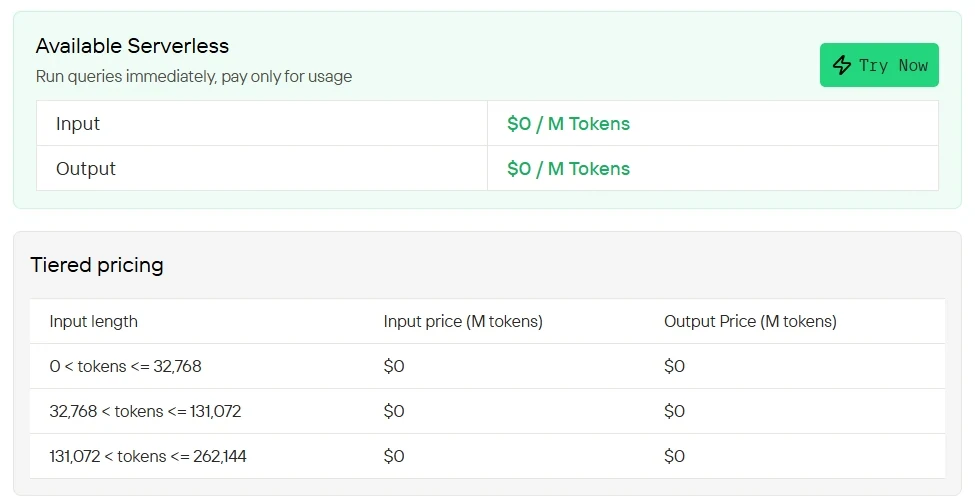
Novita AI offers KAT Coder APIs
with up to 256K context completely FREE across all supported tiers,
allowing KAT Coder to deliver its full agentic coding capabilities at no cost.Novita AI
Step 1: Create your Account
Sign up for a Novita AI account. Once you’re logged in, you’ll begin by generating an API key, which you’ll use to authenticate requests.
Step 2: Generate your API Key
Navigate to Key Management and select Add New Key. This key is your authentication credential. It appears only once, so be sure to copy it right away and keep it in a secure place, as you’ll need it for the next steps.
Step 3: Verify Model Access
- Select a Model Name: You’ll need to copy the model name you want to use from Novita AI’s Model Library.
- API Endpoint:
https://api.novita.ai/openai - Compatibility: Full OpenAI API standard support
Top 7 AI Coding Models Available on Novita AI Platform
| Model | Context Window | Best For | Model ID |
|---|---|---|---|
| KAT Coder | 256k | Agentic coding and large-scale software engineering | kat-coder |
| Minimax M2 | 204.8k | Fast agentic coding workflows | minimax/minimax-m2 |
| GLM 4.6 | 204.8k | General coding excellence | zai-org/glm-4.6 |
| Qwen3-Coder 480B | 262k | Specialized coding tasks | qwen/qwen3-coder-480b-a35b-instruct |
| DeepSeek V3.1 | 131k | Complex problem solving | deepseek/deepseek-v3.1 |
| Kimi K2 | 262k | Large codebase analysis | moonshotai/kimi-k2-0905 |
| OpenAI GPT OSS 120B | 131k | OpenAI alternative | openai/gpt-oss-120b |
| Gemma 3 12B | 131k | Visual + code tasks | google/gemma-3-12b-it |
Complete Cursor Installation and Setting Guide
Step 1: Install and Activate Cursor
- Download the newest version of Cursor IDE from cursor.com
- Subscribe to the Pro plan to enable API-based features
- Open the app and finish the initial configuration
Step 2: Access Advanced Model Settings
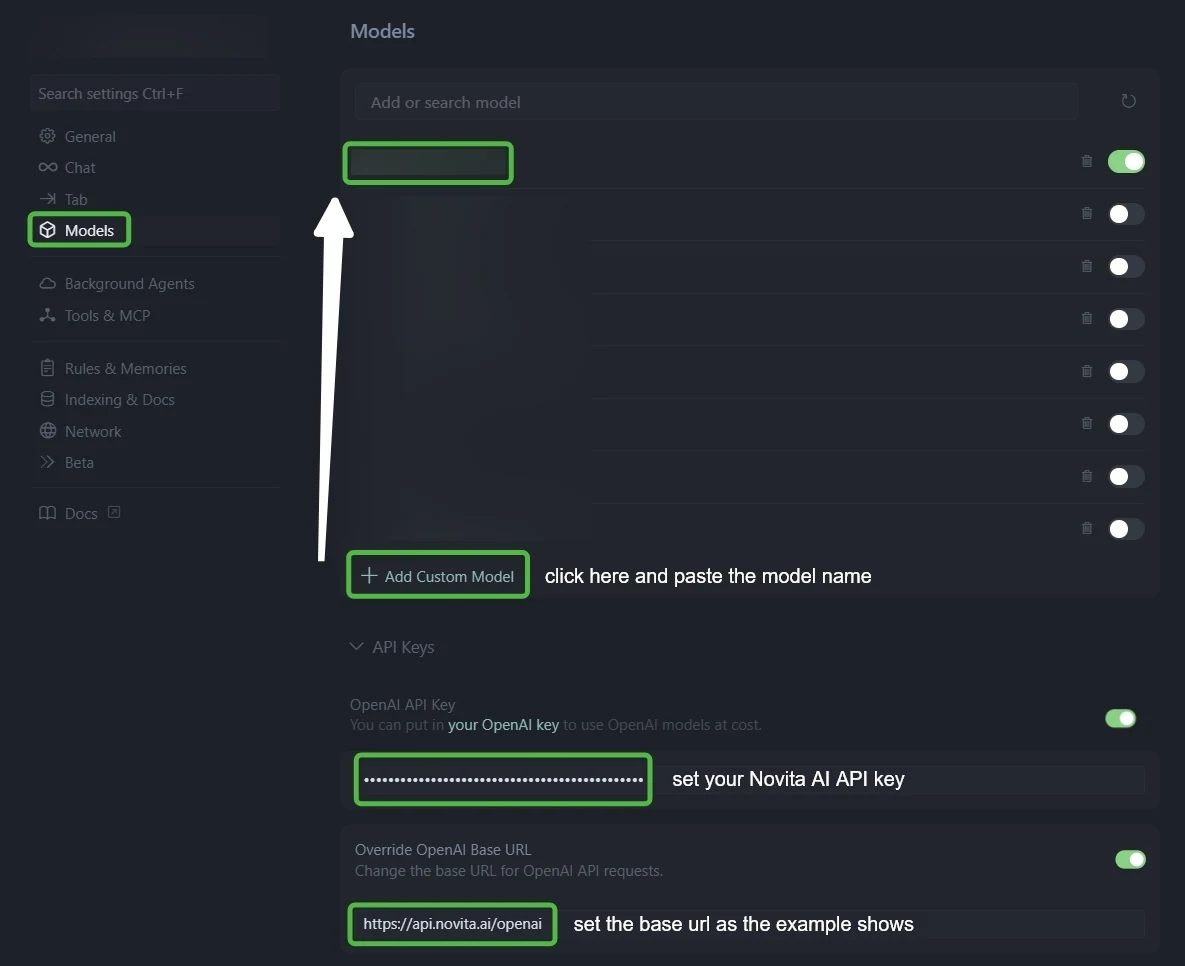
- Open Cursor Settings (use Ctrl + F to find it quickly)
- Navigate to the “Models” tab in the left menu
- Find the “API Configuration” section
Step 3: Configure Novita AI Integration
- Go to the API Keys settings.
- Enable both OpenAI API Key and Override OpenAI Base URL.
- Enter your Novita AI API key in the API Key field.
- Replace the Base URL with:
https://api.novita.ai/openai.
Step 4: Add Multiple AI Coding Models
Click ”+ Add Custom Model” and add each model:
minimax/minimax-m2qwen/qwen3-coder-480b-a35b-instructzai-org/glm-4.6deepseek/deepseek-v3.1moonshotai/kimi-k2-0905openai/gpt-oss-120bgoogle/gemma-3-12b-it
Step 5: Test Your Integration
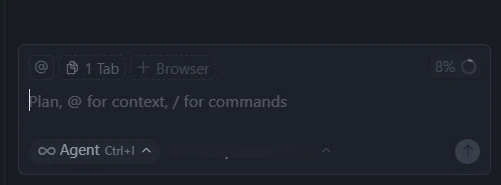
- Start new chat in Ask Mode or Agent Mode
- Try multiple models across different coding scenarios
- Confirm each model returns valid responses
Frequently Asked Questions
What is KAT Coder?
KAT Coder is Kuaishou’s flagship agentic coding model, trained to handle complex engineering tasks autonomously.
Is KAT Coder open-sourced?
No, KAT Coder is a closed-source, proprietary model accessible through Novita AI REST API.
What programming tasks does KAT Coder support?
KAT Coder supports many programming languages. It handles eight core tasks: feature development, bug fixing, refactoring, testing, code review, documentation, deployment configuration, and interactive debugging.
Novita AI is an AI cloud platform that offers developers an easy way to deploy AI models using our simple API, while also providing an affordable and reliable GPU cloud for building and scaling.



