The collaboration between Novita AI and DocsGPT brings innovation to how developers interact with technical documentation. By combining Novita AI’s conversational AI capabilities with DocsGPT’s streamlined documentation retrieval, this partnership enhances productivity and simplifies workflows. This article introduces a clear, step-by-step approach to use DocsGPT with Novita AI, offering a concise and innovative way to optimize the development process.
What is DocsGPT?
DocsGPT is an open-source genAI solution designed to deliver accurate and dependable answers from any knowledge base, minimizing the risk of hallucinated responses. Featuring advanced tooling and agentic system integration, it streamlines information retrieval, offering users fast and reliable access to critical insights.
Benefits of DocsGPT
DocsGPT streamlines navigating extensive documentation, enabling users to quickly locate key information. Powered by advanced GPT models, it analyzes vast data in seconds, providing concise summaries and critical insights. By eliminating time-consuming manual searches, DocsGPT boosts productivity, saves time, and simplifies workflows, making it an essential tool for optimizing workflow efficiency.
A key highlight of DocsGPT is its powerful integration with the LangChain framework, delivering a seamless and efficient experience for developers. This integration supports a variety of file types, including MD, RST, TXT, PDF, and ZIP, making DocsGPT highly versatile and adaptable to the diverse documentation formats frequently used in software development projects.
Key Features and Functionality
DocsGPT provides a robust suite of features specifically designed to streamline the process of accessing and retrieving information from documentation and research papers, making it an indispensable tool for professionals and developers alike.
- Comprehensive Documentation Support: Easily access and analyze various documentation types, including technical manuals, guides, and source code, across multiple formats like PDF, DOCX, and CSV.
- Seamless Integration: Integrate effortlessly with major LLMs (OpenAI, Google, Anthropic) or local models like Ollama. Leverage pre-built tools, such as chat widgets and search functionalities, and connect to diverse data sources like URLs, sitemaps, GitHub, and web crawlers for robust coverage.
- Local Hosting and Security: Host DocsGPT in your own environment with Kubernetes support, ensuring enterprise-grade security, scalability, and complete control over your data.
- Streamlined Setup and Ingestion: Quickly ingest documentation using a simple CLI and set up API keys to configure chatbots and integrations with ease.
- Intelligent Information Retrieval: Powered by GPT models, DocsGPT delivers precise, context-aware answers to queries, whether for code snippets, API references, or conceptual explanations, with accurate source citations.
- User-Friendly and Extensible Interface: Interact through an intuitive UI designed for accuracy and flexibility. The platform supports similarity search indexing, allowing developers to adapt and manage documentation as needed.
How to Use DocsGPT
Prerequisites:
Docker: Ensure you have Docker installed and running on your system.
Launching DocsGPT (macOS and Linux)
For macOS and Linux users, the easiest way to launch DocsGPT is using the provided setup.sh script. This script automates the configuration process and offers several setup options.
Step 1: Download the DocsGPT repository
- First, you need to download the DocsGPT repository to your local machine. You can do this using Git:
git clone https://github.com/arc53/DocsGPT.git
cd DocsGPT
Step 2: Run the setup.sh script
- Navigate to the DocsGPT directory in your terminal and execute the
setup.shscript:
./setup.sh- This interactive script will guide you through setting up DocsGPT. It offers four options: using the public API, running locally, connecting to a local inference engine, or using a cloud API provider. The script will automatically configure your
.envfile and handle necessary downloads and installations based on your chosen option.
Launching DocsGPT (Windows)
For Windows users, please refer to the Docker Deployment documentation for detailed step-by-step instructions on setting up DocsGPT using Docker.
How to Integrate Novita AI API with DocsGPT
Step 1: Log in to Novita AI and create an API Key
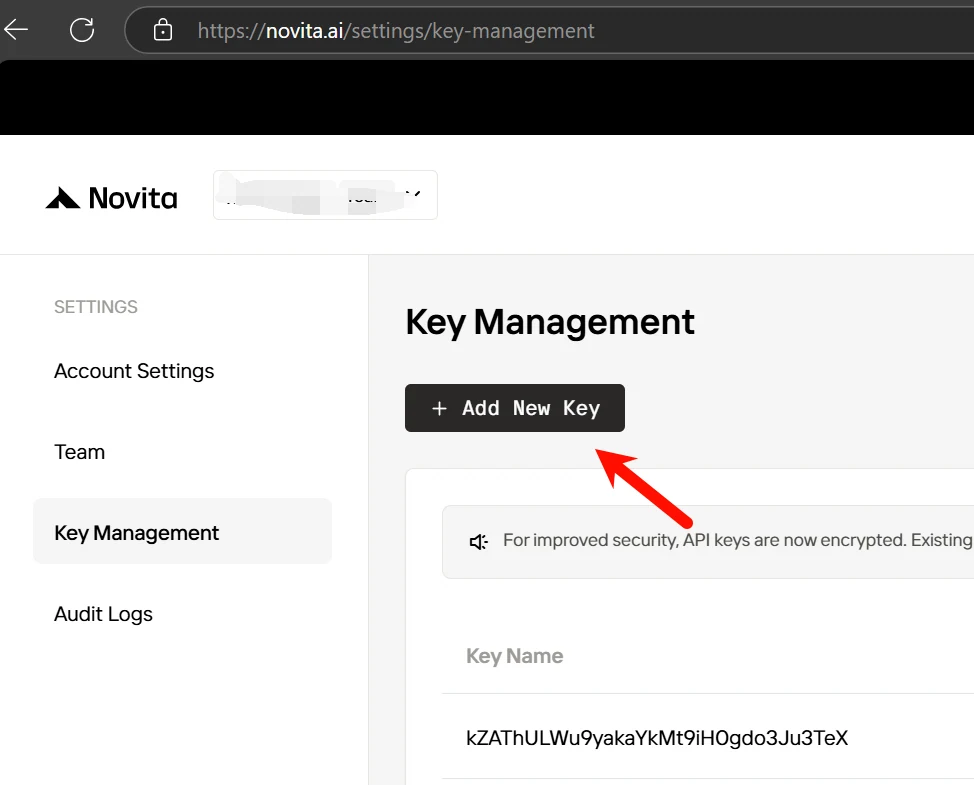
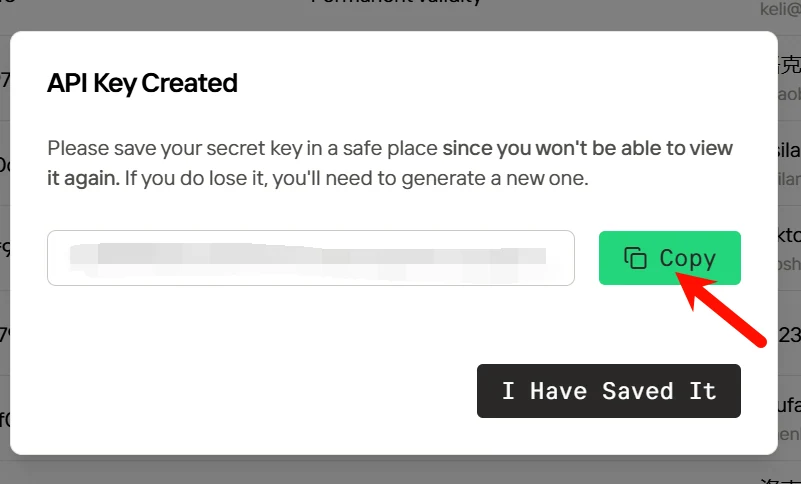
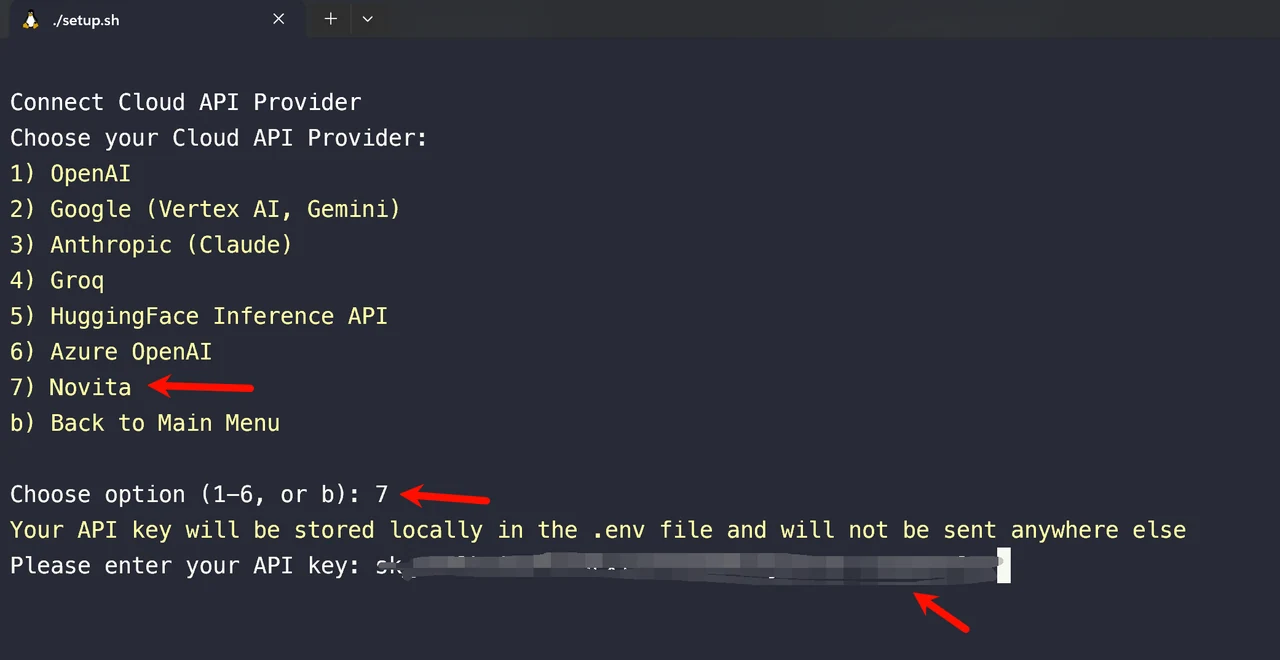
Step 2: Select option4 and connect cloud API provider in your terminal
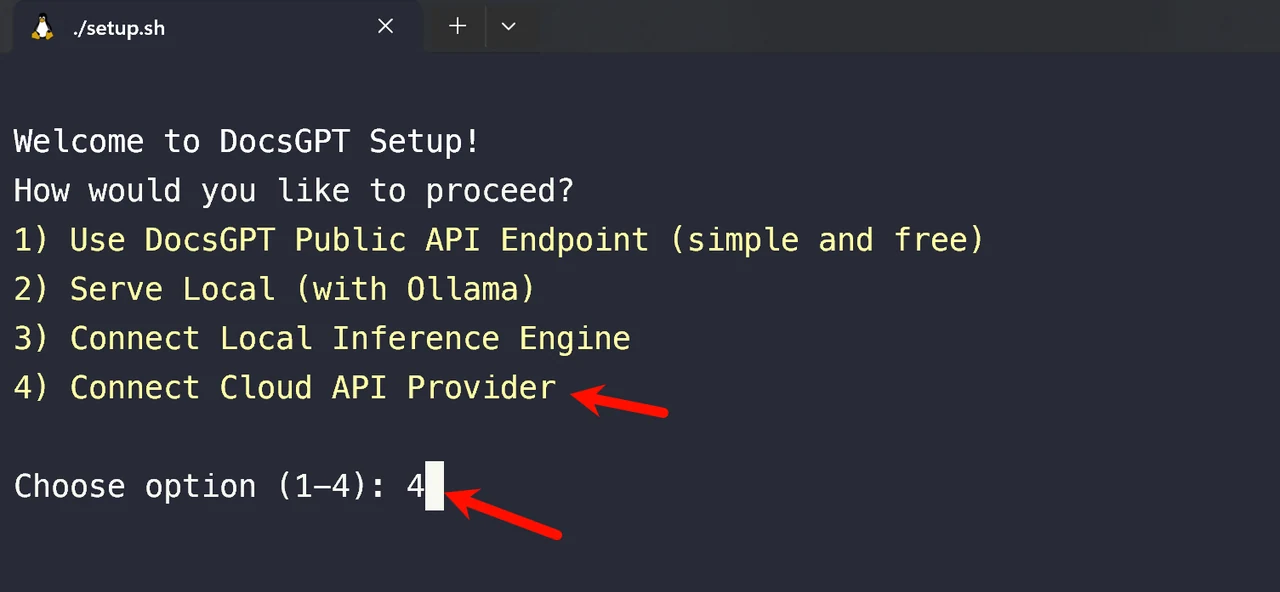
Step 3: Choose option7 Novita and enter the API key you just created
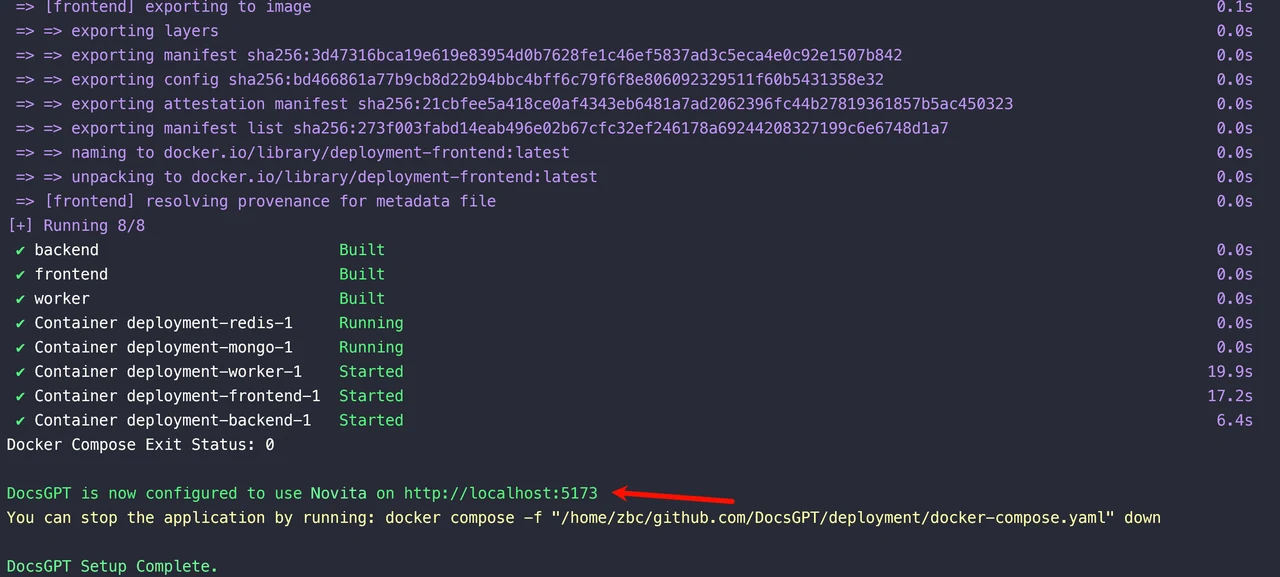
Step 4: Wait for the startup process to complete
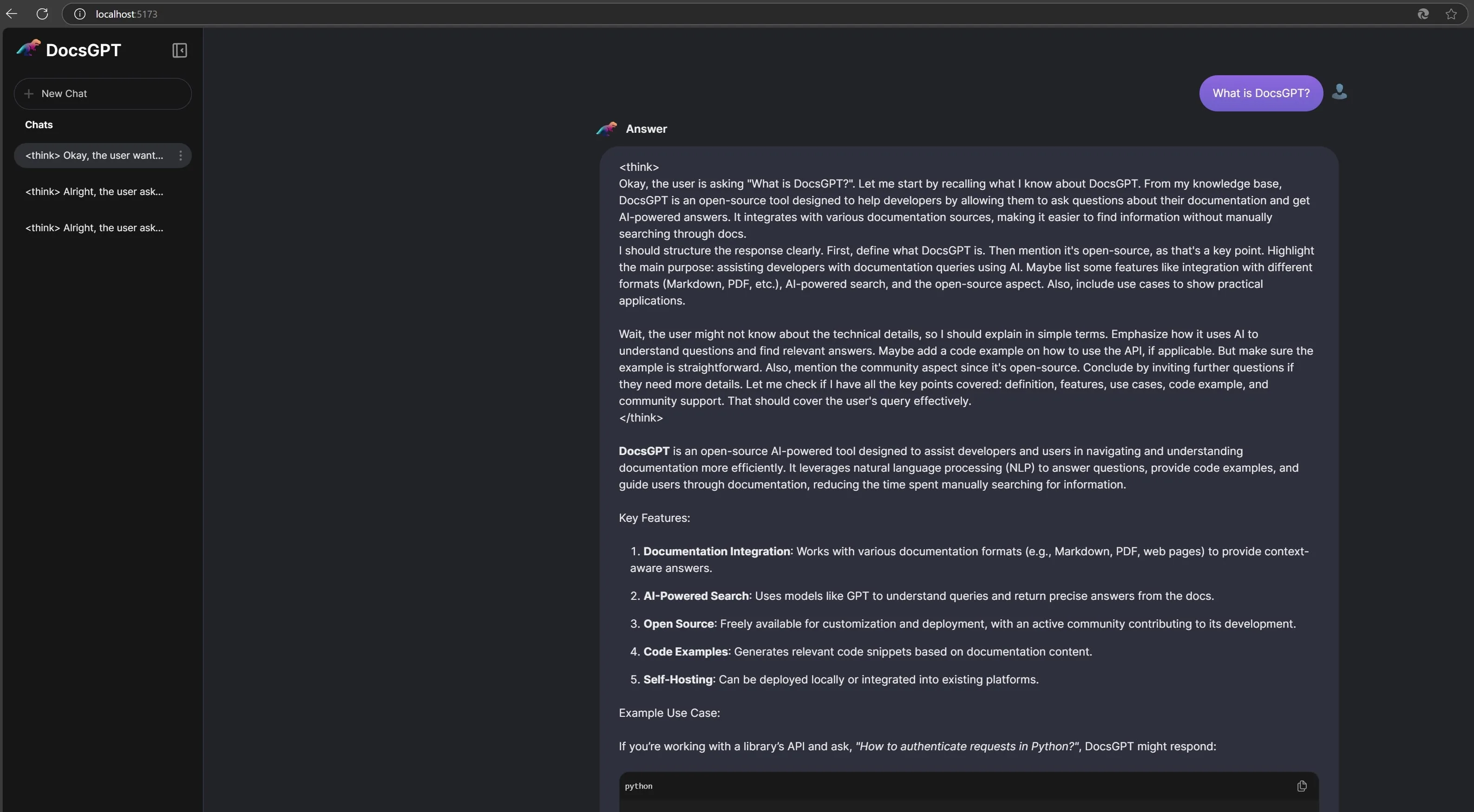
Step 5: Access DocsGPT in your browser
- Once the setup is complete and Docker containers are running, navigate to http://localhost:5173/ in your web browser to access the DocsGPT web application.
Step 6: Stopping DocsGPT
- To stop DocsGPT, simply open a new terminal in the
DocsGPTdirectory and run:
docker compose -f deployment/docker-compose.yaml down- (or the specific
docker composecommand shown at the end of thesetup.shexecution, which may include optional compose files depending on your choices).
Useful Links and Resources
To further enhance your understanding and usage of DocsGPT with Novita AI, consider exploring these valuable resources:
Conclusion
DocsGPT revolutionizes how developers interact with project documentation, providing fast, accurate, and context-aware information through GPT models. Powered by Novita AI’s seamless integration capabilities, DocsGPT connects effortlessly with major LLMs, APIs, and tools, making it adaptable to diverse workflows. This integration bridges conversational AI with documentation, making it a game-changer for development teams. Developers can now access precise answers from documentation effortlessly, reducing time spent searching and improving efficiency.
Frequently Asked Questions
Is there a way to troubleshoot connection issues with Novita AI?
Yes, ensure your API key is correctly entered, check your internet connection, and verify that Novita AI’s services are operational through their status page.
Can I use Novita AI’s cloud services while hosting DocsGPT locally?
Yes, you can host DocsGPT on your local environment while leveraging Novita AI’s APIs for model inference and GPU resources.
Does Novita AI support both pre-trained and custom AI models?
Yes, Novita AI supports over 200 pre-trained models and also allows you to deploy and manage custom models on their infrastructure.
Limited-time Offer
Novita AI now offers a Referral Program which can be a benefit for Helicone users: If someone is interested, users can share their invitation link/code, and both they and their referrals will receive $20 in credits to use with the DeepSeek R1 & V3 APIs.
About Novita AI
Novita AI is an AI cloud platform that offers developers an easy way to deploy AI models using our simple API, while also providing an affordable and reliable GPU cloud for building and scaling.